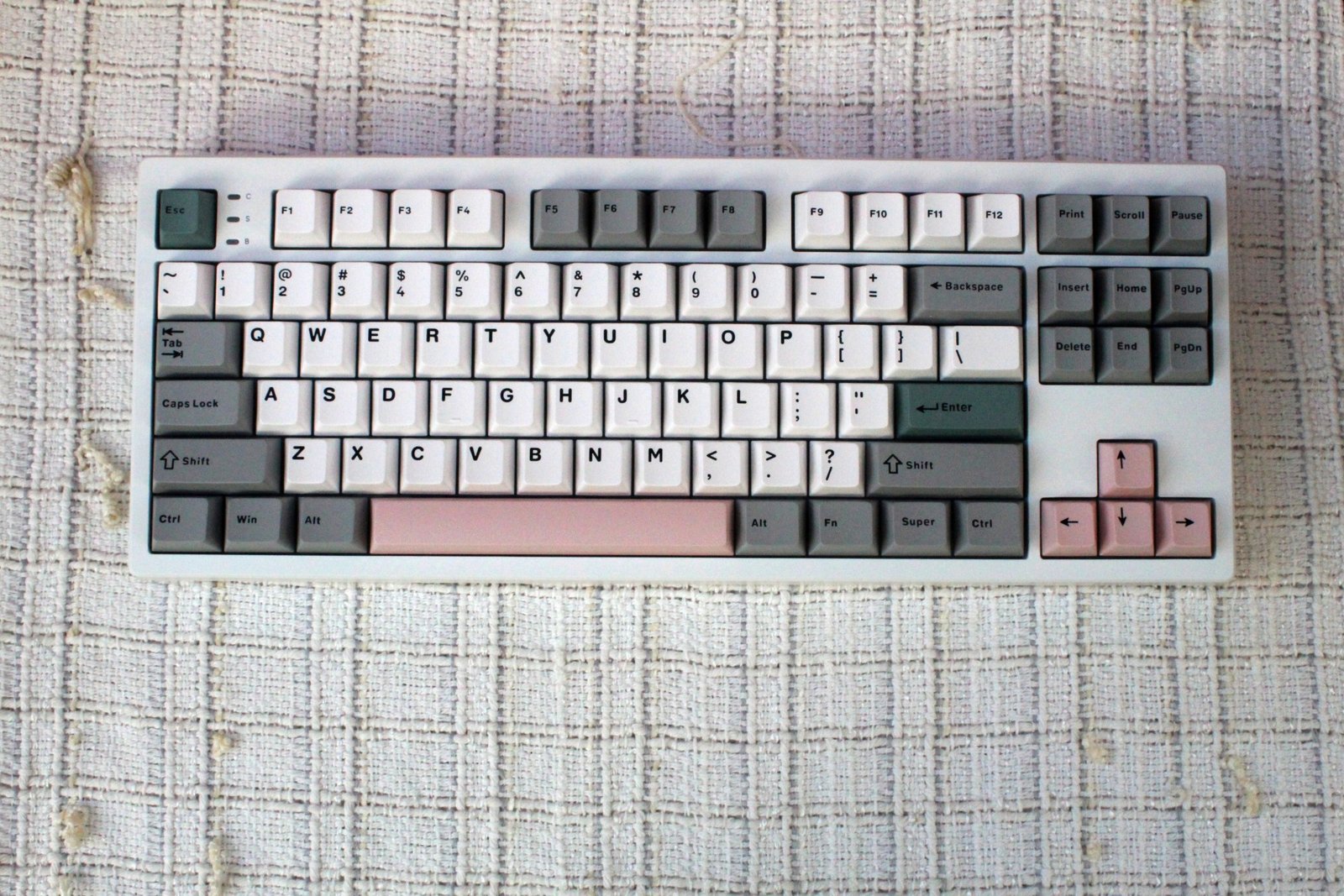
Nesse artigo irei analisar o EPOMAKER TH87, que se trata de um teclado mecânico "TKL", ou seja, sem teclado numérico, sendo essa a única diferença para um modelo padrão, no padrão ANSI, sem "Ç", com construção em plástico e iluminação RGB, onde seus maiores diferenciais está na possibilidade de trabalhar sem fio.
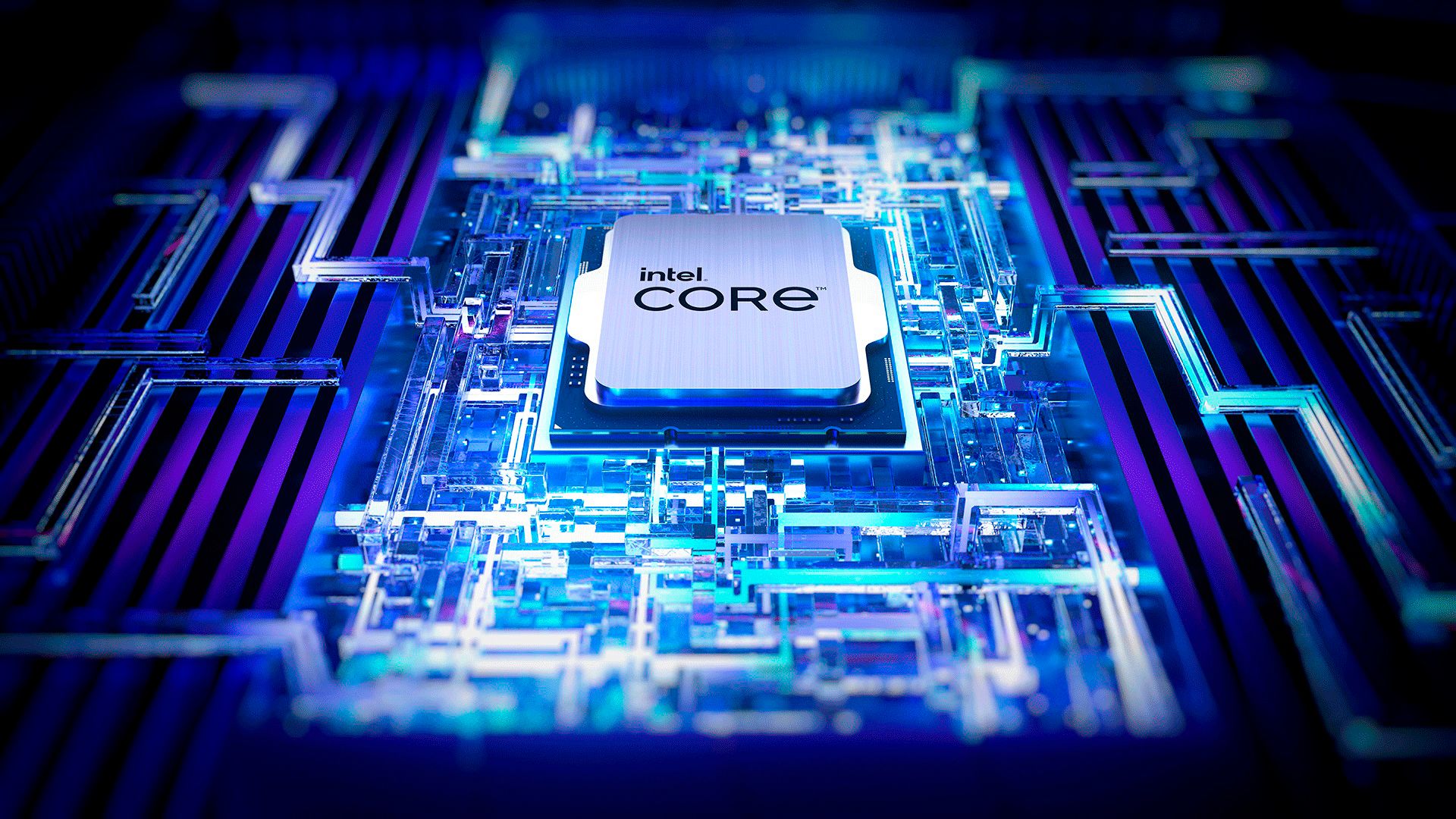
Intel has published an internal test driver with the "RPL-NEXT" label, presumably in reference to Raptor Lake Next CPUs that Tom's Hardware first reported on in June. On the same day as the driver was uncovered, shipping manifests from Vietnam were published by Club386, showing exports of CPUs labeled "Raptor Lake Next" dating back to August, complete with cache and clock speed information.
The driver was first spotted by @momomo_us on X, and we were able to find it by searching the name in Intel's software database. The file is locked (hence the padlock icon), and clicking on it will redirect you to an Intel login page. Given that and the "testbuild" label, it looks like this is an internal driver test that wasn't meant to be published.
Judging by the existing conventions, the driver package is for the Smart Sound Technology (SST), a audio digital signal processor integrated into the silicon since the Alder Lake days. Audio codecs like those of Realtek use SST for offloading duties like noise reduction, echo cancellation, low-power audio playback, and wake-on-voice without adding to the CPU load, and saving precious watts in the process.
For broader context, Raptor Lake Next is Intel's refresh of the Raptor family of CPUs, meant to plug into existing LGA-1700 motherboards. Given the currently insane DDR5 memory prices, gamers ought to be happy on two fronts: getting newer chips for their existing motherboards, and the ability to use more affordable DDR4 instead, an ability all but confirmed by Gigabyte's recent BIOS updates.
According to Club386's shipping manifests, there are so far four chip models en route from Intel's Vietnam facilities. Their specs suggest that they're replacements for extant Core i5 and Core i7 models, as a previous leak indicates that Intel doesn't yet have any plans for replacements for its Core i9-14900K chip.
As such, the listed models should top out with the 99DLMV part number, with 16 cores in an 8P + 8E arrangement, a meaty 3.5 GHz base block, and 30 MB of cache (presumably L3). This is the only model with a 125W TDP, and its base clock is higher than that of the Core i9-14900K, so it should be a speedy enough affair despite not having the high core counts of the halo models. Chances are it'll be a nice gaming CPU with pretty high turbo clocks, but only reviews will confirm that.
Interestingly, the 99DLMT has 20 cores (8P + 12E), but its much lower 65W TDP and 2.1 GHz base clock, which indicate that this model might be an efficiency-oriented productivity chip. In the table below, we added our guesses as to which models match existing chips.
Part number
Cores / Threads
TDP
Base clock
Cache
Approximate matches
99DLMV
8P + 8E (24)
125 W
3.5 GHz
30 MB
i7-14700 / i7-13700
99DLMT
8P + 12E (28)
65 W
2.1 GHz
33 MB
i5-14600K / 13700K
99DLMW
6P + 4E (16)
65 W
2.6 GHz
24 MB
i5-14400 / i5-13500
99DLMX
n/a
65 W
2.6 GHz
24 MB
As above
There's no word about pricing, but we'd expect the new chips to ring in at roughly the prices of the existing models. As points of reference, the Core i7-14700 is currently $366, or $330 for the "F" variant without integrated graphics. At the lower end of the above table, the Core i5-14400 is sitting at $208, or only $161 without an IGP.
The FlipGo is yet another entry into the portable dual-monitor field from JSAUX (the previous one being the more ambitious FlipGo Horizon Pro), and it definitely makes a good first impression. Not only do you get two 16-inch 2560 x 1600 IPS displays, but the FlipGo also supports touch input (on Windows systems). In addition, it incorporates a built-in USB hub that gives you two additional USB-A ports and one USB-C port for your peripherals.
JSAUX provides all of this functionality in a product that comes in at a bit under $500, which is in line with other portable dual-monitors on the market. However, there’s a hefty toll for the functionality that’s provided in this package for those expecting to actually use it as a travel companion.
Design of the JSAUX FlipGo (PM0204)
When I first received the shipping box for the FlipGo, I was shocked at how large and heavy it was. My shock was made even more apparent when I removed the FlipGo from its protective padding, revealing a massive dual-screen device weighing an incredible 4.18 pounds. That’s more than half a pound heavier than a 14-inch Apple MacBook Pro.
The choice of materials contributes to the 4+ pound weight of the FlipGo. JSAUX uses a thick aluminum chassis that resists flexing and feels incredibly premium to the touch. That premium feel even extends to the hinges that connect the two displays. They are robust, with no play, allowing you to easily open the FlipGo to whatever display angle you desire.
Tom's HardwareTom's Hardware
While JSAUX labels the FlipGo as a “portable” monitor, this is not something that you’ll be able to easily slip into a laptop bag or even a backpack. The dual 16-inch screen frame measures 14.41 x 9.45 inches and is 0.7 inches thick. For most people, the FlipGo will take up a permanent residence on your desk, or perhaps travel with you from one side of your office building to the other. But carrying it around for travel seems like a bridge too far.
With that said, the specs on the FlipGo are quite impressive. You get two 16-inch 60 Hz IPS displays, each with a resolution of 2560 x 1600. Considering that most competitors in this space give you dual 1920 x 1080 panels, this resolution upgrade is much appreciated here.
Both screens feature a glossy finish, which is uncommon for dual-screen monitors. However, that’s because both panels support 10-point touch input natively in Windows 11. Unfortunately, touch input is not supported in macOS, so you’ll want to consider the FlipGo (non-touch) if you’re a Mac user.
Connectivity-wise, the FlipGo’s primary ports are on the left side of the bottom panel. Here you’ll find two USB-C ports and two mini-HDMI ports. On the right side of the bottom panel, you’ll find ports provided by the internal USB hub: two USB-A and one USB-C. Adjacent to the USB hub hookups is a three-way jog wheel for the OSD and the power button.
JSAUX offers a stand that allows you to prop the FlipGo up in landscape (one monitor stacked on top of the other) or portrait mode (both monitors standing up vertically, book-style). However, our review unit only came with a red faux leather protective cover. Without the stand, I could use the monitor with the bottom panel sitting flat on my desk and the top panel sitting vertically. Alternatively, I could use it in portrait mode.
JSAUX FlipGo (PM0204) Specifications
Panel Type / Backlight
IPS
Screen Size / Aspect Ratio
16 inches / 16:10 x2
Max Resolution & Refresh Rate
2560 x 1600 @ 60Hz
Typical Brightness
500 nits
Contrast Ratio Typical
1,200:1
Video Ports
2x USB-C, 2x micro-HDMI
USB Hub
2x USB-A, 1x USB-C
Speakers
None
Weight
4.18 pounds
Warranty
1 year
OSD on the JSAUX FlipGo (PM0204)
The FlipGo uses a relatively basic on-screen display (OSD), which is controlled using a three-way jog wheel. Despite there being two displays, you don’t have independent control over picture settings. Adjustments made on one display apply to both, for better or worse.
You can flick the wheel right or left to adjust brightness up or down. Moving up and down with the jog wheel navigates through the OSD, while pressing on it takes you one level deeper until you select an option (similar to the previously reviewed FlipGo Horizon Pro). Likewise, pressing once on the power button takes you back one menu, and a long press turns off the monitor.
You’ll find the usual assortment of adjustable settings in the OSD, like brightness, contrast, and sharpness. There’s a separate menu for color temperature, saturation, and hue. There are also options to switch between HDMI and USB-C inputs.
Connecting and Operating the JSAUX FlipGo (PM0204)
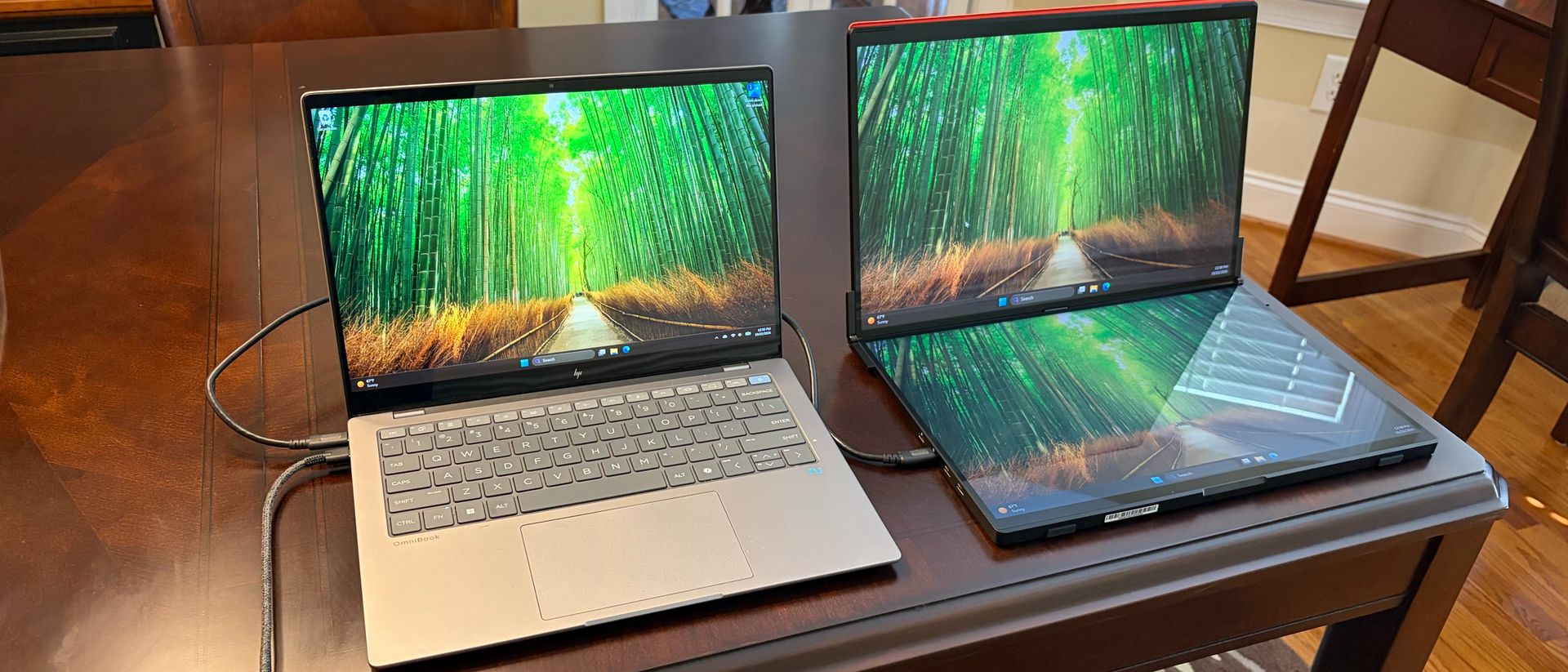
The FlipGo comes with an assortment of cables in the box. You get two USB-C cables, a mini-HDMI to HDMI cable, and a USB-C wall adapter. As I previously mentioned, the FlipGo does not support touch input on macOS. In addition, the FlipGo only supports mirror mode for both screens on macOS and requires you to use both USB-C and mini-HDMI to HDMI cables to connect (Windows 11 supports both mirror and extend modes). Because of these limitations and the fact that you’d be better off buying the cheaper non-touch model for macOS, I performed all of my testing with a Windows 11 laptop (HP OminiBook X).
Setting up the FlipGo couldn’t have been easier. Although JSAUX includes two mini-HDMI ports on the FlipGo for use with older laptops, if you have a USB-C port that supports DisplayPort, you can use that instead. With my OmniBook X test laptop, I was able to use just one USB-C cable to handle both power and video/data for the FlipGo. The FlipGo also supports 60-watt power passthrough to your laptop, which you can leverage by running dedicated power through the second USB-C port.
Tom's HardwareTom's Hardware
Using just a single cable between the FlipGo and the OmniBook X, I primarily used the two displays in portrait mode. In this mode, I could have two separate webpages open, side-by-side next to the OmniBook X’s internal panel. While I could use the FlipGo in landscape mode, the bottom panel had to lie flat on my desk, given that no stand was provided with my review unit to prop it up.
Touch support functioned, as expected, on both panels without needing to install any additional software. In short, the FlipGo operated flawlessly.
Display Performance on the JSAUX FlipGo (PM0204)
The FlipGo uses two 16-inch IPS panels, each with a resolution of 2560 x 1600 and a refresh rate of 60 Hz. JSAUX listed maximum brightness at 500 nits, but as you’ll see with our test numbers below, that figure was quite optimistic.
As I previously stated, due to the lack of a stand provided with my review unit, I primarily used the FlipGo in portrait mode, and it performed wonderfully here. The large panel sizes combined with the extra resolution over 1080p panels made them ideal for putting two webpages side-by-side. More frequently, I found myself pairing a webpage with an instance of Microsoft Word or Microsoft Excel. I especially appreciated the extra vertical resolution to limit scrolling up and down in Excel.
(Image credit: Tom's Hardware)
Compared to the FlipGo Horizon Pro that I previously reviewed, the panels on the “regular” FlipGo were far superior. Not only were they much more colorful and vibrant, but they were also vastly superior in brightness (319 nits versus 247.4 nits). However, I must note that the 319 nits that we recorded were a far cry from the 500 nits that JSAUX claims.
For our color tests, the FlipGo covered 97.2 percent of DCI-P3 and 137.2 percent of sRGB color spaces. That put the FlipGo well ahead of its competition, with the Aura Triple Aero 15.6 Pro Max coming the closest (at 85.4 percent and 120.6 percent, respectively). Given the higher-quality panels on the FlipGo compared to the FlipGo Horizon Pro and the glossy finish on my OmniBook X’s display, overall color balance matched pretty well across all three displays, adding to the enjoyment of using the portable monitor. I’ve often found that portable monitors have slightly (and sometimes far) inferior panels than their laptop counterparts, which can lead to a jarring experience when looking from one to the other. That is definitely not the case with the FlipGo.
Bottom Line
The JSAUX FlipGo is a remarkable piece of hardware for productivity warriors. At first sight, the FlipGo impresses with its high-quality build, stiff hinges, and plentiful video input options. JSAUX even incorporates a USB hub that gives you a couple of USB-A ports and a USB-C port to expand your peripheral footprint.
The FlipGo also tops the charts when it comes to color performance and brightness, more than justifying its $479 street price. I have two reservations concerning my review unit, but only one is really applicable. My review unit lacked a stand to prop the FlipGo up in landscape or portrait modes; however, shipping units from Amazon now include that part. So, crisis averted on that front. My other complaint is unavoidable: the 4.18-pound weight is considerable and is probably a bit more than most people are willing to deal with when traveling. However, it makes a perfect companion for expanding real estate on your desk without the massive footprint that comes with hooking up a traditional desktop monitor.
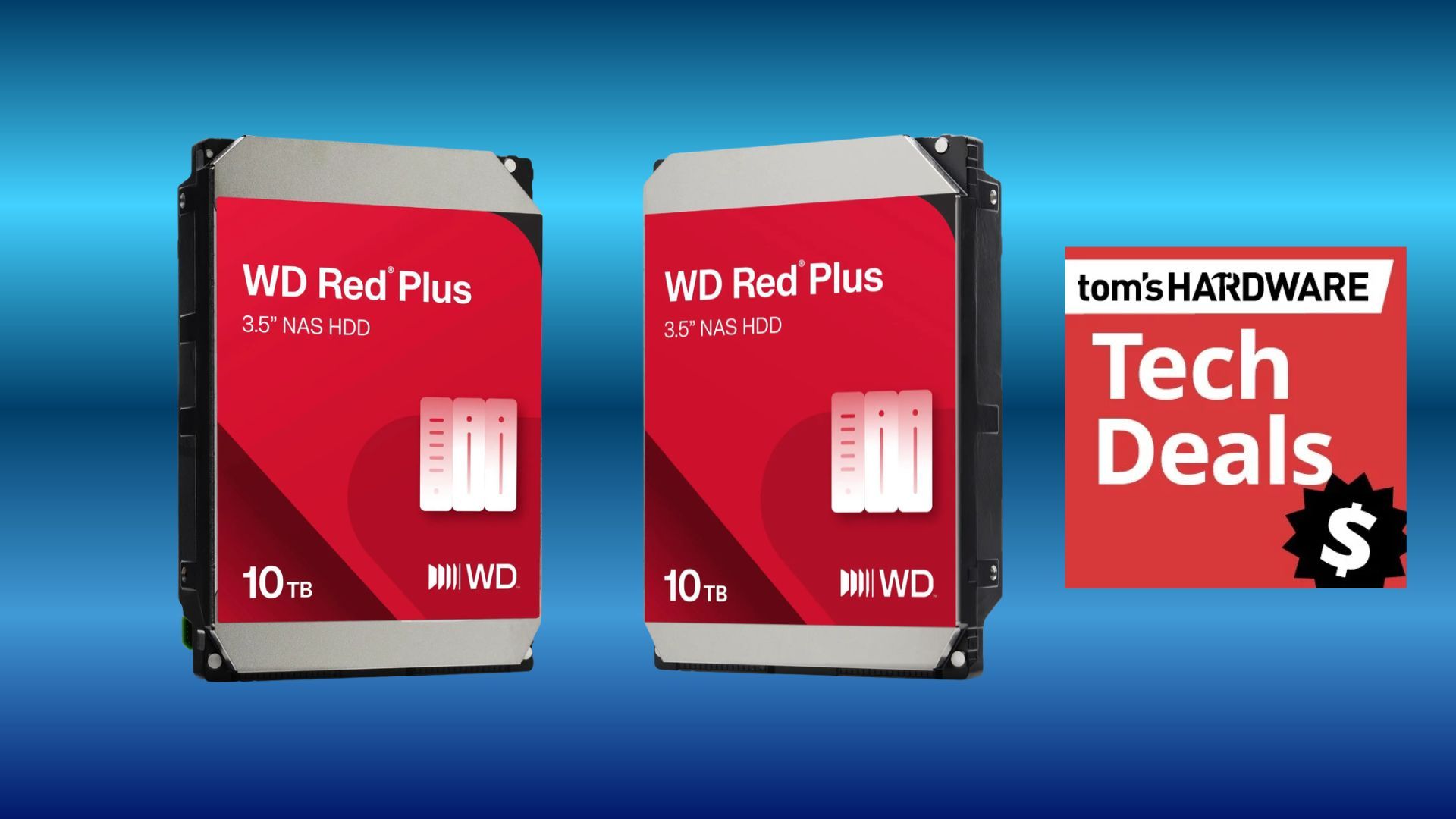
Whether you've had a NAS drive for a while, or you're looking at setting one up, the most important thing is making sure you have plenty of storage capacity. So, if you're looking to replace or boost your current storage drives, then this double-up deal from Newegg on 2x Western Digital WD Red Pro 10TB Hard Disk Drives for $785.98 might be helpful. The price of storage has skyrocketed over the last year due to the ongoing AI infrastructure rollout, so finding a relative deal on HDD storage has become a rare sight indeed. You can save $134 on this deal. The list price for the two drives is $919.98, with a single WD Red Plus 10TB listed for $459.99.
WD Red Pro hard drives are designed and constructed to be more reliable. These are not your average consumer drives, as they've been engineered to be more robust and cope with vibrations, small shocks, and continuous operation. With NAS drives often operating 24/7, you want reliable hard drives that are up to the task of sustained use. This two-pack of drives instantly starts you off with 20TB of storage capacity.
Red Plus 10TB (2-pack): was $919.98 now $785.98 Western Digital's WD Red Plus 10TB NAS HDD is a NAS-optimized hard drive for servers and other NAS operators looking to upgrade their capacity with a reliable and energy-efficient drive. This two-pack of drives instantly starts you off with 20TB of storage capacity.View Deal
The benefits of going with NAS-specific WD Red Plus HDDs include the fact that they are optimized for lower power consumption and lower operating temperatures than standard HDDs, ensuring lower electricity bills and hopefully great longevity. These WD Red Plus 10TB drives come with a 3-year limited warranty, which should help you to replace this expensive drive should there be any unfortunate drive failures.
The WD Red Plus drive has a 512MB cache and is rated to operate at speeds of up to 216 MB/s with a 7200RPM speed, supporting a workload of up to 180TB/year. That's a fair amount of data for a single drive, and should give the Red Plus plenty of longevity in your NAS setup.
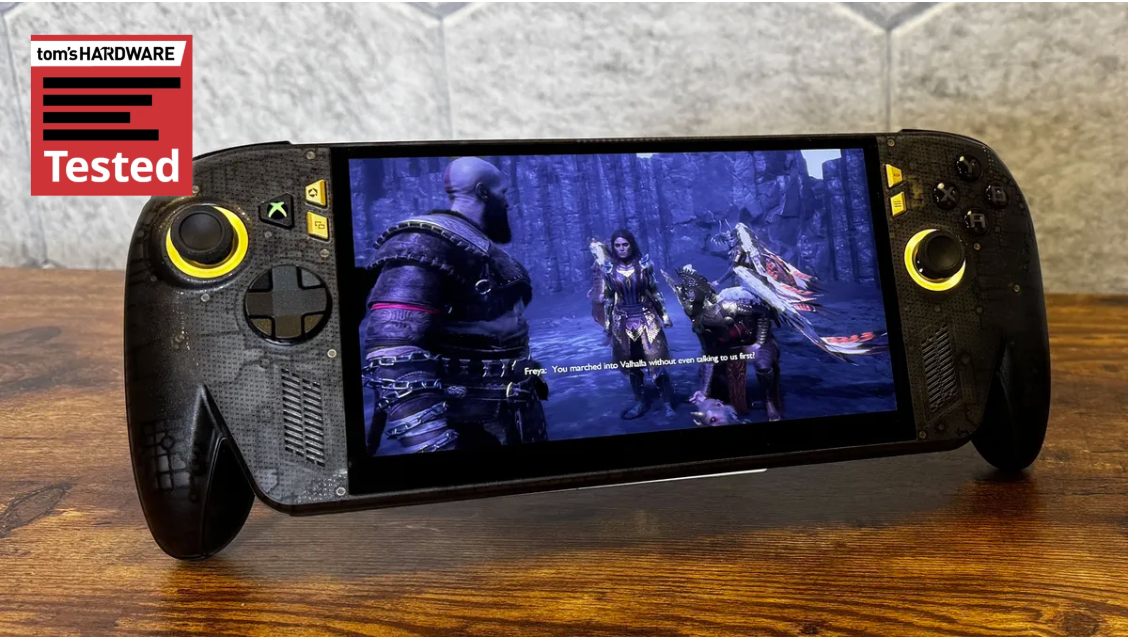
For Asus ROG's 20th birthday, the company released a slew of computer parts (enough for a supremely expensive build). But it's not overlooking its more recent entry into gaming handhelds, with the new Asus ROG Xbox Ally X20, a revamped version of the Asus ROG Xbox Ally X, which is already one of the best handheld gaming PCs.
The $1,299.99 gaming handheld ($2,499.99 if you get it in a bundle with XR glasses, a Pelican case, and a Dbrand Killswitch case) doesn't change performance at all. Instead, it makes some common-sense tweaks to its existing $999.99 handheld, adding TMR joysticks, rubberized grips, a see-through design, a transforming D-pad, and, most importantly, an OLED display.
(Image credit: Tom's Hardware)
If you already have an Ally X, this isn't a reason to upgrade. But if you're looking to get into handheld PC gaming and are willing to splurge, the changes here sure are nice.
Design and Display on the Asus ROG Xbox Ally X20
If you put the Asus ROG Xbox Ally X20 and the original next to each other, it's impossible not to notice the differences. But still, these are largely the same system, inside and out. They have the same button layout, the same grips, the same screen size, speaker placement, and vents.
Tom's HardwareTom's HardwareTom's Hardware
The most visible difference is that the X20 has a new, transparent plastic case with a black tint, along with gold menu buttons, a gold stripe across the back (rather than silver), and a large "20th Anniversary" ROG badge on the rear. I prefer the original Xbox Ally X's plainer design; the clear plastic looks more like a toy. I also found that it let the status lights shine through the top of the system, just abover the screen, which is distracting.
(Image credit: Tom's Hardware)
There is one minor change in the menu buttons: where the Ally X had a library button, the Ally X20 has a screenshot button. It's more useful in general, but it's also a great way to accidentally take a screenshot.
But once I picked up the Ally X20, the original couldn't compare. The chassis feels more substantial, especially with rubberized grips on the back of the prongs. There's a new directional pad, which feels more substantial; it also twists between a 4-way and 8-way pad, though I found switching between these two modes quite awkward. The 8-way D-pad is better for fighting games, while the 4-way with more distinct cardinal directions will make more sense for action-adventure and platform games.
Tom's HardwareTom's Hardware
The new TMR joysticks, which should show less wear with age, feel tighter. All of this adds up, even though there is no performance difference between the two devices. They share the same AMD Ryzen AI Z2 Extreme chip.
The other big change is the screen. Both use 1920 x 1080 touchscreens, but the Xbox Ally X20 has a 7.4-inch OLED panel, slightly larger than the original's 7-inch IPS display. While the screen size isn't much of a difference, the narrower top bezel is noticeable.
(Image credit: Tom's Hardware)
And the OLED screen looks great. It's only slightly more vivid on measured color tests. But it's definitely brighter, and it's absolutely an improvement. The OLED screen doesn't measure as well as the OLED screen on the Steam Deck OLED, but in isolation, I thought Asus's panel looked great, and it has a much more recent chip than the Steam Deck.
Forza Horizon 6 looked beautiful, with lush greenery on the sides of tracks and realistic, colorful paint jobs. In God of War: Ragnarok, dark areas with deep blacks made dim light stand out.
Asus ROG Xbox Ally X20 Specifications
Processor
AMD Ryzen AI Z2 Extreme
Graphics
AMD Radeon RDNA 3.5 graphics (16 cores)
Display
7.4-inch, 1920 x 1080, OLED touchscreen, 120 Hz
Memory
24GB LPDDR5X-8000, soldered
Storage
1TB PCIe 4.0 NVMe M.2 2280 SSD
Networking
Wi-Fi 6E, Bluetooth 5.4
Ports
USB4 Type-C (Thunderbolt 4 compatible), USB 3.2 Gen 2 Type-C, 3.5 mm headphone jack, microSD card reader (UHS-II)
Battery
80 WHr
Power Adapter
65W
Operating System
Windows 11 Home
Dimensions
11.42 x 4.76 x 1.08 ~ 2.00 inches (29.0 x 12.1 x 2.75 ~ 5.09 cm)
Price as Configured
$1,299.99
Battery Life on the Asus ROG Xbox Ally X20
The Ally X20 has the same 80 Whr battery as its predecessor. To get an idea how long you can play a demanding game for, I booted up God of War: Ragnarok, set the screen to 50% brightness, and used the 17W performance mode. With the game running on low settings with AMD FSR 3.1.4 at 720p, the machine had 47% charge left after an hour and 15 minutes of gameplay.
That suggests that I could have hit about 2.5 hours had I kept going. That's down from about 3 hours on the original Ally, though it's not apples to apples, as I played different games. It's to be expected that an OLED display would use a bit more power, however.
Software and Warranty on the Asus ROG Xbox Ally X20
The ROG Xbox Ally X20 uses the same Full Screen Experience that the original Xbox Ally X originated. Portions of Windows don't even load unless you switch to desktop mode, which saves RAM and helps boost performance.
For some features, Asus includes Armoury Crate SE. That's where you can make changes to the lighting around the joysticks, adjust power management (whether in the app or in the Xbox menu), and calibrate your joysticks and triggers.
Asus sells the ROG Xbox Ally X20 with a 1-year warranty.
Bottom Line
(Image credit: Tom's Hardware)
The Asus ROG Xbox Ally X20 is the definitive form of Asus' handheld. It feels better in the hands, has joysticks that should last longer, and the OLED display is a noticeable improvement.
All of that being said, games play the same across the two devices. If you already have an original ROG Ally X, this isn't worth the upgrade. You won't get any more performance, and the IPS screen on the original is still plenty bright and colorful, even if the blacks aren't as good as on an OLED screen.
If you're buying a new machine, it's a tougher choice. The X20 is $1,299.99 — a $300 increase over the original, which is staying on the market. If this is your sole gaming machine, that may be worthwhile for the improved screen, TMR joysticks, and a slightly more solid build. But it's a lot of money; the original Xbox Ally X will play games the same way for $300 less. Neither will play games as well as the Intel Arc G3, but the only system with that available right now is $1,799.
The X20 is worth getting if it's going to be your only gaming PC for a few years. The $1,299.99 price is high for a handheld, but given that the $999.99 version is effectively the best deal in handhelds right now, it makes some sense to invest if you want the best experience.
A Chinese team has claimed a new world record for real-time transfer speeds across 24-core optical fiber cable. The collaboration between the National Key Laboratory of Optical Communication Technology, and Network of China Information and Communication Technologies Group, Pengcheng Laboratory, and Fiberhome Fujikura Fiber Optic Technology Co., Ltd. hit speeds fast enough to download “more than 20,000 4K movies” in one second, reports the Chinese government website for Hubei Province.
We note that this new 3.2 Pb/s real-time optical transfer speed world record comfortably eclipses the 2.5 Pb/s record set by the same teams earlier this year. The improvement represents an almost 30% performance uplift within a year.
According to the source, these speeds could mean, if and when they are successfully rolled out, “3.2 million households simultaneously enjoying gigabit broadband.” Or you could say this speed is roughly 3.2 million times faster than a typical one-gigabit internet connection. Both are probably more useful and practical comparisons than knowing that one person would be able to download 20,000 4K movies in a single second.
In technical terms the 3.2 Pb/s test proved the success of the spatial division multiplexing and S+C+L multi-band transmission technology used by the team. Major hurdles faced by the researchers included crosstalk interference, and handling the varying spec requirements of the S+C+L transmission bands.
The new 3.2 Pb/s transmission record was achieved using commercially compliant hardware architectures in real-time. Thus, the headlining result could be practical and deployable in the real world in the not-too-distant future, with enough will and effort.
Contrast that to pure academic lab optical fiber transmission milestones which have reached transfer speeds (across similar 24-core telecommunications fiber) of up to 5.29 Pb/s. However, these incredibly impressive lab results often lean on advanced or experimental signal processing and laboratory equipment.
AMD's Zen 6 processors are out! Well, the EPYC 9006 family of server CPUs is out, anyway. These aren't chips that mere mortals like you and I can reasonably acquire, so there aren't really many third-party benchmarks out there yet, but somebody ran GeekBench 7 on one, and you know what that means: time for some wild speculation, such as the supposed 15% single-threaded IPC increase you might have seen reported this week. However, it isn't quite that clear yet. Well-known enthusiast and occasional leaker HXL (@9550pro) spotted the EPYC 9996 result, and now Russian enthusiast "three twenty six" (@326powah) has done a direct comparison with his Ryzen 7 9700X at the same clock.
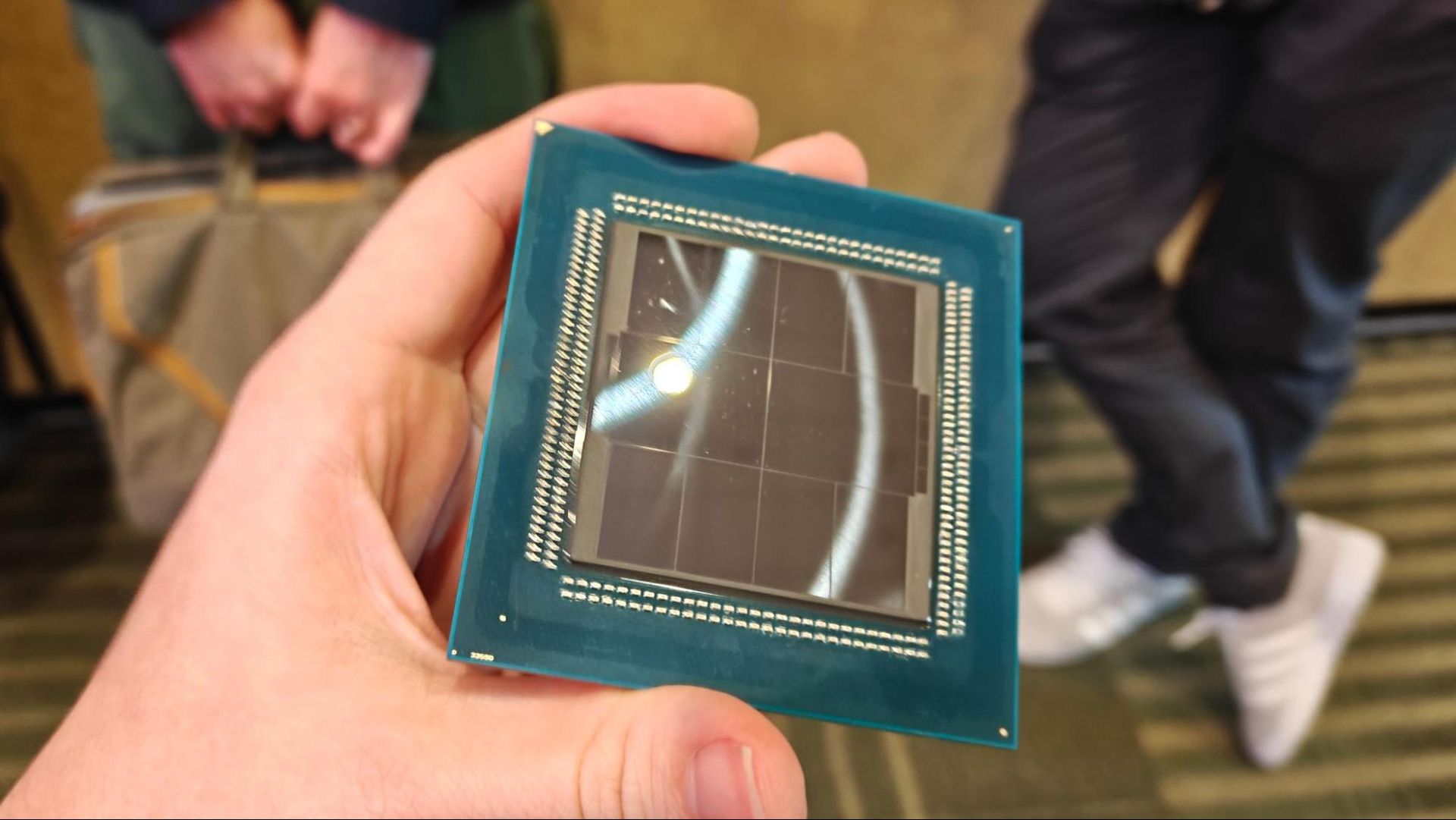
Let's lay out the details: the AMD EPYC 9996 is an absolutely gargantuan server processor with 256 "Zen 6c" cores spread across eight "Monarch" CCDs with 32 cores apiece. Each CCD has 128MB of L3 cache, which is reportedly split into two 64MB domains for each 16-core CCX. This gives us 4 megabytes of L3 cache per CPU core, which happens to be the exact ratio that AMD has maintained since Zen 2. Meanwhile, 326's Ryzen 7 9700X is a desktop CPU with eight Zen 5 CPU cores and 32MB of L3 cache, giving it the same cache-per-core ratio yet an overall smaller local cache for the CPU cores, to say nothing of the 1GB of L3 cache on the full EPYC 9996.
Yes, 1GB of L3 cache. That enormous CPU is also served by a 1024-bit memory bus, likely running at 12,800 MT/s, giving it a colossal 1.64 TB/second of memory bandwidth. However, the specific benchmarks we're comparing here are single-threaded benchmarks, and as a result, they aren't likely to be bottlenecked by memory bandwidth on either machine; even 326's relatively pedestrian DDR5 memory at 6000 MT/s CL34 is more than sufficient for a single-threaded, lightly vectorized workload like Geekbench 7. Matching the CPU core clock rates at 4.1 GHz actually gives us a pretty decent core-to-core comparison of performance, even if all factors are not equal.
Comparing the Linux results, the gain over the desktop chip varies quite a bit depending on the specific test, but there are no regressions. (Image credit: @326powah on X)
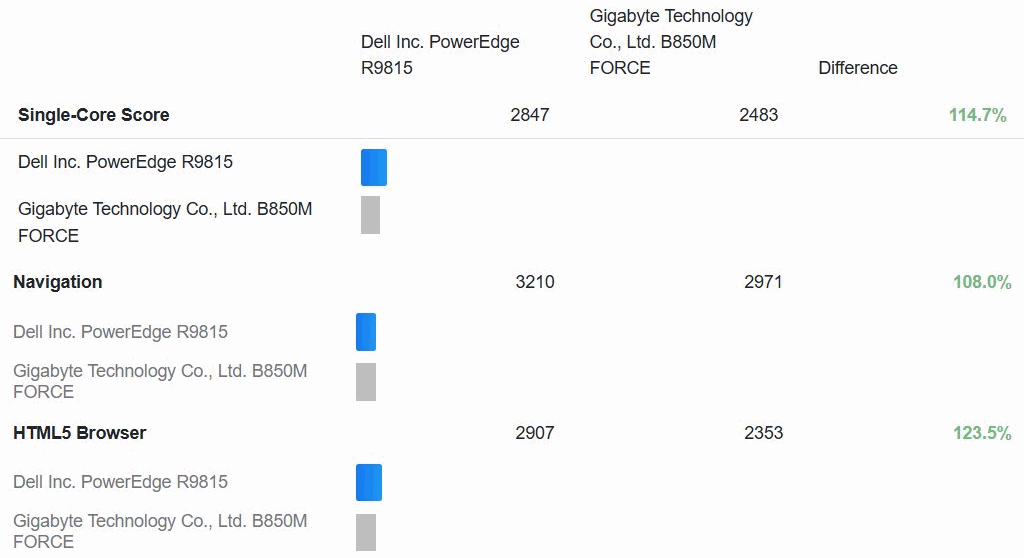
So how does it come out? Frankly, it's a massacre. That's true whether we look at the Windows 11 results he posted first or the CachyOS Linux results that he posted later, although the Zen 5 part doesn't get embarrassed quite as badly in Linux. The Dell PowerEdge R9815 server hosting the big EPYC part scored 2847 in the single-threaded test; 326's Ryzen desktop scores 2483 in Linux and 2318 in Windows.
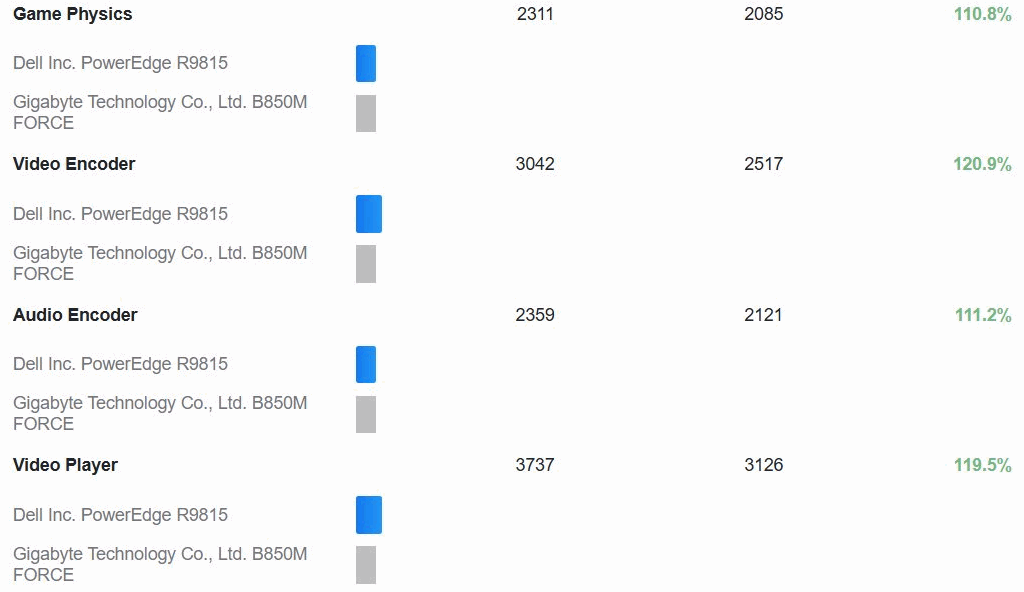
Looking at the Gala-to-Honeycrisp Linux results, the biggest performance gulf is some 24% in the HTML5 Browser test, which is normally quite sensitive to memory latency. That could easily be caused by the massive L3 cache of the EPYC CPU. Other tests aren't so easily dismissed by configuration mismatches, though. The 19% gain in asset compression, the 21% gain in video encoding, and the 17% gain in photo editing all point to real architectural differences between Zen 5 and Zen 6 that seem quite promising for its desktop debut next year.
What's fascinating is that these results won't have been affected much by the considerable SIMD horsepower of the Zen 6 CPU core, as Geekbench—at least historically speaking—makes relatively light use of CPU SIMD, and in fact, this specific test is marked as "AVX2," meaning it definitely isn't using the muscular AVX-512 units present in either CPU. In fact, most of these tests are actually measuring CPU integer arithmetic and memory subsystem performance more than raw CPU number-crunching power, so Zen 6 coming out so far ahead here is really interesting.
Media processing seems to be especially strong on Zen 6. (Image credit: @326powah on X)
Obviously, you shouldn't take this as gospel that "Zen 6 has 15% higher IPC than Zen 5," though that's arguably a plausible conclusion; there are just too many confounding factors to say that so far. Indeed, another one of those factors is that this isn't the Zen 6 CPU core that we'll be getting in desktop CPUs. The EPYC 9996 is a high-density part that uses Zen 6c, the specialized dense core design meant for increased area efficiency at the cost of its ability to scale to high clocks. After all, 4.1 GHz isn't exactly a high clock rate these days, and particularly not for chips manufactured on a bleeding-edge 2nm-class manufacturing process.
That's the part that should get you excited. Zen 5 had a very modest IPC uplift over Zen 4 (including even some regressions), and combined with a similarly modest clock rate gain, it wasn't a very exciting release for most desktop users. Zen 6 seemingly may have a significant IPC advantage as well as, if rumors hold, a fairly extreme clock jump over the current-generation parts. If that holds, this may be another leap like from Core 2 to Core i7, and these parts are confirmed to be coming to an AM5 socket near you. We'll be waiting with bated breath for the launch early next year. Hopefully there's RAM to buy by that point.
Having jettisoned 4F2 memory cells from its roadmap, Micron must use different methods to continue scaling its DRAM devices in the coming years to keep up with rivals planning to use smaller DRAM transistors towards the end of the decade. Instead, Micron intends to introduce wafer bonding with its upcoming 1ε DRAM process technology and adopt High-NA EUV lithography for subsequent generations. Meanwhile, the company is developing new types of memory, including vertical high-bandwidth memory (vHBM) and vertical edge inference memory (vEIM), which will be integrated directly on top of processors.
"DRAM is nearing atomic limits at this point," said Scott DeBoer, president and chief technology and products officer at Micron, during the company's event this week. "Although we have confidence in several more planar nodes, we are very focused on making sure that we introduce 3D DRAM at the optimal time from a cost and performance point of view."
Wafer bonding, High-NA EUV, and new materials
Micron's current 1γ DRAM process is already in high-volume manufacturing, whereas its successor, 1δ, is scheduled to enter volume production in the second half of 2027. The latter promises a mid-20% increase in bit density and is optimized for future AI memory products, including HBM5, vHBM, and vEIM. Beyond 1δ, Micron plans to introduce wafer bonding with its 1ε process, which is currently under development. However, the company has not disclosed how it intends to implement wafer bonding or what improvements it expects from the technology.
(Image credit: Micron)
For subsequent generations — ζÅ and ηÅ — Micron plans to adopt High-NA EUV lithography (ζÅ, zeta angstrom, Micron's 1st Generation sub-10nm-class DRAM node) and new materials (ηÅ, eta angstrom, Micron's 2nd Generation sub-10nm-class DRAM node) to continue shrinking DRAM cells. For many of its upcoming fabrication technologies that will be used over the next five to 10 years, Micron is also collaborating with Albany NanoTech. Of course, as with all organizations like Albany NanoTech, we are mostly talking about fundamental, or pre-competitive, IP that could be used for DRAM production at some point.
"Albany NanoTech, our announced focus on advanced lithography [is] really driving High-NA EUV roadmap for DRAM," said DeBoer. "In particular at Albany with our team there, focused on the next five to ten years."
(Image credit: Micron)
Micron is also developing 3D DRAM technologies and lists two generations — 3D1 and 3D2 — in its roadmap already. However, the company has not disclosed its architectures or launch schedules, as it intends to introduce 3D DRAM only when the technology offers sufficient advantages in manufacturing costs, complexity, and performance over conventional planar DRAM.
"When we look at three 3D DRAM we have that on the roadmap, as I mentioned, and it is shown here in between one zeta and one eta," said Micron's CTO. "But in reality, this is a parallel path, and we will implement it [3D DRAM] in a fashion that is ideal for cost, complexity, and device performance."
Going vertical, becoming critical
Beyond developing new process technologies for its upcoming DRAM products, Micron is also working on all-new types of DRAM products that are tailored for very specific use cases, including vertical HBM (vHBM), vertical edge inference memory (vEIM), and various custom HBM (cHBM) implementations.
(Image credit: Micron)
vHBM will place memory stacks directly on top of processors (such as AI accelerators and AI GPUs) rather than next to them. This approach promises substantially lower latencies and higher bandwidth thanks to shorter connections. However, placing memory above a processor creates significant thermal challenges and limits the number of memory stacks that can be integrated on top of an ASIC. Therefore, Micron expects vHBM to complement conventional HBM, which will continue to provide the bulk of memory capacity in many AI accelerators.
(Image credit: Micron)
Another technology under development is vertical edge inference memory (vEIM), which shares architectural and packaging characteristics with vHBM but targets different applications. Whereas vHBM prioritizes maximum bandwidth for high-performance AI accelerators, vEIM is focused on energy efficiency for edge AI processors used in autonomous vehicles, robotics, and other power-constrained devices. Nonetheless, even the 1st Generation vEIM targets formidable 2 TB/s bandwidth at
(Image credit: Micron)
Both vertical memory architectures will require advanced packaging technologies, particularly hybrid bonding, which enables much denser connections than conventional microbumps. Thermal management will also be critical, especially for vHBM. To meet cooling requirements, Micron is developing specialized heat-spreading structures to transfer heat from hot regions of memory base dies through the DRAM stacks.
The company has not disclosed when vHBM, vEIM, or cHBM will enter commercial production. What is important about the development of such types of memory is that it indicates that future improvements in memory performance will increasingly depend on advanced packaging and closer integration with processors, which will require collaboration between DRAM makers and logic developers. In turn, this transforms memory from a commodity to a critically important ingredient of an ASIC design.
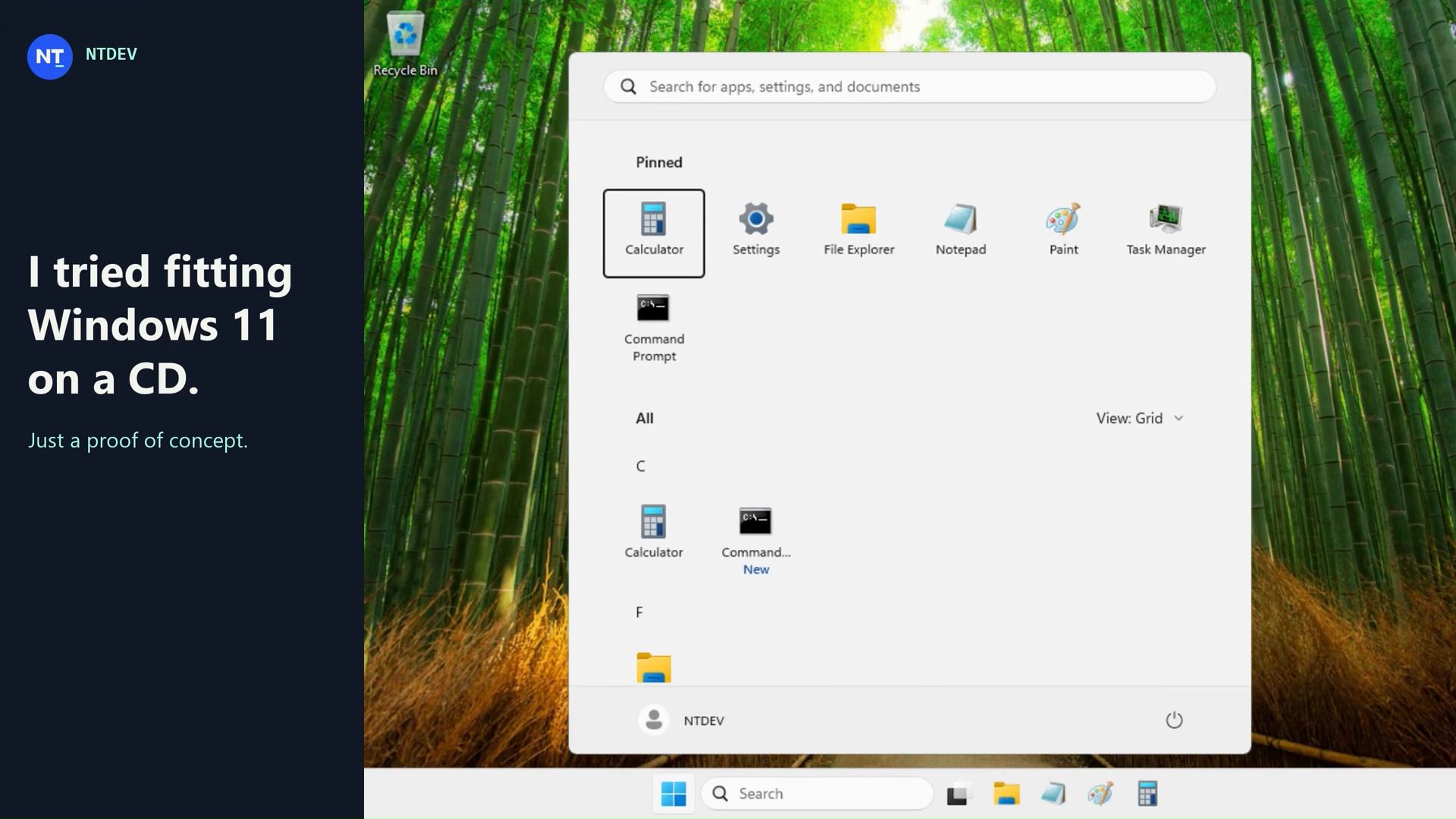
Professional Windows crusher NTDEV has showcased their next-generation tool for compressing Windows 11 into the tiniest of tiny installs. Based on their newest and unreleased Pico11, they managed to create a “proof of concept I put together to see how small I could make a Windows 11 ISO while keeping a working desktop and a few familiar apps.” Moreover, it’s a perfect installer to shove on a 700MB CD-ROM without wasting space, with this demo version weighing in at 699,811,840 bytes.
The test system (a VM with 4GB allocated) used around 883MB of RAM.
In the above video, NTDEV demos a freshly installed Windows 11 ISO that had been processed with Pico11. The desktop looks familiar to anyone currently using Windows 11. “Calculator and Settings still open, Notepad saves files, and Paint still lets me draw questionable logos,” highlights the dev. However, it is also pointed out that “Task Manager might look a little older than you remember.” The older Task Manager seems to be a lightweight legacy version. It may have been possibly swiped from Windows 7, but its exact origin isn’t divulged by NTDEV.
At this time, NTDEV admits what you see is “an experiment, not a replacement for a normal Windows installation,” and that’s mainly because Windows Update and general servicing have been removed to fit inside the constraints of CDR capacity. If you are interested in creating Windows installs like this, the good news is that NTDEV says they are working on adding what they describe as Pico11 capabilities to the Tiny11 builder tool, which you can find on GitHub.
Tiny11 has already demonstrated impressive Windows 11 ISO building capabilities with its Tiny11 mode, Tiny11 Core mode, and Custom mode. Pico11 sounds most closely related to Tiny11 Core as it eschews servicing and recovery support. However, there appears to be some more under-the-hood tweaking, which may have been evidenced in this new showcase by the presence of the older version of Task Manager.
Tiny11 has historically been responsible for even smaller Windows 11 installs, but the extreme 100MB distillation of the OS, for example, came without any Windows 11 UI. Builds could also be remarkable for using tiny amounts of RAM – as little as 176MB. More typical and useful were custom builds powered by Tiny11 where 'bloatware' was removed and that weighed in at around the 2GB mark.
Hopefully we will learn more about Pico11 and get greater insight into its capabilities soon.
Cadence, one of the largest electronic design automation (EDA) companies, has unveiled Maestro, its new portfolio of domain-specialized AI models tailored for its chip design agents, in a press release sent just ahead of earnings. In initial results compared with general-purpose AI models, Cadence claims up to a 30% improvement in the quality of results and that Maestro effectively uses fewer tokens for the same task, with up to 5x the token efficiency. The first models “are available to select early access customers” in Q4 2026, and customers may run them on Cadence’s cloud, public clouds, or customer-controlled on-premises environments and post-train them on their own “proprietary data, designs, and workflows.” To learn more about Maestro, we spoke with two Cadence executives: Rob Knoth, senior group director of strategy and new ventures, and Paul Cunningham, senior vice president and general manager.
This approach is distinct from Synopsys’ own specialized model, GPT-Synopsys, which will run on OpenAI-hosted infrastructure, without using customer data to train the model. The models of both EDA giants, announced less than a month apart, now split on where a customer’s design data goes. Where they might not differ is why: Paul Cunningham, senior vice president and general manager at Cadence, told Tom’s Hardware Premium that agent costs have “really started to explode,” adding, “And I think the world realized so.” That makes it a natural step, he said, to move more of the agents’ iterating “into the weights of the models themselves.”
(Image credit: Cadence)
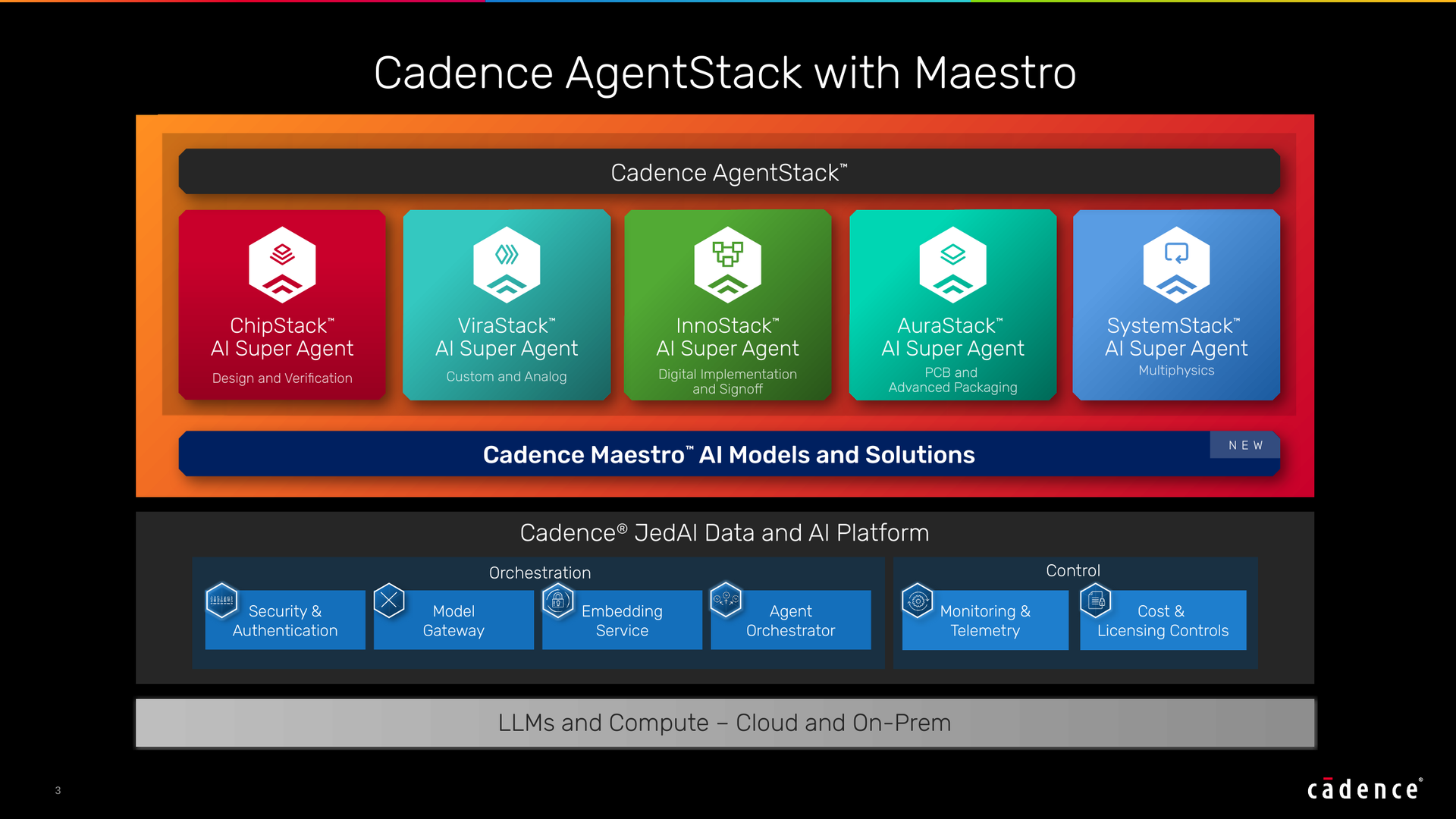
Maestro takes this step through Cadence’s AI Super Agents, which “interpret design intent, decompose tasks” and “orchestrate the Maestro portfolio with other leading frontier and open-weight models,” evaluating trade-offs to guide decisions with domain expertise. It also uses reinforcement learning (RL), where Cadence’s “deterministic solvers evaluate outputs against engineering objectives, constraints and ground truth,” and, importantly, the results feed back into the models for improvement.
The models include Nvidia’s Nemotron, and customers can run the customer-data training step themselves with Cadence’s fine-tuning harness, potentially “on their own GPUs, on their own network,” Cunningham said. He added that Nemotron, specifically, was “giving really solid results and actually improving very, very fast.”
One constant that keeps popping up with agentic EDA is the need to nail down what the numbers actually measure. In chip design, quality of results usually refers to the design’s power, performance, and area, though Cadence didn’t specify what its 30% figure measures. Both it and the 5x token efficiency figure are measured against “a general-purpose foundation model,” which Cadence told us is the open-source model Maestro started from before its training. The company wouldn’t name the foundational AI model that Maestro is derived from beyond mentioning that it is “one of the leading open source models that’s very competitive with commercial frontier models.”
Cadence credits the token savings to balancing its EDA and system design automation (SDA) “tool calls with LLM invocations.” As an analogy, Cunningham said, “You don’t need to drive to Safeway in the jet engine,” and you want to use “the right model at the right time for the right task.”
Runtime does matter, too: as Rob Knoth, senior group director of strategy and new ventures at Cadence, told Tom’s Hardware Premium in September that a tool call could take anywhere from hours to days to return a value, while the AI industry’s training loops are “used to minutes.” Efficiency could also lower costs, since Maestro use counts toward Cadence’s agent pricing, a subscription with a consumption allowance and charges for use beyond it, Cunningham said. He didn’t say whether the token savings cut a customer’s bill.
Being flexible for the customer is a key element of any solution, and for Cadence’s competitor Synopsys, this lies in Autopilot, which Synopsys says allows customers to “choose among commercial, open-source, and fine-tuned language models” across “Synopsys-managed and customer-managed deployments,” with cloud or on-premises infrastructure. For agent security, such as sandboxing, Cadence says it’s working with Nvidia on an integration with Nvidia’s OpenShell Reference Architecture, which Nvidia launched last week, naming both Cadence and Synopsys. These options can help protect customer intellectual property.
Cadence Maestro vs. GPT-Synopsys
Cadence Maestro
GPT-Synopsys
Announced
Oct. 26, 2026
Sept. 30, 2026
What it is
A portfolio of domain-specialized AI models for Cadence’s AI Super Agents
A specialized model that operates Synopsys’ tools directly
Model partner
Nvidia (Nemotron, OpenShell)
OpenAI
Models
Post-trained LLMs, trained decision models and agent skills, blended with frontier and open-weight models, including Nemotron
OpenAI frontier models
Where it runs
Cadence’s cloud, public clouds or customer-controlled on-premises environments
OpenAI-hosted infrastructure
Customer data
Customers can post-train it on their own data, designs and workflows, with Cadence’s fine-tuning tools
Customer data isn’t used to train the model
Claimed results
Up to 30% higher quality of results and up to 5x token efficiency vs. a general-purpose foundation model, the unnamed open-source model Maestro started from (initial results; measure not stated)
None disclosed
Availability
First models to select early-access customers in Q4 2026
No date; early technology engagements underway
Customers named
Socionext, Silicon Labs (Nvidia as partner), frontier AI labs
None
Pricing
Subscription with a usage allowance, then charged by use
Not disclosed; Synopsys and OpenAI share revenue under their deal
Cadence has had a busy 12 months with customers and agents alike. During Cadence’s July earnings call, CEO Anirudh Devgan said ChipStack, its design and verification agent, “has more than 20 customer engagements,” and ViraStack, its custom and analog agent, “more than 25 customer engagements.” Socionext said just last week that it was applying InnoStack. Silicon Labs has also credited ChipStack with accelerating debugging, and both companies say they are watching Maestro next.
Cadence's agentic consolidation began with its acquisition of ChipStack back in November 2025. In June 2026, the company claimed that its agent had reached Level 5 autonomy, which we explored in detail. In September, Knoth teased Maestro’s ingredients to Tom's Hardware Premium a month early, two days before the GPT-Synopsys announcement: “reinforcement learning loops, domain-specific post-training of open-weight models, model routing.” Maestro is now sitting under all four super agents, targeting a similar year-end window to Synopsys’ Autopilot; the table below has the full timeline.
Done; co-founder Kartik Hegde now leads Cadence’s core AI research group
February 2026
ChipStack AI Super Agent
Up to 10x productivity for coding designs and testbenches, test plans, regressions and debug
In early access since launch
April 2026
ViraStack (custom and analog), InnoStack (digital implementation) and AgentStack (head agent)
—
Socionext is deploying InnoStack in production; others not stated
June 2026
ChipStack at Level 5, with Nvidia’s Nemotron and OpenShell
Over 40x faster RTL validation cycles in Nvidia’s deployment
Level 5 and AgentStack due to early-access customers in the second half of 2026
July 2026
AuraStack (PCB and advanced packaging)
Up to 2x faster time to market and 15x higher productivity
Available on Cadence’s Millennium M2000 supercomputer; Nokia is deploying it (Oct. 21)
September 2026
ChipStack RTL Generation Agent
An average of 24% less area and 18% less power than pure foundation-model code, in early evaluations
Due to select early-access customers in Q4 2026; early collaboration with Honda R&D
Oct. 26, 2026
Maestro AI Model Portfolio
Up to 30% higher quality of results and up to 5x token efficiency vs. a general-purpose foundation model, in initial results
First models available to select early-access customers in Q4 2026; about a dozen engagements
This rapid pace of progress means that a clear distinction has to be made between early access and general availability. Both Cadence and Synopsys can point to customer engagements, and, at least in the latter’s case for the AgentEngineer portfolio and Autopilot platform, general availability remains a goal by year’s end; Cadence hasn’t given a general availability date for Maestro. For GPT-Synopsys, though, only “early technology engagements are underway,” according to its partners. The platforms and agents remain works in progress.
For Maestro, Cunningham hopes for “more case studies, more quantifiable benefits” through Q4. The real story, as he aptly put it, is that “we’re going to bring agents and agentic AI natively into our vertical, not that our vertical is going to get embedded into general-purpose agents.” Only customer results on real workflows will test Cadence’s 30% number, but going by what both companies have shown so far, their own early figures are extremely promising and exciting for the EDA industry.
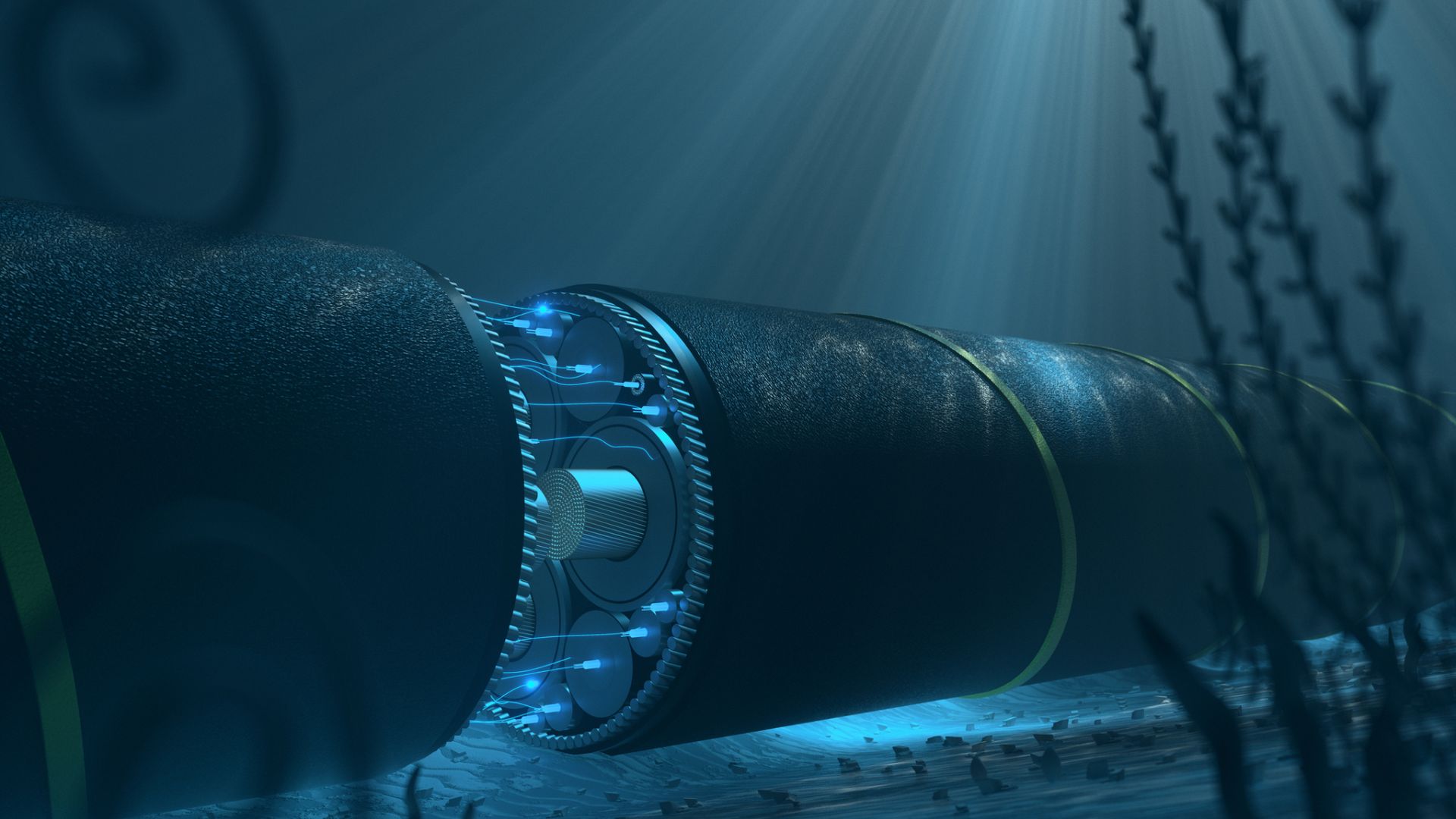
China is spending more time loitering near undersea cables in the Pacific Ocean than any other nation, according to a report by the Center for Strategic and International Studies, a U.S.-based think tank in Washington, DC. The analysis compared the behavior of 200 research vessels from 47 different nations, including the U.S. and Russia, and found that Chinese vessels spent a "statistically significant larger share of time" near critical infrastructure.
The analysis, reported by Indo-Pacific Defense Forum, notes that Chinese activity was particularly suspicious in this regard. It notes that the "persistent and disproportionate activity" means that China "may be leveraging its research fleet for underwater data collection that may aid... analysis of terrain for sabotage or submarine operations."
Civilian research vessels provide a unique cover for states looking for "plausible deniability" for their research gathering activities. The report mentions the activity of a ship from the Xiang Yang Hong research fleet which, between July and October 2024, spent time near three undersea cables that connected the U.S. with Australia, Indonesia, Singapore, Guam and others.
The ships move in a "lawnmower" pattern which, it notes, is associated with surveying to create accurate seafloor maps. While the ships themselves aren't part of the PRC's navy, the data they collect could be used to serve China in future conflicts.
These "gray zone research activities" continue in an era of Chinese conflict with its neighbors as it asserts territorial claims in the South China Sea against states like the Philippines and Vietnam, not to mention its claims over Taiwan, which Beijing considers a breakaway province.
Intel and AMD have spent decades competing for the processors inside PCs and data centers, but the rivalry hasn't stopped the two companies from working together when their interests align. And now, Intel CEO Lip-Bu Tan has reportedly discussed potential areas of cooperation with AMD chief Lisa Su, adding another possible partnership to the mix as Intel tries to regain its footing in the semiconductor industry.
According to a recording (embedded below) of Tan’s October 24 fireside chat with Chinese American Semiconductor Professional Association (CASPA) President Jimmy Cheng, the Intel CEO outlined his plans to rebuild the company’s CPU business, develop chips tailored to specific customer workloads, and attract more customers to its foundry operations. However, Tan did not publicly detail the reported areas of potential cooperation with AMD CEO Lisa Su.
Intel has traditionally built its business around its own processor roadmaps, but Tan says the company needs to be more flexible as customers look for silicon designed for particular workloads. He pointed to Intel's Xeon processors as one area where that approach is changing, alongside continued development of GPUs and accelerators.
"We have to reclaim the leadership in CPU. That is something that I am very determined to do." Tan said.
He also described a change in how Intel approaches customization. "Intel is so proud they never want to modify for customer needs," he said. "I'm modifying it for customer needs, and so that, I think, to me, is a fast-growing area, and I'm double, triple down on it."
The strategy extends beyond conventional CPUs, with Tan identifying application-specific integrated circuits (ASICs), co-packaged optics (CPO), physical AI, and advanced packaging as potential growth businesses. He wants two or three of these areas to eventually contribute around 10% of Intel's revenue each.
Intel's foundry business is another major part of Tan's plans. He said the company's 18A manufacturing process had reached volume production, while development of its next-generation 14A process was progressing strongly. Intel has already released version 0.5 of the 14A process design kit (PDK), which provides chip designers with the technical information and tools needed to develop products for the process.
Tan said version 0.9 was coming next, followed by version 1.0 for volume production in early 2027. "We have multiple customers [who] really want us to really scale their business," he said, referring to interest in Intel's foundry services.
However, Intel did not identify those customers or disclose the size of any potential manufacturing orders during the discussion. Notably, in January,Intel had two prospective customers evaluating 14A test chips, with firm supplier decisions expected during the second half of 2026 and the first half of 2027. Tan also described foundry manufacturing as a business where trust matters as much as technology. Customers hand over wafers that will eventually become products on which their own revenue depends, making missed deadlines or manufacturing problems costly. "The moment we take on the foundry, take on the wafer is a lot of responsibility to make them successful," he said.
He recalled one customer who had waited six to eight months hoping he would become CEO before presenting 15 areas where Intel had fallen short. Tan said he addressed the problems individually, after which the customer agreed to deepen its relationship with Intel.
That said, the prospect of further cooperation would not be entirely new. In October 2024, Intel and AMD established the x86 Ecosystem Advisory Group alongside other technology companies to coordinate improvements to the x86 instruction set architecture and make it easier for hardware and software developers to support both companies' processors.
That cooperation has since moved into AI software. Last week, it emerged thatAMD was integrating its ZenDNN optimizations into Intel's open-source oneDNN library, bringing the companies' CPU optimization work for PyTorch AI inference under a common software path. The companies have also worked together on Advanced Matrix Extensions and other x86 capabilities through the advisory group, showing that they cooperate on shared technologies while continuing to compete for customers. For now, however, neither company has announced a new agreement arising from the discussions.
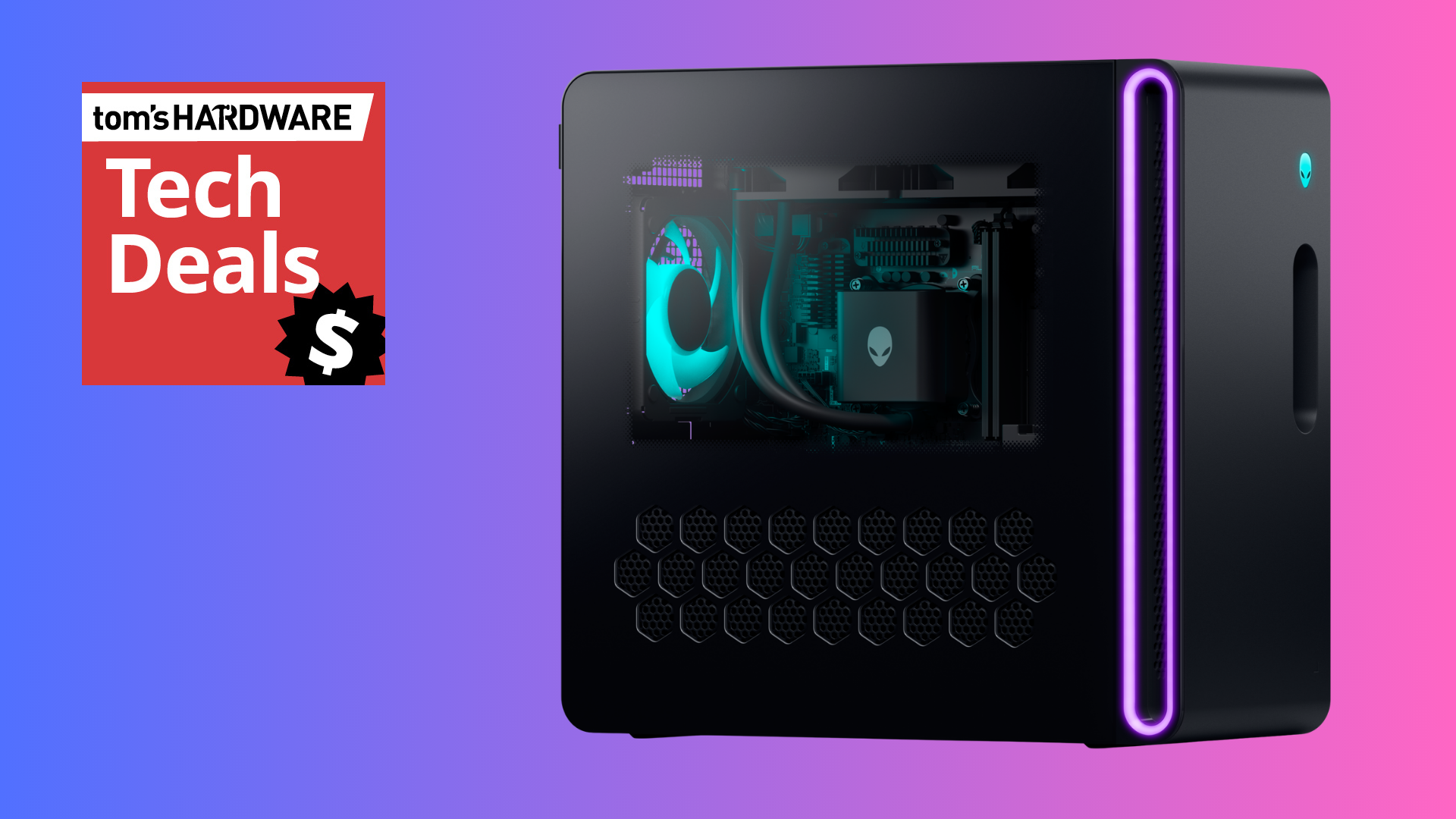
AI has forced PC component prices up with no slowdown in sight over the last year. While building your own might be expensive, pre-built gaming PCs continue to offer the best value in many cases. With that in mind, you could secure a huge $1,070 discount on an Alienware Aurora gaming PC at Newegg right now, featuring an Nvidia GeForce RTX 5070 and 32GB DDR5 RAM for $2,199.99.
Dell's premium Alienware gaming brand usually comes with a price premium compared to budget or no-brand models. With this $1,070 discount applied, you're getting a rig for 4K-capable gaming at a fairer price than you would get by buying from Dell directly. Alongside the RTX 5070, this ACT1250 model ships with an Intel Core Ultra 7 265KF processor and a 1TB SSD.
Aurora ACT1250: was $3269.99 now $2199.99 This Alienware Aurora gaming PC is a powerhouse for 4K gaming. It features an Nvidia GeForce RTX 5070 GPU, a 20-core Intel Core Ultra 9 265KF CPU, 32GB of DDR5 RAM, and a 1TB SSD.View Deal
The GPU is often the big-selling feature in a gaming PC. With the Nvidia GeForce RTX 5070, you're getting one of Nvidia's latest Blackwell GPUs with 6,144 CUDA cores and 12GB of GDDR7 VRAM, operating on a 192-bit memory bus. What that means for gaming is that you've got a card that will smash through high frame rates, even with the highest graphics presets, at 1080p.
At 1440p, you're also going to see good performance, although the most demanding games might need a drop down or two. You can also fall back to using Nvidia DLSS with multi-frame generation for an uplift, powered by AI to add extra frames into the mix for smoother gameplay, especially if you want to game at 4K. Our GPU benchmarks show that the RTX 5070 is a strong option compared to its rivals, offering slightly better performance than the RTX 4070 it replaces.
You're getting an Intel Core Ultra 7 265KF CPU with this build. This is a 20-core Arrow Lake CPU with 20 cores, with eight good-for-gaming performance cores, along with 12 efficient cores for multi-threaded work. This is locked, meaning you can overclock it, and it ships with a max boost clock speed of 5.5 GHz.
This isn't a CPU able to compete with top-spec AMD rivals, but it's a solid enough performer when you couple it with the RTX 5070's power. Elsewhere, though, you're getting 32GB of DDR5 memory, so no compromises there. There's also a 1TB SSD, leaving you enough storage for at least a few big AAA installs.
The AI-powered inrush of software vulnerability reports over the last year has shined a light on how many critical pieces of open-source software are chronically underfunded. The latest victim is PHP, the scripting language powering about 71% of websites, making the news due to a critical remote code execution vulnerability. The PHP Foundation, which develops and oversees the language, reportedly counts only one full-time person and 14 "mostly part-time" contractors. That's bad enough, but the real problem goes far deeper thanks to the internet's lazy development practices and systems administration.
In an interview with Reuters, the PHP Foundation's Executive Director Elizabeth Barron spells it out clearly: she's the only full-time person on staff, and works with the contractors' help. Pertaining to the software itself, the team's job is to develop and maintain the PHP core, including taking care of security fixes. The core team accepts contributions from the world at large, in an arrangement not too dissimilar to Linux kernel development — except that project is far better-manned, with many full-time contributors and company-employed developers.
Naturally, the PHP foundation collaborates with other companies and many cybersecurity firms, but the dev team was stretched thin even before the increase in security vulnerabilities with the help of countless AI agents. Barron does note that there was no reported exploitation of PHP2Shell before the security fix came out.
But the lack of a higher funding level likely led to the "structural failure" to address the underlying vulnerability in a timely manner, as the out-of-memory condition (OOM) that eventually led to the 2026 exploits was originally discovered in 2024. Given how widespread PHP is, and how many third-party extensions there are, the work on fixing the OOM problem "stalled and restarted repeatedly over months." It didn't help that the Chainguard security firm broke the PHP2Shell embargo too early by accident.
Even still, the team is thankful for the money it has, as "without the Foundation’s funding it would have been impossible to have multiple people work on this issue full time, eventually through weekends and around the clock to coordinate and communicate with other involved parties." One would hope that this latest incident releases the purse strings of more companies that make their living off of PHP.
And yet, this failing is far larger than just bugs in the core language, which, notably, were only one point update away. In theory, any server running the current 8.x brand of the software should be upgraded in minutes with the released patches, but reality was far different, as websites went down for hours or days out of fear of exploitation.
The real problem reared its ugly head: nearly 73% of PHP installations were running versions well past their end-of-life (EOL) date, meaning that obtaining fixes is now far harder. Many professionals who worked with the language, including yours truly, had spent decades warning of this reckoning, even considering many Linux distributions were backporting fixes.
Many of these servers were still running PHP 7, a version that was completely EOL'd four years ago, with many years of advance warning, and that originally came out in late 2015, almost eleven years back. If that doesn't sound silly enough, let it sink in that around 7.7% of PHP sites were still running version 5.x, which first saw the light of day 22 years ago in 2005, and saw the final sunset in 2018. It's safe to say that everyone had plenty of time to prepare.
To further illustrate the ridiculousness of collective complacency: the jump from PHP 5 to 7 and then from 7 to 8 required changing sections of website code, but the vast majority of said changes are simple to find and apply, and even before AI, there were already automated code-patching tools around. A couple years ago I mapped them all out for a PHP 5-to-8 codebase conversion myself.
Most of the alterations were about dropping support for ancient functions and libraries, which themselves had had long-standing warnings of incoming deprecation. Not a lot of core language features underwent modification, and a lot of convenient syntax was added to help clarify fiddly, error-prone code, too. That the overall situation got to this point beggars belief and illustrates how complacency, laziness, and cost-cutting are a far bigger force than a cadre of AI bots digging for flaws.
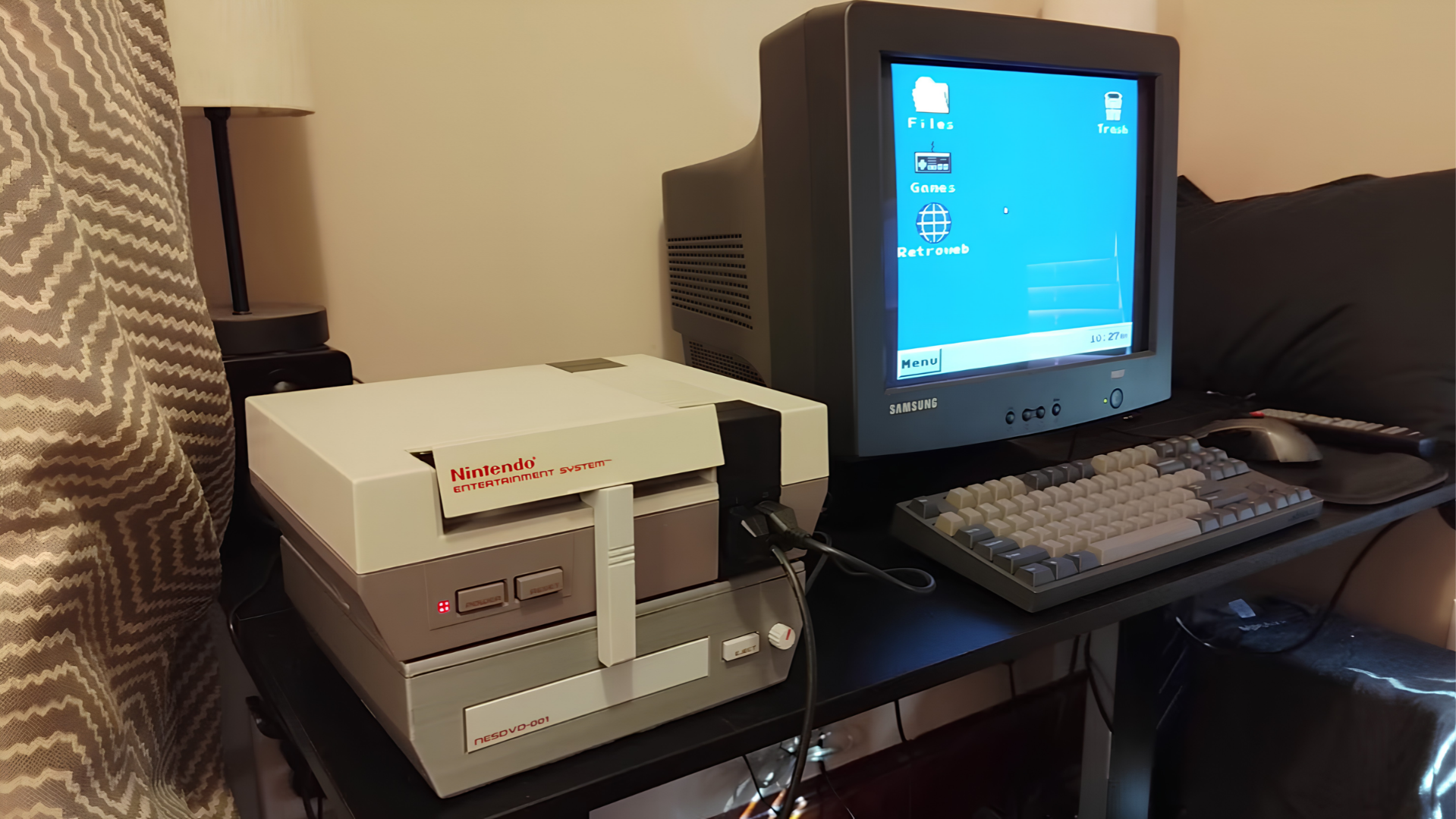
YouTube retro gaming experiment channel Throaty Mumbo created a Windows-like desktop environment on the NES. The project took advantage of the EverDrive N8 Pro, an FPGA-powered NES cartridge that handles the heavy x86 emulation. Throaty Mumbo has made the NESPC project available on GitHub and included firmware for an RP2350 he used to make a USB interface for keyboard, mouse, and MIDI functionality.
Throaty Mumbo started out with ROMs he found on the internet, trying out a Chinese Windows 98 ROM that didn’t really do much. It had Paint, Windows Explorer, and plenty of things that looked like Windows 98 programs, but none of them were actually functional; only images of what the programs approximately look like. He also tried out a ROM of Linux, a project named NES86 by decrazyo, but it was incredibly slow and unusable, leading him to create his own ROM.
Since the NES’ 6502 8-bit microprocessor was too slow to emulate x86, Throaty Mumbo used the EverDrive N8 Pro, which has a much more powerful ARM-based Cyclone IV FPGA. It simply goes into the cartridge slot and takes advantage of the NES’ cartridge-side processing, basically making it act similarly to an external graphics card by outsourcing tasks to another processing unit. To run x86, Throaty Mumbo used Next186, an open-source FPGA soft processor core that can make the FPGA execute Intel 80186-compatible instructions as if it were an x86 CPU.
Throaty Mumbo first showed his NESPC project with a command-line interface, demonstrating how fast you can navigate the environment and run command-line programs like tty-tetris, which didn’t work well at such a low resolution, but he did show a command-line train animation running quite smoothly. He finally showed that he built a whole desktop environment that looked like a very stripped-down version of the Windows 98 ROM earlier. His UI, however, was more functional, serving as a menu replacement for the EverDrive N8 Pro menu ROM, even having a fully playable Minesweeper in the Start menu. The UI also had program icons that served as ways to start game ROMs and access files inside the EverDrive N8 Pro cartridge’s storage.
Throaty Mumbo wasn’t satisfied, however, as moving a mouse cursor and typing with an NES controller isn’t the best desktop experience, so he tried adapting a Family BASIC keyboard for the Famicom to it using the NES expansion slot and a breakout board to connect jumper wires to specific pins. It didn’t work very well, with each keystroke outputting multiple letters and symbols; the bulk on the bottom also didn’t allow the NES to sit flat on the desk.
Throaty Mumbo then thought of using an RP2350 microcontroller with custom firmware so he could connect a USB device into the NES controller ports. This worked much better, even allowing smooth mouse inputs, but it only had one USB port, so it could only take either a keyboard or a mouse. His solution to this was to use a keyboard with a USB hub built into it, which worked great. Throaty Mumbo further experimented with this USB input as a MIDI device, plugging in a USB piano keyboard and playing with a very basic digital audio workstation (DAW), even playing some Mario soundtracks from NSF (Nintendo Sound Format) files.
To get even more of a retro PC experience, he added his previous 3D-printed NES CD drive project, the NESCD, which plugs into a port on the EverDrive N8 Pro cartridge and the expansion slot, allowing him to play music in the background while playing an NES game at the same time without losing any performance. He then upgraded the NESCD with a Seeed Studio XIAO ESP32 to add WiFi capability, allowing for 4 MB/s download and 90 KB/s upload speeds. Since the internet capabilities are very limited, the NES uses Throaty Mumbo’s laptop as a proxy to fetch the NES’ requests from the internet and simplify them to be more easily displayed on the limited resolution. However, Throaty Mumbo also added an option to connect directly to the internet, which would be a miserable experience.
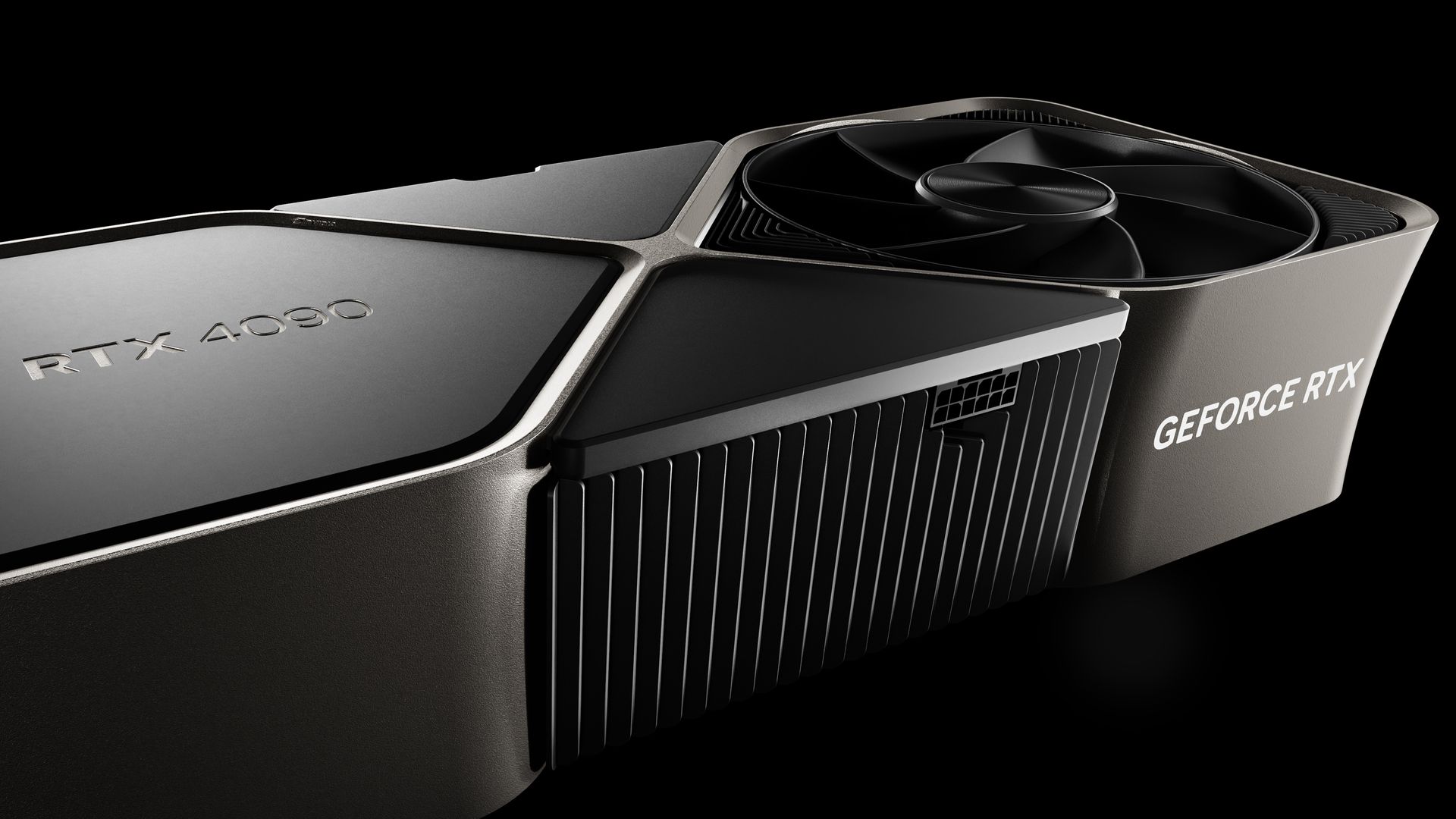
Modders have discovered a way to remove imposed half-speed AI performance limits on Nvidia RTX 20, 30, and 40-series GPUs with a firmware exploit, VideoCardz reports. Without the limitation, the RTX 4090 can achieve double its peak tensor rate, and matrix math can improve by up to 80% for the RTX 3090 Ti, with gains on other cards varying. Real workloads gain significantly less than the RTX 4090’s doubled peak would imply, and chatbot token speeds remain about the same, as that performance is dependent on memory bandwidth.
For all impacted GeForce generations, Nvidia imposed a limit that, per its own published specs, runs FP32-accumulate math at half each card’s FP16-accumulate rate. That does not apply to its Turing and Ampere pro cards. The unlock returns native matrix-math throughput to owners of the cards, which can speed up prompt processing and image generation.
Three separate projects offer generation unlocks, each with its own unofficial Linux module, while experimental Windows builds pursue a different approach. Card coverage varies by generation, with gpu-unlock handling Ampere and listing the GA102/GA103/GA104/GA106 series IDs. An Ada fork, gpu-unlock-ada, covers the RTX 4090 and, experimentally, the 4090 D, 4070 Ti Super, and the 4060 Ti 16GB. The turing-unlock project, adapted from gpu-unlock, works with the RTX 2080 Ti. See Table 1 for a breakdown.
Which GeForce cards each unlock covers
Generation
Project
Cards with reported results
Experimental or untested
RTX 20 (Turing)
turing-unlock
RTX 2080 Ti (22GB memory-modded cards)
Other Turing GPUs, added untested; FP16 only, since Turing lacks BF16 support
RTX 3070 Ti and GA103 cards untested; one RTX 3080 Ti 20GB OEM card stays at half rate
RTX 40 (Ada Lovelace)
gpu-unlock-ada
RTX 4090
RTX 4090 D, 4070 Ti Super, 4060 Ti 16GB (experimental, one card each)
RTX 50 (Blackwell)
None
—
Not supported; gpu-unlock’s developer calls it out of scope
How much faster the cards get
The peak doubling is for tensor rates, with the Ada fork developer’s RTX 4090 moving from 165.6 to 331.6 TFLOPS on FP16 and 165.5 to 330.6 TFLOPS on BF16. The gpu-unlock-ada README states that, in one independent owner’s matrix-multiply benchmark, cuBLAS GEMM medians only saw improvements of 12–34% and up to 20%, respectively. A separate data point, for an RTX 4070 Ti on Windows, saw larger matrix-multiply gains of +80.1% and +76.4%, the difference possibly caused by power limits.
In the matrix-multiply benchmark, a tested RTX 3090 Ti scored +35% for FP16, +80% for BF16, and +94% for TF32, based on a user’s test with a modified Nvidia driver. The gpu-unlock README lists BF16 matrix-multiply gains from user reports of +25–67% for the RTX 3090, +70–73% for the 3080 10GB, +56–59% for a memory-modded 20GB version, +73–81% for the 3070, and around +80% for the 3060 12GB, though it notes they are not directly comparable. The power limit “matters a lot”: the lowest figure, +25%, came from cards capped at 225 W. For Ampere, LLM prefill improved 14–36%, with diffusion and FlashAttention speeding up, but LLM decode and INT8 stayed “about the same.”
An RTX 2080 Ti with a 22GB memory mod, a Dell OEM card limited to 250 W, saw FP16 matrix-multiply improvements of +36% to +64% depending on size; BF16 is unaffected, since Turing has no BF16 hardware. A user’s variant of the card at 260 W saw a +59% improvement. A separate project, KohakUnlock, on a Leadtek 2080 Ti 22GB saw an 85% improvement on an instruction rate test, with a best matrix-multiply median of +53% against a second, locked card of the same model.
There is “not a claim of a 2× application/game speedup,” says KohakUnlock’s README. See Table 2 for a rundown of the numbers for all three generations. The turing-unlock README notes that the mod “may damage your hardware,” while KohakUnlock adds that it “can hang a GPU or host, prevent boot, corrupt data, or damage hardware,” so caution is advised.
Matrix-multiply benchmark gains, unlocked vs. stock
Card
Precision
Gain
Tested by
RTX 4090
FP16 / BF16
+12–34% / up to +20%
One owner, Linux, 450 W
RTX 4070 Ti (MSI)
FP16 / BF16
+80.1% / +76.4%
Separate Windows port, one card
RTX 3090 Ti
FP16 / BF16 / TF32
+35% / +80% / +94%
One user, modified Nvidia driver, 450 W
RTX 3090
BF16
+25–67%
User reports; lowest at a 225 W cap
RTX 3080 10GB
BF16
+70–73%
User report
RTX 3080 20GB mod
BF16
+56–59%
User reports
RTX 3070
BF16
+73–81%
User reports
RTX 3060 12GB
BF16
About +80%
User reports
RTX 2080 Ti 22GB mod (Dell)
FP16
+36–64%
turing-unlock developer, 250 W, by matrix size
RTX 2080 Ti 22GB mod
FP16
+59%
One user, 260 W
RTX 2080 Ti 22GB mod (Leadtek)
FP16
+53%
KohakUnlock; best median vs. a locked card
RTX 2080 Ti 11GB (ASUS, stock)
FP16
+77%
haohervchb pre-boot loader
How the exploit works
The explainer for gpu-unlock states that the rate limits are in two “speed selector” registers that the host driver can’t write, but Nvidia’s signed SEC2 “Booter” firmware has a stack buffer overflow which can be exploited to run code in “heavy secure” mode. This was discovered after Nvidia published a debug Booter encrypted with a known public test key. A single 4-byte write with the V67 payload opens the privilege mask so the host can set the full rate, and the module then resets the card before Nvidia’s driver binds it.
The underlying bug is described in Jon Pry’s “A Canary in the Crypto Mine: Defeating Stack Protection in a GPU Secure Coprocessor,” published on Zenodo in June. The stack overflow was found on the CMP 170HX in the Heavy Secure Falcon, and the V67 constants come from WildFlash1st/cmp90hx-unlock. The pre-driver timing gpu-unlock uses appear to come from WildFlash1st’s separate Windows EFI bootloader, cmp90hx-unlock-for-windows, while the best-known use of the exploit is the CMP Unlocker for the CMP 170HX. Zagitta, the maintainer of gpu-unlock, said on Hacker News that the project is their work but “the exploits … aren’t my ideas by any means” and that the unlock “just flips the 2 bits” needed.
Zagitta said that RTX 40 support is in progress and that forks are already unlocking those cards. Zagitta added that Hopper and Blackwell cards are “out of scope for this approach” at least.
The Ada fork says other boards “remain unverified” and that shared firmware “does not establish support for untested cards.” The turing-unlock project, likewise, has a list of untested Turing IDs. Gaps remain for GA103 and most Ada and Turing cards. None of the projects contains a roadmap, but data is being gathered, as gpu-unlock is asking GPU owners for compatibility reports.
A hacker has successfully breached a vulnerable server, claiming a prize pot worth $2,021.22 in Bitcoin after exploiting PHP2Shell vulnerabilities, a posting on theSteal My Bitcoin website has shown. The challenge's creator confirmed the win on October 25, ending an experiment designed to test claims that exploiting critical software vulnerabilities is becoming easier.
The challenge, hosted on the website a day earlier and announced through a forum post, initially offered approximately $502 worth of Bitcoin. Donations subsequently increased the pot to 0.02511679 BTC, worth $2,021.22 at the time of the win. The creator's website recorded the successful claim at 15:47 UTC on October 25, after the challenge had been running for approximately 19.28 hours.
The experiment follows the disclosure of CVE-2026-109618 and CVE-2026-109619, two critical PHP vulnerabilities that can allow remote code execution under certain conditions. The flaws received critical severity ratings, and fixes were released on October 21. Turning the vulnerabilities into a reliable attack, however, requires more than simply running a publicly available exploit against an arbitrary server.
The challenge's creator, posting under the name ‘cloudlandsdev’, had said the project was designed to see whether anyone could use the vulnerabilities to compromise the server and claim its Bitcoin. “Made this because I'm curious if anyone out there has figured out how to actually use this PHP RCE, we spent the last few days panicking. Have fun!” the creator wrote.
PHP2Shell refers to two vulnerabilities in PHP’s request-handling and memory-management processes. Under vulnerable configurations, an attacker could potentially exploit these flaws to execute code with the privileges of the web server account.
The experiment quickly attracted attention, but the resulting traffic also became a problem. In an update, the creator said visitors were exhausting the server's available computing resources shortly after each capacity increase. Limited storage also prevented the server from retaining all its logs, complicating efforts to document a successful attempt.
The winner, ‘KillaBoi’, published aproof of concept on GitHub describing the attack against the live challenge and providing a local test environment. The exploit took advantage of PHP's handling of multipart uploads and session data, where, by pushing a PHP worker beyond its memory limit, the attacker could leave internal state in an inconsistent condition. Subsequent requests then exposed memory contents through session cookies, providing information about the locations of PHP's memory structures and executable code.
Notably, the attacker used those addresses to construct a forged PHP data structure that triggered command execution during cleanup. The final request returned evidence that the command had run inside the PHP process. Although the server was successfully compromised, the recoveredprivate key did not match the advertised prize address. However, on-chain data shows the funds were subsequently sent to an address “bc1qr4…lk7a9”, labeled as a Kraken cold wallet.
Bitcoin recovery efforts have previously involved reverse-engineering software rather than exploiting a live server. In 2024, hardware hacker Joe Grand, known as ‘Kingpin”, and researcher Bruno recovered access to 43.6 BTC belonging to an owner identified as Michael, who had forgotten a 20-character wallet password.
The researchers reverse-engineered an older version of RoboForm's password generator and identified a flaw that made the password predictable. They recovered the wallet in November 2023, when the Bitcoin was worth approximately $1.6 million. Its value had climbed to nearly $3 million by the time the recovery was reported in May 2024.
A more recent case involved a Bitcoin holder who recovered five BTC worth roughly $400,000 in May 2026 after losing access to the wallet for years. The pseudonymous owner, known as ‘cprkrn’, said Anthropic's Claude AI helped identify a backup file from December 2019, which could be decrypted using a password the owner had previously written down in a notebook. The backup contained the keys needed to access the Bitcoin.
The latest event comes as security teams face pressure to patch PHP installations following the public disclosure of PHP2Shell. A separate report on the vulnerability disclosure controversy detailed how premature publication disrupted the coordinated release process. That said, for now, evidence of the latest successful attack suggests that exploiting these PHP vulnerabilities may not be that hard after all.
Reddit communities are increasingly tightening their rules around artificial intelligence, with some restricting AI-generated submissions and others limiting discussions about the technology. The latest crackdown comes fromReddit’s r/opensource community, whose moderators announced sweeping restrictions on October 24, banning projects built with AI, projects that use AI, and software intended for AI. The announcement has sparked backlash over its broad wording, with some developers saying AI-assisted coding does not automatically make a project low quality or any less open source.
Notably, the new rules go beyond AI, with projects promoted in r/opensource now required to have been actively maintained for at least a year, have multiple contributors, maintain an existing community, and use an OSI-approved open-source license. Common student projects, such as note-taking apps and PDF viewers, are also excluded, while requests for maintainers or additional contributors are no longer permitted.
The moderators also require Reddit accounts to be at least a year old and have a history of significant contributions. They warned that users who contact the moderators after attempting to post could face a permanent ban and a mute. The announcement takes a particularly hard line on AI-assisted development.
“If it's obvious you're using AI in your project, we don't want it. Tokens are cheap, and we don't care how many you spent to make your amazing project,” the moderators wrote.
The policy also tells people who do not speak English to find another community, arguing that moderators cannot reliably distinguish AI-written English from AI-translated text. That provision has drawn separate criticism, with one commenter calling the hostility toward non-English speakers “disgusting.”
Other developers objected that the rules could exclude legitimate projects simply because they were built by a solo developer or used AI tools. One developer said their nine-year-old project had more than 300 GitHub stars but only one contributor, leaving it at risk of exclusion despite having no AI involvement.
The restrictions have also prompted questions about whether projects such as the Linux kernel could fall foul of the new rules as AI becomes more common in software development.
Meanwhile, Linux has taken a different approach. In April,the kernel project formalized rules allowing AI-assisted code contributions, with disclosure requirements and human contributors remaining responsible for submitted code and any resulting bugs or security problems. The policy initially introduced an “Assisted-by” tag for AI involvement.
Linux creator Linus Torvalds has previously pushed back against blanket opposition to AI tools. “AI is a tool, just like other tools we use. And it's clearly a useful one,” hesaid in July, during a discussion about AI-assisted code review.
For context, the r/opensource debate does not mean Linux has been banned. Moderator Wolvereness said the kernel would satisfy the project's minimum requirements and suggested that whether a project was obviously AI-generated would be a subjective decision. That leaves considerable room for moderators to interpret the policy differently across projects.
The backlash has already prompted the creation of r/TrueOpenSource, a rival subreddit launched by Reddit user u/esk6plays. The r/opensource moderators acknowledged the new community in an edit to their announcement, describing it as a potential refuge for users affected by the restrictions.
The debate is not limited to Reddit’s open-source community. In April, the moderators of r/programming temporarilybanned posts about large language models, saying the volume was overwhelming technical discussions. In May, they replaced the trial ban with a policy treating most AI and LLM content as off-topic, while allowing deeply technical discussions of implementation. Meanwhile, open-source projects such as Gentoo and NetBSD have imposed restrictions on AI-generated code contributions, reflecting concerns about code quality, licensing, and accountability.
Open-source maintainers have also struggled with the volume of AI-generated contributions and reports. Projects including cURL, tldraw, Node.js, and OCaml have faced problems involving questionable bug reports or large AI-generated patches, prompting concerns about the time needed to review submissions and verify their quality. These cases have fueled calls for better disclosure and human review, rather than a single approach across every project.
That said, the latest restrictions contrast with OpenAI's efforts to encourage the use of its coding tools in open-source projects. Through itsCodex for Open Source program, the company offers eligible maintainers six months of ChatGPT Pro with Codex, API credits, and conditional access to Codex Security.
OpenAI says the support is intended to help maintainers with coding, issue triage, code review, security work, and release workflows, although it does not directly address the r/opensource controversy.
Denmark’s Ministry of Digitization, which has since been merged with other ministries and is now called the Ministry for Research, Education, and Digitization, has reportedly ended its experiment to replace Microsoft Office with an open-source alternative. According to Danish publication Computerworld[machine translated], the pilot project was launched in 2025 and involved 38 employees, all of whom would start using the British open-source Collabora office suite instead of Word, PowerPoint, and Excel.
The experiment was initiated by the then Digitization Minister Caroline Stage, who wanted to reduce the country’s dependence on American technology. Denmark isn’t alone in moving away from U.S. software, with France and the Netherlands both taking steps to replace Microsoft Windows. However, it seemed that the experiment fizzled out less than six months after it started. It had reportedly ended by the time the Danish government called for an early election in February 2026, with some employees complaining about issues with style, paragraph formatting, blank pages, and challenges with tracking changes.
But even though it’s been months since the experiment reportedly ended, Prof. Mikkel Flyberbom of the Copenhagen Business School complains that the project hasn’t been properly evaluated. “It’s a good idea to test alternatives in a pilot project,” the professor said in an email. “However, I wish that the ministry would take the opportunity to learn from the pilot project and share those experiences with other parts of the public sector.”
The Microsoft Office alternative had to work with the then Ministry of Digitization’s central case management system called F2, but it’s unclear why it only chose Collabora for the project. While Collabora is based on LibreOffice, which is one of the most popular and mature open-source alternatives to Microsoft’s office suite, there are also several other alternatives it could have tested, like OnlyOffice, OpenOffice, and Calligra. There have also been recent attempts to use AI to create open-source versions of subscription-based software like Microsoft 365 and the Adobe Creative Suite, but governments would likely want to choose a reliable and stable build instead of these experimental AI-built apps.
It’s still a mystery why the Danish government chose to work with only open-source Microsoft Office alternatives in its testing. It probably would’ve been better if different teams used three alternatives and then the project proponents conducted a review after the testing period to determine the best solution. Nevertheless, the question is moot with the apparent failure of the open-source experiment.
AI spending is generating revenue for technology providers, but most other S&P 500 companies have yet to show comparable gains in productivity or profit margins, a report byApollo’s Daily Spark analysis has shown.
Artificial intelligence has helped fuel a boom in technology spending, but the financial benefits remain difficult to spot across much of corporate America. Apollo Global Management chief economist Torsten Slok said on October 24 that revenue per worker and profit margins were rising for the Magnificent Seven technology stocks while remaining flat across the other 493 companies in the S&P 500.
Notably, Slok’s analysis found no clear evidence that AI is boosting productivity growth, despite heavy investment in the technology. Revenue per worker and profit margins have risen among the Magnificent Seven but remain flat across the other 493 companies in the S&P 500, according to the report. “Despite massive investments and widespread hype around artificial intelligence, the technology has delivered zero financial payoff to corporate America outside of tech,” Slok wrote.
Running AI models at scale can quickly drive up costs since many providers charge by token usage, so bills climb as employees make more requests or AI agents process data and handle increasingly complex tasks. Slok said mainstream companies were beginning to view token spending as a cost center rather than a source of growth. Venture capital-backed businesses are spending more on tokens, he noted, while established companies have less incentive to pay for the newest models if cheaper alternatives can do the job.
That creates a problem for AI providers hoping to turn growing adoption into a lasting revenue stream. Selling more computing power and model access can boost suppliers’ sales, but customers need to see corresponding gains in productivity, revenue or operating costs to keep spending at the same pace. Moreover, if AI expenses rise without a measurable improvement in business performance, the additional spending could weigh on margins.
“AI does not understand accountability, trust, culture, unwritten rules, ethical trade-offs or fairness, all of which shape reputational risk and ultimately drive revenue growth and profit margins.” Slok added. “The bottom line is that the AI story will be decided in the S&P 493, not the Mag 7, and so far, there is no evidence that revenue growth or margins are improving outside the tech sector.”
Slok’s analysis also points to a broader limitation: AI adoption remains concentrated among a relatively small group of companies. Unless usage spreads across more industries and produces measurable results, the technology’s effect on the wider economy could remain limited.
The same tension is emerging in India’s financial technology sector. APwC India survey reported by Business Standard on September 11 found that 84% of surveyed fintech respondents had yet to see measurable financial results from their AI investments.
That has not stopped companies from pressing ahead. The survey also found that 48% of respondents identified proprietary intelligence as a leading strategic priority. Meanwhile, 30% expected customer experience to drive AI agent adoption over the next three to five years, followed by cost reduction and productivity gains at 22%.
Trust is another hurdle for businesses looking to deploy AI agents in financial services. As per the survey, 41% of respondents identified customer trust and adoption as the biggest barriers to scaling agentic payments, while 33% pointed to fraud, security and risk management as major concerns.
AI agents could expand the technology’s role in business by handling multistep tasks rather than simply responding to prompts, although their ability to access tools, process information and act across company systems also brings additional usage costs and security concerns.
Nvidia has been developing tools to address some of those risks, previously,introducing its Open Agent Safety Platform, a hardware-and-software security stack designed to help businesses control AI agents and restrict potentially harmful actions.Rising token consumption has also prompted companies including Microsoft, Meta and Amazon to rein in AI usage as employees adopt the tools and agentic workloads drive up bills. The trend highlights a growing challenge for businesses: encouraging wider AI adoption without allowing operating costs to spiral.
OpenAI CEO Sam Altman has also acknowledged the problem,describing AI token costs as a “huge issue” for customers seeking better value from their spending. The infrastructure behind the AI boom carries its own price tag with Amazon, Google, Meta and Microsoft having committed enormous sums to data centers, chips and the power needed to run AI workloads.

 Login