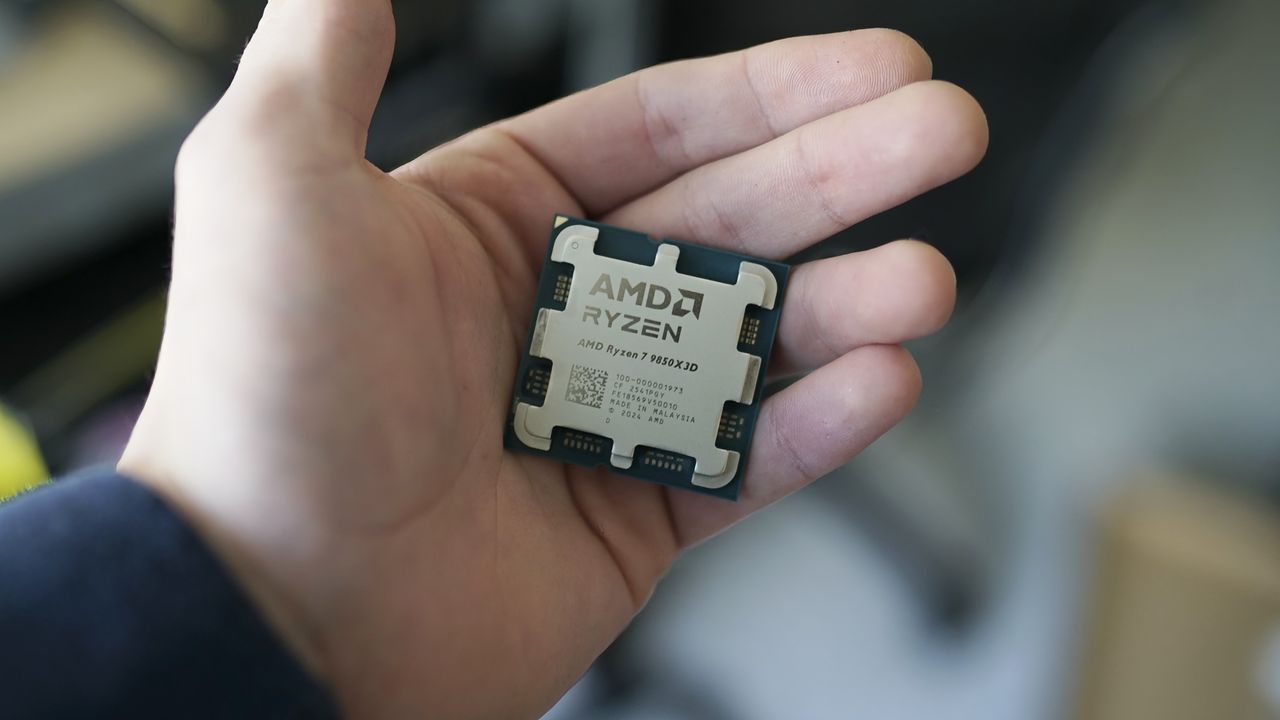
For those seeking the highest performance for gaming, AMD’s Ryzen 7 9850X3D is currently the best CPU money can buy. If you’re planning to upgrade or build a new PC, now might be a good time to pick one up, as Newegg is selling the 9850X3D for $484, around $15 less than its launch price. The deal also includes a 240mm Cooler Master AIO liquid cooler, valued at $79.99, along with a copy of Onimusha: Way of the Sword worth $69.99, both included as free gifts.
Announced at CES 2026, the Ryzen 7 9850X3D is essentially a higher-binned version of the Ryzen 7 9800X3D. It retains the same 8-core, 16-thread configuration and 4.2 GHz base clock as its predecessor, but gets a higher 5.6 GHz boost clock. The chip comes with the same 104MB of total cache, including 96MB of 3D V-Cache, which is the key ingredient behind its strong gaming performance. It also shares the same 120W default TDP and uses the AM5 platform with DDR5 memory support, making it compatible with a wide range of existing 800- and 600-series AMD motherboards.
Built on AMD’s Zen 5 architecture, the Ryzen 7 9850X3D combines 8 cores and 16 threads with a 5.6GHz boost clock and 96MB of 3D V-Cache.View Deal
In our in-depth testing of the Ryzen 7 9850X3D, we found that it was only 3.3% faster than the Ryzen 7 9800X3D. But a win is a win, and that performance edge puts the CPU at the top of our 16-game 1080p FPS performance geomean, beating the more expensive Ryzen 9 9900X3D and 9950X3D. Although it loses out to Intel in some productivity workloads, the less complex 8-core configuration packed into a single CCD results in lower power draw. As you can see from our results, the peak power consumption is around 170W, making it much easier to cool.
With the included 240mm AIO liquid cooler, you should be able to keep the Ryzen 7 9850X3D well under control during gaming and moderate workloads, although it may run warmer under heavy multi-core workloads. At its sale price of $484, you’re paying less than its actual launch price while getting two useful extras at no additional cost. That makes this a worthwhile deal for anyone looking to build a high-end gaming PC around AMD’s gaming-focused platform.
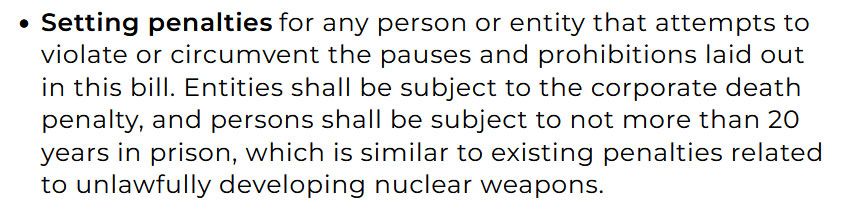
Senators Bernie Sanders and Greg Cezar have announced their Ban Artificial Superintelligence Act. Seeking to pause advanced AI development, the legislation’s stick is pretty severe. Penalties facing entities/developers who violate the pauses and prohibitions in the bill could face up to 20 years in prison. That’s a sentence on a par with someone found guilty of designing a rogue nuclear weapon.
The news is suddenly filled with grave concerns about AI becoming too powerful. It could even threaten the future of humanity. Moreover, it might surprise casual observers that AI industry leaders like Sam Altman, Dario Amodei, and Elon Musk appear to agree. With this threat on the horizon, politicians are keen to introduce legislation to protect the citizens they serve.
According to USA Today, the Sanders bill “is the most extreme AI-related legislation to date.” It likely faces strong opposition in Congress, particularly among enterprise-supporting Democrats and Trump-aligned Republicans. However, with recent statements from industry leaders seemingly harmonizing with calls to slow down AI development and in favor of greater oversight/regulation, we could see politicians agree on something for a change.
Back to the Ban Artificial Superintelligence and Temporarily Pause Advanced AI Development bill and its specific wording, we note that it is advised that the government set up a new cabinet-level federal agency "to safeguard the public from the dangers of artificial intelligence, including by enforcing a prohibition on artificial superintelligence." As well as setting harsh penalties in the U.S., it is proposed that work be done to "ban superintelligence around the world" via international agreements, allied coordination, and so on.
Full speed ahead, or hit the brakes?
There remain plenty of interesting arguments on both sides of the AI progress divide. It is difficult to argue that the U.S. shouldn’t keep going as fast as it can, as a matter of national security, for example. On the other hand, the whole of humanity being wiped from the face of the Earth by opening Pandora’s AI box of tricks makes geopolitical concerns seem like minor grumbles.
We’ve seen some other theories about why the AI barons are suddenly in favor of regulation. Some critics say they may be running out of road, unable to balance private investments with credible paths to profitability. Thus, they now want to move away from a commercially funded model to a government-funded ‘Manhattan Project II,’ with their terrifyingly powerful AI being guarded by the state.
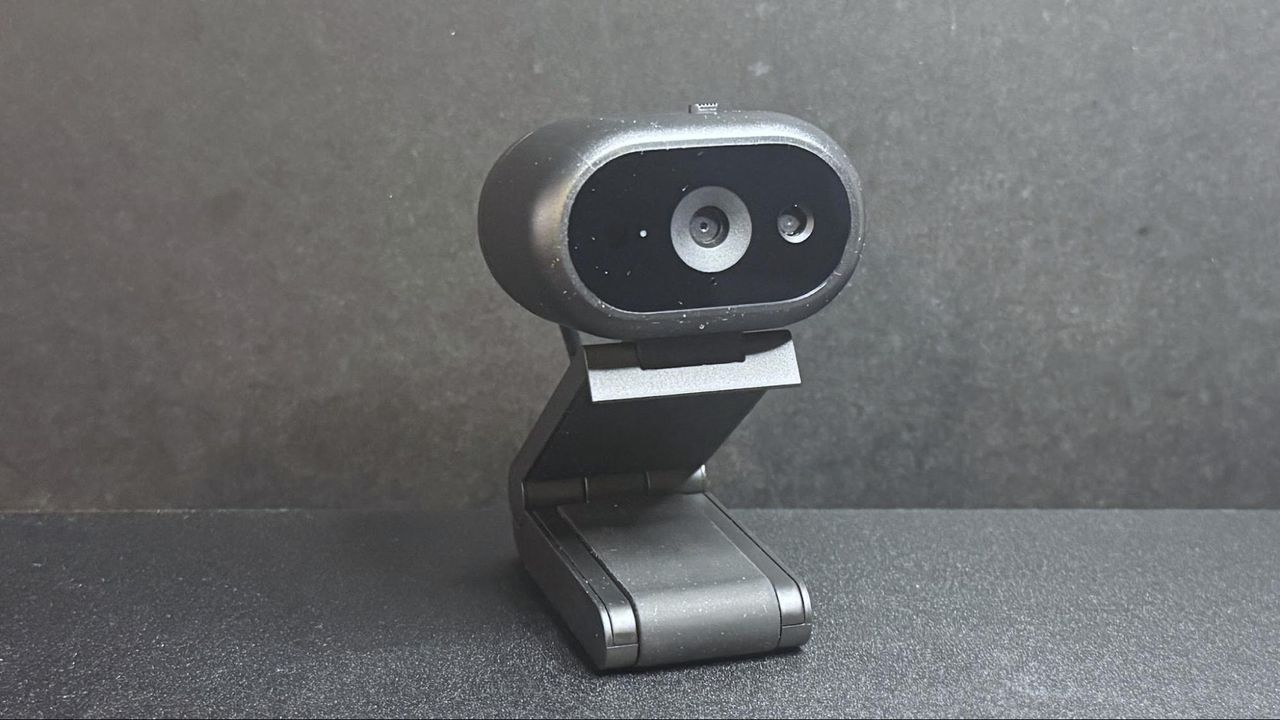
Just because you're in the office doesn't mean you might not still need to be on camera — so I guess it's not too surprising that some of the best webcams are made specifically for the office. Or that Dell is the one to make them.
Dell's new office-oriented 2K webcam, the Dell Pro 5 (WB526), is a small, lightweight webcam that records video at 2K QHD / 30fps, 1080p / 30fps, and 720p / 60 and 30fps. It sports a Sony sensor and has a 78-degree field of view, 2x digital zoom, and an autofocus lens with a maximum aperture of f/2.0. As for its "office-friendly" features, it's compatible with Windows Hello, and it has an "anti-theft interface" and comes with a lockable cable that you can attach to a loop on the non-detachable USB-C cable. It also has some intelligent features, such as smart auto-exposure, AI auto-framing, and face tracking, as well as a built-in omnidirectional microphone that doesn't sound quite as terrible as most built-in webcam mics. It's available now for $119.99, though it's currently on sale for $114.99.
Design
The Dell Pro 5 webcam is a small oval-shaped webcam with a non-detachable USB-C cable (which comes with a built-in USB-A adapter. It has a lightweight black plastic body, measuring about 2.28 inches (57.9mm) wide by 1.7 inches (43.18mm) deep, and is 1.4 inches (35.56mm) high. It's a fairly small webcam — not quite as small as the YoloLiv YoloCam S3, but close. It also has a physical lens shutter, which you can open and close via a small switch on top of the device. It's not the most elegantly implemented lens shutter we've ever seen, but it does the job perfectly well.
Like many lower-cost webcams, its cable is not detachable — it's a 5-foot (1.5m) rubber USB-C cable with a built-in USB-C to USB-A converter attached to one end. It's not a particularly thick cable, but it's stiff enough (and the webcam is lightweight enough) that it does influence the webcam's position, and bumping it can cause the webcam to accidentally move and mess up your framing.
Tom's HardwareTom's Hardware
The Dell Pro 5 comes with a sturdy detachable monitor mount that attaches to the bottom of the webcam via a strong magnet. (The webcam also has a standard tripod mounting point, should you want to use it with a different camera mount.) The mount is surprisingly hefty — it weighs about 4.7 ounces (133g), which is nearly twice the weight of the webcam itself, which weighs around 2.57 ounces (73g). It's a pretty standard monitor clip mount, with a lip that goes over the edge of your monitor and an adjustable, rubber-coated "foot" that sits on the back of your monitor to hold the webcam in place.
The mount allows you to tilt the webcam forward up to 90 degrees, which will probably be useful for the webcam's document-reading feature. It also allows you to swivel the webcam almost 90 degrees in either direction, so it's actually pretty flexible for a mount included with a more budget-friendly webcam. It does not have a tripod mounting point on the bottom, however, so you won't be able to take advantage of this flexibility away from your PC.
(Image credit: Tom's Hardware)
In the box, the Dell Pro 5 comes with its detachable monitor mount and a locking mechanism for those of you who work in insecure office environments (or, I suppose, for those who might travel and work from co-working spaces, I guess). The locking mechanism is designed to slide through a loop on the cable.
The Dell Pro 5 is a 2K webcam that outputs video in 2K UHD at 30fps — it's not 4K, but it should give you more detail and better image quality than a standard full HD 1080p webcam, even if most streaming and video conferencing services limit your outgoing stream to 1080p or lower.
For our well-lit performance test, I tested the Dell Pro 5 webcam in a fully-lit setting. From the front, I have two professional lights (a ring light on the right side and a key light on the left side), as well as four monitors (three 27-inch monitors and one 34-inch widescreen monitor), plus ambient lighting from various peripherals, including my desk. Behind me, there are two desk lamps, and overhead I have an arching floor lamp. There is no uncontrolled light in my home office, and it's a pretty bright scenario. (All of my test photos are taken with Windows' native camera app for consistency, but please note that test photos are mainly for illustrative purposes and the conclusions drawn are based on extensive testing.)
Dell Pro 5Tom's HardwareDell Pro (WB5023)Tom's HardwareElgato NeoTom's Hardware
The Dell Pro 5 performed pretty well in our well-lit scenario, though the color balancing seemed to wash me out slightly and the picture wasn't quite as crisp as I would have liked. That said, this is exactly the kind of picture I look for in an office-oriented webcam — bright and evenly-lit, if a little flat, for a more "professional" appearance (and so it can do things like read text and scan documents). It's not the most cinematic, dramatic, or flattering image from a webcam, but it should work very well in a professional setting.
Low-Light Performance
For our low-light test, I turned off all of the lights in my home office except for one 27-inch monitor, on which I had a window open with Google's homepage (mostly white) filling half the screen and the Windows 11 Camera app filling the other half. This is basically a completely dark scenario with only my (admittedly, relatively large) monitor for lighting.
Dell Pro 5Tom's HardwareDell Pro Webcam (WB5023)Tom's HardwareElgato NeoTom's Hardware
The Dell Pro 5 performed about as well as I expected in this scenario — it was able to pick up more detail in the dark than most 1080p webcams, though its low-light performance is far from what I'd call "good." This was more noticeable in moving video, however, as the video was extremely grainy with large artifacts (this photo actually makes it look much better than it was). The Dell Pro 5 does have HDR, but this didn't seem to make a significant difference in the low-light picture quality.
By comparison, the Dell Pro (WB5023) webcam did a better job with balancing light in the low-light scenario, though it picked up the same amount of detail. The Elgato Neo, which is a budget 1080p webcam, did a much better job of balancing light in this scenario, but its picture was also extremely grainy.
Overexposed Performance
For our overexposed performance test, I turned off most of the lights in front of me (save for one 27-inch monitor) and left the lights behind and above me turned on. This is actually one of the most likely scenarios for webcam users, as offices tend to be generally well-lit environments, but without dedicated camera-focused lighting aimed at the user.
Dell Pro 5Tom's HardwareDell Pro Webcam (WB5023)Tom's HardwareElgato NeoTom's Hardware
The Dell Pro 5 performed adequately in our overexposed performance test: it managed to balance light fairly well (every webcam struggles with this), but its auto color balancing was definitely off. Both the Dell Pro (WB5023) and the Elgato Neo did a much better job with color balancing in the overexposed scenario, especially with the default settings.
Features and Software
The Dell Pro 5 is configurable via Dell Display and Peripheral Manager, which lets you adjust the webcam's image settings and toggle on various features such as face tracking, HDR, and auto exposure. You can also set up features such as gesture control and Windows Hello from this app, as well as Document View, which can be configured to automatically turn on when you tilt the camera down at least 60 degrees and show a rectangular document.
(Image credit: Tom's Hardware)
While the Dell Display and Peripheral Manager does have a lot of settings you can adjust, including brightness, sharpness, contrast, saturation, and vibrance, I found that adjusting the settings didn't actually seem to do much for the picture. Turning the saturation down to 0%, for example, gave me a slightly desaturated image — not a completely black-and-white one. I also found it frustrating that there was no way (at least as far as I could see) to minimize the app to your system tray.
The Dell Pro 5 has a built-in omni-directional microphone for when you have absolutely no choice other than to use your webcam's built-in mic. The mic wasn't the worst I've heard on a webcam — it managed to pick up my voice pretty clearly, and didn't make me sound like I was yelling through an underwater tunnel — but it wasn't great, either. It should work fine if you've got nothing else on hand to speak into, but it's not a microphone I'd recommend.
Bottom Line
The Dell Pro 5 webcam is definitely designed for office use — and for an office-oriented webcam, it's not bad. But if you're looking for something easy to use and cheap enough that your coworkers aren't going to try to steal it, I'd probably recommend the Elgato Neo over the Dell Pro 5 — after all, the Elgato Neo retails for $60 and can currently be found for about half that, which means the Dell Pro 5 is more than four times as expensive.
The Dell Pro 5's 2K resolution might come in handy if you're the type of person who's constantly showing documents over video calls, but Razer's Kiyo X also has a 2K resolution and retails for $100 (and can currently be found on sale for around $75). The Dell Pro 5 isn't a bad webcam, but you don't need to pay $120 for similar quality.
The progress of artificial intelligence technologies in recent years is undeniable, and its pace is pretty much unbelievable. With at least four American contenders with frontier AI models, the competition is intense, and the development of new models is moving fast. Yet, Dario Amodei, chief executive of Anthropic, has called for slowing down the development of new AI models, even warning of a potential AI-powered botnet swarm that could take over the entire internet.
"Given the accelerating rate of AI capability development, it is my worry that in 6–12 months such a swarm could be capable of taking over the entire internet with a persistent botnet (potentially causing hundreds of billions of dollars in damage), and that the scale of damage would continue to increase from there if AI becomes more powerful without the necessary guardrails," Dario Amodei, chief executive of Anthropic, wrote in an open letter.
Dario Amodei's vision is to a large degree shared by Evan Hubinger, an AI scientist who exited Anthropic recently, who then said there was a 10% chance humanity was set for extinction by the end of the decade. "We really do earnestly believe AI could kill all humans," Hubinger wrote in an X post. "I personally think it is >10% within the next decade. I believe Anthropic is trying its best, but we do not yet have a plan to solve alignment for superintelligence and are not clearly on track to."
In universes created by James Cameron (Terminator) and Frank Herbert (Dune), AI is posed as a dangerous invention. But let us take a closer look. Further development of AI is moving from answering questions to autonomously performing complex multi-step tasks, something that previously required teams of skilled human specialists, which turns us to how adversaries use Anthropic's AI capabilities, lacking human resources.
Anthropic's own findings show that today's AI models can already assist with weapons engineering, military intelligence, surveillance, cyber operations, and other potentially destructive activities, while more capable successors could dramatically reduce the expertise, manpower, and time required to conduct them.
The findings echo two rather different warnings from science fiction: James Cameron's Terminator showed the consequences of losing control over autonomous military AI, whereas Frank Herbert’s Dune imagined humanity eventually outlawing AI after becoming dangerously dependent on them.
Meanwhile, greater capability does not automatically translate into greater danger. For example, more advanced AI technology can also have stronger safeguards, detect malicious activity, and automate work that so far has not been automated.
Halting AI development could also be counterproductive if less responsible companies or countries continue advancing their models. In fact, leaving the most capable AI systems in the hands of actors that are known for military aggression is no less dangerous than leaving a monkey with a grenade.
AZZA is one of those brands that has been around far longer than its shelf presence suggests. The company is the PC-components arm of Linkworld Electronic, and it has spent the better part of two decades selling cases, coolers, chassis fans and power supplies into the value end of the market, mostly through regional distribution rather than the big review-sample circuit. That low profile cuts both ways. AZZA has never had the marketing budget to overpromise the way larger brands do, but it also has never had to answer for its power supplies in public the way brands like Corsair or Cooler Master routinely do. Like almost every brand in this segment, AZZA designs none of their units themselves but buys platforms from (usually Chinese) OEMs and puts its own sticker on the side.
The PSAZ series is AZZA's mainstream ATX line, and the PSAZ-750G is the 750W Gold-badged member of it. The unit we have is marked ATX 3.1 and PCIe 5.1 Ready on the box, carries a native 12V-2x6 connector, and is rated for its full 750W at 40°C ambient. It ships with a 2-year warranty, which is a statement all by itself. The platform comes from Helly, a manufacturer that supplies a number of platforms and we meet their products frequently in mainstream units. What makes the PSAZ-750G interesting is not the specification sheet but the badge on it: the box, the label and the retail listings all carry the 80 PLUS Gold logo, and AZZA has not put a PSAZ unit through 80 PLUS certification since 2015. That claim, more than anything else, is what this review has to settle and determine whether it deserves a spot in our list of best power supplies.
Specifications and Design
AZZA PSAZ-750G ATX 3.1 Power specifications ( Rated @ 40 °C )
RAIL
+3.3V
+5V
+12V
+5Vsb
-12V
MAX OUTPUT
20A
20A
62A
2.5A
0.3A
100W
100W
744W
12.5W
3.6W
TOTAL
750W
AC INPUT
100 - 240 VAC, 50 - 60 Hz
MSRP
$78
In the Box
Packaging is plain and inexpensive, and honest about it. The sleeve is a flat slate-blue with the AZZA wordmark rendered as three large outlined chevrons on the left, a line drawing of the unit on the right, and the model and wattage stacked underneath. The badges run along the lower half - PCI-e 5.1 Ready, ATX 3.1, and the 80 PLUS Gold logo in its usual gold square. The unit sits inside between two moulded protective inserts, with the cables bundled beside it.
(Image credit: Tom's Hardware)
The bundle is as thin as it gets. There is the AC power cord, four mounting screws and four black zip ties. No Velcro straps, no cable combs, no pouch, no tester, and nothing in the way of printed documentation beyond what is on the box itself. At $78 for a 750W unit, none of that is unreasonable, but it is worth noting that the four zip ties are doing real work here. With a hardwired cable set there is no way to leave unused cables out of the case, so whatever routing tidiness you get, you will be building yourself.
(Image credit: Tom's Hardware)
The cables themselves are better than the accessory list implies. All of them are black nylon-sleeved rather than the flat ribbon type common at this price, sleeved right up to the connector housings, and the wire gauges look appropriate throughout. The 12V-2x6 cable is a native run from the PCB rather than an adapter, and it is printed with a 450W rating along its length, which is the single most important thing to know about this power supply before you buy it. That is enough for a mid-range card, and not enough for a 500W+ flagship, regardless of what the 750W on the box suggests. There is no dual-color keying on the connector, so seating it correctly is on you.
AZZA PSAZ-750G ATX 3.1
Connector type
Hardwired
Modular
ATX 24 Pin
1
-
EPS 4+4 Pin
2
-
EPS 8 Pin
-
-
PCI-E 5.1
1
-
PCI-E 8 Pin
3
-
SATA
6
-
Molex
2
-
Floppy
-
-
External Appearance
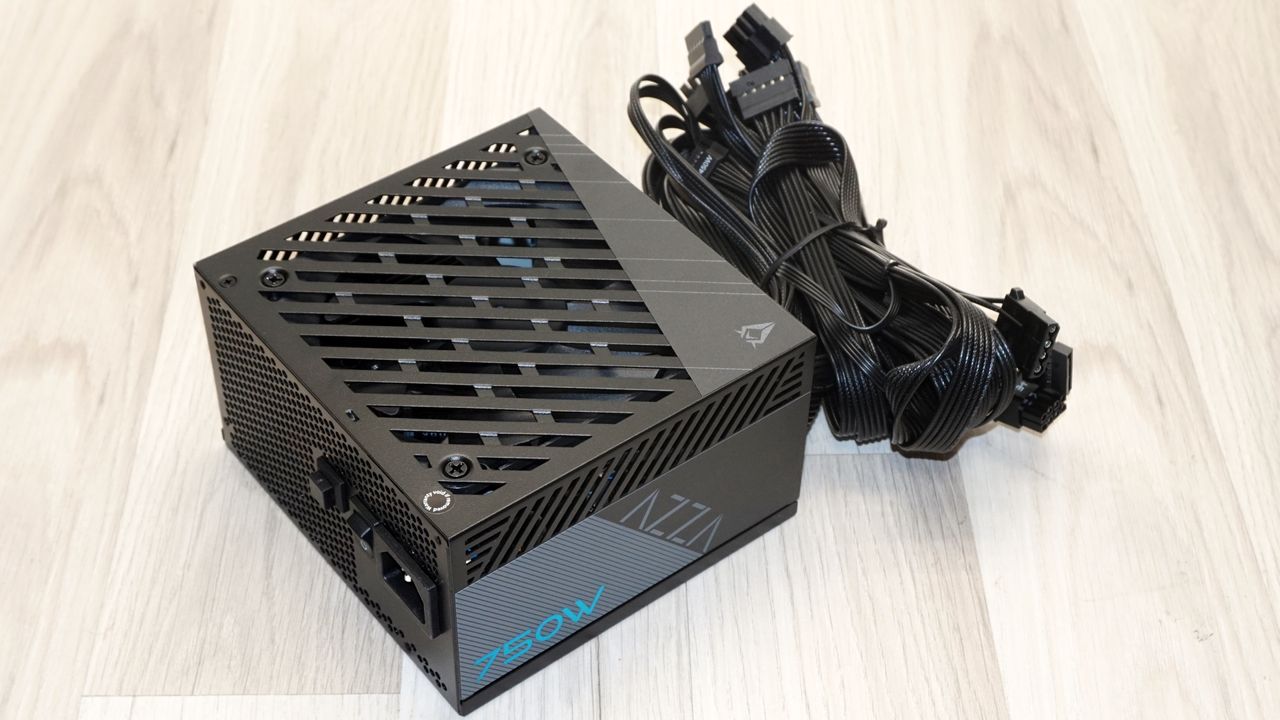
At 150 x 86 x 140 mm the PSAZ-750G is a standard-depth ATX unit, and 140 mm means it drops into essentially any case that takes an ATX supply, with enough clearance left over to deal with the fixed cable loom. The chassis is finished in a dark grey-brown matte paint and it is a better finish than the price would predict. The top face carries a slotted grille with wide diagonal bars over the fan, cut off at one corner by a plain triangular panel bearing the AZZA logo and a few thin pinstripes. It is a restrained, slightly industrial look, and the diagonal grille bars do restrict airflow area more than a wire or honeycomb grille would, which increases noise.
(Image credit: Tom's Hardware)
The side panel carries the only color on the unit: a grey hatched rectangle with the AZZA wordmark in outline and 750W set in a bright cyan that matches the box. The top side holds the specifications label, and it is worth reading. It lists the ATX 3.1 and PCIe 5.1 Ready marks and, again, the 80 PLUS Gold logo.
(Image credit: Tom's Hardware)
The rear face is a hexagonal honeycomb exhaust panel with the AC receptacle, the main I/O rocker, and a second, smaller square button beside it. That button is the hybrid fan mode switch: press it and the semi-passive behavior is disabled, so the fan runs continuously from idle rather than waiting for load. It is a feature several units at three times this price still omit, and it is faintly odd to find it here. The front face is solid, with the fixed cable loom leaving through a single rubber-grommeted opening. There is no modular bay, no LED, and no other features.
Tom's HardwareTom's Hardware
Internal Design
Cooling comes from a 120 mm Yate Loon D12BH-12, a ball-bearing fan rated at 12V and 0.60A. Yate Loon publishes this model at 2300 RPM, 89 CFM and 41 dB(A) at full speed, which puts it firmly in the high-airflow, high-noise half of the catalogue. Ball bearings are a durability advantage over the sleeve-bearing fans that usually appear at this price, and given the 2-year warranty that matters - a fan that outlasts the coverage period is the minimum bar. What it is not is a quiet fan, and the platform leans on it hard, as the hot-box results below make clear.
(Image credit: Tom's Hardware)
The platform is a Helly design and is similar to the platform Phanteks AMP GH series is using - but that is where the similarities end. The layout is clean and reasonably modern, with the main PCB carrying the primary and secondary stages and a pair of small vertical daughterboards near the front handling the minor rails. Heatsinks are generously sized for the class, dark-anodised finned extrusions rather than the bent aluminium strips that budget platforms often make do with, and the board is well populated with silicone glue on the taller components. The main transformer is marked ATX3.0 on the bobbin, which is a small reminder of how recent the 3.1 revision on the box actually is.
Tom's HardwareTom's Hardware
Transient filtering runs to four Y capacitors, three X capacitors and two common-mode chokes, which is a complete filter by any reasonable standard and better provisioned than several units we have looked at this year. Inrush is handled by an NTC thermistor with a relay for bypass. Two bridge rectifiers sit on their own dedicated heatsink, feeding an APFC stage built around two Oriental Semiconductor OSG55R190F MOSFETs. The bulk capacitor is a 560 µF, 420V Ltec from its HP series, rated at 105°C. That is a low-cost Taiwanese part rather than a premium one, and it is the first place the budget shows. Capacity is adequate for 750W, the temperature rating is right, but the pedigree is not. The APFC coil beside is unshielded, which is a cost decision rather than a functional problem, though it does nothing for radiated noise.
(Image credit: Tom's Hardware)
The primary inversion stage uses two PIP PTA25N50 MOSFETs in a half-bridge LLC resonant arrangement, the standard modern topology at this power level. On the secondary side, the 12V rail is rectified by four Fuxin FXN0204C MOSFETs in synchronous rectification, with the 3.3V and 5V rails generated by DC-to-DC converters on the two vertical daughterboards.
Tom's HardwareTom's Hardware
Secondary filtering is a mix of Ltec electrolytics and a smaller number of APAQ polymer capacitors, both Taiwanese. This is the part of the component list that will decide how the unit ages: Ltec electrolytics are not terrible parts, but they are at best ordinary ones, and they will spend their life sitting next to secondary heatsinks that may hit well over 70 °C in a normal system. A 2-year warranty against that combination is not a comfortable pairing.
(Image credit: Tom's Hardware)
Cold Test Results (25°C Ambient)
Cold Test Results (25°C Ambient)
For the testing of PSUs, we are using high-precision electronic loads with a maximum power draw of 2700 Watts, a Rigol DS5042M 40 MHz oscilloscope, an Extech 380803 power analyzer, two high-precision UNI-T UT-325 digital thermometers, an Extech HD600 SPL meter, a self-designed hotbox, and various other bits and parts.
At 25°C ambient the PSAZ-750G averaged 90.6% at 230 VAC and 88.6% at 115 VAC across the nominal load range. The curve peaks at about 92% at 230 VAC around 300W and holds 90.2% at a sustained 750W, with the 115 VAC line topping out at 90.3% and finishing at 87.3%. Those are respectable numbers and the shape of the curve is healthy, with no full-load collapse. They are also, and this is the point, not Gold. 80 PLUS Gold requires 90/92/89% at 20/50/100% load on 230 VAC and 87/90/87% on 115 VAC. We measured 90.1/91.8/90.2% and 88.7/89.9/87.1% respectively. The unit clears the 20% and 100% checkpoints on both inputs and misses the 50% checkpoint on both, by 0.2 and 0.1 points. It is a near miss rather than a fraud and CLEAResult tests at 23 °C so it could possibly pass, but there is no 80 PLUS entry for the PSAZ series after 2015 to argue otherwise. There is no Cybenetics listing either.
Acoustically the cold run is the best part of this review. The fan stays completely stopped up to roughly 40% load, giving a genuine 300W fanless window that covers desktop work and a good deal of gaming outright. It starts at 31.6 dB(A) and ramps gently to about 33 dB(A) at half load, at which point it becomes the quietest thing in most builds. Past 450W the curve steepens noticeably, reaching 38 dB(A) at 600W and 42 dB(A) at a sustained 750W. That is audible but not intrusive, and it is a reasonable trade for a good thermal result. The heatsinks reached 66-68°C at full load. Nothing here is under severe stress.
Hot Test Results (~45°C Ambient)
Hot Test Results (~45°C Ambient)
Inside the hotbox at roughly 45°C ambient, five degrees above the unit's own 40°C rating, efficiency falls by roughly a point and a half. It was not an unexpected result but it is severe for a 750W unit. The averages come to 89.4% at 230 VAC and 87.5% at 115 VAC, with the curve peaking near 90.8% and finishing at 88.5% and 85.6% respectively at full load. Nothing in the electrical behavior suggests the platform is in deep trouble but we can see the signs of thermal degradation at full load.
The thermal and acoustic picture is where the platform shows its limits. The fan leaves its passive mode in the hot box very quickly, starting at about 33.6 dB(A) from 200W, then climbing steeply and continuously: 43 dB(A) at 500W, 48.6 dB(A) at 600W, and 52.2 dB(A) at a sustained 750W. That last figure is loud in the plain sense of the word, well past the point where the PSU is the loudest component in a mid-tower and into the range where it likely is the loudest thing in the room. It is also the fan doing exactly what it should, because the internal temperatures need it. The heatsinks reached 94°C at full load, which is on the high side for a 750W unit. Those are not typically failure temperatures, but they are high enough to matter for the Ltec secondary electrolytics sitting beside them over a several-year ownership period.
PSU Quality and Bottom Line
Power Supply Quality
Voltage regulation is the strongest result on the sheet. Across the 20% to 100% load span the 12V rail moved by just 0.9%, with the 3.3V and 5V rails both at 1.4%. Sub-1% on 12V is genuinely good, better than several other Gold units, and it is the credit side of the DC-to-DC secondary arrangement. The minor rails are looser, but both stay comfortably inside the ±5% ATX window and neither matters much to a modern system.
Ripple suppression is adequate rather than good. The 12V rail peaked at 52 mV at full load and 50 mV in the 12V-weighted cross-load test, against a 120 mV ATX limit. The 3.3V and 5V rails topped out at 26 and 28 mV against their 50 mV limits. Those are passes with about 57% headroom on 12V and roughly 45% on the minor rails, so nothing is close to the edge. They are also roughly double what a well-filtered enthusiast platform delivers, and the 12V figure more than doubles between 50% and 100% load, which points at secondary filtering that is sized to the requirement rather than beyond it. For the hardware a 750W unit at this price will actually feed, it is sufficient.
During our thorough assessment, we evaluate the essential protection features of every power supply unit we review, including Over Current Protection (OCP), Over Voltage Protection (OVP), Over Power Protection (OPP), and Short Circuit Protection (SCP).
All protection mechanisms were present and triggered correctly. With the unit hot, OCP tripped at 146% on the 3.3V rail (29.2A), 140% on the 5V rail (28A), and 128% on the 12V rail (79.4A), with OPP shutting the unit down at about 130% of rated output, or roughly 975W. The 12V threshold is the sensible one of the three. The minor-rail thresholds are loose enough that the 100W combined budget is the real constraint there, not the protection.
Main Output
Load (Watts)
151.27 W
377.39 W
563.17 W
749.01 W
Load (Percent)
20.17%
50.32%
75.09%
99.87%
Amperes
Volts
Amperes
Volts
Amperes
Volts
Amperes
Volts
3.3 V
1.81
3.37
4.53
3.36
6.8
3.33
9.07
3.32
5 V
1.81
5.06
4.53
5.05
6.8
5.01
9.07
4.99
12 V
11.25
12.09
28.11
12.07
42.17
12.01
56.23
11.98
Line
Regulation
Voltage Ripple (mV)
(20% to 100% load)
20% Load
50% Load
75% Load
100% Load
CL1 12V
CL2 3.3V + 5V
3.3V
1.4%
20
16
22
26
22
26
5V
1.4%
20
16
20
28
22
26
12V
0.9%
30
22
36
52
50
28
Bottom Line
The PSAZ-750G is a competent budget power supply carrying a claim it cannot support. The Helly platform underneath is more modern than the price suggests and used by several manufacturers at this price point. Inside, we have a half-bridge LLC primary, DC-to-DC minor rails, a complete transient filter, generously sized heatsinks, a ball-bearing fan and a native 12V-2x6 connector. Regulation on the 12V rail is genuinely good at 0.9%, ripple is comfortably inside specification everywhere, protections all work and trip at sane thresholds, and the 300W fanless window at room temperature is real. There is nothing broken here.
(Image credit: Tom's Hardware)
The efficiency claim, however, is one that does not survive contact with the bench. Our numbers put the unit 0.2 points under the Gold requirement at 50% load on 230 VAC and 0.1 under it on 115 VAC, clearing every other checkpoint. CLEAResult tests at 23°C, so a good sample could plausibly clear the bar on the official bench. On the other hand, other units using the same platform passed our testing, even if they were fully modular (typically hardwired cables increase efficiency slightly). AZZA has not certified a PSAZ unit since 2015, there is no official 80 PLUS entry for this particular model, no Cybenetics listing and no PLPP listing, yet the Gold logo is printed on the box, on the label and in the retail listings. The unit performs like a borderline Gold supply. It is being sold as a certified one. Those are not the same thing, and the second is the vendor's choice, not a measurement artifact.
Most of the remaining compromises are ordinary for the money. Hardwired cabling at 750W in 2026 is behind the market but forgivable at $78, but the Ltec capacitors is what a $78 budget buys. One thing is harder to wave through. That is the 2-year warranty, which is half or less of what every serious competitor offers; set against heatsinks that reached 94°C at full load in the hot box, with ordinary electrolytics sitting beside them, it reads as the manufacturer telling you how long it expects the unit to be its problem.
(Image credit: Tom's Hardware)
Against named rivals, the placement is straightforward. The Phanteks AMP GH series runs a related Helly platform, which is worth keeping in mind - the design itself is not the problem here; the specification is. The MSI MAG A750GL PCIE5 is fully modular, genuinely 80 PLUS Gold certified, and backed by a 10-year warranty, and it is better than the AZZA on every axis except price. The Cooler Master MWE Gold 750 V4 at $119 MSRP is quieter under sustained load, carries verified Gold efficiency and a 10-year warranty, and gives up only a little on 12V regulation, where the AZZA's 0.9% is the better figure.
The PSAZ-750G beats them on nothing but cost, but it beats them there by a wide margin. So the recommendation is narrow but real. If you are building a mid-range machine on a tight budget, the card you are pairing it with draws under 450W, and you can live with 2 years of coverage and a fixed cable loom, the PSAZ-750G will do the job, and it will do it quietly at the loads you will actually run. If any of those three conditions do not hold, the extra money for a certified, longer-warrantied, fully modular unit is the better spend, and it is not a close call. Buy it for what it measures, not for the badge on the box.
Intel has reversed its decision to shelve its open-source font project designed specifically with developers in mind. The font’s GitHub repository was archived earlier this week, only for the company to reportedly restore the project and potentially continue to maintain it. The cancellation came amid a wider reduction in Intel’s open-source efforts. According to Phoronix, Intel has been closing down projects where development has slowed, or the employees responsible for them have exited the company.
Introduced back in 2023, One Mono is a monospace font where each character occupies the same horizontal width. Intel carried out the development in collaboration with type design studio Frere-Jones Type and marketing agency VMLY&R. Working with low-vision and legally blind developers during the design process, live testing sessions were conducted to identify characters that could be difficult to distinguish when reading code.
“Identifying the typographically underserved low-vision developer audience, we designed the Intel One Mono typeface for maximum legibility to address developers' fatigue and eyestrain and reduce coding errors,” said Intel in its introduction.
The font was designed with several features to improve legibility, including distinctions between similar-looking letters and coding characters. For example, characters such as the lowercase “e” and uppercase “G” were given more distinctive shapes to make them easier to identify. The difference in height between uppercase and lowercase letters was also increased, along with longer ascenders and descenders to make blocks of code easier to read. Additionally, the font supports more than 200 languages using the Latin script and is available in Light, Regular, Medium, and Bold weights, along with matching italics.
As mentioned, One Mono is available under an open-source license; thus, developers are free to use and modify it. Unfortunately, the font has not witnessed any significant updates since 2024, with activity during 2025 reportedly limited to Readme updates. Thus, its archival seemed pretty obvious, especially with Intel shutting down projects that were no longer seeing active development. For now, the font has managed to avoid becoming a casualty of Intel’s open-source cleanup. While the project remains silent, its revival means the developer-focused font is not being abandoned after all.
The past few years have been an exciting time for flight simulation hardware. Established brands and newcomers alike have introduced a wide range of new products, making it easier and more affordable than ever to build a capable home cockpit.
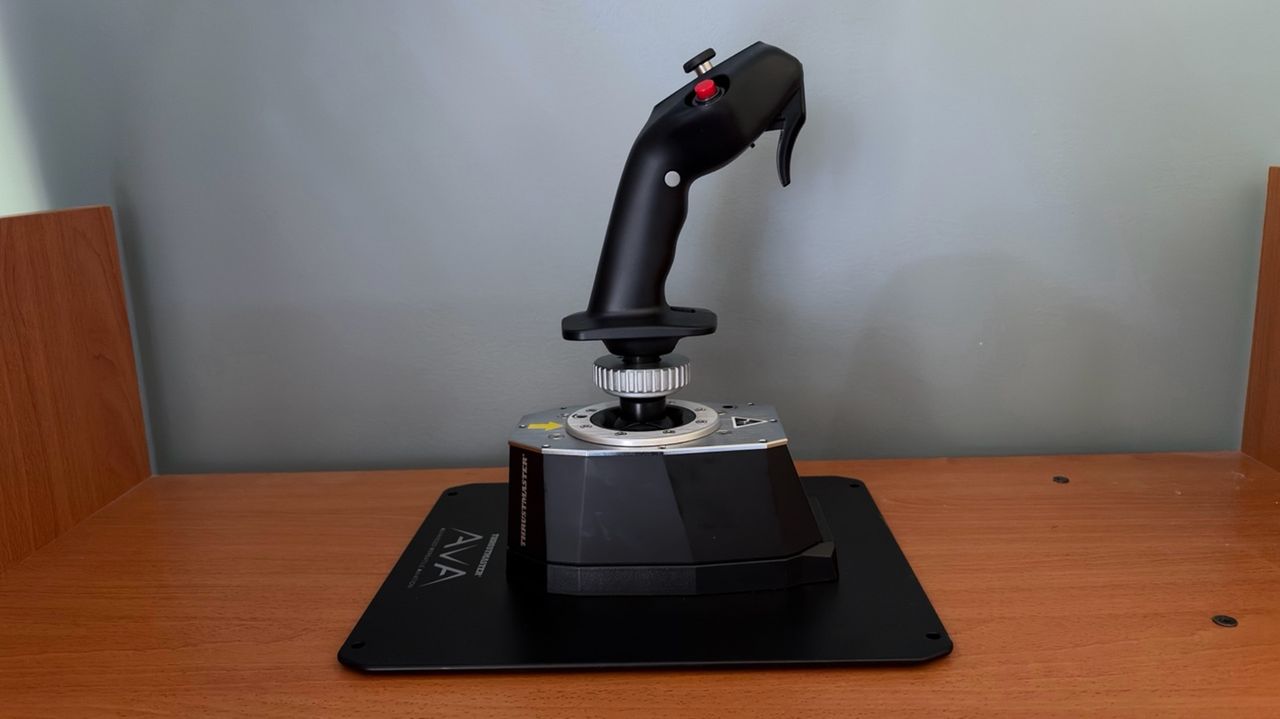
Thrustmaster has long been one of the leading names in flight simulation hardware. Its HOTAS Warthog has been a staple in home cockpits since its release, earning a reputation for its robust construction. In 2024, Thrustmaster introduced the AVA Joystick Base, bringing several notable improvements over the Warthog base. Until recently, however, there wasn't a dedicated Airbus grip compatible with the AVA base.
In this review, we'll be taking a look at the recently released Thrustmaster Airbus Add-On Grip paired with the AVA Joystick Base. We will put both the grip and the base to the test using the Fenix A320 in Microsoft Flight Simulator 2024.
Inside the Box
Tom's HardwareTom's Hardware
The Airbus Add-on Grip contains the grip itself, the A400M module, and a button cover.
The AVA Base contains the joystick base, two sets of two cams (Aero and Jet), three sets of two springs (Soft, Medium, and Strong), three masks (Small, Medium, and XL), two Allen keys, and one detachable USB-C cable.
Airbus Add-on Grip Dimensions: 3.1 inches / 78 mm wide, 3.3 inches / 83 mm deep, 7.7 inches / 195 mm tall. Weight: 0.4 lb / 203 g.
AVA Base Dimensions: 4.3 inches / 108 mm wide, 6.7 inches / 170 mm deep, 2.8 inches / 72 mm tall. Weight: 2.4 lb / 1,069 g.
Thrustmaster also sent us an AVA Base Plate for easier desktop mounting, along with AVA Dual Pitch Cam. The Dual Pitch Cam contains two FBW (fly-by-wire) cams which are meant to simulate the sensation of a fly-by-wire aircraft.
One of the primary goals of the AVA Base is to provide a high degree of customization, allowing users to tailor the joystick to their preferred flying experience. The interchangeable cams let you adjust the axis curve, different springs allow you to fine-tune resistance, and the various deflection masks can be used to limit the range of travel.
The user manual includes recommended configurations for different types of aircraft. Since we’re testing the Airbus Add-On Grip, we’ll configure the AVA Base for an airliner-style feel. According to the manual, this involves using the Jet Cam with the Medium spring. However, as mentioned earlier, Thrustmaster also provided us with a pair of FBW cams that are designed to deliver an even more authentic experience by simulating the control feel of a fly-by-wire aircraft, such as those in the Airbus A3XX family.
The AVA Base also comes with T.A.R.G.E.T (Thrustmaster Advanced pRogramming Graphical EdiTor), which is an application that allows you to further tune the feel of the axes and access advanced profiles created by the Thrustmaster community.
Like the AVA Base, the Airbus Add-On Grip also offers several customization options. For example, it includes a module and button cover that transform the grip from an A3XX sidestick into an A400M sidestick. Additionally, the Z-axis can be locked out using an integrated mechanical lock, preventing unintended twist inputs.
Overall, customizing the base and the grip was very straightforward.
Build Quality
Tom's HardwareTom's HardwareTom's Hardware
The AVA Base has a premium feel, with a high-quality plastic outer shell complemented by a metal top plate. The are only two drawbacks. On its own, the base is not stable enough to handle larger stick inputs. We therefore recommend pairing it with the optional AVA Base Plate, which significantly improves stability. Additionally, the base does not include enough damping out of the box, causing the stick to wobble if you move it with a finger. This is not noticeable during normal flight, but stronger damping would have been a welcome inclusion. Thrustmaster offers additional dampers, which are sold separately, that address this issue.
The Airbus Add-On Grip is designed as a 1:1 replica of the Airbus A3XX sidestick, closely matching the shape and ergonomics of its real-world counterpart. In its standard airliner configuration, it features the signature red autopilot disconnect button. It also includes an interchangeable module and removable button cover, allowing it to be converted into an A400M-style sidestick.
Both the AVA Base and Airbus Add-On Grip use Hall effect sensors with 16-bit precision. The base employs them on the X and Y axes, while the grip uses them for the twist (Z) axis and integrated mini-stick.
How Does it Feel?
The first thing that stood out was how much more authentic the AVA Base felt compared to the Thrustmaster Warthog. Unlike the Warthog, there is no noticeable center detent as you pass through the neutral position. Resistance increases progressively as the stick moves farther from center, resulting in smoother and more natural control inputs.
Compared to the Thrustmaster TCA Airbus Sidestick, the AVA Base also has less overall travel on both the X and Y axes, with a progressively increasing resistance rather than the TCA's more linear feel. Based on previous experience with an A320 simulator, this behavior closely matches the feel of the real Airbus sidestick, making the controls feel more authentic.
The Hall effect technology and 16-bit precision of the AVA Base also allow the user to make very fine and precise inputs. In normal conditions, that is exactly how one would fly an Airbus - using small, deliberate sidestick movements.
The Airbus Add-On Grip captures the look and feel of the real Airbus sidestick, with ergonomics that make it feel instantly familiar to anyone who has flown or used an Airbus simulator.
Microsoft Flight Simulator 2024 Testing
We tested the AVA Base and Airbus Add-On Grip in Microsoft Flight Simulator 2024 using the Fenix A320. While there are several Airbus aircraft available for MSFS 2024, we chose the Fenix because it offers one of the most accurate flight models and flight dynamics for an Airbus plane in the sim, making it the best platform for evaluating Airbus flight controls.
We also tested with a pair of FBW cams designed to replicate the feel of an Airbus fly-by-wire sidestick. However, based on our experience with an A320 simulator, we found that the standard Jet cams included with the AVA Base felt more authentic. The FBW cams introduced a more noticeable center detent, whereas the Jet cams provided a smoother transition through center, more closely matching the feel of a real Airbus sidestick.
We tested the base and stick in three difference scenarios:
Basic maneuvering. Flying at 5,000 feet, we performed gentle turns and pitch changes to evaluate the precision of the base during small, accurate control inputs.
Turbulent approach. We performed an approach into Las Vegas under hot, windy conditions with strong updrafts and downdrafts. This scenario required larger, more frequent control inputs to assess the resistance and how the base handles turbulence and rapid corrections.
Curved approach. Finally, we flew the RNAV Visual approach to Runway 1R at San Francisco International Airport. This approach is available in MSFS 2024 if you use the Navigraph database, but it is missing the RF leg between the waypoints KLAUS and SQIRL, so we added it to the navigation database of the Fenix A320 ourselves. The procedure features a sweeping right-hand arc that continues until roughly one mile from the runway threshold, requiring the aircraft to remain in a turn at very low altitude. The approach demands precise tracking of the flight path while also requiring a smooth, accurate transition to the runway centerline after the final waypoint. This scenario tested both the precision and responsiveness of the AVA Base.
Basic Maneuvering
While flying at 5,000 feet, we were impressed by the AVA Base’s precision when making small adjustments to both pitch and roll. Compared to the Warthog and TCA Airbus Sidestick, the AVA Base allowed for significantly finer roll inputs, making it easier to make small corrections and maintain a precise flight path.
When controlling vertical speed through pitch adjustments, we were able to consistently achieve the desired climb or descent rate within approximately 100 feet per minute, demonstrating the level of control possible with the high-resolution sensors.
Turbulent Approach
Landing in Las Vegas during the summer can be a challenging experience. The combination of extreme heat, strong winds, and thermals along the approach path can create significant turbulence, resulting in a much less stable approach. Microsoft Flight Simulator 2024 is able to replicate these conditions through its Live Weather system. While it is important to avoid overcorrecting and creating pilot-induced oscillations, these conditions require more frequent and sometimes larger control inputs than a typical approach.
The AVA Base handled this turbulent approach very well. The conditions forced us to make slightly larger inputs, so we felt the progressive resistance of the base as we moved further from center, which felt authentic. We were also able to make very quick corrections to counter the turbulence and keep the aircraft on the published approach path.
Curved Approach
(Image credit: Tom's Hardware)
During the RNAV Visual approach to Runway 1R at San Francisco International Airport, we were able to precisely track the sweeping right-hand arc all the way to the final waypoint, SQIRL. Once established at SQIRL, the AVA Base’s responsiveness allowed us to smoothly align with the runway centerline.
Other products, including the Warthog and TCA Airbus Sidestick, produced more noticeable jerky movements during this approach, which is likely due to lower precision around the neutral position.
Overall Thoughts
After putting the AVA Base and Airbus Add-On Grip through extensive testing, we came away extremely impressed with the experience. As competitors have continued to close the gap with Thrustmaster Warthog — and even surpass it — the AVA Base represents a return to the level of quality and refinement we have come to expect from the brand.
The AVA Base delivered exceptional precision, smooth control, and an authentic Airbus-like feel across a variety of challenging flight scenarios. The addition of the recently released Airbus Add-On Grip finally allows users to pair this high-end base with a dedicated airline-style sidestick, making it a compelling option for anyone who regularly flies Airbus aircraft.
The biggest obstacle is the price. The level of engineering and build quality comes at a premium, which may put the AVA Base and Airbus Add-On Grip out of reach for many users. However, for those looking for a high-quality Airbus stick and willing to invest in a premium setup, the Thrustmaster AVA Base paired with the Airbus Add-On Grip is a compelling option.
While China claims to have advanced AI models that may well compete against those developed in the U.S., for some reason, hundreds of China-linked agents allegedly used Anthropic for at least five different programs: two military, two surveillance, and one aimed at distilling Claude's capabilities, according to Anthropic's September 2026 threat report.
Two military programs
One China-based actor used Claude to draft a fire-control specification for an anti-torpedo fire-control system (the core logic that determines when and where an anti-torpedo weapon should engage an incoming threat), test the potential system against U.S. Navy anti-torpedo and anti-submarine systems based on public knowledge about these programs, and prep a 200+ page technical proposal for a potential client. While the actor disguised itself as an OEM in the U.S. defense sector, Anthropic believes that the actor was associated with a Chinese defense manufacturer seeking to develop a system for the People's Liberation Army Navy.
Another China-based defense and military-industrial researcher used Claude to develop about 16 software modules for electronic warfare and suppression of enemy air defenses. The software analyzed radars, SAM sites, command posts, and communications nodes and prioritized targets. At one point, the default scenario contained 12 targets in Taiwan, including Patriot and Tien Kung batteries, air bases, an early-warning radar, and a command bunker. Interestingly, Anthropic claims that account metadata and content caught by its safeguards 'indicated the actor was linked to PRC research institutions, including the PLA Academy of Military Sciences,' though it does not outright say that Claude was used by the PLA.
Given China's considerable AI capabilities — which may still lag behind those of the United States in some areas (more on this later) — it is striking that two Chinese military-related projects relied on Anthropic's Claude. Given the Chinese-language prompts and other account-level evidence identified by Anthropic, plausible deniability hardly seems to have been the primary reason for choosing Claude over domestic alternatives. More likely, Claude was simply better or more convenient for these particular engineering workflows, particularly coding, reasoning, and agentic tasks. There may also have been another advantage: U.S. frontier models are trained on enormous amounts of English-language material and could therefore have particularly extensive knowledge of publicly available information about American military technologies and systems.
Given China's major AI prowess (which may well fall short of American, but still be quite capable), it is interesting to see two Chinese military projects using Anthropic AI. Given Chinese IP addresses and Chinese language prompts detected by Anthropic, plausible deniability is certainly not the main reason for using Claude instead of using domestic tools (more on this later). Apparently, Claude was better or more convenient for these particular engineering workflows (coding => reasoning => agentic) than whatever models the actors could readily access. Furthermore, after all, U.S. frontier models were trained mostly on English-language materials, and they may have way more information about American military capability than Chinese spy channels have ever gotten (we are speculating, of course).
Significant surveillance activities
Anthropic also disrupted China-linked surveillance operations related to Uyghurs outside of China, perhaps because similar operations are already in place in the Xinjiang Uyghur Autonomous Region. One China government-linked actor used Claude to infiltrate Uyghur armed groups in Syria and surveil Uyghur diaspora activists and media, while posing as an Arabic-speaking 'expert' consultant.
Once the agent had infiltrated the said groups, Claude helped process information collected from more than a hundred WhatsApp groups and dozens of Telegram channels, identify people across platforms, map social networks, and reveal potential recruitment targets considered vulnerable because of financial problems, family separation, or ideological disillusionment with the new Syrian government.
The actor also singled out individuals with relatives remaining in Xinjiang, while Claude helped draft deceptive approaches in local dialects, locate people and organizations, translate conversations in real time, and evaluate the credibility of recruitment messages. The same operation targeted diaspora journalists, particularly Uyghur Post, with coordinated mass-reporting and bot-amplification campaigns.
Stealing from Anthropic
Perhaps the most ironic thing about Anthropic's findings is that Chinese entities steal from the company. While reported broadly in 2024 – 2025, it does not stop Chinese entities from using distillation, the main way to 'steal' an AI model's capabilities without obtaining the model itself.
Anthropic says several major Chinese AI developers conducted industrial-scale distillation campaigns designed to extract Claude's reasoning and other capabilities and reproduce them in their own models. The largest one allegedly came from Alibaba, whose operators generated more than 151 million Claude exchanges between May and July 2026. At one point, this approached 3 million requests per day through thousands of fraudulent accounts. Anthropic says the harvested chain-of-thought data helped train Qwen 3.x, particularly for reasoning, coding, agentic software engineering, kernel development, and long-horizon tasks, according to Anthropic.
Alibaba is far from alone, as Anthropic accuses DeepSeek, Xiaomi, Zhipu/Z.ai, and others of similar campaigns. Techniques they have allegedly used span from proxy networks and fraudulent accounts to disguising the secret entity all the way to forwarding their own customers' requests to Claude and purchasing harvested Claude conversations from third parties. DeepSeek alone allegedly generated more than 12.1 million exchanges in 14 days, while Xiaomi generated more than 400,000.
Anthropic defines this activity as distillation: covertly extracting a frontier model's answers and then replicating the knowledge at a fraction of the compute, time, and cost required to develop them in-house.
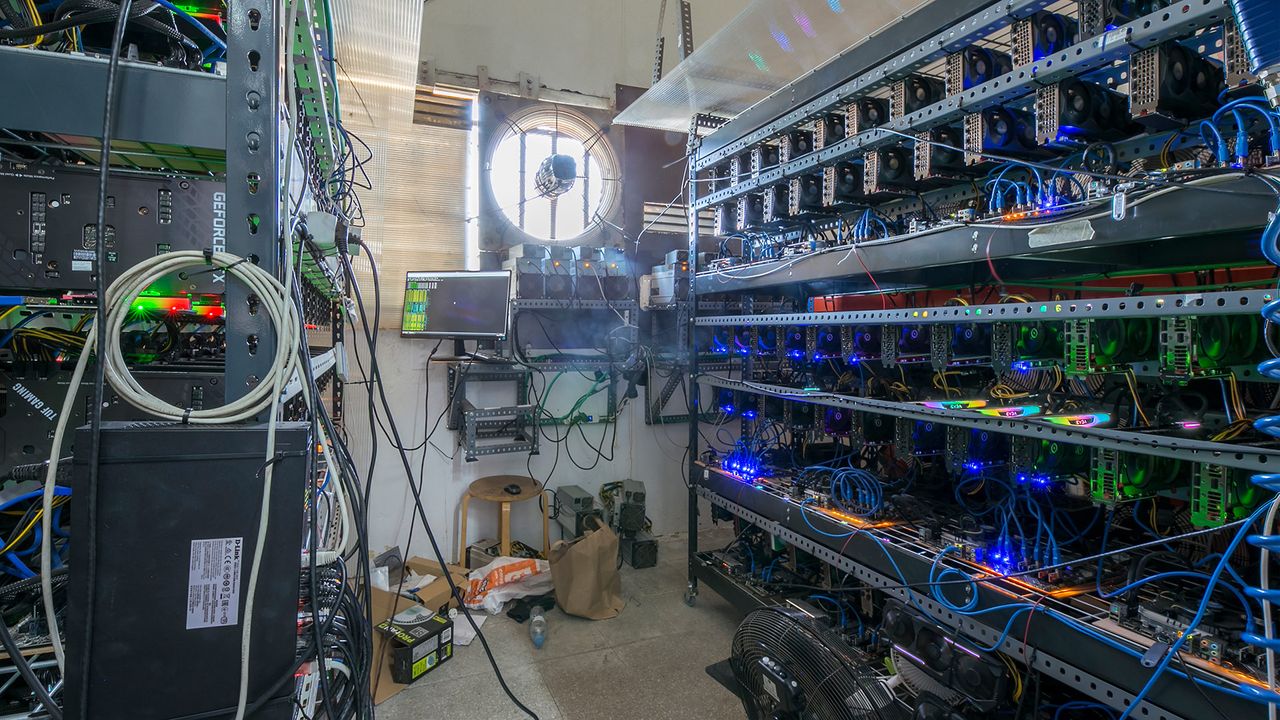
There is increasing evidence that Mexican drug cartels are diversifying into cryptocurrency mining and are using crypto platforms to diversify their income and, at the same time, launder their ill-gotten gains and fund other illegal activities. Reuters reports that local Mexican police uncovered a clandestine cryptocurrency farm in Tlaola, a town located in the leafy mountains of Puebla's Sierra Norte region. They found 300 GPUs, electricity infrastructure, and satellite equipment. The electricity-hungry operation likely drew power by secretly tapping into the grid at Presa de Necaxa, a nearby hydroelectric dam.
While this latest hidden facility found by police may seem small, Reuters notes it is the fourth such crypto farm Mexican authorities have uncovered in this region since early last year. According to a Mexico-based security analyst, the crypto farms discovered show that the cartels are increasingly sophisticated in their operations. In the latest bust, the Mexican federal authorities, the Navy, and state police seized around 300 GPUs, 80 medium-voltage terminations, a transformer, and eight satellite antennas.
It might not be surprising to hear about the Mexican cartels being tied up in crypto. Blockchain analytics firm Chainalysis, as cited by Reuters, reckons illicit crypto transactions grew from $59 billion in 2024 to $154 billion last year. The firm links the surge recorded to sanctions evasion involving governments. However, in South America, cartels are increasingly interested in using this channel to launder money. The mining operations are also integrated into the scheme, as stealing electricity is easy for organized crime. Mainstream consumer GPU mining ended in H2 2022, flooding the market with used graphics cards.
The source report doesn’t say how authorities found the crypto farm. Perhaps locals in this remote area of Puebla alerted authorities to the operation. Two folks from neighboring communities told Reuters that they could hear the crypto farm noise (transformers, cooling) from a kilometer away (0.6 miles), and the place was apparently a mere 2 km (1.2 miles) from the nearest village. The other three recently uncovered crypto farms were also near the same HEP dam, it is noted. Tlaola is a small community with around 20,000 inhabitants, so the noise levels and power consumption of crypto farms are very perceptible even if the cartels try to hide them deep in the mountains.
Remote communities, such as Tlaola, are popular locations for clandestine crypto farms because the electricity is cheap and most of them are under the protection of the cartels. For example, the Cartel Jalisco Nueva Generación (CJNG) and its armed branch, La Barredora, have the strongest presence in Puebla.
According to SILIKN, a Mexican cybersecurity firm, the use of cryptomining to launder illegal money rose by at least 55.8% last year in México. Drug cartels such as the Cartel de Sinaloa and the CJNG have set up crypto farms to mine Bitcoin (BTC), Monero (XMR), and Tether (USDT).
Similarly remote, illicit cryptomining facilities exist around the world, with Reuters recalling news of raids in Brazil, the U.S., and Thailand. Do you think there’s one near you? Please call the local police and liberate those stressed GPUs. Meanwhile, analysts expect crypto-related crime will reach new heights in the coming years.
Following a tip-off from robotaxi firm Waymo, San Francisco police conducted a “high-risk vehicle stop” and arrested two juveniles last week. The crime? The Waymo had seen its two passengers handling a loaded AR-style assault rifle. Police who intercepted the car also found “suspected marijuana and mace spray,” reports SFGate.
Fully autonomous taxi cabs like the Waymo in this story are an increasingly common form of transport seen on the world’s roads. With no human driver, these electric vehicles are packed with sensors, cameras, and more, all tied into the software presence that is called the Waymo Driver. To ensure the utmost safety, the sensors also continually monitor passengers. This might typically check if passengers are following the rules regarding minor transgressions like smoking or not wearing a seatbelt. In this case, the cameras recognized something more serious.
From our understanding of the Waymo in-cabin camera monitoring procedure, humans may review footage when something is flagged by the in-car sensors. That may be how the source report can say that the AR was loaded, or that was a later discovery from the police stop that somehow got attributed to the Waymo phoning home.
According to the source report, this incident took place in the 800 block of 40th Avenue, in the Outer Richmond neighborhood, just before 4am on Thursday, September 3. Alongside a loaded ‘ghost gun,’ the police officers found suspected marijuana and mace. The individuals arrested, a male and a female, can’t be identified in the media due to their age. Reports say the specific charges they face are related to illegally possessing a firearm.
This isn’t the first case of a Waymo telling on its passengers. SFGate previously reported on San Mateo police being called after a pair of 15-year-olds were allegedly drinking alcohol and shooting toy ‘gel blaster’ guns in the taxi cabin.
Waymo robotaxis are now well established in San Francisco, Los Angeles, and some other major cities. Earlier in September, the service branched out into San Diego, Denver, and Tampa, Fla. More and more areas in the U.S. and abroad are giving the autonomous service permission to operate.
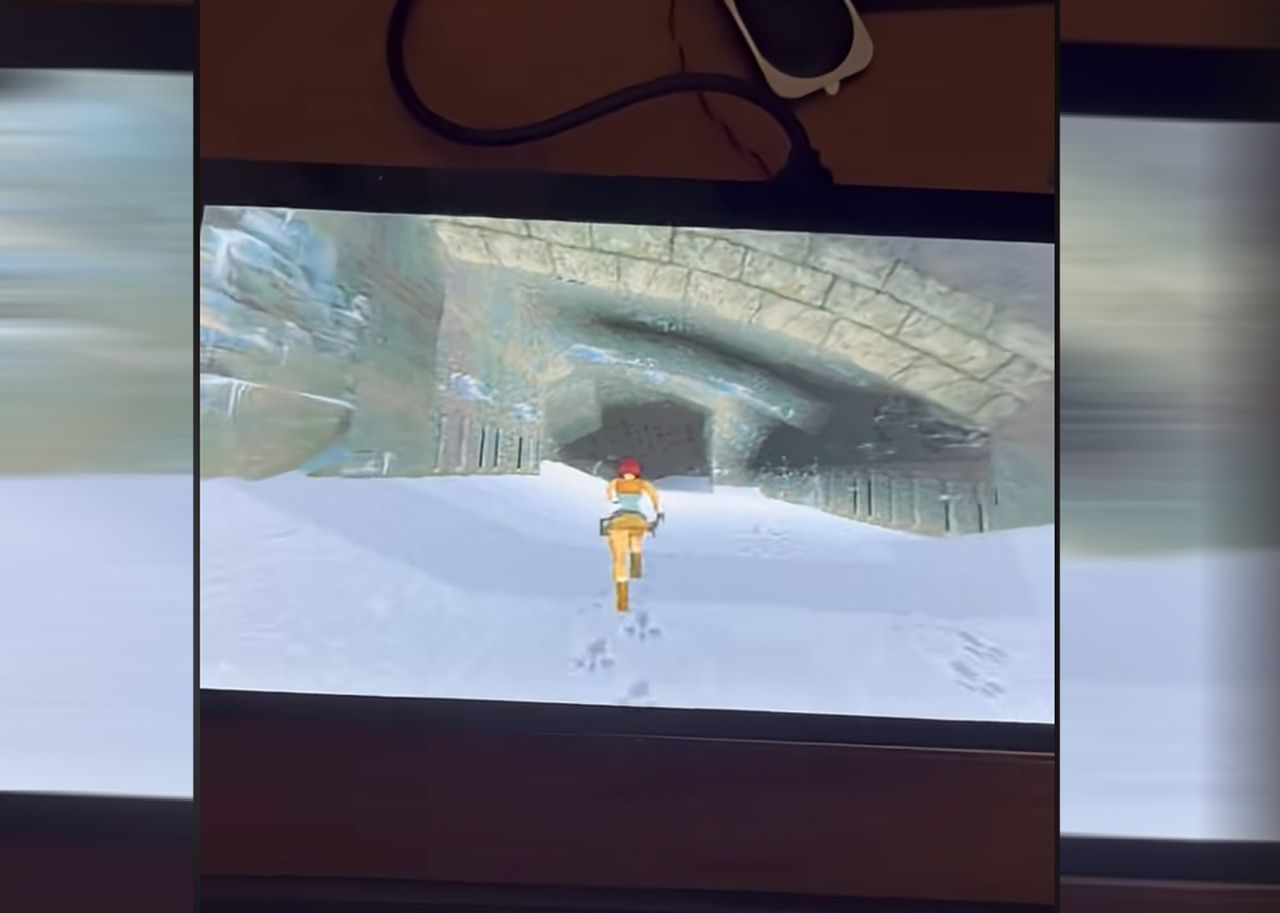
A retro video gaming devotee has showcased Lara Croft adventuring in and among ancient tombs on a humble ESP32-P4 microcontroller. This highly affordable device (available as a sub-$25 dev board) packs a pair of 32-bit 400 MHz RISC cores and delivers a slick, playable 1,024 x 600 pixel experience for TheAlexKid777, yet consumes roughly 1 watt at peak. It is good to see someone having video-gaming fun with cheap, power-sipping new tech in 2026.
When it launched in the mid-90s, Tomb Raider quickly became a classic by successfully capturing the add-a-third-dimension-to-all-games-and-IPs trend while delivering an eminently enjoyable adventure game. Not all games were better because they were in 3D rather than 2D. Far from it. Now the compute power required to run a title like OpenLara doesn’t require an expensive and power-hungry game console - a cheap dev board that typically consumes milliwatts is capable enough today.
But the high-efficiency low-wattage gaming feat described above is just half the story. The other phenomenon demonstrated here is the beefing up of commonly available microcontrollers. Developers no longer need to be extremely resource thrifty when coding for these humble devices. They now pack plenty of horsepower to spare.
In the case of Espressif’s ESP32-P4, there is “a dual-core RISC-V CPU featuring AI instruction extensions, an advanced memory subsystem, and integrated high-speed peripherals,” the maker highlights. There’s also up to 64MB PSRAM, 768KB SRAM, an FPU, DSP, ISP, 55 programmable GPIOs, and more. It sounds almost like an original Tomb Raider era dream.
In TheAlexKid777’s demo, this hardware is attached to the back of what looks like a 7- or 8-inch LCD. It runs OpenLara at 320 x 240 pixels, which is PPA hardware scaled to 1,024 x 600 pixels. The game also features stereo audio pumped through the dev board’s ES8311 codec, and it's controlled via a connected USB keyboard.
We’ve previously reported on various ESP32 family microcontrollers being used to: power a retro Mac emulator, host a tiny ad-blocking dongle, and even run a 28.9 million parameter LLM. Some of these projects use far cheaper ESP32 microcontrollers, too, starting at $5.
Ukraine’s Navy has claimed that it has won “the first-ever battle of unmanned naval boats” (machine translation). Its Sargan 3000 sea drone is shown destroying a Russian MBeK in the Black Sea in a video shared today on the official UA Navy Telegram channel.
In the video, you can see the Ukrainian unmanned surface vehicle (USV) target what is claimed to be a Russian MBek and fire several rounds with its 12.7mm ‘Protector RWS’ automatic turret. The official Telegram bulletin states that the Russian USV was “detected by the GUR units.” We understand GUR is an acronym for the Main Directorate of Intelligence of Ukraine's Ministry of Defense.
After taking fire, there is at least one explosion, and then smoke begins to surround the Russian USV. Ukraine must also have had some flying drones in the vicinity, as we have some aerial footage of this historic unmanned naval duel.
Eventually, and we are uncertain how long the battle went on, the video shows the MBeK slipping down to its watery grave. The Russian vessel sank with a characteristic nose dive to the sea floor, perforated like a tea bag.
The Sargan 3000 entered service for the Ukrainian Navy in April 2026. Ahead of this latest headlining feat, the same type of USV hit the headlines for sinking a Russian FSB border patrol ship ‘Izumrud,’ off the coast of the Russian resort town Gelendzhik in mid-July.
Ukraine's unmanned sea drone is a multi-purpose platform, and its multi-payload flexibility appears to have been confirmed by imagery and operator statements. The automatic turret model in today’s video might be somewhat different from how the Izumrud wrecker was equipped, for example. Photos have also shown variants of this USV kitted out with an FPV drone carrier, plus two transport and launch containers, and a remote weapon station.
The Sargan 3000 is thought to be nearly 23 feet (6.9m) in length, has a combat radius of almost 1,000 miles (1,600 km), can carry a payload of up to 990 pounds (450kg), and has a top speed of around 50 knots. Ukraine can produce around 25 Sargan 3000 USVs a month, it is estimated.
The U.S. and UK are also busy developing sea drones. Some are already being tasked with protecting undersea cables and pipelines.
With subscription services on the rise, it's probably not surprising that many people are seeking reassurance in the physicality and immutability of tangible media such as game cartridges, vinyl records, and CD players. So the Syitren RM1 CD player frame should fit right in. A lot of people seem to agree, as the $109 player has already collected over $540,000 on its Kickstarter — well beyond the initial goal of $3,000.
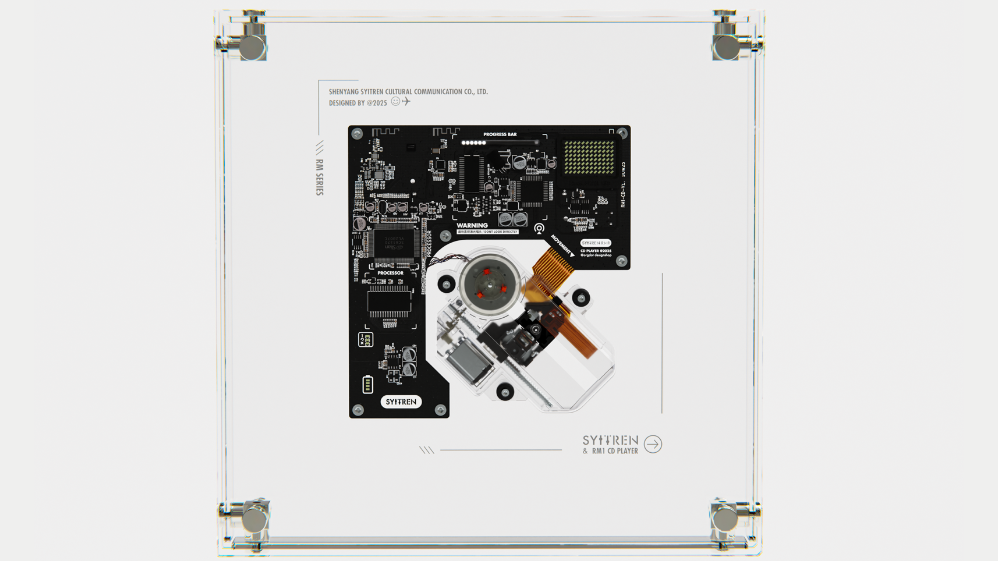
The RM1 is a compact disc reader fully encased in a transparent "borderless" acrylic frame, ready for hanging on a wall or sitting on a shelf. The components and mechanical parts are all fully visible, and the transparency extends to the read head assembly, battery compartment, and onboard buttons. There even appears to be a backlight LED under the moving harness for added visual appeal.
To fully avoid pesky cables, the unit is capable of Bluetooth audio output and uses a rechargeable 2000 mAh battery in an 18650 size that should be good for six to eight hours of playback and charges in one to two hours via a USB-C port. The unit is capable of reading standard CDs as well as data discs with MP3 files, just like in the good old days before subscriptions. There's also a 3.5-mm output jack if you want to wire the audio out to a separate unit.
(Image credit: Syitren)
Those who lived through the 90s and 2000s will notice design cues taken from the iconic Bang & Olufsen Beosound 9000 tower CD player/changer, which was always visible in movies and shows where the set director said: "We need a futuristic-looking piece of audio gear."
Syitren's offering isn't the only one of its type, with its main competitors being the Coolgeek M1, the Clearframe CD Player, and the Moondrop Discream 2. All share the same root concept of making the CD and mechanical parts visible, though in my personal opinion the RM1 has the best execution. It does seem to be aimed at nostalgia and industrial design lovers rather than audiophiles, and for its affordable price, that's a perfectly fine bar to clear — especially considering the convenient, cable-free nature.
The Bang & Olufsen 9000c, an annoyingly ubiquitous presence in every futuristic living room across movies and shows. (Image credit: Bang & Olufsen)
The claims of "hi-fi" audio output merit some inspection, though, as digital mediums live and die by how they're turned into physical signals. Over Bluetooth, the unit only supports SBC (baseline) and AAC codecs, with modern protocols or lossless transport notably absent. The wired output specs say "over 70 dB" of dynamic range, THD (distortion) "under" 0.1%; these figures are lower than even early desktop CD players.
These days, even an affordable audio interface such as my Audient Evo 4 is orders of magnitude better, with a dynamic range of 113 dB (remember, decibels are logarithmic) and THD under 0.0015%. That said, the RM1 should be fine for use with compact Bluetooth speakers — just don't expect a grandiose experience when hooked up to bigger amplification.
You can preorder a Syitren RM1 at Kickstarter for $109 just for the main unit, or $139 with the firm's N200 Bluetooth speaker that's dressed in Braun-inspired design cues. $169 gets you two RM1s ($84.5 a piece), and you can get a four-pack for $319 ($79.75 each). If you just want the N200 retro speaker, you can purchase those separately for $59, in beige or black colorways.

 Login
Login