Variation galleries were introduced in WooCommerce 10.9 as an opt-in feature and rolled out gradually. As per previous announcement, starting in WooCommerce 11.1, they will enabled for every store, and the experimental feature toggle is removed.
The functionality previously provided by the WooCommerce Additional Variation Images extension is now part of WooCommerce core. When a store updates to WooCommerce 11.1, the standalone extension is automatically deactivated to prevent conflicts. Existing variation galleries continue to appear through WooCommerce core.
Technical details
Core stores gallery attachment IDs in _product_image_gallery on the variation record—the same postmeta key used for galleries on parent products.
The wc/v3 product variation REST API exposes the gallery through the readable and writable gallery_image_ids property. This property contains gallery attachment IDs only; the variation’s featured image remains separate in image.
The former feature option, wc_feature_woocommerce_additional_variation_images_enabled, is removed during the WooCommerce 11.1 database update. Variation galleries are always enabled and no longer appear under WooCommerce > Settings > Advanced > Features.
Migrating from Additional Variation Images
If migration has not already completed, WooCommerce schedules an Action Scheduler job that copies data from _wc_additional_variation_images to _product_image_gallery. It processes up to 250 variations per run and requeues itself until no variations remain.
The migration is idempotent and does not overwrite a non-empty _product_image_gallery value. Legacy meta is preserved for backward compatibility, but it is not kept synchronized after core takes ownership of the gallery. We recommend testing the upgrade on a staging site, especially for stores with large variation catalogues or custom gallery integrations.
How can developers tell if they are affected?
You may be affected if your extension, theme, or custom code:
Uses the Additional Variation Images extension.
Reads or writes _wc_additional_variation_images or _product_image_gallery directly.
Stores without the extension or custom variation-gallery integrations do not need to take action.
What action do developers need to take if affected?
Remove any feature gates based on wc_feature_woocommerce_additional_variation_images_enabled, because WooCommerce 11.1 deletes this option.
Access variation galleries through WC_Product_Variation::get_gallery_image_ids() and set_gallery_image_ids(), or through gallery_image_ids in the wc/v3 product variation REST API.
Do not treat _wc_additional_variation_images as the current source of truth. Although its existing value is preserved, core edits are not written back to it, and subsequent writes to the legacy key may not affect the gallery displayed by WooCommerce.
Test custom storefront integrations when selecting, changing, and clearing variations, particularly when variations have different galleries or no gallery of their own.
Initially scheduled for Tuesday, September 1, 2026, we are tentatively postponing the release of WooCommerce 11.1.0 to Thursday, September 3, 2026.
Reason for delay
During early testing of WooCommerce 11.1.0 RC1, we identified certain issues around the mini cart, and highlighted some additional fixes .
We are preparing RC2 with a fix and will complete another round of pre-release validation before the stable release.
What happens next?
We plan to prepare RC2 and begin additional testing on September 2, 2026. If testing is successful, WooCommerce 11.1.0 will be released on Thursday, September 3, 2026. We will share any further changes to the release plan through this blog.
Thank you
Thank you for your patience and understanding as we work toward the WooCommerce 11.1 release.
WooCommerce block types and patterns were previously registered on nearly every request, including many that never render or edit blocks. We are changing that deliberately: a request should only pay for block registration when it can actually render or edit blocks.
The first step shipped in WooCommerce 11.0, where patterns register by file path and their content is loaded only when the editor requests it, matching WordPress core and saving 5–8 ms on every request that registers blocks .
WooCommerce 11.1 completes the change: a new BlockRegistrationContext guard now skips block and pattern registration on non-rendering requests. One exception is built in: when a product or variation description contains a WooCommerce block, block types are registered on demand via the woocommerce_short_description filter, so descriptions still render correctly in the products REST API, the Store API, the variation AJAX endpoint, and product webhooks.
Front-end, core admin, and block/site editor requests are unchanged, and the guard only skips contexts it recognizes; anything else keeps registering blocks, so a missed case costs a little performance, never a rendering regression.
The benefit: Store API and WooCommerce REST requests are 13–18 ms (30–42%) faster in our measurements.
How can developers tell if they are affected?
This applies from WooCommerce 11.1.0. You are affected only if your extension renders WooCommerce blocks, or relies on WooCommerce block types, patterns, or per-block assets being registered, during one of the skipped requests above. A WooCommerce block comes back as raw block markup (<!– wp:woocommerce/… –>) or as static HTML without its dynamic output which can be confirmed in code:
// Returns false in a skipped context on WooCommerce 11.1+.

WP_Block_Type_Registry::get_instance()->is_registered( 'woocommerce/mini-cart' );
Product and variation descriptions need no action; they are handled on demand. Blocks your extension registers itself with register_block_type() are also unaffected; so this only covers registration done by WooCommerce.
What action do developers need to take if affected?
Opt back in with the new woocommerce_should_register_blocks filter; return true only for the requests where you actually render blocks:
The filter runs on plugins_loaded, before the main query is parsed, so the condition can only rely on what’s available that early ($_SERVER, $_GET).
Please test your extension against WooCommerce 11.1 before the final release.
One more recommendation: don’t build your blocks onAbstractBlock. It’s an internal class, and blocks built on it inherit every registration decision WooCommerce makes, including the skips above; its lifecycle will keep changing as we optimize registration.
Retiring stable WooCommerce Admin feature flags in WooCommerce 11.1
WooCommerce 11.1 retires a set of stable WooCommerce Admin feature flags from the normal feature configuration pipeline.
These features are no longer experimental or optional, so WooCommerce now loads them directly instead of treating entries in core.json, development.json, or window.wcAdminFeatures as the source of truth for whether the feature should be available.
This change should not remove functionality from stores. The affected features continue to be available. To preserve backward compatibility, WooCommerce 11.1 includes deprecated PHP and JavaScript compatibility shims for existing checks.
These will continue to return compatibility values for now. However, these checks are deprecated and will emit deprecation warnings. The compatibility layer is intended to give extension developers time to remove feature-flag-based gates before the shims are removed in a future WooCommerce version.
Who is affected?
This affects extensions and custom code that check retired WooCommerce Admin feature flags before loading UI, routes, tasks, recommendations, or other WooCommerce Admin behavior.
Developers should audit their code for usage of:
– Features::is_enabled()
– Features::exists()
– Features::get_available_features()
– Features::get_optional_feature_options()
– Features::enable()
– Features::disable()
– window.wcAdminFeatures
– the woocommerce_admin_features filter when used to control stable WooCommerce Admin features
In most cases, checks for retired stable feature flags can be removed because the related feature is now treated as stable and available.
Affected feature flags
The retired compatibility shims include the following feature slugs:
Developers should use the underlying option or supported API when they need to check behavior that remains configurable.
About woocommerce_admin_features
The woocommerce_admin_features filter should no longer be used to control retired stable WooCommerce Admin features.
WooCommerce now loads these features directly, so removing a retired stable slug from the filtered feature list is not a supported way to disable the underlying feature behavior. Deprecated compatibility lookups may still reflect legacy filtered values while the shim exists, but those lookups now emit deprecation warnings and should be removed.
Extensions that currently use woocommerce_admin_features to gate stable WooCommerce Admin features should migrate away from that pattern and use the actual option or API for behavior that remains configurable.
In WooCommerce 11.1, we changed how WC_Abstract_Order::remove_order_items() handles persisted order items.
Core data stores now record the IDs of order items present when removal is requested. Only those IDs will be deleted when the order is saved. This prevents extensions that save replacement items before $order->save() from having those new items accidentally deleted.
Custom order data stores overriding delete_items() retain synchronous deletion. They can opt into deferred deletion by also overriding the new optional delete_items_by_ids() method. Developers should check custom stores for incompatible existing get_item_ids() or delete_items_by_ids() declarations.
The existing hooks and arguments are unchanged. On the deferred path, woocommerce_removed_order_items fires when deletion occurs during $order->save().
Most extensions require no changes. Developers maintaining custom order data stores should review their deletion methods and any code relying on immediate deletion or hook timing.
The good news for me: with my five-year anniversary at Automattic, I get to go on a 3-month sabbatical, starting this week. It also means not only a break from Automattic but also from the WordPress community, a place that kept me engaged for the last 17 years. So that’s going to be a little weird for me. When I get back, I’ll let you know how it went.
The good news for you: my colleague Justin Tadlock will keep publishing Weekend Editions on Gutenberg Times while I am away. If you’ve read his tutorials on the WordPress Developer Blog or his earlier posts here on the Gutenberg Times, you know you’re in excellent hands. Not every week, but enough to tide you over during my pause.
And, just to give serendipity a chance, I will be at WordCamp Athens in December. Until then, all the best to you, your business and your family. I’ll be back.
Yours, Birgit
Table of Contents
Developing Gutenberg and WordPress
Karol Król‘s first look walks you through six features of WordPress 7.1 worth your attention: responsive styles, the new Tabs block, the Media Editor, the admin bar’s wider reach, hover and focus pseudo states, and the latest Notes updates. A useful orientation if you’ve been meaning to sit down with the release but haven’t had a chance to click around in the editor yet.
Plugins and Tools for #nocode site builders and owners
Change one header and it changes everywhere — that’s the part templates make easy and the part that trips people up. Wes Theron’s seven-minute walkthrough on editing WordPress templates covers the difference between editing a page and editing its template, how to tell which template a page uses, and how to work through List View. Along the way you’ll remove titles across pages, add a site-wide banner, drop featured images from all posts, and reset a template when you’ve gone too far.
Your wp-admin, but as a desktop: OpenStation opens admin screens as draggable, resizable windows with a dock built from the admin menu, plus virtual desktops, snap-to-grid, wallpapers, and a Cmd+K palette. It’s opt-in per user, patches nothing in core, and reverts completely on deactivation — the classic admin stays untouched for everyone else. Bundled extensions add a Monaco code editor, a cron manager, and an RSS reader. Available on the plugin directory as Desktop Mode, or try it in Playground. The plugin also inspired contributors to create three additional features for the Desktop mode:
Built at WordCamp US Contributor Day, the Photo Directory Importer lets you search wordpress.org/photos from inside wp-admin and pull CC0 images into your Media Library. No API key, no account, and imports are deduplicated. In the block editor it’s a tab inside the Media Library modal rather than an entry next to Openverse and Pexels — so look one level deeper. Topher DeRosia and six co-contributors want testing before it goes to the .org repo.
The admin bar takes up viewport space and makes every page you view slightly not the page your visitors see. The official WordPress browser extension hides it while keeping the shortcuts in your browser toolbar, and adds block outlines, a phone-sized preview, cache-busted reloads, and cookie clearing. Jake Goldman of HumanMade writes that nothing leaves your device. Chrome and Safari now, Firefox next. Ray Morey of The Repository has more on its origins as Goldman’s WP Detective side project.
Anne McCarthy‘s Accessibility Lab plugin prototype arrives with the Accessibility Team’s buy-in and a clear boundary: it’s a testing ground for features headed to core, not a substitute for fixing core. Three modules so far — Media Library view controls, real-time heading-order validation, and Troy Chaplin’s Block Accessibility Checks. Rae Morey traces how the idea won conditional support after 2025’s pushback, and where you can contribute.
Theme Development for Blocks
Mitch Canter‘s field guide to responsive block styles in WordPress 7.1 gets into the details the announcement posts skipped: the theme.json syntax, the two default viewports (@mobile at 480px and @tablet at 782px), and how to set your own breakpoints. You’ll also see :hover and :focus states — official only on Button and Navigation Link blocks so far — how the feature coexists with fluid typography and clamp() tokens, and a quick-reference table worth bookmarking.
“Keeping up with Gutenberg – Index 2026” A chronological list of the WordPress Make Blog posts from various teams involved in Gutenberg development: Design, Theme Review Team, Core Editor, Core JS, Core CSS, Test, and Meta team from Jan. 2024 on. Updated by yours truly.
“This block contains unexpected or invalid content“; if you maintain custom blocks, you’ve met that message. Paulo Carvajal collected five WordPress block deprecation patterns in a GitHub Gist that cover most real cases: markup-only changes, attribute renames paired with isEligible() and migrate(), source changes, InnerBlocks restructuring, and stacked deprecations ordered newest-first. Each comes with copy-ready code, plus a reminder to test against real database content and keep old save() functions intact.
You might have heard that building a custom block no longer requires React or a build pipeline. Fränk Klein tests PHP-only block registration in WordPress on CSS-Tricks: an autoRegister flag generates the editor JavaScript and sidebar controls for you, straight from the PHP registration. He’s honest about the limits (no in-preview editing, no live post data, three attribute types) and argues the real win is porting legacy widgets, shortcodes, and template parts into block themes with PHP skills you already have.
WordPress and AI
Ask ten agencies whether they use AI and you’ll get ten yeses, Brad Williams, Co-Founder of WebDevStudios, notes in explaining what agentic AI development means for your WordPress project. Building on Alfredo Navas‘s WordCamp US talk, “the model knows WordPress, it doesn’t know your WordPress”, William’s the post lays out three prerequisites: written project rules, documented processes, and scoped tool access, with a human reviewing everything. You also get five questions to ask any agency, including where your project’s knowledge lives when people leave.
Jonathan Bossenger‘s latest live stream puts three viewer-suggested plugins through a WordPress AI plugin showdown: Cross AI MCP Manager, Albert, and WP Vibe, judged on whether you can set each up without reading docs, connect it to a local site, and tell what data it sends home. WP Vibe routes everything through a third-party server, Albert won’t connect locally at all, and Cross AI — after real troubleshooting of its separate abilities and tools — is the only one working end to end.
Now also available via WordPress Playground. There is no need for a test site locally or on a server. Have you been using it? Email me with your experience.
Questions? Suggestions? Ideas? Don’t hesitate to send them via email or send me a message on WordPress Slack or Twitter @bph.
WooCommerce 11.1 introduces Order Withdrawal, bringing the right of order withdrawal functionality to better serve EU customers. This gives customers a simple, self-serve way to request a withdrawal from their order within 14 days of placing it.
This feature may help your store meet these requirements, but it does not guarantee compliance. For guidance specific to your business and where your customers are located, please consult a legal professional.
How to enable it
Order Withdrawal is disabled by default, since it won’t apply to every store. One can enable it by following the steps below:
Go to WooCommerce > Settings > Advanced > Features
Enable the Order Withdrawal option
Save your changes
Once enabled, the request form becomes available at /my-account/withdraw-order for you to surface it to your users. You can change that URL by editing the endpoint under WooCommerce > Settings > Advanced > Page Setup. The page works whether or not the customer is logged in, so a shopper who checked out as a guest can still find it.
Note: By default the “Order Withdrawal” page is available for all users logged in or not, but it is not linked anywhere by default. You can surface it by adding a link to the page from a prominent location, like your store’s footer and/or order emails.
What the customer sees
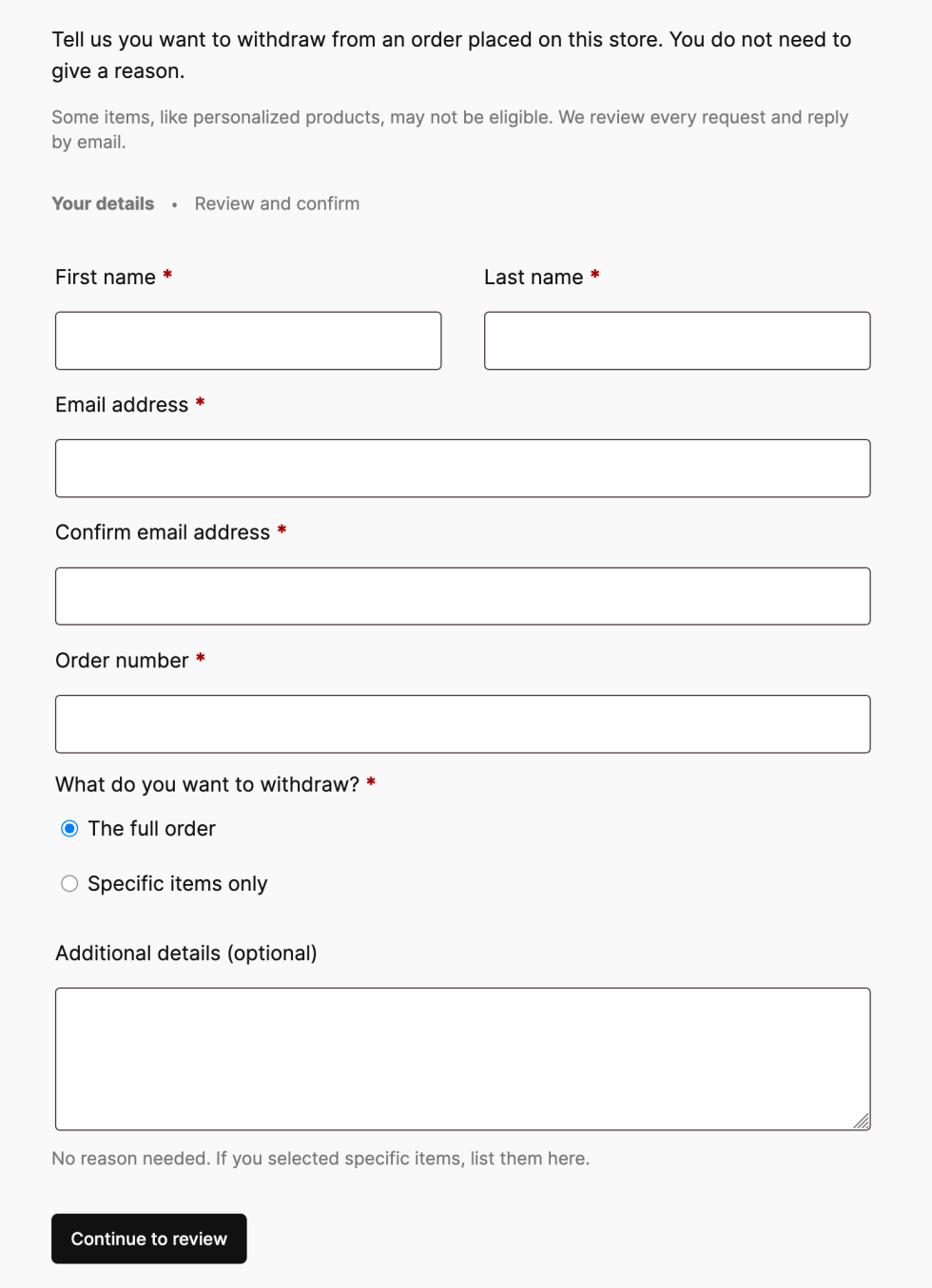
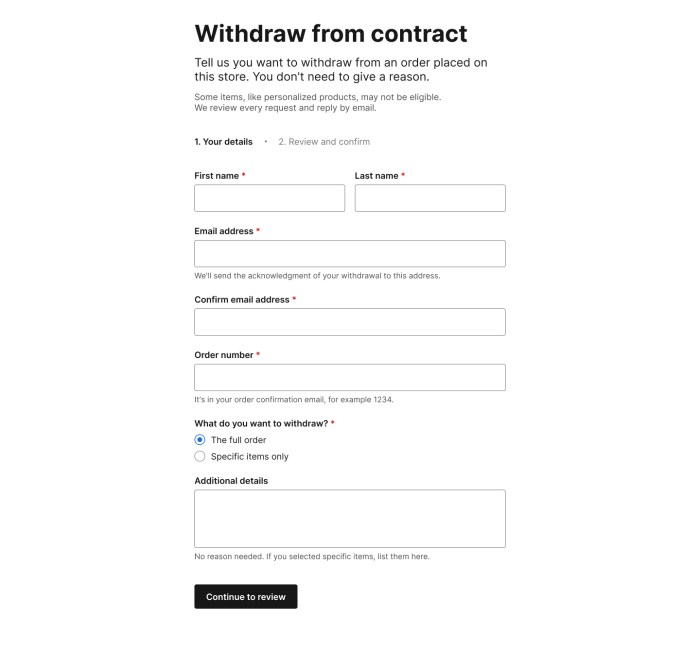
A customer who visits the withdrawal page is presented with a short request form. After filling it in, they get a chance to review their details before submitting.
Order withdrawal form
Once they submit the request, they see a confirmation screen and receive an acknowledgment email containing the details they entered. This gives the customer a confirmation that their request has been submitted and provides a record of the request.
Customer email confirmation
What the merchant sees
When a request comes in, we make sure the store owners know about it in a couple of ways: an email notification for the withdrawal request, and an inbox notification on your WooCommerce home screen.
Inbox notificationStore email notification
If the order number and billing email match an existing order, the request is automatically linked to that order, and an order note is added. If there’s no match, the request is still accepted, and the customer still gets their acknowledgment email; the notification simply flags that manual review is needed and skips the order link.
Submitting a withdrawal request does not change the order status, cancel the order, or issue a refund. How a store handles each request is up to the owner, whether that’s approving a refund, asking for the item back, or following up for more information.
What’s next
Order Withdrawal is coming in WooCommerce 11.1. Give it a try, and let us know how it works for your store!
[00:00:19] Nathan Wrigley: Welcome to the Jukebox Podcast from WP Tavern. My name is Nathan Wrigley.
Jukebox is a podcast which is dedicated to all things WordPress, the people, the events, the plugins, the blocks, the themes, and in this case a new way to keep up with WordPress news and updates.
If you’d like to subscribe to the podcast, you can do that by searching for WP Tavern in your podcast player of choice, or by going to wptavern.com/feed/podcast, and you can copy that URL into most podcast players.
If you have a topic that you’d like us to feature on the podcast, I’m keen to hear from you and hopefully get you, or your idea, featured on the show. Head to wptavern.com/contact/jukebox, and use the form there.
So on the podcast today, we have Damon Cook. Damon has been a developer in the WordPress ecosystem for over a decade, working with WordPress centric agencies, and more recently running his own freelance business, Noma Digital. He’s a longtime community member, contributor, and someone who remains keenly engaged with the latest WordPress developments from releases like 7.1, to shifts in plugins, themes, and the broader WordPress landscape.
Damon joins us today to discuss WP Trend Watcher, an open source tool he’s created to help WordPress professionals keep up with the ever increasing deluge of news, community updates and feature releases. As the WordPress space grows more dynamic, and let’s be honest, sometimes a bit overwhelming, WP Trend Watcher is designed to sift through a fire hose of RSS feeds, summarise the trends, and inject some much needed human curation into AI generated content.
Damon talks about the importance of staying ahead in the WordPress ecosystem, especially for freelancers, agency owners, and developers who want to anticipate changes and support their clients.
He gets into the technical nuts and bolts, breaking down how the tool gathers, and summarises, news. The models and local AI setup he’s experimented with, and the balance between automation and critical human review.
If you’re someone who struggles to keep up with the relentless pace of WordPress news, and wants a smarter way to separate the worthwhile updates from the dross, this episode is for you.
If you’re interested in finding out more, you can find all of the links in the show notes by heading to wptavern.com/podcast, where you’ll find all the other episodes as well.
And so without further delay, I bring you Damon Cook.
I am joined on the podcast by Damon Cook. Hello, Damon.
[00:03:04] Damon Cook: Hi, Nathan. Good to see you again.
[00:03:05] Nathan Wrigley: Yeah, thank you. Damon and I had a chat at WordCamp US. I think you said a little while ago that it was in 2024. So it’s been a few years since we’ve had a chat, and there’s been a few pivots in your life. At the time you were working for a hosting company, which I don’t think you are doing anymore. But we’re going to have a chat today about something which caught my attention probably on social media, I imagine, I saw it there. It’s called WP Trend Watcher.
I would just say at the beginning before we get stuck into the topic, if you go to the WP Tavern website, I will bury all of the links in the show notes. So anything that we discover today, go and click on the links over there. And actually given the nature of the topic, it might be wise, dear listener, to go and do that before you get into this podcast, because it’ll be fun to have a poke around and be forewarned as to what is it that we’re going to be looking at.
So anyway, Damon, thank you for joining us again. Just before we begin, I mentioned that you have changed roles in the last 24 months or so. Do you just want to tell us a little bit about you and your roles in WordPress over these many years?
[00:04:07] Damon Cook: Sure, yeah. Yeah, been a developer in WordPress ecosystem for over a decade. And always been with WordPress-centric agencies. And yeah, as of the past year about, I’ve just been running my own freelance, Noma Digital, then also doing some contract work. And yeah, and still keeping up on all the latest WordPress news and features coming out. 7.1, what is coming out in, well yeah, in like a week, I think.
[00:04:37] Nathan Wrigley: Yes. Yeah.
[00:04:38] Damon Cook: Lots of cool stuff there.
[00:04:39] Nathan Wrigley: Yeah, there really is a lot happening. Genuinely, there is a lot happening in the WordPress space. And, it may be that you’re a developer, and so that side of things captures your attention. But from my perspective, I am not really a developer, but I am curious about all the things that are going on, because I’m fascinated by Core and plugins and themes and blocks and all of that.
But equally, the community side and all of that. There’s a whole load going on, and events and marketing and loads going on. But that deluge of information, that sort of fire hose is very hard to keep a track of. Some websites that were publishing for many years die out and other ones replace them, and things come at you from different angles.
And so you have built a tool, WP Trend Watcher, which you’re able to put on your local machine. I believe that’s right at the moment. It’s a sort of local install, and we can talk about the technicalities of that in a moment.
But this tool, the way that you’ve built it is primarily pre-built, if you like, to go out and inspect the WordPress space so that you can summarise the zeitgeist, of what’s going on in the WordPress world. You can keep up without having to do that manual slog of going out, reading everything, spending hours every day kind of wasting time, and I’m doing air quotes there, if you know what I mean.
Okay, so my first question is revolving around the why of this. What was the importance here that you felt that you wanted a tool that did this for you? And really what I’m trying to get there is why did you feel it was important to keep up with the WordPress space? Is it… if you’re a client, if you’ve got relationships with clients and you’re building client websites, is it not enough in your scenario just to know that WordPress drops, they do a version change every now and again, we get a release, I’ve got a suite of plugins, I probably need to keep up to date with those. Why? Why are you interested in the broader landscape?
[00:06:34] Damon Cook: Sure, yeah. I’ve been a, I was pretty active contributor for a while to the project, not so much lately. But, when I was a contributor there was, I mean, there’s always been a lot of news to keep up with, between Slack and Trac and WordPress.org stuff. But I started to see some of what were the reliable sources in that area. And as I work with WordPress daily, I still need to keep up with what is coming down the pipeline.
And so yeah, I just wanted to take that, it was very a selfish starting point. I needed to take all these RSS feeds, get them summarised, but then also verify that, what’s being summarised with AI isn’t just hallucinations or some kind of, you know, mistrust was there, because that’s a critical component to this project was the human layer. It’s just pulling in a bunch of RSS feeds, summarizing it, and then I go through and make sure the summaries and click through it, like a lot of the stuff, and read it, and it’s helpful for me to process and see what’s actually going on and then provide my own judgment on it, so.
[00:07:47] Nathan Wrigley: The sort of curious bit there then I suppose is that you, it feels like you always want to be one step ahead of what’s happening in the WordPress space. And I suppose if you’re being a freelancer, having that knowledge of what’s coming up, particularly in WordPress and WordPress Core, because I’ve noticed that a lot of RSS feeds, for want of a better word, and we’ll get into that in a moment, are Core related.
So that then sort of tells me that you want to be ahead of what’s coming in the next feature set so that you can, I don’t know, forewarn your clients, or practice things that you know are going to suddenly drop on a particular day of the year, and so that when the inevitable call comes, “Why is this there now?” And, “How does this new feature work?” You’re ahead of it all. Does that kind of summarise your interest in it, or is it more eclectic than that? You’re just curious about it because it’s curious.
[00:08:39] Damon Cook: Yeah, I mean there’s certainly the curiosity is there, but yes, I do like to be at the bleeding edge of what is coming down in the new, like for example, the 7.1 release coming out. Just seeing what’s being worked on, what might have gotten dropped from proposals. Yeah and just I guess being in the ecosystem, I’ve seen how a lot of the community has come and gone, and what has been critically talked about is, what is a critical feature, and why might something not be worked on and all that stuff.
So yeah, it’s just a selfish way to keep up on the latest, developer news and, yeah, and share it out and summarise it and get some human judgment behind it.
[00:09:22] Nathan Wrigley: A curious thing which is not related to this podcast, but most Mondays I do like a live show in which we have three or four panelists, and we bat around the WordPress news from the previous seven days. And I’ve been doing that show for, oh, I don’t know, maybe seven or eight years or something like that. And in the sort of the week preceding, I go around the internet, I look at social networks, I read the blogs that I’m familiar with. I’ve got a giant list of RSS URLs in a feed reader, and I go through, and I read them, and I look at them all.
And it, genuinely is incredibly time inefficient. That is to say that I open things, get halfway through, realise there’s nothing really for me to talk about here with my guests, and there’s probably nothing for the the listeners to engage with. And so I lose a lot of time, doing that exercise, and it strikes me that in the era of AI, that would be, the intention here is to cut out that. Cut through the dross, sift out the bits and pieces that are of interest, and make the bits that finally reach your eyeballs worthy of attention.
How have you orchestrated that to happen? Because with the best will in the world, I think we all know that AI can go off the rails a little bit. It may be that it doesn’t quite match the intentions that you would wish it to have. How are you corralling it to be what it is that you want?
[00:10:47] Damon Cook: Sure. Like I alluded to, it just stemmed from a selfish kind of interest in keeping up on these news sources, and I knew a lot of them all had RSS feeds. I think that even I, you know, I have a fascination, an obsession almost, with AI these days and I’m always trying some cutting, more cutting edge stuff and tinkering.
But I think even myself, and I think I see a lot of people confuse AI with automation. And so it’s interesting to see, when I, this project, I didn’t want to automate the whole thing, like just go get RSS feeds, AI summarises, AI publishes, just do it, right? Which I can, we could potentially do with the project, but I limited it to that contract of, go get these RSS feeds, the latest news, come back, summarise them, and then show them to me so I can audit them.
A lot of them, I just open up like yourself. It seems counterproductive, but I actually like that’s how I really keep up. Because if I just read the paragraph from the AI summary, which I do, it’s it’s not really covering, and might miss something in that full article that actually really interested me.
So you know, I click through most of these and I’m reading. I peruse, I don’t read every single word for sure, but I peruse and just try to validate that the summary matches, and then I look for tidbits that might been missed that I’m curious about, and then drop that in the human summary element of the published final briefing. So that’s the workflow of it right now.
[00:12:27] Nathan Wrigley: Yeah.
[00:12:27] Damon Cook: That’s how I’ve set it up and I enjoy just the whole, the sequential part of like gathering and then, there is an automation of it shows me everything I gathered, and then gives me an area to write my thoughts and then I click through everything. So it’s just turned into a weekly, kind of hobby project and it’s fun to do, so.
[00:12:48] Nathan Wrigley: Yeah, so the bit that is infuriating to me is just the dead time. And the dead time for me is not once I’ve found the link. That for me is when it actually becomes interesting. You click the link, you open it, and you do the reading and what have you. It’s finding the link and finding the interesting thing.
[00:13:07] Damon Cook: Yep.
[00:13:07] Nathan Wrigley: And so I think, it is totally credible to get AI to do that. And I have this, I’m not a great user of AI. That is to say I’m not somebody that uses AI an awful lot. But it’s becoming pretty clear to me that one of the areas which it genuinely is good at is curating like a silo of information. You give it a body of information, a corpus of information, and say, “summarise that,” or, “Draw out of that the bits that might be of interest.”
Now, it’s not perfect, but it seems to be exceedingly good at that. The creative side, maybe less so, and we don’t really need to get too much into that. But this bit of drop the corpus of information in, summarise that, publish your results. That seems like a really credible way of using AI in the year 2026, and that is indeed what you’ve done.
So now that you’ve got this built, and I will link to a report so you can see Damon’s previous, I think you’ve got seven or six or something like that, previous ones from previous weeks up, and you can see them all. It basically ends up in a bullet-pointed, numbered list of titles with links, and then maybe one sentence of about 20 words following on from that. And then that will obviously either lead to a click or not.
How have you found those summaries to be? The 20 or so that you’ve got in each of your little editions. How have you found them to be? Do they seemingly accurately represent what’s contained within, or does it tend to go off the rails a bit?
[00:14:39] Damon Cook: No, they’re accurate.
[00:14:41] Nathan Wrigley: Yeah.
[00:14:42] Damon Cook: The key kind of component there is when the summaries happen, it’s using, I set it up because I wanted to use local models. It’s all prompt-based, so essentially, it’s going to these RSS feeds, getting the latest articles and links, then parsing that through AI and saying, and passing a prompt along saying, “summarise this for developers and agency owners with a critical eye on, X, Y, Z.”
And so that’s where things do actually come, they come back pretty accurate. And the inference of what the summary shows, it’s fascinating. But yeah, it’s pretty accurate, and the fun part is trying to prove it, to see like, “okay wow,” that sounds like it would interest me as a developer and agency owner. I’m going to click and read through and make sure that’s an actual thing, and not a hallucination. So it’s like a game of just fact-checking in a way.
[00:15:46] Nathan Wrigley: I’m curious to know what it doesn’t include. So for example the addition, I’m going to call it an addition. I don’t know. Oh, summary. There we go. Weekly summary is what you’ve called it. This particular one has 19 items listed, and I don’t know if it produced 19 different things and all of them got written to the page, or if, I don’t know if you can see in the background, 34 just didn’t cut the mustard. Can you inspect what didn’t get included and thereby start to have intuition to say “okay, I wonder why that one didn’t cut the mustard?”
[00:16:20] Damon Cook: Yeah, there is a built-in, for the AI to, when it does a review, it checks sources and it looks for duplicate, two kind of posts on two different sites about the same exact topic. It’s going to try to not do a summary on both of those.
[00:16:39] Nathan Wrigley: Okay.
[00:16:40] Damon Cook: So it does check for duplicates, weak language, missing sections. So it does do some of that to cut out the duplicate work. But also, yeah, it’s not looking, like part of the prompt and part of the exercise for AI is to not look for superfluous, just like really fact-based deterministic stuff and not just you know. It’s funny because trend is in the title, right? WP Trend Watcher.
[00:17:06] Nathan Wrigley: Which is maybe the exact opposite of what you’re after.
[00:17:09] Damon Cook: It’s kind of like it’s not really looking for what’s popular, but what is factual coming out of a lot of these sources.
[00:17:17] Nathan Wrigley: Okay. When you are looking at this, this is a strange question, and I don’t know how you’re going to react to this. How does it make you feel? Do you have the intention that you’re cheating on the Damon from five years ago would’ve thought, “Oh, this is horrific, somebody did all this with a computer. This should be done by, a human being should be corralling this.” How does it make you feel on that level?
[00:17:41] Damon Cook: Yeah, it does make me feel cheap.
[00:17:43] Nathan Wrigley: Yeah.
[00:17:45] Damon Cook: And I think that’s kind of why I publish these. It’s trying to be transparent. So if anybody’s going to go and read this, they know that I even put at the bottom how much time I spent trying to look through everything. So you can take all those facts and base whether you want to read this or not.
[00:18:08] Nathan Wrigley: Yeah.
[00:18:09] Damon Cook: Did he spend enough to? You can pass your own judgment. Did he spend enough time? Maybe he should have spent more time.
[00:18:14] Nathan Wrigley: Yeah.
[00:18:16] Damon Cook: But yeah, that’s part of the exercise for me is making this open source, and just having this public, and so if folks do find it fascinating and helpful, they could even fork it and try to do something else. Or I even have, possibility to submit sources because I’m always thinking “Should I have another source in here?” or.
[00:18:39] Nathan Wrigley: Yes, yes.
[00:18:41] Damon Cook: There’s room for improvement too.
[00:18:43] Nathan Wrigley: The issue there is you end up with scope creep, don’t you? And before you know it, you’ve got 5,000 RSS feeds that you’re pummeling everywhere, and then you really are in a maze of trying to figure out what’s relevant and what’s useful.
The report that you get on the front end, obviously, you’ve got these AI generated the numbered list, in this case 19, the one that I’m looking at. Again, links will be in the show notes.
But then the interface that you built provides the option then to add sort of human notes, for want of a better word, at the end. So it’s not just a case of, okay, that’s where it ends. The idea is then that you would go in, contribute for yourself what it is that you feel is important here, free form writing like we always used to do, and so on.
[00:19:24] Damon Cook: Yep.
[00:19:24] Nathan Wrigley: Why did you include that bit? Why, what was the purpose in having that? Was it just a more human curated portion at the end, so you wanted to remember what you actually thought?
[00:19:33] Damon Cook: Yeah. It’s twofold. I wanted the human in the loop. It’s a pretty popular phrase these days with AI, but I wanted that aspect there. But also selfishly, a game to fact-check a lot of these things and make sure AI isn’t hallucinating. But also it’s the exercise of memory of like going through and reading these things, because then I actually, you know, it registers in my brain. Like this is really what’s coming down the pipe. Because if I just read through the summaries, even if they were 100% accurate and I just trusted them out of the box, I feel like it doesn’t necessarily always register for me. So the actually exercise of going and clicking and reading through and comparing to what AI summarised is helpful for to sink in that data.
[00:20:20] Nathan Wrigley: I think if this were something that I was looking at, and I’m definitely not ruling out doing something like this because I genuinely think there’s a lot of merit in my specific case for this. I think I’d be looking at four of those a day and just trying to, I don’t know, at 9 in the morning just before the day begins, or at 5 at night just as the day’s about to end, the workday. Just go in and look at a few of those. Because I’m like you, if I read the AI 20-word summary, there’d be no substance to that and I wouldn’t remember it.
But the fact that the interface is there and those articles have been surfaced, and I presume you could probably run one of these each day and adapt what was there the previous day and what have you. So technically then, how does it work? I’m fairly sure that this is a thing which you have built, and is currently sitting on a machine in your house somewhere.
[00:21:08] Damon Cook: Yep.
[00:21:08] Nathan Wrigley: Just describe the technicalities of what you need to get, on your machine to make this occur.
[00:21:13] Damon Cook: Yeah. It’s a TypeScript code base, and it’s on GitHub, so you can fork it, contribute to it. But yeah, I run it. You can pass in kind of a flag. I run it weekly. It was just an arbitrary decision, and it felt weekly would be good. But you can, yeah, it just checks basically the last date of when it ran, and then tries to grab the sources.
Then I use LM Studio application on my Mac, which allows me to kind of download models that are fit for my system. I have an 18 gigabyte memory that I can work with, so that is limiting. But, I think a lot of these models are coming down in size and the local AI movement, I don’t know if it’s a movement, but I think it’s taking off in a lot of ways.
[00:22:07] Nathan Wrigley: Yeah, I think so. Yeah. Yep
[00:22:09] Damon Cook: We’re starting to see a lot more, yeah, local implications. That was part of the exercise for me, was exploring that. What models I could use on my system, and then what were the results of using those models with this tool for the summaries.
So yeah, I think every week at the bottom, that’s part of the report is what model I used locally to run the summaries against. And I try to switch it up. I think I used probably six of them, I used the same model. I think it was a Qwen model. Then the most recent one I used, I switched it up, and it was a, I forget the name even. It was like an LS.
[00:22:49] Nathan Wrigley: Oh, these things come and go so fast. Yeah.
[00:22:51] Damon Cook: Yeah, exactly. And that’s the fascinating part is just to drop in a new model and see how it does, and the softwares look like, because they do change. And even the report, I think you’ll, if you just compare this week’s with last, just the output is a little different. And I’m trying to… That’s something I plan on working more towards is deterministic, the output. The summaries are one thing, but then when it outputs into the final report, getting that more deterministic. Especially, I really want to have footnotes, so that people can see where these summaries and stuff are, what they’re exactly they’re linking to. It’s kind in there but it does’t always output exactly the same in formatting, so.
[00:23:35] Nathan Wrigley: So you’re doing this work on the local machine, and then obviously I’m looking at it so it’s published, by the looks of it on GitHub. Is that all automated or are you curating that process? Or have you got, you know, your local machine is bound to GitHub, your GitHub repository and so this is all automated in that sense as well?
In other words, what I’m saying is if you took a break for a month and came back, would this all just be chugging along in the background and producing these weekly reports? Or is this something that you manually invoke on a weekly basis and copy and paste and what have you?
[00:24:07] Damon Cook: That’s the part that, yes. I just run the report and write my judgment in it, then publish it to GitHub, and then GitHub does a little, it takes basically the artifacts and just spits them out. But there’s not much there in the automation on GitHub. It’s just publishing it to GitHub Pages.
The fact that I have a section that’s required for human in the loop kind of takes away full automation. I could make it run, but then I would have to take that component out of me reading through, clicking through, and writing my own judgment at the end of the report. And I don’t plan on getting rid of that. I actually enjoy that aspect, so.
[00:24:47] Nathan Wrigley: So it’s become a bit of an interface. The AI plus Damon equals the finished product. You really don’t want it to be automated. And in a way, that feels to me a bit like, I don’t know, a race to the bottom. If we automate all the things, I just don’t know where the audience for that lives, because you’ll, never really know. Because there’ll never be a moment where you look back at it and say, “Is anybody reading this?”. “Has anybody talked to me about this?” and what have you. Whereas the fact that you’re interested in it, you’re on this podcast talking about it, you’ve got an interest in the subject matter, you’ve clearly engaged with it. I don’t really have a question there, but there’s definitely something there. The fact that you’re in the weeds of it and it’s not just AI for AI sake, I think is important.
[00:25:32] Damon Cook: Yeah. And it’s, yeah, that’s a great point. And I think that makes me, I don’t know, I guess go back to, where some of this started from. Yeah, I think people are creating their own knowledge bases. And you even touched on this. Just having that corpus of artifacts, a lot of that AI can do these days, and you can automate some of that.
But, how you take all that data and get the human in the loop and, is it even interesting if you, it’s interesting maybe to you to read, but if you want to share that, is it going to interest others? And yeah, the human aspect is critical for me there, because, especially if you’re going to share it publicly, you know.
[00:26:14] Nathan Wrigley: Yeah.
[00:26:14] Damon Cook: At least be transparent.
[00:26:16] Nathan Wrigley: Yeah, so you’ve called it WP Trend Watcher. And it feels to me, if I was to rewind the clock to, I don’t know 2023, where for the first time we were all beguiled when ChatGPT came along, and we all just thought this whole interface was remarkable. But it felt, oh, it’s novel, it’s interesting, it behaves in many ways it’s a bit, I don’t know, passed the Turing test and it convinced us that it was human.
But now that we’re in the year 2026, it feels like one of AI’s central roles is just, as I said earlier, these corpses of information, but not finite in the way that a human brain is. There’s only a capacity that I have to remember so much, and it’s alarmingly little. But over time, if you were to stick with this endeavor, the name that you’ve given it, this sort of Trend Watcher, it feels like the data that you’re gathering, as it grows and grows and the AI’s capacity to manipulate, understand, I’m doing air quotes, “understand” and, create meaning from the disparate bits of data, that will grow over time.
And so it’d be interesting in 2027 and 2028, what happened? Why did that bit never got built? And how did we get this thing shipped into Core? Where did it come from? What were all the little bits and pieces? Where were the jigsaw pieces that led that to happen? And how did this happen? And what’s the market trend? Why have we got a 4% decrease or an 8% increase in market share? How’s all that happened?
So it feels to me as if you keep pushing this out, that kind of information will be available, kind of MCP-able, by simply asking it questions, in a way that we’ve never had available to us in the past. Again, there’s no question, but do, you know what I’m saying there?
[00:28:03] Damon Cook: Yeah. I think, when I set out to build this there is, and there is still a component where I do want to have kind of the trend watching part of taking these past reports and having AI review them, and come up with inference of was there a trend? Why, yeah, why did we go from report 1 to report 18 about this? Maybe there’s this feature in WordPress 7, whatever. What changed there? And come up with a separate component for that. I haven’t built that in, but that’s kind of a potential, that’s always the end goal. And keeping these receipts for now and generating these reports is just the scaffolding in a way.
[00:28:48] Nathan Wrigley: So it feels to me as if it really isn’t bound to WordPress. You could run with what you’ve built and point it at just about any industry or thing. Your local tennis club or, whatever it may be. You could, over time, build up this sort of trend analysis, and see what’s going on.
And dare I say it, you could even implement it upon yourself so that you can see, what’s the cadence of my writing? How have I done my fitbit data or whatever it may be? You can see that, even as I’m saying the words, I’m thinking, “Oh, this is a dystopia that I don’t want to live in.” But at the same time, I’m really curious as to what that bigger capacity to maintain state and hold data over time. What that will furnish us with.
Because we all forget things, our brains are very ephemeral. Things that are important to us come and go. We misremember things constantly, and it will be really interesting to see what things like you’ve built, are going to enable us in the future. And it does seem like this is baby steps. The humans in 2029 looking back on the work like you’ve just been talking about for the last half an hour will think, “Oh, that was cute, but look where we got to now, we stood on the shoulders of those giants, and here we are now.” It’s fascinating and terrifying in equal measure. Let’s say it that way.
[00:30:11] Damon Cook: Yes. Yeah, absolutely.
[00:30:13] Nathan Wrigley: Yeah.
[00:30:14] Damon Cook: There’s so much data and it’s just growing, right?
[00:30:17] Nathan Wrigley: Yeah.
[00:30:17] Damon Cook: It’s going to get worse before it gets better.
[00:30:19] Nathan Wrigley: Yes. Well, it’ll be very interesting to see how it all lands. But, what I would encourage everybody to do, I’m going to link to at least three things. I will link to the GitHub repository, which is obviously at Damon’s GitHub account. It’s colorful-tones, and then this is called WP Trend Watcher. I’ll also link to damonacook.com, where there is a blog post about how you can get up and running and what the necessary steps are for you to do that.
But I will also link to the sort of output, which is again, it’s a GitHub repository, but you can go and see the weekly summaries and what have you, and judge for yourself whether or not this is something that you want to install on your local machine.
I think the inevitable is going to be that there’s going to be more and more of this in our lives. It remains to be seen whether we have the time to actually interact with the data that it puts out, or we’ll need another layer of AI to cope with the level of AI we’ve got, if you know what I mean. It’ll be wheels within wheels.
So there you go. Anything you want to add? Did I miss anything there before we wrap it up?
[00:31:27] Damon Cook: No, the only thing just you know I’m colorful-tones. Actually, it might not be with, it might not have the hyphen, but on X. And then on LinkedIn I try to just share the report out weekly on there just for folks keep up, but that’s about it.
[00:31:47] Nathan Wrigley: Lovely, in that case, I will endeavor to find your Twitter or X handle and various other bits and pieces. And, wptavern.com, if you search for the episode with Damon Cook. It’s spelt in the way that you might imagine, D-A-M-O-N Cook, C-O-O-K. Search for that. And yeah, thank you so much for chatting to me today, and bravo for a topic which I think I’m going to be leveraging very much for my WordPress news cycle.
[00:32:14] Damon Cook: We can get that, get some RSS feeds and we can get them, get you hooked up.
[00:32:18] Nathan Wrigley: Yeah.
[00:32:18] Damon Cook: You can start generating some other reports.
[00:32:20] Nathan Wrigley: Okay, great. Yeah, let’s have a chat after we click stop in a moment. Damon Cook, thanks so much for chatting to me today.
[00:32:26] Damon Cook: Thanks.
On the podcast today we have Damon Cook.
Damon has been a developer in the WordPress ecosystem for over a decade, working with WordPress-centric agencies and, more recently, running his own freelance business, Noma Digital. He’s a long-time community member, contributor, and someone who remains keenly engaged with the latest WordPress developments, from releases like 7.1 to shifts in plugins, themes, and the broader WordPress landscape.
Damon joins us today to discuss WP Trend Watcher, an open source tool he created to help WordPress professionals keep up with the ever-increasing deluge of news, community updates, and feature releases. As the WordPress space grows more dynamic, and let’s be honest, sometimes a bit overwhelming, WP Trend Watcher is designed to sift through a fire hose of RSS feeds, summarise the trends, and inject some much-needed human curation into AI-generated content.
Damon talks about the importance of staying ahead in the WordPress ecosystem, especially for freelancers, agency owners, and developers who want to anticipate changes and support their clients. He gets into the technical nuts and bolts, breaking down how the tool gathers and summarises news, the models and local AI setup he’s experimented with, and the balance between automation and critical human review.
If you’re someone who struggles to keep up with the relentless pace of WordPress news and wants a smarter way to separate the worthwhile updates from the dross, this episode is for you.
In WooCommerce 11.1 and 11.2, we are focusing on performance optimizations for larger product catalogs. While this work prioritizes backward compatibility, some of the components involved were designed years ago and are structurally incapable of supporting the required performance improvements — the changes below outline what’s affected for extension developers and stores with customizations.
As the product data stores now skip these calls when the stored value already matches, the optimization reduces per-save SQL count by up to 45%.
While technically, the contracts are preserved, changed set_object_terms hook invocation frequency can cause side effects. To verify your extensions and customizations for side effects this change could potentially cause, consider using AI tooling of your choice with the following prompt:
Search the active plugins, mu-plugins, and theme's functions.php for add_action('set_object_terms', ...) callbacks. For each match, check if the callback assumes it fires on every product save regardless of whether the product type changed. If so, the callback needs to be moved to a more appropriate hook (e.g., woocommerce_update_product or save_post_product).
Previously, when you reordered products under Products -> All Products -> Sorting, the complete catalog was reindexed. The new algorithm is designed to work with large catalogs and implements faster re-indexing and smarter (range-based) reordering.
The algorithm replacement required redefining customization and deprecating old hooks according to this table:
Using deprecated hooks will cause a fallback to the old unoptimized algorithm. Please reference the second PR for details.
Hook
Status
Use-case
woocommerce_after_single_product_ordering
Deprecated
Fired per product during catalog reindexing
woocommerce_after_product_ordering
Deprecated
Fired once after reordering is completed.
clean_post_cache
Unchanged
Fires per affected product on both legacy and fast paths.
Depending on the exact usage of the deprecated hooks, please consider using clean_post_cache, wp_ajax_woocommerce_product_ordering, woocommerce_product_ordering_process_reindexed_products, and woocommerce_product_ordering_process_moved_products as primitives for replicating the original behaviour.
In this 134th episode of the Gutenberg Changelog Podcast, Birgit Pauli-Haack hosts Jessica Lyschik , senior developer at Greyd, to discuss recent Gutenberg and WordPress developments. The conversation centers on the releases of Gutenberg 23.7, 23.8, and WordPress 7.1 (“Mary Lou”), highlighting user-facing enhancements and developer-oriented changes. WordPress 7.1 introduced notable features, including new styling […]
In this 134th episode of the Gutenberg Changelog Podcast, Birgit Pauli-Haack hosts Jessica Lyschik , senior developer at Greyd, to discuss recent Gutenberg and WordPress developments. The conversation centers on the releases of Gutenberg 23.7, 23.8, and WordPress 7.1 (“Mary Lou”), highlighting user-facing enhancements and developer-oriented changes.
WordPress 7.1 introduced notable features, including new styling tools, updated media flow, notes functionality for collaboration, and improved support for AI-driven workflows. Jessica Lyschik emphasized the impactful addition of pseudo states (hover, focus, active) in buttons and navigation links, though global style options for navigation states are still being developed for 7.2. The new icon API was also discussed, which currently requires plugins for full editor integration.
Both speakers observed an ongoing shift: features first become available via theme.json for theme builders, then gradually get exposed in the UI for broader audiences. They also touched on the evolving approach to child themes, font management, and the need for clear style inheritance indicators. Specific enhancements in Gutenberg 23.7/23.8, like responsive editing toggles and improvements to dynamic galleries and block inspector controls, were covered alongside new opt-out mechanisms for block controls.
The episode closed with a look toward WordPress 7.2, highlighting efforts to address “block editor paper cuts” (small annoyances) and improved tracking of in-progress features. Birgit Pauli-Haack announced a three-month podcast hiatus for sabbatical, promising a return for the 7.2 release. Listeners were encouraged to follow GitHub tracking issues and stay current with upcoming Gutenberg releases.
Birgit Pauli-Haack: Welcome to our 134th episode of the Gutenberg Changelog podcast. In today’s episode, we will talk about Gutenberg 23.7 and 23.8, and also, of course, WordPress 7.1, which was just released, and also what’s in the pipeline. Not very detailed, but we’ll see. I’m your host, Birgit Pauli-Haack, curator at the Gutenberg Times and a full-time core contributor for the WordPress open source project sponsored by Automattic. It’s again a special treat for me to have Jessica Lyschik to join me on the show again. Jessica is a senior developer at Greyd, which is a German WordPress company that builds Greyd.Suite, an all-in-one toolkit for building and managing professional WordPress sites. Welcome to the show, Jessica. How are you today?
Jessica Lyschik: Thank you. I’m very good today. And thanks for having me yet again. I don’t know how often have I been here now?
Birgit Pauli-Haack: I think it’s either the 6th.
Jessica Lyschik: 3rd, 4th?
Birgit Pauli-Haack: Well, I think we’re coming up to 6 or 7.
Jessica Lyschik: Is there like an ongoing list of people how often they have been on the show?
Birgit Pauli-Haack: Of course. Of course there is a list.
Jessica Lyschik: Probably I’m very at the top.
Birgit Pauli-Haack: It feels like. Absolutely. Yeah, you are. Top producer here.
Jessica Lyschik: Nice.
Birgit Pauli-Haack: Yeah. So Jessica, you are not only working on Greyd, you also work co-organizer on the WordPress Germany, and you also are a co-organizer for the German-speaking DACH Online WordPress Meetup. DACH, for those who don’t know it, is Deutsch, Austrian, also Österreich and Schweiz, Länderkennung.
Jessica Lyschik: Yes.
Birgit Pauli-Haack: And the meetup comes together every other month, right?
Jessica Lyschik: Yes.
Birgit Pauli-Haack: The 3rd Wednesday in a month in odd months. Yeah.
Jessica Lyschik: Correct. Yes.
Birgit Pauli-Haack: Yeah. So what are you doing there? What’s coming over next?
Jessica Lyschik: So our next meetup is, well, it is all in German. So for those listeners who are not speaking German, it’s unfortunately not for you, but you can try and come over and practice and listen. But we mainly held a whole day meetup in German. So for the German, Austrian, and Swiss communities. And yeah, the next meetup is in September and it is, yes, on the 16th. And we are talking about WordPress 7.0 and 7.1 as the latest releases. We will have Benjamin Sekavica with us who was also the, I think, release coordinator for 7.1, if I’m not mistaken.
Birgit Pauli-Haack: Yes.
Jessica Lyschik: So he will share a bit more because he has been fairly involved into the last past 2 releases and he will share a few insights and everyone can share their experiences. We can answer each other’s questions. And yeah, that’s what we are going to do. So we aim for more of a professional audience with the online meetup.
Birgit Pauli-Haack: You mean developers and agencies?
Jessica Lyschik: Yeah, or also anyone who is working professionally with WordPress. And we are not focusing too much on like beginners, but this is our area where we have our target audience, basically.
Birgit Pauli-Haack: Yeah, yeah, it makes sense. Awesome.
Announcements
Well, thanks for letting us know about that. We’re coming to some announcements. I only got one that I wanted to share with you, dear listeners. Jeff Paul opened the call for volunteers for WordPress 7.2 release squad, and the release is scheduled for December 9th. So that’s kind of the timeframe that you’re looking at. December 9th means there’s 4 weeks beforehand is release candidate, and 6 weeks and 7 weeks is beta before that. So by October, you’re probably gonna be part of the— ongoing work to get this release over the finish line 2 months later.
Jessica Lyschik: Yeah.
Birgit Pauli-Haack: So experience being on the release squad, you had experience with that and I had too. I don’t think that’s a job for someone who hasn’t been part of core for a while because it’s a very fast-moving process and you need to know a lot about how WordPress is actually managed, developed, and released.
Jessica Lyschik: Mm-hmm.
Birgit Pauli-Haack: There are quite a few release squads from previous releases that could come up and volunteer again. Yeah.
Community Contributions
So speaking of first-time contributors to core, there is a new WordPress Contributor Toolkit that has been tested quite a bit, and it’s out in the first version. The first contribution does not start again with installing Git, Node.js, and Docker, and kind of takes the whole Contributor Day morning or in the afternoon when you start doing that. So this is a desktop …
Jessica Lyschik: I remember this.
Birgit Pauli-Haack: Yeah. And not everybody has their computer set up so it all goes smoothly. Yeah. So I have always had trouble with all the installations because my computer is not on the latest stuff. Yeah. So this desktop app handles it all. And after you run the setup wizard, Contributors can link to a track ticket and apply or test existing patches on the running site. It’s also based on Playground. And then open a pull request or attach a patch or hand their work to a mentor or— yeah, there’s quite a few features in there. And Juan Margarito is the project manager, so to speak, but he had input from quite a few core contributors. And I have not heard yet how it all went on WordCamp US, but I think the next version for WordCamp Asia is already in the works. So yeah, test it out. Then if you see something that needs to be fixed or that doesn’t work, yeah, find your way into the GitHub repo so you can leave an issue or, yeah, have some discussion there.
Jessica Lyschik: Yeah, that sounds actually very promising to speed up the process. As I said, I remember like being on Contributor Day and now you have to install this, now you have to install Docker. Now you have to do this. Docker doesn’t work properly. What is the issue? It was a never-ending story. And having a setup that is like ready to go, I think this is very interesting. Yeah, I have not been at WordCamp US either, so I don’t know how this worked out, but I heard only good vibes so far from Contributor Day. Right.
Birgit Pauli-Haack: They published quite a few.
Jessica Lyschik: I think it will speed up the process.
Birgit Pauli-Haack: Yeah, absolutely. Yeah. Yeah, WordCamp US was, the Contributor Day were about 400 people out of 1,000. So that’s a phenomenal ratio there. And they changed the format a little bit from what I read, that they actually were project-oriented. So they actually were able to finish a few projects. And it’s more like a hackathon rather than kind of everybody picks something up and works on things. And that’s what I heard from a lot of people that were at the contributor day.
Jessica Lyschik: Yeah.
What’s Released – WordPress 7.1
Birgit Pauli-Haack: And on August 19th, WordPress 7.1 was released called Mary Lou. After the jazz musician Mary Lou Williams, who has over 100 records. So she was very prolific in producing her music. And I’m glad that we found another woman to be part of the jazz naming for a WordPress version.
We talked quite a bit on this show about the various features. Just a reminder, there’s a lot packed into new styling tools. Updated media flows, added notes functionality, some changes to the new capabilities for AI, other tools and workflows. Anne McCarthy was the first-time release lead for it, and I must say she did a fantastic job, probably better than any other of the release leads because her communication style was very upfront, and it was also always kind of keeping everybody in the loop, and it was really nice to see. And for me, working on the source of truth, truth, it was really helpful that she was the release lead and I could bounce off some things like, how does it work? Or did I get this right? Or yeah, what is missing? What are your most favorite features from 7.1? Or what is it that tripped you up as a developer? Kind of, we can have both ways of talking about things.
Jessica Lyschik: Yeah, we can, we can do it. There’s, uh, some things that have happened. So what I’m really happy about is the pseudo states. So hover, focus, active on buttons. For when I saw that, I went in there and during the release candidate phase and was like, hmm, I read something about navigation and if in the source of truth, what is going on? So I figured out that navigation links do have on the individual navigation links, you can toggle it on. But then I thought like, hey, for navigation, it would just make so much more sense if you would do that in the global styles. But it was not there. So there was nothing in the global styles to change these states. And I was a bit confused about that. But glad we figured it out in the outreach channel. I think I posted it on Slack. And it was actually not done yet because there’s one more addition coming to it, which is the, the active state.
Birgit Pauli-Haack: Mm-hmm.
Jessica Lyschik: So it’s not the, it’s not the pseudo state active, but when you have in WordPress, when you click on a navigation item, then this specific navigation item on the page you’re on gets the class current menu item as of now. I don’t think this is going to change in the future, but then what’s being worked on is that this also can be, this color can also be changed or this settings for when this state is actually happening.
Birgit Pauli-Haack: Mm-hmm.
Jessica Lyschik: And now for the navigation items, you would have then 3 states. So you have the responsive styles, you would have the pseudo styles, and you would have this active style. And because these are kind of intertwined, this was the reason why it has not been coming into 7.1 yet, but it’s being worked on for 7.2. So Maggie is on it. Maggie Cabrera, who I did the Twenty Twenty-Four theme with, she’s working on that. So that’s very cool. And yeah, that’s something to look forward because I just remember like the last week been talking about it with someone and it was in Torino Twenty Twenty-Four on my talk when at Workcamp Europe where I think it was Rich Tabor who asked the question what I would like to see, and I was like, pseudo styles would be great.
Birgit Pauli-Haack: Yeah.
Jessica Lyschik: So 2 years later, we are finally here. Of course, it’s not everywhere yet, but I think it’s a very good start. We have it on buttons now, and it can only extend to other blocks as we have seen it with many features before. They start out on one very specific area and then got released to the rest of the items that are there. So yeah, I’m very much looking forward to that. The new icon API is also something that’s very interesting. And I just had an email from a client today saying, hey, there’s this new icon API. What’s, what’s the matter? So I was curious too, of course, can I just do this in the editor? Because this was probably most people are going to ask. And no, you cannot, but you technically can through a plugin. There’s also an article from Justin Tadlock on the developer blog about this, right? I saw that this week.
Birgit Pauli-Haack: Yeah.
Jessica Lyschik: I have not tested it out yet. I had not had the time with this, but it definitely looks promising to— we’re getting there to like all these little changes that are kind of not just nice to have, but kind of sort of life improvements to how you would otherwise work that. I mean, there’s the icon block, of course, from Nick Diego, who is like the base for all what is in Core now, but you still can do a lot more in terms of customization with it. But yeah, we’re getting there. So yeah, we’re looking forward to that.
Birgit Pauli-Haack: Yeah. So when you say it’s not there yet for the navigation link, it’s also not there. Well, you can do it in the theme.json. So it’s just the UI or the interface wasn’t finished. But the feature is there for theme builders that use the theme.json to style their stuff. They don’t have to rely on the global styles interface.
Jessica Lyschik: Yeah, but that’s always the first route you go. So you go first in the editor. Can I see it? Is it there? And it was like, eh, disappointment. Yeah, but that’s what I forgot to mention. You can use it through theme.json, but then it’s like a bit of a, how to say, it’s, yeah, like you need to have your own theme.json. You just cannot go into any default theme or any existing theme that is from another author and then change it there because with the next theme update, your changes will be gone. So this is something you have to watch out for. And then for most people, it’s like also the feedback I often get from clients, from colleagues, it’s like, is it in the editor? No, sorry.
Birgit Pauli-Haack: Not yet. Still have to code. Not yet.
Jessica Lyschik: Not yet.
Birgit Pauli-Haack: But that’s pretty much the cadence of any of the styling things, that they are first coming into theme.json for theme builders, because that’s the basis of it. That’s kind of the API. That’s the— yeah, how it all fits in with the rest of it. And then it’s a whole different mindset to figure out how the interface is going to work, because the interface also needs to kind of figure out not only for those that are advanced builders, but also for those that are actually beginners or don’t know what a pseudo-state is. Yeah, so you have a language issue there, and it’s a whole different mindset to get this right for the interface. And I’m really glad that we finally have it in the theme.json and people can work with it from there. But yeah, you’re right, it’s not for one of the default themes where you can change the theme.json. Yeah, but it’s your own. Yeah, like I did for the Gutenberg Times. I have my own theme and I can kind of change things there.
Jessica Lyschik: Yeah, it just depends how comfortable people are with using it. So if some are just, give me an existing theme that does get updates every now and then to do changes. And some just code their own because they feel comfortable with it. So It’s, it’s just that as long as we communicate, hey, that’s the current state of this. You can use it there, here and there, but here, watch out. This is the catch. Then I think it’s all fine because the more you know, the more you can adjust to your needs.
Birgit Pauli-Haack: And some who are longer in the WordPress space than just 4 years or so, so since it’s block themes, there is also the idea of a child theme that a lot of people go that route, which has its own theme.json. that is then combined with the parent theme and the global style. It gets a little bit unwieldy. Yeah, kind of figuring out where things are changed and how do you revert something and where does it go? Because you also have the additional CSS and then the block-level CSS. So yeah, there’s a lot of things that you can change and confuse everybody.
Jessica Lyschik: Or even yourself. So it does happen that you change something somewhere, then forget about it and come back like 6 months later and be like, Why does this not change when I change the setting here? Now I can change the setting, but nothing happens. And I’ve been there. Don’t worry. It happens to the best. So it’s a tough one, but yeah, you just have to find your way in how you approach things. And again, everyone’s different. Everyone has different knowledge, different base on it. Child themes, definitely you can use them. Some people say child themes are dead. Well, it depends.
Birgit Pauli-Haack: It depends. Yeah.
Jessica Lyschik: I mean, the most cases are slowly like, for example, if you wanted to use fonts, special fonts, then a child theme was always the best option to just have the files there, implement them and queue them correctly and so on. Well, now we have the font library. So. With a little exception, if you cannot upload certain fonts or do not want to use Google Fonts, for example, like there’s Adobe and like Adobe Fonts and another font places. where we, where you can get fonts from, you still need to implement them in a sort of hacky way. It does work. It’s not perfect, but it’s one of those things where a child theme would, or is still useful in my opinion.
Birgit Pauli-Haack: Yeah.
Jessica Lyschik: And yeah, there’s just so much variety around it. So yeah, everyone will find its way or their way too.
Birgit Pauli-Haack: I made the decision to not go with child theme, although the Gutenberg Times theme is based on Twenty Twenty-Five. Okay. I don’t, I don’t wanna kind of have this whole mental load, like figuring out where my patterns live or what are the theme.json settings that I need to override. And so I said, okay, I will make a copy and delete everything else that I need— don’t need, and then take it from there. It’s so robust that I don’t think I’m running into any problems that I didn’t make myself. Yeah.
What else? 7.1, I wanted to interject that with— so 7.2 is of course coming. We talked about it on December 9th. There is not a roadmap out yet, but what’s already in the works is what you mentioned is that we get ourselves confused when we don’t know where things are in styling. There’s actually an effort to have in the inheritance of styles be marked in the interface. There is a discussion on how to make that, and the designers are still kind of figuring it out. But you get an indicator in either the global styles or in the block settings in the sidebar if that’s a changed style. So it’s not the global style, but it’s kind of an individual style. So you can at least manage that.
Jessica Lyschik: Yeah.
Birgit Pauli-Haack: Or at least recognize it. How far it goes, we don’t know, but the discussions are there. And I will link that particular issue in the show notes so you can kind of check it out if you want to and kind of see how that’s gonna come out. So anything else you wanna kind of say what you like about 7.1? What about the responsive styles? Do you like them?
Jessica Lyschik: They look promising. I have not tried them out yet. I mean, it’s been just 2 days. I have been very busy with keeping up and, well, not having things break for great customers. We did have a little release. I was doing a little release yesterday for a little fix. No fatal errors or anything.
Birgit Pauli-Haack: Yeah.
Jessica Lyschik: Yeah, you are on your tippy toes when a new release is out. And of course, I have had it running on my local environment for quite some time, the release candidate, just to make sure that if I work or test things that I do not run into any issues. No, no deep dive yet, but what I noticed is that quite a few things moved around. For example, I was just made aware of yesterday that at the group block, you now have these settings that were usually the first thing. It’s like the blocks should inherit the site width or content width or something like that.
Birgit Pauli-Haack: Oh yeah.
Jessica Lyschik: This, this, the layout. Yeah. The layout part, it has now been moved from the settings to the styles. And I think this was because of the responsiveness, because then you have everything together in one go and do not have to switch the tabs back and forth for this.
Birgit Pauli-Haack: Yep.
Jessica Lyschik: I mean, there is some refinement in the, in the UI of how things look. I think the notices got quite an update. They are looking different now. And it’s just like the little details from what I noticed in working on it, but I did not do yet, unfortunately, but I hope I can. Yeah. Dive a bit more deeper in this weekend. What’s new? I’ve been just reading on, just checking technically if there’s anything. I mean, one big thing is definitely the enforced iframe in the editor.
Birgit Pauli-Haack: Yeah. I was about to ask you about that, if you had any issues there with your—
Jessica Lyschik: We actually prepared for 7.0 already because it was first said, hey, we are doing this for 7.0, and then it was rolled back. It’s like, okay, we are not doing this for 7.0, but we are doing this for 7.1. So we were kind of prepared.
Birgit Pauli-Haack: Mm-hmm.
Jessica Lyschik: We just had to catch up with, I think, 2 blocks that we offer, but all, all works fine. So we are, we are good now there. And we did this ahead of time. So we were aware of these changes. And this is what I’m looking out specifically. Sometimes the fancy details as well, because I have to know, because most people come to me in my company saying, hey, why is that? What, what, what have, what has changed here? Tell me. And then I have to go to deep dive. I did it. I did this yesterday to say, why did things move? Ah, things move because of the responsive styles. Okay. So then you have the train of thought and know what’s happening, like kind of reverse engineering it, if you will.
Birgit Pauli-Haack: Mm-hmm.
Jessica Lyschik: But yeah, I will have a deeper dive into 7.1 and testing out a few things because I’m curious myself. I mean, of course we still work in, in and with WordPress, so we need to be aware of what’s happening.
Gutenberg 23.7
Birgit Pauli-Haack: All right. Yeah. So Gutenberg 23.7 was released and it has a few enhancements that we can talk about. Some of them actually made it into 7.1, which is actually a little bit unusual because normally after beta there are no enhancements. But if that’s a blessed, so to speak, feature, then still enhancement can make it into beta. And even if a release candidate, if it’s important and it needs to be fixed.
Enhancements
So there were not a whole lot of things that I would point out, but the first one was the responsive editing enabled setting.
Jessica Lyschik: Yeah.
Birgit Pauli-Haack: With that, you can actually turn off the responsive styles option, and that made it into 7.1. It’s just a setting in your, in your block.json file, there, I think there’s also a filter where you can do that.
Jessica Lyschik: Yeah, you can use a filter in the functions.php of your theme or child theme, preferably child theme in this case.
Birgit Pauli-Haack: Yeah.
Jessica Lyschik: Just where we had it. So you can, but then it’s, I think it removes it completely if I’m not mistaken, because the way the filter looks to me looks like it would disable it for everything.
Birgit Pauli-Haack: Right.
Jessica Lyschik: When you use it on the block itself in the block.json, then it’s just for that one block.
Birgit Pauli-Haack: Right, right. The filters goes for everything. And it could be custom blocks, yeah, that you don’t want the responsive editing to come in, or you want them enabled. You know, it’s kind of the other thing. What is not turned off is the styling that you already put in. Yeah. So those are not affected by that filter. So if you come from a theme that already has them in the global styles or in the theme.json, they’re not turned off. It only turns off.
Jessica Lyschik: Yeah. So it’s just basically in the user interface that you do not have this option anymore. You cannot access it anymore. Yeah.
Birgit Pauli-Haack: So it, it came out of the feedback loop from a lot of agencies that kind of said, okay, can I have my user not use that? So, which is pretty common for WordPress. Yeah. If you have a new feature that you also need to implement a turnoff thing for a lot of people.
The next one. is to extract— well, I’m reading that— to extract the preset management from shadows and font sizes. To implement those presets for shadows, so you have your own shadow configuration or your own font size configuration in the global styles or in the theme.json, those are actually handled pretty similar. And the developers said, okay, we don’t want to have too many same-looking files in our codebase. So let’s unify things and make it available so we can actually add additional presets with the same management kind of system. It’s a codebase and it’s on Gutenberg behind the scenes, but I think it will actually change a little bit how you code that for your custom blocks if you want to also have preset management enabled with that. So I wanted to point that out. I don’t know if that makes any sense to you.
Jessica Lyschik: I have to deep— deeper dive into it because I actually don’t— it was not on my radar, to be honest, but it sounds fairly interesting. Yeah.
Birgit Pauli-Haack: Do you wanna take the next one?
Jessica Lyschik: Reflect inherited global styles values and block inspector controls. This was what you were just talking about, right?
Birgit Pauli-Haack: Right.
Jessica Lyschik: Yeah.
Birgit Pauli-Haack: So it is already in 23.7. Yeah.
Jessica Lyschik: Yeah. I think when you scroll down further, I think this is with the kind of, how do you say, flipped squares or diamond sort of shape. I wonder if this is maybe not too— it’s not too visible. It’s like very hidden and kind of very much blends in. I would be curious to see what that actually looks like. So, okay, I do not have only 7.1 tasks for me for this weekend, but also Gutenberg tasks. Coming from the, what you just described before, that you don’t know where things are coming from, if things have changed locally, I think this is a very interesting user interface change that I assume will be kind of helpful for people to figure out, okay, apparently this is not the global style. Something has changed here. The question is then where?
Birgit Pauli-Haack: Yeah.
Jessica Lyschik: It will be interesting to see how good this particular style or sort of indication will be, will be kind of recognized because I find it very, it blends in too much from, in my opinion.
Birgit Pauli-Haack: Yeah.
Jessica Lyschik: I think there needs to be a pop of color because we have this purple color as well for certain things in editor. And I think because if it’s just black and white, it’s kind of, it blends in too much because you have the, there’s screenshots from the typography panel when you choose the font size, when it’s You have only 5 options, S, M, L, XL, and XXL. And then it’s just a little dot or an outlined dot sort of, because it’s fairly small and it kind of blends in with the toggle next to it where you can toggle the Preset selection. Yeah, the sizes. So yeah, you’re right to see what other people will think about this.
Birgit Pauli-Haack: Yeah, it will come with a tooltip definitely for that. And it also will open a modal or will open the same modal that you have where you can reset a setting. So if somebody says, okay, we changed the theme update and you didn’t see— that’s the case where it really makes sense is, oh, and you don’t see the new styles or new things is because you have an override in the database and you can reset that to theme style and then you get the new new stuff in there. So that’s kind of the use case that I can think of. And I think it makes fairly sense. And once you know what that little diamond or whatever does, but you’re right, it’s not in your face and it’s not very …
Jessica Lyschik: I mean, it shouldn’t be like in your face, like kind of be like a giant billboard, you have made a change here, but it should be like a bit more coming out a bit more because right now I think it blends in too much. And I would probably be wondering if this is maybe a bug or if that neighboring icon may be having some sort of display issue or something because it’s too— not distinct enough, I think is the right term.
Birgit Pauli-Haack: It’s very subtle. Subtle, yeah. Yeah, I— when I first looked at it, was it a scratch on my screen or something like that?
Jessica Lyschik: Yeah, exactly, exactly. So I was like, It looks a bit small, so I have to check it out on, on like on an actual installation and see what happens. If I notice it or if I just wonder where I did the change and it did not happen for whatever reason.
But Fixes
Birgit Pauli-Haack: Yeah, the next item is, it’s one of those quality of life things that you mentioned. It’s that the COVID and accordion blocks have now an exit on enter. So you hit enter once, you get to the next one, and then enter twice and you’re out of that whole container block. I only want to mention it because it’s— I found it missing on quite a few ones, except especially one of the cover and accordions. But it’s also when you— if you’re a developer and you want to learn how to do this, this is also a PR where you can actually check out how that’s going to work because it’s actually just a block support, yeah, that you need to put in there. It’s an experimental API, but it has been around for I think about 2 years now. And as long as Core is using it, it’s probably gonna stay there. So it could be also a good way for the block developers to kind of learn that little quality of life feature that you give the user out on the, on the block without having to do after and before kind of thing. Yeah. That I have to refer to once in a while.
Jessica Lyschik: Yeah, but I didn’t know about it. I learned something today.
Birgit Pauli-Haack: So, yeah.
Jessica Lyschik: Mission accomplished.
Birgit Pauli-Haack: Yes.
Jessica Lyschik: Yeah, but it’s actually, yeah, I can totally get it for the COVID block because like what I am, I’m hon— I wanna be honest here. I am very much, I click away. I click somewhere outside because it does not work in, quote, in air quotes that, uh, you can exit a block and go up the next level outside of the block. So yeah, that’s good to know.
Birgit Pauli-Haack: All right, great. Yeah. Do you want to take the next one?
Jessica Lyschik: Yeah. Dynamic gallery. Rename toolbar button to detach and add a modal explaining what will happen.
Birgit Pauli-Haack: The dynamic gallery is the one where you can have a gallery automatically created from your attached images. And that’s especially interesting for those that have been blogging for a long time and have been there. Photos all over the place. And now they can, you can, you don’t have to take one image at a time. You can do it all in one swoop. But the problem is when you want to add an image that’s not attached to it, or if you want to delete one, you need to break that dynamic thing.
Jessica Lyschik: Oh yeah.
Birgit Pauli-Haack: Yeah. So you can do singular image things with a gallery. So you need to detach it. And then the modal explains that particular context. Kind of comes up and say, you say okay, and then be done with it. That detached image also comes, and we see it probably in 23.8 when we talk about it later. That’s also the same method how you can, for the page list in the navigation, that’s at first a dynamic one, but once you change things and add another link in there, it’s kind of not dynamic anymore. So it will, new things will not be added is also a downside of that. And it’s the same thing for the table of content block has instead of the, it had a long time convert to a static list. So it’s also not dynamic anymore. It’s now also called detach. I don’t know if it’s the same modal. I haven’t tested that yet, but it’s kind of a switch in. How, how we teach people about the attach and detach kind of thing, kind of the, the context of this is a dynamic block that you can actually free from the, from that automation.
Jessica Lyschik: Yeah, we actually have the similar wording in the Grid plugin. So it’s, it’s very familiar to see here, detach this. Because we also have sort of like these dynamic features and you can detach stuff from these dynamic features to make them static. Basically what you just explained. It’s interesting to see that even though I don’t think anyone has ever, like I was not involved in this, but seeing this basically turning out exactly what we’ve been doing in a product already, it’s kind of interesting. So it’s, I guess, not the worst idea to do.
Birgit Pauli-Haack: Yeah. But like, especially when it’s kind of already done by you.
Jessica Lyschik: Yeah, yeah, yeah. But like, it’s like to have a— not really consenting, but like to have a general understanding of that, this wording of detaching stuff and like having it dynamic is like universal, sort of. So, and this is kind of the language where we are going to. Yeah, it’s just great to see that there is not much that you have to reteach people because plugins have it done this way, but now core is like kind of catching up and you can use that knowledge that, okay, if I detach this, it’s no longer connected to it. And if it’s kind of dynamic, then okay, maybe there is some sort of connection. I mean, in a very broad sense now.
Birgit Pauli-Haack: Yeah. Yeah. Glad we can kind of continue in the consistency that you brought to your product in core.
Jessica Lyschik: Yeah.
Birgit Pauli-Haack: Yeah.
Jessica Lyschik: It’s really, it’s my, And I was not involved. I just want to say that I was not involved in this one.
Birgit Pauli-Haack: Don’t blame me. Yeah. So, so what’s next? I don’t know why I looked at that.
Jessica Lyschik: Dynamic mode conversion, a single undo level. I think this was also part of that.
Birgit Pauli-Haack: Yeah, I tested this dynamic gallery quite a bit because I couldn’t get my head around why that was important because I don’t— every time I’m in my block editor on a post, I upload images and I know they’re automatically attached, but I wouldn’t upload images in bulk in my editor. And then I kind of, it flipped for me that, okay, in the media library I can upload images in bulk and I can also in bulk attach it to a post. There’s a column there where you can attach it. And I said, okay, when you do that, then you really appreciate that you can have a gallery with that. So It took me a while to kind of get that because it’s a, it wasn’t a workflow that I wasn’t familiar with and I wouldn’t, wouldn’t have used. So what’s the dynamic mode conversion thingy? Undo?
Jessica Lyschik: I think it’s just a sort of small life improvement that you, when you undo, so you have a dynamic gallery, then you kind of make it detached to stay with the, with the wording here. And then when I go back and said I made a mistake, Then you only have to press undo once instead of 15 times, twice, or multiple times for every image. Now the entire gallery gets basically back to the state it was in.
Birgit Pauli-Haack: Pretty neat. Yes, I like it. So there were quite a few changes to the background image and to the global styles, but they are also minor. Yeah, there’s one thing that theme builders that use theme.json probably need to know about that is that the level block level preset class specificity has been changed through the :where command. So that is certainly something when you— that you might come across when you have a custom theme and you have some custom CSS and try to work with that.
Jessica Lyschik: Yeah, I think we had this kind of big thing last year when things got changed with the :where selector, and then you had to redo stuff because things were not applying or Again, applying to things depending on what it was. So yeah, that’s something we have to look out for to see. Because every time core is like changing something like this, you just need to double check that your stuff still works. Because I think, I wouldn’t say a lot, but I know it from the Greyd WP theme. We do use quite some extra styles to make the theme happen and have the blocks styled the way we would, we imagine it in our theme. And yeah, it’s just like revisiting your theme again to make sure things still work. To-do for the theme developers, definitely.
Birgit Pauli-Haack: Right, right. Absolutely. And that is actually in 7.1. This was patched back to core during the release. Yeah. So that’s why I’m pointing that out.
Experiments
And then the last thing I think is in the experiment section that the inheritance UI that we talked about quite a bit in this show is actually now only visible through the Gutenberg experiment screen. Yeah. So you need to switch it on to actually test it for yourself.
Jessica Lyschik: Good to know because, and I would’ve been very confused again if I just went, oh, let’s update to Gutenberg plugin. Why does this not show? Okay, let’s do a deep dive once again.
Birgit Pauli-Haack: Right. Yeah. So now you know.
Jessica Lyschik: But that’s why it’s so helpful to have all these What’s New in Gutenberg blog posts, I have to say. Because they highlight everything and then you can go back and just like yesterday I was searching for something, why did this thing change? And that’s how I got back into like, okay, this was the change. Then obviously whatever is in the pull request is quite a kind of technical. And if you do not have technical people asking you the question, you kind of need to translate, okay, this happened because of that. And this is the reason for it because you just cannot send them a link to the pull request and here is it. And then they go back, what is it about?
Birgit Pauli-Haack: So yeah, well, it’s always— There’s one step that I use now is I share that URL with Claude and say, explain it to me like an 8-year-old or something like that. And then it kind of tells me what’s this about. I mean, and that’s when I know.
Jessica Lyschik: It does work. But if the person is already with you and like, Jessica, what is—
Birgit Pauli-Haack: No, no, of course.
Jessica Lyschik: What is going on here? Then you’re like, Yeah.
Birgit Pauli-Haack: That’s how I get smarter.
Jessica Lyschik: Yeah, it’s definitely, it, it helps me also. So I’m not just saying that this is, I did not use it in that case. I probably should have done this yesterday, but I like to search for things and find, figure things out, why, why things change and how they work. AI is like the shortcut to it.
Birgit Pauli-Haack: Yeah.
Jessica Lyschik: And I do use it sometimes. Yeah, definitely. And, but I still like to. tinker and figure things out myself because that’s what I enjoy.
Birgit Pauli-Haack: Yeah, that’s one thing. That’s also when you learn, you know, if an AI kind of gets you something back, you have it for the moment, but it’s harder to retain that information for a longer period of time. You know, that’s how our brains work.
Jessica Lyschik: That’s true.
Birgit Pauli-Haack: Yeah. If we, we need the challenges to overcome to actually learn something. Yeah. All right. That was our fast go through 23.7.
Gutenberg 23.8
23.8 came out just this week. This week was the whole release week. Yeah. With, or last week with 7.0.4, 7.1, Gutenberg released 23.8.
Jessica Lyschik: Yeah.
Birgit Pauli-Haack: It’s kind of a lot of information to disseminate. And I have found that the Gutenberg releases have more PRs in them than previous. Last year or something like that. So there are a lot of, a lot more people or the same people pushing more PRs into the release. It’s really interesting to go through all the changelogs and all that. So we might miss something. So in terms of collaboration, the notes feature got a new method, that is the email— that it emails users now that are mentioned in a note. So you have now— you can now mention people that are on the blog with an @ sign. And then once you save the note, it emails those users that they were mentioned and that there was a note for them to do or to look at, which is quite nice because not everybody goes to every site every time.
Jessica Lyschik: So, yeah, or this specific blog post, because if you do not, are not working on that because you don’t know that your attention is needed there, then this is definitely a way that you can actually get to know that people are waiting for a reply for you.
Birgit Pauli-Haack: Yeah.
Jessica Lyschik: Of you.
Birgit Pauli-Haack: Yeah. I’m still looking for that place where I can see all my comments on posts in one swoosh and not have to go into the post. I don’t know if it’s coming, but it’s definitely plugin territory. So if you want to have a good plugin, that’s definitely a feature request for me. Let me know if you start it out. Do you want to do the next one?
Enhancements
Jessica Lyschik: Visual revisions, add shareable URLs. Ooh, this is interesting. Yeah, I have been quite a fan of the visual revisions so far. I mean, I have not used them too much yet, but—
Birgit Pauli-Haack: Me too.
Jessica Lyschik: It’s like, it’s just a whole new experience. And now you can actually get a shareable URL of that. So you can basically say, hey, here’s the URL to that specific change set. Here’s what I’m having trouble with, dealing with, whatever it is. This is actually kind of cool.
Birgit Pauli-Haack: That’s the one thing. And what I also can see is that you say, okay, this was the version before and this is it now. Yeah. So people say, what changed? Or wasn’t it better before kind of thing? Yeah. And then you can actually see it side by side or you say, okay, I have 2 versions of it. This is one version, this is the other one version. Which do you like? Yeah, kind of. So you don’t have to do the staging site just for little changes. You can actually put it on site, but you always have a main version there. So a live version. So yeah, be careful with that.
Jessica Lyschik: And that’s why you have revisions. So whenever you do something wrong, you can go back if you have revisions. So it’s that custom post types sometimes do not have revisions.
Birgit Pauli-Haack: Yeah.
Jessica Lyschik: And you have to turn that on when you register the post type. I think most plugins let you do that. And if you do not do it and you have no revisions.
Birgit Pauli-Haack: Yep.
Jessica Lyschik: And it’s a bad thing.
Birgit Pauli-Haack: Yeah. I also learned that some of the shared hosting providers actually turn revisions off or just limit them to 3 revisions or 10 revisions. And then, yeah, I would be doomed because some of my posts have 100 revisions. For especially the source of truth. Yeah. So. Yeah.
Jessica Lyschik: Yeah. You need to be aware of that sometimes. So there are different ways, not different ways. The way to limit the post revisions is through the, a constant in the wp-config file.
Birgit Pauli-Haack: Yep.
Jessica Lyschik: And yeah, it’s true that shared hosts, they limit it probably because they do not want the data, the databases to blow up because every time a new revision is added, it is basically like a post in a database. You just do not see it, but it’s connected to the post. I think it’s, the post type should be revision or something. It’s not post. Yeah, it’s post type revision. So that’s why it’s filterable. And yeah, so yeah, if you have 100 revisions, you have like this blog post 100 times essentially in your database. If you just have a few blog posts, no one cares. But if you have a very huge site with a lot of posts and a lot of pages and maybe even WooCommerce running, for example, then your database goes whoosh and everything is huge. And yeah, so there is a good reason for it.
And the next thing we actually talked about it, that the rename of the edit action to detach for page list and table of contents, that’s now in 23.8. So you can see that in your interface. Oh, and here it is also the opt-out for block style state controls. We talked about the opting out of the responsive styles. And in 23.8, you also find an opt-out method from the state controls, which is, I think, going through the same— no, it says block states enabled opt-out. So there is another variable filter for that on the block editor settings.
Jessica Lyschik: Yeah, it basically follows the other one for the responsive styles. Yeah.
Birgit Pauli-Haack: Yeah. So it’s responsive styles editing enabled is the variable. And the other one is block states enabled. And setting that to false. What else is next?
Jessica Lyschik: Oh, more revisions. Add a code diff view inside the editor. Ooh, is it what it is? I think. Yeah, it is. It is actually what I think it is. So it’s kind of bringing back the old view that we had for revisions where it was just like this, like you know it from, if you’re a developer, you know how diffs look like. And now that we have the new visual revisions, now we can actually go back to that specific thing and maybe see if, I don’t know, any HTML tags have changed or any settings in there have changed, which is true that these are not as visible. With the visual revisions. So the visual revisions are great for like scanning the content and making sure like the content is as you wish or wanna go back or whatever. But yeah, I think this is actually a very good change to bring this kind of view back. Because if you need to go a bit more technical and see, okay, have block settings changed, for example, it’s not easy to see on the, on the visual.
Birgit Pauli-Haack: Right. And they have tried to make this also available in this, in the inspector controls in the sidebar, if there are any block attributes changed. But I think it’s helpful to see it in a, in a code edit view better than just to name the block attribute how that changed. So it’s, yeah, I think it’s a good, good feature set to bring back.
Oh, and there was, I didn’t highlight that, but it’s, we talked about Presets management in 23.7. Now the— in 23.8, there’s also that font size presets and the shadow presets actually use this new preset management layer. So that’s actually already implemented and is now— it’s a code change in the background, but it’s actually streamlining the whole thing and makes it available for extensibility later on.
Yeah, that was 23.8, and we are also almost coming up on the end of the show. It’s not the end of the changelog. This changelog was also really huge.
Jessica Lyschik: The lists are endless for both 23.7 and 23.8. It’s probably also because of AI, I guess, has accelerated it quite a bit to get the pull requests done and finding things, fixing things, doing things. So it’s a lot. There’s a lot to go through, definitely.
What’s in Active Development or Discussed
Birgit Pauli-Haack: Yeah, definitely. Yeah. So I have 2 things that are for active development and what’s discussed, and they’re both for 7.2. So Ella van Durpe has a tracking issue of block editor paper cuts, which means to, to list all the small annoyances that she could find that people have issues with and put them all in a list to be fixed.
So it might be big tasks like rethinking the appenders and inserters, how they actually behave, or writing flow, writing flow improvements, or even longstanding bugs that have been passing Excel to in the block editor, or selection quirks with Safari, or multi-block selections on iOS, or yeah, these kind of things. She found 48 issues to be fixed. If you have one that is not listed, feel free to put it in the issue and have it also on the list. She already fixed 9 items when I was putting this together. There might be even more now. So she definitely needs help with testing and commenting on those issues. So yeah, it’s a nice little literature for you if you have been working with the block editor for years and years and years, what you see that comes up. So I will share, of course, the link in the show notes.
And then, Anne McCarthy for 7.1 had actually said, the release lead, that it would be great to have, because it’s hard to follow which feature comes in and what are the plans and all that. And she needs it for roadmap. And other people like Jessica and I, we need to kind of see what’s going up, ongoing issues or features that are in the works so we can test them and we can kind of figure out things. So she asked the teams that are working on features to actually put tracking issues together for the certain versions.
So quite a few actually have already put in the tracking issues for 7.2, and I will share the search link. I haven’t gone through them yet to study them, but there’s an iteration issue for the notes features, for the dynamic galleries, for the media editor modal, for the pattern editing. Also how to extend the site editor. I’m really very happy to see that. Then of course for the responsive styles. And so all the ongoing things. Or Maggie’s custom states for blocks tracking issue. So you can follow along on the things because then they have sub-issues and you see which ones have already been merged and which ones are already in the works and are in review or these kinds of things. So it’s really good to follow along. It’s not for everybody because GitHub is not for everybody, but it’s definitely something to go there. And if you want, I haven’t mentioned it yet.
Dear listeners, this will be the last episode on the Gutenberg changelog until December. There will be a break. And I’m very grateful for the break because Automattic, after a 5-year anniversary, allows you to go on sabbatical for 3 months. And I’m starting mine next week. So this is the last episode of the Gutenberg changelog.
There will be a Gutenberg Weekend Edition, certainly not every weekend, but Justin Tadlock is going to take that on and he will do it either biweekly or monthly. It’s not quite sure yet because he has other duties, but he’s definitely looking forward to writing those weekend editions.
So, dear listeners, take the link to the tracking issue as your homework for the next 3 months on my break. And of course, study every Gutenberg release in the meantime. I think I checked it out. So this was 23.8. And in November, when I get back, we will already beony 24.4 Gutenberg releases. So there are quite a few releases in there. 6 exactly. I will not catch up on those, but I will catch up on the 7.1— 7.2 again, 7.2 release, because it’s only about 10 days away when I get back. So that’s definitely the first episode that we are going to do in December. Yeah. Anything that you wanna talk about here that we haven’t covered yet?
Jessica Lyschik: No, I think, I think you made a very good thing. I didn’t know about editor paper cuts PR. Well, my homework is getting longer and longer for the weekend. Definitely.
Birgit Pauli-Haack: Yeah.
Jessica Lyschik: I mean, it will be sad to not have a Gutenberg changelog for the next couple weeks, but I guess it’s well deserved that you go on a sabbatical.
Birgit Pauli-Haack: Well, thank you.
Jessica Lyschik: And I feel very honored that I have been on the last show for now. And yeah, let’s see. If we can catch up.
Birgit Pauli-Haack: Yes, absolutely. Absolutely. Just to make sure it’s not a couple of weeks, it’s 12 weeks. So a long couple weeks, 6 couple of weeks. So, and yeah, I will share how you can reach Jessica on all the interwebs with the show notes so she doesn’t have to repeat it here. But I want to also point out she’s sometimes on the Greyd podcast with the Greyd conversations. And there are quite a few interesting episodes there. I’ll send, put also the link into the— is there one that you wanna point out about block editor or block themes or so that you had?
Jessica Lyschik: Oh, I have not been on the show in quite a while.
Birgit Pauli-Haack: Okay.
Jessica Lyschik: I have been very busy in the background. So, but we do have very interesting shows. I think the latest ones were with Katie Keith and Matt Cromwell about products and, and stuff. I think there was one more person on there. I know this is horribly bad for me.
Birgit Pauli-Haack: No, no worries. No, I put you on the spot there, so don’t worry about it. But I mean, I can— I was trying to look it up. It’s about product companies and—
Jessica Lyschik: Yeah, it’s about a product business. And maybe just— I think we redo that and I would just like to correctly say it.
Birgit Pauli-Haack: Yeah. It’s How Can Product Companies Grow in WordPress Space Right Now? And it was with Katie Keith, as you said, and Aurelio Volle. He’s the founder.
Jessica Lyschik: Oh, Aurelio. Yeah. WP Umbrella.
Birgit Pauli-Haack: WP Umbrella and Matt Crumbrall, founder of Roots and Fruits. Roots and Fruits.
Jessica Lyschik: Yes.
Birgit Pauli-Haack: And they are, they’re talking about product companies and how they can be successful in the WordPress space, especially now. With or without AI and with the abundance of plugins now. So it’s gonna be interesting to see how you can build a business there. All right.
Jessica Lyschik: Yep.
Birgit Pauli-Haack: As always, the show notes will be published on gutenberg-times.com/podcast. This is episode 134. And if you have questions, suggestions that can wait until December, send me an email to changelog@gutenberg-times.com. That’s changelog@gutenberg-times.com. Caveat there, I’m not gonna pick up email during sabbatical on the Gutenbergtimes.com or on Automattic and very, very sporadically on my Gmail account. But yeah, send me things and you will see what happens.
Thanks, Jessica, for being with me on the show. Thank you all for listening. And this is goodbye.
It has been another evenful week for sure! WordCamp US came to an end and WordPress 7.1 was released.
Your WordPress profile now has a shortcut w.org/@[yourusername]. If you want to check out mine w.org/@bph (don’t forget the @ sign) . Mullenweg mentioned in his closing fire side chat that this could actually work without the redirect in the future. Now that would be cool, right?
Another cool and rather weird thing Mullenweg mentioned are Piplets. One self-contained PHP-file for your notes, no database, no hosting needed, for tinkerers who live in the Terminal window. If that’s you, grab the file from the GitHub repo and try it out. (64-bit PHP 8.1 or newer is required.) There will be . To be honest, it’s not my idea of simplicity, though. I am firm in the Obsidian camp.
Apropo WordCamp US: All Talks are already available in the Playlist on YouTube for your on-demand viewing pleasure. Or you organize a viewing party with your local WordPress Meetup. Just a thought.
Have a great weekend!
Yours, Birgit
Table of Contents
Nicholas Garofalo’s recap of WordCamp US 2026 in Phoenix covers four days, 1,100 attendees, 111°F, and a Contributor Day where 425 people formed 26 teams around goals they could finish by evening. You’ll get the Showcase Day migrations of The Ankler and Daily Kos, keynotes from Bo English-Wiczling and Loyal Pyczynski on judgment in the age of AI, and Matt Mullenweg’s closing pitch for simplicity, including Piplets, a single self-modifying PHP file with no database.
WordPress 7.1 is out!
WordPress 7.1 “Mary Lou”, names after Mary Lou Williams an American jazz pianist, arranger, and composer who recorded hundreds of records.
The WordPress 7.1 micro site with the featurettes, tiny videos highlighting the main features is definitely a beauty! What a pleasure to read and experience the most important updates!
Release lead Anne McCarthy kept a WordPress 7.1 release lead decision log, and it reads like the other half of the release notes. You’ll see why real-time collaboration, React 19, inherited-style display, and the Classic block removal were punted, why responsive styling got an opt-out rather than a pause, and how she decided to publish the announcement when auto-updates had already reached 300K sites while Matt Mullenweg was on the WordCamp US stage. Each entry links to the thread where the call was made.
On the WordPress Developer Blog, Justin Tadlock goes hands-on with the WordPress 7.1 Icon Registration API and builds a restaurant icon collection from scratch. You’ll register a collection with wp_register_icon_collection(), add 13 food icons via wp_register_icon(), and see why he prefers a string-backed PHP enum over arrays for naming them. He also lists what 7.1 still strips: only svg, path, and polygon elements survive, and stroke attributes are removed, so stick with fill-based icons for now.
If Justin Tadlock’s walkthrough is more than you need right now, Ryan Welcher covers the same API in five minutes in his video on custom icons in WordPress 7.1. He registers a collection and a single icon in PHP, loads a folder of SVGs from disk the way core does, and renders one in a template with wp_get_icon(). The gotchas matter most: the sanitizer strips fill="currentColor", and a function_exists() check keeps 7.0 sites from fatal-erroring.
The block editor’s single biggest frustration is finally addressed, Jackson argues in his tour of the new features in WordPress 7.1, and he means responsive block styles. Over twenty minutes you’ll see thirteen features in action: hover and active states for buttons and navigation, the Tabs block, the Icon block with Aki Hamano’s custom icon plugin, the Playlist block’s waveform, the in-browser media editor, and a Query Loop checkbox that stops your related posts from recommending the post you’re reading.
Gutenberg 23.8 released
Selecting all blocks in a 1,000-paragraph post used to take 16.8 seconds; in Gutenberg 23.8 it takes 0.4. Release lead Jon Surrell’s post on what’s new in Gutenberg 23.8covers that List View speed-up alongside the shareable revision URLs and in-editor code diff, and email notifications when someone @-mentions you in a note. You also get a real default block on the empty canvas, Audio-to-Playlist transforms, and, for developers, inner block templates declared in registerBlockType() and public Calendar components in @wordpress/ui.
For the Gutenberg Changelog 134 episode, Jessica Lyschik, senior developer at Greyd, joined me to discuss Gutenberg versions 23.7 and 23.8. We also chatted about WordPress 7.1 and what comes next for the December release of WordPress 7.2 As always the episode with its show notes will come to your favorite podcast app over the weekend.
Plugins and Tools for #nocode site builders and owners
If you build with the Ollie block theme, Gina Lucia‘s WordPress 7.1 walkthrough shows where the new core features meet Ollie’s tools. Responsive styling now lives in core, so Ollie Pro’s Responsive Controls shift to handling column and grid stacking, while its Class Manager picks up where the new hover and focus states for Button and Navigation Link leave off. You’ll also see how the Tabs and Playlist blocks, gradient-over-image backgrounds, and the persistent admin bar fit your Ollie site.
Merging cells is still missing from the core Table block, and Aki Hamano‘s Flexible Table Block plugin fills that gap on 40,000+ sites. Version 3.9.0 adds WordPress 7.1 support and announces row and column selection to screen readers. You can merge and split cells, style the table, cells, and caption separately, and set your own breakpoint for horizontal scrolling or stacking cells on mobile. It also converts to and from the core Table block with rowspan and colspan intact. Aki Hamano is a major contributor to the Gutenberg project from Japan and co-tech lead for WordPress 7.1. There is a lot of crediblity attached to this plugin. And hat tip to Daniel Kossmann, editor of the Portuguese WordPress newsletter PainelWP 374.
The new Tabs block in WordPress 7.1 swaps panels abruptly, since the Interactivity API toggles the hidden attribute. Elliott Richmond‘s Tabs Animationplugin softens that with a fade or a slide from any of four directions, plus a duration up to 3000ms and five easing options under Settings → Tabs Animation. It’s one small inline stylesheet with no JavaScript and no theme changes, and it switches itself off for visitors who prefer reduced motion. One setting applies site-wide for now.
“Keeping up with Gutenberg – Index 2026” A chronological list of the WordPress Make Blog posts from various teams involved in Gutenberg development: Design, Theme Review Team, Core Editor, Core JS, Core CSS, Test, and Meta team from Jan. 2024 on. Updated by yours truly.
On his livestream, Ryan Welcher got back on his son’s hockey team site with WordPress Studio Code, this time handing over the single post template. The first pass got close, then navigation broke, the header came in too tall, and the content width wouldn’t match the homepage, so you’ll watch him go several rounds with Annotate, clicking and describing what’s wrong. Two hours used 2.5 percent of his monthly limit. He also covers the 7.1 iframe change and a twenty-minute custom fields tangent.
Now also available via WordPress Playground. There is no need for a test site locally or on a server. Have you been using it? Email me with your experience.
Questions? Suggestions? Ideas? Don’t hesitate to send them via email or send me a message on WordPress Slack or Twitter @bph.
[00:00:19] Nathan Wrigley: Welcome to the Jukebox Podcast from WP Tavern. My name is Nathan Wrigley.
Jukebox is a podcast which is dedicated to all things WordPress, the people, the events, the plugins, the blocks, the themes, and in this case, the decline of WordPress work on Upwork, and the rise of new opportunities.
If you’d like to subscribe to the podcast, you can do that by searching for WP Tavern in your podcast player of choice, or by going to wptavern.com/feed/podcast, and you can copy that URL into most podcast players.
If you have a topic that you’d like us to feature on the podcast, I’m keen to hear from you and hopefully get you, or your idea, featured on the show. Head to wptavern.com/contact/jukebox and use the form there.
So on the podcast today, we have Adrian Sticea. Adrian has been working in the WordPress space since 2013, starting out as a developer for small companies. Then moving into freelancing, agency roles in the US, major projects at IBM, a, stint at StellarWP, and extensive work with enterprise level clients.
Most recently, Adrian’s post on LinkedIn about the dramatic drop off in WordPress work through the Upwork platform, went viral, sparking many conversations and comments.
I suspect that many WordPress professionals listening have seen shifts in their freelance workloads, and maybe wondering what’s behind these changes. And Adrian is here to share his own data-driven account.
He talks about his experience using Upwork as a primary source of project leads. How for years it was a reliable fountain of work, but recently the flow has all but dried up.
We dive into the possible causes, the impact of AI making developers more efficient, and thus reducing hiring demand, changes in the broader economy, increasing competition from rival platforms, and how the nature of WordPress work itself is changing.
Adrian mentions the difference between simple website builds, which are still in demand on Upwork, and complex plugin or enterprise projects, which he thinks might have migrated elsewhere.
We also talk about diversification, whether it’s a mistake to rely on just one marketplace for freelance work, and the importance of building real relationships, collecting testimonials, and seeking recommendations. Adrian shares how he’s pivoted, leveraging LinkedIn for networking, connecting directly with agencies, and building partnerships with recruiters and temp agencies.
If you’ve ever felt your freelance pipeline shrink, are curious where the most interesting WordPress work has gone, or want to hear how other professionals are adapting to marketplace shifts, this episode is for you.
If you’re interested in finding out more, you can find all of the links in the show notes by heading to wptavern.com/podcast, where you’ll find all the other episodes as well.
And so without further delay, I bring you Adrian Sticea.
I am joined on the podcast by Adrian Sticea. Hello, Adrian.
[00:03:34] Adrian Sticea: Hey.
[00:03:34] Nathan Wrigley: Very nice to have you with us. Adrian is joining us today because of something that he posted on LinkedIn, which captured my attention.
I’m not a frequent lurker on LinkedIn, and so I don’t really know how the algorithm works. But Adrian and I have, as far as I know, not been in communication with each other before. But, Adrian’s post went really viral, I think it’s fair to say, and it certainly caught my attention and got into my feed.
And it’s all about the state of work in the WordPress space at the moment, particularly through a particular platform. And we’ll get into that in a minute, though. Adrian, if it’s okay with you, do you want to just tell us a little bit about your backstory? What it is that you’ve been doing these many years and so on?
[00:04:15] Adrian Sticea: Sure. I started working as a WordPress developer in 2013. I worked for a couple of small companies, local companies that needed kind of customer support, and also web development. And after that I started doing freelancing for about two years. I moved to the US in 2016, that’s when I started to look around for better paid jobs.. And I started working as a WordPress developer for a digital marketing agency, and I did that for, about a year and something.
In 2018, I joined IBM to work on one of their WordPress projects. I think it was the largest WordPress one that they had at the moment. Basically it was a learning platform, and the courses were about technology, programming and other stuff. I left IBM at end of 2020 because of multiple factors, and I started doing freelancing.
I freelanced for about three years and after that I joined StellarWP, where I worked in the marketing department as one of their web engineers. And I worked there for about a year and a half. And at start of 2025 I started doing freelancing again. And since 2018, I mostly worked with enterprise-level companies and more complex work than just building websites.
That’s the stuff that I’ve been doing for the past.
[00:05:40] Nathan Wrigley: Thank you for that, and all of that really plays into what we’re going to talk about because, what I’ll do is I’ll link to the post that Adrian wrote, which kind of went viral on LinkedIn. And the first thing you’re probably going to capture is there’s a graph at the bottom, and it’s a line graph, and it’s not pleasant to look at this line graph. Because it starts off and there’s this blue line and it’s fairly high up on the on the axis and it moves across horizontally. And it just goes along and along and then it just starts to tail downwards until finally, it hits the axis and it basically zeros out.
And so I caught sight of that and I thought, “okay, that’s interesting.” And then caught sight of the word WordPress, you know, and you being a WordPress developer, and then noticed that this was the volume of work that you had been receiving. And we’re talking about volume of work coming through a particular platform. The platform is called Upwork.
Now, I confess I don’t know a lot about Upwork, so we can get into that in a moment. But essentially, it looks like from the year 2015 through 2020, more or less everything that you did, bar a couple of percent, maybe 5% in some years and what have you, was through the Upwork platform. And then by the year 2022, 20% of that had been shaved off, so down to 80%. A year later, 2023, 60% and then 40%. And then in this year, 2026, 0%. And I caught sight of that and I thought, “okay, we’ve got to talk about this,” because there’s a lot of interest in the WordPress space at the moment.
So do you just want to just run us through your journey with the kind of work that you’ve been doing through Upwork and, you know how it’s tailed off? And then maybe we can get into the discussion about perhaps why this is happening.
[00:07:32] Adrian Sticea: Sure. Just to preface, I had periods of time where I worked on Upwork just part-time, not as a full-time freelancer because I had jobs here and there.
[00:07:43] Nathan Wrigley: Ok, yeah yeah.
[00:07:44] Adrian Sticea: And I was actually calculating this morning how much time I was full-time freelancing and full-time on a job, and it was kind of split in half. So basically, half of my professional career was spent as a freelancer, and the other half was doing part-time. So if I had a job, I will search for other avenues to get a bit more revenue in. And also I didn’t like the idea of just relying on one source of income.
So I always had running in the background, the project, a couple of hours here and there or, a week or a project a month that doing. And that graph represents the number of basically of leads and projects that I got from Upwork over the years.
[00:08:28] Nathan Wrigley: Okay.
[00:08:28] Adrian Sticea: Even if it’s full-time or part-time, basically that was kind of the lead source that I primarily used.
[00:08:34] Nathan Wrigley: And so what we’re seeing, I guess is you, like many people in the WordPress industry, you’ve taken the approach that, subscribe to a bunch of these, I’m going to call it a marketplace, you know.
[00:08:47] Adrian Sticea: Yes.
[00:08:48] Nathan Wrigley: Something like that, where you subscribe to this marketplace and it can bolster what it is that you do already. So maybe you’ve got a 50% gig somewhere where you’re part-time and you need something to top that up. Or it may be that, come to rely on it, and it genuinely has been 100% of the income that you’ve accrued in particular years.
But how do you explain though, the fact that it has kind of just gone down? Because to me the obvious explanation, and it’s a fairly, you know, this is the kind of explanation which is being rolled out everywhere at the moment, is AI. Simply because it seems to coincide so perfectly with the advent of AI.
Now, I don’t know if you’ve got any thoughts beyond that, you know really the graph takes a massive turn in the year 2023, 2024, sometime there. And that seemed to be the moment at which, the kind of work that many of us have done in the past perhaps was getting done by AI. And if not getting done by AI, people at least had intuitions that there would be a future in which that work could be done by AI.
So that’s my first pass at this. Do you think there’s anything in that whole AI debate, whether or not it’s captured the kind of work that you may have got from Upwork?
[00:10:06] Adrian Sticea: I think the answer is more complex than just blaming AI for everything that is happening in the marketplace right now. Definitely AI plays a role because it made developers more efficient in shipping code, shipping features and stuff that clients need.
But I don’t think it’s only reason because if you work with clients and stuff like that, you’ll know a client will pay you to do a work. They will not go themself, even if it’s with AI, do the work. So because of it, because AI it’s making developers build faster, the need for developers decreased. That’s one of the reasons behind it. If you want to blame AI for anything, it’s that it made developers faster.
[00:10:55] Nathan Wrigley: Okay, that’s an interesting one. So the work in your experience anyway, the work is still there, it’s just the expectations of the clients maybe have gone up. So instead of wanting X amount of work, they may want 1.5X or 2X or whatever it is, or perhaps have it delivered in less time or something like that.
[00:11:12] Adrian Sticea: I think it’s a fair assumption. But also probably market, the way that the economy is right now, I don’t think it’s in a good shape. And also one of the factors. Like, if you look at the number of layoffs, a lot of companies in the tech sector, ’cause I think this was more affected than others, happened in the past three years.
[00:11:36] Adrian Sticea: But AI most likely was an accelerator of that just because. And before 2022, a lot of companies needed engineers to support the demand for people staying at home. And after they didn’t need that demand, a lot of layoffs happened and AI came along. And just it was basically a perfect storm for massive layoffs ’cause you had engineers that can deliver more work, and you didn’t need that many engineers because the demand was not there anymore.
[00:12:09] Nathan Wrigley: I suppose the other thing we should bring into question is the popularity of WordPress as an avenue to gain work. So for example, I don’t know, probably 2018 feels like a good place to point the needle. 2018, WordPress couldn’t be more popular.
[00:12:30] Adrian Sticea: Yeah.
[00:12:30] Nathan Wrigley: It was just really really super popular, everybody was talking about it. It was an exciting place to be. Lots and lots of work. Lots of companies getting in and investing in all sorts of bits of WordPress.
[00:12:41] Adrian Sticea: Mm-hmm.
[00:12:42] Nathan Wrigley: Whether that was the community or getting plugins built, and shipping them and all of that kind of stuff.
[00:12:46] Adrian Sticea: Yes.
[00:12:47] Nathan Wrigley: And so I wonder if maybe that plays into it. You know these companies, who require websites to be built, or projects to be built. I wonder if they’ve cast their gaze elsewhere, and so that reservoir of work in the WordPress space on the Upwork side has dried up a little bit.
[00:13:03] Adrian Sticea: Yep definitely today there are more options than there were in 2018, like with the rise of Wix, Squarespace, other page builders. Definitely, made people that just wanted websites built, like presentation websites, simple stuff, not rely on WordPress. Because to be honest, WordPress out of the box is not that user-friendly for building a website as the other competitors are. Because you still, or at least before the full site editing was introduced. But even then, it’s a steeper learning curve than other page builders in a sense.
But where I see the deep is actually in newer projects rather than legacy ones, where companies that used WordPress to build their infrastructure, at least web infrastructure on. Because newer builds probably rely more on AI than on WordPress, and that’s kind of basically the, where the market shifted.
But again, like if companies used to build, because I see this in the clients that I serve. Not one of them that I worked with probably the past two to five years said like “Let’s remove WordPress from our web assets and just build it with AI,” because they understand the value of it, and also like technical debt and what actually maintaining software means so.
[00:14:23] Nathan Wrigley: Do you think then there might be a realignment? Let’s say you’re a fairly large company and you’ve got WordPress website as you just described, you’re willing to let go of that. You’ve got so much stuff in there and legacy, and all of your staff know how to use it and what have you.
Do you think though, perhaps we’re in an era though where the experience that somebody with 20 years building on top of WordPress could bring, would make them an absolutely invaluable asset? You know, you’ve got John Smith over there, he’s done 20 years of really hardcore WordPress development, and therefore he’s the person that we’re going to reach out to, or at least, if he comes through a platform like Upwork, that’s really credible.
I wonder if we’ve entered an era where, and I’m going to use the word vibe coding, we all know that’s fraught, and not really the right term to use, but I hope you get what I mean. I wonder if it’s now that people are questioning that, and thinking more like, do we really need John Smith with his 20 years of experience at $250 an hour? Or could we hire somebody with half the experience, a quarter of the experience, who charges a quarter of the rates? And if we factor in that it might take a little bit longer, but they’re going to use AI along the way. Do you know what I mean?
[00:15:39] Adrian Sticea: Yes.
[00:15:40] Nathan Wrigley: I’m just sort if that that kudos that your experience used to bring you. I wonder if that’s being brought a bit lower in people’s estimation of importance when they’re hiring.
[00:15:50] Adrian Sticea: I think it might. But again like I think the answer is more complex than yes or no. And I think it all depends on what part, or role, the website or web assets that were built on WordPress is valued by the company.
So if it’s really important thing, probably they will not think about redoing it using AI. If it’s not that important, because I saw this, if it’s not that important it’s just probably a brochure website. It doesn’t do a lot. It doesn’t bring in. It’s just for visibility. Some of them they move to, again, like probably Framer or they just vibe code it.
[00:16:29] Nathan Wrigley: So given all of that, and we’re pontificating and guessing why.
[00:16:33] Adrian Sticea: Yeah.
[00:16:34] Nathan Wrigley: And the truth is we don’t really know.
[00:16:36] Adrian Sticea: Exactly, yeah.
[00:16:37] Nathan Wrigley: We’re putting our finger air and kind of trying to figure it out. However, given that we don’t know, what we do know is that this line chart that we can see, of yours has gone really in a very different direction. Flat lining for years, lots and lots of work available, and now kind of like nosedive, and then more recently fell off a cliff. And so does that mean that you are struggling to find work? Or does it just mean that you’ve pivoted and that work in a different way?
Does it mean that the Upwork platform, I don’t know, is no longer aligned to WordPress, or just doesn’t have WordPress as a priority? How can you explain it, and we’re talking about Upwork in particular.
[00:17:20] Adrian Sticea: Yes.
[00:17:21] Nathan Wrigley: How can you explain it happening in that way over on that platform specifically?
[00:17:26] Adrian Sticea: One of the things that happened, it was probably saturation of a marketplace. That’s one.
And the other thing is that different competitors are on the market right now, outsource companies and more like, just to put it in perspective, most of my clients, probably 95%, are US-based clients, are not somewhere in UK or somewhere in Eastern Europe, or somewhere in other places that are still needing WordPress work done. And the type of projects that I’m looking for are not websites, basically. They are complex builds, plugin builds and kind of regular maintenance that people need. If they have legacy code base that they need maintenance, or adjusting rule or a code rebuild and stuff like that.
So those kinds of projects are not there anymore. You can still find work in building websites on WordPress, or having small gigs. But the type of project that I used to get on Upwork, like I said, like pretty complex builds are not there anymore. And my read it’s like I said, it’s more complex. Probably it’s a market.
[00:18:40] Nathan Wrigley: So, there’s a particular kind of work that you used to get in Upwork which has dried up? And the, let me just understand that correctly. So just the website building side of it, did you say that was still okay? know if you’re just trying to hawk your service as a website builder, that’s fine. But the kind of “I need a plugin,” or, “I’d like a plugin adapted,” or what have you, that kid of stuff has gone away?
[00:19:06] Adrian Sticea: So most stuff that are more developer focused are kind of dried up. At least in the US, because I’m not looking outside of US. So the US market shifted away basically from Upwork towards probably different competitors of them. Or using like temp agencies, or recruiters that pre-vet their developers before they are presented with a candidate they can have a discussion with.
[00:19:33] Nathan Wrigley: Okay. So I’m thinking immediately of things like Codeable and things like that, where they’ve just got a slightly, maybe they’ve got a slightly different approach, I don’t know?
[00:19:40] Adrian Sticea: Yes, Toptal I think also they pre-vet their developers. And also like I said, temp agencies like Robert Half or, I don’t know, whatever tech systems that are here in the US. Basically you have a discussion with the recruiter before being presented to a potential project. It’s a different workflow basically. Because of it, it presents a better candidate than Upwork can present to a client.
[00:20:04] Nathan Wrigley: Okay, so that’s interesting. So we’re apportioning some of the responsibility for this on the platform and the way the platform works and what have you?
[00:20:14] Adrian Sticea: Yes.
[00:20:15] Nathan Wrigley: And so, you know one of the things that we constantly talk about in the WordPress space is owning your own stuff. So for example, rather than posting stuff onto Facebook, write it on the WordPress blog, and then if Facebook goes out of business, or somehow decides that your account needs to be closed, you’ve still got access to it.
[00:20:31] Adrian Sticea: Mm-hmm.
[00:20:31] Nathan Wrigley: And so I’m going to flip that into this conversation and say that sort of seems like potentially what’s happened here to you with Upwork. Presumably over the years, you’ve fostered a relationship with Upwork, and built up your kudos over there, and at some point presumably Upwork recognized that, “Oh, this Adrian guy, he’s really good. Look, he’s getting loads of work. Let’s push Adrian,” and so on and so forth.
Do you have any regrets about putting the eggs into that one basket? Now that you’ve got to the point where the line has hit zero and there’s no work coming through? Do you wish that you’d have been on a variety of, maybe you have been, but do you wish that you’d been on a variety of different marketplaces? Or is it just, “Okay, this has happened. I didn’t think it was going to happen. Time to move on and try the different marketplaces”?
[00:21:19] Adrian Sticea: I think not only me, but people usually are nearsighted, so they don’t think long-term. So whenever I started on Upwork, it was pretty easy to get clients because you don’t have to pay a fee, or you don’t have to go to events, or meet people in person, which for developers is pretty hard, at least for me. I’m a pretty introvert person. Going, mingling around with other people, it’s not something that I look forward to do.
[00:21:46] Nathan Wrigley: Yeah, I get it.
[00:21:46] Adrian Sticea: Or it’s something that it’s in my skill set. Over the years, I got better and better because I’ve worked with clients and became more confident in my skills and stuff like that. But Upwork presented a easier way to get clients, and that’s kind of the appeal of those kind of marketplaces, because you don’t have to go outside of your comfort zone. You just have a keyboard, apply for a different bunch of gigs, and you can get accepted or not.
Just to put it in perspective, probably half of the work that I’ve done was only through messaging back and forth, not even interacting with a real person, which for a developer is really appealing.
[00:22:28] Nathan Wrigley: No kidding, yeah.
[00:22:29] Adrian Sticea: It’s easier in a sense because, again, like it’s easier. But to be honest, the larger projects that I took on Upwork, or outside of Upwork needed that human touch. Like meeting with the client, talking about your skills, how you will approach the project and all of that. So they can gain confidence that you are competent enough to take their work.
So that’s kind of the reason why I got into it. If I have any regrets of it, of course, because if you leave that, you are basically handcuffed to that platform if you want to get more work. Because you don’t have any contacts outside, and also, it doesn’t produce any referrals.
So if a client is satisfied, the maximum that they can do with it, is just leave you a good review because they are so scattered around, they don’t have any other contacts that you can get recommendations from. So basically, for all the clients that I had, I didn’t get recommendations altogether. Probably just one in the past 10, 11 years.
[00:23:32] Nathan Wrigley: Okay.
[00:23:33] Adrian Sticea: That’s not good for long term, because you rely on constant getting new and new work from different clients. It’s not sustainable in a sense, because you have to focus yourself on delivering the work, but also getting the work, instead of building a network of clients that can supply that work for you, and recommend you to their friends and other of their peers.
[00:23:56] Nathan Wrigley: Yeah, I suppose a lesson to be learned, with the benefit of hindsight, is to spread yourself around, but also go looking for those kind of recommendations, and ensure that people endorse you and maybe even write you an email or something that you can put away somewhere and kind of have a bank of credible testimonials and so on and so forth.
Now, the piece itself on LinkedIn got quite a lot of commentary. I have to confess, I didn’t go reading all of the different comments that people had put in. But did you get a sense that the people that were commenting had had a similar experience from you? Or do you feel that you’re in some kind of unlucky, unhappy valley that nobody else over on Upwork is experiencing?
[00:24:37] Adrian Sticea: No, I think I talked with agency owner, that most of their work comes off of Upwork, and they said they didn’t get any. Actually, this was the post that inspired me to write this. They didn’t get any work this month or in July from Upwork, even though they constantly applied. And one of the things that he said, it stood up was that, if they increase a bit their prices, they will not get any responses.
So basically, probably the market became more sensitive on spending. And because of the rise of AI, you can say that AI commoditize more development than it used to be. So it’s not just a me thing. I think it’s a general.
[00:25:24] Nathan Wrigley: So it is more broadly across the platform there. So fees you brought up, that’s interesting. I wonder if people are playing a bit of a wait and see game, and just keeping that money in their own bank account just to see how the landscape changes. Maybe this heralds a change in the industry which is going to stick for a while where the fees that people such as yourself can charge are going to be driven down, because less work seems to be available, so people are going to be more sensitive to the cost of it, and the competition will be greater and what have you.
[00:25:53] Adrian Sticea: Yeah.
[00:25:54] Nathan Wrigley: I guess only time will really tell. Yeah.
[00:25:57] Adrian Sticea: And also most likely is, the fact that AI commoditize programming in a sense. They are not the same number of WordPress projects that are started now. And they use, I don’t know, whatever AI is better on building with, which is like JavaScript-based stacks. And that’s probably the new directions where the new projects are going to rather than WordPress.
[00:26:25] Nathan Wrigley: Okay, so just before we wrap it up then, let’s move to this point, which is that, no matter how much you inspect all of this, and out what’s going on, and the reasons behind it. I guess the bottom line is you’ve got to do something.
Maybe you’re perfectly all right, and you can take this hit from the Upwork platform and that’s absolutely fine. You’ve got other irons in the fire. But I’m guessing the next question’s pretty obvious, which is what are you doing to shore up this considerable loss of income? What’s the plan that you’ve got going forward? You may not have a fully hatched plan, in which case your best guess is fine. But I’m curious to know what your idea is to keep your irons in the fire and to keep the through put of your business up.
[00:27:07] Adrian Sticea: Just to put in perspective, my income didn’t decrease because of Upwork. So I’m pretty good, I’m in a pretty good shape. The thing is that I shifted away from relying on it, and trying to get, work through other avenues. And one of the other avenues that I am expanding on right now is basically LinkedIn, and it’s not.
[00:27:27] Nathan Wrigley: You’re suceeding.
[00:27:29] Adrian Sticea: I’ve succeeded on getting viral, yeah.
[00:27:33] Nathan Wrigley: That’s the first step, isn’t it, in a way?
[00:27:35] Adrian Sticea: Yeah, exactly, yeah. So I took three different approaches on LinkedIn. One was to post content, to see if I get any interaction with potential clients. I did get a couple of leads from that, and I get some gigs from it.
The other one is actually talking directly with agency owners that build websites, but from time to time they have a need for either adjusting a legacy code base, or building something more complex that they don’t have in-house tools for. So I started building those relationship, and I do work with couple of different agencies that I they provide work for me from time to time.
And the third one is talking with recruiters from temp agencies. So I build couple of relationship with some of the big temp agencies, and whenever they have a project that it’s my lane, they contact me first basically, and I get to talk directly with the client, and they decide if they want to work with me or not.
[00:28:34] Nathan Wrigley: So in a sense, although there’s this cautionary tale of, gosh, this whole thing dried up, the bigger picture is that actually the whole thing didn’t dry up. There are different ways of getting the same work. In your case, you just had to be a bit creative for a few months, and start to talk in different ways to different people.
[00:28:51] Adrian Sticea: Yeah, and also another thing is that I needed to start thinking a bit more long term rather than one-off projects, not one-off projects, but just thinking that one source of leads will basically provide whatever I need every month budget-wise.
Also this is how business used to work. Like you went, you interacted with a person, and they give you a business or not. Not chatting with a person on the other end of the world, and they give you work.
So basically, fostering those relationships are more beneficial, and to be honest, they pay better than clients on Upwork. And you get into the cycle of recommendation, and you don’t, it’s less work for you to get clients than it is on Upwork, but it takes longer to build those relationships.
[00:29:46] Nathan Wrigley: Right. And that’s a really interesting observation, isn’t it? Because essentially the advice that you’re giving there is as old as the hills really, isn’t it? You could have had that same marketing advice in like 1930s.
[00:29:56] Adrian Sticea: Exactly.
[00:29:57] Nathan Wrigley: Which is, go out, find people who you can work with, build up a longstanding credible relationship with them, and then the next time they need a bit of work, which hopefully they will, you’re going to be the first person who they’re going to call.
But it’s curious how we’ve all fallen into, and I’m just doing air quotes, “the trap” of having these platforms around you know, like Upwork. It just allows you to very easily get work here, there, and everywhere. And it’s only at the point when that starts to dry up for all the reasons that we discussed that you realise, okay, gotta pivot a little bit. But it’s great to hear that in effect, it’s had no impact on your bottom line. It’s just meant that you’ve had to pivot, do things slightly differently, go outside, get out of the office and go and interact with people in the real world.
[00:30:46] Adrian Sticea: And again, like the projects that I was able to get outside of Upwork are for better clients that I did on Upwork. It’s not that I didn’t work on interesting projects on Upwork. It’s that the opportunities that can lead after the work is completed for those clients are bigger than the opportunities that you get from working on, for clients on Upwork.
[00:31:08] Nathan Wrigley: Oh, I see. Okay, so the long tail of work, you know, let’s say that you land a client and they build website in the year 2026, maybe they’ll need an upgrade in 2028, and they’ll need some modification in 2027 that you’re the person to do it.
Yeah, whereas Upwork is more here today, gone tomorrow. Disposable thing, you finish it, move on, another thing, another thing. And that’s worked for years, but maybe that system, certainly for you at least anyway, is drying up and you’re trying out other things, which I hope you are successful with. I guess that’s the perfect place to, to call it a day.
[00:31:40] Adrian Sticea: Mm-hmm.
[00:31:41] Nathan Wrigley: Honestly Adrian, all the best of luck. I know that when you put that post out, it must have been, it’s hard to write that kind of stuff, isn’t it? Because it demonstrates that in some way you’ve had to modify things and that things have been a struggle. But it’s nice to hear that you seem to have got a handle on it.
[00:31:58] Adrian Sticea: Yes.
[00:31:58] Nathan Wrigley: And I would wish you the best for the future.
[00:32:00] Adrian Sticea: Thank you.
[00:32:00] Nathan Wrigley: If anybody wanted to reach out to you, because we have a fairly large audience, and I wouldn’t be surprised if one or two people out there were going through something very similar, where’s the best place to reach out to you? I can obviously link to your post on LinkedIn.
[00:32:14] Adrian Sticea: Yes.
[00:32:14] Nathan Wrigley: And people can click on the link and contact you via that. But is there any place you hang out online?
[00:32:18] Adrian Sticea: Yeah, mostly LinkedIn. And if you want to check my website out, it’s CustomWP.io. That’s kind of my avenues of contacting me and that’s about it.
[00:32:28] Nathan Wrigley: Okay. I will put that into the show notes. So if, dear listener, you’re listening to this, head to the episode with Adrian in it. Probably by the time you listen to this it’ll be one of the first two bits and pieces on the WPTavern.com website. Go and click into the show notes and all of the links will be buried somewhere in there.
So, Adrian Sticea, thank you so much for chatting to me today. Good luck with the future.
[00:32:50] Adrian Sticea: Thank you.
On the podcast today we have Adrian Sticea.
Adrian has been working in the WordPress space since 2013, starting out as a developer for small companies, then moving into freelancing, agency roles in the US, major projects at IBM, a stint at StellarWP, and extensive work with enterprise-level clients. Most recently, Adrian’s post on LinkedIn about the dramatic drop-off in WordPress work through the Upwork platform went viral, sparking many conversations and comments.
I suspect that many WordPress professionals listening have seen shifts in their freelance workloads and may be wondering what’s behind these changes, and Adrian is here to share his own data-driven account. He talks about his experience using Upwork as a primary source of project leads, how, for years, it was a reliable fountain of work, but recently, the flow has all but dried up.
We dive into the possible causes. The impact of AI making developers more efficient (and thus reducing hiring demand), changes in the broader economy, increasing competition from rival platforms, and how the nature of WordPress work itself is changing. Adrian mentions the difference between simple website builds, which are still in demand on Upwork, and complex plugin or enterprise projects, which he thinks might have migrated elsewhere.
We also talk about diversification, whether it’s a mistake to rely on just one marketplace for freelance work, and the importance of building real relationships, collecting testimonials, and seeking recommendations. Adrian shares how he’s pivoted, leveraging LinkedIn for networking, connecting directly with agencies, and building partnerships with recruiters and temp agencies.
If you’ve felt your freelance pipeline shrink, are curious where the most interesting WordPress work has gone, or want to hear how other professionals are adapting to marketplace shifts, this episode is for you.
WooCommerce 11.1 brings a complete order withdrawal flow for shoppers, a new REST API refund calculation endpoint, several bug fixes for the product CSV import and export, and a focused set of compatibility changes for extension developers. Here is an early look at the changes taking shape before the release.
Several bug fixes were applied to Product Importing, including preserving terms and categories in re-uploads, clearing images when the file indicates so, respecting existing store currency settings, and better handling for variation creation if the product already exists.
Order withdrawal
WooCommerce 11.1 brings the right of order withdrawalfunctionality to better serve EU customers. A customer can request a withdrawal from a new My Account page /my-account/withdraw-order/, no auth required. Submissions are then routed to merchants, who receive an email and an inbox notification to follow up with the customer. Order withdrawal is disabled by default and must be enabled from WooCommerce -> Settings -> Advanced -> Features.
REST API refunds and Store API checkout totals
We have updated the refund flow in the WC REST API. We now call POST /wc/v3/orders/{id}/refunds with compute_totals: true in the body, which lets the server calculate the refund totals for you (instead of doing manual calculations).
A new endpoint POST /wc/v3/orders/{id}/refunds/preview allows you to run the calculation and preview the refund without actually applying it.
On Store API, checkout endpoints gain an optional expected_total: integer field that should contain the total the customer is seeing, and if they get charged a different amount, the request would fail with a new 409woocommerce_rest_checkout_total_mismatch response. This field is then immediately applied in the Checkout block.
The block email editor makes core/embed insertable for providers that render clickable thumbnails: YouTube, Vimeo, VideoPress, TikTok, and Dailymotion, plus the WordPress embed, which renders as a rich link card. Audio providers are excluded. Embeds from unsupported providers can still be pasted in; however, the editor issues a warning and sends a link to reflect the delivered result.
Personalization tag callbacks now receive their destination content type. A tag can escape correctly for HTML, plain text, or an href. The new parameter is optional and defaults to HTML; automatic escaping applies only to newly registered text-typed tags.
Multiple performance fixes are included in this release, mainly reducing N+1 queries around variations and attributes in both the editor and frontend, and reducing queries on price caching as well.
Block registration is skipped on non-rendering requests
Block types and patterns previously registered on nearly every request, including many that never render or edit blocks. A new BlockRegistrationContext guard now skips registration on cron, AJAX, and REST API requests, while preserving front-end, admin, and editor behavior.
One exception is built in: when a product or variation description contains a WooCommerce block, block types are registered on demand via the woocommerce_short_description filter, so descriptions still render correctly in the products REST API, the Store API, the variation AJAX endpoint, and product webhooks.
Extensions that assume block registration on every request must adapt. The new woocommerce_should_register_blocks filter opts back in for extensions that render blocks in a skipped context.
An experimental unified block editor assets feature replaces per-block editor scripts and styles with shared JavaScript and CSS bundles. Frontend assets are unchanged. Testing measured 91.7% fewer editor assets, a 48.3% reduction in network transfer size, and 62.3% smaller style bundles.
The experiment is disabled by default, and stores can opt in to test it from WooCommerce -> Settings -> Advanced -> Features -> Experimental features. When enabled, WooCommerce blocks use the wc-block-library handle instead of individual block handles, editor styles consolidate under wc-block-library-style, and legacy handles stay registered as placeholders that emit a deprecation warning when enqueued.
Internal storage for a product video gallery is behind a feature flag as the first step toward product gallery videos; this can be enabled through WooCommerce > Settings > Advanced > Features > Product gallery videos (Beta).
is_rest_api_request() previously detected REST requests only through pretty-permalink paths under /wp-json/. It now treats a non-empty rest_route query parameter as a REST request.
Other compatibility notes
ProductGalleryUtils::get_product_gallery_image_count() is deprecated and restored as a shim that emits a deprecation notice pointing to get_product_gallery_media_count(): #66550.
The quantity stepper’s DOM order now matches its visual order, fixing WCAG 1.3.2 and 2.4.3. Themes with CSS keyed to the old DOM order should re-test: #66670.
WC_Order_Item_Product::set_product() now resets variation_id, and partial REST order updates preserve variation IDs when product_id is unchanged. An explicit variation_id: 0 still demotes to parent: #66734, #67343.
search_products() now wraps its OR-group disjunction in parentheses, so include, exclude, status, and type clauses apply to all groups. Result sets change: #67420.
A new GET /wc-analytics/activity-panel/counts collapses three endpoints previously called by two components each, turning six requests per admin page load into one: #66276.
Analytics page output no longer carries request-derived properties, so cached pages cannot emit another visitor’s request data: #67003.
@woocommerce/entities no longer exposes internal utilities on window.wc.wcEntities. Those utilities were never intended as a public API: #66978.
Currency symbol output changes for MOP (P to MOP$) and ZMW (ZK to K). Existing symbol-override filters continue to work: #66716, #66722.
As of WooCommerce 11.0.0, the order items form in the admin order editor no longer attempts to save reserved meta keys entered through its Add meta button, an operation that never worked reliably.
A key is reserved when the order item’s data store lists it as internal meta (e.g. _product_id, _qty, _line_total), or when an extension registers it as hidden via the woocommerce_hidden_order_itemmeta filter.
Order item metadata in the admin.
Why this change
The goal is correctness and consistency: reserved keys are data that WooCommerce or extensions manage, and editing them through a generic form was never safe. Before 11.0.0, the form accepted these keys, with broken results.
Keys backed by a setter, such as _product_id, were silently processed by the item’s setter, where an invalid value could break the order screen and a valid one could partially overwrite data. Any other reserved key was appended as a new meta row even when the item already had one, confusing code that expects a single value.
In no case could the entered value be reviewed or edited afterwards.
What has and hasn’t changed
Reserved keys entered through the Add meta button in the order editor are now skipped when the item is saved. In practice, not much else changes: these keys never showed in the form, and adding one only ever worked when the key was missing, due to a bug.
Everything else stays the same:
Keys that aren’t reserved save normally, even if they start with _. Order item meta doesn’t follow rules similar to WordPress protected meta.
Programmatic reads and writes via add_meta_data(), update_meta_data(), the REST API, WP-CLI, etc. are unchanged.
Order meta (the order’s own custom fields) is unaffected: this change only concerns meta on order items.
For developers
If your extension registers keys in woocommerce_hidden_order_itemmeta those will be skipped not just for rendering, as usual, but now also at save time, failing silently.
If admins are expected to manage a meta key, don’t register it as hidden, or provide a dedicated UI for it, giving them a much clearer flow than raw meta entry.
To keep the key hidden but still let admins set it from the items form, re-apply the submitted value from woocommerce_before_save_order_items as a workaround:
If an extension’s documentation asks you to enter a meta key through Add meta and the value doesn’t stick, the extension most likely registers that key as hidden. Until the extension is updated, you can unhide the key with a small snippet, which makes it visible and editable in the order editor:
Before you read any further, another security updates needs your attention: WordPress 7.0.4 is out. Update now!
You might have noticed, that the Gutenberg Times website has a new theme. It’s built on top of the Twenty Twenty-Five default theme. I started working on it last year, but was pulled away by other priorities. Then AI Enablement weeks arrived and I started to use all kinds of different AI tools for design and WordPress. None of them were really good at block themes at first. Then Telex got me close and I used it for my Block theme workshop. As the final stack I used WordPress Studio with the new AI Agent (Beta) and Claude. Both competently used theme.json and block markup for patterns, template and template parts.
The biggest hurdle, and that’s why it took multiple trials, was that the podcast data wasn’t block-theme ready so I had to build a plugin that handles all the block bindings and assembles them into templates. The plugin is in the WordPress repository (still beta), if you are interested. During the process I used Claude and WordPress Agent skills. Between November 2025 and August 2026 the quality of Claude’s work has improved considerably and it produced much more robust code. The deployment to GitHub and WordPress repository was a breeze. Take a look at the new podcast page. All feedback is welcome!
The WCUS program team announced great keynote speakers:: Bo English-Wiczling, PayPal, Loyal Pyczynski, Disney and Meta, Amanda Ventura, Waymo and the fireside chat w/ Matt Mullenweg round up a fantastic roster of speakers and topics. If you can make it get your ticket now. And I see you on the WCUS Livestream!
Have a great weekend!
Yours, Birgit
Developing Gutenberg and WordPress
WordPress 7.0.4shipped as a security release fixing a single vulnerability: an authenticated remote code execution via malicious file upload, affecting sites running Imagick with Ghostscript, responsibly reported by the team at pwn.ai. Release lead John Blackbourn notes the fix is being backported all the way to the 4.7 branch and into the 7.1 release candidate. If your site doesn’t update automatically, head to Dashboard → Updates and click Update Now.
Release day falls on the last day of WordCamp US, and Justin Tadlock’s August roundup of what’s new for developers tells you what to test in the days that remain: responsive block styles with theme-configurable breakpoints, pseudo-states for Buttons and Navigation Links, the now-public SVG Icon API, and the always-iframed post editor. He also flags the change most likely to quietly break something — post list table row headers moved — and notes React 19 is punted again.
Joe Dolson tallies88 accessibility enhancements and bug fixes in WordPress 7.1, 45 in core, 43 in the editor. Highlights are the new accessible tooltips API, post list tables that identify rows by title instead of checkbox, a decorative toggle for the Image block, and stronger focus indicators throughout. He’s equally candid about the known regression: the Media Library’s infinite scroll is an inaccessible pattern, and the note walks you through three ways to turn it off.
Just in time for WCUS Contributor Day, JuanMa Garrido released v1.0 of the WordPress Contributor Toolkit. Your first Core contribution no longer starts with installing Git, Node.js, and Docker — this desktop app handles it all. After running the setup wizard, contributors can link a Trac ticket, apply and test existing patches on a running site, then open a pull request, attach a patch, or hand their work to a mentor. If you are heading to Phoenix and want to join the Core table, download it and create your first site before Sunday, so you can hit the ground running.
48 fixes for the small annoyances that add up: Ella van Durpe opened a round of Block Editor Paper Cuts for the WordPress 7.2 cycle. The list spans big tasks like rethinking appenders and inserters, writing-flow improvements, and long-standing bugs — pasting from Excel, Safari selection quirks, multi-block selection on iOS. Nine items are already done and several more have PRs in progress, so if one of these papercuts has been bugging you, now’s the time to test or comment.
Jeff Paul opend the call for volunteers for WordPress 7.2 release squad. The release is scheduled for December 9th, 2026. That’s of course, still preliminary.
Plugins, Themes, and Tools for #nocode site builders and owners
Elliott Richmond pulled fourteen WordPress 7.1 features from the Source of Truthand tested every one hands-on against the release candidate for his latest video — no speculation, no reciting release notes. You’ll see responsive styling controls, custom breakpoints in theme.json, hover, focus and active states, the new Icon, Tabs and Playlist blocks, the media editor modal and the mark-as-decorative accessibility option. Thirteen earn a genuine thumbs up; the one mixed verdict only asks you to think backwards for a bit.
Image processing moves from your server to the browser in WordPress 7.1, and Carlo Daniele’s rundown of client-side media processing, design tools, and the Abilities API for Kinsta explains what that shift means: libvips compiled to WebAssembly produces images roughly 15% smaller while cutting server CPU and RAM. He also covers rich-text Notes with @mentions, the Playlist and Tabs blocks, four new Abilities API lifecycle filters, and the design tokens plugin developers can use to style admin screens.
Do custom field builders need to worry about WordPress 7.1? Lua Nguyen answers for the Meta Box community with a look at what’s new and how it affects Meta Box users. The always-iframed editor is the big one — Meta Box blocks already run on Block API v3 with modal-based editing, so you can upgrade without changes. Client-side media processing covers the Image fields automatically, and editable blocks inside Custom HTML give developers finer control over what clients may touch.
WooCommerce 11.0.1 arrived as a security and compatibility dot release, and Brian Coords lists what’s inside: a stronger, salted hashing scheme for guest session cookies, sanitized notices in Cart and Checkout blocks, capability checks on image matching, onboarding and Marketplace endpoints — plus faster logging that cuts checkout latency on stores with large log backlogs. It also readies the Orders list for WordPress 7.1’s changed list-table markup, so update your stores before August 19.
Theme Development for Full Site Editing and Blocks
Your hero area looks gorgeous on desktop and clunky on a phone — a scenario Eric Karkovack solves in his walkthrough on how to hide WordPress blocks based on device. He builds two versions of the hero, then uses the Block Visibility controls from WordPress 7.0 to hide one on mobile and the other on desktop and tablet — no plugin, no custom CSS. A neat companion piece to the responsive block styles arriving in 7.1.
WordPress uses “patterns” for two related but different things, and Gina Lucia sorts them out in her guide to WordPress patterns vs reusable blocks— the latter renamed synced patterns back in WordPress 6.3. Regular patterns become independent copies once inserted; synced patterns stay connected, so one edit updates every instance, with partially synced overrides for things like team member cards. She also draws the line between patterns and templates and shows you how to save your own.
“Keeping up with Gutenberg – Index 2026” A chronological list of the WordPress Make Blog posts from various teams involved in Gutenberg development: Design, Theme Review Team, Core Editor, Core JS, Core CSS, Test, and Meta team from Jan. 2024 on. Updated by yours truly.
If your plugin styles the post list table or expects a non-iframed editor, WordPress 7.1 has surprises in store. Jonathan Bossenger spent a livestream testing the developer-focused changesfrom our Source of Truth ahead of release day: responsive per-viewport block styles, hover, focus and active states, the admin bar rendering as a block, the Playlist and Tabs blocks, and the reworked Notes with mentions. He flags a gradient-over-background-image bug live and shares migration notes for both breaking changes.
One npx command scaffolds the whole plugin — from there, Emre Ekener‘s six-step tutorial onbuilding your first custom Gutenberg block from scratch has you shipping an editable CTA block with heading, description, and button. Along the way you’ll learn what actually matters: attributes in block.json, the split between edit.js and save.js, RichText for inline editing, and InspectorControls for sidebar settings. As he puts it, the complexity scales, but the structure stays the same.
Ai and WordPress
You configure an AI provider once, and every plugin on the site can use it — no keys in plugin settings, no provider lock-in. Team WPShout’s developer guide to the AI connectors and wp_ai_client_prompt() covers where credentials live, why environment variables beat the database (keys there sit unencrypted), and builds a complete post-summarizing plugin whose actual AI work takes five lines. The gotchas section warns you: core ships no spend limit, so gate every feature behind the support checks.
Greg Ziółkowski‘s walkthrough of the Abilities API in WordPress 7.1 covers the three areas the release fills in: an execution lifecycle you can observe with actions and steer with filters, a shared preparation layer that turns canonical schemas into portable Draft 4 copies for REST and AI clients, and discovery filtering in wp_get_abilities() by category, namespace, and metadata. Each extension point comes with a working code example and the trade-offs he’d weigh before reaching for it.
Now also available via WordPress Playground. There is no need for a test site locally or on a server. Have you been using it? Email me with your experience.
Questions? Suggestions? Ideas? Don’t hesitate to send them via email or send me a message on WordPress Slack or Twitter @bph.
[00:00:19] Nathan Wrigley: Welcome to the Jukebox Podcast from WP Tavern. My name is Nathan Wrigley.
Jukebox is a podcast which is dedicated to all things WordPress. The people, the events, the plugins, the blocks, the themes, and in this case, what draws people into the work of open source projects.
If you’d like to subscribe to the podcast, you can do that by searching for WP Tavern in your podcast player of choice, or by going to wptavern.com/feed/podcast, and you can copy that URL into most podcast players.
If you have a topic that you’d like us to feature on the podcast, I’m keen to hear from you and hopefully get you, or your idea, featured on the show. Head to wptavern.com/contact/jukebox and use the form there.
So on the podcast today, we have Amy Kamala.
Amy’s journey into tech is anything but conventional, starting with a master of fine arts from UCLA, and a passion for art that eventually bled into, and was overtaken by technology. Since 2018, she’s been an active contributor to WordPress, serving multiple teams such as the Hosting and Core Teams.
Her career zigzags through key roles at DreamHost, InMotion Hosting, Pantheon, Canopy Studios, and local government. Picking up everything from technical support and web development, to managing teams of designers and DevOps staff. Along the way, Amy has organised WordCamps, led teams, and is currently being sponsored by Elementor for her open source work.
Today’s conversation gets into the chaotic, creative, overlap between art and tech and how those different mindsets can feed one another, especially in the world of WordPress. We talk about the blend of creative and logical thinking needed in web development and why skills like user experience, curiosity, and even willingness to fail publicly can set you apart.
We then turn to contribution. What draws people to volunteer in an open source community? What Amy gets out of participating far beyond her paid hours, and the messy journey from being an eager helper to an essential part of the team.
She explains the unique feeling of the WordPress community, the importance of being welcoming to new contributors, and why being outgoing and not afraid to ask questions can be your biggest asset.
If you’ve ever wondered about the blurred lines between arts and code, why people throw themselves into volunteer work in the WordPress ecosystem, or what’s really at the heart of this global community, this episode is for you.
If you’re interested in finding out more, you can find all of the links in the show notes by heading to wptavern.com/podcast, where you’ll find all the other episodes as well.
And so without further delay, I bring you Amy Kamala.
I am joined on the podcast by Amy Kamala. Hello, Amy.
[00:03:22] Amy: Hello. Thank you for having me.
[00:03:24] Nathan Wrigley: You’re very welcome. Amy was introduced to me by Jonathan Desrosiers, who’s been on this podcast many, many times before. I don’t exactly recall the nature of that introduction, but I’m very glad to have you on the podcast today. The intention really is to have a broad, wide-ranging, no-holds-barred conversation, I think about contribution, why people do it, and the community in general. So we’ll see where it takes us.
Amy, firstly, thank you for joining us, and I wonder if you wouldn’t mind just telling the listeners a little bit about yourself. Honestly, you can go in any direction you like with that. Maybe if you, I don’t know, bind it to WordPress or contribution or whatever it may be, that would be good.
[00:03:59] Amy: Thank you too. Thank you so much for having me. I’m happy to be here. So I’m from Venice Beach, California, and I’m actually an artist and my background is in art. I have a Master of Fine Arts degree from UCLA. But a lot of my artwork was supported by technology, and at some point, technology crossed over, took over, and now my technology is supported by artwork.
I’ve been contributing to WordPress since 2018. In 2019, I became a team rep for the hosting team, and I am now on my sixth non-consecutive year as a team rep. And this year I’m also a Core team rep, which has been really fun and I love working with both teams.
I started working in the tech industry in 2015 in social support for web host, DreamHost. I was there for about five years, a little bit less than five years. I worked my way up from social support to technical support to live chat, and then helped form a specialised WordPress support team. And I was taking escalations, training team members, devising and documenting team processes. And while I was there, I helped strategise and implement new WordPress products which made revenue in beta, and that was really fun. I got to work directly with the CEO and the VP of product, and I learned a lot doing that.
Then I left, and I became a tech lead at a web dev agency, and then the pandemic hit, and we all know how that went. And then in 2020, I started working for InMotion Hosting as their web development manager. I was responsible for over 23 online corporate assets, five web servers, multiple Jira projects, and also the supporting infrastructure, the DevOps pipeline, GitLab, so on and so forth. And I loved that. It’s actually, that was one of the best jobs I’ve ever had. They’re a great company. It was amazing working there. I had an amazing boss. Totally great. I still have friends from there, and from DreamHost for that matter. And DreamHost was also great. I have a special love in my heart for DreamHost. I’ve known those guys for a really long time.
And then I was recruited by Pantheon to be a solutions architect for their professional support team. That didn’t work out for me as I had hoped, and I left a little bit less than a year later and started being a web developer for my local government. Again, I was recruited. I didn’t pursue these jobs. I may have gone in a different direction if I had. And that was a year-long contract. It ended in the end of 2023, and I’ve actually just been freelancing ever since then. I have a contract with a company called Swishtech. They’re not a WordPress company. They’re not even a web development company. They are an AutoCAD. They train and sell AutoCAD software. And they’re great too. And I also am sponsored by Elementor to contribute to the WordPress open source project.
[00:06:58] Nathan Wrigley: Gosh, you really have done the whole lot, haven’t you? There’s just almost no stone that you haven’t turned over and looked at the underside of. That really is a fascinating story, yeah.
[00:07:09] Amy: Thank you. There is, I considered completely abandoning both of those careers, art and tech and going into psychology and becoming a therapist at some point recently over the past few years.
[00:07:22] Nathan Wrigley: Right, okay. Well I could definitely talk about that. There’s somebody very close to me in my family who does that kind of work.
Can I ask, this is a complete segue, the fact that you pursued art at such a high level tells me that there must be some yearning inside of you for that side of life, you know, the artistic side, the creative side and what have you. I’m wondering if there’s any bit of technology that satisfies that, or do you find that you have to go back to the art to sate that craving? Or are there creative pockets inside of tech that allow you to sate that sort of desire to be creative?
[00:08:00] Amy: So that’s a great question and very insightful of you. Yes, so in 2015 when I started working for DreamHost, I’ve known the founders and some of the managers of DreamHost since like 1999-ish. That’s a different story, but I had just finished grad school and I was kind of in a bad living situation and I just needed a job, any job. I didn’t care what job. And so I hit them up and I found like a entry-level social support, entry-level job that I qualified for. It’s pretty easy to qualify for that. Hit them up and said, “Will you recommend me for this job at your company?” And of course they did. I still went through the interview process and like did typing tests and so on and so forth. But that’s how I ended up.
So it was kind of just circumstantial that I started working in tech. And then once I was there, I tend to get really hyper-focused, and I really hyper-focused on my work at DreamHost on moving up and learning technical things. I’ve always kind of had an aspect of technical. When I was doing art, strictly art, just art, I was still doing technical things. In undergrad I got into, well, so I started, I learned HTML when I was like 18 years old in the year 2000. I was an HTML programmer. It was one of my first jobs. The other job, my first job was working at Venice Beach at one of the stores down there. But like first real job, HTML programmer for a web development agency and graphic design.
And then I went to undergrad and I did a lot of fine art, sculpture, video installations. And working with video is pretty technical. You’re using computers. I also learned Photoshop at Otis where I went to undergrad. I still use it. It’s like one of my primary mediums for making art. But working with video is pretty technical. You’re doing editing, you’re working on a computer, there’s definitely a technical aspect to it.
And I also, I had a boyfriend at the time who was doing web development, and so I started learning PHP and Perl. And I started using PHP as a tool to make my animations. I was making little animations at the time, and video art interactive. So I did some installations that utilised interactive elements that actually used web technology.
Then I was working at an animation studio on a Red Hat box. So I had to, I learned Linux, and I also was introduced to Avid which is a high-end, professional video editing software or film editing software. And then I was working at a film post-production facility where I was using DOS, which is Command Line. And also I was working in the tape room transferring tape formats from one to the other. It was pretty technical. And I was also helping their web team manage the online video assets, uploading and downloading with FTP and so on and so forth. So there’s always been an element of tech integrated in my art.
And to answer your question, working in tech primarily, there’s definitely an element of art that supports, that has supported my career in tech. UI/UX design and graphic design rely on the same fundamentals as fine art. Composition, colour, so on and so forth. And so my training there, and I have some, I don’t like doing graphic design. I, like, actually really hate it, but I do have some professional experience doing it. And that led me to be able to lead teams of designers and developers. At InMotion Hosting, I had five developers and three UI/UX designers on my team, who I was the manager of.
So it wasn’t just development that I was doing there. It was also user experience, very user experience-focused. And so my experience with art has definitely supported my experience with tech and vice versa.
Yes, there’s definitely a yearning that, you know, I wanted to do, I wanted to make weird, cute, maybe a little dark experimental films. And I haven’t been doing that for the past 10 years or so.
[00:11:54] Nathan Wrigley: I always think that the motto for WordPress is code is poetry. I think if you peel back the curtain on that just a little bit, obviously, it may be that you’re just trying to create a website, but there are creative ways of doing that. But also code code really does unlock something, but still it’s quite a logical thing. And I’ve always found those two things difficult to overlap. The sort of Venn diagram of logic meets creativity that, I don’t know how well they fit together. But it sounds from what you’re saying that you feel that the two things have married well in your career.
They’ve enabled you to do things because, I don’t know, maybe it’s thinking outside of the box or something like that. Your capacity to think differently to other people. But I’ve always found that curious. I’ve never had a particularly artistic grain of anything in me. I’m much more logical than I am creative. So I’ve always sort of struggled to see how those two things marry up.
[00:12:49] Amy: Oh, well, you know, that’s actually something that I’ve thought about a lot. And the too long, didn’t read, answer for me about that is, so art is experiential. It’s not about the object necessarily. It’s not even about your skills. It’s about creating an experience. The viewer, relationship between the viewer and the item that they’re looking at. Books, movies, music, all of that, it’s experiential. It creates an experience. And so do websites, so does software, so does using the software.
One of the reasons that Apple is so successful is because of the user experience, because they focus on it being an easy, intuitive, fast experience to use their products. And so when you think about it in terms of user experience, and in terms of just human experience, there’s a lot of crossover.
[00:13:41] Nathan Wrigley: When you worked at some of those companies that you mentioned, I presume that you were surrounded by lots and lots of people, in an office environment. So this question, I hope it lands correctly. I’m certainly not trying to put anybody in a box or stereotype anybody. But did there tend to be a fairly interesting split between the kind of character that you would find on the, I don’t know, making the website look nice, let’s say. You know, putting the pixels on the page, the design and what have you, and then the people who are writing the code in order to make those designs a reality.
I just wonder what, if there’s an aisle down the middle of those two camps where, okay, the artistic people, they’re all over there, look at them being artistic, and over there, there’s all the coders, look at them crouched over their computers being logical. I don’t know if there’s a there there, but I’ve always found that curious too.
[00:14:25] Amy: Well, it crosses over in web development. A lot of web developers are doing, as a web developer, you have to do CSS, SAAS, you have to style the front end. If you’re on a, you know, a big professional team, you’re going to have designers, and then you can just pull the styles from software. But if you’re on a smaller team, which, you know, the majority of people end up working at some point on very small teams or even, like, a one-person team, you do it. And so there’s quite a bit of crossover in web development.
In software development, you’re probably always going to have a bigger team, and so you’re going to need designers. But web development, there’s always web developers that like have a history in graphic design, have a history in UI/UX design that ended up also coding. And those designers don’t necessarily tend to be really great at like PHP and JavaScript, but they do tend to be phenomenal at CSS.
[00:15:18] Nathan Wrigley: Oh, interesting. Yeah, okay. Thank you. I took us on a total detour there. That was really not intentional, but it was kind of fun peeling back the curtain a little bit there.
[00:15:27] Amy: Well as a team lead, it really helps to know people’s strengths and talents, that you’re likely to have developers who are more logical and who, like, they can bang out some code. It’s going to function. It’s probably going to have all of the crosses and the dots and the so forth. But then you also have developers who are more visual, but they just kind of like ended up working in development. And that’s who you would want to tap to make something look really nice but still be functional.
[00:15:52] Nathan Wrigley: Yes. It’s a rare and wonderful thing when you encounter that character who can do all of it. I have a friend, a very dear friend who, it doesn’t matter what task you put in front of him, he just excels at all of it immediately. And it’s rare, you know, because there is this sort of, most poeple get into a niche, don’t they, and they become good at a particular thing. And as the world requires us more and more to be specialised in one thing or another thing, we do tend to lean into, I don’t know, I’m a CSS person, or I’m a PHP person, or I’m into JavaScript, graphic design or whatever it may be. And when you encounter that one character that can do literally all of it, I’m a bit in awe, frankly. Quite a lot of my jealous genes kick in and.
[00:16:31] Amy: That’s very interesting. I am the one character, you know, I’ve had my hands in, DevOps, system administration, but also design, art, user experience, accessibility, so on and so forth, which has served my career, you know, being a web development manager, it was absolutely necessary to have that range of skill set. But I will say that I don’t specialise in any of those things. I’m not like a, you know, JavaScript specialist or anything like that. I’m not the SMC on all of those technologies, but have a good umbrella overview that allows like cross-functionality.
I wouldn’t mind specialising in something like that, but I just haven’t really found a niche. I kind of ended up in leadership roles because I’m outgoing and chatty. And so that reads as leadership ability. And I’m good at organising. So those are some leadership skills. And so I kind of ended up, but I ended up in leadership roles before I had mastered anything other than like drawing and maybe video editing. And so in a way that’s been really good and it’s led me on this career path, and also in a way it’s been really bad because I’ve not been able to focus on any specific skills to excel in those. I guess I’ve excelled in team management.
[00:17:50] Nathan Wrigley: It sounds like you’ve not done too badly. It also sounds from, I mean I’m reading between the lines here, and forgive me if I’ve misconstrued what you were saying. It also sounds like from the go, since you finished your arts program, it sounds like you’ve been quite intentional. You know, when opportunities have arisen, the way you’ve described it makes me feel that you can sense an opportunity and you grasp it with both hands, and you’re willing to learn something which maybe last week you’d never heard of, but this week, okay, that’s a thing. Let’s give that a go. Again, forgive me if I’ve got that wrong, but it sounds like you’re quite a force of nature. Let’s go with that.
[00:18:23] Amy: Thank you. That’s correct. I love learning new things, new skills. I’m never like, well, I’m only going to focus, that’s part of it too. It’s a conscious choice to not focus on just one thing. I did at one point kind of like sit down and say to myself, we have to make a decision, art or coding? And I actually determined that I should just stick with tech, the technical end of things because that makes more money than art, even like with a full-time job.
[00:18:53] Nathan Wrigley: Yes. It is difficult, isn’t it, to become an artist in whatever field of art that may be. I think the chances of you making that work from an economic point of view are much more unlikely than they are.
[00:19:06] Amy: Well, I could tell you as a fine artist, I have made $0.
[00:19:10] Nathan Wrigley: Right. Okay. Well there you go. That puts it into stark relief. That gives us some idea.
It also sounds from what you’re doing that you’re on more of a journey than you are arriving at a destination. And what I mean by that is, it feels like maybe if I chatted to you in a decade’s time, who knows where you’re going to be. It’s more of a, this is where I am now. Tomorrow might present something entirely different. Again, I could have that wrong.
[00:19:32] Amy: No, I think that’s actually totally correct. I’ve kind of, I haven’t really been that intentional with my direction. I tried to be when I, you know, made a decision, art versus tech, to go with tech. Secondary decision, I had already decided to go with art and then, you know, switch careers. But at this point I don’t have, like I don’t dream to be a product manager or dream to be, you know, a coder or a specific thing, a software engineer.
I’m not quite sure to be honest. I do know that I love working in the tech industry, that I love working on teams, I love working on software, I love collaborating and focusing on user experience. And I even, I really actually, I loved being in technical support. Being social and chatty is both a blessing and a curse because my entire career exists because I’m outgoing and social and chatty, and I just randomly message people and start talking to them or randomly walk up to people. You know, and that’s how I ended up in all of it pretty much, and even working on releases.
And that’s also helped me to be able to do those roles because I will randomly message anyone and be like, hi, blah, blah, blah. So that really works to my benefit. But it also, like sometimes I say too much, or I definitely talk too much, way too much, way too frequently. And I might like be bothering people. And I’ll ask them. But at DreamHost, Kira Schroder and Mika Epstein both worked at DreamHost at the same time as me. And because I’m not shy and I am apparently not afraid to talk to people, I started messaging them and asking them questions. And not just them, but the other developers and leads, and the VP of product and so on. It helped that I already knew them, but just started asking them questions.
And also, being willing to be embarrassed and to look stupid is a huge plus because you learn a lot from making mistakes. If you make those mistakes in front of people, you’re going to remember. You’re going to remember the answer to those mistakes. And that’s kind of what I’ve been doing. I’ve kind of stumbled up, and asked a lot of stupid questions, which I’m still doing.
[00:21:46] Nathan Wrigley: I’m just going to interrupt you there very quickly because I love when I meet people who have no shame about failure. I’m being really serious. You know when you meet that character who literally doesn’t have the capacity to feel shame for their inability to do a thing that they’ve never done before? I don’t know, you see somebody who’s picked up a tennis racket for the first time and clearly can’t do anything useful with it, whatever it may be. Just imagine almost any scenario. But they are absolutely happy to do it in front of other people.
I know for me that’s not a gift I possess. I could be racked with sort of, oh, shame and all sorts of other things because I haven’t managed to achieve this level of competency out of the gate. And when I see people doing that, you know, failing willingly in front of other people, I’m always, always thinking, I really should be more like that.
Because I’m glancing around thinking, where are the people that are pouring scorn on them? And the answer is, they’re never anywhere to be seen. There’s nobody, generally speaking, looking and going, look at you. You messed up with the tennis racket. No, there’s just people looking going, oh, hang on a minute. No, what you need to do is this.
[00:22:58] Amy: Right, try this technique and.
[00:22:59] Nathan Wrigley: Right, people around to support. And yet I seem to have, that is a thing in me which I suspect I’ll take to my grave, to my great cost. So well done for being that characteristic.
[00:23:11] Amy: Thank you. Well, I do have shame and fear of, I don’t prefer to fail in front of, for example, 54,000 people in the Core Slack channel. But I’ve done it so many times at this point, I’m like, yeah, I’m going to. I’m going to. I’m going to learn and I’m going to do better next time.
Also in, way back in the day had a brief stint with performing. I was in a theater group, and one of the things that I learned in that theater group, and it really, really stuck with me, is that when you have an audience, the audience is rooting for you. They want you to win. They want you to succeed. They want to hear what you have to say. They want to see you do your whatever it is you’re there to do.
And so when you think about it, I have horrible stage fright, so this doesn’t fix my stage fright but it does kind of fix the mentality of like being embarrassed potentially, or being afraid of failing in front of people. But you go into a room to lead a meeting, or to do whatever it is that you’re doing and you are going to be nervous, but it’s inevitable that you’re going to mess up because you’re human. And to look at it in the way that like, I’m going to mess up and everyone’s on this journey with me and they support me and they want me to win, you know? We’ll fix it together, we’ll learn together, we’ll.
[00:24:23] Nathan Wrigley: We need more of that. Don’t know how many times I’ve preached that gospel to my own children, only to not be able to actually carry it on myself.
I’m going to pivot us slightly. I’m going to sort of draw us into the WordPress space because it’s a WordPress podcast after all. You found yourself in some fairly, I don’t know, important decision-making processes, sort of like contributing to Core and what have you. Can you just chart the journey for that? Like, how did you get to the point where you were contributing your own, presumably free time in some cases? Maybe it was on the company dollar, you know, maybe you were sponsored to do that. I think you implied earlier that that was the case. How did you end up picking WordPress and whichever team that you’ve spent most of your time in? Just chart that journey for us.
[00:25:04] Amy: So that leads us back to DreamHost. DreamHost back in the late, around 2017, DreamHost was, they’re a regular web host, and they were putting in a concerted effort to become a WordPress, a quote unquote, WordPress host. So they were looking into contributing and actively contributing to the project, you know, looking for more PR and marketing opportunities and being a sponsor, so on and so forth. And the hosting team, which has been my main team, was born directly of that.
The hosting team was originally a, primarily DreamHost / wordpress.org project. There have been many other hosts that have been involved. But primarily, at the very beginning, it was spearheaded dramatically by DreamHost and wordpress.org. And so DreamHost was telling its employees, hey guys, we want to be a WordPress host. Hop into WordPress Slack and go to meetings and, like, represent. So they weren’t offering to like any special contribution contracts or anything like that. They were just encouraging people to check it out and get involved in whatever capacity they felt inclined to.
And so I did. I hopped in the hosting channel. I went to a hosting meeting, and I wasn’t expecting this because I didn’t know at the time. I know now. So the hosting team originally was trying to do video meetings. The first meeting I went to was a video meeting, and I knew everyone in the room already. It was a bunch of DreamHost people, but there were also people from other web hosts who I knew from, you know, mutual contacts. So I knew everybody in the room already in one way or another, and so it was a very, very soft landing for me.
It was easy to get involved because I had an in with all those people and with the team reps. Kira Schroder was one of the team reps. It also helps when the people in the project are really friendly and welcoming. And that has been my experience, that the other contributors, the team reps, and the team leads are very welcoming. Might be a different story on the development end. But in terms of just being involved with community and team happenings, usually you’ll get a very warm welcome.
And certainly the hosting team, if anybody wants to hop in and contribute to the hosting team or participate as a team rep, we’re going to be very welcoming. We’re going to want you to come. We’re going to be encouraging. We’re going to help guide you. We’re going to be super patient and we expect confusion, questions, stupid questions, mistakes, and so forth because that’s just how it goes. And so having someone on the other end receiving you really can make all the difference.
So the contributors that are listening today that can receive new contributors, be as warm and welcoming as you possibly can be. And it does kind of take a lot of extra effort to guide people, but I think it’s worth it, and you build relationships and strong ties along the way. And you never know what that person can do and what they will do and how that later on benefits you.
So I got a really warm welcome. The hosting team didn’t even exist until I think it was 2017. 2018 I joined and started contributing. I became a team rep in 2019. And a lot of that is because I’m really outgoing, and I just was like blah, blah, blah-ing in the meetings all the time. And so that also makes me visible. In a remote, a fully remote space, I’m actually less chatty in person, although I think people would probably argue with that.
But it really, really helps to be outgoing and to jump in, like throw yourself in the fire. Throw yourself in the fire because you may or may not be thrown into the fire by someone else. It’s a really good way to learn. It’s very intimidating. I actually, I prefer more hand-holding onboarding than being thrown into the fire. But you can throw yourself into the fire in a gentle capacity. Like, hey, I volunteer to take team meeting notes, or volunteer to update some documentation. These are really kind of low-pressure things that you just need to know English, and how to type to do it. And, you know, it starts the ties between people and your presence in the project and so forth.
So I was really just hosting team for a very long time. At some point, I think it was, I joined Ladies of WordPress, I think the Slack community is, which is just like women who are involved in, women contributors basically, and befriended a couple people in that space. And one of those people I befriended was Francesca, or Francina is her Slack name, who is a Core contributor. I branched out and started going to Core meetings, like waving in at the new contributor meetings and so forth. I wasn’t quite as chatty in there because at the time it was like 30,000 people, which is a lot of people still. Now I think it’s 54,000 people in that channel.
So Francesca roped me in to, and I volunteered. You know, being not shy is really, really the key in this scenario. Being not shy led me to befriend people who then roped me into these projects, and I started contributing to Core, running release model working group meetings to kind of examine and improve the release process. And then at some point, so before every release, there’s a call for volunteers. And anyone can volunteer, you just need a wordpress.org account. Anyone can. And then of those volunteers, they form the release squad.
So I started volunteering. 5.6 is the first Core release that I was involved in. I was also working at InMotion Hosting at the time as a web development lead. And so I was working really, really, really long days. So I wasn’t quite as engaged in that release as I would have liked to been, or as I was with 6.9 and 7.0. But it was a good like backend release squad experience. And I learned a lot and made connections.
And the other contributors are really, really supportive. If you ask them for help, they’re going to help. And if they think you need help, they’ll offer to help even if you don’t ask. And so it’s kind of, there is some competition, and there is some criticism that happens, but for the most part everybody is really, really, really supportive.
So how I ended up being sponsored though, so I was joining from DreamHost on the clock. I was pretty much always working when I worked at DreamHost. I was working like these insane, like, 50, 60, 70 hour weeks. So I was pretty much always working. So I was joining on the clock. I was wearing many hats with them, and that was one of them. So I was not officially sponsored by them, but I do credit them as a past sponsor because of obvious reasons.
And thereafter I became a tech lead at a web dev agency called Canopy Studios. And they market themselves as being an open source contributor. They contribute to WordPress and they contribute to Drupal. And so they’re looking for their employees to be contributors, and they set aside three hours per week to contribute to your project. So they were sponsoring me for three hours per week. At the time I was doing way more than three hours per week. I was doing meetups, I was helping with WordCamp LA, I was helping with the Release Model Working Group, and I was a Hosting Team rep, and I was speaking at Camps.
So it’s a lot. It was really, like way more than three hours a week. But they, because of that sponsorship it kept me inclined to continue engaging with the project. And then InMotion Hosting had never officially sponsored a contributor, but one of my fellow hosting team reps was a developer at InMotion. That’s how I kind of ended up there. And so they were familiar, obviously they’re familiar with the WordPress project, and they’re familiar with contributing. I just straight up asked them if they would be willing to sponsor me. I was just like, hey, I do this thing. You guys want to use this thing for your marketing and PR, and how about you officially sponsor me? So they sponsored me for 10 hours a week. But again, I was working really, really long days, and I wasn’t able to fully dedicate myself to it as much as I would like to.
Also, that was around pandemic time. So the pandemic definitely affected my ability and everybody’s ability to contribute and engage. And then after that, I didn’t have a sponsor. I kept contributing because it was kind of like part of my thing. The Hosting Team had become special to me, and I guess that the element of me getting hyperfocused is probably key also to why I might contribute for free. Because I like will get involved in something, and then it becomes important to me, and I’m focused on it, and I’m going to carry it probably, hopefully carry it through whether I’m paid or not.
So I wasn’t sponsored for a while there. And then in 2023, I did a talk at WordCamp Europe. So I have family that lives in Israel. My brother lives in Israel. That context is important for this story. But WordCamp Europe that year was in Greece. I had been to Greece before. I love Greece. It’s like one of my favorite places. I’m going buy a house on an island there someday. But Greece is really close to Israel, so after WordCamp Europe, I went to Israel and visited my family.
Before WordCamp Europe, I had done some podcasts and written some articles, and in those conversations, at some point it was brought up that I’m Jewish, and Jewish American, obviously. And I don’t know any other contributors that are Jewish. At that time, zero. I didn’t know a single one. I thought there weren’t any. And Jews are a world minority, so there aren’t that many that I know of, but there are a few.
So somebody directed me to Miriam, Miriam Schwab, who is, I didn’t even care who she was. I was like, yay, I get to make a new friend. But she’s the community manager for Elementor. And so I contacted Miriam trying to make a new friend. I was like, yay, another Jewish person that I could be friends with that contributes to WordPress. Little did I, I didn’t even, like I knew what her job role was, but it never occurred to me that Elementor might want to sponsor me, or that they’re looking for contributors to sponsor or anything like that.
And so she invited me when I was in Israel to go to their headquarters, you know, meet their CEO, be shown around, meet other staff members, play on their, in their little old school arcade and so forth. And I was there like, yay, I’m making new friends. Totally naive completely to the fact that there was any professional interest whatsoever, which was silly. I was just so excited to make a new friend, or multiple new friends. And so then Miriam started talking to me about sponsoring me, and that’s how I ended up being sponsored by Elementor. So really kind of what you said, like a very unintentional chain of events that sort of just ended up working out the way it did.
[00:35:47] Nathan Wrigley: Yeah, looking back, there’s a thread there, isn’t there? But it’s only with the benefit of hindsight looking back that you can probably see the thread. On a day-to-day basis, it probably doesn’t quite feel like that. Are you currently sponsored by Elementor? Are you, in fact, are you sponsored by anybody currently? Yeah, okay.
[00:36:00] Amy: I am. So I’m sponsored part-time, 10 hours a week by Elementor. And again, I’ve been spending way more than 10 hours per week. So if anyone wants to sponsor me on top of them, please contact me.
[00:36:10] Nathan Wrigley: Can I ask about that though. Why? I mean the question is probably obvious to you, but I don’t know on what level you’ve inspected that part of you. Obviously there’s a why. You’ve alluded to it. You know, there’s friendship there and there’s habit, and you’ve been accustomed to it and, you know, you like being in that community, and the people there are nice.
But just sort of drawing the veil back a little bit more. Why do you give more time than your allocation, let’s say, from Elementor? Why does the 10 hours not stop on the clock like you would do for a regular job? You know, 5 o’clock winds along and exactly 5 o’clock you put your tools down, and you go off, and you go home, and what have you. What do you get out of it? What’s the thing that is satisfied by this?
[00:36:49] Amy: Well, so it’s part personal and part professional. So I tend to not draw clear boundaries when it comes to work. I tend to like, if my shift is over, but the task isn’t complete, I will finish that task. Depending on, you know, details and so forth. So I guess there’s a bit of a level of dedication that maybe doesn’t even need to be there, but that’s fueled me in a lot of ways.
Why do I contribute to wordpress.org specifically, even if I’m not paid? I do find it personally meaningful. Working with other people, making new friends, contributing to something bigger than me, participating in something bigger than me, giving to the world in one way or another, I find that personally meaningful. And it’s kind of kept my life a little bit more full and more rich over the past eight, nine years. And so it brings value to me in that way.
I have friends of a decade now from, you know, engaging with WordPress. It’s led me to jobs, and it’s led me to other opportunities and to meet really interesting people. And so there is a personal element to that for me personally. And I think that probably a lot of people also, maybe if somebody is more of an introvert, they might not have that same level of benefit that I, as not an introvert, have. Because I get a, the personal connection benefit and the meeting people is really rewarding to me.
But there’s also a lot of professional benefit being a team lead. We don’t say team lead, we say team rep, but it is a leadership position. So leading a team for a major software project has been pretty beneficial to getting jobs, getting opportunities, and just kind of a general professional portfolio. The Hosting Team is a bit of a red-headed stepchild and is kind of like quiet and nobody really knows that it exists. Except for maybe recently because of me talking about it. And it has been for a long time.
It started to blow up a lot, like way back in 2020-ish, 2019, 2020. And the pandemic kind of really threw a wrench in that. And then some other things over the years have also thrown wrenches in that. There was the whole hosting page debacle, and rift between .org and web hosts, that’s still currently affecting. So the Hosting Team is pretty, pretty quiet. It’s not like a big, Core is not quiet, Hosting Team is really quiet.
So that makes it easier to engage. But there’s definitely professional benefit that a lot of my jobs have been because of WordPress, or because of someone I met through WordPress, or my experience with contributing to WordPress just boosts my appeal to employers. So there’s that too.
And on top of that, you build skills. You know, I now have multiple repos that I’ve been a maintainer for, for years. And I had those skills to begin with, but you refine and define your skills more through experience and through working on teams and so forth.
[00:40:03] Nathan Wrigley: Do you know, it’s really interesting the order in which you stack those answers. I feel, I could be entirely wrong about this. I feel like in the corporate world where everything is out and out profit, imagine, I don’t know, evilcorp.com or whatever it may be. I feel like the calculation there might be exactly the opposite. You know, you put them the other way round. You get the skills, which allow you to then advance your career, and the meaningful bit is just maybe there, maybe not.
But the way that you stack that with the meaningful coming first is really interesting because I have that suspicion as well that the majority of the people in the WordPress project, if they were to truly ask themselves that same question, would probably arrive at a similar answer. That meaningfulness bit, it often doesn’t get talked about. It’s just kind of, oh, we all understand, we’re here, we’re having a nice time and what have you.
But that meaningful bit, I can’t put my hands on it. I can’t explain what that is, but that’s the same for me. There is something significant and meaningful about being involved in something, like you said, bigger than you, that has the capacity to improve people’s lives. And you don’t often get the chance to elucidate that thought and say it out loud. But when you do, it’s nice to know that that’s a part of your character, I think. That that that bit matters apparently more any other bit, because that’s the bit that tumbled out of your mouth first of all.
[00:41:26] Amy: Actually way more. Honestly way more than it because I am smart, I’ve taken many IQ tests. I might do and say stupid things, but nonetheless I have a high IQ, and very capable, and I have numerous different talents. I could do any variety of things. I think that if I were to be dropped in any work environment, I would excel, or at least be competent in that work environment. It doesn’t quite matter what it is. That’s, you know, my perception of myself, and I’m also a huge advocate of learning on the job. I think that companies should be hiring people who don’t know what they’re doing, and then teaching them what to do. That’s personally my take on it.
And so the meaningfulness is, it’s way more powerful than, I could make money and I could, obviously we all have to survive, but it kind of all folds into itself. That you get involved in something because it’s meaningful, and then you like learn and build skills and make connections and end up making money from it.
If people come to WordPress trying to make money, I think that you can absolutely, and probably a lot of it, but it’s the wrong values. It’s not a match for open source values and for WordPress values. And the WordPress values are one of the, probably the thing that attracts me to the WordPress open source project the most.
[00:42:52] Nathan Wrigley: Right. And I think me too. I think that was what drew me in the first place. But again, I can’t get my hands around it. I can’t sum it up. But there is a there there. There is a thing. There’s this ephemeral, non, you know, you can’t quite make contact with it, but there’s a certain feeling.
When you go to these events and you see that, you know, this whole thing has been put on by a bunch of volunteers, and the underlying code, which is what we’re all there for anyway, that equally has been largely created by a bunch of volunteers.
Where’s the profit motive for that? Well in many cases, there isn’t much of a profit motive obviously, as you said, for some people there is. That is a curious characteristic. I don’t know, there’s just something about those people that I would like to be in proximity to. Finding it very hard to describe what I’m saying, but there is something about that characteristic that I like to be in proximity to. That’s kind of it, I think.
[00:43:42] Amy: It’s very authentic and genuine. You can feel it as a human being. You can feel it when somebody wants something from you, or maybe I can’t. But most people can feel it, if somebody wants something from you, and that’s their intention. Versus if someone’s interested in you, or compelled towards you for some subconscious or other underlying reason that they’re just like, oh, you seem nice. You seem interesting. You touched on this topic and I like that topic, you know? There’s something very rewarding, and deeply fulfilling, on a human, spiritual. It covers our basic needs as humans for interaction and for community.
And I think that at events it’s even stronger. Like in Slack, you’re all in different locations. There’s definitely, you know, social interaction happening, and friendships being formed, and bonds being built. But at events it’s kind of like that on steroids. There’s a really strong sense of community, really strong sense of belonging together, a really strong sense of doing something meaningful, and contributing to something meaningful, and being part of something meaningful. And I think that’s really powerful. And it satisfies a core human need.
[00:44:54] Nathan Wrigley: Yeah, that is so interesting. I’d love to put a survey together and actually ask intelligent questions which drill down specifically into that. Because I think there would be a correlation between the things that you’ve just described, the characteristics that you’ve described, the feelings that you like to be associated with, the events that you enjoy and what have you. I think there’s a correlation between that and the community that we have. I can’t quite prove it.
But time and again, that intuition has proved itself in the real world. You know, you get into conversations like this, and this kind of subject emerges. Why do you do it? Because it’s meaningful. Because I get a great sense of satisfaction from it, and I know that I’m doing something which will be bigger than me, longer living than me, and so on and so forth. So, gosh, that’s really interesting. I’m glad that you share that same opinion.
[00:45:38] Amy: It’s beautiful.
[00:45:39] Nathan Wrigley: Yeah. Yeah it is, isn’t it? And that’s the basis upon which the whole project is built.
[00:45:44] Amy: Right. Without the community there’s, it would be a much different thing.
[00:45:48] Nathan Wrigley: Yeah, really so. Sadly, we’re going to have to end it because of the time constraints that we’ve got. But what a fascinating, I think we were just peeling back something really interesting there, but there we go. That’s the time that is allowed for this particular episode.
So anything that you wanted to get out that you didn’t get a chance to? Is there any intelligent question that you wish I had asked you?
[00:46:06] Amy: No, not at all. Thank you so much for inviting me. I’ve really enjoyed chatting with you, and I found it very interesting.
[00:46:13] Nathan Wrigley: Yeah, thank you. It’s been a pleasure. Thank you so much. This will go out on the wptavern.com podcast, the Jukebox podcast, so if you want to go and check it out over there, wptavern.com.
So all that it remains for me to do is say thank you very much, Amy Kamala, for chatting to me today. Really appreciate it
[00:46:30] Amy: Likewise. Thank you too, and thank you to all your listeners.
On the podcast today we have Amy Kamala.
Amy’s journey into tech is anything but conventional, starting with a Master of Fine Arts from UCLA and a passion for art that eventually bled into, and was overtaken by, technology. Since 2018 she’s been an active contributor to WordPress, serving multiple terms, such as the Hosting and Core teams. Her career zigzags through key roles at DreamHost, InMotion Hosting, Pantheon, Canopy Studios, and local government, picking up everything from technical support and web development to managing teams of designers and DevOps staff. Along the way, Amy has organised WordCamps, led teams, and is currently being sponsored by Elementor for her open source work.
Today’s conversation gets into the chaotic, creative overlap between art and tech, and how those different mindsets can feed one another, especially in the world of WordPress. We talk about the blend of creative and logical thinking needed in web development, and why skills like user experience, curiosity, and even willingness to fail publicly can set you apart.
We then turn to contribution. What draws people to volunteer in an open source community, what Amy gets out of participating far beyond her paid hours, and the messy journey from being an eager helper to an essential part of the team. She explains the unique feeling of the WordPress community, the importance of being welcoming to new contributors, and why being outgoing, and not afraid to ask questions, can be your biggest asset.
If you’ve ever wondered about the blurred lines between art and code, why people throw themselves into volunteer work in the WordPress ecosystem, or what’s really at the heart of this global community, this episode is for you.
Before you dive headfirst into all the big and small changes and pick your favorites, make sure to read these preliminary thoughts about this post and how to use it. If you have any questions, leave a comment or email me at pauli@gutenbergtimes.com.
A huge “Thank you” to Anne McCarthy, Justin Tadlock, Isabel Brison, Adam Silverstein, Ramon Dodd, Andrew Serong, Hans-Gerd Gerhards, Marin Atanasov, Krupa Nanda, Aaron Robertshaw, Ben Dwyer, Brent MacKinnon, Ashar Fuadi, and a lot more. It still takes a village. Also huge respect to the whole release squad on getting WordPress 7.1 over the finish line.
Try not to just copy and paste what’s in this post since it’s going to be shared with plenty of folks. Use this as inspiration for your own stuff and to get the best info about this release. If you do copy and paste, just remember that others might do the same, and it could lead to some awkward moments with duplicate content floating around online.
Each item has been tagged using best guesses with different high-level labels so that you can more readily see at a glance who is likely to be most impacted. Each item has a high-level description, visuals (if relevant), and key resources if you would like to learn more.
WordPress 7.1 rounds out the block editor’s styling controls and makes working with media noticeably smoother. Long-requested features let you style how blocks look across three screen sizes and in interactive states like hover and focus — all without writing custom CSS. The admin experience becomes more personal, too, following you with your own color scheme and toolbar across every screen.
Handling images gets a considerable upgrade, too. The new media editor modal brings free-form cropping, rotation, and metadata editing into one workflow, and client-side media processing makes uploads faster and more resilient, with broader format support and better-optimized files.
The new Playlist and Tabs blocks enrich the layout options available out of the box and make for more creative information presentation. In the same realm fall the expanded Icon API with custom icon collections, dynamic galleries, and background gradients for more blocks.
The unification of WP Admin and the block editors progresses as well: the editors now respect your admin color scheme, and the admin bar stays with you on every screen — including the editors and the front end.
While real-time collaboration has been punted to a future WordPress version, the asynchronous collaboration in Notes took real steps forward with inline notes on partial text selections, @mentions, rich text formatting, and multiple notes per block.
Beyond the headliners, core blocks receive many quality-of-life improvements and bug fixes to make editing content in WordPress streamlined, consistent, and fast — and developers get an expanding set of APIs to build on.
This release consists of features from the Gutenberg plugin version 22.7 – 23.6. Here are the release posts of those plugin releases: 22.7 | 22.8 | 22.9 | 23.0 | 23.1 | 23.2 | 23.3 | 23.4 | 23.5 | 23.6 Later Gutenberg releases contain bug fixes, backported to WordPress 7.1. release branches.
To make this document easier to navigate based on specific audiences, the following tags are used liberally:
[end user]: end user focus.
[theme builder]: block or classic theme author.
[plugin author]: plugin author, whether block or otherwise.
[developer]: catch-all term for more technical folks.
[site admin]: this includes a “builder” type.
[enterprise]: specific items that would be of interest to or particularly impact enterprise-level folks
[all]: broad impact to every kind of WordPress user.
How can you use these? Use your browser’s Find capability and search for the string including the brackets. Then use the arrows to navigate through the post from one result to the next.
Short video on how to use the tags to navigate the post.
Priority Items for WordPress 7.1
WordPress 7.1 introduces significant enhancements to block-based design and editing. These priority features focus on responsive controls, interactive states, media management, and modernized Admin bar navigation.
Responsive styles for blocks
[theme builders] [site admin][end user]
Probably the most requested improvement of the block editor: after years of pushing intrinsic design for fonts and spacing, WordPress 7.1 makes responsive design a built-in, first-class part of the editing experience. The feature builds on earlier steps in this direction — the ability to show or hide blocks by screen size and the Navigation block’s customizable mobile overlay — and extends the idea to styling itself.
The feature is available across all block editors for Posts, Pages, Templates, Patterns,template parts and Navigation. Responsive styling follows a desktop-first model, letting styles cascade to smaller screens until you customize them for specific devices.
Viewport-specific values are currently limited to block sidebar settings (like typography, spacing, and colors). The controls work in Global Styles (affecting all instances of a block) and on individual block instances, across all block editors — Posts, Pages, Templates, Patterns, template parts, and Navigation.
Any controls from the toolbar that can’t be set by viewport will be hidden when a viewport state is enabled. Among the most significant controls: viewport-level aspect ratio presets for Image, Featured Image, and Cover blocks, so each can be optimized per device (#78543). Alongside this work, the Layout controls moved from the Settings tab to the Styles tab, keeping all styling decisions together.
Community feedback from the Call for Testing made sure this feature ships with an off switch via a new responsiveEditingEnabled editor setting: turned off, both the Responsive styles option in the View menu and the viewport selector in Global Styles disappear. It gates the editing interface only. Responsive styles already saved keep rendering as before. (#80814). See code examples are in the responsive styles dev note.
Follow the Call for Testing: Responsive Styling to learn how to invoke the feature and what to look out for, and find the technical details in the Dev Note: Responsive block styles and configurable viewports in WordPress 7.1.
Themes can now define custom breakpoints in theme.json, so both responsive styling and per-viewport block visibility work from your design system’s breakpoints instead of WordPress’s defaults. For theme developers and designers, this provides fine-grained, device-agnostic control over responsive behavior. (79104).
This makes interactive design accessible to non-coders and theme builders. It eliminates the need to add custom CSS snippets for common interactions.
Interactive states styling (hover, focus)
You can now style interactive pseudo-states (:hover, :focus, or :active) without writing any CSS. For the Button block, this works both per-instance and site-wide in Global Styles. For navigation link blocks (Custom Link, Page Link), the state controls are available per-instance in the block inspector; in Global Styles, the state selector is enabled per block, with Button as the first, so styling navigation states site-wide currently goes through theme.json. An editor UI for the current-item state is also in development as part of the custom states iteration for 7.2.
The new media editor modal replaces the inline cropping tool, accessed via the familiar Crop button, and brings together free-form and aspect-ratio cropping, flip, fine-grained rotation with snap guides, and metadata editing in one unified workflow. (78653, 78935, 78792)
This considerably improves the editing experience in WordPress Block editor. The goal was to eliminate the need for external tools for basic image editing. You can now exercise faster, more precise control over your images—fine-tuning framing, fixing orientation, or mirroring an image to better fit your layout in just a few clicks, all without breaking your editing flow.
For the Cover Block, this new media editor modal is hooked up to the Crop background image button. The option appears whenever the Cover block uses an editable image, and the block automatically recalculates its overlay color and contrast after an edit, so text stays readable even if the crop removes the image’s brightest or darkest areas (79258 )
When you upload an image in the block editor, your browser — not your server — will now handle the creation of all sub-sized images using a WebAssembly (WASM) version of libvips (wasm-vips), a high-performance image processing library. The result stored on your server is improved over what server-side processing produced until today: smaller files generated directly on your device. Server-side image processing CPU usage could decline by more than 80% on capable devices (79188)
The update also comes with broader modern image format support that includes HEIC (the default format for iPhone photos), JPEGS with HDR gain maps (used by UltraHDR and Adaptive HDR), AVIF and WebP support built in. A great performance improvement is the GIF-to-video conversion feature for lighter, more efficient files that are faster to load on the front-end. This feature is opt-in right now. Uploads are also more resilient, with a progress indicator and automatic retries if your data connectivity drops off (76765, 79307).
For content creators uploading media, this update means better support for HDR images, faster, more reliable uploads, broader format support, and better-optimized files without manual intervention.
Plugin developers should note that some server-side hooks, including `wp_generate_attachment_metadata`, `image_resize_dimensions`, and `wp_handle_upload` may not fire as before. The team is working on documentation and mitigation strategies. (74333)
WordPress 7.0 shipped a built-in set of SVG icons for the block editor and the Icon block. With WordPress 7.1, this grows into a proper, public API: plugins and themes can register their own icons, group them into collections, render them on the server, and read them over the REST API.
For developers, the pieces come together on the PHP side: register a collection with wp_register_icon_collection(), add icons with wp_register_icon() — from an inline SVG string or an .svg file — and print any registered icon with wp_get_icon(), including size, CSS class, and an accessible label. Icon names get strict validation, the registry’s register method is now public, and REST API endpoints expose collections and icons to your own code. A dev note with full code examples is on its way to the Make Core blog.
One breaking change to flag: all 330 icons in @wordpress/icons v15 now declare fill="currentColor", so icons inherit the surrounding text color by default. If you’ve been tinting icons with the CSS fill property, switch to color — it’s more reliable, since an icon may use fill, stroke, or both internally. If you register your own icons, add fill=”currentColor” to their <svg> element to get the same behavior.
With WordPress 7.1, the WordPress admin bar which sits at the top of your site’s front end and other admin pages is now displayed when using block editor by default. It stays hidden when Fullscreen mode and Distraction-free mode are both turned on.
Until now, entering the editor in its default fullscreen mode meant the admin bar disappeared, cutting you off from the rest of wp-admin. Since the admin bar now provides site context, the update also replaces the top-left W/site icon in the site editor with an explicit back button, making the navigation control more obvious (79197).
With this update also comes a design refresh:
your site icon replaces the home icon,
the profile avatar becomes circular, and
the command palette keyboard shortcut moves into the Admin bar to remove visual clutter and resolve shortcut conflicts. (79060)
This keeps the familiar navigation with you on all screens again.
This release expands the block library with versatile new tools. These additions provide content creators with improved ways to display interactive media and organize information.
Playlist block
The new Playlist block lets you create audio playlists with waveform visualization, making it easy to showcase multiple tracks or podcast episodes in a single interactive player. Visitors can browse and play through your audio content without leaving the page. For content creators this provides a rich, modern listening experience built right into WordPress to highlight podcast episodes, track of music or talks.
Each track comes with its metadata: artwork, artist name, track number, and track length. The tracklist itself is configurable — you can set the play order and toggle artwork, artist names, track numbers, and track length individually to suit the design of your page.
This is the first version and contributors are working on improvements for the next WordPress version, too looking to add more waveform styles, shuffle and skip buttons, a hover overlay for more intuitive track scrubbing, as well as performance improvements.
The new Tabs block organizes content into separate tabbed panels that visitors click through to navigate. It’s a design pattern that presents information compactly without overwhelming readers with a wall of text. It’s a common layout for FAQs, product features, or any content where you want to show options side-by-side. For editors, it’s a familiar, flexible layout pattern now available natively in WordPress.
The block family consists of a Tab List for the navigation and Tab Panels for the content. Each panel accepts any blocks you like, and the tab buttons come with their own color, typography, border, and spacing controls, so the navigation can be styled to match your theme. Using the toolbar buttons you can reorder the tabs quickly.
Core blocks receive numerous quality-of-life improvements in 7.1. These updates refine existing editing workflows, simplify media handling, and provide deeper customization for layouts and design.
Block transforms: preview first, convert faster
[end user][site admin]
Switching a block’s look or type is now much easier to evaluate before you commit. When you open the block switcher in the toolbar, the style options a theme provides — say, a Button’s “Outline” style — show live previews on hover, so you see exactly how your block will look with the style applied. (75889) The same previews in the inspector’s Styles panel now match the toolbar presentation, so it no longer matters where you make the switch. (75989) A small polish fix also centers the Navigation block’s preview in its preview pane. (75741)
Transforms got more capable, too: a block can now transform directly into a variation of another block. Instead of converting to a Group and then picking Row afterwards, the transform menu offers Row or Stack as direct targets — one step instead of two. (78713)
The same “one step instead of two” thinking extends to legacy content. Pasting or converting an shortcode now creates a proper Embed block instead of leaving raw shortcode text behind, so embeds from YouTube and other services display correctly right away (77937)— and if you change your mind, undo restores a paragraph with the URL rather than deleting it. (77551).
The Shortcode block joins in as well: when its content matches a registered shortcode, it now offers block-specific transforms to convert it into the equivalent block. (77944)
For anyone maintaining a site with years of shortcode-based posts, that removes a tedious cleanup step on the way to block-based editing.
Combine gradient and image backgrounds
[end user][theme builder][site admin]
More blocks now support background gradients through the new background.gradient block support, which layers a gradient on top of a background image instead of one overwriting the other — a translucent color wash over a photo, for instance, without custom CSS.
Previously, gradients lived only in the Color panel, stored as a CSS background shorthand that clashed with any image on the block. The new support adds a Gradient control to the Background panel next to the existing Image control, and the style engine combines both into a single layered background-image value on individual blocks, in Global Styles, and via theme.json. A follow-up allows modern color functions in standalone gradients, and the text and background color controls moved to the Typography and Background panels to match.
To place the two color settings for background and gradients in the sidebar together, the controls needed to be split up from the text color. So now the color settings for text color and background colore are in two different panels.
WordPress 7.1 ships with six blocks supporting the new gradients: Group, Verse, Accordion, Pullquote, Post Content, and Quote. More will follow, with a long-term plan to migrate the older color.gradient to the new system across all blocks. There’s no built-in migration path in 7.1 yet.
For extenders, opting in follows the familiar block supports pattern. Custom blocks declare it in their block.json:
JSON
"supports": {"background": {"gradient": true }}
Themes control the setting via theme.json under settings.background.gradient (it’s also included in appearanceTools), and can define gradient values in styles — at the root, per block, or in style variations:
Besides gaining the new media editor modal for background images, the Cover block addresses a request from community feedback. When the block’s “Embed video from URL” feature shipped in WordPress 7.0, site builders asked for a way to curate or disable it. WordPress 7.1 adds a new allowedVideoProviders attribute to restrict which video providers are offered, or to remove the URL-embed option entirely by allowing none (#80092). Existing embeds keep working; only new URL input in the editor is restricted.
Gallery and the attached images workflow in the Media Library
[end user][site admin]
Images you upload while writing a post have always been “attached” to that post. This specifically true for older sites, pre-Block editor. Attached images where no accessible as an cluster and need to be added the block editor canvas one at a time. WordPress 7.1 finally puts that relationship to work in the editor, via an additional filter drop-down item Uploaded to this post in the Media Library Inserter modal. Photos and other media you’ve uploaded stay within reach for reuse instead of disappearing into the media library.
The Gallery block is the showcase: instead of hand-picking every image, a single Use attached images button populates a dynamic gallery from all media attached to the current post (#78796). For content creators, this makes assembling image galleries faster and more flexible. It also helps reorganize image on older posts. The Source panel provides options for sorting the images. This brings the block editor handling of Galleries up to par with some features of the [ gallery ] shortcode.
To have entire freedom to control the Gallery block, the Detach feature comes in handy. A Detach button in the toolbar and in the sidebar’s Source panel, makes out a stand-alone Gallery without the dynamic connetion to the post’s image. Using it help user to edit/upate the gallery block.
Below video visualizes the connection between a list of image attached to a post from the Media Library and the gallery block with the new feature.
It’s a step back toward the simplicity of dropping photos into a post and having WordPress do the arranging. It’s the first visible piece of a larger effort around dynamic galleries and post-attached media, with dynamic queries by date and eventually categories or tags ahead.
Image Block: Mark as decorative toggle
[end user][site admin]
Screen readers announce every image to their users — but some images, like dividers and design flourishes, carry no information worth announcing. The Image block’s new “Mark as decorative” checkbox tells assistive technologies to skip such an image entirely on the front end, by rendering it with role=”none” in the published post. It now eliminates the question, did we forget an alt=text or was it a deliberate decision to leave the alt-text empty?
There is further processing to come with the checked box. Marking an image decorative clears its alt text and disables captions and links, since an image that links somewhere or explains something isn’t decorative by definition. Until now, the accessible route was knowing the empty-alt-text convention; the checkbox makes the intent explicit, machine-readable, and available to every content creator. (78064)
Login/out Block Improvements
[theme builder][site admin][developer]
The Login/Logout block has an option to display a full login form instead of a simple link — but until now, that form’s submit button ignored your theme entirely, rendering with plain browser-default styles that stuck out next to every other button on the site. With a block theme active, the submit button now carries the standard button classes (wp-block-button__link and wp-element-button), so it automatically picks up the button styling your theme defines in theme.json — colors, border radius, and all — with no custom CSS required. The block follows the same approach the Comments form already uses, resolving a mismatch first reported back in 2023. (76746)
Navigation Block and Link Creation
[theme builder][site admin][end user]
The Navigation block picks up several improvements that give site builders more freedom in what a menu can contain and where it can be edited. The Login/Logout block can now be nested inside submenus (#75497), handy for tucking account actions into a “My Account” dropdown instead of spending a top-level slot on them. New links can be created directly from the sidebar List View in the Site Editor (#75918), so building out a menu no longer requires clicking into each item on the canvas. And the Home Link block gains previously missing controls (#76672), bringing it up to par with its navigation siblings.
One behavior change to note for theme builders: the Navigation block no longer force-propagates its font size down to individual menu items (#77419). Until now, every navigation link, submenu, and page list item received the parent’s font-size markup — and because relative units multiply, nested dropdowns compounded dramatically (1.5em became 2.25em, then 3.375em).
The block now relies on standard CSS inheritance instead, which also fixes mismatched typography between the editor canvas and the front end. Most themes need no changes, but themes that target has-{slug}-font-size classes directly on nav items should check their menus — the Miscellaneous Editor Changes dev note includes a filter to restore the old markup if needed.
Search block Styling
[theme builder][site admin][end user]
A styling gap is closed in the release for the Search block: color settings now apply to the search input field even when the search button is disabled (77219), so your search boxes match your design system regardless of which display options you choose.
The block also embraces modern HTML: it can now render inside the native <search> landmark element, which carries search semantics for browsers and assistive technologies without the manual role=”search” attribute. Because dropping that attribute could break existing theme CSS, the feature is opt-in — per block via a new HTML element selector in the Advanced panel, or site-wide with add_theme_support( ‘search-element’ ) (#78485). Default output is unchanged, with a path to making the modern markup the default in a future release.(78485)
Query block
[theme builder][site admin][end user]
The Query block received an additional filter to control the list of blocks: You can now exclude the current post from a list of posts. This is useful when you want to add a list of posts with related posts. (64916).
General quality of life improvements.
Pattern editing experience improvements
[theme builder][site admin][developer]
WordPress 7.0 shifted pattern editing to focus on content changes rather than exposing every tool, treating patterns more like single blocks. In 7.1, work focuses on UX refinements based on feedback, bug fixes, and general maintenance. For users inserting and customizing patterns, this means a more polished, predictable experience with fewer rough edges.
Pattern Editing and Block Fields: Highlight selected block (74841)
Pattern editing: show root block identity when editing pattern sections #79417
Block Width and Layout Controls
[theme builder][site admin][developer]
Refines spacing and layout tools to be more intuitive. The Columns block no longer shows a confusing ‘Skip’ option in its layout picker, the Button block now uses the standard width control system, and spacing controls display in a more logical order when unlinked. These changes remove friction points that tripped up editors when building complex layouts.
Columns: Remove redundant Skip option from layout picker #78405
Re-order spacing side controls when unlinked #66317
Link Control and Preview Enhancements
[theme builder][site admin][developer]
When linking to pages or posts, the link picker now shows ‘Homepage’ instead of just ‘Page’ for your site’s front page, and uses the actual entity link title for previews. These small improvements make link creation feel smarter and help editors understand exactly what they’re linking to before publishing.
Use entity link title for link control preview #77155
Link Picker: Use Homepage badge instead of Page if Homepage #75929
Additional CSS Validation
[theme builder][site admin][developer][end user]
Additional CSS is now validated both on mount and via a new dimension validation endpoint for sideloaded styles. These checks prevent malformed or insecure CSS from breaking your site’s appearance or introducing security risks, giving you more confidence when adding custom styles.
Add dimension validation to sideload endpoint #74903
Block Editor Attribute Handling
[theme builder][developer]
The block editor now correctly targets the right block when copying direct insert block attributes, fixing edge cases where attributes would apply to the wrong block. This fix ensures that copy-paste and duplication workflows behave as expected.
Block Editor: Fix target block for copying direct insert block attributes #77877
A set of small fixes makes working with images more predictable. If an image points to a media library item that has since been deleted, the editor no longer treats it as a local attachment, preventing confusing errors. The crop button only appears when cropping is actually available for your user role and image type, so you’re never offered a tool that can’t work.
And the featured image field now shows placeholder text making clear at a glance what goes there.
Image block: Validate attachment ID exists before treating image as local #77178
Image/Site Logo: hide crop toolbar when editMediaEntity is unavailable #76626
Ensures the Post Template block’s fallback styles only apply when appropriate, preventing layout conflicts when custom minimum column widths are defined. This fix gives editors more predictable control over query loop layouts without unexpected style overrides.
Ensure Post Template fallback styles don’t apply when minimumColumnWidth is defined #77411
Post Title Block Enhancements
[site admin][end user]
The Title block gains a placeholder attribute, letting you show helpful text when no title has been entered yet. This small addition improves the editing experience for custom post types and guides content creators to fill in required fields.
Post Title: Add placeholder attribute #7601v22.7.0
Block Inserter Enhancements
[site admin][end user]
Makes discovering and adding blocks easier with visual polish to the inserter interface. The search input now stays visible while scrolling through block options, and the inserter button animates to clearly signal when the panel is open. These small touches reduce friction when building pages and help editors stay oriented while exploring block options.
Block Inserter: Animate inserter button icon to signal open state. #78306
Make Block Inserter search input sticky while scrolling #77698
Editor enhancements
Beyond the block improvements, the editing experience itself picks up refinements across the board. Notes mature into a fuller commenting workflow. Visual revisions gain a more detailed timeline. And your site’s brand identity gets a dedicated home in the Site Editor.
Notes, the inline editorial comments right in the editor, continue to mature, with several additions in this release that make asynchronous collaboration richer and easier to act on without leaving WordPress.
The headline feature: inline notes. You can now attach a note to a specific text selection rather than to a whole block. Select part of a paragraph, add a note, and the highlight stays anchored to that text as you keep editing around it. A single block can carry multiple inline notes, sorted by the order they appear, and none of the highlighting shows up in the published post. Also, blocks are no longer limited to a single conversation, either — you can start multiple note threads on the same block.
The conversations themselves got more expressive, too. Notes now support rich text formatting — bold, italic, links, and code. @mention autocomplete makes it quick to pull a colleague into a thread. Longer notes collapse behind a “Show more” toggle, and a “Resolved” divider in the sidebar separates finished discussions from open ones, so it’s easy to see what still needs attention.
A new Appearance > Editor > Identity screen consolidates your site’s logo, favicon, title, and tagline into one easy-to-find location, with inline editing so you can crop and adjust images right there. This eliminates hunting through Settings or digging into templates just to update foundational branding. For new site builders especially, it makes setting up your site’s identity quick and straightforward. Existing site owners have an intuitive place to update the data. (76264, 76116)
Visual revisions improvements
[site admin][end user][theme builder]
Building on the visual revisions introduced in 7.0, the revisions screen gains a paginated timeline in the inspector with more detailed information about each revision, making it easier to understand what changed as you scrub through versions. (77333)
Changes made via autosave are now labeled in the revisions timeline and make the autosave notice work with the visual revisions UI.(79950, 79947)
Apply Globally now with review panel
The block inspector’s Apply globally action which has been a one button push of the block’s local style changes to Global Styles, has received an upgrade in WordPress 7.1 so designer can have a more granular control, on which part of the styles will make it into the global styles.
The button now opens a review modal instead, listing each modified style with its current and new value. All changes come pre-selected; deselect any you want to keep as local overrides, and only the checked styles are applied. Undo still restores the previous state in one step. What was a somewhat risky action is now a deliberate choice. You see exactly what will change across your site before committing. (#79839)
Admin / Workflow updates
Updates to admin and workflow tools in 7.1 improve navigation, content management, and site administration. These changes are designed to reduce friction and help you work more efficiently within the WordPress dashboard.
Organized command palette
[all]
The command palette, the quick-access menu you open with keyboard shortcuts, now groups results into recent, suggested, and matching sections, and remembers your recently-used commands across sessions. The visual design has also been refreshed to make scanning results easier. This helps you navigate WordPress faster by surfacing the tools you use most often right at the top. (75691)
Change a comment’s parent from the Edit Comment screen
[end user][site admin][enterprise]
Ever needed to fix a comment that landed in the wrong thread? The Edit Comment screen now has an “In reply to” control in the Save box — hit Edit and you get a dropdown of the post’s other comments, listed by the author with a short excerpt. Top-level comments just show “None.”
You can’t create broken threads with it: the dropdown hides the comment itself and anything nested under it, and the server double-checks on save — the new parent has to be on the same post and can’t be the comment or one of its own replies (anything invalid gets bounced with a WP_Error). If the current parent wouldn’t normally show up in the list (a pingback, say), it’s kept in there as the selected option, so saving without touching the field changes nothing. Works without JavaScript too, and there are tests covering the validation. (65570)
See an excerpt of posts without titles
[end user][site admin]
If you publish posts without titles for instance for quick status-style updates, the Posts list has been pretty useless for telling them apart: just a column of identical “(no title)” links.
Now, in Compact view, untitled posts show the first 15 words of the excerpt right after “(no title)”, so you can actually see what each post is at a glance.
The checkbox’s screen-reader label gets the same text, password-protected posts keep their content hidden, and the Extended view is unchanged since it already shows excerpts.(65022).
Media Library: infinite scrolling is back on by default, with a per-user opt-out
[end user][site admin]
The Media Library grid now uses infinite scrolling by default, so attachments load continuously as you scroll instead of behind a “Load more” button. For anyone who prefers the previous behavior, there’s a new personal option: a “Disable infinite scrolling in the Media Library grid view” checkbox on the profile screen. The setting only appears for users who can actually upload files, since others never see the attachment grid.
For developers, the existing media_library_infinite_scrolling filter still works and now takes top precedence: a hooked filter always wins, followed by the user’s profile preference, with infinite scrolling enabled when neither is set. Note the filter’s default value has flipped from false to true as of 7.1.0, so any code relying on the old default should be reviewed. The change ships with unit tests covering the new user option and the full precedence chain (65564).
Since WordPress 6.8, speculative loading lets browsers prefetch or prerender pages a visitor is likely to open next, making navigation feel near-instant. WordPress ships with deliberately cautious defaults — and until now, changing them required an mu-plugin. With WordPress 7.1, hosting providers and site owners can adjust the default mode and eagerness through environment variables or wp-config.php constants. A well-configured host with page and object caching in place can opt its sites into more aggressive speculation and pass the speed gains on to visitors. The real-world data hosts gather this way will also help inform whether core changes the defaults for everyone in a future release. The technical details are available in the core ticket (#65624).
WordPress 7.1 provides developers with expanded APIs, theme.json capabilities, and system improvements. These tools offer greater control over site design, block behavior, and system integrations.
Post editor iframe now always on
Other editors in WordPress—the site editor, the template editor, and block, template, and device previews—have been unconditionally iframed for a long time, going back to the template editor’s introduction in 5.8. The post editor was the holdout: starting in 7.0, whether it ran isolated depended on the blocks actually present in a given post, so a post using only Block API v3+ blocks got the isolated canvas, while a post containing even one older block (API v1 or v2) dropped out of it entirely. That meant the same site, even the same author, could see the editor behave differently from post to post. In 7.1, that condition is removed: every post editor is always iframed, regardless of theme type or block API version.
For most people writing and editing content, this is good news—no more switching behavior depending on which blocks happen to be inserted. Block developers have a bit of homework, though: the iframe has its own document and window, separate from the admin page where editor scripts run, so any code that reaches for the global document or window to touch the canvas will now be looking at the wrong place. The usual fix is to get the canvas’s document from an element inside it (via ownerDocument and its defaultView) rather than the global object, and to use useRefEffect for attaching and cleaning up canvas event listeners.
The Abilities API arrived in WordPress 6.9, and 7.1 gives extenders real control over it. Four new lifecycle filters let plugins step into ability execution — short-circuit it entirely (think caching, rate limiting, or maintenance mode), transform input, layer on extra authorization rules, or reshape and even recover results. Two more filters add custom input and output validation on top of JSON Schema, and a new wp_ability_invoked action fires on every invocation — even failed ones — handy for logging and auditing. The core info abilities return more user details, input over the REST API now arrives properly typed, and wp_prepare_json_schema_for_client() strips PHP callbacks and WordPress-only conventions before a schema goes out to REST clients, MCP integrations, or AI tools.
A new public metadata flag rounds it out: declare once that an ability is meant for external clients, and REST, MCP adapters, and future integrations use it as their default — with channel-specific flags still able to override, and permission callbacks still guarding actual execution.
Finding the right abilities gets easier too: wp_get_abilities() now accepts arguments to filter registered abilities by category, namespace, or meta — with the same filtering available on the REST endpoint.
Theme authors can now define text shadows directly in theme.json via a new textShadow property under styles.typography. It works everywhere you’d expect: at the root level, per-block (say, a shadow on paragraphs only), via style variations, and on elements — including pseudo-selectors like a link’s :hover state. Any valid CSS text-shadow value is accepted, including stacked multi-shadow definitions. Block placeholder text in the editor resets the shadow so it stays readable regardless of what the theme sets.
Nine more core blocks (Post Date, Post Excerpt, Post Navigation Link, Post Title, Query Title, Site Tagline, Site Title, Pullquote and Term Name) now use WordPress’s standardized text-align system. As part of a larger migration effort this update ensures consistent alignment controls across the editor and makes these blocks behave predictably alongside newer blocks.
WordPress EndUser are not supposed to see any changes and existing blocks continue to work. Theme designers are now able to style any of these blocks text align via theme.json property. The code example shows how to set the center as the site-wide TextAlign default. And `”textAlign”: false` disables the feature for this block
When set to false, the toolbar button and block options menu item are hidden. In this regard, it makes this block support consistent with color, typography etc.
blockVisibility.allowEditing follows the layout flag. The reason is the two-fold nature of blockVisibility at the block supports level: a bool means don’t render the block at all, but viewport settings allow users to control visibility per viewport.
The object shape also leaves the door open to extending block visibility to triggers, not only blockVisibility.viewports but others like post type or whatever. (76559).
Block Supports: CSS variables by feature selector
Block Supports now generates CSS custom properties based on a block’s feature-specific selectors, not just its root selector. Some blocks—the Button block is the example given—define their outer wrapper and an inner styling target as different elements, and previously there was no way to output a preset variable (like a dimension size) onto that inner element specifically. Theme and plugin authors building design systems now have a way to target the right element per feature, without needing custom CSS to work around the mismatch.
A minimum-width option for block dimensions
Blocks already supported height, minHeight, and width. What was missing was a way to stop something from shrinking too far—so a layout element wouldn’t collapse into an unusable sliver on a narrow screen. Minimum-width closes that gap, mirroring how minimum-height already works.
It’s opt-in at the block level: the control stays hidden in the inspector until a block explicitly enables it, though it shows by default in the global styles panel. Theme-defined dimension presets carry over automatically, so existing spacing scales just work. The Group block is the first to adopt it.
The first version of the design system’s theme component arrives in WordPress 7.1. It consists of standardized CSS custom properties that follow the W3C Design Tokens specification. You probably won’t spot the difference right away — the default theme was deliberately built to match existing styles — but this is the machinery that will power the admin color scheme in the Site Editor. You can read more details on the future direction in the Merge Proposal: Design System Theming
The Site Editor’s sidebar and interface now respect your chosen WordPress admin color scheme instead of always showing a dark background. This brings visual consistency across the post editor, Site Editor, and admin dashboard. If you’ve personalized WordPress with a color scheme you prefer, that choice now carries through everywhere you work. 78397
Mix static HTML with editable blocks
A new innerContent block support lets a block keep static HTML fragments interleaved with editable inner blocks as the canonical source of its own markup. In practice, this means a hand-written HTML structure can have just a piece of it—a paragraph, an image—editable in place, while the rest stays fixed and can’t be moved, removed, or rearranged.
The Custom HTML block is the first adopter: pasting HTML with a block comment delimiter embedded in it (for example, a <!– wp:paragraph –> block inside a larger static <div>) makes that inner piece editable directly in the canvas, while the surrounding markup remains locked in place. It’s a narrow, developer-facing capability for now—the HTML block is the only place it’s wired up—but it opens the door for custom blocks to offer the same kind of “mostly static, partly editable” experience going forward. (79115)
The List Item block has gained Block Bindings support. A List Item’s content can now be connected to a data source—a custom field, a pattern override, or another registered source—so individual entries in a list can be populated dynamically rather than typed in by hand. The change registers content as a bindable attribute for core/list-item.
A related fix rounds out the feature: previously, if a bound List Item also contained a nested sub-list, that nested list was dropped when the binding was rendered. Now a List Item can carry a bound value and a nested list beneath it at the same time. In practice, this means multi-level lists—say, a team member’s name pulled from a custom field, with a nested list of their current projects underneath—can now be fully dynamic without losing structure.
The Connectors framework, which manages WordPress’s connections to external services like AI providers, now supports username and application password authentication as an alternative to API keys. A merged pull request adds a default connector form for this method, along with the underlying authentication type, mirroring the equivalent API already available in WordPress Core.
The change also handles the practical details: saved passwords are masked in the UI and over REST, credentials can be set via constants or environment variables instead of the database, and a companion Core patch keeps the two in sync. For connectors that require an account login rather than a bare API key, this removes the need for a custom settings screen.
This lands alongside a broader open proposal for a PHP-side field registry that would let connector authors declare arbitrary settings—model choice, temperature, custom URLs, and more—the way register_setting() works elsewhere in WordPress. That registry isn’t built yet; the application password work is a first, concrete step (new auth method, not new field types), addressing one of the two gaps the proposal identified rather than the full vision.
Blocks package stabilizes two experimental functions
The Blocks package stabilizes cloneSanitizedBlock and sanitizeBlockAttributes, dropping their __experimental prefixes now that the functions have been stable in practice for some time. The old __experimental-prefixed names still work but will log a deprecation notice, so plugins or themes importing them directly should switch to the new names.
Post author notifications: the filter decides
The notify_post_author filter now has the final say: approval status is checked before the filter runs, so it receives an accurate default and returning true reliably sends a notification — even for unapproved comments. Sites forcing notifications with __return_true should switch to a callback that checks approval, or they’ll start receiving emails for spam and moderated comments. (#64217). More Details can be found in the Dev note The notify_post_author filter now has the final say on post author notifications
Accessible tooltips and toggle tips API
WordPress adds a core mechanism for accessible tooltips (51006), offering an alternative to the title attribute, which is not available to keyboard and touch users. Two new functions cover different use cases: wp_get_tooltip() exposes an accessible name when a control has focus or hover, such as for icon-only buttons, and wp_get_toggletip() implements a popover disclosure with extended help information that stays open until dismissed. Both generate accessible markup that avoids excess verbosity for screen readers and follows best practices for voice command users.
The first toggle tip in core explains the “Remember Me” option on the login screen (55343). Plugin developers can use the functions for their own settings screens and metaboxes. (62741).
Plugin developers can now configure the Site Editor’s Pages, Templates, Template Parts, and Patterns screens through four new PHP filters — one per screen. Each filter adjusts the DataViews and DataForm components powering these screens: the default view (layout, sort order, visible fields), the layouts available to users, the preconfigured views in the sidebar such as “All” or “Drafts,” and the fields shown in the Quick Edit form.
This creates a single place of configuration per entity, with more screens — including the editor inspector — planned to draw from the same source in future releases (#76544). Code examples are in the Dev Note: Filtering Site Editor Screens in WordPress 7.1.
Post list table markup changed for accessibility
An eleven-year-old accessibility ticket is resolved: in post list tables, the row header (th scope="row") moves from the checkbox column to the title column, so screen readers identify each row by the post’s name rather than by a checkbox that may not even be present. (#32892).
Extenders should check their CSS and JavaScript: selectors like th.check-column or ones expecting the title and row actions inside a td need updating. The dev note Post list tables row headers changed lists the affected patterns, and keeping both td and th selectors preserves compatibility with older WordPress versions.
Admin settings initialize consistently across WooCommerce admin pages. This fixes a Payments settings bug that could show a false business-location mismatch warning for stores outside the United States. (#67532)
Password protection covers product short descriptions across embeds, Product Summary blocks, and block-based single-product templates. Shoppers must enter the product password before these summaries appear. (#67557)
Store API payments for existing orders enforce each coupon usage limits correctly. (#67549)
Store API cart tokens are read from one request source and validated before a customer session loads. A PHP_CodeSniffer rule catches direct token reads in future Store API code. (#67550)
Guest session cookies now use a stronger, salted hashing scheme. Legacy cookies remain valid until they expire so guest carts survive the upgrade. (#67408)
Single dismissible notices in Cart and Checkout blocks are sanitized before rendering. Entity-encoded HTML in Store API error messages is displayed as safe content instead of executable markup. (#67476)
The [woocommerce_review_order] shortcode renders only on WooCommerce’s managed review-order page with a matching order key. Requests from other pages or with the wrong key return no order content. (#67552)
External product button labels pass through text sanitization when submitted to REST API versions 1 through 4, and the Product Button block escapes labels on output. (#67558)
Automatic featured-image matching by SKU requires the current user to have the edit_product capability for the matched product. An image upload cannot change a product the user lacks permission to edit. (#67530)
Activating a Marketplace subscription requires activate_plugins for plugins or switch_themes for themes. The endpoint also rejects unsupported product types. (#67567)
The onboarding theme-installation endpoint checks the WordPress install_themes capability. Users without that permission cannot install a theme through onboarding. (#67533)
Analytics CSV exports validate report_args against the selected report’s REST schema. Unsupported orderby values are rejected whether an export is queued through REST or directly in PHP. (#67551)
Analytics order reports accept only recognized date columns from the woocommerce_date_type option or a date_type query argument. Unknown stored values fall back to date_paid, while unknown per-request values fall back to date_created. (#67554)
Writing a log no longer requires scanning the entire wc-logs directory, reducing checkout latency on stores with large log backlogs. Cleanup processes bounded batches until the backlog is empty, and the woocommerce_order_step_logging_enabled filter lets developers disable place-order debug logging without changing the site-wide threshold. (#67410)
The Orders list is compatible with WordPress 7.1’s updated list-table markup. Checkbox interactions and responsive layouts work correctly with both the old and new primary-cell markup. (#67364)
The product-review list-table test accepts both the older check-column markup and the markup introduced in WordPress 7.1. This keeps pre-release CI compatible with both versions without changing runtime behavior. (#67517)
The Add Product screen’s JavaScript-count test accounts for the wp-tooltip and wp-sync scripts added in WordPress 7.1. This test-only change does not affect runtime behavior. (#67473)
It was another busy release week: the WordPress 7.0.3 security update, WordPress 7.1 RC 1, and Gutenberg 23.7 all landed. More on each below — but before you keep reading, update all your sites to 7.0.3 now. This newsletter can wait…
If you are traveling to Phoenix: safe travels, and pack a sweater — the AC will be cranked up high in every building! This year, I will see you on the WCUS Livestream.
Have a great weekend!
Yours, Birgit
Table of Contents
Developing Gutenberg and WordPress
WordPress 7.0.3shipped as a security release fixing twelve vulnerabilities, so update your sites right away if automatic background updates aren’t already handling it for you. Release lead John Blackbourn lists the fixes, including a pre-auth XSS on the login screen that could lead to PHP code execution, several contributor-level stored XSS issues, and a multisite privilege escalation. Backports reach all supported branches down to 4.7, and 7.1 RC2 carries the fixes too.
To appreciate the huge effort by the security team to get this release out, consider the numbers: until earlier this year, there were 20 to 30 reports per month; now that number has jumped to 450 per month. Both security updates, 7.0.2 and 7.0.3, were backported not only to the two officially supported versions, 6.9 and 7.0, but all the way back to version 4.7. That’s two dozen major versions that needed updating. See also Rae Morey’s story in The Repository: WordPress 7.0.3 Patches 12 Vulnerabilities as Bug Bounty Reports Climb to 450 a Month.
August 19 is the scheduled final release date, and Benjamin Zekavica announces WordPress 7.1 Release Candidate 1 ready for your test sites. Since Beta 4, more than 145 updates landed — 57 in the Editor, 88 in Core — plus new features like the Icons API, shareable revision links, and email notifications for @mentions in Notes. Plugin and theme authors: wrap up testing and bump your “Tested up to” to 7.1. WordPress Playground lets you try it straight in the browser.
Milana Cap counts more than 310 Core Trac tickets, twenty new hooks, and roughly 600 Gutenberg enhancements in the WordPress 7.1 Field Guide, your linked index of every dev note for the August 19 release. Highlights range from client-side media processing and the always-iframed post editor to the SVG Icon API, responsive block styles, and the persistent admin bar. A candid closing section covers what didn’t make it, from the Classic block’s reprieve to real-time collaboration and React 19.
The post editor is always iframed in WordPress 7.1, and the escape hatch that let one apiVersion 2 block pull a whole post out of the iframe disappears. That’s the compatibility risk topping the developer’s audit list for WordPress 7.1by release coordinator Benjamin Zekavica. He sorts each section by risk level, walks through the SVG Icon API’s strict sanitizer, responsive block styles, and the new DataViews filters, and closes with a checklist for your August 19 release.
The Gallery block’s ambiguous “Convert to images” button becomes “Detach,” complete with a modal explaining what happens — one of many refinements Jonathan Bossenger walks through in what’s new in Gutenberg 23.7. You’ll also find the Global Styles inheritance UI now opt-in via the Experiments page, LaTeX errors in the Math block waiting until you leave the field, and fixes for floated blocks overlapping sticky ones and Pullquote line heights in the editor.
Plugins and Tools for #nocode site builders
Variable product pages load roughly 9 to 12 percent faster and large stores get snappier Order screens, Brent MacKinnon reports in what’s new in WooCommerce 11.0. Analytics also grows more trustworthy: refunds now count in the period they happened, session counts exclude bots, and you can rerun incomplete historical imports. Guest customers can claim past orders when they create an account, and a Checkout Recovery beta lets you test messaging before a full rollout.
Getting Site Editor changes out of the database and into version control has frustrated agency developers for years, and Brian Coords argues agents make it urgent again. His experimental agent-first approach to Create Block Theme, wp-theme-control, wraps the upcoming WP-CLI 3.0 wp block commands in bash scripts and an agent skill: a plan command lists database changes, then you dry-run, export them into your theme, and optionally clear the database copies. He’s collecting feedback ahead of his WordCamp US talk.
Clients pinning comments straight onto your live pages — no logins, no email chains, no PDF round-trips — is the pitch of Ben Elwood‘s Reviso client feedback and approvals plugin. Among other page builders it’s native to the block editor, with threaded replies, status tracking, and review links that work even in maintenance mode. Version 1.5.2 switches on Suggest mode by default, so reviewers propose wording changes like tracked changes and your team applies them with one click.
Bas Buis released Dynamic OSM Maps, a pluginthat adds interactive maps without Google API keys or recurring fees. The lightweight block runs on OpenStreetMap and Leaflet: in the free version you enter addresses manually, while Pro connects your custom fields — coordinates, addresses, or repeaters — for unlimited markers and popups. That opens the door for directory and listing sites to render stored location data straight onto the map.
Emily Rapport opens with Dutch tulip mania to frame the rush of llms.txt files and AI-visibility subscriptions, then does something rarer: shares a year of her own content work with real Search Console data. Her rewritten maintenance page climbed from position 50 to 13 and collected exactly five clicks — yet three inquiries arrived saying “I asked ChatGPT.” Her takeaway: publishing consistently across real topics beats chasing one niche, and you still can’t reliably trace an AI recommendation to a page.
“Keeping up with Gutenberg – Index 2026” A chronological list of the WordPress Make Blog posts from various teams involved in Gutenberg development: Design, Theme Review Team, Core Editor, Core JS, Core CSS, Test, and Meta team from Jan. 2024 on. Updated by yours truly.
The WooCommerce Developer Blog follows up its All Products proof of concept with the why behind it. Veronica Fasulo and co-authors lay out the value of DataViews and who it’s for: you describe a field once and it powers the list column, Quick Edit, bulk edit, and forms, instead of four hand-wired implementations. Merchants get switchable views without page reloads, extension developers get registration instead of DOM patching — and the team openly asks whether DataViews is even the right foundation.
What’s new in Playground?
A customizable Dock, auto-save, and live visual previews of your saved instances headline the new WordPress Playground UI, which Fellyph Cintra demos on WordPress.tv. The video walks through importing projects from GitHub or Zip files, previewing Core and Gutenberg pull requests, and the built-in file editor, database manager, and error logs — plus switching WordPress versions all the way back to 0.7. Feedback goes to the Make Playground blog or the #playground Slack channel.
AI in WordPress
Vercel, a major platform shipped the Vercel AI Gateway Provider plugin, by former Core AI team rep Felix Arntz. One API key unlocks hundreds of models from over 40 providers. Any AI Client plugin on your site can route text, image, and video generation through the Gateway — including the Photo to Post demo from Jonathan Bossenger’s tutorial. Automatic fallbacks kick in during provider outages, and you pay provider rates without platform fees.
Your AI agent designs a beautiful page, and Gutenberg freezes it into one uneditable Custom HTML blob. Human Made’s answer is Block Runner, now open-sourced on GitHub: a deterministic Node CLI that converts generated HTML into properly nested native blocks — wp:cover, wp:columns, wp:buttons — with real attachment IDs, and validates every result against headless Gutenberg. In the team’s benchmark, raw models writing block markup score 35 to 73; paired with Block Runner, the same models hit 93 to 99.
Readers may remember Chris Huber’s Block Format Bridgefrom a few months back — it tackles the same gap from inside WordPress, converting Markdown and HTML server-side at insert time, while Block Runner works the pipeline side with its validation gate and CI hooks. Two open-source answers to the same question is a good sign the agentic content problem is getting real attention.
A third piece of the puzzle: the official WordPress agent-skills repository takes the prevention route, teaching AI coding assistants to write valid block markup in the first place. For a lighter-weight approach, you can also point your AI agent straight at the updated Core Blocks Reference, where each block’s page now documents its markup, attributes, supports, and allowed nesting.
Now also available via WordPress Playground. There is no need for a test site locally or on a server. Have you been using it? Email me with your experience.
Questions? Suggestions? Ideas? Don’t hesitate to send them via email or send me a message on WordPress Slack or Twitter @bph.

 Login
Login