On September 2nd, Anthropic published the Claude commerce agents, an open-source starter code for shopping assistants as well as merchant assistants. We leverage the code to ship our own version for WooCommerce which can be found in our latest Agentic Tools repo, which will be a fun, growing space for our open-source commerce tools. Please keep in mind that these are built for experimentation and growth, and are not maintained within official capacity.
We wanted to get a version out that really considers merchant control. Ultimately, you as developers and merchants should still be at the helm of your catalog, checkout experience, payment gateway decisions and ultimately your customer relationships. This is the direction we’d like to see agentic commerce move towards, and we would like to define that together. So, we encourage you to utilize and test the agents and code, and experiment with the opportunities to build on these elements.
What Anthropic actually shipped
Anthropic shipped a blueprint for patterns and guardrails needed to get commerce agents up and running:
The shopping agent allows for catalog search, comparison, multi-item planning, cart building, order tracking, policy answers, and customer memory.
The merchant agent contains sales performance questions, inventory and order alerts, pricing and promotion suggestions, campaign drafting. Every write is staged behind a human approval gate.
This includes three runtime paths with Messages API, Claude Agent SDK, and Managed Agents with MCP as the external system connection. It also requires Python 3.11 or newer for backend and Node 22 and Next.js on the frontend.
What we built for WooCommerce
The blueprint is platform-agnostic by design. It defines the agents and leaves the connection to a real store for each platform to build. With ours, a shopper can ask the assistant for products, build a cart, and get handed to the store’s normal WooCommerce checkout. A store owner can ask about sales, stock, and problem orders, and approve the assistant’s suggested changes (prices, restocks, listing copy, scheduled sales) before anything goes live. Nothing places an order or takes payment on its own.
The shopper side needs a small bridge plugin on the store. The assistant’s cart lives under a Store API cart token, and the shopper’s browser has its own WooCommerce session that can’t see it. When the shopper clicks through to check out, the plugin re-adds each item to the shopper’s own cart with normal stock checks and sends them to checkout. Once the order is placed, it empties the assistant’s cart and records which cart the order came from, which is how the assistant can later answer “Where is my order?” The plugin is part of the reference, not a supported extension. We encourage you to read it and the code before installing it.
python3 -m venv .venv && source .venv/bin/activate
pip install -r requirements.txt && npm install
	# Python packages, then the two web apps
cp .env.example .env
	# then set ANTHROPIC_API_KEY in .env
wordpress/local-store/scripts/setup.sh
	# WordPress + WooCommerce in Docker on :8090, seeded
One command starts a Docker WordPress and WooCommerce test store which includes a test store “ACME Supply Co.”, eight products, nine orders, policy pages, shipping, and the bridge plugin. Then start each side in its own terminal.
Storefront:
source .venv/bin/activate && uvicorn storefront.api.main:app --port 8006
npm run dev -w storefront/web                       # http://localhost:3006
Merchant:
source .venv/bin/activate && uvicorn merchant.api.main:app --port 8007
npm run dev -w merchant/web                         # http://localhost:3007
From a clean checkout to a first conversation takes about fifteen minutes. To point either side at your own store instead of the test store, follow the README, and start with a staging copy.
Limitations
Since this is reference code, there are a number of limitations to be aware of:
There is no undo: Reversing a change means asking the assistant to stage a new one with the old values. That is a redo, which can be refused, and it can be wrong.
No durable record. The conversation is the log of what changed, and a restart drops it. In WooCommerce the changes appear under the API key’s user with nothing naming the assistant. Only orders from the bridge are marked.
No authentication. Anyone who can reach the services can use them, and the merchant service holds a full-write REST key. Put them behind your own auth.
Built for small stores. Headline totals come from WooCommerce Analytics when it is available. Alerts and per-product figures come from a scan capped at 400 recent orders and 250 products, so a high-volume store can get alerts wrong.
No traffic or conversion data. WooCommerce core records no sessions.
Campaigns are read-only. The assistant can report on campaigns from installed marketing extensions but not draft them.
Retrieval is keyword search. The model does the semantic work on top, rephrasing, retrying, and judging results, so it behaves like a hybrid. It can only reason about products a keyword actually returned. This one matters most for large or oddly-named catalogs, which is exactly what we want people to test.
It is a self-hosted Python service beside WordPress. Cost is Claude usage, and the merchant side uses a larger model, plus hosting.
Who is this for?
The shopper side essentially runs as a second storefront, so shoppers will use it instead of the theme and return to the store at checkout – and for a merchant, it sends the shopper out to a different frontend in order to access this. This should be kept in mind for conversion from a merchant’s perspective.
The merchant side is currently built for smaller stores. If you want this kind of functionality at higher order volumes, reach out to join the WooCommerce AI Beta.
Ideally, this reference code is best used by developers and agencies that are evaluating and prototyping AI applications and workflows for their merchant-clients.
If the initial question is, “how do I start building an assistant on Anthropic’s stack” then the reference code above is the ideal gateway to experimentation. However, we can think of WooCommerce AI as a tool that answers the more specific question of, “what should a merchant’s assistant be?”
WooCommerce AI brings scoped opinion and direction for a merchant’s AI experience. It lives inside wp-admin and communicates with the store by answering from the store’s own data from inside WooCommerce.
Installed as a plugin, WooCommerce AI runs every change through preview, approval, and undo. Each change carries a reversibility tier, and an Activity Log records what the assistant did. It handles batch changes as well. There is nothing additional for a merchant to host, the assistant runs within the merchant’s admin.
Want to contribute?
If you’re interested in experimenting with our agentic tools, please head to our Agentic Tools repo, and also add your thoughts to the GitHub Discussion.
Issues and PRs are welcome, so don’t be afraid to contribute!
If you are interested in participating in the WooCommerce AI Beta, please reach out to @shanibanerjee via the WooCommerce Community Slack or at developer-advocacy@woocommerce.com.
Strong affiliate numbers can hide brand bidding. Learn how to define violations, build a search test list, capture ad evidence, and match it to partners.
Cloudflare's Disallow AI Training keeps mixed-use crawlers available for search. Google and Apple honor training opt-outs; Bing robots.txt support is pending.
WooCommerce has spent the last few years investing heavily in the block editing experience for merchants and developers. The only thing missing was an official block theme we could recommend, built specifically for Woo.
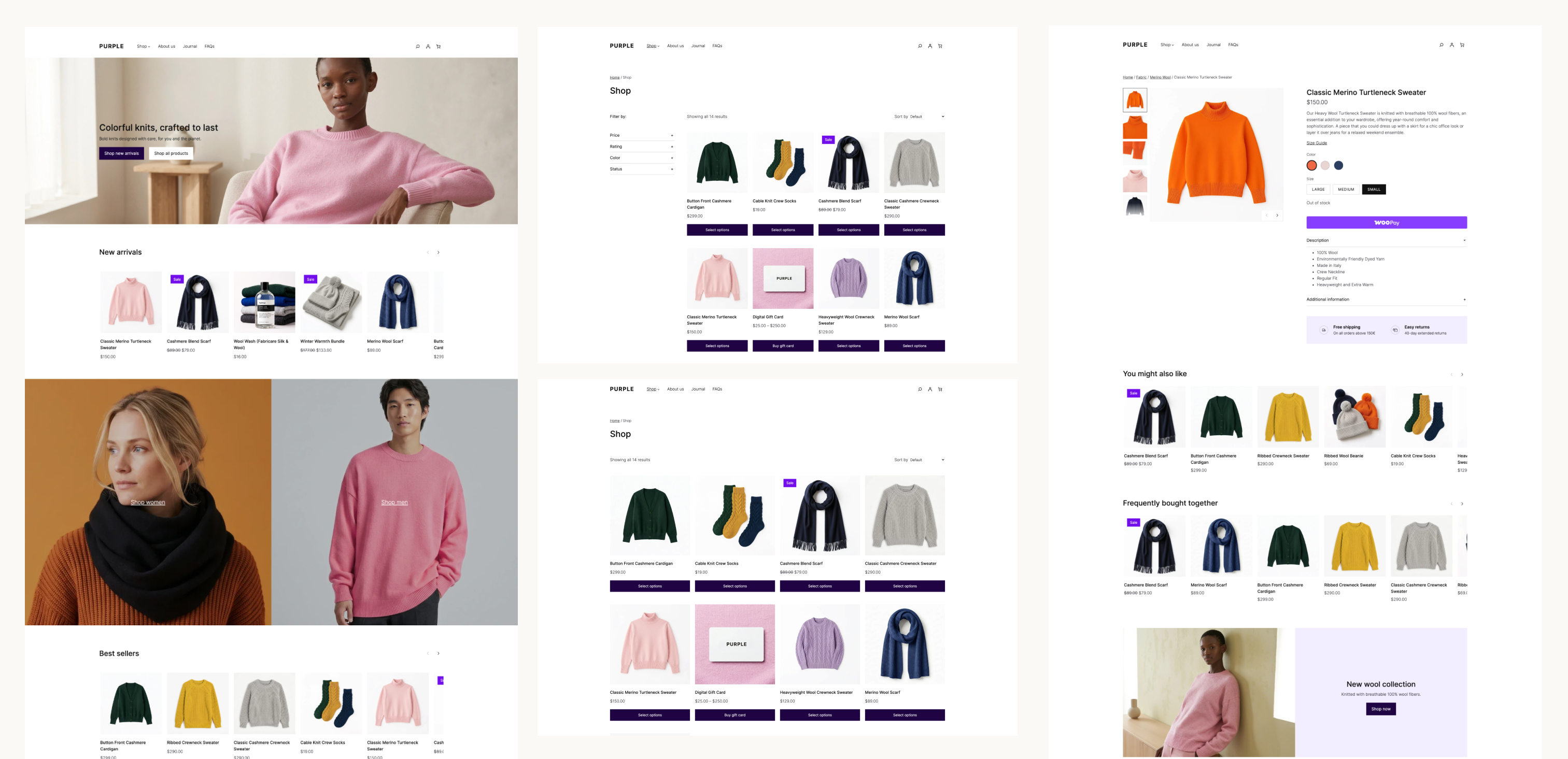
Purple is the open source WooCommerce starter theme made by Woo. The theme includes templates for most block-enabled WooCommerce pages, ten color palettes and ten font pairings, and custom styles for WooCommerce and WordPress core blocks. It also includes a pattern library focused on ecommerce with product grids, filters, collections, call-to-actions, product detail pages, and more.
For merchants launching on Woo, Purple is designed to give your store a modern and performant starting point. However, thanks to the customization options built into blocks, developers and agencies can modify and extend the templates and styles and use the theme as a starting point for bespoke store designs.
With everything WordPress and Woo have to offer, a good block theme is intentionally lean and modular. They don’t require the traditional layers of functionality and lock-in that older theme framework typically included.
When you compare Purple to our classic flagship theme, Storefront, you might wonder where all the featured extensions have gone. When using Storefront, you might have needed extensions for product hero designs, custom homepages and product galleries, a mini-cart, or even a more advanced header and footer. With WooCommerce’s block library and the block editor, those customizations are already possible within any block theme, including Purple.
The work is landing in WooCommerce core
The larger project is the work that Purple helped drive in WooCommerce core: more granular style controls in blocks, templates that showcase your product catalog, and an easy path to defining your store’s brand consistently across your site.
The improvements below are a small example of what’s available to any block theme that uses the affected blocks and APIs.
WooCommerce 11.0 made block themes lighter and more consistent
WooCommerce 11.0 established several foundations for the work that followed:
Pattern content is loaded on demand. WooCommerce registers patterns by file path and loads their content when the editor requests it, reducing work on requests that do not need pattern content (#65922).
Product images work better with theme settings. The Product Image block uses larger thumbnails and preserves the correct aspect ratio for cropped images (#66191, #66354).
Product collections compose more reliably. The Product Collection block now keeps the right context when nested inside a Query Loop, so its inner product blocks render correctly in composed templates and patterns (#65637).
More blocks participate in global styles. The Breadcrumbs block supports theme.json styling, including custom font sizes (#65460, #65537).
Product filters are easier to compose. The Product Filters block gained an option to disable its filter drawer and fixes synchronization across multiple filter instances (#65671, #65622).
Cart markup is more accessible. Cart table headers now expose the appropriate ARIA roles and scope attributes for assistive technology (#65364).
WordPress 7.1 introduced responsive design controls for the block editor. WooCommerce 11.1 gives those controls more useful WooCommerce blocks to work with:
Product Price supports responsive styling for typography, colors, padding, and margins, with the editor and frontend using the same responsive states (#67007).
Product Reviews now follows the WordPress wrapper used for responsive styling, so review content and the review form can reflect the styles selected for each viewport (#67360).
Product Details supports padding, margin, background, and border settings through the block and Global Styles (#67409).
Product Gallery supports custom aspect ratios and keeps the large image area and thumbnail rail in sync (#66441).
The release also completed some initial performance improvements for block registration. WooCommerce skips block and pattern registration for recognized requests that cannot render blocks, making Store API and REST requests 30–42% faster in the published measurements (#65781). This release also introduces experimental support for unified block editor assets while editing your site, with a 48.3% reduction in network transfer size.
WooCommerce 11.2 continues refining the storefront building blocks
WooCommerce 11.2 is still in development, and it contains some of the most visible examples of the theme work moving into core:
Product Filters has responsive overlay and sticky-positioning controls. The block can stay inline, switch to an overlay on mobile or tablet, or use an overlay at every viewport. The behavior works in the editor and on the frontend, respects the configurable responsive breakpoints in WordPress 7.1, and can keep filters visible as shoppers move through a product catalog (#67696, #68256).
Product Quantity exposes more styling controls. Text color, background color, border radius, and border and shadow styles can be configured through block styles. Grouped product quantity controls use the same styling model (#68040, #68000, #68148).
Product images can use theme-defined borders. The Product Image block now supports border styles, giving product grids and collection patterns another way to express a store’s visual system (#68342).
Chips are more themeable. The Chips block, used by Product Filters and Add to Cart + Options, adds typography and border-radius controls that can be styled consistently with the rest of the store (#68105).
WooCommerce patterns are easier to find and customize. The inserter category is being renamed from “WooCommerce” to “Shop,” and customized template parts no longer take priority over template parts queried directly (#67874, #67892).
This is just a subset of the most recent work done to improve the block editing experience, but Purple has been a long project, and a key factor in our work to improve the foundations of WooCommerce for all users.
How to test Purple
Please test Purple on a staging or local site. Use the latest version of WordPress and WooCommerce so you can exercise the responsive controls described above.
Install the purple directory as a theme, either by uploading a zip of that directory or copying it into wp-content/themes.
Activate Purple and open Appearance > Editor.
Review the front page, Shop or Product Catalog, Single Product, Cart, Checkout, My Account, and search templates.
Test the Product Filters block at desktop, tablet, and mobile widths. Try the inline and overlay modes, then test a custom settings.viewport configuration.
Test Product Price, Product Details, Product Reviews, Product Gallery, Product Quantity, Catalog Sorting, and Mini-Cart with simple, variable, and grouped products.
Add your usual extensions and child-theme customizations, then repeat the tests on the frontend and in the editor.
Purple is a beta. Expect the templates, patterns, and styling to continue changing as we learn from testing. Note: when downloading Purple directly from GitHub, it will not receive automatic updates.
Share your feedback
Please open an issue in the Woo Themes repository when you find a problem or have a suggestion. Include the WordPress, WooCommerce, PHP, and Purple versions; the template or block you were testing; the steps to reproduce the problem; and screenshots or a recording when the issue is visual.
Your feedback will help us improve the default WooCommerce storefront and the blocks and templates available to every block theme.
CallRail’s Meagan McLoughlin explains what to audit before/after Local Services Ads migrate into Google Ads, from historical reports to tracking numbers and lead quality.
Count AI marketing's hidden rework and maintenance costs before claiming efficiency gains, or risk repeating programmatic's mistake and starving long-term strategy.

 Login
Login