❌

Normal view

WordPress 7.1.4, Gutenberg 24.3, a new Studio workspace, WordPress for the Agentic Web, and more—Weekend Edition 379

Howdy,

First things first: if you haven’t updated to WordPress 7.1.4, do that before reading any further. The October 28 security release fixes more than a dozen issues, including a weakness in the upgrade process that could lead to remote code execution and stored XSS in several blocks and the Interactivity API. The fixes were backported all the way to the 4.7 branch, so don’t forget about those older sites you maintain.

Running a store? WooCommerce had a busy week, too. WooCommerce 11.2.2 is a security release with a database update, and there’s a separate security update for WooPayments with a table of fixed versions for each release line.

As for me, I’m just enjoying the autumn weather. It feels like we’ve finally shed off the days of summer heat in Alabama. And that means it’s fall festival season. I’ll see if I can find one or two to enjoy in the coming weeks.

With that, let’s get down to the latest news.

Your friendly neighborhood developer advocate, 🍂
Justin Tadlock


Developing Gutenberg and WordPress

WordPress 7.2 is one step closer. David Baumwald announced WordPress 7.2 Beta 4 on November 3. Beta 3 shipped inside the 7.1.4 security release. This round continues the work on the Abilities API and DataViews extensibility, and it improves focus visibility in Windows High Contrast mode. Translation updates also show up individually on the Updates screen now, so you can choose which ones to install. Beta 2 laid the groundwork for much of this, adding server-side registration for DataViews and DataForm and moving the admin to SVG icons.

The final release is still set for December 8. Spin up the Beta 4 Playground instance to test, or run wp core update --version=7.2-beta4 on a staging site.


Formatting no longer stops at the edge of a block. In What’s new in Gutenberg 24.3, George Mamadashvili shows how you can now select text across several blocks and format all of it at once. Notes pick up emoji reactions, and the Media inserter moves onto the same DataViews component behind the Site Editor’s lists. Failed saves finally explain themselves, too, with a copy button for sharing the details. The release carries the security fixes from 7.1.4, so update the plugin if you run it. The 24.4 release candidate followed on November 3.

Getting ready for WordPress 7.2

Dashicons are on their way out of the admin bar and menu. In WordPress 7.2, those icons are inline SVGs, and Ashar Fuadi explains what the SVG icon change means for plugins and themes. Most code needs nothing. But admin color schemes and anything that styles or hides icons through ::before will need a small CSS update, and the post has before-and-after rules you can copy. There’s a new API, too: add_menu_page(), register_post_type(), and admin bar nodes now accept a registered icon name like core-admin/pin.


Visit /random/ on a 7.2 site, and you’ll land on a random published post. Aaron Jorbin details the new random content endpoint, which also works for categories, tags, authors, and custom post types. It’s on by default, with a new randomable argument for post types and a wp_enable_random_content_redirect filter to switch it off.

It hasn’t landed quietly. Dozens of comments push back on the on-by-default choice, citing hidden content that could surface (Core still has no noindex option), ORDER BY RAND() load on large sites, and agencies now facing an must-use plugin across hundreds of sites. Matt Mullenweg has since agreed it shouldn’t use the page URL structure, so expect changes before 7.2 ships.


Anne McCarthy pulled several features still in development into one prototype for imagining the near future of collaboration in WordPress. It combines the 7.2 Notes features, suggestion mode, and the Presence API with a small workflow plugin that blocks publishing until every open note and suggestion is resolved. She purposely left real-time collaboration out to show how much works without it. She also shares the full prompt she used. Borrow it and build the demo yourself. Watch for an upcoming call for testing on suggestions.

Feature Notifications get a design, and some pushback

Plugins have spent years shouting over each other with admin notices. Exploring a design for Feature Notifications, from Poli Gilad, proposes a single notification bell on every admin screen, in the editor, and on the front of the site, with plugins sending data rather than layout. Existing admin notices keep working.

Screenshot of proposed feature notifications dropdown with tabs for different types of notifications.

That last point drew the most criticism. Matt Mullenweg argued that the proposal does nothing about today’s notice spam and that the fix needs directory guidelines, enforcement, and incentives, not only a new interface. He backed David Perez’s suggestion that plugins declare each notice’s intent (operational, setup, or promotional) as a requirement.


On the code side, Jonathan Bossenger’s weekly update for October 30 reports that the notification repository is now scoped per user, laying the groundwork for the REST API. Prefer to watch the work happen? His Friday live stream includes testing the plugin in Studio and the AI-assisted workflow he uses for reviewing PRs. He also holds office hours in the Feature Notifications Slack channel on Thursdays at 10:00 UTC.

Prototypes from Dave on WP

The block toolbar has picked up a lot of buttons over the years. Dave Smith asks whether this is the end of the block toolbar and demos a consolidated version inside his Create Not Learn prototype editor. In about eight minutes, you’ll see how grouping those controls could make everyday formatting quicker and more consistent without giving up any of the editor’s power. The video description has a Playground link, so you can click around it yourself.

He also took a first look at drag-and-drop grid building, pulling Andrei Draganescu’s work-in-progress free-form grid into the same prototype. You can drag, resize, snap, and rotate blocks on a grid, and that demo has its own Playground link.


Release roadmap posts have kept roughly the same shape for three years. Anne McCarthy wants to know whether they still work, and she’s asking everyone from Core committers and extenders to hosts and everyday users to help shape future release roadmaps by November 16.

Plugins, Themes, and Tools for #nocode site builders and owners

WordPress Studio is now built around a conversation. Rich Tabor introduced a new workspace for building with WordPress, where you describe the site you want and an AI agent builds a first version next to a live preview. It offers four looks, then four layouts, and saves your choices to a DESIGN.md file so later chats keep the same design. You can pin notes on the preview with Annotate, bring your own Anthropic API key, or connect Claude Code, Codex, or Cursor over MCP. It’s a free desktop app for macOS, Windows, and Linux.

For a hands-on take, Elliott Richmond writes up what’s changed since his first look, along with one fair caution: the agent can now edit your live site directly, so building locally first is still the safer habit. Rich also shared why he rebuilt Studio on his own blog, and Nick Diego recorded a quick video overview of the new design and agentic features.


Stores running WooCommerce’s Purple theme are about to get more design control. In the WooCommerce 11.3 pre-release post, Brian Coords highlights color, spacing, and border controls curated for each block, including Product, Featured Product, Featured Category, and Product Categories List. The On-Sale Badge block can show the discount as an amount, a percentage, or custom text, and Product Gallery swiping on mobile now follows your finger naturally. The beta is out now, with the final release scheduled for the week of November 9.


Two new short tutorials from WordPress.com cover blocks you’ll use on nearly every site. The Columns block walkthrough builds grids, feature sections, and pricing tables, including column widths and stacking on mobile.

The Query Loop block video shows how to choose which posts appear, then sort and filter them, in about two minutes. Bookmark both for the next time a client asks how it’s done.

Theme Development for Full Site Editing and Blocks

Ipsum, the default theme shipping with WordPress 7.2, is easy to mistake for a simple theme. Carlo Daniele’s dive into the Ipsum theme and how to extend it for Kinsta shows what’s underneath. Templates hand their layouts to hidden patterns, around 60 patterns ship with it, and the default text colors reach a WCAG AAA contrast ratio.

My favorite detail is its use of the Block Bindings API: a comments call to action changes its text depending on whether the post already has comments.

 “Keeping up with Gutenberg – Index 2026” 
A chronological list of the WordPress Make Blog posts from various teams involved in Gutenberg development: Design, Theme Review Team, Core Editor, Core JS, Core CSS, Test, and Meta team from Jan. 2024 on. Updated by yours truly. 

The previous years are also available:
2020 | 2021 | 2022 | 2023 | 2024 | 2025

Building Blocks and Tools for the Block editor.

PHPStan can’t check a call to a class it has never seen, so code that integrates with other WooCommerce extensions usually gets skipped or baselined. Ján Mikláš introduces automated PHP stubs for Woo extensions, a woocommerce/php-stubs package generated from extensions on the WooCommerce Marketplace and WordPress.org. The stubs are public on GitHub and Packagist. If your plugin or theme talks to other Woo extensions, you can check those calls without installing every extension in your analysis environment.


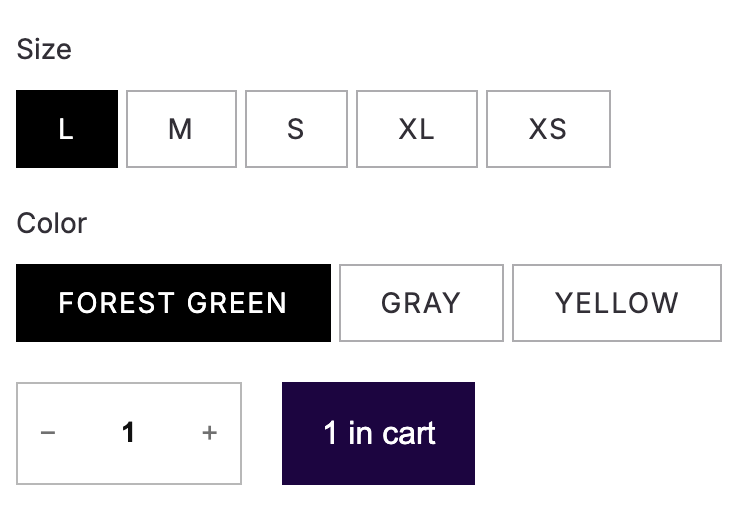
WooCommerce 11.3 fixes a confusing count for stores that sell bundles. When an extension adds a product to the cart as part of a bundle, the Product Button says “1 in cart” even though the shopper never added it on its own. Luis Herranz explains declaring parent-child cart item relationships through a new woocommerce_store_api_cart_item_parent_item_key filter and a parent_item_key field in the Store API. WooCommerce never marks items as children by itself, so it’s up to your extension to declare them. Today only the button count uses it, but the Cart and Mini-Cart blocks could someday nest child items under their parents.

What’s new in Playground?

You can now test changes on a copy of your real site without a local server. Fellyph Cintra details how to clone your WordPress site in Playground with Reprint. Install the Reprint plugin on your live site, authorize Playground with a migration key, and you’ll have an editable copy in your browser. Nothing you change there gets published to your live site. It’s handy for trying a design change, checking a plugin update, or tracking down a bug. Not ready to connect your own site? The post links to a public demo you can clone first.


Playground’s building blocks aren’t only for WordPress anymore. In Joomla Playground: shared PHP tools beyond WordPress, Fellyph Cintra looks at Herman Peeren’s community project, which runs Joomla in a browser tab on the same @php-wasm packages and mysql-on-sqlite library. The interesting part is what comes back to WordPress. A different CMS sends different queries and workloads through those shared tools, surfacing compatibility and performance issues both projects can fix.

AI in WordPress

Imagine telling your AI agent, “Help me with my example.com site,” and it recognizes WordPress, asks you to authorize it, and gets to work. That’s the experience behind WordPress for the Agentic Web, the AI team’s plan from Jason Adams. It lays out four areas of work: a more reliable MCP Adapter that could move into Core, a baseline set of Abilities for common site tasks, OAuth so you don’t have to paste Application Passwords into an agent, and an end-to-end user experience tying them together.

The 7.2 cycle lays the foundation, and 7.3 is the target. Each area still needs a lead, so now’s the time to raise your hand. Not everyone in the comments is sold on MCP-first, though. Adrian Mörchen argued that most agents already work fine over the REST API and that filling its gaps should come first, and Jason replied that Abilities serve both routes. The October 28 contributor summary covers the first discussion, with Tammie Lister volunteering to lead UX, and The Repository has its own take on the plan.


Six new experiments landed in AI 1.5.0, the canonical AI plugin, and Jeffrey Paul breaks down each one. Text to Speech generates an audio version of a post, and Content Verification detects C2PA Content Credentials in uploaded images. MCP Access installs the MCP Adapter and adds a Tools → MCP Access screen where you decide which Abilities agents can see. The other three are WebMCP, Revision Change Summary, and Block Container Label Generation. If you’re following the Agentic Web work, MCP Access is the one to try first.


Through the end of November, free WordPress.com sites can connect to ChatGPT or Claude at no cost. Full access normally comes with a paid plan. Alexa Peduzzi notes that both connections run on MCP, so after a one-time setup you can ask your AI to save a draft, clear out comments, or suggest what to fix this week. The post includes ready-made prompts that open in either tool. Not interested? Connecting is entirely optional, and a WordPress.com reply in the comments points to the separate Prevent third-party sharing setting for anyone worried about AI training on their content.


AI prototypes that ignore the design system keep landing on designers’ desks. In working towards higher-quality agentic experiences, @leilabyron shares the 13 best practices Automattic Design wrote for agentic interfaces, grouped under capturing intent, showing the work, and building trust. The guidance doesn’t stop at a list: an agentic-design-brief skill picks the practices that matter for a feature, and an AGENTS.md file gives coding agents explicit rules. One rule worth stealing: ask when the request is genuinely ambiguous, and don’t ask when the answer is already clear.


What happens when an AI feature gives a wrong answer or lets a prompt injection slip through? At WordPress Day for AI Faro 2026, Ivelina Dimova shared how to use guardrails and evals for AI features in WordPress to test quality before anything reaches production. Anyone adding AI features to client sites should pair it with the Automattic Design post above. The slides are linked from the video page.

Need a plugin .zip from Gutenberg’s master branch?
Gutenberg Times provides daily build for testing and review.

Now also available via WordPress Playground. There is no need for a test site locally or on a server. Have you been using it? Email me with your experience.


Questions? Suggestions? Ideas?
Don’t hesitate to send them via email or
send me a message on WordPress Slack or Twitter @bph.


For questions to be answered on the Gutenberg Changelog,
send them to changelog@gutenbergtimes.com


We went looking: what Woo has done about security since June

If you run a WooCommerce store, or build for people who do, you’ve seen more security updates from us over the last few months: core patch releases, extension updates, and a PHP advisory. I want to explain why that’s happening, what we’ve been doing about it, and why I think the result is a stronger platform. 

In short: AI tools have made finding vulnerabilities much easier, for everyone. Researchers are pointing them at our code, but more importantly, so are we. We chose to go looking, and a wave of fixes is keeping WooCommerce a secure platform for your commerce needs.

The rest of this post covers what changed, what we’ve put in place since June, how fixes reach your store now, and what you should do. If you just want the checklist, skip to, “What to do now”.

AI is making security vulnerabilities easier to find

Security has always been important to us at WooCommerce (and our parent company Automattic). Besides maintaining a bounty program via Hacker One, at various points in previous years we’ve also done our own internal security focused research through the codebase to find and fix vulnerabilities. It is also an important part of every review code goes through and we have used various tools like PHPCS, and PHPStan to help with static review around best practices for secure websites.

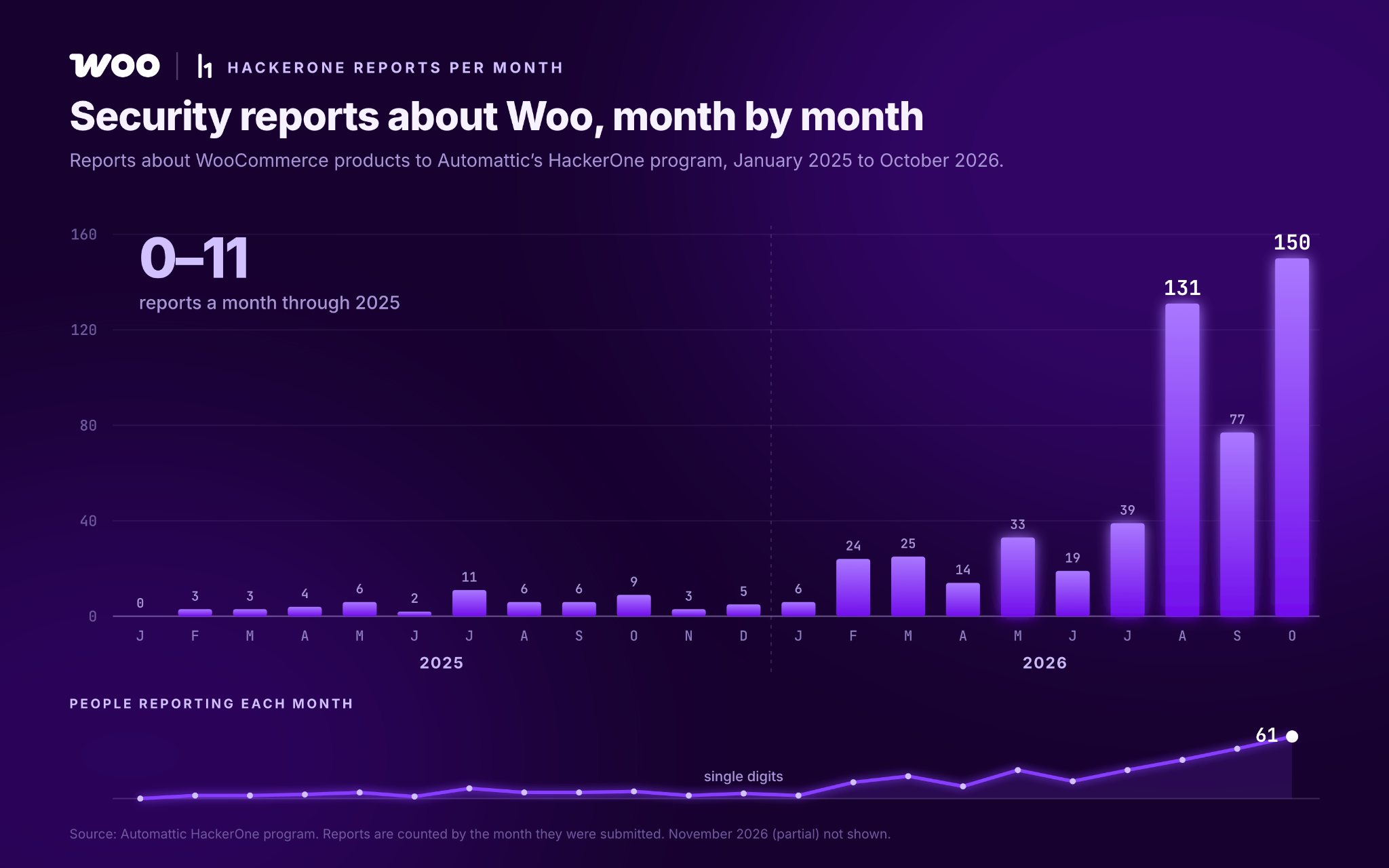
However, for anyone following the changes AI is bringing to the tech industry, you understand the impact LLM intelligence is having on the security of every piece of software. Over the last year, reports about Woo products through Automattic’s HackerOne program increased  roughly nine times. Duplicates jumped as well which indicates that lots of people are pointing similar AI tools at the same public code, and they’re finding the same things.

We’re not alone. WordPress launched its Core Security Initiative in August in response to an even greater rise in incoming reports, and the wider open source world is seeing it too. That attention is one of open source’s real strengths. Anyone can read WooCommerce’s code, which means anyone can check it, and right now a lot of people are. Closed-source software has the same kinds of bugs but fewer people are allowed to look for them, and you rarely see the fixes. With open code, problems get found sooner, fixes ship in the open, and anyone can verify what changed.

Two things are worth knowing about that volume. 

First, most of it isn’t urgent: about three quarters of the valid issues we’ve tracked in WooCommerce core since July are Medium or Low severity. These are a class of issues that on their own are still valid, and need addressed, but the vulnerability either requires a specific set of conditions to exist, or the impact of an exploit based on it is minor.

Second, every report still needs a person to verify it, fix it, test that there are no undesired side-effects from the fix, and then ship the fix. We’re working on streamlining this process too, but given the importance of WooCommerce as a platform for commerce across hundreds of thousands of stores, it’s important we get things right.

Our scans are finding vulnerabilities before external reports arrive

The bigger change over the past year is what we do before anyone reports anything. Security work used to be mostly reactive (outside of regular human review checks on PRs): a report came in, we fixed it, we shipped it. Since late May, we’ve been aggressively switching to a more proactive approach:

  • In July, we ran a tailored AI-assisted review across a full year of WooCommerce releases to test it against history. This review caught every high-severity issue we already knew about, which gave us the confidence the initial setup could be used more broadly for ongoing detection.
  • In August we ran deep scans across the WooCommerce monorepo and the extensions we maintain. These scans flagged roughly 700 potential issues. Raw scanner output always includes false positives, so teams validated each finding and fixed the ones that remained.
  • Since August, every merge to WooCommerce core’s trunk and release branches gets an automated security scan with powerful LLM models. Every merge to trunk also gets an AI powered regression review. Since August there were 34 security related issues surfaced by this scan and of those 18 turned out to be valid.The regression review has also prevented a large number of flaws from ever getting into a release and we’re currently seeing roughly a 77% “valid” rate across findings.
  • In October we enrolled WooCommerce, and an initial batch of our extensions in Anthropic’s OSS Scanner program, and more of our extensions are in line. In the initial batch, Anthropic flagged roughly 200 findings across all the enrolled projects. Within the platform software itself, about 90% were deemed valid after triage, and those fixes are shipping in 11.2.2 and 11.3.1. We’re also looking into other frontier model open source programs when they become available to supplement our own internal scanning work.

As a result of the above efforts, our own scanning and the scanner programs we opted into have turned up more than twice as many valid core issues as external reports have. We’re also increasingly finding things before a report comes in (and closing reports that come in as duplicates of what we’ve already discovered and are addressing). This is a pretty important signal because we’d much rather find a problem in our own scans than in a report.

We’ve also learned that no single scan finds everything. Even if we fix every finding from one pass, the next pass (often with better models, or learning from previous scans and the validation loop) will turn up more. Which is why we have automated scans running on our codebases.

AI triages reports; people verify issues and approve fixes

The volume of fixes that we are seeing would typically bury a team that handled every report by hand. And based on the latest indicators we see across the industry, this volume is likely to continue to rise in the short term. The latest models are continually getting better than humans at finding arcane and hard-to-spot exploits, sometimes chained together across multiple seemingly minor flaws to escalate severity, and at a rate that is impossible for humans to keep up with using the processes of 6 months to a year ago.

Which is why our defense has to be powered by LLMs as well. Across Automattic, incoming reports now get an AI first-pass assessment within minutes through a specialized tool we’ve built called SentrySift, so people spend their time confirming severity, and working with agents to create fixes instead of sorting inboxes. Automation prepares the work. People decide severity, review every fix, and approve anything that goes out. 

Security fixes now ship in dedicated patch releases by default

We’re also improving how security fixes ship. Through the summer they mostly rode along with regular releases (outside a few planned patches). That had a cost we don’t like: if a feature release had an unrelated regression, rolling back a staggered release meant losing the security fixes too. Which is problematic because the vulnerabilities have been publicly disclosed already.

Now our default is to give security fixes their own releases:

  • Critical and High severity fixes ship in the next patch release on the current released version.
  • Medium and Low severity fixes ship in the patch release after the next minor version.

While that’s the new default, it’s not a hard rule. When our testing gives us enough confidence and a fix is important enough, we’ll still ship it in a regular release. WooCommerce 11.2.2 is the first release under this new approach, and 11.3.1 will follow 11.3.0 with the next set. The point is smaller, predictable updates you can apply quickly, separate from new features. 

Extensions get the same attention. We published security updates for Stripe for WooCommerce in August and WooPayments this week. There’s also a new way for those fixes to reach you, covered in the next section below.

Under our Security Patch Support Policy, the most severe issues will be considered for backporting to older major versions. Everything else ships in the latest release only. 

Required security updates install automatically on eligible connected stores

This change is a really valuable one as a part of providing a great security posture for our merchants. In August we fixed a vulnerability in WooCommerce Subscriptions eight days after our own scanning found it. The fix was ready, but we had no way to get it onto stores that don’t update on their own. All we could do was publish it and ask people to install it.

Starting with WooCommerce 11.2, WooCommerce.com can mark an extension’s security release as required. Connected stores with an active subscription then install it on their next update check, usually within a day, even if auto-updates are turned off. WordPress.org already does this for critical plugin updates on plugins hosted in that directory. WooCommerce only uses it for security fixes, and only after the developer has published the fixed version. A store that’s set up to block automatic updates  programmatically can still do so.

This protection is available for all extensions available through the WooCommerce Marketplace, on stores connected to WooCommerce.com with an active subscription. That’s one of the best reasons to buy extensions via the official marketplace and keep that connection in place: when something serious turns up, the fix comes to you instead of waiting for you to notice it.

Your PHP version and hosting need security updates too

The PHP security release in October was a good reminder that WooCommerce is one layer of many. Those vulnerabilities affected any server running PHP, and no WooCommerce update could fix them. Stores on Automattic hosting were already protected; everyone else needed their host to act.

PHP versions before 8.2 no longer get security updates from the PHP project. WooCommerce 11.3 adds an admin notice for stores on PHP 7.4 and 8.0, 11.5 is the last release that supports them, and 11.6 (February 2027) requires PHP 8.1 or newer while we recommend 8.3 or newer. Most stores are already there: about 9% of tracked stores run 7.4 or 8.0, and closer to 6% among stores updated in the past year. 

Security fixes take priority, delaying some planned features

Right now validated security work takes priority over everything else on our roadmap, and unfortunately at the moment that does mean some of the work we have planned across our products has been delayed to make room. I think most readers will agree that’s the right trade. Adding new features in the software have no value if you can’t trust that what has already shipped is safe, and secure.

What we’re working on now is making the impact of this new elevated security challenge something that is routine for us, instead of all hands on deck. We’ve already proven many of the separate pieces work, and we’re continuing to iterate and streamline the gaps that still exist. The goal is simple: make Woo a hard target, without stopping everything else to do it.

Update your software, keep extensions connected, and check PHP

If you maintain an extension, scan your own code before someone else does. If you distribute your plugin through WordPress.org or WooCommerce.com you already have scanning against every release.

For merchants managing their own stores, or a developer/agency maintaining store for clients, the following items are important contributors to a good security posture:

  • Keep WooCommerce, your extensions, and WordPress up to date. After a security update, check the installed version even if automatic updates are on.
  • Buy extensions through the WooCommerce Marketplace, keep your store connected to WooCommerce.com, and keep your subscriptions active, so critical fixes can reach you on their own.
  • Check your PHP version under Tools > Site Health > Info > Server, and plan a move to PHP 8.3 or newer. If you’re already on one of Automattic’s hosting options (VIP, Pressable, or WordPress.com), you’re already covered! Otherwise, confirm with your host that they’ve applied the latest PHP security releases.
  • Check every site you manage, including publicly accessible staging and development sites. One updated site tells you nothing about the others.
  • Test against release candidates so a security patch release is a non-event for your store environments. This includes testing against release candidates of WordPress (did you know WordPress 7.2 Beta 4 is available)?
  • Found a vulnerability? Report it privately through Automattic’s HackerOne program, not in a public issue.

To everyone who has reported an issue responsibly this year: thank you. More eyes and faster fixes is how open source is supposed to work. Let’s keep this collaboration going.

The post We went looking: what Woo has done about security since June appeared first on The WooCommerce Developer Blog.

WooCommerce 11.2.2: Release notes

Dot Release

WooCommerce 11.2.2 is available now

This dot release is now available for download. Review the fixes below.

Updates

  • Store API and REST API hardening
  • Improved validation of CSV data
  • Admin endpoints are more secure
  • Released: November 04, 2026
  • Security update: Yes
  • Database update: Yes

What’s in this release

WooCommerce 11.2.2 is a security release with multiple security updates. We strongly recommend updating as soon as possible. This release contains:

  • Additional hardening of Store API cart item quantities, REST API key authentication, and checkout tax calculation for local pickup.
  • Hardened how product default attributes are updated when a global attribute term is renamed, and how they are read. This release includes a database update to clean up affected data.
  • Hardened Store API checkout so an order that could not be saved does not go on to payment.
  • Hardened the decoding of payments profile data.
  • Improved validation of the product CSV importer’s column mapping.
  • Hardened the admin connection endpoints.
  • Each Store API checkout request now starts with its own order and payment data.
  • The cart now ignores attributes that the product does not use when a shopper adds it.
  • Fixed PayPal Standard shipping address updates so shipping and tax are recalculated correctly.

Additional Notes

  • Store API checkout now stops if the order fails to save. If an extension’s callback on woocommerce_before_order_object_save, woocommerce_new_order, or woocommerce_update_order throws during Store API checkout, checkout now returns a 500 error. Before, it carried on with a partially saved order. save() itself still does not throw.
  • Two wc-admin connection endpoints now require an administrator browser session. onboarding/plugins/jetpack-authorization-url and plugins/connect-jetpack now need a logged-in cookie and a wp_rest nonce on top of the capability check. Requests using REST API keys, WP-CLI, or application passwords get a 403. The wc-admin client isn’t affected.

The post WooCommerce 11.2.2: Release notes appeared first on The WooCommerce Developer Blog.

#240 – Martin Schmidt on Building Partnerships Between WordPress Product Makers and Hosting Companies

Transcript

[00:00:19] Nathan Wrigley: Welcome to the Jukebox podcast from WP Tavern. My name is Nathan Wrigley.

Jukebox is a podcast which is dedicated to all things WordPress. The people, the events, the plugins, the blocks, the themes, and in this case, building partnerships between WordPress product makers and hosting companies.

If you’d like to subscribe to the podcast, you can do that by searching for WP Tavern in your podcast player of choice, or by going to wptavern.com/feed/podcast, and you can copy that URL into most podcast players.

If you have a topic that you’d like us to feature on the podcast, I’m keen to hear from you and hopefully get you, or your idea, featured on the show. Head to wptavern.com/contact/jukebox, and use the form there.

So on the podcast today we have Martin Schmidt.

Martin has been deeply involved in the WordPress and hosting industries since 2005 when he created his first WordPress travel blog while living in New Zealand. Over the years, he’s developed websites for small businesses, spent 13 years with IONOS in various management and strategy roles, and built partnerships at Wix, and a German SaaS company.

Most recently, Martin has focused on connecting WordPress plugin companies with web hosts, helping both sides unlock growth through smarter partnerships.

Today, the conversation focused on the often overlooked world of partnerships between plugin developers and hosting companies. Martin shares insights from his two decades of experience on why hosting providers are the perfect allies for WordPress product makers looking to grow, given their established relationships and marketing channels to large customer bases.

We talk about the curious fact that many plugin builders put enormous effort into their products, but stumble when it comes to sales, marketing, and building the business relationships necessary for broader success.

Martin discusses what hosting companies are actually looking for in a partnership, the technical and marketing preparations plugin makers should have ready, and why empathy and preparation make all the difference when trying to connect with busy product managers.

If you’re a developer, freelancer, or agency owner interested in taking your WordPress product to the next level, or if you want a candid look at how partnerships really work in the open source ecosystem, this episode is for you.

If you’re interested in finding out more, you can find all of the links in the show notes by heading to wptavern.com/podcast, where you’ll find all the other episodes as well.

And so without further delay, I bring you Martin Schmidt.

I am joined on the podcast by Martin Schmidt. Hello Martin.

[00:03:14] Martin Schmidt: Hi, Nathan. Great to be here.

[00:03:16] Nathan Wrigley: Yeah, thank you. Martin and I do not know one another, so this is our first call, but we were joined together, on maybe LinkedIn. I’m not entirely sure.

[00:03:23] Martin Schmidt: I was LinkedIn. Yeah. Yeah.

[00:03:25] Nathan Wrigley: Probably LinkedIn, by Nicole, so thank you to Nicole for doing that, really appreciate the linking together there. And we’re going to have a conversation today about, I suppose the word to describe it would be partnerships. How to partner with various different entities, possibly hosting companies are going to come up and things like that, so.

Before we begin that conversation, Martin are you able to just give us your little bio? Tell us a little bit about who you are and what you’ve done in the hosting partnership WordPress space, whatever you think fits best.

[00:03:55] Martin Schmidt: Yes, absolutely. I’m from Germany. I lived down south in Karlsruhe. Originally from the Cologne area. Started working with WordPress actually in I think 2005, something like that. When I was moving to New Zealand and started studying in New Zealand. That’s when I spun up my first WordPress site as a travel blog. And this was my first contact with WordPress. So I think, yeah, one of the, not one of the first users, but one of the very early.

[00:04:20] Nathan Wrigley: Fairly early, yeah, pretty early.

[00:04:22] Martin Schmidt: Very early. So that’s when you still had to like download WordPress and upload it via FTP, and there was no like auto update in the WordPress admin, and stuff like that. So one of the very early users and.

Yeah, around that time, that’s also how I got in touch with like the whole hosting industry. I was a web developer myself, started in high school developing websites for small businesses. Built them for people here in Germany and then also in New Zealand while I was studying over there.

And when I got back from New Zealand, I started applying for jobs. And one was with Google, the other one was with Ionos. And Ionos answered I think within a week, and I’m still waiting for the answer from Google till today. So, they never really got back to me, but yeah, it’s somewhere in the mail, yeah.

But luckily the guys from Ionos got back to me and I think a week later I had a phone interview. Another four days later an interview in Karlsruhe. And then I started, I think two weeks later. Already started there like end of October with my first job as a product manager at Ionos.

And then spent 13 years at Ionos in various roles, in product management and the last five years in strategy. And from there I got the chance to move on to Wix. Worked for Wix.com in Germany. There was, during the COVID pandemic, I moved employers and started to work for Wix, and spent two years there building partnerships in, Europe.

Actually also put them in touch with a company called Sevdesk, which is a German accounting company, similar to Zero or QuickBooks Online. And couple of months later the CEO asked me if I was interested in joining their side, after they had raised some money and built partnerships from their side. I kept him waiting a little bit, but then after a while I decided, that’s interesting to join a German SaaS company. Something different than hosting, and online presence.

So yeah, I spent the next two years building the ecosystem around the SaaS software, like all the software that integrates with the accounting product basically.

Then end of 24, I got a call from my former boss from Ionos, who had just moved to hosting.com and became the CRO, and they also wanted to do partnerships. So, yeah, had a chat with him and with the CEO and started there in February 2025, and started building partnerships for hosting.com.

And, the main focus was really on building partnerships with WordPress companies. Just after Cloudfest, we launched the partnership with WP Rocket. Started to build quite a few more partnerships, or that were in the making. And by the end of the year, which was interesting to me, I had a lot of those WordPress plugin companies that I reached out to telling me, look, this is super interesting. We want to work with hosting companies.

We’re really glad to be working with you. We would also love to work with a lot of more hosting companies, but honestly we don’t really know where to start, and how to do this. And they really got me thinking. And then over New Years, and you know when you like, get some time to maybe reflect on the year and stuff that’s happening, this was like, it, really hit me. It’s like, well there’s so much interest of companies wanting to partner with web hosts.

And I’ve sat on the other side for some 20 years, like people pitching to me, like explaining me why their product is going to be the next big thing for me in the hosting company. And you start to see patterns of like things that people do good, and maybe things that people don’t do as well when like trying to pitch to you as a hosting company.

And I saw all this demand from these WordPress plugin companies and I was like, hey, maybe this is finally the idea of starting my own business. Like something I wanted to do for the last five years, but I never really had the idea of like what to do? Or not the idea that was convincing enough for myself to give up my corporate job.

And, once you got a house and family, I mean, it becomes a bit more difficult to just jump into the cold water, right? I guess a lot of people can relate to that. But this time it was different. I felt like this could really be something. So I started reaching out to more people in my network, and ask them, hey, I’m thinking about doing like this sort of consulting advisory thing. Do you think this is interesting? And I got a lot of positive feedback, way more than I had anticipated.

So I thought, okay, if I’m not doing this now, I will never do it. I will never try and do it. So yeah, I decided to go independent and officially started in May. And that’s what I’m doing now, like helping tech companies who want to partner with web hosts to find a way to do it.

And I always tell people that are interested in, you can do it by yourself, right? You can find it all out yourself. It’s probably going to take you like three to four years to figure out the right model, and make all the connections. Build the trust with the hosting companies. Find out the right business model. The right support model, like the co-marketing activities, all the things you need to do. Or if you don’t want to wait for four years, you can work with me and I help you take a shortcut.

And the goal is by month six that you have someone in your organisation who can take care of partnerships, and just run this by yourself. But you don’t make all of those mistakes, and all of those extra investments that don’t turn into anything.

My pitch to my customers is like, I’m helping you cut down the time to market. I’m telling you what works and what doesn’t work, and what makes a good pitch.

[00:09:49] Nathan Wrigley: Yeah, this is genuinely really interesting to me, and we’ll get into that a little bit later. But I have a different angle to you, but probably we’ll end up at exactly the same place.

I’ve been podcasting in the WordPress space for a decade. So 2016, something like that, I started. And, if you do podcasting often enough, your voice is heard, and people have this sort of expectation, if you send an email to me with a product that you’ve just launched, I will somehow have a silver bullet for making you successful.

And first thing to say is, I basically don’t. You know, I can put you on a podcast episode, but that really is the limits of what I can do.

But also what’s quite fascinating, and I honestly genuinely, I probably get about 30 or 40 of these emails a week. And the bit that stands out for me is how unprepared, let’s go for that word, how poorly prepared the email that I receive is.

So in many cases over the last couple of years, it’s clearly been written by an AI. There hasn’t been a lot of due diligence about who I am, so it kind of feels like this really, really cold call. I somehow got on an email list somehow. And it comes, you know, with all of the usual caveats. The first paragraph is telling me what I do, and I already know what I do. So like there was an AI in there somewhere.

But also it feels like they’ve got a product. Quite often I’ll go and look at the product and I think to myself, boy, that’s so good. Look at what they’ve done. Like they’ve built a plugin and it’s fulfilling a real need.

Unfortunately, I can’t really help them except put them on a podcast, but it occurs to me if only they could connect with all the right people, have the right language, know how to pitch themselves, know how their website should look so that it speaks to people that drop into it.

What I’m basically trying to build up a picture is of is that there’s loads of people out there who are building things, but clearly the building of it is the part that they’ve been interested in. And as soon as it’s built, they then have this moment of, oh, now what do I do with it? You know? And they don’t have that marketing expertise, and so they’re kind of looking around trying podcasters and what have you. And it feels like you are trying to step into that gap a little bit.

But instead of it being a podcast, you are trying to hook them up to what are the big players in the WordPress space? The people with deep pockets. The people who have reliable income month over month. And that’s the hosting companies. Have I summarised that correctly? Is that your experience as well? You get people that have got a thing, but don’t really know how to move on from the I’ve built the thing, to now I need to sell the thing.

[00:12:37] Martin Schmidt: Yes. So I think you’re spot on. And I would add there’s probably, I would say two groups. There’s the one which is maybe the builder who doesn’t know marketing, right? And we had these people before AI that were building fantastic products. But they just don’t know marketing because they’re fantastic builders. They’re tech people, but they’re missing that marketing piece.

And the one thing they don’t hire a marketing person who does it for them. I think that’s always a shame. You see this fantastic product, someone like driving a product with their passion. They’re really solving a pain point, but they just don’t understand how to sell it. Because to them it’s all clear, it’s all obvious, but you do need to translate it to people in your target audience.

So I think this is one group, and I see that also a lot with WordPress plugin companies. It feels like, coming from the hosting space, where all of the big companies are so good at marketing. Looking at WordPress companies, I feel like this is really something that they are somewhat missing.

I think the most successful WordPress plugin companies, I think that’s probably the ones that have understood that next to building fantastic product, and also needs fantastic marketing. But I think this is really the one group.

And the other one is, I would call them like lazy salespeople. They’re just sending out like sales messages. And we had them way before AI, just sending out without doing any research at all. You get messages and you look at them or you look at the product, it’s like, there’s no fit at all. I’m selling to small businesses, and you pitching me a product for enterprise customers. Like, why? You are just wasting time, right?

If your goal is to work with a company to potentially sell to hundred, thousands, or millions of customers, and that’s going to be a deal worth hundred thousands or millions of dollars, you should invest maybe an hour, half an hour, of research and just see if there’s any fit at all right. And then if you take the time to go in a meeting with me and pitch your product, do a little bit of research to just make it fit. Just this tiny bit of research will make you stand out amongst the crowd like completely.

[00:14:41] Nathan Wrigley: It feels to me in the first case as if, timing’s not really the right word, but there’s a component of timing in here. And what I’m meaning by that is, what I’m feeling is that a lot of people have spent all of their time building the thing. So that might be time, but it might be money, whatever the thing that you’ve got going on in your business.

But at no point during the time from conception, idea to completed product have they said to themselves, okay, at some point we’re going to have to market this. We’re going to have to think about it.

So maybe, and I don’t know if this is part of the sort of wisdom that you have, but it feels like maybe halfway through that process of build to complete build, you need to put the brakes on and say, okay, now we’re halfway through, let’s work in two channels now. Let’s do the, finish the build, but also at the same time, let’s do the marketing.

So I don’t know if there’s anything in there, like just put on the brakes before you finish, have some resources, have some ideas of contacts, have some marketing, have a website and all of that kind of stuff done. So that when you finish, it’s all ready to roll.

[00:15:43] Martin Schmidt: Yes. That’s definitely it. I don’t know if you have to put on the brakes, but I think it’s like, at least you as the CEO, you have to like work on two tracks. There’s the guys building the product, but then there’s also the marketing piece of it, right?

And you can have the most fantastic product if you’re not telling the story, if you’re not letting the world know. How are people going to find you, right? I think we see, I saw a stat on LinkedIn recently that there’s like a thousand plugins published on the repository every week. It’s going to be so crowded. You need to do something to stand out and to be found.

And I think that’s also with web hosts and every tech company, you can have the most amazing product, but if you’re not found, if the target audience doesn’t know about you, nobody will use your product. And you’re going to be the only user of your own product.

I think in the end, you need to master marketing to be successful with your business. And it’s not just about the best product. And, I think that’s the important message here. You don’t need to know marketing yourself. Just hire someone. There’s so many people specialise in marketing. Just get someone on board who knows marketing and who understands a little bit of tech to get why your product is so special, and who’s able to translate that into a customer pain point, and figure out how to sell it. that’s really it.

[00:16:58] Nathan Wrigley: So we’ve done podcast episodes on this podcast before where we’ve talked about partnerships in a different way. We’ve talked about partnerships in terms of plugin Company A joining with plugin Company B, because they’ve got similar enough products that they kind of overlap, and they can help each other out and mutually market and do marketing campaigns together and things like that.

But that’s not what we’re talking about here. We’re talking specifically about going to hosting companies. So I guess the first question is, why go to hosting companies? What is it that they bring? I suppose the obvious answer is they’ve got bajillions of customers. In many cases, you know, some of the big hosts, if you can forge some sort of relationship with them, goodness knows, you know, maybe they literally have millions of customers. But why have you made hosting companies the bit of the half of this jigsaw puzzle?

[00:17:45] Martin Schmidt: Yes. beside me coming from hosting and knowing hosting, which was kind of like, make it a bit easy to decide for hosters. But I think they also play an important role. In the end, if a small business wants to run a website, they need to host it somewhere. They decide for hosting company. They get their WordPress site spun up. And then, that’s where usually in the next step you would go with like certain plugins. Like for SEO, performance, backup, security, translations, whatever your use case is, right?

As you mentioned, the hosting company is the one that has all of the relationships with the customers. And unlike the WordPress companies, who are not allowed by the repository rules to directly market to their customers via email and things like that, they can only use popups inside the WordPress admin.

One thing that the host is free to do, they can call the customers, they can send text messages, they can send them emails. They can do all of the up and cross sell marketing to their customers. And I think that’s one advantage that the hoster has that they can bring to the table, beside all of these customer relationships, right? They can really do the full blown marketing to those free users, to push a premium version of the plugin.

[00:18:59] Nathan Wrigley: Okay. So it’s not just visibility within the platform of, I don’t know, you’re at the point of it installing a plugin because you’ve got a brand new WordPress website. And look, here’s a bunch of partners that we’ve got, you may be interested in those.

That’s one piece of it. But there’s also this sort of marketing side. Presumably just like every company on earth, web hosting companies are as keen to keep front of mind as any other company. So if they can come up with a good, and I’m doing air quotes, excuse to send out an email, they’ll do that. And why not send out an email because we’ve onboarded a new partner and, you know, have you thought about doing this with your website? It turns out we’ve got a partnership with this particular plugin company.

I’m guessing there that the ability to send out emails is something, you know, to keep front of mind is something that the web host would want to do. But what’s in it for the web host? Like if I was a plugin company coming to a web host, I would want to have in my mind, okay, these are the kind of things I know they’re looking for. What are they, what do the web hosts want in return?

[00:19:55] Martin Schmidt: Yeah. So a lot of web host will tell you, hey, I want new customers, and that’s what I usually tell the web hosts. This is something you can’t expect from the WordPress plugin company. Because they are like in the later stage of that decision process. So the customer decides for the plugin a lot later than they decide for the host. So it’s not fair to ask the plugin company to bring in new customers to the web host.

But what they can do and what the WordPress plugin company can help with is, A, make the product a lot more attractive. They’re web hosts that sell hosting bundled in with plugins like WP Rocket. So the product itself is more attractive from the get go.

And if you don’t bundle it in the start, you can also help solve certain customer pains that make the customer more happy, therefore more sticky, right? So you prevent churn. As a host, you reach like a hundred thousand, 200,000 customers. You really need to work hard that your new customer growth isn’t eaten up all by churn. Making your customers sticky and drive up the revenue per customer, that’s in the interest of the web host, right? And, with a certain size, increasing that revenue per customer also becomes very important and interesting for the web host.

So I think that’s where the plugin company can come in and help the web host. They won’t just partner with any plugin. The plugin needs to solve a certain pain point for the customer. So this could be performance, this could be SEO, this could be accessibility. So these are challenges that the customers of the web host are actually faced with. And the plugin is simply a solution to that pain point.

So the hoster has an answer to that question of their customer. They’re in the role of the trusted advisor to their customers. And if the customer says, look, I’m running a website on your servers. I need to now be in compliance with the accessibility requirements in my country, or I need to do certain things. Then there’s the answer. Let’s use WP Rocket for performance. Here’s a partnership that we have with them, right? And that’s where the plugin company can come in and help the host.

Beyond that, obviously joint co-marketing will also help the hoster. And obviously if you talk like Ionos, GoDaddy or Newfold, I mean they’re massive, like they have millions of customers. So probably what a plugin company can bring to help them in co-marketing is not going to make a huge impact. There’s hundreds of hosters with hundred thousands of customers. For them working with one of those plugin companies can still be very interesting in doing like joint co-marketing, and getting the word out.

[00:22:32] Nathan Wrigley: That’s interesting. In the back of my head, when we were talking until just now, for some reason I was thinking about all the big hosts. You know, the ones that you’ve all heard of with the millions of customers. But of course that’s not the case, is it? There are thousands of smaller hosts.

[00:22:47] Martin Schmidt: Yes.

[00:22:48] Nathan Wrigley: Who may be more amenable to this kind of thing because, well, Idon’t know, they just don’t have that sort of scale that they need to worry about. And, you know, they’re looking for opportunities because they themselves are looking to grow in different ways that perhaps the other big hosts don’t have to think about quite so much.

Okay. So that’s interesting. So, you know, if it doesn’t fit one hosting company and you get a silent wall from all the big ones, that doesn’t mean you’re out of the game. It may be that the smaller hosts with different staff, and a different approach, and different geography and things like that, they may be more amenable to that.

[00:23:21] Martin Schmidt: Yes, absolutely. And I will always tell my clients, I know that GoDaddy, Ionos and Newfold look very interesting because their publications, that they have millions of customers, but you don’t want to start with them. It’s going to take you three or four years to get a deal done if at all. If you start with them, I mean you’re going to give up frustrated halfway through probably.

So start with the smaller guys. They’re more approachable, right? They may be less busy. You mentioned that you get like 30 emails a week. That’s what the everyday of a product manager at an Ionos or GoDaddy looks like as well. They get pitches all the time. Getting some air time with them is nearly impossible.

Start with the smaller guys and they’re going to be a lot more open to discuss with you. And start some smaller partnerships. Work through the teething problems of partnerships with bigger companies, right? Build some track record. And once you’ve established a track record, you can work your way up, right? Every hoster has a competitor that’s bigger and one that’s smaller. Once the smaller competitor starts doing something, they will notice, and they will look like, why are these guys partnering with plugin company XYZ? Should we be doing the same? So you kind of like work your way up to the bigger guys and the bigger guys, right?

[00:24:34] Nathan Wrigley: Yeah.

[00:24:35] Martin Schmidt: Everyone is watching the other guys and watch what they do. So it’s, once you start working with some of them, the rest will start like, oh, this is interesting. If X, Y, Z worked with them, maybe we should too. That’s how you build the traction, but you need someone to start, right? And that’s probably not going to be the biggest guy.

[00:24:53] Nathan Wrigley: Yeah, and again, I hadn’t really thought about that, but yeah, the, sort of looking over your shoulder if you’re a hosting company, seeing with perhaps jealous eyes, oh look, they’re getting loads of attention out there on social media because they’ve formed this relationship. And their emails are going out, and people are making comments on their tweets and their blog posts and things like that. Oh, we should definitely get a bit of that. Okay. That’s, really interesting.

So if somebody approaches you, then let’s say they’ve got a plugin. Let’s just assume that it’s a plugin that is useful and that a hosting company would be interested in it, if they had everything wrapped up correctly. What would be some wisdom that you would drop in terms of how to wrap it up? Like, how prepared do you need to be? What are the kind of things that you expect plugin developers to have ready, so that on day one, when you do your first outreach to the first hosting company, you feel confident that, okay, I’ve got a good client here, we’ve got a good chance. What are the bits and pieces that you need to have them have done?

[00:25:50] Martin Schmidt: I think on the technical side, I mean they will need to have some sort of like provisioning enabled. The host would probably want to sell the plugin themselves within their billing engine, and their system. So they will need some sort of provisioning to your system to say look, someone bought a licence and this licence needs to be valid and stuff like that.

So, this integration and that usually, I mean, if you don’t have that, it probably takes you a few months to implement that. So that’s something like, I would really start first and built these kind of things.

The other stuff that I think the plugin company should have ready is, what’s your proposition to the web host? And what’s the proposition of your product to the web host customers? I always tell my clients like, don’t make the other guys think. Tell them. Show them that you thought about it. Coming back to our earlier point about people being unprepared, don’t be that unprepared person. Like once you get some air time with these guys, tell them what your product is. Tell them what your product, or your company can do for the web host. But also tell them how they should be using your product and marketed to their customers.

[00:26:56] Nathan Wrigley: Kind of spoonfeed them basically.

[00:26:58] Martin Schmidt: Yes.

[00:26:59] Nathan Wrigley: Have everything so that they can lift it and just walk off with it and, okay, we’ll do that then.

[00:27:03] Martin Schmidt: Yes. It might feel like spoonfeeding and like, why do I need to do your job? But I mean, in the end, put yourself in the shoes of that product manager, and tell them, look, if I was you, I would be selling my product this and this way.

Some of the worst product pitches I had. Companies came to me. Told me look, this is our product. You’re going to make millions with it. And then I was like, okay, that’s interesting. How do I sell it to my customer? And then the answer was like, I don’t know your customers. You need to know how to sell stuff to your customer. It’s like, that’s not how you land a deal, right?

And one thing I like to do when I was pitching products. I looked at the website of the company I was pitching to. I mocked up their website with my product, and I put that in my presentation, and I told them, look sorry guys, we already hacked your website. Our product is already on your website. This is what it’s going to looks like. This is what it’s sold for, right? It shows them that you put some thought into that. That’s going to make you stand out.

Understand the work life of that product manager. They get those 30 emails like you, do. They decide to go on that meeting with you. You spend 30 minute pitching your product, and then you leave them with this big question mark. Like okay, this sounds interesting, but how the heck do I sell this to my customers?

After your meeting then they have lunch, then there’s like an escalation, then there’s an all hands, then there’s the weekend. On the next Monday they will have almost forgotten about you. And if they think about you it’s, oh, I still have to figure out how to sell this. This is complicated. I don’t have time for this. I’m going to postpone it. And that’s not what you want to achieve.

You want them to go out of that meeting and thinking, well this is an amazing product, solves a problem for my customers. And these partners, they think about me. They think about how I should be selling it. And maybe it’s not a hundred percent right. It’s not about getting it a hundred percent right.

[00:28:51] Nathan Wrigley: Right. They can adapt.

[00:28:52] Martin Schmidt: Yes. But giving them something to adapt is like a lot more than just don’t give them anything, right. And adapting is always easier than coming up with it yourself.

[00:29:01] Nathan Wrigley: So, the email that I typically get is basically a description of a product. It tells me what it’s called and then what it does. And often it’s a fairly technical description of a product. And, I imagine that if you are a marketer, you’re four lines into that email and your eyes have glazed over, and it’s like, okay great.

But what you are describing is go the extra mile. Don’t just explain the product. Presumably, there’s a bit of that’s got to go on, but it’s also now explain to the person receiving that email how their company can use that. How they could market it. The way that could be marketed. The sort of mockup landing page that you described just there. Go the extra mile, sit in their seat for a minute. Try to imagine what their busy life is like, have a bit of empathy, and imagine that they’ve only got an attention span of a few moments. It’s more that, than the here’s a product description. Now that you know what it is, please come and contact us, because that’s just not going to happen.

[00:29:59] Martin Schmidt: No, it’s not. I think it’s the same for us in private life. If you get emails about products that. I mean you just know yourself. You’re busy with so many things in between. Your kids coming home from school, and someone calling, your parents calling and all of that. You, just look at the email and if it doesn’t click immediately, it goes to the trash bin.

And it’s the same with these guys as well. Convincing people just in email is probably going to be difficult. You need to at least get them into the meeting. And I think that’s the one step before that. But once you have them in a meeting, spend that time wisely. It’s difficult enough to get them into the meeting. But if you have them in a meeting, don’t waste it with generic presentations.

Invest this little bit of effort, and mocking up that websites or just taking a bit of a look at who they’re selling to and adapting your message to that. It doesn’t take a ton of work. And it didn’t take a tonne of work four or five years ago. And now with AI it’s even less, it’s even less work, right? But if you want me to trust you as my partner to go forward and sell to my customers, that’s going to blame me for everything. I want to see that you invest a little bit of effort too.

[00:31:04] Nathan Wrigley: I think that’s right. Yeah. I think that’s a very human characteristic, isn’t it? I would like to see that you made an effort, if I’m going to make an effort. That’s just how the game goes, right? That’s just how it is. You know, if I get the impression that you just want to rock up, make loads of money, and do nothing, that’s never going to work really.

[00:31:25] Martin Schmidt: No.

[00:31:26] Nathan Wrigley: I mean there’s the occasional person that manages to pull that off, but on the whole, that’s not how human relationships flourish and work.

[00:31:33] Martin Schmidt: In the end, it’s about you want to build a partnership, right? And that’s not, I come to you and you give me loads of money. I don’t have a lot of friends like that. And I don’t think anyone else has a lots of friends like that.

Usually it’s like you give and you receive, right? And sometimes one side invests a bit more, and the other side invests a bit more. But usually if only one side is giving and the other one is only taking, that’s a toxic relationship. And usually they tend to break. So why should business relationships work any differently?

But it’s a funny conception that a lot of companies have is oh, I want to do partnerships. I just go out there and then they’re going to sell my product and I’m going to make lots of money, and I don’t need to do anything. That’s honestly what a lot of companies think.

And that’s the difficulty that a lot of partner managers have, right? They’re being sent out to get those partners, and then they’re expected to bring in just all the revenue without any additional investment. And that’s just not happening. Honest truth, nobody is out there waiting for you and for your product.

[00:32:32] Nathan Wrigley: Yeah. That is the brutal truth isn’t it? Do you subscribe to doing things in person? You know, so WordPress has got a real panoply of events, Meetups and WordCamps and there’s obviously other things that you mentioned, you know, Cloudfest and things like that. Do you find that tends to short circuit things?

I guess there’s a bit of personality that comes into this as well. You know, some people are, seem to have all the characteristics for selling. They’re incredibly good at that kind of thing. Maybe they’re practised at it. Maybe they’re just, you know, born in that wonderful manner. Do you subscribe to that? Is that a part of this jigsaw puzzle as well? You know, show up, meet the people, shake the hands, go to the restaurants, do the schmoozing and all of that.

[00:33:12] Martin Schmidt: Absolutely. You could do all the Zoom calls that you want, but I’ve experienced it firsthand. Like during COVID, we were talking to people for six months via video conference. Like one in person meeting in Munich. It felt like this moved us further than just the six months of constant video calls.

You can meet people, and you can relate to them, and there can be some sympathy and stuff like that. And you might not have to meet ever, but it usually helps a lot to build that trust. To just meet the person face to face, shake a hand, maybe have a beer and have a laugh and stuff like that just helps a great deal.

And I’ve seen partnerships without any face-to-face meeting, but usually I would definitely advise to see people in person. And some people are just difficult to get hold of. And then catching them at the Colosseum Bar at Cloudfest 10 o’clock at night really helps to suddenly be in touch with that person.

[00:34:07] Nathan Wrigley: There is something ever so human about that isn’t there? And I think we all on some level enjoy that.

So you found yourself in this product market space. Like I said, I know that this is a thing. So I would imagine that given a fair wind, you’ll be doing this for years to come.

Where do you find yourself online? Do you have a website where you’ve packaged up these products and services, you know, these partnership liaison services that you do? Where can people find you? Where do they go online to discover more about you?

[00:34:37] Martin Schmidt: At the moment mostly active on LinkedIn. That’s where I meet a lot of the people. I also have a website, martinschmidt.co. And that’s where also people can reach out to me. The website has been a little bit neglected to be quite fair because I straight on, jumped into LinkedIn and started publishing on LinkedIn, because the audience is already there. And people are not searching for how do I build partnerships with web hosts? But they come to me via LinkedIn because they tend to read some of my posts, and that’s how I get to speak to people like yourself.

[00:35:07] Nathan Wrigley: Yeah. Well, that is exactly how it happened. It was LinkedIn and I think you’re right. I think having a website would be of great value, but at the same time, you know, given the proclivities of what you’re doing, LinkedIn seems to be very much the best place to do that.

What I’ll do is I will put your bits and pieces into the show notes. So if dear listener, you head to wptavern.com you search for the episode with Martin Schmidt, that’s S-C-H-M-I-D-T, you’ll be able to find the links there. So hopefully you’ll be able to contact Martin via LinkedIn and what have you.

Really interesting topic and Martin, thank you for chatting to me about it today.

[00:35:42] Martin Schmidt: Yes. Thanks for having me, Nathan. It was fantastic.

On the podcast today we have Martin Schmidt.

Martin has been deeply involved in the WordPress and hosting industries since 2005, when he created his first WordPress travel blog while living in New Zealand. Over the years, he’s developed websites for small businesses, spent 13 years with IONOS in various management and strategy roles, and built partnerships at Wix and a German SaaS company. Most recently, Martin has focused on connecting WordPress plugin companies with web hosts, helping both sides unlock growth through smarter partnerships.

Today the conversation focused on the often-overlooked world of partnerships between plugin developers and hosting companies. Martin shares insights from his two decades of experience on why hosting providers are the perfect allies for WordPress product makers looking to grow, given their established relationships and marketing channels to large customer bases.

We talk about the curious fact that many plugin builders put enormous effort into their products, but stumble when it comes to sales, marketing, and building the business relationships necessary for broader success.

Martin discusses what hosting companies are actually looking for in a partnership, the technical and marketing preparations plugin makers should have ready, and why empathy and preparation make all the difference when trying to connect with busy product managers.

If you’re a developer, freelancer, or agency owner interested in taking your WordPress product to the next level, or if you want a candid look at how partnerships really work in the open source ecosystem, this episode is for you.

Useful links

Martin’s website

IONOS

Hosting.com

WP Rocket

Martin on LinkedIn

💾

A new WordPress Studio

WordPress Studio aims to revolutionize the way users build with WordPress, offering a modern workspace and streamlined workflow for creators.

Security update for WooPayments

A security update now is available for WooPayments. If you manage a store using WooPayments, check its installed version against the fixed versions below and update any affected site.

The update addresses a security issue in the subscriptions functionality bundled with WooPayments (extending a fix announced in August).

Check that your store has the update

  1. In WP Admin, in the left hand navigation, go to Plugins → Installed Plugins.
  2. Find WooPayments and note the current installed version.
  3. Compare it with the fixed version for your release line in the table below.
  4. If your store needs the update and one is available, select Update now.
  5. When the update finishes, check the installed version again to confirm it matches a fixed release.

Check the installed version even if automatic updates are enabled or your host manages updates for you. If your store is already running a fixed version, you do not need to repeat the update.

Fixed versions

If your store runsUpdate to
11.2.011.2.1
11.1.011.1.1
11.0.0 – 11.0.111.0.2
10.9.010.9.1
10.8.010.8.1
10.7.0 – 10.7.110.7.2
10.6.010.6.1
10.5.0 – 10.5.110.5.2
10.4.010.4.1
10.3.0 – 10.3.110.3.2
10.2.010.2.1
10.1.0 – 10.1.110.1.2
10.0.010.0.1
9.9.09.9.1
9.8.09.8.1
9.7.09.7.1
9.6.09.6.1
9.5.09.5.1
9.4.09.4.1
9.3.09.3.1
9.2.0 – 9.2.19.2.2
9.1.09.1.1
9.0.09.0.1
Older than 9.0.011.2.1

Developers and agencies: Check each site

Verify the installed WooPayments version on every affected site you manage, including publicly accessible staging and development sites. A completed update on one site does not confirm the status of another.

Keep a record of the versions you have checked so you can follow up on sites that still need attention. For stores managed by a hosting provider or another developer, confirm the installed version with that person or team.

Get help with the update

If the update is unavailable or fails to complete, contact WooCommerce Support. Include your installed WooPayments version and any error shown during the update so the team can help you find the appropriate next step.

The post Security update for WooPayments appeared first on The WooCommerce Developer Blog.

Automated PHP stubs for Woo extensions

WooCommerce uses PHPStan along with a number of other tools for testing, linting, and static analysis. However code that interacts with other extensions can be skipped or baselined when their classes and methods aren’t available to the analyzer.

To ensure that any integration between Woo plugins is proper and doesn’t break with future changes, PHPStan needs to know the shape of classes and methods. Otherwise, you end up with class.notFound errors and no way to verify it works as it should. Enter PHP stubs.

We’re introducing woocommerce/php-stubs, a new package that auto-generates PHP stubs for Woo extensions, both from the WooCommerce Marketplace and WordPress.org, so PHPStan can check calls into other extensions instead of skipping them. The stubs are public on GitHub and Packagist.

If you develop a plugin or theme that integrates with Woo extensions, you can use the same stubs to check those integrations without installing every extension in your analysis environment.

Why we built it

Even though we’re making this widely available to developers building on Woo, the truth is, we needed it for ourselves.

  • Integration code had no checks. PHPStan can’t check a call to a class it doesn’t know, so the code was skipped or baselined.
  • Hand-written stubs go stale. A number of extensions each had their own, but they were stale against the latest versions.
  • Version matters. Checks need to be against the minimum version requirement, not the latest release, otherwise it can call a method that older sites don’t have.

What’s included

The public package includes the first release of each of the newest 10 minor versions (x.y.0) and the newest release. A patch release stays only while it’s the newest.

  • Woo-owned paid plugins from the WooCommerce Marketplace.
  • Free Woo-owned WordPress.org plugins.
  • Third-party Marketplace extensions whose developers opt in to public stubs.
  • A supplement for WooCommerce internals that php-stubs/woocommerce-stubs skips. It picks the supplement matching your installed WooCommerce stubs automatically.

The stubs are generated from each extension’s release using php-stubs/generator: functions, classes, interfaces, traits, enums, and constants. New releases are published automatically – paid plugins within an hour, free plugins daily.

How to use it in your repo

Require the public package next to the WooCommerce stubs:

composer require --dev woocommerce/php-stubs:dev-trunk php-stubs/woocommerce-stubs

Include the plugins you integrate with in phpstan.neon.dist. Pin the minimum version you support, always an x.y.0 release. Use latest.neon when you don’t declare a minimum.

includes:
    # Minimum supported version: move the pin together with the minimum.
    - vendor/woocommerce/php-stubs/stubs/woocommerce-bookings/3.10.0.neon
    # No minimum declared: newest release.
    - vendor/woocommerce/php-stubs/stubs/woocommerce-subscriptions/latest.neon
    # WooCommerce internals: matches your installed stubs automatically.
    - vendor/woocommerce/php-stubs/supplements/woocommerce-internal.php

If your code checks plugin versions, add each plugin’s version constant to PHPStan’s dynamicConstantNames. A stub defines it with one release’s value, which would otherwise make version_compare() guards look constant.

The stubs are plain PHP, so Phan, Psalm, and IDEs can read them too. The package README explains which files to load.

Add stubs for your extension

Marketplace extension developers can opt in by adding this line to the main plugin file header in their next release:

 * Woo Stubs: public

That release’s stubs will then be generated and published. If you need stubs for another WordPress.org plugin, open an issue in the repository with information about the plugin and integration you want to check.

I’d like to see this used across more repos, as this can catch cross-plugin integration bugs that might otherwise go unnoticed. If you need help setting this up, open an issue.

The post Automated PHP stubs for Woo extensions appeared first on The WooCommerce Developer Blog.

#239 – Remkus de Vries on How Scanfully 2.0 Is Making WordPress Security and Performance Monitoring Simpler

Transcript

[00:00:19] Nathan Wrigley: Welcome to the Jukebox podcast from WP Tavern. My name is Nathan Wrigley.

Jukebox is a podcast which is dedicated to all things WordPress. The people, the events, the plugins, the blocks, the themes, and in this case how Scanfully 2.0 is making WordPress security and performance monitoring simpler.

If you’d like to subscribe to the podcast, you can do that by searching for WP Tavern in your podcast player of choice, or by going to wptavern.com/feed/podcast, and you can copy that URL into most podcast players.

If you have a topic that you’d like us to feature on the podcast, I’m keen to hear from you and hopefully get you, or your idea, featured on the show. Head to wptavern.com/contact/jukebox, and use the form there.

So on the podcast today we have Remkus de Vries. Remkus has been active in the WordPress space for over 20 years, starting out with his own agency focused on high performance, scalable WordPress websites. Over time he has diversified into education and community building with projects like WithinWP, and a new initiative, The Guild, which is a paid community aimed at helping people build smarter, more performance, sites through a first principles approach.

Our conversation centres on Scanfully, a site health and monitoring SaaS Remkus co-founded, which recently hit version 2.0. Scanfully’s focus is giving users meaningful, actionable, insights into WordPress site, health, security performance, email, deliverability, DNS, and more. Packing all this data into an easy to understand dashboard.

We talk about Remkus’ motivation for diving deep into the complexities of WordPress monitoring, and why many users struggle to keep on top of the technical side of their websites. Remkus argues that too many site owners are stuck in a reactive mode, only investigating issues once something breaks. And Scanfully aims to change that mindset by making ongoing health checks accessible and easy to parse, even for the spreadsheet averse.

Remkus walks us through the products evolution, including the 2.0 update that aimed to reimagine their dashboard experience, added public APIs, and introduced tools like MCP AI integration, empowering users to query their sites health conversationally.

We also get into recent and upcoming features such as WooCommerce checkout monitoring, activity logs, and future add-ons designed to cover forms and other business critical flows.

If you manage multiple WordPress sites, run an agency or are simply interested in building more robust futureproof WordPress projects, this episode is for you.

If you’re interested in finding out more, you can find all of the links in the show notes by heading to wptavern.com/podcast, where you can find all the other episodes as well.

And so without further delay, I bring you Remkus de Vries.

I’m joined on the podcast by Remkus de Vries. Hello, Remkus.

[00:03:29] Remkus: Hello, Nathan.

[00:03:30] Nathan Wrigley: It’s been a while. Remkus and I have been on many calls in the last few days and weeks. We’re going to have today about a project that Remkus has been actively involved in for a number of years. It’s called Scanfully. We’ve reached version, I’m going to say 2.0, let’s go with that.

[00:03:46] Remkus: Yeah. Yeah. Yeah.

[00:03:47] Nathan Wrigley: But over the last few days it’s actually advanced a little beyond that. So that’s going to be the main focus.

I would probably urge listeners to this podcast. If you want to understand what the product is and how it works, maybe press pause. Go to Scanfully.com, so scanfully.com, and then come back and you’ll understand fully what the product is.

Before we get stuck into updates and product and what it all does. Very briefly, Remkus, do you want to just tell us a little bit about you, your backstory, WordPress space, that kind of thing?

[00:04:17] Remkus: Yeah, sure. Been in the WordPress space, active, 20 plus years now. Started with an agency, very quickly moved into complex performance scaling, more complicated type of sites.

Ran a niche agency like that for a very long time. In the last couple of years I’ve been doing some diversification. I have withinwp, which is a WordPress, how do I explain this? Because this is also in transit, but it’s a podcast, it’s a newsletter. One that’s being cited by This Week in WordPress a lot, I should say.

And part of it is the educational side, which is the part that I’m building out currently. And what I mean with educational side, that I’m preparing a community, a paid community, that has the sole goal to help you better understand WordPress and build better sites, smarter sites, more performance sites, that sort of stuff. Basic first principles type approach.

And that is roughly how I look at WordPress. And Scanfully is something I started with my co-founder Barry, let’s call it three years ago. And from a similar angle, we want to solve, essentially site health and performance monitoring tool of your WordPress site in the broadest sense of the word. Meaning the word Scanfully is literal. We scan fully and what we’re not scanning fully currently, we will be.

[00:05:32] Nathan Wrigley: Okay. Thank you. Can I ask a question? May touch on your personality, I guess. All those years ago, 20 plus years when you came into WordPress. How can you explain why you delved into this bit? Because there were so many ways that you could have gone, but you’ve really made scanning, and site health, and monitoring and performance, that is your thing. Is there a bit of that which, speaks to you on some level? Do you find yourself drawn in that direction, no matter where you look on the internet?

[00:05:58] Remkus: Yeah.

[00:05:59] Nathan Wrigley: Do you enjoy data analytics, spreadsheets, numbers, all of that?

[00:06:03] Remkus: I wouldn’t call it enjoy, but, I’ve always been good at it. I always found it fun to some degree. But in general, I get bored quite easily. If I’m to stick with a topic, it needs to be the complicated version of a topic. To me, in web development, that quickly revolves around all the things that make a WordPress site more tricky to scale, or more tricky to make fast, or more tricky to fill in the blank. There’s tonnes of different subtopics to that.

[00:06:25] Nathan Wrigley: Yeah.

[00:06:26] Remkus: And that then gives you a different view of what is important. And Scanfully is one of the answers to that. we. See that there’s, I think the whole industry is levelling up in a way. I don’t think it’s happening fast enough, but part of it forces you to start thinking about things in a more professional way, like more preemptively understanding what is something that’s going on. What is a trend on your site? What do you see happening? And I think we’re still too much on the reactive side of things. So if my side is down, or if somebody complains it’s slow, then I’ll have a look. And we want to change that awareness and make it one of your first thoughts instead of an afterthought.

[00:07:02] Nathan Wrigley: It’s a curious thing then that the complexity which you enjoy, in a sense, you require other people to not enjoy it as much as you, in order for you to have a product. And I am one of those people. If you present me with a, I don’t know, a Google Analytics dashboard, or a spreadsheet which goes beyond about four rows, then I quickly lose interest. I genuinely can’t maintain my effort over there. I glaze over and don’t enjoy it.

And so part of the problem with dealing with WordPress is getting over that hump. Maintaining the interest in an area that I feel ill-equipped, not just ill-equipped, completely out of my depth.

And so having tooling, the likes of which you’ve built with Scanfully enables people like me to actually stand back and go, okay, that complicated thing is made more easy. I can actually start to understand it in real terms, with data and charts that are less overwhelming. And I guess that’s the point.

[00:07:53] Remkus: That is the point, and that is essentially also the driver, why we went from dashboard version 1.x to now, 2.x. Because it’s very easy when you’re on the more technical side of things and you kind of understand what the signal is and what it’s implying to forget what the person who doesn’t understand the extra layers and the assumptions that go underneath. Like what does that actually mean?

The 2.0 rebrand. Because it’s not a rebrand in terms of what we do, but it’s a rebrand and how we interpret every single version of the monitoring metrics that we collect, how we present it, and what we allow you to do with it. Everything has been rethought. It’s been a, I think in total, we’ve had about four or five months of just working with a redesign. And we call it a redesign because it is, because it visually looks different.

We’ve got all this feedback of how people are using it. And a common theme was, we’re missing this, we’re missing that. Could you make that easier? So we were like, okay, that’s a lot of stuff pointing in the same direction. Why don’t we start rethinking how we’re going about helping you figure this out?

And I’ll give you a very concrete example. So if a site goes down, because we have an uptime monitoring, you get a notification. But if it’s the server that goes down and you have 25 sites on that server, it doesn’t make a lot of sense for you to receive 25 emails.

[00:09:05] Nathan Wrigley: No.

[00:09:06] Remkus: So gathering information per monitoring alert is something we’re doing now. And, the same goes for if there’s, I don’t know, if the latest plugin you’re using on all of your sites has something that needs to be fixed, or something that is already fixed. So let’s assume there’s a security release for it. You don’t need to know that 25 emails. You need to know there’s one email, and these are the sites that are affected. But you also want to know, is this a high risk? Is this a medium risk? Is this a low risk?

Because there’s plenty of security stuff that is so close to impossible to replicate that, do I need to act right now? Maybe, but we give you the insight that you can act upon it. Like it’s not, we’re not forcing you to pay all the attention all the time.

And it’s things like that. So we had the data already, but the question then becomes, how do we make this digestible? How does this become a signal, versus the noise that it’s also is? So that’s a lot of rethinking. That’s a lot of rethinking in what is valuable to share, and how is it valuable to share and what are the things you would like to do with certain things?

So, an example, related to that is what if there is an update available for a plugin that you’re using in a few places? But there’s no fix yet. Do we need to send you every single day that there is a security update? Or there’s a security issue? Probably not. So why don’t we allow you to snooze a particular alert? It’s simple things like that. And I say simple. It’s not simple to implement, but.

[00:10:27] Nathan Wrigley: Simple on the front end.

[00:10:28] Remkus: Yeah. Simple for you as an end user. So that was a lot of thinking and figuring out how do we make this more pleasurable, for as pleasurable as the topic itself is.

[00:10:39] Nathan Wrigley: I’m going to circle back to the product in a moment, but I’m going to ask you a curious question.

[00:10:43] Remkus: Yep.

[00:10:43] Nathan Wrigley: You may balk at this question and think, okay, that’s unusual and a bit weird. Is the WordPress space for you quite an exasperating thing. And what I mean by that is, you are obviously steeped in this knowledge, about how things can go wrong, and how a poor implementation of something over here can have catastrophic effects over there. Given enough time, and the stars aligning in a certain way.

I don’t know how to describe this. Does that mean that everywhere you look, you just see catastrophe and problems. And you open up a WordPress website, you’ve got a new client or somebody’s onboarded you with the plugin. You look inside and you sort of face plant, head slap. Okay. All the stuff that I know, which is second nature to me. Why don’t they all know this? There’s no question there, but can you see what I’m trying to.

[00:11:27] Remkus: Yeah. Yeah, I can. You’re not recording the video. The people listening didn’t see me nod along the way of what you were saying, but yes. If you understand things. So there’s a principle called first principles. Which means everything we approach, we should approach from the first principles. Like what is the base layer of where to solve problems. And, this is not even just WordPress, this is life, I guess.

But there’s a big tendency for people to look at a problem and then have the idea of how they want to fix the problem, but they don’t actually look at the layer, it should be fixed. They just want to fix the outing. That’s not really a fix, right. You fix things at the bottom layer. You can identify where the problem lives.

And when that is your view on life slash work. Yeah, there’s moments where you go, how do you, not look into this? This is your work, this is your job, this is your, competency. Why do you not dive into this? But I also understand that’s not for everybody to be in that layer of how I look at things. And it’s not me wanting to force other people, my model of the world, but it is something where I go, you don’t need to do my model of the world, but there’s some stuff that you actually should be quite skilled on because it’s part of your job. Because it touches your job. It touches the clients you serve and all of that sort of stuff. Long-winded answer, but yes, I have those moments.

[00:12:39] Nathan Wrigley: Yeah, I guess it must be the same no matter which bit of WordPress you’re in. So for example, I don’t know if you’re a front end designer and you see catastrophic use of fonts and spacing and typography, and it would make the head plant moment occur. But also accessibility. And there’s these tendrils isn’t there? And we can’t become expert at all of them, but many of the things are inconveniences. Where if something goes wrong, it’s annoying, but that’s probably where it ends.

Whereas the stuff that you are dealing with, there’s a potential for catastrophe to occur. The website gets defaced or taken down, or the server gets compromised and is used in some crazy way that we can’t imagine. That makes your part I suppose a little bit more essential. But then, as as you said, we can’t all be experts, and relying on the expertise that you have and the tools that you’ve built. I suppose that’s why you occupy the space that you do.

[00:13:33] Remkus: Yeah.

[00:13:33] Nathan Wrigley: Because not everybody can spend the time becoming as knowledgeable as, as you have become.

[00:13:37] Remkus: And I, for the record, I don’t acclaim to have all the knowledge. I just happen to specialise on a few things I find highly interesting.

[00:13:44] Nathan Wrigley: Yeah.

[00:13:44] Remkus: My goal for the Within WordPress community that I want to build, which is called The Guild, is exactly to behave like a guild. We’re all there to elevate each other up. That is what a guild is supposed to do. And, back in the day, you had guilds that were that you went there, you were part of it, and all that had as a goal was to help you elevate your craft.

And we need to start thinking about what we do as a craft. And how do you do your craft? Well there’s tonnes of different ways to do the craft that’s putting bread on the table. But if you’re not actively developing yourself to become better at your craft, then what are you doing? You’re, essentially behind in the first week you start working. And you’re only playing catch up. And most people have forgotten that they’re just in the game of playing catch up. Which I think is a shame.

[00:14:26] Nathan Wrigley: You’ve alluded from various bits and pieces that you said. You’ve suggested what Scanfully does. So we have an idea that there’s charts, and graphs, and information about things that could be going wrong with your website in the background. But we haven’t really explained what the tool does at its core.

So putting the update to one side, if we just examine why you built the tool in the first place, what does it broadly do? And then we can get into what it most recently does and how it’s been adapted for the 2.x version.

[00:14:55] Remkus: So Scanfully is about giving you the information so you know what broke on your site, and what changed and what things you need to pay attention to. Anywhere from critical stuff. So vulnerabilities, downtime, to also adjacent critically, are my emails being sent from the site? Does that still work? So we do email monitoring. We do DNS checking.

We do all kinds of site health, like actual site health menu inside of WordPress. We pull in that data so you can see and you can filter for which of my sites are in PHP seven point, whatever still? You can figure that out.

If you need to do all kinds of filtering on data that is living in all of your WordPress sites. That’s a pain in the ass to have to click through every single site to figure out what’s what. And maybe your control panel on your server tells you something, but Scanfully will tell you everything.

We will tell you how large the uploads folder is. We will tell you, is your certificate about to be renewed, yes or no? Did anything go wrong when that happened? Things like that.

So anything and everything that goes into the bucket of what is site health, what is a healthy site mean? We are monitoring, or we will be monitoring. We still have a very long list of stuff we’re going to add. But yeah, the goal for Scanfully is to have you be in control of what’s going on with your site.

[00:16:19] Nathan Wrigley: Ok thank you. I have some follow up questions just to that, so the first one is. Who has been, or who potentially is your ideal customer? So I’m going to broadly bucket that as, I don’t know the person who’s got just one WordPress, or a handful of WordPress websites and they manage that themselves. Are they the kind of people that you are trying to get? And then I’m going to go into different buckets of enterprise perhaps. Agency level customers. I’m imagining there’s some perfect fit there.

[00:16:42] Remkus: Yep.

[00:16:43] Nathan Wrigley: And then also I’m wondering if hosting companies also might be a customer of yours in terms of adding this in, to a deployed website on their platform.

[00:16:53] Remkus: They are now. One of the features we added, we kind of already had it, but we added publicly now, with Scanfully 2.0 is a public API. Which means if there’s a public API, anybody can hook into whatever data we have, and display that in their dashboard or website, or wherever they would choose to do so.

So yes, we cast a broad net, But the goal is for any client that needs to be in control of what’s going on with their site. But the reality is this is from freelancers to agencies and indeed, hosting type of adjacent companies. Yeah.

[00:17:25] Nathan Wrigley: Right. So there’s a fit across all of those three things that I just mentioned?

[00:17:29] Remkus: Yeah.

[00:17:29] Nathan Wrigley: And do you have pricing that reflects that? So in other words, can you buy a single licence, and a multiple licence and a, I don’t know, an unlimited licence?

[00:17:37] Remkus: It’s a flat structure. It’s 299 a month per site. Simple.

[00:17:41] Nathan Wrigley: And, in terms of the level of depth of technical understanding that you have to have in order to get the tool working, is this more a case of upload the plugin, activate the plugin, and then there are some sensible defaults? Or do we have to do a tonne of background research to understand what’s going on? And maybe that’ll lead us into the 2.0 stuff in a minute.

[00:17:59] Remkus: There’s nothing more than installing and activating.

[00:18:03] Nathan Wrigley: Okay.

[00:18:03] Remkus: And even the activating we have made as frictionless as possible. The only thing you need to do is once the plugin is activated, you click that button that says connect to your Scanfully dashboard, and assuming you’re already logged in there, clicking that button is all you need to do. There’s no copying pasting of keys and other weird stuff.

[00:18:18] Nathan Wrigley: So I presume from what you said earlier, the 2.x, the article that I’m going to link to in the show notes on the WP Tavern website is about 2.0, but I understand time has passed and probably by the time this episode will be on two point something.

[00:18:32] Remkus: 2.3.

[00:18:33] Nathan Wrigley: It would appear that you obviously took a stab at what you thought people would like to see in their dashboards. That’s one of the things that’s been updated. How did you adapt that over time then? Because, like we said earlier, getting complicated data to be easy to understand, that is a proper art form. I don’t think you’ll probably ever end this journey.

[00:18:52] Remkus: No. No.

[00:18:54] Nathan Wrigley: You’ll just be iterating forever.

[00:18:54] Remkus: Yeah.

[00:18:54] Nathan Wrigley: But is that one of the things that you got feedback on? Okay, it’s good, but we’re still confused. Make it simpler to understand. Just describe that side of things.

[00:19:02] Remkus: Yeah. So that’s the part where you go, how do I go from showing noise? Because there’s a tonne of data that you actually need to be in control of. But how do I make that, easy, digestible?

So one of the solutions we came up with, and that seems to have gone down really well, people like it, is essentially every view on top has the most important things. So we’ll tell you if there’s stuff that you need to be updating. We’ll tell you if email is not being delivered. We’ll tell you if the percentage of up and down times you’re having is odd, or requires more investigation. Essentially we’re helping you figure out the important things per monitor, per view. And then from there, you can deep dive into the data that we collect and figure out things.

[00:19:46] Nathan Wrigley: You’re moving away from graphs and data first, into more of a human readable summation in a couple of sentences?

[00:19:53] Remkus: Yep.

[00:19:53] Nathan Wrigley: Okay. So you can finally parse what’s going on. Okay. That’s good to know. And you said that’s been well received?

[00:19:59] Remkus: Yeah, people like it.

[00:20:00] Nathan Wrigley: Okay.

[00:20:00] Remkus: It’s more straightforward in terms of quickly understanding what’s going on. That was a big part, and we also wanted to make that information available more easily as well. And what I mean with that is that inside the API you can query this now.

But more conveniently, we have an MCP server available as well. So you can connect us to your favourite LLM, your favourite AI and just ask the questions. Like let’s say you have a bunch of sites for different clients in there, but one client has a specific question. You’ve labelled them accordingly inside of Scanfully. You can do that now. And then your LLM, you can ask, either ask it to label it, you say these are the domains, labelled them with this client. And then tell me do I have any vulnerabilities? Is email being sent out correctly? Are there any weird DNS changes? What does my uptime look like? And we’ll tell you.

[00:20:46] Nathan Wrigley: So the API enables you to, I don’t know, if you’re an agency owner, you could build a dashboard, for example, for your clients or something like that. So you could put charts and information in a place where your client can go and see it in a way that makes sense for them.

[00:20:58] Remkus: Correct.

[00:20:59] Nathan Wrigley: But the MCP enables you to kind of have a conversation with the security and the current state of your WordPress website. That’s so intriguing.

[00:21:07] Remkus: Yep.

[00:21:08] Nathan Wrigley: Have you discovered some interesting, quirky things in there? You know, you you ask it a particular thing and a surprising thing came back?

[00:21:13] Remkus: I got for one of the sites that I have in my account, I got some intermittent email is not being delivered. And I go, why does it turn on and off all the time? What’s going on here? So I ask it to investigate, look at any commonalities. Look at anything that stands out. And it sure enough came up with something that goes along the lines of there’s conflicting DNS records. So if there’s multiple validation records, I was using a transactional email service for that. But their validation system allows you to have old validation DNS records in there as well. And apparently their system picked up both intermittently. How do you figure that out?

[00:21:48] Nathan Wrigley: With an MCP, it turns out. Yeah. That’s really interesting.

[00:21:50] Remkus: Yeah. So it told me, double check the DNS records here, because it looks like, and then I go, okay, let me check that. And I go in, I dive deeper into the dashboard for my transactional email provider. And I go, hold on. This is, okay. I get it now. So let me delete those. I deleted them, and the problem solved.

[00:22:07] Nathan Wrigley: Does your MCP enable bi-directional things to happen? Or is it basically read only?

[00:22:12] Remkus: It is read only on the data. It’s write on, like I said, if you want to create labels and other things like that.

[00:22:18] Nathan Wrigley: Unharmful stuff is right.

[00:22:20] Remkus: Correct.

[00:22:21] Nathan Wrigley: Because you are dealing with quite a lot of powerful stuff here, and writing in the wrong direction in a silly way, which let’s be honest, MCPs enable us to be very silly very quickly.

[00:22:30] Remkus: Yeah. Yeah. Yeah.

[00:22:31] Nathan Wrigley: Okay, that’s good to know. It’s basically read only.

Okay. We’ve got the dashboard updates with more human readable data. We’ve got the API. We’ve got the MCP. Anything else in Scanfully 2.x?

[00:22:43] Remkus: If we include 2.x, the release we did yesterday is 2.3. And in that we have much smarter user activity tracking. Content changes. Not only who did the change, but what is the change, that sort of stuff.

We pull everything out of WordPress into our dashboard. So for instance, we have a full WordPress activity log and in that log, we collect all the things. Whatever happens on your WordPress site, so that’s a plugin installed, updated, all those things. So now user activity is in there as well.

And it’s also the things happening to your user. So elevated admin rights given to a user. Was that supposed to happen? An email address change to a administrator is something you would want to know. On a multi-site, if a user gets to have super admin, you’ll want to have that logged. So things like that.

So the 2.0 essentially, which is a week and a half ago, it allowed us to have a whole bunch of other refinements we had essentially lined up. We have a much better foundation to build these things on top of what we now have. So we can move forward much faster.

[00:23:42] Nathan Wrigley: We’ve already agreed pre hitting the record button that there’s a whole load of stuff which you know is going to occur, but we are not quite ready for public disclosure at the moment.

One thing that we didn’t touch on, which I suspect people will be listening to this thinking, okay, hang on a minute. How does it all work in terms of, is there a scanfully.com/whatever login? In other words, do you have a SaaS sort of admin section?

[00:24:06] Remkus: Yes.

[00:24:06] Nathan Wrigley: So the plugin kind of binds to that, because I miss that at the beginning.

[00:24:11] Remkus: Yeah, correct.

[00:24:11] Nathan Wrigley: We probably should have explained that. So the plugin binds to the SaaS. The SaaS holds the data. And in that way, for example, an agency could have an overview of all the sites that they’re managing and that kind of thing?

[00:24:23] Remkus: And everything that happens on that site that is worthy of tracking and monitoring for. So again, the activity log is a good example. A WordPress activity log should not live inside the WordPress site, period. From a performance standpoint, it makes no sense. Most databases for most hosting companies have issues when you track and sort a, let’s call it a busy website.

So what we do is we asynchronously pull all of that into our dashboard. So if your site goes down for whatever reason, we have a track record of what the last things that were happening on your site.

[00:24:53] Nathan Wrigley: Oh yeah, of course.

[00:24:55] Remkus: There’s just an easier way of being in check.

[00:24:58] Nathan Wrigley: So you’d log into the SaaS, everything’s there. So if your site does have some catastrophic failure, then at least you can begin to understand what’s going on.

[00:25:06] Remkus: Yep.

[00:25:07] Nathan Wrigley: And work backwards from there?

[00:25:08] Remkus: Yep.

[00:25:08] Nathan Wrigley: I think that’s probably all the questions that I’ve got. Is there anything that we didn’t touch on that you wanted to mention?

[00:25:14] Remkus: I think what’s fun to mention is that this whole rewrite allowed us to start building add-ons as well.

So the base monitor service as we have it currently is what Scanfully is. So that’s Scanfully monitor. But we’re, and probably by the time this podcast is being aired, I think we will have, the beta available for WooCommerce checkout monitoring.

This is essentially an add-on to the base service. And what it does, we fully check everything that goes into, from is the product available in your WooCommerce, website? Can I add it to cart? Can I then go to cart? Can I then start the checkout? Can I fill out the checkout? Can I start the processing of the actual payment. So we don’t go into the payment itself? So they’re test orders, so to say.

[00:25:59] Nathan Wrigley: But the moment right before?

[00:26:01] Remkus: Yep to the moment, right before. So we’ll tell you if we can’t reach the payments provider. We’ll tell you that, but we can’t, at this moment in time, do the step beyond that.

[00:26:09] Nathan Wrigley: So how does that work then? Does it literally do that as if it’s a human being, you know?

[00:26:13] Remkus: It does.

[00:26:14] Nathan Wrigley: Is some part of your SaaS kind of opening up a browser somewhere in effect and doing that journey. Finding a product, putting it in the cart, checking the cart, and so on.

[00:26:21] Remkus: And the fun thing is you get to define what that journey looks like. So if you have a custom WooCommerce checkout, or any of the other solutions. We account for that. And you can tell us if it’s any different from what their default is, or the WooCommerce default.

And from there you get to essentially define the journey. And then the journey is stored as the thing we’re checking. And we’re doing this from the external, obviously. So it doesn’t touch any monetary things. Nothing gets charged, nothing gets booked. And the plugin that is providing the connection to our dashboard, that plugin cleans up whatever test orders were made in that process.

[00:26:56] Nathan Wrigley: Right, okay. So it’s not 3000 carts.

[00:26:58] Remkus: Yeah, we don’t, want to do that.

[00:27:00] Nathan Wrigley: Do you enable that in other ways as well? for example, I’m thinking maybe a contact form is incredibly important to somebody’s business.

[00:27:07] Remkus: Yep, that’ll be next.

[00:27:08] Nathan Wrigley: Is it possible to, outside of WordPress, visit a contact page, fill out the form fields, and then even, I don’t know, maybe even check on the other side to see if an email landed or something like that?

[00:27:17] Remkus: A part of it we’ve already solved with the email monitoring, or I should say email deliverability monitoring.

[00:27:23] Nathan Wrigley: Of course you’re on the inside there, so you can see whether that got sent.

[00:27:27] Remkus: Yes. But once we’re fully done with releasing the WooCommerce checkout monitoring, we are going to move to forms next. Because you’re right, if you have a landing pages, or a critical contact form or whatever, you need to know that that still is working as intended.

[00:27:41] Nathan Wrigley: So that’s a roadmap item. To be able to build these custom journeys, starting with WooCommerce, but more or less anything at some point. We want to see if people are going from A to B to C as we’d hoped.

[00:27:52] Remkus: Yeah, it’ll be a separate thing in the sense that WooCommerce will do a lot more than just checking the validity of the form, because that’s essentially on the WooCommerce side of things, that’s the checkout form. You fill out the form. And that’s the most similar to a general form. But yeah, we will build a separate feature inside of Scanfully that allows you to do all the types of monitoring you could possibly imagine you would need to make sure your forms are working the way you design them.

[00:28:16] Nathan Wrigley: Random question just before we end. How exciting do you find this? When you embark on the journey of building a product like this, you know, oh we’re going to do this thing, me and my friend. We’re going to do this thing, it’s going to be brilliant. And then the reality sets in, you know, it’s difficult, you’ve got to manage customers and all that kind of stuff. Do you still wake up excited by this?

[00:28:32] Remkus: Oh yeah.

[00:28:33] Nathan Wrigley: Obviously you’re not going to say the opposite. I’m just wondering if that curiosity still remains and whether or not.

[00:28:38] Remkus: It does, because there’s just so much more we can still do. And the feedback that we’re getting is very positive. And especially with this new imagination of how this should be solved with the 2.x reboot I guess is probably the best word. It just excites me on the potentials that we have.

The WooCommerce checkout monitoring is a good example, but there’s tonnes of other add-ons we have in mind where it just makes sense for you to have the Scanfully monitor as base. But there’s stuff that we can do more. We’re already gathering it in one way or another, and just to be super complete with what we’re presenting. Yeah, that excites me, yeah.

[00:29:11] Nathan Wrigley: Okay, thank you for chatting to me today. Scanfully.com. Go and check it out. Remkus, where are you apart from there? If people want to contact you, are you available on a particular platform, I don’t know, social media or email or what?

[00:29:26] Remkus: remk.us

[00:29:28] Nathan Wrigley: Nice. Of course you have that domain. Yeah. That’s lovely. In which case Remkus I will speak to you soon and thank you for chatting to us about Scanfully.

[00:29:38] Remkus: Thank you for having me.

On the podcast today we have Remkus de Vries.

Remkus has been active in the WordPress space for over twenty years, starting out with his own agency focused on high-performance, scalable WordPress websites. Over time, he has diversified into education and community-building with projects like WithinWP and a new initiative, The Guild, which is a paid community aimed at helping people build smarter, more performant sites through a first principles approach.

Our conversation centers on Scanfully, a site health and monitoring SaaS Remkus co-founded, which recently hit version 2.0. Scanfully’s focus is giving users meaningful, actionable insights into WordPress site health, security, performance, email deliverability, DNS, and more, packing all this data into an easy to understand dashboard.

We talk about Remkus’ motivation for diving deep into the complexities of WordPress monitoring, and why many users struggle to keep on top of the technical side of their websites. Remkus argues that too many site owners are stuck in reactive mode, only investigating issues once something breaks, and Scanfully aims to change that mindset by making ongoing health checks accessible and easy to parse, even for the spreadsheet-averse.

Remkus walks us through the product’s evolution, including the 2.0 update that aimed to reimagine their dashboard experience, added public APIs, and introduced tools like MCP AI integration, empowering users to query their site’s health conversationally.

We also get into recent and upcoming features such as WooCommerce checkout monitoring, activity logs, and future add-ons designed to cover forms and other business-critical flows.

If you manage multiple WordPress sites, run an agency, or are simply interested in building more robust, future-proof WordPress projects, this episode is for you.

Useful links

Scanfully

Scanfully 2.0 release post

Within WordPress

The Guild

Remkus’ personal website

Remkus on X

💾

Declaring parent-child cart item relationships in WooCommerce 11.3

In WooCommerce 11.3, the “N in cart” count of the Product Button block (including the button inside Add to Cart with Options) will leave out cart items that an extension declares as children of another cart item.

Until now, a product that was in the cart only as part of another item, like a product inside a bundle, made its button say “1 in cart”, even though the shopper never added it on its own. Core can’t tell those items apart from the ones added separately, so the extension that adds them needs to say which item they belong to.

To do that, there’s a new filter, woocommerce_store_api_cart_item_parent_item_key, and a new read-only field in Store API cart items, parent_item_key (a string, or null by default).

A few details:

  • WooCommerce never marks an item as a child by itself. Only your extension does.
  • The parent key is returned only while the parent item is in the cart. If the shopper removes the parent, or it’s dropped from the cart, the child’s parent_item_key becomes null and it counts as a standalone item again.
  • If the filter returns a key that doesn’t match an item in the cart, or the item’s own key, WooCommerce returns null.
  • If a product appears in several cart lines, the count now adds them all up (before, the hydrated button showed only the first line’s quantity).

For now, the Product Button count is the only place that uses parent_item_key, but the idea is that blocks can rely on it whenever they need to know that an item belongs to another one. For example, in the future the Cart and Mini-Cart blocks could show child items indented under their parent item. So even if the “N in cart” count isn’t a problem for your extension, we think it’s worth declaring the parent of the items your extension adds.

How can developers tell if they are affected?

You’re affected if your extension adds cart items on behalf of another cart item. For example bundles, composite products, mix and match, force sells, chained products or “frequently bought together”.

An easy way to check is to add the parent product to the cart and look at the Product Button of one of the products it added. If it says “1 in cart”, your extension should use the new filter.

Free gift or upsell plugins that add a real product tied to another item can decide either way, because “1 in cart” may be correct for them.

Nothing breaks if you don’t adopt the filter. Those items just keep counting as they do today.

What action do developers need to take if affected?

Store the parent’s cart item key (the one WC()->cart->add_to_cart() returns, not a product ID) in the child’s cart item data, and return it from the filter:

add_filter(
	'woocommerce_store_api_cart_item_parent_item_key',
	function ( $parent_item_key, $cart_item ) {
		return $cart_item['_my_extension_parent_item_key'] ?? $parent_item_key;
	},
	10,
	2
);

For any other item, return $parent_item_key unchanged so you don’t erase a parent declared by another extension. You don’t need to clear the stored key when the parent leaves the cart, WooCommerce handles that.

The Store API documentation has a full example, including how to add the parent and the child.

The post Declaring parent-child cart item relationships in WooCommerce 11.3 appeared first on The WooCommerce Developer Blog.

Drag and Drop Grid Building in the WordPress Editor (First Look)

💾

A first look at drag-and-drop grid building in the WordPress editor, running inside my Create Not Learn prototype.

Try it in WordPress Playground!

https://playground.wordpress.net/?blueprint-url=https://raw.githubusercontent.com/getdave/create-not-learn-editor/refs/playground/getdave/gutenberg-pr-84894-grid/blueprint.json

Andrei Draganescu has been building a free-form grid for Gutenberg. You can drag, resize, snap and rotate blocks on a manual grid in a way that's never been possible in WordPress before.

Create Not Learn is built on WordPress packages, so anything that lands in Gutenberg I can pull straight in. I wanted to see how Andrei's work feels in a real page-building flow.

It's still a work in progress. I'd love the grid to be more visible while you drag and resize, so you can tell when a block is about to snap. Kudos to Andrei for the work so far.

Want to try it? Open the Playground demo below and follow Grid layouts in the site's menu. Switch to Edit, pick a section, then choose Edit design and More control. The grid controls only work on the Grid layouts page.

🔗 Links

- Try it in WordPress Playground: https://playground.wordpress.net/?blueprint-url=https://raw.githubusercontent.com/getdave/create-not-learn-editor/refs/playground/getdave/gutenberg-pr-84894-grid/blueprint.json

- Create Not Learn on GitHub: https://github.com/getdave/create-not-learn-editor

- The grid demo PR on Create Not Learn: https://github.com/getdave/create-not-learn-editor/pull/161

- Try it in WordPress Playground: https://playground.wordpress.net/?blueprint-url=https://raw.githubusercontent.com/getdave/create-not-learn-editor/refs/playground/getdave/gutenberg-pr-84894-grid/blueprint.json

- Andrei's grid canvas issue: https://github.com/WordPress/gutenberg/issues/85505

- The Gutenberg PR this demo pulls in: https://github.com/WordPress/gutenberg/pull/85210


⏰ Chapters
00:00 Intro
00:31 The Create Not Learn editor
01:13 Opening the Grid layouts page
01:42 Edit design
02:01 More control
02:17 Moving and resizing blocks on the grid
03:17 Rotating blocks
03:22 How to try it yourself

Is this THE END of the WORDPRESS block toolbar?

💾

Try it in Playground: https://playground.wordpress.net/?blueprint-url=https://raw.githubusercontent.com/getdave/create-not-learn-editor/trunk/demos/blueprint.json

Github repo: https://github.com/getdave/create-not-learn-editor

-----

The WordPress block toolbar is becoming too cluttered. I am demonstrating a new approach to consolidate these tools for a better editing experience.

Jay Costa has identified that the current block toolbar is no longer fit for purpose, often feeling unwieldy for everyday tasks. This video explores how consolidating these interface elements can improve consistency and speed up your workflow within the editor.

By streamlining the layout, we can reduce friction and create a more intuitive environment for managing content. I walk through the specific formatting adjustments that help simplify the block toolbar while keeping the power of the system intact.

Subscribe for weekly WordPress editor breakdowns, and share your thoughts on whether these interface changes would improve your daily workflow.

WooCommerce 11.3: What’s coming for developers

Beta

WooCommerce 11.3 is coming soon

This release is now available for testing. Review the highlights below, test the beta, and share feedback before the final release.

Highlights

  • Customize more blocks with new styling controls
  • Display savings in the On-Sale Badge block
  • Analytics Orders now supports payment method filters.
  • Beta available now
  • Release week: Nov 9, 2026
  • Feedback requested

WooCommerce 11.3 is scheduled for the week of November 9, 2026 and the first beta release is ready for testing. This is a big one, with 1,310 commits and 117 contributors so far. Highlights include more styling controls, flexible On-Sale Badges, and smoother mobile swiping in Product Galleries to improve the experience of using Purple, our block theme. You’ll also see improvements Analytics, product queries, and numerous REST API and MCP updates for developers.

More styling options come to WooCommerce blocks

PRs: #69398, #69607, #69016, #69440, #69600, #69603, #69606, #69066

We’ve expanded styling options for many blocks: Product, Featured Product, Featured Category, and Product Categories List blocks and more. New controls include colors, spacing, and borders, with options curated for each block.

In addition, Featured Category block can now be used in Terms Query block, allowing users to display a collection of product categories in unified way and nice custom designs.

We’ve also introduced more customizable Product Result Count and Catalog Sorting:

Based on user feedback we’ve also improved the mobile gesture support in Product Gallery block. It’s smoother and more intuitive. Images now follow user’s finger and respond to quick flicks with natural momentum, thanks to native scrolling and scroll snap.

New options for the On-Sale Badge block

PRs: #69180, #69596

In WooCommerce 11.3, the On-Sale Badge block will support showing the discount amount or percentage, along with custom text. This lets you show how much customers save directly on the badge.

Select the On-Sale Badge block in the Product Catalog or Single Product template. Under Badge content → Show, you can now choose between:

  • Text: show “Sale” or your own text, like “Special offer”.
  • Amount: show the amount saved, like “$5.00”.
  • Percentage: show the discount percentage, like “25%”.

For Amount and Percentage, you can add a prefix and suffix. For example, “Save ” and “ off” will display “Save 25% off”. The default remains “Sale”, so you don’t need to change existing blocks.

For variable products, the badge shows the maximum discount with “Up to”, like “Up to 50%”. On single-product views using Add to Cart + Options, it updates to show the selected variation’s discount. If the selected variation isn’t on sale, the badge is hidden. Clearing the selection restores the “Up to” badge.

Set refund and returns policy pages

PR: #69002

Merchants can select their refund and returns policy page under Settings → Advanced → Page setup. The selected page is also labeled visually in the Pages list.

For discoverability, WooCommerce adds structured data linking to the selected policy page and expose its link to search engines without requiring custom markup.

WooCommerce MCP updates

PRs: #69787, #69678, #69681, #69683, #69684, #69692

WooCommerce 11.3 removes its deprecated /wp-json/woocommerce/mcp endpoint and its REST API key connection path, and stops bundling the MCP Adapter and Abilities API packages. Core product and order abilities are enabled by default. To access them through MCP, clients use the WordPress MCP Adapter plugin with a WordPress application password. Developers using the old endpoint can follow the migration steps in WooCommerce 11.3 MCP Adaptor updates.

The experimental Extensible abilities API is off by default. When enabled, extensions can add their fields to product and order ability reads, support fields in product writes, and register query filters and validators. The API is still changing, and the team is asking extension developers to test it outside production. See Call for testing: Extensible abilities for extension fields for examples, known gaps, and the feedback discussion.

Purple, the official block theme, is broadly available

PR: #69820

Woo’s official block theme, Purple, is now available in the WordPress theme directory, Woo marketplace, and WordPress.com theme directory. For contributors, the theme’s development has moved to the WooCommerce monorepo, so any issues and PRs can be tracked alongside WooCommerce.

WooCommerce Beta Tester 4.00 has been released

WooCommerce Beta Tester 4.0.0 is available for testing upcoming WooCommerce releases. Update the plugin before trying the 11.3 prerelease. This version improves switching away from Live Branch builds and adds a template-loading tool to WCA Test Helper. Use it on a non-production site running WordPress 6.8 or newer. Get WooCommerce Beta Tester.

Developer advisories

Products API endpoints have updated on_sale, include, and exclude behavior

PR: #69432

Several endpoints related to products have been updated so the include and exclude parameters work in a more predictable way when used in combination with the on_sale parameter.

Expand for more details on the affected endpoints

The updated endpoints are:

  • Products Rest API: /wc/v2/products, /wc/v3/products
  • Product Variations Rest API: /wc/v2/products/<id>/variations, /wc/v3/products/<id>/variations, /wc/v3/variations.
  • Products Store API: /wc/store/v1/products

Using on_sale, include or exclude alone is unchanged. The only change is when the parameters are used in combination.

This table shows how these parameters behaved before 11.3, and how they behave in 11.3:

RequestBefore 11.311.3
on_sale=true + includeEvery included product, including ones not on sale, plus some other on-sale products when the on-sale list was longer than includeProducts that are both included and on sale
on_sale=false + includeThe include list. on_sale was ignoredIncluded products that are not on sale
on_sale=true + excludeexclude was ignoredOn-sale products, minus exclude
on_sale=false + excludeSome on-sale products could still be returnedProducts that are not on sale, minus exclude

For example, in a store with product 10 not on sale and products 13-18 on sale, on_sale=true&include=10,13 previously returned 10, 13, 15, 16, 17, 18. In WC 11.3 it will only return 13.

The new behavior matches what developers would expect and makes on_sale aligned with other parameters such as featured or type.

If your implementation is making a request to the endpoints listed above using on_sale in combination with include or exclude, we recommend re-testing it to make sure it matches your expectations.

Additional validation for refunds made via REST API

PR: #69302

Starting with WooCommerce 11.3, POST /wp-json/wc/v3/orders/{order_id}/refunds validates explicitly supplied line-item refund amounts before creating a refund. This change prevents the REST API from creating refunds whose line-item amounts contradict the overall refund amount or exceed what remains refundable. Previously, those requests could leave order records and Analytics reporting inconsistent.

Expand for more details and testing instructions

Integrations supplying line_items should check that:

  • Each nonzero allocation refers to a product, fee, or shipping line on the same order.
  • Each line’s refund_total plus its refund_tax values does not exceed that line’s original or remaining refundable amount.
  • The sum of the line allocations, including tax, does not exceed the refund’s top-level amount. If amount is omitted, supply numeric line amounts from which it can be calculated.
  • Refund amounts have the appropriate sign for their order line. Negative refunds remain supported for negative lines, such as discount fees.

Invalid requests can now return HTTP 400 or 422, with a woocommerce_rest_* error code, rather than creating a refund. For example, amount: “3” with a line-item refund_total: 4 returns 400 woocommerce_rest_invalid_refund_amount; an allocation above a line’s original or remaining balance returns a 422 error. Check the response before treating a refund as created, and correct the allocation rather than retrying the same payload.

Developers are affected if their integration creates refunds through POST /wp-json/wc/v3/orders/{order_id}/refunds with explicit line_items amounts that exceed the refund’s amount or a line’s remaining refundable balance. After updating to WooCommerce 11.3, those requests return HTTP 400 or 422 instead of creating a refund; check for woocommerce_rest_* error codes in the response.

Ensure refunds are within the bounds of the remaining refundable balance, and ensure the combined line amounts do not exceed the refund’s top-level amount. Handle HTTP 400 and 422 responses as validation failures: show or log the error, correct the request, and don’t assume a refund was created.

Changes to Product Collections and Product Filters

PRs: #68935, #69195, #69630

Product Collection now uses the same filtering engine as the Product Filters blocks for URL filters. This applies to collections with filtering enabled that don’t inherit the template query.

Extensions modifying generated filter clauses through query_loop_block_query_vars. For price, stock, attribute and taxonomy filters, modify query arguments such as max_price instead of the generated meta_query/tax_query clauses. Custom conditions and rating filters are unchanged.

The newly added woocommerce_product_filter_params hook lets developers localize URL filter parameters or rename them to avoid conflicts. It receives the full parameter map, but only taxonomy changes are supported in 11.3.

As an example, you can replace existing parameter names with Spanish parameter names (categorias, etiquetas, and marcas) by registering the filter before the parameter map is first read:

add_filter( 'woocommerce_product_filter_params', function ( $params ) {
    $params['taxonomy']['product_cat']   = 'categorias';
    $params['taxonomy']['product_tag']   = 'etiquetas';
    $params['taxonomy']['product_brand'] = 'marcas';
    return $params;
} );

Context helpers in product blocks

PR: #68533

WooCommerce 11.3 changes how the Single Product block passes product context to nested blocks. The previous implementation tracked descendant block names and could leak context into nested Product Collection, Query, or Single Product blocks. #68533 now uses WordPress block context, fixing #45374 and #45342.

This cleanup removes the protected extract_single_product_inner_block_names() method and the $product_id and $single_product_inner_blocks_names properties. Normal use of the block is unchanged.

Search extension or theme code for extract_single_product_inner_block_names. Only custom PHP subclasses that use them are affected. Before upgrading to WooCommerce 11.3, remove dependencies on the removed method and use WordPress block context instead.

Shop pages now associate directly with the Product Catalog template

PR: #68506

WooCommerce now associates the Shop page with the Product Catalog template when a block theme is active, allowing the page editor to preview that template.

This changes the value returned when reading the Shop page’s _wp_page_template metadata. Reads specifying this key return archive-product, including when the page has a custom template assignment saved in the database.

Expand for more details

For example, if the saved value is my-custom-template:

$shop_id = wc_get_page_id( 'shop' );
get_post_meta( $shop_id, '_wp_page_template', true );
// Before this change: 'my-custom-template'
// After this change:  'archive-product'

The saved metadata remains unchanged. However, the override applies wherever the WooCommerce filter is registered, including frontend, admin and REST requests. This metadata override does not affect other pages or stores using classic themes.

Developers should review extensions, themes, and integrations that use the Shop page’s template assignment. Look for:

  • Reads of _wp_page_template using get_post_meta().
  • Logic that reads or synchronizes the Shop page’s REST API template field.

You are affected if this code expects a previously saved custom template value while a block theme is active. To verify, activate a block theme, assign a page as the WooCommerce Shop page, and compare the values returned before and after the update. If your integration needs a different effective template value, use the get_post_metadata filter to override the logic.

VAT exemption and calculated shipping now survive customer logins

PR: #69615

In WooCommerce 11.3, a logged-in customer’s VAT exemption (is_vat_exempt) and calculated shipping (calculated_shipping) are kept in the session when the customer account is saved. Previously, any save to the account (including checkout saving the billing address) made the session out of date, so WooCommerce threw it away and both values reset to false. If a VAT-exempt customer had their payment declined, tax would be calculated after retrying payment. Addresses and other saved fields still reload from the account as before.

You’re affected if your code calls WC()->customer->set_is_vat_exempt( true ) and relies on an account save to clear it again. For example, exempting a customer with a valid VAT number and expecting that to drop when they change country. The flag now stays set until your code clears it, whether the account was saved by checkout, My Account, or an admin. Set the flag both ways, based on the customer’s current details, rather than only ever setting true:

function myplugin_update_vat_exempt() {
	WC()->customer->set_is_vat_exempt( myplugin_customer_is_exempt() );
}
add_action( 'woocommerce_store_api_cart_update_customer_from_request', 'myplugin_update_vat_exempt' ); // Checkout block.
add_action( 'woocommerce_checkout_update_order_review', 'myplugin_update_vat_exempt' ); // Classic checkout.

Payment methods now appear in Analytics Orders report

PRs: #68970, #69651

WooCommerce 11.3 adds the payment method to the Analytics Orders report. It shows as a table column, a CSV export column and a new advanced filter. To make this work, the update changes the wc_order_stats table.

Expand for a deeper dive into what changed:
  • wc_order_stats has a new nullable payment_method column. It holds the gateway ID, the same value as WC_Order::get_payment_method(). A refund takes the gateway of the order it refunds. Orders with no gateway stay NULL.
  • wc_order_stats has a new index, idx_payment_method_date_paid_status on (payment_method, date_paid, status).
  • The database update wc_update_1130_backfill_order_stats_payment_method() fills the column for existing orders. It runs in the background through Action Scheduler, 500 orders per batch.
  • Items from reports/orders have a new payment_method property.
  • reports/orders and reports/orders/stats accept two new optional arguments, payment_method_is and payment_method_is_not. Both take a list of gateway IDs.

No existing hook, field or query argument changes.

Custom SQL that joins wc_orders

Before 11.3, only wc_orders had a payment_method column, so custom Analytics SQL could use it without a table name. Now both tables have it.

If your code joins wc_orders into an Analytics query through the woocommerce_analytics_clauses_* filters and uses the bare payment_method, the query fails with: Column 'payment_method' in field list is ambiguous

On the Orders report, this shows an empty table. Search your woocommerce_analytics_clauses_* callbacks for payment_method. Code that reads _payment_method from post meta is not affected.

Large stores

WooCommerce adds the column and the index to wc_order_stats during the update. On MySQL 8.0 and later with InnoDB, adding the column is instant. The index builds without blocking writes, but MySQL still reads every row of the table to build it. On a large store, this takes time and disk I/O. The index needs about 47 MB per 1M orders.

On older database servers, for example MySQL 5.7, adding the column also rebuilds the whole table.

  • Add the table name to the column. For example, change payment_method = 'stripe' to {$wpdb->prefix}wc_orders.payment_method = 'stripe', or use the alias from your join. This works on earlier versions too.
  • If you join wc_orders only to get the payment method, on 11.3 you can drop the join and use wc_order_stats.payment_method or the new payment_method_is argument. Existing rows are empty until the background update fills them.
  • On large stores, plan the update for a quiet time.

Legacy Reports menu hidden on new stores

PRs: #69247, #69367

Analytics replaced the legacy WooCommerce > Reports screen years ago, but every new store still lists Reports in its menu. From 11.3, stores first installed on WooCommerce 11.3.0 or later no longer show it.

Expand to see more details for stores using legacy reports

What changed:

  • On a new store, WooCommerce hides the WooCommerce > Reports menu item. It also hides the top-level Sales reports item that users with view_woocommerce_reports see when they can’t access the WooCommerce menu.
  • Stores installed before 11.3.0 see no change. WooCommerce decides by the woocommerce_initial_installed_version option. A missing or malformed value counts as an existing store.
  • The page stays registered. admin.php?page=wc-reports, its tabs, the screen IDs (woocommerce_page_wc-reports, toplevel_page_wc-reports) and the view_woocommerce_reports capability all work as before.
  • WooCommerce hides the item with the hide-if-js class. The entry stays in the global $menu and $submenu arrays, so code that reads, reorders or removes it keeps working.
  • New filter: woocommerce_show_legacy_reports_menu. It takes one boolean, $show, and lets a plugin force the item on or off.

The menu stays visible on a new store when:

  • Analytics is disabled, or
  • an extension adds legacy reports: it hooks wc_reports_tabs or wc_admin_reports_path, or its woocommerce_admin_reports callback adds a report group or report that core doesn’t define, or replaces a core report’s callback.

Analytics-only entries added through woocommerce_admin_reports don’t count, so extensions that use that filter only for Analytics don’t bring the menu back.

You may be affected if your extension:

  • Adds a legacy report and registers its filters late. WooCommerce makes the decision at the end of admin_menu (priority PHP_INT_MAX). Report filters added after that, for example on admin_init or current_screen, aren’t seen, so the menu stays hidden on new stores even though your report exists. Your report still loads at admin.php?page=wc-reports; merchants just can’t find it in the menu.
  • Adds a legacy report only on certain screens. If your woocommerce_admin_reports callback checks the current screen before adding its report, it adds nothing when the menu is built, and the menu stays hidden.
  • Links merchants to WooCommerce > Reports by menu position, or tells them in docs or onboarding to “go to WooCommerce > Reports”. On a new store, that item isn’t there.
  • Checks for the Reports item in the menu, for example in end-to-end tests that click WooCommerce > Reports on a fresh install.

To check, install WooCommerce 11.3 on a fresh site, activate your extension and open the WordPress dashboard. To test against an existing store, run:

wp option update woocommerce_initial_installed_version 11.2.0

  • Register your woocommerce_admin_reports, wc_reports_tabs or wc_admin_reports_path callbacks on plugins_loaded or init, before admin_menu. Add the report on every request, not only on the Reports screen.
  • If you need the menu regardless, return true from the filter, and add the callback before admin_menu:

add_filter( 'woocommerce_show_legacy_reports_menu', '__return_true' );

  • Link straight to admin.php?page=wc-reports&tab=your-tab rather than describing the menu path.
  • Better still, move your reports to Analytics. WooCommerce is retiring the legacy Reports screen, and this change is one step.

Customer results on order edit screens are now keyed by user ID

PR: #36437

The woocommerce_json_search_found_customers filter runs both during AJAX customer searches and when WooCommerce renders the selected customer on an order edit screen. The purpose of this change is to bring these two filter call sites into parity, so extensions receive the same array shape whether filtering search results or the customer already selected on an order.

// Before WooCommerce 11.3, the order edit screen passed the selected registered customer with numeric key 0:

array(
	0 => 'Customer Name (#123 – customer@example.com)',
);
	
// Starting in 11.3, it uses the customer’s user ID as the key, matching the AJAX payload:
array(
	123 => 'Customer Name (#123 – customer@example.com)',
)

Guest orders continue to pass array( '' ). The displayed customer label and the filter’s return value are otherwise unchanged.

Search extension, theme, and custom code for callbacks attached to woocommerce_json_search_found_customers. Code is affected if the callback runs while rendering an order edit screen and directly accesses numeric key 0, such as $found_customers[0]. Callbacks using current(), reset(), or value iteration continue to work.

If the callback only needs the selected label, retrieve it without assuming a key: $label = current( $found_customers );. If it needs the customer ID, use the array key while accounting for the unchanged guest value.

Variation-price hashing enabled for new stores

PR: #68910

We are graduating the optimized hashing algorithm announced in WooCommerce 10.5 and enabling it by default for new stores to align with the original graduation timeline. Read the developer advisory for more information.

Parent-child cart items in the Store API

PR: #69204

A new filter, woocommerce_store_api_cart_item_parent_item_key, and a new read-only field in Store API cart items, parent_item_key (a string, or null by default), now allows extensions to mark cart items as children of another cart item, leading to more accurate “N in cart” strings for customers. Read the full developer advisory for more information.

Test WooCommerce 11.3

Install the WooCommerce Beta Tester plugin, switch to the Beta channel, and update to 11.3.0-beta.1. Please read our Beta Testing documentation for more info.

The post WooCommerce 11.3: What’s coming for developers appeared first on The WooCommerce Developer Blog.

❌