
❌

Normal view

Nvidia CEO Jensen Huang admits to having an affair with suspected Chinese spy

Nvidia CEO Jensen Huang has admitted to having an affair with a woman who is allegedly a Chinese spy. His apology came in a letter to Nvidia staff, which you can read in full below. Nvidia's board of directors released a statement late on Sunday to address the bombshell report that U.S. intelligence believes Huang had an affair with a Chinese spy. The board says it has no reason to believe sensitive corporate information or U.S. national security was compromised, but the company intends to examine all available information to determine what happened.

The BoD claims it is fully confident in Jensen Huang and his leadership team. Huang, who has been married to his wife, Lori Huang, for 41 years, says he fully supports the investigation.

"A committee of independent directors, assisted by outside independent counsel, will oversee the investigation," a statement by Nvidia's BoD reads. "The Board prioritizes U.S. national and economic security, which is paramount to the interests of Nvidia and its shareholders. […] Jensen fully supports the review and has committed to cooperating with it."

On Friday, the first reporting emerged claiming U.S. intelligence agencies believe Huang had a romantic relationship with Alice Huang, also known as Huang Le, a former executive at Singapore-based Megaspeed who was allegedly recruited by China's Ministry of State Security (MSS) to gather information and help Chinese companies obtain restricted AI GPUs. The company has been on the radar for smuggling restricted hardware to China since at least 2025: Megaspeed has been accused of smuggling $2 billion worth of AI chips into China via its subsidiary Speedmatrix.

To my colleagues at NVIDIA, I owe my family and all of you an apology.

Jensen Huang, Nvidia CEO

Nvidia has strenuously rejected suggestions of improper dealings, saying that its CEO regularly meets thousands of customers and that these interactions do not involve sensitive corporate information or national security secrets. Chinese officials have also dismissed the espionage allegations as unfounded.

The suspected Chinese intelligence operation targeting Jensen has not been independently confirmed as a fact. The relationship is alleged to follow the typical "honeypot" strategy, wherein foreign intelligence agencies use operatives to ensnare targets into romantic relationships to steal information and influence their decision-making.

Huang has been an outspoken critic of those opposed to limiting the supply of AI GPUs to China. Huang recently expressed his opinion that the label 'China hawk' is not a badge of honor Americans should wear; it is really 'a badge of shame.' Huang also said it "doesn’t have to be all us or them. It could be us and them," drawing fire from others in the administration and other tech companies, including the CEO of Palantir.

"I owe my family and all of you an apology," Huang wrote. "I was unfaithful to my wife. My actions hurt her and our children. There is no excuse for what I did. I am deeply sorry. Throughout my life, my family has given me love and support. They deserve my honesty and loyalty. Instead, I let them down and damaged the life we built together. I take full responsibility for what I did and the hurt I caused, and I accept the criticism that comes with it. To my wife and family: I love you. I know an apology cannot undo what I have done. I hope our family will heal and that, over time, I can earn back your trust."

In June 2018, Intel chief executive Brian Krzanich resigned after an internal investigation, assisted by external legal counsel, confirmed that he had engaged in a consensual romantic relationship with an Intel employee, which violated the company's non-fraternization policy applicable to all managers. Krzanich, who had led Intel since 2013, also stepped down from the company's board, while then-chief financial officer Robert Swan took over as interim CEO. For now, it remains unclear if Jensen will meet a similar fate and lose control of the company he founded.

Jensen's full letter to staff reads as follows:

To my colleagues at NVIDIA, I owe my family and all of you an apology. I was unfaithful to my wife. My actions hurt her and our children. There is no excuse for what I did. I am deeply sorry.

Throughout my life, my family has given me love and support. They deserve my honesty and loyalty. Instead, I let them down and damaged the life we built together. I take full responsibility for what I did and the hurt I caused, and I accept the criticism that comes with it.

To my wife and family: I love you. I know an apology cannot undo what I have done. I hope our family will heal and that, over time, I can earn back your trust.

To my colleagues at NVIDIA, including those I have worked alongside for decades, and to our board, partners, and shareholders around the world: you deserve better from me. Leading NVIDIA is the privilege of my life. My responsibility is to serve you and be worthy of your trust. I have fallen short of that responsibility. I am fully committed to NVIDIA and will work to earn back your confidence.

Regarding the national security concerns raised in news reports, NVIDIA’s Board of Directors has initiated an independent investigation. I support the investigation and will cooperate fully. I love our country and our company. I am committed to protecting NVIDIA and supporting America’s national security. I am proud and grateful to be an American.

My family bears no responsibility for my choices. I do. Please give them privacy.

Jensen

The whole statement from Nvidia's Board of Directors reads as follows:

The Nvidia Board is initiating an independent investigation in light of recent reporting that founder and CEO Jensen Huang has been the target of a foreign intelligence effort.

A committee of independent directors, assisted by outside independent counsel, will oversee the investigation.

The Board prioritizes U.S. national and economic security, which is paramount to the interests of NVIDIA and its shareholders.

While the Board has no reason to believe that either national security or NVIDIA secrets were compromised, the Board's inquiry will examine all available information.

Jensen fully supports the review and has committed to cooperating with it.

The Board has confidence in Jensen and his leadership team and will provide further updates as appropriate.

Diamond Foundry creates world's first 200mm single-crystal diamond wafer

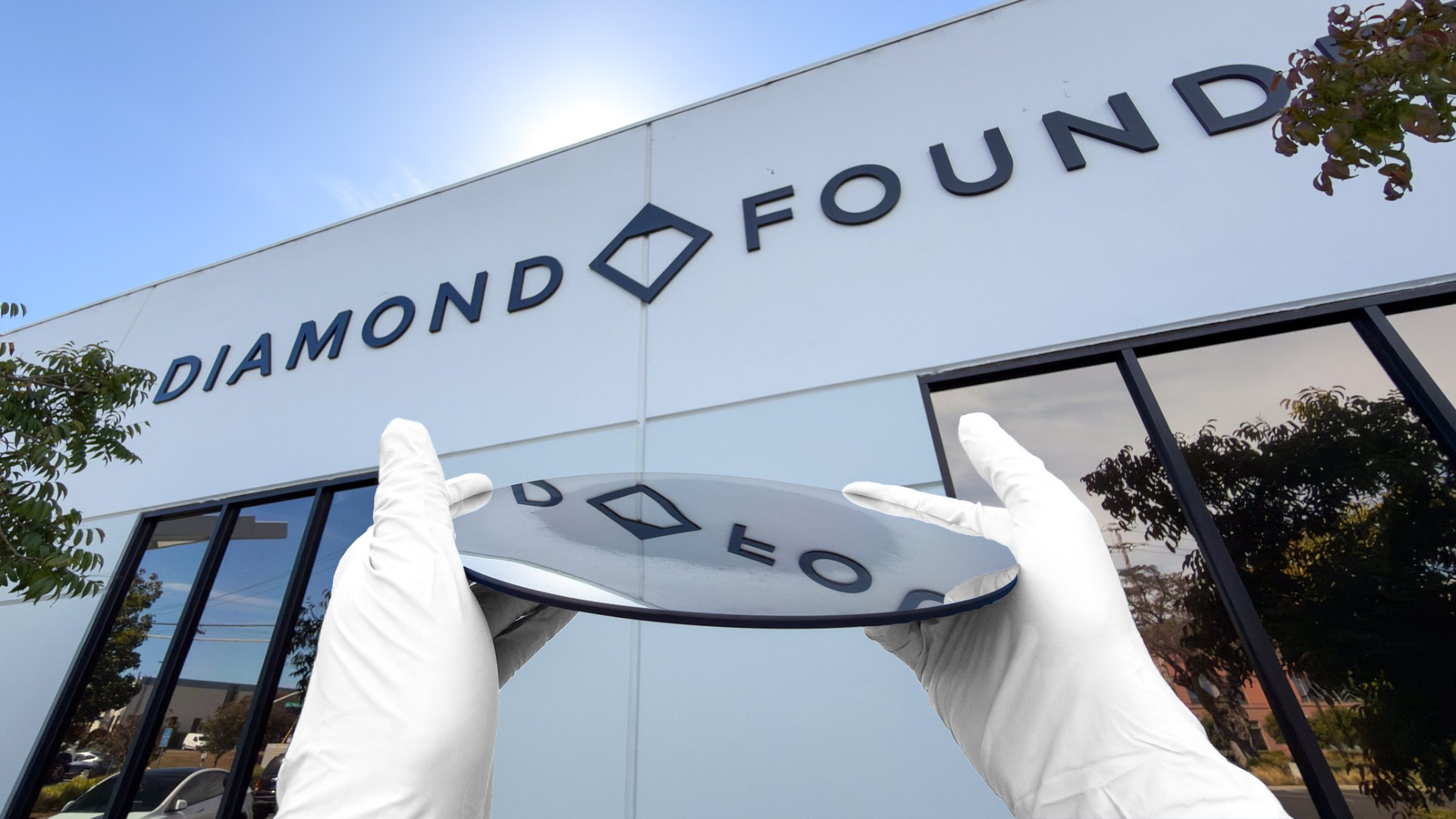
Diamonds have exceptional cooling capabilities due to their excellent thermal conductivity, with the material estimated to be at least five times more conductive than copper. Because of this, Diamond Foundry, a firm focusing on lab-grown diamonds, announced the world’s first 200mm single-crystal diamond (SCD) wafer. The 200mm SCD is about the same wafer size that semiconductor fabs use for older processes, with the company boasting on its website that “Single-crystal diamond has entered the wafer-scale era.” This is part of the effort to manufacture SCD at scale so that it can be used for semiconductor cooling, especially now that increasing power of AI chips has also led to enormous thermal problems.

What makes Diamond Foundry’s 200mm SCD wafer different from other lab-grown diamonds is that it’s created as a high-quality single-crystal piece instead of a polycrystalline gem. Although the former is difficult to manufacture, it is what allows diamond to become an extreme efficient thermal conductor while simultaneously retaining its electrical insulating properties — this efficiency should help cut down on hotspots, making SCDs an excellent solution for AI chip cooling.

The company also showed in a graph that it is now thought possible to create a D300 SCD wafer before 2030, matching the size of the wafers used in leading node processes. However, it should be noted that the sample shown by the company remains unpolished, meaning it still needs to go through some processes to make it suitable for chipmakers.

Diamond Foundry prediction

(Image credit: Diamond Foundry)

Although the company was founded in 2012, it also acknowledged the work of scientists who have been chipping away at the scale problem of SCDs since the early 2000s. “This is one of those milestones that once seemed almost impossible. Hundreds of DF engineers, scientists, and technicians contributed to us getting here. It is the accumulated result of countless experiments, failures, inventions, rebuilt machines, and insights over more than a decade,” Diamond Foundry CEO Martin Roscheisen said.

“Stefan and Martin pursued this goal for 25 years. There are very few examples in technology of someone sticking to a really hard scientific challenge with that level of perseverance. They kept going when the prevailing view was that single‑crystal diamond simply could not be made at this scale. Today, the perseverance shows as the first-ever D200mm single‑crystal diamond. And best of all, it makes D300mm predictable as well.”

Diamond Foundry slides
Diamond Foundry
Diamond Foundry slides
Diamond Foundry

Diamond Foundry isn’t the only company that has identified the potential of lab-grown diamonds for semiconductor cooling. Akash Systems secured $18.2 million in CHIPS Act funding in 2024 to produce Gallium Nitride fused with synthetic diamond, which it claims will reduce temperatures by 20 degrees C. The De Beers Group, which is known for its diamond mines in Africa, is also building a copper-plated diamond composite material aimed at improving cooling efficiency for AI, high-performance computing, and GaN RF devices. Even Frore Systems, which is known for its solid-state cooler, is diving into diamond-infused watercooling cold plates for Nvidia’s next-generation AI GPUs.

Logitech G502 X Lightspeed Review: No lights, same price

Logitech's G502 X Lightspeed has been around for awhile — the mouse was introduced in 2022 alongside the fancier Logitech G502 X Plus (and the wired G502 X), but since it’s receiving a firmware update that upgrades its Hero 25K sensor to a Hero 44K sensor, this seemed like a good time to take a look at it. The G502X Lightspeed is available in black and white colorways and currently retails for $159.99, which is the same price as the G502 X Plus — however, it can (and should) normally be found for less than this.

Design and Comfort of the G502 X Lightspeed

The Logitech G502 X Lightspeed is a right-handed gaming mouse with an ergonomically contoured shape. It's the same size and shape as the G502 X Plus, with large primary mouse buttons, textured rubber side panels for grip, and a smooth matte chassis with glossy accents. It comes in black and white colorways (our review unit was black) and has no lighting aside from a small indicator light at the front of the mouse to indicate connection and battery life.

Like the G502 X Plus, the G502 X Lightspeed is definitely on the larger side. It measures 5.17 inches (131.4mm) long by 3.12 inches (79.2mm) wide, and is 1.62 inches (41.1mm) high at its tallest point. It's larger than the Razer Basilisk V3 Pro and V4 Pro (5.11 x 2.96 x 1.67 inches / 130 x 75.4 x 42.5mm) — not by a lot, but it definitely feels like a much larger mouse. It weighs about 3.6 ounces (102g), which makes it lighter than the Basilisk V3 Pro, but slightly heavier than the Basilisk V4 Pro.

Logitech G502 X Lightspeed
Tom's Hardware
Logitech G502 X Lightspeed
Tom's Hardware
Logitech G502 X Lightspeed
Tom's Hardware
Logitech G502 X Lightspeed
Tom's Hardware

The G502 X Lightspeed has 11 programmable buttons, and 13 programmable controls if you include scroll up/down. There are the left and right primary mouse buttons, as well as two side buttons along the left edge of the left mouse button. On the left side of the mouse there are the two standard thumb buttons, plus a "sniper" button that's magnetically attached and can be flipped so that it's not in your way. The sniper button can also be "deleted," and Logitech includes a delete cover in the box that makes the button unpressable (and also has the same soft, rubbery texture as the rest of the thumb rest).

Logitech G502 X Lightspeed
Tom's Hardware
Logitech G502 X Lightspeed
Tom's Hardware
Logitech G502 X Lightspeed
Tom's Hardware

The scroll wheel is a 4-way tilt wheel, so it has three programmable "buttons" (left click, right click, and center click), as well as scroll up/down. Above the scroll wheel are two buttons: One is a mechanical scroll wheel switch that switches between notched, tactile scroll and free scroll — that’s not programmable, as it's a physical switch — and the other is a profile cycle button that can be remapped.

Logitech G502 X Lightspeed
Tom's Hardware
Logitech G502 X Lightspeed
Tom's Hardware

On the bottom of the mouse you'll find UHMWPE mouse feet — at the top and bottom, around the sensor, and under the thumb rest. There's a power switch, as well as a magnetically-attached dummy puck that can be swapped out for the charging puck included in the Logitech PowerPlay 2. Under the puck is a slot for storing the mouse's wireless dongle.

In the box, the G502 X Lightspeed comes with a 6-foot (1.8m) USB-C-to-USB-A cable, a USB-A dongle, a USB-C converter, and a sniper button delete cover.

Specs

Specs

Sensor Model

HERO 25K

Max Sensitivity

25,000 DPI (44,000 DPI with update)

Max Speed (IPS)

400 IPS (678 IPS with update)

Max Acceleration

40 G

Polling Rates

1000 Hz

Programmable Buttons

11 (13 programmable controls)

LED Zones

8

Cable

6ft / 1.8m USB-C to USB-A

Connectivity

2.4GHz wireless, wired (USB-C)

Measurements (L x W x H)

5.17 x 3.12 x 1.62 inches / 131.4 x 79.2 x 41.1 mm

Weight (excluding cable)

3.6oz / 102g

MSRP / Price at Time of Review

159.99

Release Date

Aug. 2022 / Firmware update Sept. 2026

Performance of the G502 X Lightspeed

The Logitech G502 X Lightspeed ships with Logitech's Hero 25K optical sensor, which has a max resolution of 25,600 DPI and a maximum speed of 400 IPS, and can handle up to 40 G's of force. However, both the G502X Lightspeed and the G502 X Plus are receiving a firmware update that will upgrade the Hero 25K optical sensor to a Hero 44K optical sensor, with a maximum resolution of 44,000 DPI and a maximum speed of up to 678 IPS. It's not clear when this upgrade will roll out, however, and I wasn't able to upgrade my review unit in G Hub as of this writing.

Upgrades aside, the G502 X Lightspeed's sensor is very good. It tracks on just about every surface you might possibly use while gaming, and is speedy, sensitive, and very accurate. The mouse supports a polling rate of up to 1,000 Hz, which is still pretty standard for most gamers — however, if you're someone who's convinced that the extra 0.125 milliseconds of lag is the reason for your losses, this is not a mouse with an 8,000 Hz or even a 4,000 Hz polling rate.

Logitech G502 X Lightspeed

(Image credit: Tom's Hardware)

The G502 X Lightspeed features Logitech's Lightforce hybrid optical-mechanical switches in its primary mouse buttons, which combine the feel of mechanical switches with the speed and reliability of optical ones. The G502 X Lightspeed's switches do have a nice, tactile click with a crisp sound that's definitely on the louder side. The side buttons also feel and sound good — not quite as tactile as the primary buttons, but with a very crisp click sound.

Logitech G502 X Lightspeed

(Image credit: Tom's Hardware)

The mouse features a dual-mode tilt wheel with a mechanical switch that lets you move between a notched, tactile scroll and a smooth, speedy free-scroll. Logitech's implementation of this is different from Razer's — Logitech's is mechanical, while Razer's is software-based. This means the modes are more distinct, but I'm not really sure if that's a good thing. While I liked the free-scroll mode of the G502 X Lightspeed better than I liked the free-scroll mode on Razer's mice (such as the Basilisk V4 Pro and the Naga V3 Pro), the tactile scroll was stiff, clunky, and very loud — with a lot of rattling. The scroll wheel only has two modes, so there's no middle ground — and while I'm fine to use free-scroll for most things, there are definitely games where I need a notched scroll wheel.

Features and Software of the G502 X Lightspeed

The G502 X Lightspeed is configurable via Logitech's universal peripheral software, G Hub. You can use G Hub to change the mouse's DPI settings (DPI steps and DPI shift speed — the DPI switch that occurs when you hit the DPI shift button) and remap keys. You can also use G Hub to update the mouse's firmware, so this is presumably where the Hero 44K sensor upgrade will come through.

Logitech G502 X Lightspeed
Tom's Hardware
Logitech G502 X Lightspeed
Tom's Hardware

Wireless Experience & Battery Life of the G502 X Lightspeed

The G502 X Lightspeed connects to your PC via 2.4GHz wireless; it can also utilize a wired connection, though the included USB-C cable is rubber and won't get you that smooth, drag-free wired mouse movement you can get with flexible paracord-covered mouse cables. The mouse does not include Bluetooth.

Logitech rates the G502 X Lightspeed at 140 hours of battery life, which is about 10 hours longer than the G502 X Plus (with no lighting). This is pretty impressive, even if there are similar wireless mice that last longer (the recently-launched Razer Basilisk V4 Pro gets up to 200 hours, for example). This should give you at least two weeks before you need to recharge, even with intense use. The G502X Lightspeed is also compatible with the PowerPlay 2, Logitech's wireless charging mousepad (sold separately).

Bottom Line

Logitech G502 X Lightspeed

(Image credit: Tom's Hardware)

The G502 X Lightspeed is a solid gaming mouse for most gamers — its contoured, ergonomic shape is comfortable, though it does feel bigger than similarly shaped mice, such as the Razer Basilisk V4 Pro. It has enough extra well-placed buttons for the average gamer (though, not enough for the average MMO player), and its 140-hour battery life is higher than average. Plus, assuming it actually gets this firmware update, it will have a competitive sensor — though it's not going to be quite as good as the actual Hero 2 sensor. But this mouse is currently priced at $159.99, which is the same price as the fancier Logitech G502 X Plus — and it's definitely supposed to be the more budget version of the two. Unless you find it at a great sale price, I'd pick up the G502 X Plus or even Razer's Basilisk V3 Pro 35K at a similar price.

Japanese arcades suffer week-long blackout following Sega server hack

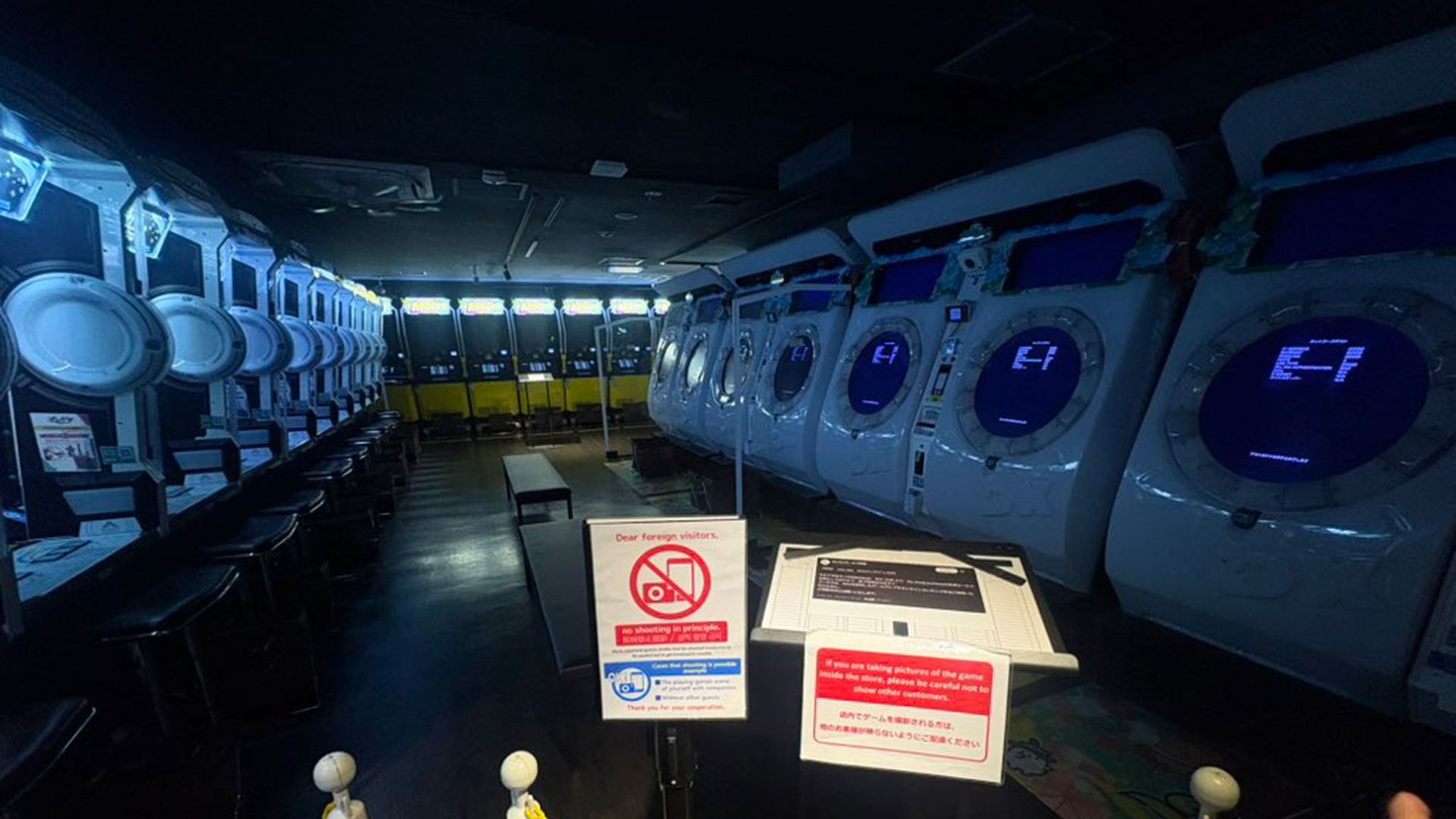
The sensory overload typically experienced when visiting video game arcades in Japan was eerily absent from some venues this week, reports ITMedia News [machine translation]. It says that a Sega system outage meant there was “no end in sight” for the rows of silent black screens. However, a recent tweet from arcade network operator ALL.net indicates that both Sega and Bandai Namco machines are affected. Moreover, arcade lovers will be pleased to hear that affected arcades will “gradually resume operation on a trial basis starting today.”

a friend sent me some pics of their local arcade and LMAO the sega outage is nuts https://t.co/3vSYjCYAIZNovember 3, 2026

ALL.Net, a contraction of Amusement Linkage Live Network, was launched by Sega in 2004 to allow arcade games to look up to the net for auto updates, data logging, implement online play, and power national leaderboards. Sega titles like Initial D The Arcade, Maimai, and CHUNITHM, rely on this network, as do Bandai Namco games like Aiko no Tatsujin, Mario Kart Arcade GP DX, and Gundam Extreme Vs.

Arcades go dark

Some services are gradually resuming operation today. (Image credit: ALL.Net, Sega Fave)

In its official apology blog post, dated November 2, ALL.Net / Sega Fave said that it suspended services a day prior after it became aware of its servers being affected by “unauthorized access by a third party.” It reassured customers that their personal info and billing data were not on the compromised server. However, it asked for more time to investigate, run safety checks, and so on, before restoring service.

This morning ALL.Net told customers that Bandia Namco titles “will gradually resume operation on a trial basis starting today (online play and card use enabled).” Sega products remain under maintenance, and online services are unavailable. There is currently no estimate for issue resolution, but a news bulletin is promised for November 10 (Tuesday).

Classic offline arcade machines weren’t affected by this outage, of course. Moreover, rival arcade gaming legends like Taito and Konami run their own, separate, arcade networks and authentication systems.

The end of an era as Linux 7.5 purges the last 30-year-old Intel MMX optimizations from Pentium age

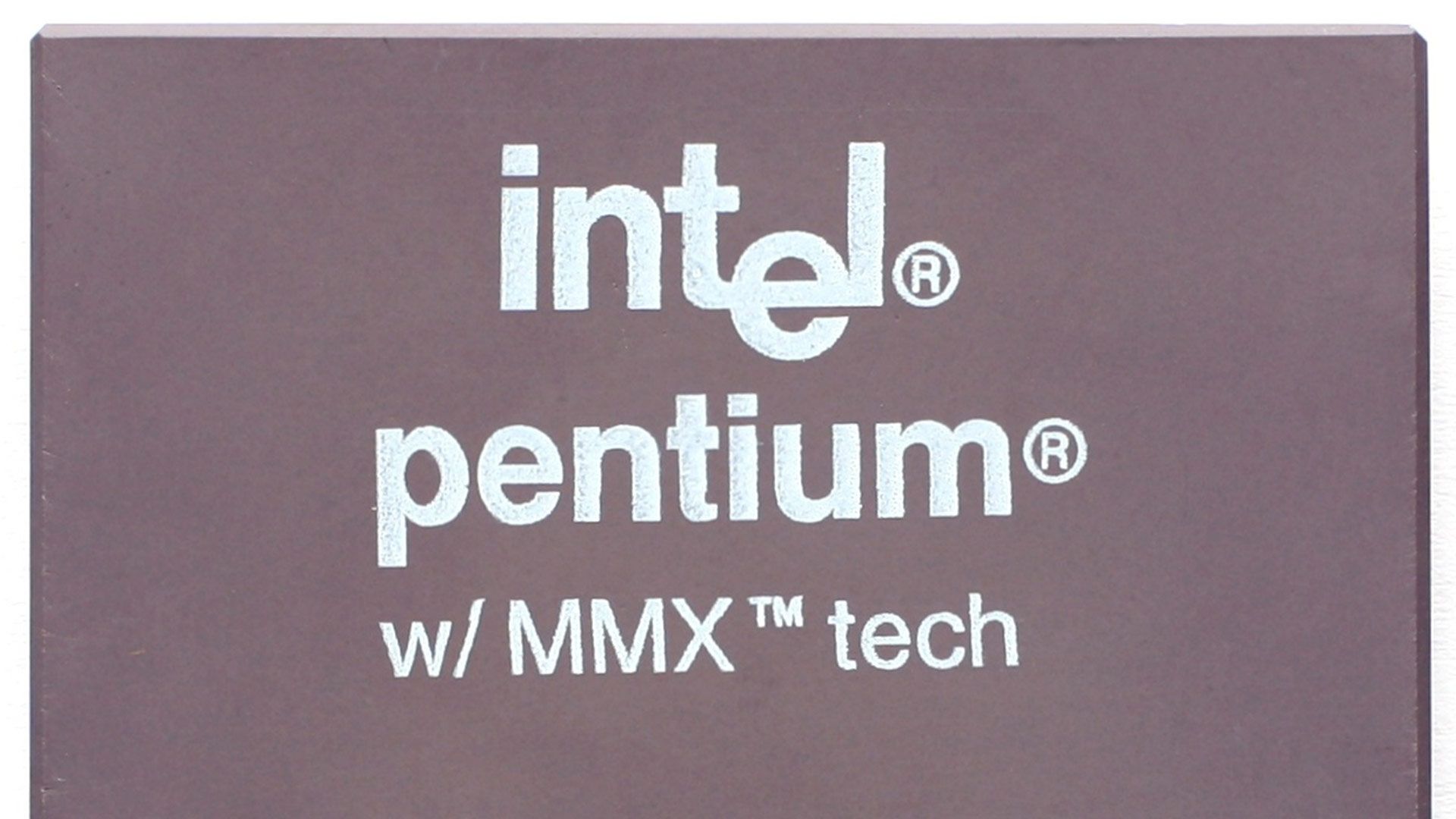
Linux developers are preparing to make Intel’s ancient MultiMedia eXtensions an irrelevance. Intel introduced MMX in the Pentium era, but a patch expected to merge into mainline Linux 7.5 will remove the last remaining optimized software from the open-source OS. Expected to be released in 2027, the new kernel will wipe MMX-optimized code from its software RAID XOR code, explains Phoronix.

Admittedly, there wasn’t much left in Linux in terms of MMX optimizations. But few folks will be running the most modern kernels on Pentium MMX and Pentium II chips in 2026. And most other MMX-optimized code disappeared from the OS half a decade ago, when some MMX-optimized memory management code was removed. Note that, if you are a determined late-90s Pentium devotee, you can still use software RAID, but it will lack the MMX fast path.

This is a classic case of Linux code housekeeping. With this change, the kernel will lose over 800 lines of code and replace them with just 12.

Remembering MMX

Intel first introduced MMX Pentium chips in January 1997. Though I vaguely remember these processors being marketed as being enhanced by ‘MultiMedia eXtensions,’ Wikipedia insists that “MMX is officially a meaningless initialism[6] trademarked by Intel.”

In a subsequent trademark battle with longtime foe AMD, a document produced in court indicated that MMX stood for ‘Matrix Math Extensions.’ AMD relied on this to sidestep the trademark, as an initialism cannot be trademarked, according to the encyclopedic source.

Eventually, all rival x86 processors managed to integrate MMX instructions – so as not to be pushed into the shade during the multimedia boom. A surprisingly large number of non-Intel chips ended up offering MMX, too. Along with Pentium MMX chips, AMD, Centaur, Cyrix, Rise, and Transmeta eventually offered MMX CPUs.

After MMX's marketing success, AMD pioneered 3DNow! instructions, and about a year later, Intel fired back with SSE and SSE2.

Ukraine builds combat robots to hunt Russian troops in underground gas pipelines

Ukraine is developing a new class of combat robots designed to operate inside underground gas pipelines, where Russian troops have repeatedly attempted to bypass frontline defenses, United24Media reports. The project, disclosed by Ukraine's 2nd National Guard Corps, Khartiia, involves modifying unmanned ground vehicles (UGVs) to perform reconnaissance and combat missions in spaces too narrow for conventional military machinery. Notably, the work is being carried out by specialists from the corps’ Lava Unmanned Systems Regiment, following Operation Veles — an underground assault that saw Ukrainian soldiers advance more than 15 kilometers through pipeline infrastructure near Kupiansk. Khartiia says the operation killed more than 100 enemy soldiers and resulted in over 30 captured, although those battlefield figures have not been independently verified.

The commander of Lavas ground robotic system battalion, identified by the callsign ‘Matematyk’, said the project addresses a category of warfare that requires a different approach from conventional battlefield robotics. “There is a very long list of tasks that need to be accomplished to fight underground and counter the enemy underground. This is a new class of technologies and challenges that we will have to confront,” he said.

The machines are being adapted from existing groundrobots,rather than developed as conventional surface vehicles. They must be compact enough to navigate narrow pipelines while retaining the ability to carry out military assignments . Most commercially available underground machinery, meanwhile, is designed for construction, drilling, and tunneling — not combat.

As of now, Khartiia is already developing several robotic systems to address those limitations, with the broader objective of sending machines into dangerous underground environments where soldiers would otherwise have to conduct reconnaissance, confront enemy positions, clear positions, or clear out themselves. “War is already underground, and it will expand. The question is how we adapt to this war,” Matematyk said.

The project follows unusual battlefield developments near Kupiansk, where Ukrainian forces used the same underground infrastructure that Russian troops have previously exploited to infiltrate behind Ukrainian defensive positions. During Operation Vels, Ukrainian soldiers moved through a gas pipeline measuring approximately 1.2 meters in diameter, according to a report by Ikrainska Pravda. The confined passage made movement and close-range firefights particularly,with Ukrainian troops having little-to-no room to maneuver.

Russia had previously used the pipeline network beneath the Oskil River to move soldiers toward Ukrainian-held territory. The Ukrainian battlefield monitoring group ‘Deepstate' reported an earlier Russian infiltration attempt in September 2025. Last month, President Volodymyr Zelenskyy said that Ukrainian forces had eliminated more than 100 Russian troops and captured over 30 during the operation. The experience also exposed the limitation of sending soldiers into such environments. Underground operations restrict visibility,complicate communications , and leave little room for maneuvering equipment.

That said, Ukraine has increased its reliance on unmanned military systems as battlefield terrain proves complicated to navigate. In July 2024, we reported on Ukrainian forces deploying AI-controlled drones capable of independently identifying and attaching targets. The country has also been experimenting with unmanned systems that operate beyond conventional aerial platforms. In August, the US Army tested an autonomous Ford F-250 breaching vehicle, which builds on the Lancer unmanned ground vehicle program and uses a counter-drone turret to protect military operations from aerial attacks.

However, autonomous ground systems still face considerable technical challenges. Russia's Shturm uncrewed assault tanks , for instance , repeatedly lost their command connection during the Tsentr-2026 military exercise. The vehicle eventually became stuck in mud, even after organizers switched to manual driving. Russia has also tested an AI powered Shahed variant using Nvidia's Jetson Orin computing platform. The system was reportedly capable of identifying targets without relying on externally supplied coordinates.

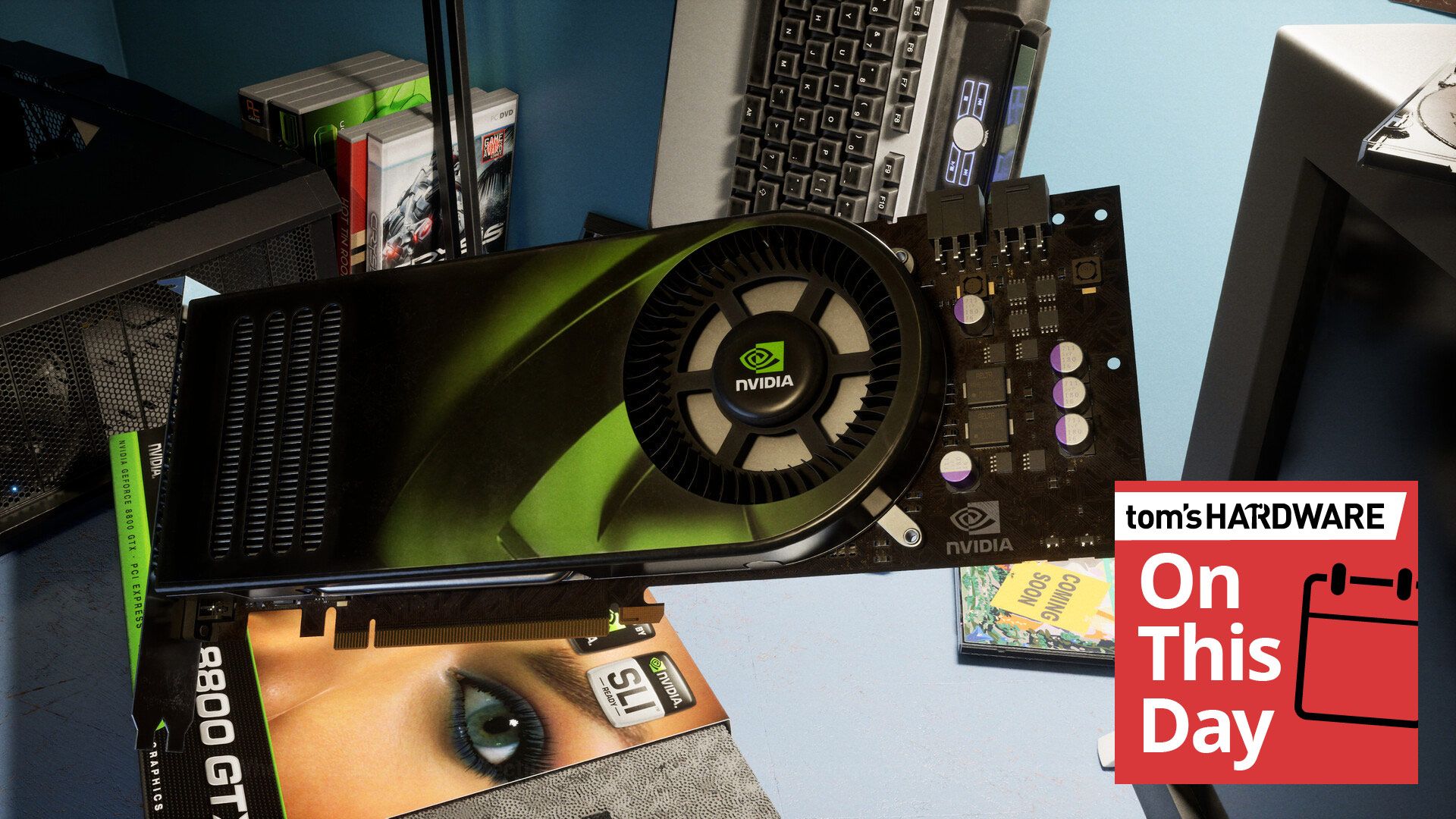
Nvidia released its 8800 GTX GPU 20 years ago today, celebrates with Steam game homage

On this day in 2006, Nvidia released the legendary GeForce 8800 GTX and 8800 GTS graphics cards. Nvidia has decided to honor the flagship of the pair with its GeForce 8800 GTX - 20 Years of a Legend interactive demo, now free on Steam. However, the recommended specs to ‘play’ with this semi-interactive path-traced unboxing experience include a wallet-worrying RTX 5080. Or you could just watch the video, embedded below for your convenience.

The downloadable demo, which also requires 32GB of RAM and 30GB of free storage, was created by Dylan Browne, a senior special effects artist who frequently works with Unreal Engine, as in this case. This experience is said to deliver era-appropriate graphics, but requires the most advanced graphics tech available two decades after the 8800 GTX first hit the scene to work its graphical magic.

To run GeForce 8800 GTX - 20 Years of a Legend on a 2026 PC, you will need at least an RTX 4070 for acceptable performance, according to the Steam page. This software is stuffed with the latest graphics tech embraced by the green team. “DLSS 4.5 with Dynamic Multi Frame Generation, Ray Reconstruction, path tracing, and Mega Geometry” are all present, says Nvidia.

GeForce 8800 GTX - 20 Years of a Legend
Nvidia, Steam, Dylan Browne
GeForce 8800 GTX - 20 Years of a Legend
Nvidia, Steam, Dylan Browne
GeForce 8800 GTX - 20 Years of a Legend
Nvidia, Steam, Dylan Browne

There’s a bit more to the interactive demo than looking around and poking a box with your mouse and then prodding it to fit the shiny new GPU into your “era-accurate PC tower.” An extra layer of fun is promised by the provision of hidden Easter eggs in this experience.

However, the demo appears to show Windows Vista on the PC in the gaming den, which launched at retail a few months after the 8800 GTX. Admittedly, this legendary GeForce card and Windows Vista OS would roam the Earth at the same time, with many folks buying the GeForce 8800 GTX and 8800 GTS to shove into their Vista PCs from 2007 onwards. Crysis launched on PCs in late 2007, a year after the G80 architecture cards debuted.

Nvidia launched the GeForce 8800 GTX (128 shader units) and 8800 GTS (96 shader units) at $599 and $449, respectively. These legendary Nvidia GPUs spearheaded the DirectX 10 era, accelerating existing PC titles and delivering next-gen visuals with new DX10 software. You can read more in our reviews from the time, like the 12-page review of the GeForce 8800 GTX and GTS from the launch week. Briefly, our reviewer thought these cards were “amazing” for their current performance and DX10 promise. They were also excited about the G80 architecture for bringing CUDA to consumers and the promise of making the GPU “something much more than a frame rendering device.” Some Luddite gamers may wish that had never happened.

GeForce 8800 GTX benchmarks
Future
GeForce 8800 GTX specs
Future

Nvidia driver support for the GeForce 8800 GTX and GTS would run out of road about a decade later. By that time, DirectX 11 hardware and games were mainstream, leaving older graphics hardware designs obsolete when it came to playing the latest AAA PC titles.

Open-source GPU task manager reveals exactly what's eating your VRAM

Microsoft VP Scott Hanselman has revealed a new open-source GitHub project called gputaskman. The name neatly encapsulates the headline role of this tool, a GPU-focused task manager, but its scope might be broader than you expect. This new tool for Windows, Linux, and macOS can show per-process GPU usage, VRAM consumption, active runtimes, and many more stats. It also breaks out AI/LLM task-specific information.

There's a lot going on in my GPU. I'm making a GPU Taskman to get insights to where my GPU memory is going. PRs welcome https://t.co/6FwKqnFWDWNovember 3, 2026

On social media, Hanselman snappily makes clear the technical itch that gputaskman was designed to scratch. “There's a lot going on in my GPU,” wrote the prominent public face of Microsoft's developer ecosystem. “I'm making a GPU Taskman to get insights to where my GPU memory is going.”

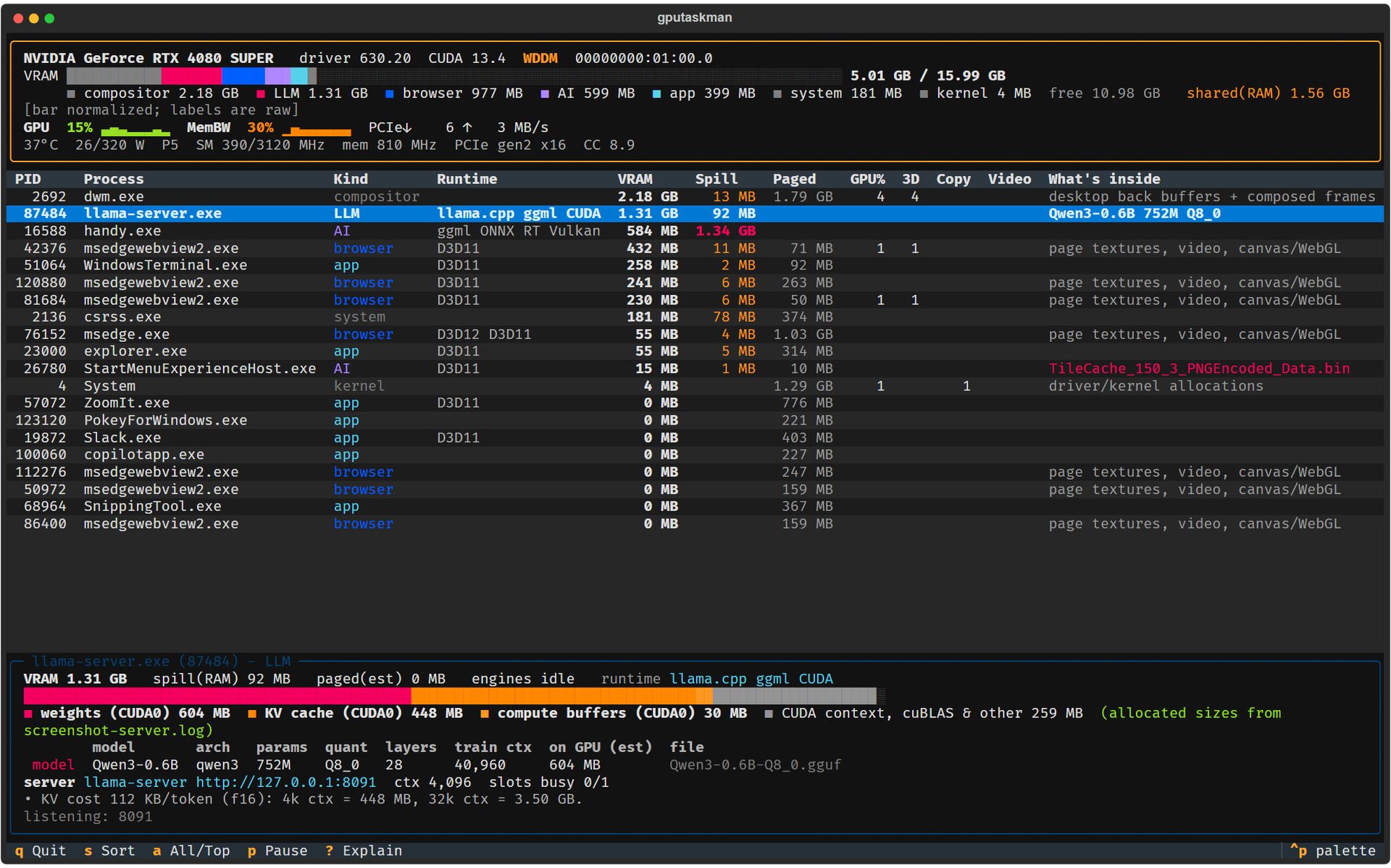
There are several example screenshots of GPU Taskman in use by the Microsoft VP. They clearly show the kinds of data that are presented in the terminal-like display that pops up in the tool. Hanselman’s tweet shows that the most VRAM-hungry app on his RTX 4080S system is the desktop windows manager. That is selected in the list, and more details are shown for this task at the bottom of the window. Also, we see AI/LLM apps consuming VRAM, and a few Windows staples.

gputaskman in action

Looking closer at llama-server.exe (Image credit: gputaskman on GitHub)

In a GitHub-embedded image, we see what details are broken out when the llama-server.exe app is selected in the list. The bottom of the window breakdown reveals that Qwen3-0.6B is being used, and there’s a breakdown of its weights, the KV cache, the number of parameters, and more. Very informative.

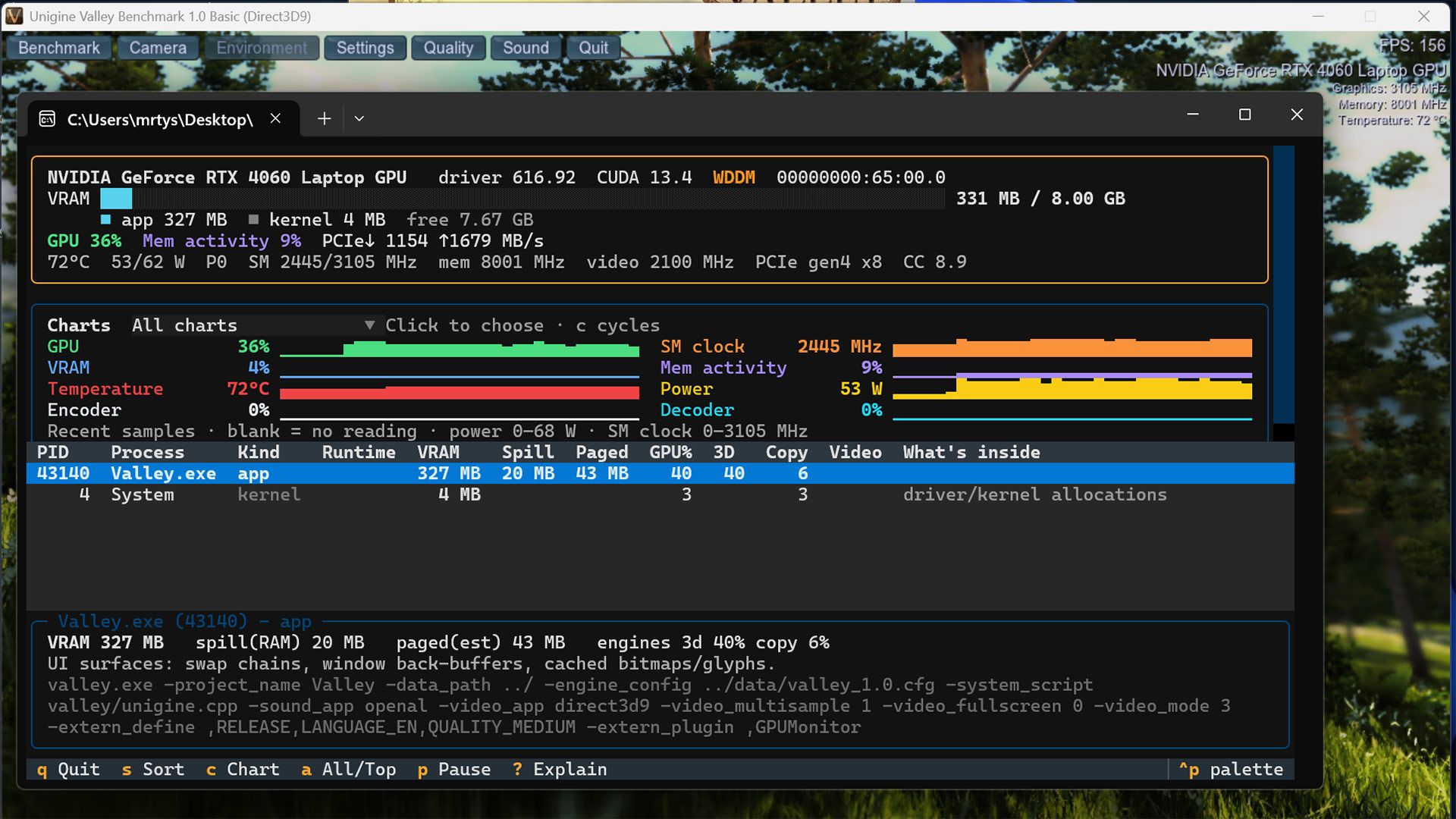
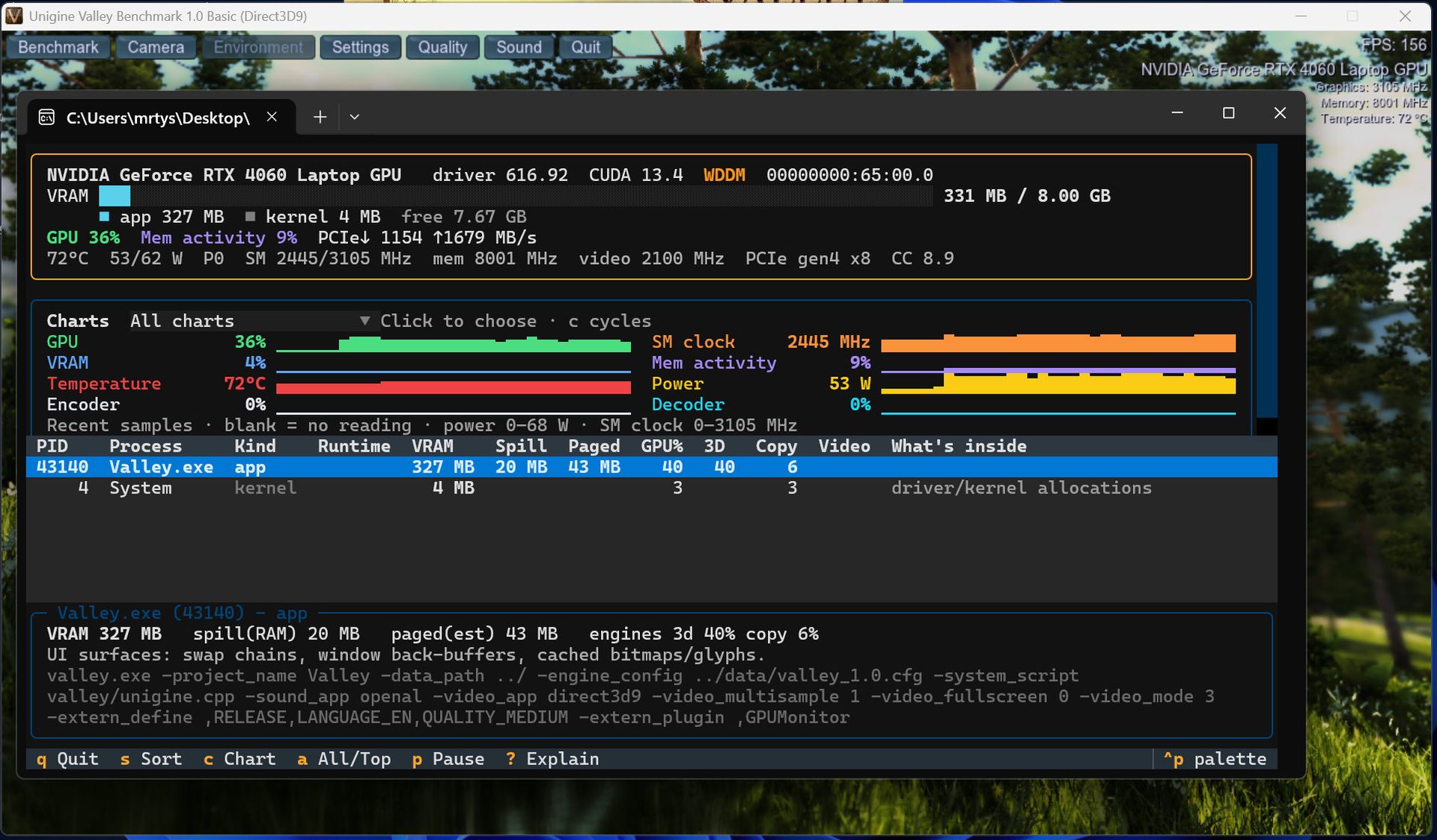
As the Microsoft developer has made portable Windows downloads of the latest v0.3.0 release of gputaskman, I couldn’t resist giving it a spin. Upon launch, I found that no tasks were using the discrete GPU in my laptop… so I fired up ye olde Unigine Valley GPU benchmark to stir the RTX 4060 from its slumber. I note the live-streaming charts showing GPU load, VRAM use, temperature, and so on are more prominent in my screenshot than in Hanselman’s examples. Perhaps he screen-shotted a previous version of the tool.

gputaskman in action

Valley's GPU resource use (Image credit: Future)

There’s a lot more information about gputaskman, its inner workings, and even its source code, on the linked GitHub repository. Hanselman is sharing his “experimental software” tool under the permissive MIT license. Finally, in social media comments, he hints that expanded GPU monitoring capabilities could be coming to Windows as standard.

Hundreds arrested after Microsoft data center protest turns violent

Amsterdam police have arrested 150 to 200 protesters at a Microsoft data center site on suspicion of trespassing. According to a Facebook post by the authorities [machine translated], tools designed for breaking into the site were seized from the protesters, who were then allowed on their way to protest peacefully. However, it appears that some members of the group decided to enter the construction site “with violence” anyway, forcing the police to intervene and leading to their arrest. There were also some allegedly stolen items from the construction site found among the belongings of some of the protesters, plus damage and vandalism done to the data center site.

Posted by politieamsterdam on 

This protest is a continuation of the action that started last Friday, where protesters breached the Microsoft data center, which was being owned by Pure Data Centers. It is also the first of many organized by the “Stop Dirty Data Centers” coalition across Europe, with actions planned for Amsterdam, Dublin, Warsaw, Denmark, and several other cities across the continent. The Dutch publication NOS [machine translated] identified the exact group at the site today as Fossielvrij, who are against the use of fossil fuels in data centers such as the jet engines that Elon Musk installed at xAI’s Mississippi data center.

“Gas prices are going through the roof, and new houses are being postponed because of the overcrowded power grid. Yet tech billionaires like Elon Musk and Jeff Bezos are building energy-guzzling, hideous data centers,” the group said on its website. “We can take back the power of Big Tech by pressing the pause button now. Give us the opportunity to democratically decide what we do and do not use AI for, so that it is not at the expense of our living environment and everything that makes our lives beautiful. Then we look at how many more data centers are needed.”

The protest comes amid the AI data center build-out, which has been facing increased opposition across the United States. A Google data center site in Finland is also in trouble after it cleared out around 1,300 acres worth of forest and trees without an environmental impact assessment, displacing wildlife, and leading to a criminal probe on Tuike Finland Oy, the Google subsidiary in charge of the site.

Fossielvrij’s action was supposed to be peaceful, but it appears that another group joined the demonstration and broke through the fences around the site, leading to the police confrontation. The suspects were arrested for domestic violence and then taken to a cell complex, where it will be decided if they will be detained longer. The police also said that “All suspects will be heard afterward.”

Two Chinese companies cleared to buy banned Nvidia AI chips have empty offices and unknown addresses

An investigation has found that addresses for two Chinese companies approved to purchase Nvidia H200 chips led to empty offices, and the receptionists at the buildings were unfamiliar with them. According to The New York Times, these companies didn’t just have empty offices; their executives are often linked to other firms sanctioned by the United States for working with and providing advanced technology to the Chinese military.

This news has revealed concerns that the U.S. Department of Commerce is simply rubber-stamping GPU export license applications instead of scrutinizing each one for potential links to Beijing. “I have a ton of concerns that neither the Commerce Department or Nvidia is doing the due diligence needed to ensure that the licensing terms are being followed,” former China director for the White House National Security Council Liza Tobin told the publication.

Many of these approved companies include well-known entities like Baidu, BYD, Tesla Shanghai, as well as ZTE, which has previously been blacklisted from the U.S. market, Alibaba, Tencent, and ByteDance. However, the outfit’s investigation also revealed approval for two relatively unknown firms: New Matrix and Maginfra. The offices for both companies were empty shells with some office furniture, and people working nearby said they’d never heard of the company or seen anyone go to the deserted spaces.

The New Matrix website also reportedly did not contain any information about its owners or its history, although public company records reveal that it was founded by Li Bin, who, along with two other primary owners, are connected to Wise Road, a Chinese private equity firm sanctioned by the U.S. for helping Beijing acquire sensitive chip technologies. Furthermore, Mr. Li chairs Tsinghua Unigroup, a tech conglomerate partly owned by the Chinese government, and owns New H3C Semiconductor Technologies, which has also been added to the Commerce Department’s Entity List for cooperating with the Chinese military.

Maginfra, on the other hand, is suspected of being linked to Inspur, which Washington has blacklisted since 2023 for supporting the People’s Liberation Army, with both companies sharing personnel, patents, and a similar government ownership structure. These two firms aren’t listed as the final users of Nvidia’s AI chips, though. Instead, they’re supposed to assemble them into AI servers, which would then be forwarded to a final user, although it’s unclear who their customers are.

Aside from these questionable non-entities, another company that received a license to purchase H200 GPUs has some suspicious links. Zhejiang Yindun Cloud Technology’s executives are reportedly related to the founder of Range Intelligent Computing Technology Group, a data center operator that has sold compute capacity to Chinese military contractors. It’s also reportedly partly operating out of a Range data center.

President Donald Trump banned the export of Nvidia AI GPUs in April 2025, even those customized to meet the performance ceiling Washington set for AI processors. The president reversed the decision late last year in exchange for a 25% cut of the sale, but it still took more than eight months for the first H200 shipments to arrive in China. Beijing’s refusal to give Chinese tech companies the green light to buy the chips for the first few months of the year caused the delay. But once China lifted its import ban on Nvidia chips, several Chinese companies applied for licenses to buy them, and The New York Times reported that around two dozen firms have already received approval, including these questionable ones.

Intel quietly confirms Raptor Lake Next CPUs through internal driver publication

Intel has published an internal test driver with the "RPL-NEXT" label, presumably in reference to Raptor Lake Next CPUs that Tom's Hardware first reported on in June. On the same day as the driver was uncovered, shipping manifests from Vietnam were published by Club386, showing exports of CPUs labeled "Raptor Lake Next" dating back to August, complete with cache and clock speed information.

➡️ https://t.co/jatYVFZ9egOctober 26, 2026

The driver was first spotted by @momomo_us on X, and we were able to find it by searching the name in Intel's software database. The file is locked (hence the padlock icon), and clicking on it will redirect you to an Intel login page. Given that and the "testbuild" label, it looks like this is an internal driver test that wasn't meant to be published.

Judging by the existing conventions, the driver package is for the Smart Sound Technology (SST), a audio digital signal processor integrated into the silicon since the Alder Lake days. Audio codecs like those of Realtek use SST for offloading duties like noise reduction, echo cancellation, low-power audio playback, and wake-on-voice without adding to the CPU load, and saving precious watts in the process.

For broader context, Raptor Lake Next is Intel's refresh of the Raptor family of CPUs, meant to plug into existing LGA-1700 motherboards. Given the currently insane DDR5 memory prices, gamers ought to be happy on two fronts: getting newer chips for their existing motherboards, and the ability to use more affordable DDR4 instead, an ability all but confirmed by Gigabyte's recent BIOS updates.

According to Club386's shipping manifests, there are so far four chip models en route from Intel's Vietnam facilities. Their specs suggest that they're replacements for extant Core i5 and Core i7 models, as a previous leak indicates that Intel doesn't yet have any plans for replacements for its Core i9-14900K chip.

As such, the listed models should top out with the 99DLMV part number, with 16 cores in an 8P + 8E arrangement, a meaty 3.5 GHz base block, and 30 MB of cache (presumably L3). This is the only model with a 125W TDP, and its base clock is higher than that of the Core i9-14900K, so it should be a speedy enough affair despite not having the high core counts of the halo models. Chances are it'll be a nice gaming CPU with pretty high turbo clocks, but only reviews will confirm that.

Interestingly, the 99DLMT has 20 cores (8P + 12E), but its much lower 65W TDP and 2.1 GHz base clock, which indicate that this model might be an efficiency-oriented productivity chip. In the table below, we added our guesses as to which models match existing chips.

Part number

Cores / Threads

TDP

Base clock

Cache

Approximate matches

99DLMV

8P + 8E (24)

125 W

3.5 GHz

30 MB

i7-14700 / i7-13700

99DLMT

8P + 12E (28)

65 W

2.1 GHz

33 MB

i5-14600K / 13700K

99DLMW

6P + 4E (16)

65 W

2.6 GHz

24 MB

i5-14400 / i5-13500

99DLMX

n/a

65 W

2.6 GHz

24 MB

As above

There's no word about pricing, but we'd expect the new chips to ring in at roughly the prices of the existing models. As points of reference, the Core i7-14700 is currently $366, or $330 for the "F" variant without integrated graphics. At the lower end of the above table, the Core i5-14400 is sitting at $208, or only $161 without an IGP.

JSAUX FlipGo dual-screen portable monitor review: Gorgeous displays with touch support and a built-in USB hub

The FlipGo is yet another entry into the portable dual-monitor field from JSAUX (the previous one being the more ambitious FlipGo Horizon Pro), and it definitely makes a good first impression. Not only do you get two 16-inch 2560 x 1600 IPS displays, but the FlipGo also supports touch input (on Windows systems). In addition, it incorporates a built-in USB hub that gives you two additional USB-A ports and one USB-C port for your peripherals.

JSAUX provides all of this functionality in a product that comes in at a bit under $500, which is in line with other portable dual-monitors on the market. However, there’s a hefty toll for the functionality that’s provided in this package for those expecting to actually use it as a travel companion.

Design of the JSAUX FlipGo (PM0204)

When I first received the shipping box for the FlipGo, I was shocked at how large and heavy it was. My shock was made even more apparent when I removed the FlipGo from its protective padding, revealing a massive dual-screen device weighing an incredible 4.18 pounds. That’s more than half a pound heavier than a 14-inch Apple MacBook Pro.

The choice of materials contributes to the 4+ pound weight of the FlipGo. JSAUX uses a thick aluminum chassis that resists flexing and feels incredibly premium to the touch. That premium feel even extends to the hinges that connect the two displays. They are robust, with no play, allowing you to easily open the FlipGo to whatever display angle you desire.

JSAUX FlipGo
Tom's Hardware
JSAUX FlipGo
Tom's Hardware

While JSAUX labels the FlipGo as a “portable” monitor, this is not something that you’ll be able to easily slip into a laptop bag or even a backpack. The dual 16-inch screen frame measures 14.41 x 9.45 inches and is 0.7 inches thick. For most people, the FlipGo will take up a permanent residence on your desk, or perhaps travel with you from one side of your office building to the other. But carrying it around for travel seems like a bridge too far.

With that said, the specs on the FlipGo are quite impressive. You get two 16-inch 60 Hz IPS displays, each with a resolution of 2560 x 1600. Considering that most competitors in this space give you dual 1920 x 1080 panels, this resolution upgrade is much appreciated here.

JSAUX FlipGo
Tom's Hardware
JSAUX FlipGo
Tom's Hardware
JSAUX FlipGo
Tom's Hardware
JSAUX FlipGo
Tom's Hardware
JSAUX FlipGo
Tom's Hardware

Both screens feature a glossy finish, which is uncommon for dual-screen monitors. However, that’s because both panels support 10-point touch input natively in Windows 11. Unfortunately, touch input is not supported in macOS, so you’ll want to consider the FlipGo (non-touch) if you’re a Mac user.

Connectivity-wise, the FlipGo’s primary ports are on the left side of the bottom panel. Here you’ll find two USB-C ports and two mini-HDMI ports. On the right side of the bottom panel, you’ll find ports provided by the internal USB hub: two USB-A and one USB-C. Adjacent to the USB hub hookups is a three-way jog wheel for the OSD and the power button.

JSAUX offers a stand that allows you to prop the FlipGo up in landscape (one monitor stacked on top of the other) or portrait mode (both monitors standing up vertically, book-style). However, our review unit only came with a red faux leather protective cover. Without the stand, I could use the monitor with the bottom panel sitting flat on my desk and the top panel sitting vertically. Alternatively, I could use it in portrait mode.

JSAUX FlipGo (PM0204) Specifications

Panel Type / Backlight

IPS

Screen Size / Aspect Ratio

16 inches / 16:10 x2

Max Resolution & Refresh Rate

2560 x 1600 @ 60Hz

Typical Brightness

500 nits

Contrast Ratio Typical

1,200:1

Video Ports

2x USB-C, 2x micro-HDMI

USB Hub

2x USB-A, 1x USB-C

Speakers

None

Weight

4.18 pounds

Warranty

1 year

OSD on the JSAUX FlipGo (PM0204)

The FlipGo uses a relatively basic on-screen display (OSD), which is controlled using a three-way jog wheel. Despite there being two displays, you don’t have independent control over picture settings. Adjustments made on one display apply to both, for better or worse.

You can flick the wheel right or left to adjust brightness up or down. Moving up and down with the jog wheel navigates through the OSD, while pressing on it takes you one level deeper until you select an option (similar to the previously reviewed FlipGo Horizon Pro). Likewise, pressing once on the power button takes you back one menu, and a long press turns off the monitor.

You’ll find the usual assortment of adjustable settings in the OSD, like brightness, contrast, and sharpness. There’s a separate menu for color temperature, saturation, and hue. There are also options to switch between HDMI and USB-C inputs.

Connecting and Operating the JSAUX FlipGo (PM0204)

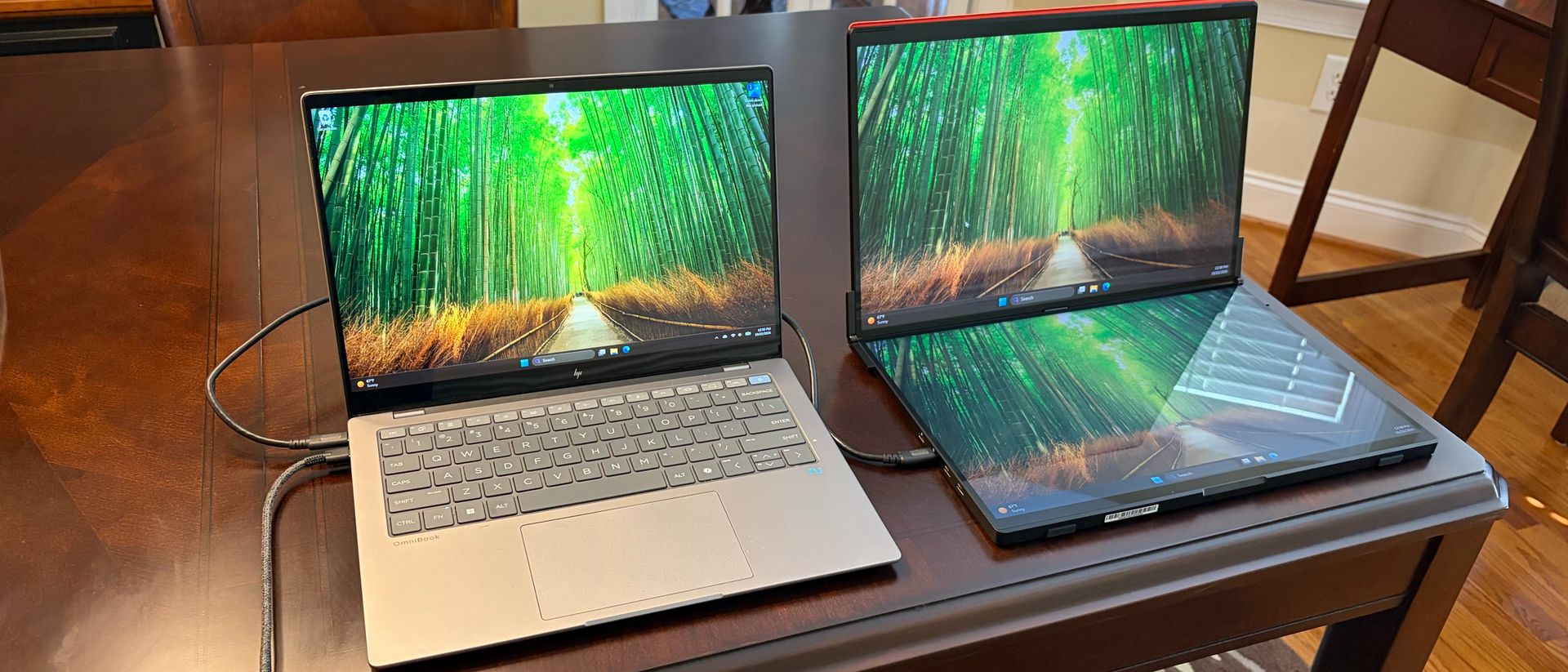
The FlipGo comes with an assortment of cables in the box. You get two USB-C cables, a mini-HDMI to HDMI cable, and a USB-C wall adapter. As I previously mentioned, the FlipGo does not support touch input on macOS. In addition, the FlipGo only supports mirror mode for both screens on macOS and requires you to use both USB-C and mini-HDMI to HDMI cables to connect (Windows 11 supports both mirror and extend modes). Because of these limitations and the fact that you’d be better off buying the cheaper non-touch model for macOS, I performed all of my testing with a Windows 11 laptop (HP OminiBook X).

Setting up the FlipGo couldn’t have been easier. Although JSAUX includes two mini-HDMI ports on the FlipGo for use with older laptops, if you have a USB-C port that supports DisplayPort, you can use that instead. With my OmniBook X test laptop, I was able to use just one USB-C cable to handle both power and video/data for the FlipGo. The FlipGo also supports 60-watt power passthrough to your laptop, which you can leverage by running dedicated power through the second USB-C port.

JSAUX FlipGo
Tom's Hardware
JSAUX FlipGo
Tom's Hardware

Using just a single cable between the FlipGo and the OmniBook X, I primarily used the two displays in portrait mode. In this mode, I could have two separate webpages open, side-by-side next to the OmniBook X’s internal panel. While I could use the FlipGo in landscape mode, the bottom panel had to lie flat on my desk, given that no stand was provided with my review unit to prop it up.

Touch support functioned, as expected, on both panels without needing to install any additional software. In short, the FlipGo operated flawlessly.

Display Performance on the JSAUX FlipGo (PM0204)

The FlipGo uses two 16-inch IPS panels, each with a resolution of 2560 x 1600 and a refresh rate of 60 Hz. JSAUX listed maximum brightness at 500 nits, but as you’ll see with our test numbers below, that figure was quite optimistic.

As I previously stated, due to the lack of a stand provided with my review unit, I primarily used the FlipGo in portrait mode, and it performed wonderfully here. The large panel sizes combined with the extra resolution over 1080p panels made them ideal for putting two webpages side-by-side. More frequently, I found myself pairing a webpage with an instance of Microsoft Word or Microsoft Excel. I especially appreciated the extra vertical resolution to limit scrolling up and down in Excel.

JSAUX FlipGo

(Image credit: Tom's Hardware)

Compared to the FlipGo Horizon Pro that I previously reviewed, the panels on the “regular” FlipGo were far superior. Not only were they much more colorful and vibrant, but they were also vastly superior in brightness (319 nits versus 247.4 nits). However, I must note that the 319 nits that we recorded were a far cry from the 500 nits that JSAUX claims.

For our color tests, the FlipGo covered 97.2 percent of DCI-P3 and 137.2 percent of sRGB color spaces. That put the FlipGo well ahead of its competition, with the Aura Triple Aero 15.6 Pro Max coming the closest (at 85.4 percent and 120.6 percent, respectively). Given the higher-quality panels on the FlipGo compared to the FlipGo Horizon Pro and the glossy finish on my OmniBook X’s display, overall color balance matched pretty well across all three displays, adding to the enjoyment of using the portable monitor. I’ve often found that portable monitors have slightly (and sometimes far) inferior panels than their laptop counterparts, which can lead to a jarring experience when looking from one to the other. That is definitely not the case with the FlipGo.

Bottom Line

The JSAUX FlipGo is a remarkable piece of hardware for productivity warriors. At first sight, the FlipGo impresses with its high-quality build, stiff hinges, and plentiful video input options. JSAUX even incorporates a USB hub that gives you a couple of USB-A ports and a USB-C port to expand your peripheral footprint.

The FlipGo also tops the charts when it comes to color performance and brightness, more than justifying its $479 street price. I have two reservations concerning my review unit, but only one is really applicable. My review unit lacked a stand to prop the FlipGo up in landscape or portrait modes; however, shipping units from Amazon now include that part. So, crisis averted on that front. My other complaint is unavoidable: the 4.18-pound weight is considerable and is probably a bit more than most people are willing to deal with when traveling. However, it makes a perfect companion for expanding real estate on your desk without the massive footprint that comes with hooking up a traditional desktop monitor.

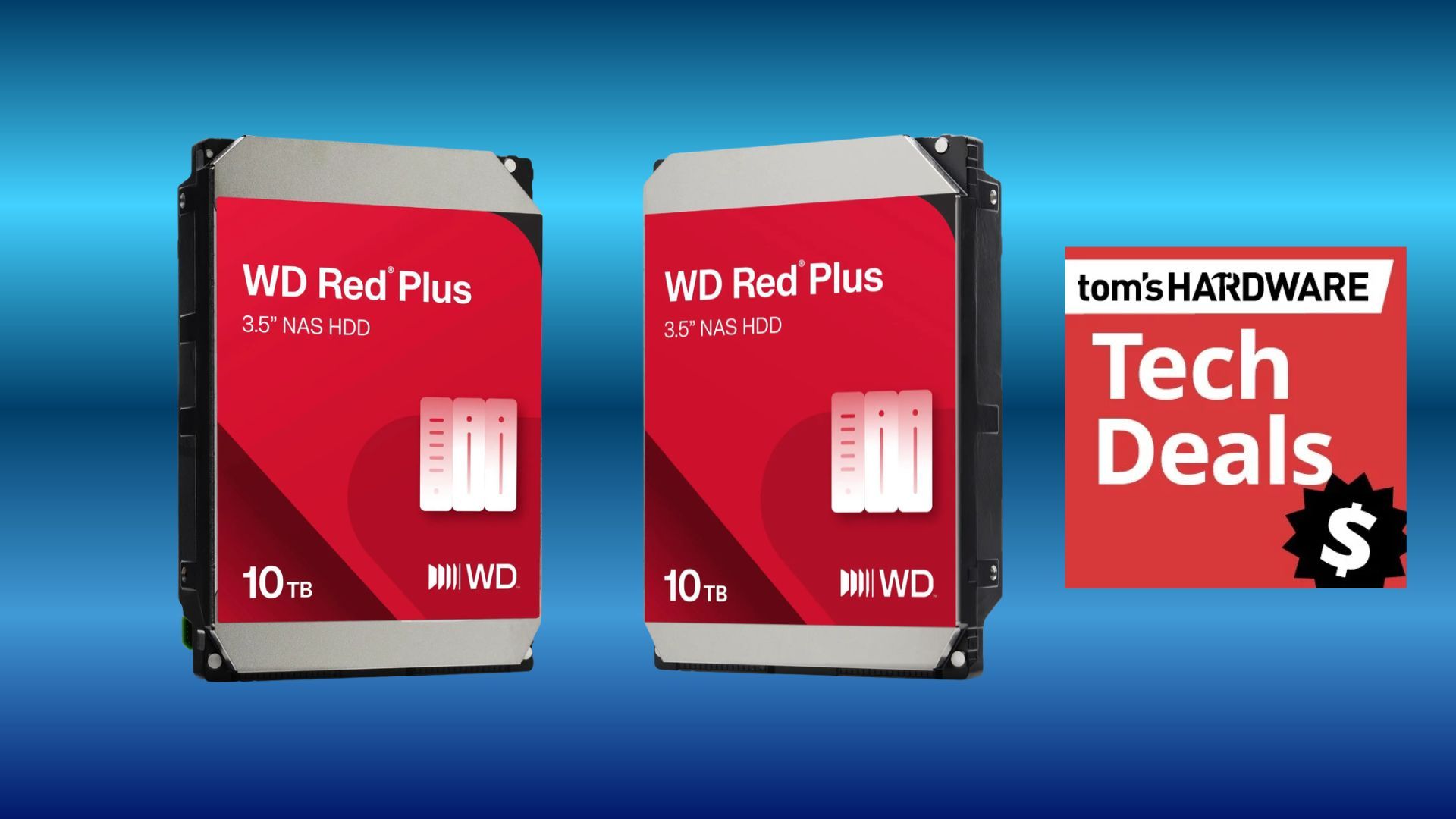
Save $134 on this WD Red Plus 10TB HDD bundle at Newegg

Whether you've had a NAS drive for a while, or you're looking at setting one up, the most important thing is making sure you have plenty of storage capacity. So, if you're looking to replace or boost your current storage drives, then this double-up deal from Newegg on 2x Western Digital WD Red Pro 10TB Hard Disk Drives for $785.98 might be helpful. The price of storage has skyrocketed over the last year due to the ongoing AI infrastructure rollout, so finding a relative deal on HDD storage has become a rare sight indeed. You can save $134 on this deal. The list price for the two drives is $919.98, with a single WD Red Plus 10TB listed for $459.99.

● Grab this HDD deal at Newegg

WD Red Pro hard drives are designed and constructed to be more reliable. These are not your average consumer drives, as they've been engineered to be more robust and cope with vibrations, small shocks, and continuous operation. With NAS drives often operating 24/7, you want reliable hard drives that are up to the task of sustained use. This two-pack of drives instantly starts you off with 20TB of storage capacity.

Red Plus 10TB (2-pack): was $919.98 now $785.98
Western Digital's WD Red Plus 10TB NAS HDD is a NAS-optimized hard drive for servers and other NAS operators looking to upgrade their capacity with a reliable and energy-efficient drive. This two-pack of drives instantly starts you off with 20TB of storage capacity.View Deal

The benefits of going with NAS-specific WD Red Plus HDDs include the fact that they are optimized for lower power consumption and lower operating temperatures than standard HDDs, ensuring lower electricity bills and hopefully great longevity. These WD Red Plus 10TB drives come with a 3-year limited warranty, which should help you to replace this expensive drive should there be any unfortunate drive failures.

The WD Red Plus drive has a 512MB cache and is rated to operate at speeds of up to 216 MB/s with a 7200RPM speed, supporting a workload of up to 180TB/year. That's a fair amount of data for a single drive, and should give the Red Plus plenty of longevity in your NAS setup.

Asus ROG Xbox Ally X20 tested: Same performance, more comfortable, and a glorious OLED screen

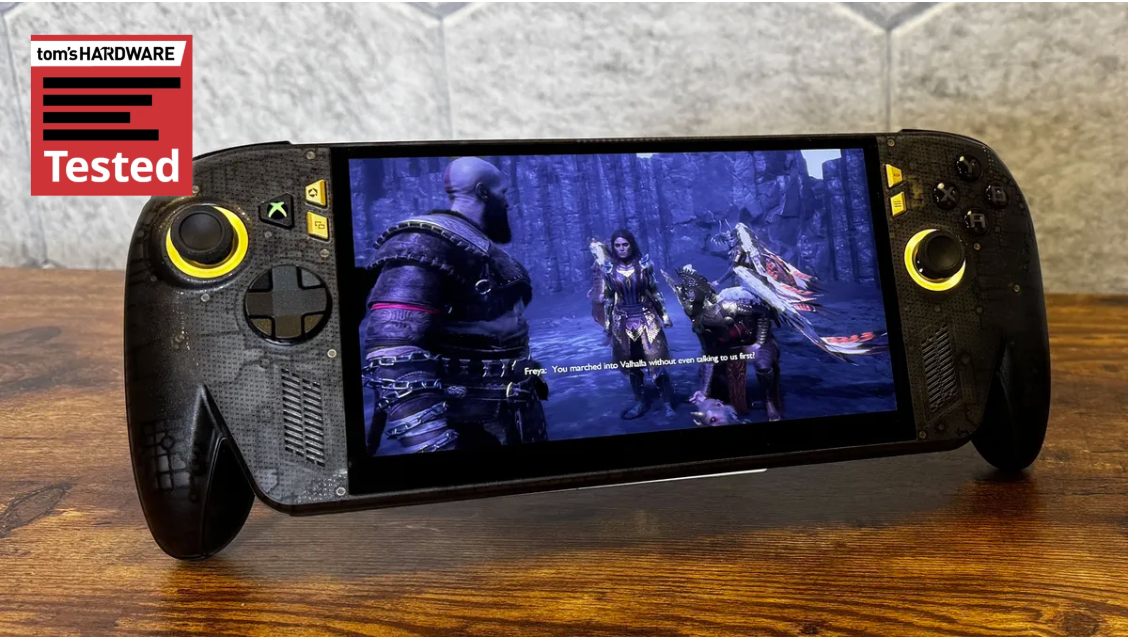
For Asus ROG's 20th birthday, the company released a slew of computer parts (enough for a supremely expensive build). But it's not overlooking its more recent entry into gaming handhelds, with the new Asus ROG Xbox Ally X20, a revamped version of the Asus ROG Xbox Ally X, which is already one of the best handheld gaming PCs.

The $1,299.99 gaming handheld ($2,499.99 if you get it in a bundle with XR glasses, a Pelican case, and a Dbrand Killswitch case) doesn't change performance at all. Instead, it makes some common-sense tweaks to its existing $999.99 handheld, adding TMR joysticks, rubberized grips, a see-through design, a transforming D-pad, and, most importantly, an OLED display.

Asus ROG Xbox Ally X20

(Image credit: Tom's Hardware)

If you already have an Ally X, this isn't a reason to upgrade. But if you're looking to get into handheld PC gaming and are willing to splurge, the changes here sure are nice.

Design and Display on the Asus ROG Xbox Ally X20

If you put the Asus ROG Xbox Ally X20 and the original next to each other, it's impossible not to notice the differences. But still, these are largely the same system, inside and out. They have the same button layout, the same grips, the same screen size, speaker placement, and vents.

Asus ROG Xbox Ally X20
Tom's Hardware
Asus ROG Xbox Ally X20
Tom's Hardware
Asus ROG Xbox Ally X20
Tom's Hardware

The most visible difference is that the X20 has a new, transparent plastic case with a black tint, along with gold menu buttons, a gold stripe across the back (rather than silver), and a large "20th Anniversary" ROG badge on the rear. I prefer the original Xbox Ally X's plainer design; the clear plastic looks more like a toy. I also found that it let the status lights shine through the top of the system, just abover the screen, which is distracting.

Asus ROG Xbox Ally X20

(Image credit: Tom's Hardware)

There is one minor change in the menu buttons: where the Ally X had a library button, the Ally X20 has a screenshot button. It's more useful in general, but it's also a great way to accidentally take a screenshot.

But once I picked up the Ally X20, the original couldn't compare. The chassis feels more substantial, especially with rubberized grips on the back of the prongs. There's a new directional pad, which feels more substantial; it also twists between a 4-way and 8-way pad, though I found switching between these two modes quite awkward. The 8-way D-pad is better for fighting games, while the 4-way with more distinct cardinal directions will make more sense for action-adventure and platform games.

Asus ROG Xbox Ally X20
Tom's Hardware
Asus ROG Xbox Ally X20
Tom's Hardware

The new TMR joysticks, which should show less wear with age, feel tighter. All of this adds up, even though there is no performance difference between the two devices. They share the same AMD Ryzen AI Z2 Extreme chip.

The other big change is the screen. Both use 1920 x 1080 touchscreens, but the Xbox Ally X20 has a 7.4-inch OLED panel, slightly larger than the original's 7-inch IPS display. While the screen size isn't much of a difference, the narrower top bezel is noticeable.

Asus ROG Xbox Ally X20

(Image credit: Tom's Hardware)

And the OLED screen looks great. It's only slightly more vivid on measured color tests. But it's definitely brighter, and it's absolutely an improvement. The OLED screen doesn't measure as well as the OLED screen on the Steam Deck OLED, but in isolation, I thought Asus's panel looked great, and it has a much more recent chip than the Steam Deck.

Forza Horizon 6 looked beautiful, with lush greenery on the sides of tracks and realistic, colorful paint jobs. In God of War: Ragnarok, dark areas with deep blacks made dim light stand out.

Asus ROG Xbox Ally X20 Specifications

Processor

AMD Ryzen AI Z2 Extreme

Graphics

AMD Radeon RDNA 3.5 graphics (16 cores)

Display

7.4-inch, 1920 x 1080, OLED touchscreen, 120 Hz

Memory

24GB LPDDR5X-8000, soldered

Storage

1TB PCIe 4.0 NVMe M.2 2280 SSD

Networking

Wi-Fi 6E, Bluetooth 5.4

Ports

USB4 Type-C (Thunderbolt 4 compatible), USB 3.2 Gen 2 Type-C, 3.5 mm headphone jack, microSD card reader (UHS-II)

Battery

80 WHr

Power Adapter

65W

Operating System

Windows 11 Home

Dimensions

11.42 x 4.76 x 1.08 ~ 2.00 inches (29.0 x 12.1 x 2.75 ~ 5.09 cm)

Price as Configured

$1,299.99

Battery Life on the Asus ROG Xbox Ally X20

The Ally X20 has the same 80 Whr battery as its predecessor. To get an idea how long you can play a demanding game for, I booted up God of War: Ragnarok, set the screen to 50% brightness, and used the 17W performance mode. With the game running on low settings with AMD FSR 3.1.4 at 720p, the machine had 47% charge left after an hour and 15 minutes of gameplay.

That suggests that I could have hit about 2.5 hours had I kept going. That's down from about 3 hours on the original Ally, though it's not apples to apples, as I played different games. It's to be expected that an OLED display would use a bit more power, however.

Software and Warranty on the Asus ROG Xbox Ally X20

The ROG Xbox Ally X20 uses the same Full Screen Experience that the original Xbox Ally X originated. Portions of Windows don't even load unless you switch to desktop mode, which saves RAM and helps boost performance.

For some features, Asus includes Armoury Crate SE. That's where you can make changes to the lighting around the joysticks, adjust power management (whether in the app or in the Xbox menu), and calibrate your joysticks and triggers.

Asus sells the ROG Xbox Ally X20 with a 1-year warranty.

Bottom Line

Asus ROG Xbox Ally X20

(Image credit: Tom's Hardware)

The Asus ROG Xbox Ally X20 is the definitive form of Asus' handheld. It feels better in the hands, has joysticks that should last longer, and the OLED display is a noticeable improvement.

All of that being said, games play the same across the two devices. If you already have an original ROG Ally X, this isn't worth the upgrade. You won't get any more performance, and the IPS screen on the original is still plenty bright and colorful, even if the blacks aren't as good as on an OLED screen.

If you're buying a new machine, it's a tougher choice. The X20 is $1,299.99 — a $300 increase over the original, which is staying on the market. If this is your sole gaming machine, that may be worthwhile for the improved screen, TMR joysticks, and a slightly more solid build. But it's a lot of money; the original Xbox Ally X will play games the same way for $300 less. Neither will play games as well as the Intel Arc G3, but the only system with that available right now is $1,799.

The X20 is worth getting if it's going to be your only gaming PC for a few years. The $1,299.99 price is high for a handheld, but given that the $999.99 version is effectively the best deal in handhelds right now, it makes some sense to invest if you want the best experience.

3.2 Petabits per second real-time optical fiber transfer speed world record claimed by Chinese team

A Chinese team has claimed a new world record for real-time transfer speeds across 24-core optical fiber cable. The collaboration between the National Key Laboratory of Optical Communication Technology, and Network of China Information and Communication Technologies Group, Pengcheng Laboratory, and Fiberhome Fujikura Fiber Optic Technology Co., Ltd. hit speeds fast enough to download “more than 20,000 4K movies” in one second, reports the Chinese government website for Hubei Province.

We note that this new 3.2 Pb/s real-time optical transfer speed world record comfortably eclipses the 2.5 Pb/s record set by the same teams earlier this year. The improvement represents an almost 30% performance uplift within a year.

According to the source, these speeds could mean, if and when they are successfully rolled out, “3.2 million households simultaneously enjoying gigabit broadband.” Or you could say this speed is roughly 3.2 million times faster than a typical one-gigabit internet connection. Both are probably more useful and practical comparisons than knowing that one person would be able to download 20,000 4K movies in a single second.

In technical terms the 3.2 Pb/s test proved the success of the spatial division multiplexing and S+C+L multi-band transmission technology used by the team. Major hurdles faced by the researchers included crosstalk interference, and handling the varying spec requirements of the S+C+L transmission bands.

The new 3.2 Pb/s transmission record was achieved using commercially compliant hardware architectures in real-time. Thus, the headlining result could be practical and deployable in the real world in the not-too-distant future, with enough will and effort.

Contrast that to pure academic lab optical fiber transmission milestones which have reached transfer speeds (across similar 24-core telecommunications fiber) of up to 5.29 Pb/s. However, these incredibly impressive lab results often lean on advanced or experimental signal processing and laboratory equipment.

Leaked 256-core Zen 6c EPYC CPU destroys Zen 5 in early single-threaded benchmarks hints at 24% IPC gain

AMD's Zen 6 processors are out! Well, the EPYC 9006 family of server CPUs is out, anyway. These aren't chips that mere mortals like you and I can reasonably acquire, so there aren't really many third-party benchmarks out there yet, but somebody ran GeekBench 7 on one, and you know what that means: time for some wild speculation, such as the supposed 15% single-threaded IPC increase you might have seen reported this week. However, it isn't quite that clear yet. Well-known enthusiast and occasional leaker HXL (@9550pro) spotted the EPYC 9996 result, and now Russian enthusiast "three twenty six" (@326powah) has done a direct comparison with his Ryzen 7 9700X at the same clock.

Let's lay out the details: the AMD EPYC 9996 is an absolutely gargantuan server processor with 256 "Zen 6c" cores spread across eight "Monarch" CCDs with 32 cores apiece. Each CCD has 128MB of L3 cache, which is reportedly split into two 64MB domains for each 16-core CCX. This gives us 4 megabytes of L3 cache per CPU core, which happens to be the exact ratio that AMD has maintained since Zen 2. Meanwhile, 326's Ryzen 7 9700X is a desktop CPU with eight Zen 5 CPU cores and 32MB of L3 cache, giving it the same cache-per-core ratio yet an overall smaller local cache for the CPU cores, to say nothing of the 1GB of L3 cache on the full EPYC 9996.

Yes, 1GB of L3 cache. That enormous CPU is also served by a 1024-bit memory bus, likely running at 12,800 MT/s, giving it a colossal 1.64 TB/second of memory bandwidth. However, the specific benchmarks we're comparing here are single-threaded benchmarks, and as a result, they aren't likely to be bottlenecked by memory bandwidth on either machine; even 326's relatively pedestrian DDR5 memory at 6000 MT/s CL34 is more than sufficient for a single-threaded, lightly vectorized workload like Geekbench 7. Matching the CPU core clock rates at 4.1 GHz actually gives us a pretty decent core-to-core comparison of performance, even if all factors are not equal.

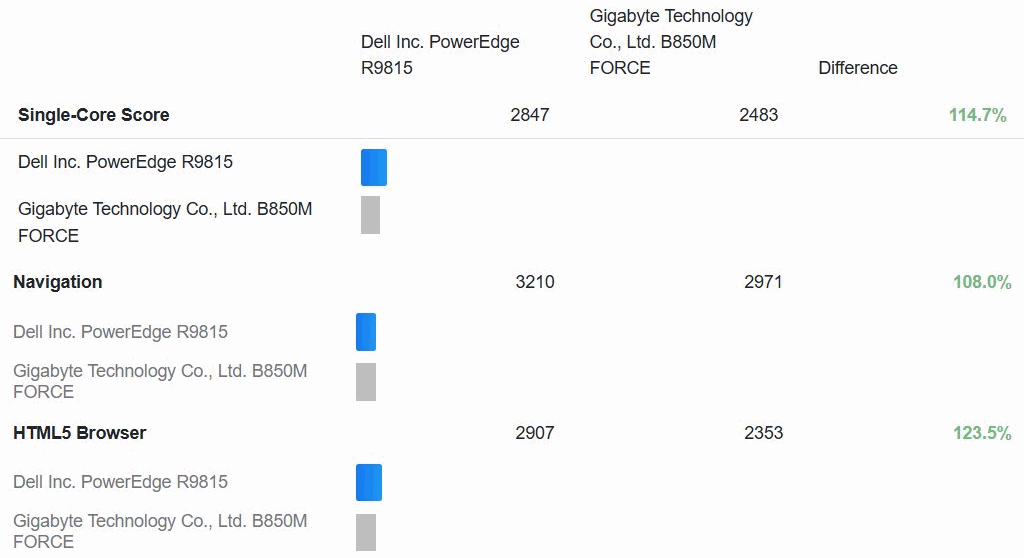
A cropped version of a Geekbench 7 single-core benchmark comparison, showing the new EPYC Venice processor beating a Ryzen 7 9700X desktop CPU.

Comparing the Linux results, the gain over the desktop chip varies quite a bit depending on the specific test, but there are no regressions. (Image credit: @326powah on X)

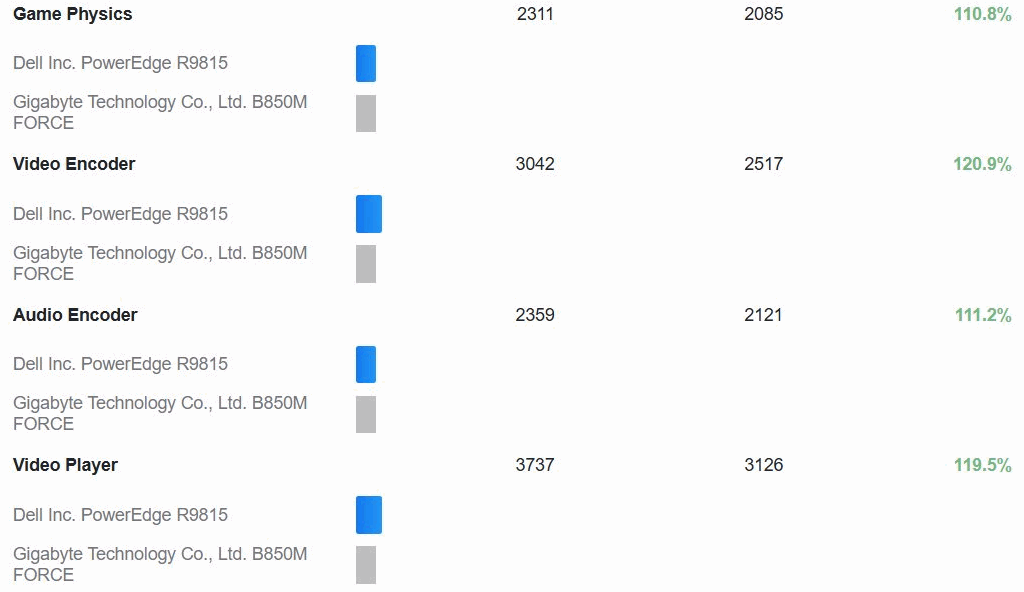
So how does it come out? Frankly, it's a massacre. That's true whether we look at the Windows 11 results he posted first or the CachyOS Linux results that he posted later, although the Zen 5 part doesn't get embarrassed quite as badly in Linux. The Dell PowerEdge R9815 server hosting the big EPYC part scored 2847 in the single-threaded test; 326's Ryzen desktop scores 2483 in Linux and 2318 in Windows.

Looking at the Gala-to-Honeycrisp Linux results, the biggest performance gulf is some 24% in the HTML5 Browser test, which is normally quite sensitive to memory latency. That could easily be caused by the massive L3 cache of the EPYC CPU. Other tests aren't so easily dismissed by configuration mismatches, though. The 19% gain in asset compression, the 21% gain in video encoding, and the 17% gain in photo editing all point to real architectural differences between Zen 5 and Zen 6 that seem quite promising for its desktop debut next year.

What's fascinating is that these results won't have been affected much by the considerable SIMD horsepower of the Zen 6 CPU core, as Geekbench—at least historically speaking—makes relatively light use of CPU SIMD, and in fact, this specific test is marked as "AVX2," meaning it definitely isn't using the muscular AVX-512 units present in either CPU. In fact, most of these tests are actually measuring CPU integer arithmetic and memory subsystem performance more than raw CPU number-crunching power, so Zen 6 coming out so far ahead here is really interesting.

A cropped version of a Geekbench 7 single-core benchmark comparison, showing the new EPYC Venice processor beating a Ryzen 7 9700X desktop CPU.

Media processing seems to be especially strong on Zen 6. (Image credit: @326powah on X)

Obviously, you shouldn't take this as gospel that "Zen 6 has 15% higher IPC than Zen 5," though that's arguably a plausible conclusion; there are just too many confounding factors to say that so far. Indeed, another one of those factors is that this isn't the Zen 6 CPU core that we'll be getting in desktop CPUs. The EPYC 9996 is a high-density part that uses Zen 6c, the specialized dense core design meant for increased area efficiency at the cost of its ability to scale to high clocks. After all, 4.1 GHz isn't exactly a high clock rate these days, and particularly not for chips manufactured on a bleeding-edge 2nm-class manufacturing process.

That's the part that should get you excited. Zen 5 had a very modest IPC uplift over Zen 4 (including even some regressions), and combined with a similarly modest clock rate gain, it wasn't a very exciting release for most desktop users. Zen 6 seemingly may have a significant IPC advantage as well as, if rumors hold, a fairly extreme clock jump over the current-generation parts. If that holds, this may be another leap like from Core 2 to Core i7, and these parts are confirmed to be coming to an AM5 socket near you. We'll be waiting with bated breath for the launch early next year. Hopefully there's RAM to buy by that point.

Micron plans to use wafer bonding and High-NA EUV for next-gen DRAM

Having jettisoned 4F2 memory cells from its roadmap, Micron must use different methods to continue scaling its DRAM devices in the coming years to keep up with rivals planning to use smaller DRAM transistors towards the end of the decade. Instead, Micron intends to introduce wafer bonding with its upcoming 1ε DRAM process technology and adopt High-NA EUV lithography for subsequent generations. Meanwhile, the company is developing new types of memory, including vertical high-bandwidth memory (vHBM) and vertical edge inference memory (vEIM), which will be integrated directly on top of processors.

"DRAM is nearing atomic limits at this point," said Scott DeBoer, president and chief technology and products officer at Micron, during the company's event this week. "Although we have confidence in several more planar nodes, we are very focused on making sure that we introduce 3D DRAM at the optimal time from a cost and performance point of view."

Wafer bonding, High-NA EUV, and new materials

Micron's current 1γ DRAM process is already in high-volume manufacturing, whereas its successor, 1δ, is scheduled to enter volume production in the second half of 2027. The latter promises a mid-20% increase in bit density and is optimized for future AI memory products, including HBM5, vHBM, and vEIM. Beyond 1δ, Micron plans to introduce wafer bonding with its 1ε process, which is currently under development. However, the company has not disclosed how it intends to implement wafer bonding or what improvements it expects from the technology.

Micron

(Image credit: Micron)

For subsequent generations — ζÅ and ηÅ — Micron plans to adopt High-NA EUV lithography (ζÅ, zeta angstrom, Micron's 1st Generation sub-10nm-class DRAM node) and new materials (ηÅ, eta angstrom, Micron's 2nd Generation sub-10nm-class DRAM node) to continue shrinking DRAM cells. For many of its upcoming fabrication technologies that will be used over the next five to 10 years, Micron is also collaborating with Albany NanoTech. Of course, as with all organizations like Albany NanoTech, we are mostly talking about fundamental, or pre-competitive, IP that could be used for DRAM production at some point.

 "Albany NanoTech, our announced focus on advanced lithography [is] really driving High-NA EUV roadmap for DRAM," said DeBoer. "In particular at Albany with our team there, focused on the next five to ten years."

Micron

(Image credit: Micron)

Micron is also developing 3D DRAM technologies and lists two generations — 3D1 and 3D2 — in its roadmap already. However, the company has not disclosed its architectures or launch schedules, as it intends to introduce 3D DRAM only when the technology offers sufficient advantages in manufacturing costs, complexity, and performance over conventional planar DRAM.

"When we look at three 3D DRAM we have that on the roadmap, as I mentioned, and it is shown here in between one zeta and one eta," said Micron's CTO. "But in reality, this is a parallel path, and we will implement it [3D DRAM] in a fashion that is ideal for cost, complexity, and device performance."

Going vertical, becoming critical

Beyond developing new process technologies for its upcoming DRAM products, Micron is also working on all-new types of DRAM products that are tailored for very specific use cases, including vertical HBM (vHBM), vertical edge inference memory (vEIM), and various custom HBM (cHBM) implementations.

Micron

(Image credit: Micron)

vHBM will place memory stacks directly on top of processors (such as AI accelerators and AI GPUs) rather than next to them. This approach promises substantially lower latencies and higher bandwidth thanks to shorter connections. However, placing memory above a processor creates significant thermal challenges and limits the number of memory stacks that can be integrated on top of an ASIC. Therefore, Micron expects vHBM to complement conventional HBM, which will continue to provide the bulk of memory capacity in many AI accelerators.

Micron

(Image credit: Micron)

Another technology under development is vertical edge inference memory (vEIM), which shares architectural and packaging characteristics with vHBM but targets different applications. Whereas vHBM prioritizes maximum bandwidth for high-performance AI accelerators, vEIM is focused on energy efficiency for edge AI processors used in autonomous vehicles, robotics, and other power-constrained devices. Nonetheless, even the 1st Generation vEIM targets formidable 2 TB/s bandwidth at

Micron

(Image credit: Micron)

Both vertical memory architectures will require advanced packaging technologies, particularly hybrid bonding, which enables much denser connections than conventional microbumps. Thermal management will also be critical, especially for vHBM. To meet cooling requirements, Micron is developing specialized heat-spreading structures to transfer heat from hot regions of memory base dies through the DRAM stacks.

The company has not disclosed when vHBM, vEIM, or cHBM will enter commercial production. What is important about the development of such types of memory is that it indicates that future improvements in memory performance will increasingly depend on advanced packaging and closer integration with processors, which will require collaboration between DRAM makers and logic developers. In turn, this transforms memory from a commodity to a critically important ingredient of an ASIC design.

Windows 11’s ‘whole ISO’ squeezed into a CD-ROM

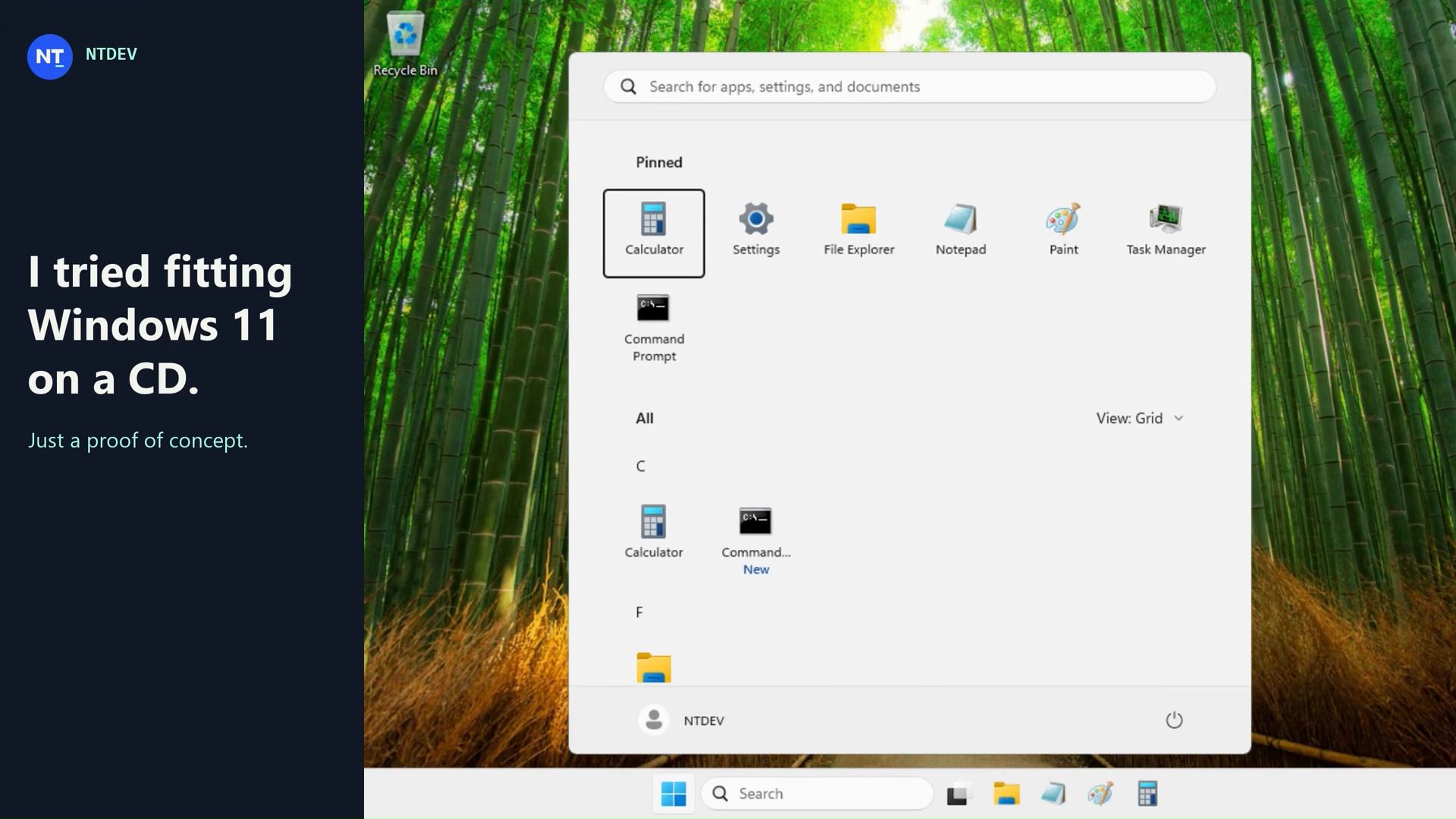
Professional Windows crusher NTDEV has showcased their next-generation tool for compressing Windows 11 into the tiniest of tiny installs. Based on their newest and unreleased Pico11, they managed to create a “proof of concept I put together to see how small I could make a Windows 11 ISO while keeping a working desktop and a few familiar apps.” Moreover, it’s a perfect installer to shove on a 700MB CD-ROM without wasting space, with this demo version weighing in at 699,811,840 bytes.

The test system (a VM with 4GB allocated) used around 883MB of RAM.

In the above video, NTDEV demos a freshly installed Windows 11 ISO that had been processed with Pico11. The desktop looks familiar to anyone currently using Windows 11. “Calculator and Settings still open, Notepad saves files, and Paint still lets me draw questionable logos,” highlights the dev. However, it is also pointed out that “Task Manager might look a little older than you remember.” The older Task Manager seems to be a lightweight legacy version. It may have been possibly swiped from Windows 7, but its exact origin isn’t divulged by NTDEV.

At this time, NTDEV admits what you see is “an experiment, not a replacement for a normal Windows installation,” and that’s mainly because Windows Update and general servicing have been removed to fit inside the constraints of CDR capacity. If you are interested in creating Windows installs like this, the good news is that NTDEV says they are working on adding what they describe as Pico11 capabilities to the Tiny11 builder tool, which you can find on GitHub.

Tiny11 has already demonstrated impressive Windows 11 ISO building capabilities with its Tiny11 mode, Tiny11 Core mode, and Custom mode. Pico11 sounds most closely related to Tiny11 Core as it eschews servicing and recovery support. However, there appears to be some more under-the-hood tweaking, which may have been evidenced in this new showcase by the presence of the older version of Task Manager.

Tiny11 has historically been responsible for even smaller Windows 11 installs, but the extreme 100MB distillation of the OS, for example, came without any Windows 11 UI. Builds could also be remarkable for using tiny amounts of RAM – as little as 176MB. More typical and useful were custom builds powered by Tiny11 where 'bloatware' was removed and that weighed in at around the 2GB mark.

Hopefully we will learn more about Pico11 and get greater insight into its capabilities soon.

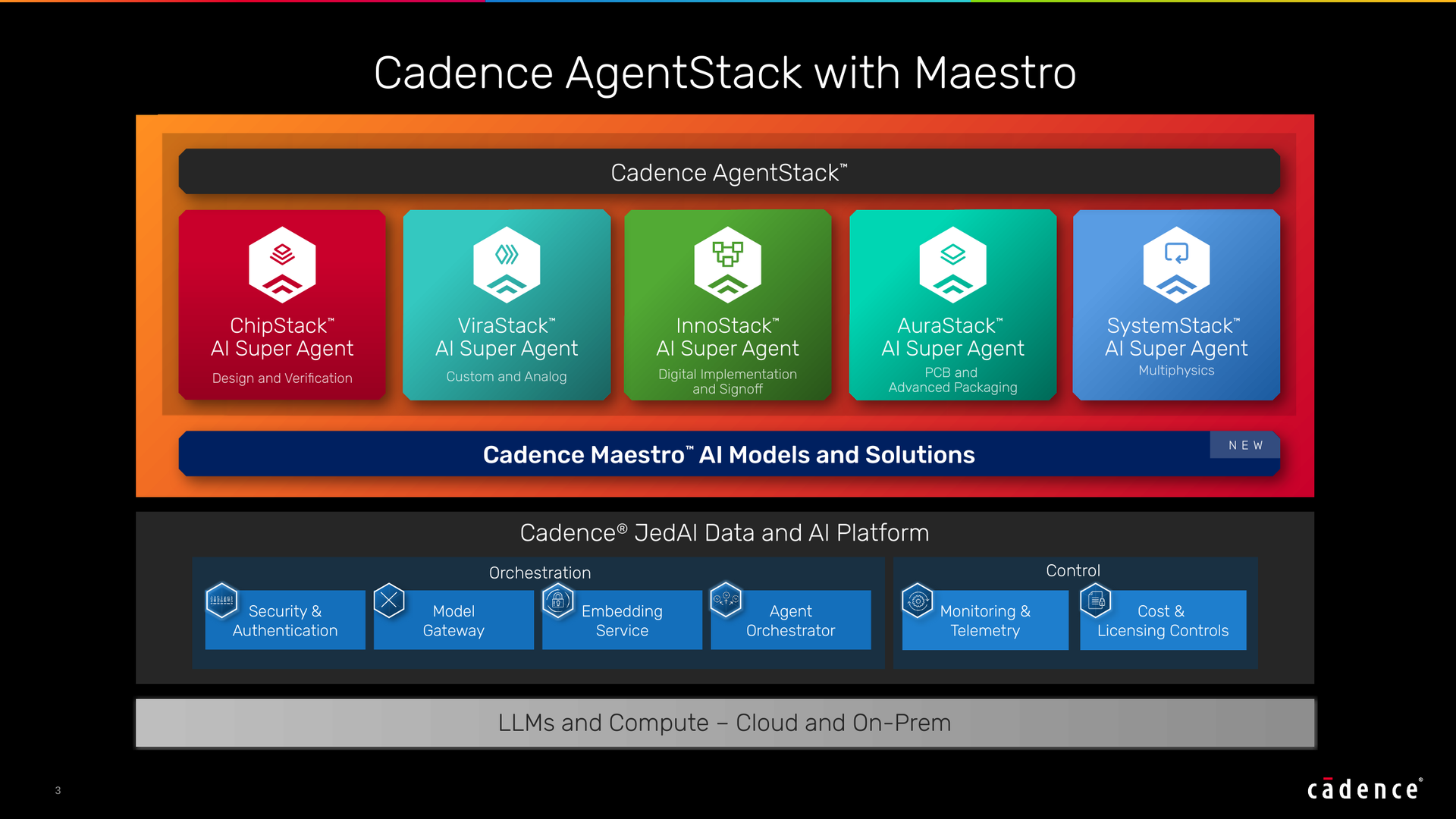
Cadence reveals Maestro, fine-tuned AI models built to run specialized chip design agents, with early access coming for 'select customers' in Q4 2026

Cadence, one of the largest electronic design automation (EDA) companies, has unveiled Maestro, its new portfolio of domain-specialized AI models tailored for its chip design agents, in a press release sent just ahead of earnings. In initial results compared with general-purpose AI models, Cadence claims up to a 30% improvement in the quality of results and that Maestro effectively uses fewer tokens for the same task, with up to 5x the token efficiency. The first models “are available to select early access customers” in Q4 2026, and customers may run them on Cadence’s cloud, public clouds, or customer-controlled on-premises environments and post-train them on their own “proprietary data, designs, and workflows.” To learn more about Maestro, we spoke with two Cadence executives: Rob Knoth, senior group director of strategy and new ventures, and Paul Cunningham, senior vice president and general manager.

This approach is distinct from Synopsys’ own specialized model, GPT-Synopsys, which will run on OpenAI-hosted infrastructure, without using customer data to train the model. The models of both EDA giants, announced less than a month apart, now split on where a customer’s design data goes. Where they might not differ is why: Paul Cunningham, senior vice president and general manager at Cadence, told Tom’s Hardware Premium that agent costs have “really started to explode,” adding, “And I think the world realized so.” That makes it a natural step, he said, to move more of the agents’ iterating “into the weights of the models themselves.”

Cadence diagram of Maestro’s three parts: domain-specialized models, routing between foundation and Maestro models, and customer-specialized models post-trained on customer data.

(Image credit: Cadence)

Maestro takes this step through Cadence’s AI Super Agents, which “interpret design intent, decompose tasks” and “orchestrate the Maestro portfolio with other leading frontier and open-weight models,” evaluating trade-offs to guide decisions with domain expertise. It also uses reinforcement learning (RL), where Cadence’s “deterministic solvers evaluate outputs against engineering objectives, constraints and ground truth,” and, importantly, the results feed back into the models for improvement.

The models include Nvidia’s Nemotron, and customers can run the customer-data training step themselves with Cadence’s fine-tuning harness, potentially “on their own GPUs, on their own network,” Cunningham said. He added that Nemotron, specifically, was “giving really solid results and actually improving very, very fast.”

One constant that keeps popping up with agentic EDA is the need to nail down what the numbers actually measure. In chip design, quality of results usually refers to the design’s power, performance, and area, though Cadence didn’t specify what its 30% figure measures. Both it and the 5x token efficiency figure are measured against “a general-purpose foundation model,” which Cadence told us is the open-source model Maestro started from before its training. The company wouldn’t name the foundational AI model that Maestro is derived from beyond mentioning that it is “one of the leading open source models that’s very competitive with commercial frontier models.”

Cadence credits the token savings to balancing its EDA and system design automation (SDA) “tool calls with LLM invocations.” As an analogy, Cunningham said, “You don’t need to drive to Safeway in the jet engine,” and you want to use “the right model at the right time for the right task.”

Runtime does matter, too: as Rob Knoth, senior group director of strategy and new ventures at Cadence, told Tom’s Hardware Premium in September that a tool call could take anywhere from hours to days to return a value, while the AI industry’s training loops are “used to minutes.” Efficiency could also lower costs, since Maestro use counts toward Cadence’s agent pricing, a subscription with a consumption allowance and charges for use beyond it, Cunningham said. He didn’t say whether the token savings cut a customer’s bill.

Being flexible for the customer is a key element of any solution, and for Cadence’s competitor Synopsys, this lies in Autopilot, which Synopsys says allows customers to “choose among commercial, open-source, and fine-tuned language models” across “Synopsys-managed and customer-managed deployments,” with cloud or on-premises infrastructure. For agent security, such as sandboxing, Cadence says it’s working with Nvidia on an integration with Nvidia’s OpenShell Reference Architecture, which Nvidia launched last week, naming both Cadence and Synopsys. These options can help protect customer intellectual property.

Cadence Maestro vs. GPT-Synopsys

Cadence Maestro

GPT-Synopsys

Announced

Oct. 26, 2026

Sept. 30, 2026

What it is

A portfolio of domain-specialized AI models for Cadence’s AI Super Agents

A specialized model that operates Synopsys’ tools directly

Model partner

Nvidia (Nemotron, OpenShell)

OpenAI

Models

Post-trained LLMs, trained decision models and agent skills, blended with frontier and open-weight models, including Nemotron

OpenAI frontier models

Where it runs

Cadence’s cloud, public clouds or customer-controlled on-premises environments

OpenAI-hosted infrastructure

Customer data

Customers can post-train it on their own data, designs and workflows, with Cadence’s fine-tuning tools

Customer data isn’t used to train the model

Claimed results

Up to 30% higher quality of results and up to 5x token efficiency vs. a general-purpose foundation model, the unnamed open-source model Maestro started from (initial results; measure not stated)

None disclosed

Availability

First models to select early-access customers in Q4 2026

No date; early technology engagements underway

Customers named

Socionext, Silicon Labs (Nvidia as partner), frontier AI labs

None

Pricing

Subscription with a usage allowance, then charged by use

Not disclosed; Synopsys and OpenAI share revenue under their deal

Cadence has had a busy 12 months with customers and agents alike. During Cadence’s July earnings call, CEO Anirudh Devgan said ChipStack, its design and verification agent, “has more than 20 customer engagements,” and ViraStack, its custom and analog agent, “more than 25 customer engagements.” Socionext said just last week that it was applying InnoStack. Silicon Labs has also credited ChipStack with accelerating debugging, and both companies say they are watching Maestro next.

Cadence's agentic consolidation began with its acquisition of ChipStack back in November 2025. In June 2026, the company claimed that its agent had reached Level 5 autonomy, which we explored in detail. In September, Knoth teased Maestro’s ingredients to Tom's Hardware Premium a month early, two days before the GPT-Synopsys announcement: “reinforcement learning loops, domain-specific post-training of open-weight models, model routing.” Maestro is now sitting under all four super agents, targeting a similar year-end window to Synopsys’ Autopilot; the table below has the full timeline.

Cadence’s agentic AI roadmap

When

Product

Cadence’s claim

Status and what’s due

November 2025

ChipStack acquisition (agentic verification startup)

—

Done; co-founder Kartik Hegde now leads Cadence’s core AI research group

February 2026

ChipStack AI Super Agent

Up to 10x productivity for coding designs and testbenches, test plans, regressions and debug

In early access since launch

April 2026

ViraStack (custom and analog), InnoStack (digital implementation) and AgentStack (head agent)

—

Socionext is deploying InnoStack in production; others not stated

June 2026

ChipStack at Level 5, with Nvidia’s Nemotron and OpenShell

Over 40x faster RTL validation cycles in Nvidia’s deployment

Level 5 and AgentStack due to early-access customers in the second half of 2026

July 2026

AuraStack (PCB and advanced packaging)

Up to 2x faster time to market and 15x higher productivity

Available on Cadence’s Millennium M2000 supercomputer; Nokia is deploying it (Oct. 21)

September 2026

ChipStack RTL Generation Agent

An average of 24% less area and 18% less power than pure foundation-model code, in early evaluations

Due to select early-access customers in Q4 2026; early collaboration with Honda R&D

Oct. 26, 2026

Maestro AI Model Portfolio

Up to 30% higher quality of results and up to 5x token efficiency vs. a general-purpose foundation model, in initial results

First models available to select early-access customers in Q4 2026; about a dozen engagements

This rapid pace of progress means that a clear distinction has to be made between early access and general availability. Both Cadence and Synopsys can point to customer engagements, and, at least in the latter’s case for the AgentEngineer portfolio and Autopilot platform, general availability remains a goal by year’s end; Cadence hasn’t given a general availability date for Maestro. For GPT-Synopsys, though, only “early technology engagements are underway,” according to its partners. The platforms and agents remain works in progress.

For Maestro, Cunningham hopes for “more case studies, more quantifiable benefits” through Q4. The real story, as he aptly put it, is that “we’re going to bring agents and agentic AI natively into our vertical, not that our vertical is going to get embedded into general-purpose agents.” Only customer results on real workflows will test Cadence’s 30% number, but going by what both companies have shown so far, their own early figures are extremely promising and exciting for the EDA industry.

Chinese research vessels loiter near Pacific undersea cables more than any other nation, report finds

China is spending more time loitering near undersea cables in the Pacific Ocean than any other nation, according to a report by the Center for Strategic and International Studies, a U.S.-based think tank in Washington, DC. The analysis compared the behavior of 200 research vessels from 47 different nations, including the U.S. and Russia, and found that Chinese vessels spent a "statistically significant larger share of time" near critical infrastructure.

The analysis, reported by Indo-Pacific Defense Forum, notes that Chinese activity was particularly suspicious in this regard. It notes that the "persistent and disproportionate activity" means that China "may be leveraging its research fleet for underwater data collection that may aid... analysis of terrain for sabotage or submarine operations."

Civilian research vessels provide a unique cover for states looking for "plausible deniability" for their research gathering activities. The report mentions the activity of a ship from the Xiang Yang Hong research fleet which, between July and October 2024, spent time near three undersea cables that connected the U.S. with Australia, Indonesia, Singapore, Guam and others.

The ships move in a "lawnmower" pattern which, it notes, is associated with surveying to create accurate seafloor maps. While the ships themselves aren't part of the PRC's navy, the data they collect could be used to serve China in future conflicts.

These "gray zone research activities" continue in an era of Chinese conflict with its neighbors as it asserts territorial claims in the South China Sea against states like the Philippines and Vietnam, not to mention its claims over Taiwan, which Beijing considers a breakaway province.

It also follows a pattern of authoritarian states looking to dominate undersea infrastructure. Last week, a report in The Telegraph found 500 incidents of Russian monitoring near undersea cables over the last five years. Meanwhile, Iran has threatened to attack undersea cables in the Strait of Hormuz in the event of further assaults by the United States if conflict erupts again.

❌