WooCommerce 11.1 introduces Order Withdrawal, bringing the right of order withdrawal functionality to better serve EU customers. This gives customers a simple, self-serve way to request a withdrawal from their order within 14 days of placing it.
This feature may help your store meet these requirements, but it does not guarantee compliance. For guidance specific to your business and where your customers are located, please consult a legal professional.
How to enable it
Order Withdrawal is disabled by default, since it won’t apply to every store. One can enable it by following the steps below:
Go to WooCommerce > Settings > Advanced > Features
Enable the Order Withdrawal option
Save your changes
Once enabled, the request form becomes available at /my-account/withdraw-order for you to surface it to your users. You can change that URL by editing the endpoint under WooCommerce > Settings > Advanced > Page Setup. The page works whether or not the customer is logged in, so a shopper who checked out as a guest can still find it.
Note: By default the “Order Withdrawal” page is available for all users logged in or not, but it is not linked anywhere by default. You can surface it by adding a link to the page from a prominent location, like your store’s footer and/or order emails.
What the customer sees
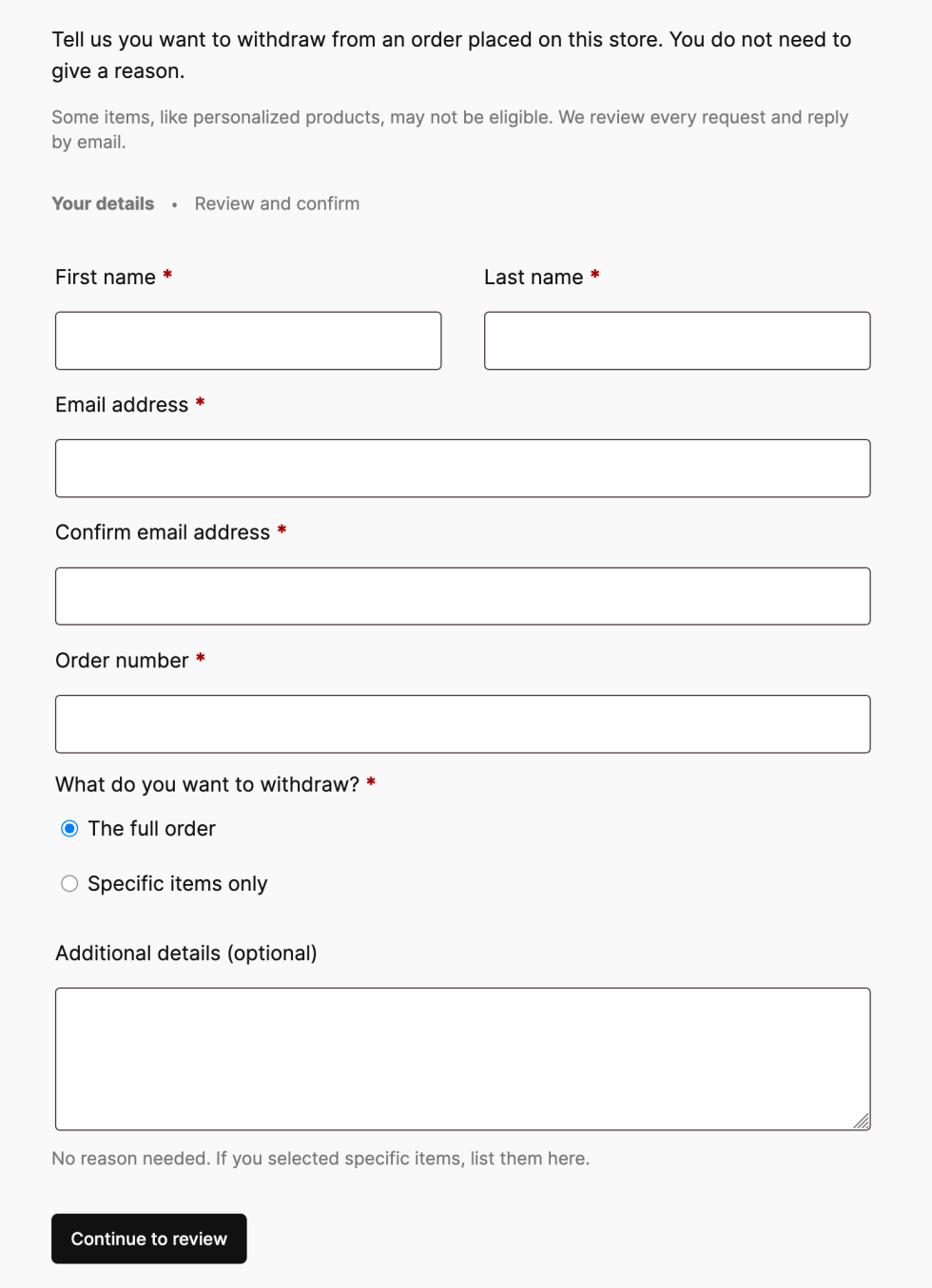
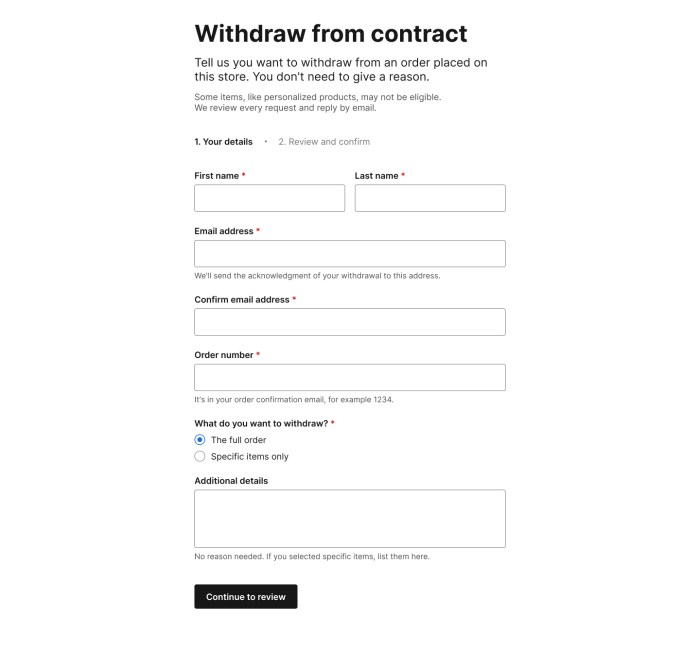
A customer who visits the withdrawal page is presented with a short request form. After filling it in, they get a chance to review their details before submitting.
Order withdrawal form
Once they submit the request, they see a confirmation screen and receive an acknowledgment email containing the details they entered. This gives the customer a confirmation that their request has been submitted and provides a record of the request.
Customer email confirmation
What the merchant sees
When a request comes in, we make sure the store owners know about it in a couple of ways: an email notification for the withdrawal request, and an inbox notification on your WooCommerce home screen.
Inbox notificationStore email notification
If the order number and billing email match an existing order, the request is automatically linked to that order, and an order note is added. If there’s no match, the request is still accepted, and the customer still gets their acknowledgment email; the notification simply flags that manual review is needed and skips the order link.
Submitting a withdrawal request does not change the order status, cancel the order, or issue a refund. How a store handles each request is up to the owner, whether that’s approving a refund, asking for the item back, or following up for more information.
What’s next
Order Withdrawal is coming in WooCommerce 11.1. Give it a try, and let us know how it works for your store!
In WooCommerce 11.1 and 11.2, we are focusing on performance optimizations for larger product catalogs. While this work prioritizes backward compatibility, some of the components involved were designed years ago and are structurally incapable of supporting the required performance improvements — the changes below outline what’s affected for extension developers and stores with customizations.
As the product data stores now skip these calls when the stored value already matches, the optimization reduces per-save SQL count by up to 45%.
While technically, the contracts are preserved, changed set_object_terms hook invocation frequency can cause side effects. To verify your extensions and customizations for side effects this change could potentially cause, consider using AI tooling of your choice with the following prompt:
Search the active plugins, mu-plugins, and theme's functions.php for add_action('set_object_terms', ...) callbacks. For each match, check if the callback assumes it fires on every product save regardless of whether the product type changed. If so, the callback needs to be moved to a more appropriate hook (e.g., woocommerce_update_product or save_post_product).
Previously, when you reordered products under Products -> All Products -> Sorting, the complete catalog was reindexed. The new algorithm is designed to work with large catalogs and implements faster re-indexing and smarter (range-based) reordering.
The algorithm replacement required redefining customization and deprecating old hooks according to this table:
Using deprecated hooks will cause a fallback to the old unoptimized algorithm. Please reference the second PR for details.
Hook
Status
Use-case
woocommerce_after_single_product_ordering
Deprecated
Fired per product during catalog reindexing
woocommerce_after_product_ordering
Deprecated
Fired once after reordering is completed.
clean_post_cache
Unchanged
Fires per affected product on both legacy and fast paths.
Depending on the exact usage of the deprecated hooks, please consider using clean_post_cache, wp_ajax_woocommerce_product_ordering, woocommerce_product_ordering_process_reindexed_products, and woocommerce_product_ordering_process_moved_products as primitives for replicating the original behaviour.
WooCommerce 11.1 brings a complete order withdrawal flow for shoppers, a new REST API refund calculation endpoint, several bug fixes for the product CSV import and export, and a focused set of compatibility changes for extension developers. Here is an early look at the changes taking shape before the release.
Several bug fixes were applied to Product Importing, including preserving terms and categories in re-uploads, clearing images when the file indicates so, respecting existing store currency settings, and better handling for variation creation if the product already exists.
Order withdrawal
WooCommerce 11.1 brings the right of order withdrawalfunctionality to better serve EU customers. A customer can request a withdrawal from a new My Account page /my-account/withdraw-order/, no auth required. Submissions are then routed to merchants, who receive an email and an inbox notification to follow up with the customer. Order withdrawal is disabled by default and must be enabled from WooCommerce -> Settings -> Advanced -> Features.
REST API refunds and Store API checkout totals
We have updated the refund flow in the WC REST API. We now call POST /wc/v3/orders/{id}/refunds with compute_totals: true in the body, which lets the server calculate the refund totals for you (instead of doing manual calculations).
A new endpoint POST /wc/v3/orders/{id}/refunds/preview allows you to run the calculation and preview the refund without actually applying it.
On Store API, checkout endpoints gain an optional expected_total: integer field that should contain the total the customer is seeing, and if they get charged a different amount, the request would fail with a new 409woocommerce_rest_checkout_total_mismatch response. This field is then immediately applied in the Checkout block.
The block email editor makes core/embed insertable for providers that render clickable thumbnails: YouTube, Vimeo, VideoPress, TikTok, and Dailymotion, plus the WordPress embed, which renders as a rich link card. Audio providers are excluded. Embeds from unsupported providers can still be pasted in; however, the editor issues a warning and sends a link to reflect the delivered result.
Personalization tag callbacks now receive their destination content type. A tag can escape correctly for HTML, plain text, or an href. The new parameter is optional and defaults to HTML; automatic escaping applies only to newly registered text-typed tags.
Multiple performance fixes are included in this release, mainly reducing N+1 queries around variations and attributes in both the editor and frontend, and reducing queries on price caching as well.
Block registration is skipped on non-rendering requests
Block types and patterns previously registered on nearly every request, including many that never render or edit blocks. A new BlockRegistrationContext guard now skips registration on cron, AJAX, and REST API requests, while preserving front-end, admin, and editor behavior.
One exception is built in: when a product or variation description contains a WooCommerce block, block types are registered on demand via the woocommerce_short_description filter, so descriptions still render correctly in the products REST API, the Store API, the variation AJAX endpoint, and product webhooks.
Extensions that assume block registration on every request must adapt. The new woocommerce_should_register_blocks filter opts back in for extensions that render blocks in a skipped context.
An experimental unified block editor assets feature replaces per-block editor scripts and styles with shared JavaScript and CSS bundles. Frontend assets are unchanged. Testing measured 91.7% fewer editor assets, a 48.3% reduction in network transfer size, and 62.3% smaller style bundles.
The experiment is disabled by default, and stores can opt in to test it from WooCommerce -> Settings -> Advanced -> Features -> Experimental features. When enabled, WooCommerce blocks use the wc-block-library handle instead of individual block handles, editor styles consolidate under wc-block-library-style, and legacy handles stay registered as placeholders that emit a deprecation warning when enqueued.
Internal storage for a product video gallery is behind a feature flag as the first step toward product gallery videos; this can be enabled through WooCommerce > Settings > Advanced > Features > Product gallery videos (Beta).
is_rest_api_request() previously detected REST requests only through pretty-permalink paths under /wp-json/. It now treats a non-empty rest_route query parameter as a REST request.
Other compatibility notes
ProductGalleryUtils::get_product_gallery_image_count() is deprecated and restored as a shim that emits a deprecation notice pointing to get_product_gallery_media_count(): #66550.
The quantity stepper’s DOM order now matches its visual order, fixing WCAG 1.3.2 and 2.4.3. Themes with CSS keyed to the old DOM order should re-test: #66670.
WC_Order_Item_Product::set_product() now resets variation_id, and partial REST order updates preserve variation IDs when product_id is unchanged. An explicit variation_id: 0 still demotes to parent: #66734, #67343.
search_products() now wraps its OR-group disjunction in parentheses, so include, exclude, status, and type clauses apply to all groups. Result sets change: #67420.
A new GET /wc-analytics/activity-panel/counts collapses three endpoints previously called by two components each, turning six requests per admin page load into one: #66276.
Analytics page output no longer carries request-derived properties, so cached pages cannot emit another visitor’s request data: #67003.
@woocommerce/entities no longer exposes internal utilities on window.wc.wcEntities. Those utilities were never intended as a public API: #66978.
Currency symbol output changes for MOP (P to MOP$) and ZMW (ZK to K). Existing symbol-override filters continue to work: #66716, #66722.
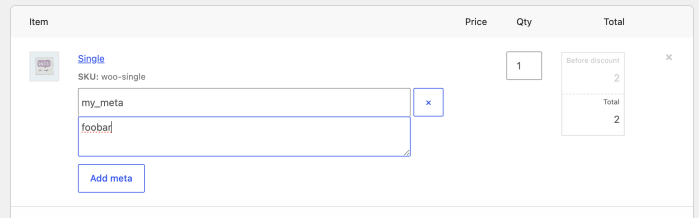
As of WooCommerce 11.0.0, the order items form in the admin order editor no longer attempts to save reserved meta keys entered through its Add meta button, an operation that never worked reliably.
A key is reserved when the order item’s data store lists it as internal meta (e.g. _product_id, _qty, _line_total), or when an extension registers it as hidden via the woocommerce_hidden_order_itemmeta filter.
Order item metadata in the admin.
Why this change
The goal is correctness and consistency: reserved keys are data that WooCommerce or extensions manage, and editing them through a generic form was never safe. Before 11.0.0, the form accepted these keys, with broken results.
Keys backed by a setter, such as _product_id, were silently processed by the item’s setter, where an invalid value could break the order screen and a valid one could partially overwrite data. Any other reserved key was appended as a new meta row even when the item already had one, confusing code that expects a single value.
In no case could the entered value be reviewed or edited afterwards.
What has and hasn’t changed
Reserved keys entered through the Add meta button in the order editor are now skipped when the item is saved. In practice, not much else changes: these keys never showed in the form, and adding one only ever worked when the key was missing, due to a bug.
Everything else stays the same:
Keys that aren’t reserved save normally, even if they start with _. Order item meta doesn’t follow rules similar to WordPress protected meta.
Programmatic reads and writes via add_meta_data(), update_meta_data(), the REST API, WP-CLI, etc. are unchanged.
Order meta (the order’s own custom fields) is unaffected: this change only concerns meta on order items.
For developers
If your extension registers keys in woocommerce_hidden_order_itemmeta those will be skipped not just for rendering, as usual, but now also at save time, failing silently.
If admins are expected to manage a meta key, don’t register it as hidden, or provide a dedicated UI for it, giving them a much clearer flow than raw meta entry.
To keep the key hidden but still let admins set it from the items form, re-apply the submitted value from woocommerce_before_save_order_items as a workaround:
If an extension’s documentation asks you to enter a meta key through Add meta and the value doesn’t stick, the extension most likely registers that key as hidden. Until the extension is updated, you can unhide the key with a small snippet, which makes it visible and editable in the order editor:
Admin settings initialize consistently across WooCommerce admin pages. This fixes a Payments settings bug that could show a false business-location mismatch warning for stores outside the United States. (#67532)
Password protection covers product short descriptions across embeds, Product Summary blocks, and block-based single-product templates. Shoppers must enter the product password before these summaries appear. (#67557)
Store API payments for existing orders enforce each coupon usage limits correctly. (#67549)
Store API cart tokens are read from one request source and validated before a customer session loads. A PHP_CodeSniffer rule catches direct token reads in future Store API code. (#67550)
Guest session cookies now use a stronger, salted hashing scheme. Legacy cookies remain valid until they expire so guest carts survive the upgrade. (#67408)
Single dismissible notices in Cart and Checkout blocks are sanitized before rendering. Entity-encoded HTML in Store API error messages is displayed as safe content instead of executable markup. (#67476)
The [woocommerce_review_order] shortcode renders only on WooCommerce’s managed review-order page with a matching order key. Requests from other pages or with the wrong key return no order content. (#67552)
External product button labels pass through text sanitization when submitted to REST API versions 1 through 4, and the Product Button block escapes labels on output. (#67558)
Automatic featured-image matching by SKU requires the current user to have the edit_product capability for the matched product. An image upload cannot change a product the user lacks permission to edit. (#67530)
Activating a Marketplace subscription requires activate_plugins for plugins or switch_themes for themes. The endpoint also rejects unsupported product types. (#67567)
The onboarding theme-installation endpoint checks the WordPress install_themes capability. Users without that permission cannot install a theme through onboarding. (#67533)
Analytics CSV exports validate report_args against the selected report’s REST schema. Unsupported orderby values are rejected whether an export is queued through REST or directly in PHP. (#67551)
Analytics order reports accept only recognized date columns from the woocommerce_date_type option or a date_type query argument. Unknown stored values fall back to date_paid, while unknown per-request values fall back to date_created. (#67554)
Writing a log no longer requires scanning the entire wc-logs directory, reducing checkout latency on stores with large log backlogs. Cleanup processes bounded batches until the backlog is empty, and the woocommerce_order_step_logging_enabled filter lets developers disable place-order debug logging without changing the site-wide threshold. (#67410)
The Orders list is compatible with WordPress 7.1’s updated list-table markup. Checkbox interactions and responsive layouts work correctly with both the old and new primary-cell markup. (#67364)
The product-review list-table test accepts both the older check-column markup and the markup introduced in WordPress 7.1. This keeps pre-release CI compatible with both versions without changing runtime behavior. (#67517)
The Add Product screen’s JavaScript-count test accounts for the wp-tooltip and wp-sync scripts added in WordPress 7.1. This test-only change does not affect runtime behavior. (#67473)

 Login
Login