Login
Login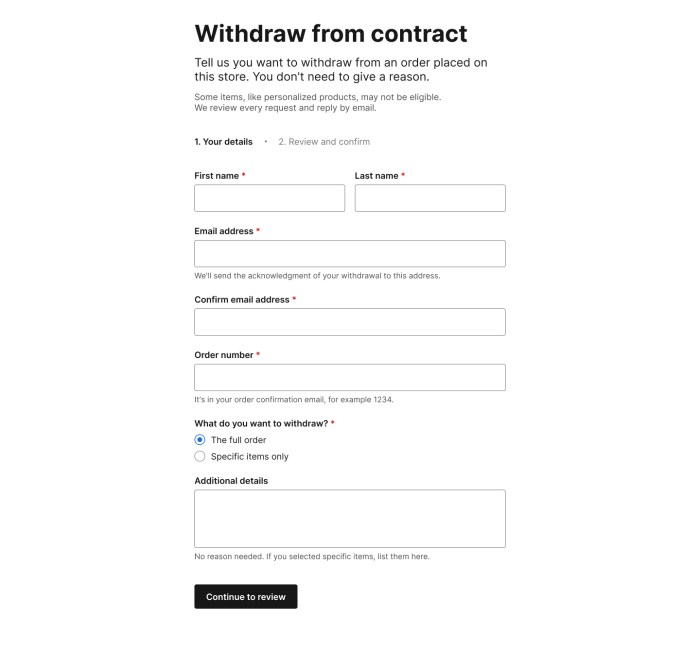
WooCommerce 11.1: What’s coming for developers
Beta
WooCommerce 11.1 is coming soon
This release is now available for testing. Review the highlights below, test the beta, and share feedback before the final release.
Highlights
- REST API has a new refund endpoint
- EU order withdrawal comes to WooCommerce
- Variable product performance has been improved
- Beta available now
- Final release: September 01, 2026
- Feedback requested
WooCommerce 11.1 brings a complete order withdrawal flow for shoppers, a new REST API refund calculation endpoint, several bug fixes for the product CSV import and export, and a focused set of compatibility changes for extension developers. Here is an early look at the changes taking shape before the release.
Product CSV import and export
PRs: #66903, #66213, #66946, #66205, #66295
Several bug fixes were applied to Product Importing, including preserving terms and categories in re-uploads, clearing images when the file indicates so, respecting existing store currency settings, and better handling for variation creation if the product already exists.
Order withdrawal
WooCommerce 11.1 brings the right of order withdrawal functionality to better serve EU customers. A customer can request a withdrawal from a new My Account page /my-account/withdraw-order/, no auth required. Submissions are then routed to merchants, who receive an email and an inbox notification to follow up with the customer. Order withdrawal is disabled by default and must be enabled from WooCommerce -> Settings -> Advanced -> Features.

REST API refunds and Store API checkout totals
We have updated the refund flow in the WC REST API. We now call POST /wc/v3/orders/{id}/refunds with compute_totals: true in the body, which lets the server calculate the refund totals for you (instead of doing manual calculations).
A new endpoint POST /wc/v3/orders/{id}/refunds/preview allows you to run the calculation and preview the refund without actually applying it.
On Store API, checkout endpoints gain an optional expected_total: integer field that should contain the total the customer is seeing, and if they get charged a different amount, the request would fail with a new 409 woocommerce_rest_checkout_total_mismatch response. This field is then immediately applied in the Checkout block.
Email editor updates
PRs: #66968, #66937, #67079, #66801, #66727
The block email editor makes core/embed insertable for providers that render clickable thumbnails: YouTube, Vimeo, VideoPress, TikTok, and Dailymotion, plus the WordPress embed, which renders as a rich link card. Audio providers are excluded. Embeds from unsupported providers can still be pasted in; however, the editor issues a warning and sends a link to reflect the delivered result.
Personalization tag callbacks now receive their destination content type. A tag can escape correctly for HTML, plain text, or an href. The new parameter is optional and defaults to HTML; automatic escaping applies only to newly registered text-typed tags.
Variable product performance
PRs: #66084, #66675, #66767, #66774, #67152, #66875
Multiple performance fixes are included in this release, mainly reducing N+1 queries around variations and attributes in both the editor and frontend, and reducing queries on price caching as well.
Block registration is skipped on non-rendering requests
Block types and patterns previously registered on nearly every request, including many that never render or edit blocks. A new BlockRegistrationContext guard now skips registration on cron, AJAX, and REST API requests, while preserving front-end, admin, and editor behavior.
One exception is built in: when a product or variation description contains a WooCommerce block, block types are registered on demand via the woocommerce_short_description filter, so descriptions still render correctly in the products REST API, the Store API, the variation AJAX endpoint, and product webhooks.
Extensions that assume block registration on every request must adapt. The new woocommerce_should_register_blocks filter opts back in for extensions that render blocks in a skipped context.
Experimental features
Unified block editor assets
An experimental unified block editor assets feature replaces per-block editor scripts and styles with shared JavaScript and CSS bundles. Frontend assets are unchanged. Testing measured 91.7% fewer editor assets, a 48.3% reduction in network transfer size, and 62.3% smaller style bundles.
The experiment is disabled by default, and stores can opt in to test it from WooCommerce -> Settings -> Advanced -> Features -> Experimental features. When enabled, WooCommerce blocks use the wc-block-library handle instead of individual block handles, editor styles consolidate under wc-block-library-style, and legacy handles stay registered as placeholders that emit a deprecation warning when enqueued.
Product gallery videos storage
PR: #65396
Internal storage for a product video gallery is behind a feature flag as the first step toward product gallery videos; this can be enabled through WooCommerce > Settings > Advanced > Features > Product gallery videos (Beta).
Developer advisories and compatibility work
is_rest_api_request() now detects ?rest_route=
PR: #66816
is_rest_api_request() previously detected REST requests only through pretty-permalink paths under /wp-json/. It now treats a non-empty rest_route query parameter as a REST request.
Other compatibility notes
ProductGalleryUtils::get_product_gallery_image_count()is deprecated and restored as a shim that emits a deprecation notice pointing toget_product_gallery_media_count(): #66550.- The quantity stepper’s DOM order now matches its visual order, fixing WCAG 1.3.2 and 2.4.3. Themes with CSS keyed to the old DOM order should re-test: #66670.
WC_Order_Item_Product::set_product()now resetsvariation_id, and partial REST order updates preserve variation IDs whenproduct_idis unchanged. An explicitvariation_id: 0still demotes to parent: #66734, #67343.search_products()now wraps its OR-group disjunction in parentheses, so include, exclude, status, and type clauses apply to all groups. Result sets change: #67420.- A new
GET /wc-analytics/activity-panel/countscollapses three endpoints previously called by two components each, turning six requests per admin page load into one: #66276. - Analytics page output no longer carries request-derived properties, so cached pages cannot emit another visitor’s request data: #67003.
@woocommerce/entitiesno longer exposes internal utilities onwindow.wc.wcEntities. Those utilities were never intended as a public API: #66978.- Currency symbol output changes for
MOP(PtoMOP$) andZMW(ZKtoK). Existing symbol-override filters continue to work: #66716, #66722.
The post WooCommerce 11.1: What’s coming for developers appeared first on The WooCommerce Developer Blog.