With Stig Abell and Thea Lenarduzzi – The graphic artist Nicola Streeten discusses two new exhibitions, in Paris and London, linking comics to trauma theory, radical politics and feminism; Alexander van Tulleken on a new book by two "rock star professors" that purports to provide a bold new solution to the refugee crisis; a crackly clip just a few minutes long is all we have left of Virginia Woolf's voice – Emily Kopley fills us in on the fraught context behind "Craftsmanship", a talk broadcast by the BBC 80 years ago
With Stig Abell and Thea Lenarduzzi – Philippe Sands discusses his forthcoming project which assembles an international cast of actors, writers, musicians and politicians to read Primo Levi's seminal account of survival in Auschwitz, seventy years after its publication; as part of our Shakespeare edition this week, TLS Commissioning Editor Michael "The Doctor" Caines considers how protective we should be of the man and the work; Rebecca Spang wades through the murky matter of money, the growth of "off shore" finance and the bewildering sexualization of monetary metaphors.Discover more at www.the-tls.co.uk.
With Stig Abell and Thea Lenarduzzi – TLS editor James Campbell, Baldwin's biographer and friend, on the writer's complex presence and legacy on and off screen; Michael Rosen on the "disappearance" of Émile Zola and the long, dappled shadow of the Dreyfus Affair; Jane Yager on a sensational and problematic investigation into mass rapes committed by allied soldiers in Germany in the wake of the Second World War, and how attitudes have – and haven't – changed.Discover more at www.the-tls.co.uk
With Stig Abell and Thea Lenarduzzi – Rory Waterman on the "uses" of poetry and Stephen Burt's admirable, if rather vexing, new collection The Poem is You: 60 contemporary American poems and how to read them; Barbara J. King on the cannibals in our midst (note: fragile-stomached listeners and lovers of banana slugs be warned); When did modern philosophy begin? And who is its godfather? – TLS Philosophy Editor Tim Crane tackles a new book by A. C. Grayling which seeks answers to these thorny questions.Discover more at www.the-tls.co.uk.
With Stig Abell and Thea Lenarduzzi – Libby Purves on the stranger-than-fiction life of Aimée Crocker, a nineteenth-century heiress with proto-PC views and an affection for boa constrictors; Gabriel Josipovici on a magisterial but contentious study of two of the greatest figures in European art history, Hieronymus Bosch and Pieter Bruegel the Elder; and finally, the novelist and poet Colm Tóibín discusses his forthcoming novel, set in ancient Greece, and reads five new poems, published for the first time in this week's TLS Discover more at www.the-tls.co.uk.
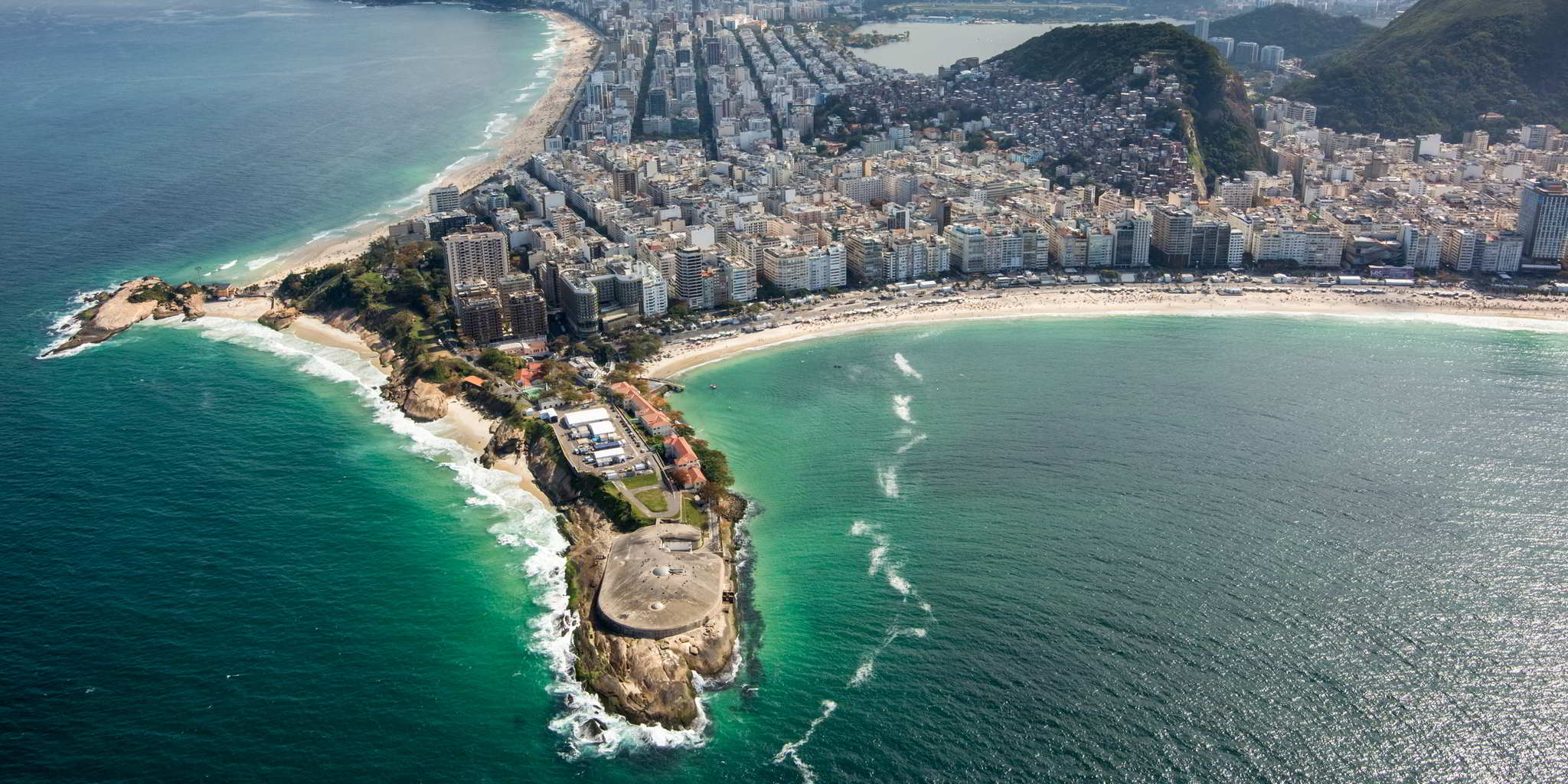
This years Libre Graphics Meeting (2017) is going to be held in the lovely city seen above, Rio de Janeiro, Brazil!
This is an important meeting for so many people in the Free/Libre art community as it’s one of the only times they have an opportunity to meet face to face.
We’ve had some folks attending the past LGM’s (Leipzig and London) and it’s a wonderful opportunity to spend some time with friends. (Also, @frd from the community will be there!)
The GIMP team will be in attendance this year. I happen to have a fondness for them so I’m asking anyone reading this to please head over and donate to the project.
That link is for the GNOME PayPal account, but there are other ways to donate as well.
This is one of the few times that the GIMP team gets a chance to meet in person.
They use the time to hack at GIMP and to manage internal business.
The time they get to spend together is invaluable to the project and by extension everyone that uses GIMP.
Just look at these faces!
Surely this (Brady) Bunch of folks is worth helping to get a better GIMP?
Left to right, top to bottom: Ville, Mitch, Øyvind, Simon, Liam, João, Aryeom, Jehan, Michael
Besides @frd I’m not sure who else from the community might be attending, so if I’ve missed you I apologize!
Please feel free to use this topic to communicate and coordinate if you’d like.
It appears that personally I’m on a biennial schedule with attending LGM - so I’m looking forward to next year to be able to catch up with everyone!
Modern digital sensors (with a few exceptions) use an arrangement of RGB filters over a square grid of photosites. For a given 2x2 square of photosites the filters are designed to allow two green, and one each red and blue colors through to the photosite. These are arranged on a grid:
The pattern is known as a Bayer pattern (after the creator Bryce Bayer of Eastman Kodak). The resulting pattern shows how each RGB is offset into the grid.
Each of the pixel sites captures a single color. In order to produce a full color representation at each pixel, the other color values need to be interpolated from the surrounding grid. This interpolation and methods for calculating it are referred to as demosaicing. The methods for accomplishing this vary across different algorithms.
The final RGB value for the initially Red pixel needs to be interpolated from the surrounding Blue and Green pixels.
Unfortunately, this can often result in problems.
There can be chromatic aliasing problems resulting in odd color fringing and roughness on edges or a loss of detail and sharpness.
Pixel Shift
Pentax‘s Pixel Shift (Available on the K-1, K-3 II, KP, K-70) attempts to alleviate some of these problems through a novel approach of capturing four images quickly in succession and by moving the entire camera sensor a single pixel for each shot. This has the effect of capturing a full RGB value at each pixel location:
Pixel Shift shifts the sensor by one pixel in each direction to be able to generate a full set of RGB values at each photosite.
This means a full RGB value for a pixel location can be created without having to interpolate from neighboring values.
Advantages
Less Noise
If you look carefully at the Bayer pattern, you’ll notice that when shifting to adjacent pixels there will always be two green values captured per pixel. The average of these green values helps to suppress noise that may have been interpolated and spread through a normal, single-shot raw file.
Top: single raw frame, Bottom: Pixel Shift
Less Moiré
Avoiding the interpolation of pixel colors from surrounding photosites helps to reduce the appearance of Moiré in the final result:
Top: single raw frame, Bottom: Pixel Shift
Increased Resolution
This method is similar in concept to what was previously seen when Olympus announced their “High Resolution” mode for the OMD E-M5mkII camera (or manually as we previously described in this blog post).
In that case they combine 8 frames moved by sub-pixel amounts to increase the overall resolution.
The difference here is that Olympus generates a single, combined raw file from the results, while Pixel Shift gets you access to each of the four raw files before they’re combined.
In each case, a higher resolution image can be created from the results:
Top: single raw frame, Bottom: Pixel Shift
Disadvantages
Movement
As with most approaches for capturing multiple images and combining them, a particularly problematic area is when there are objects in motion between the frames being captured.
This is a common problem when stitching panoramic photography, when creating image stacks for noise reduction, and when combining images using methods such as Pixel Shift.
Although…
The RawTherapee Approach
Simply combining four static frames together is really trivial, and is something that all the other Pixel Shift-capable software can do without issue. The real world is not often so accommodating as a studio setup, and that is where the recent work done by @Ingo and @Ilias on RawTherapee really begins to shine.
What they’ve been working on in RawTherapee is to improve the detection of movement in a scene. There are several types of movement possible:
Objects showing at different places in a scene such as fast moving cars.
Partly moving objects like foliage in the wind.
Moving objects reflecting light onto static objects in the scene
Changing illumination conditions such as long exposures at sunset.
All of these types of movement need to be detected to avoid the artifacts they may cause in the final shot.
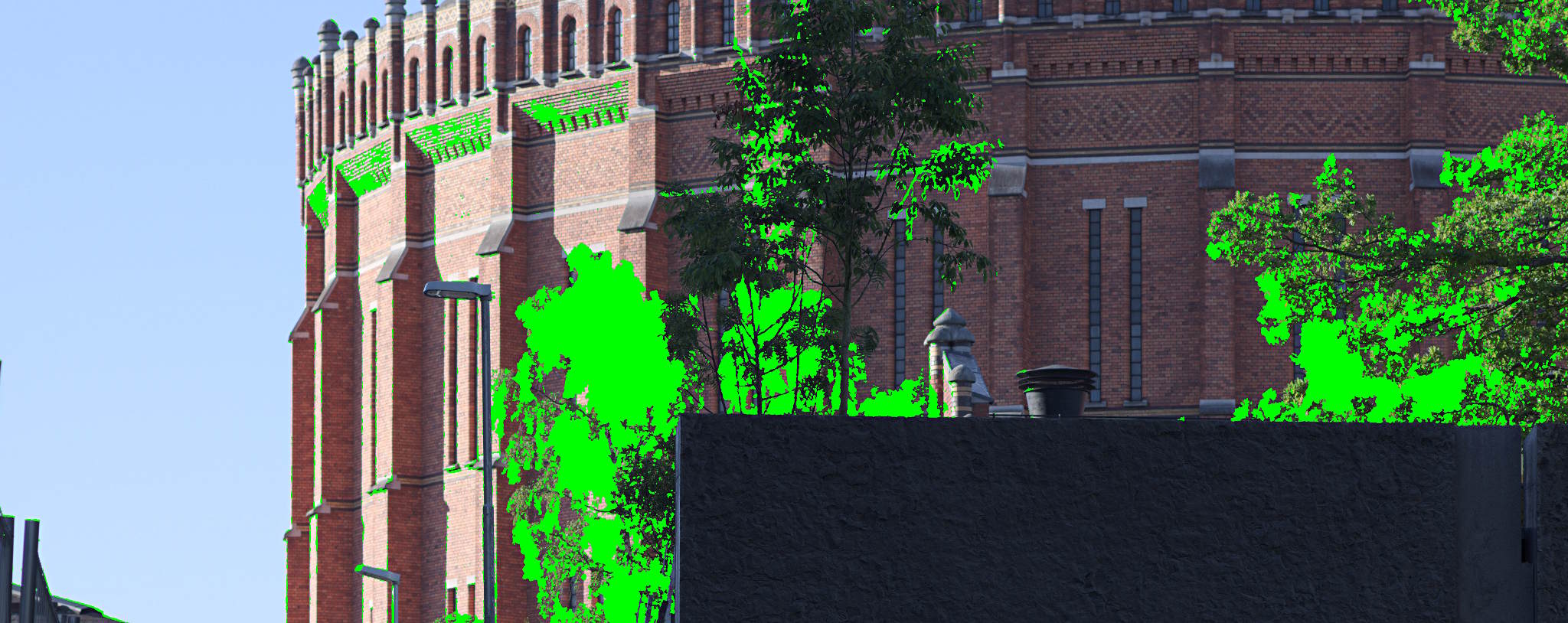
One of the key features of Pixel Shift movement detection in RawTherapee is that it allows you to show the movement mask, so you get feedback on which regions of the image are detected as movement and which are static. For the regions with movement RawTherapee will then use the demosaiced frame of your choice to fill it in, and for regions without movement it will use the Pixel Shift combined image with more detail and less noise.
Unique to RawTherapee is the option to export the resulting motion mask (for those that may want to do further blending/processing manually).
The accuracy of movement detection in RawTherapee leads to much better handling of motion artifacts that works well in places where proprietary solutions fall short.
For most cases the Automatic motion correction mode works well, but you can also fine tune the parameters in custom mode to correctly detect motion in high ISO shots.
Besides being the only option (barring dcrawps possibly) to process Pixel Shift files in Linux, RawTherapee has some other neat options that aren’t found in other solutions. One of them is the ability to export the actual movement mask separate from the image. This will let users generate separate outputs from RT, and to combine them later using the movement mask. Another option is the ability to choose which of the other frames to use for filling in the movement areas on the image.
Pixel Shift Support in Other Software
Pentax’s own Digital Camera Utility (a rebranded version of SilkyPix) naturally supports Pixel Shift, but as with most vendor-bundled software it can be slow, unwieldy, and a little buggy sometimes. Having said that, the results do look good, and at least the “Motion Correction” is able to be utilized with this software.
Adobe Camera Raw (ACR) got support for Pixel Shift files in version 9.5.1 (but doesn’t utilize the “Motion Correction”). In fact, ACR didn’t have support at the time that DPReview.com looked at the feature last year, causing them to retract the article and re-post when they had a chance to use a version of ACR with support.
We’re going to look at some 100% crops from that article and compare them to the results available using RawTherapee (the latest development version, to be released as 5.1 in April).
The RawTherapee versions were set to the most neutral settings with only an exposure adjustment to match other samples better.
Looking first at an area of foliage with motion, the places where there are issues becomes apparent.
For reference, here is the Adobe Camera Raw (ACR) version of a single frame from a Pixel Shift file:
The results with Pixel Shift on, and motion correction on, from straight-out-of-camera (SOOC), Adobe Camera Raw (ACR), SilkyPix, and RawTherapee (RT) are decidedly mixed. In all but the RT version, there’s a very clear problem with effective blending and masking of the frames in areas with motion:
Things look much worse for Adobe Camera Raw when looking at high-motion areas like the water spray at the foot of the waterfall, though SilkyPix does a much better job here.
The ACR version of a single frame for reference:
Both the SOOC and SilkyPix versions handle all of the movement well here. RawTherapee also does a great job blending the frames despite all of the movement. Adobe Camera Raw is not doing well at all…
Finally, in a frame full of movement, such as the surface of the water.
The ACR version of a single frame for reference:
In a frame full of movement the SOOC, ACR, and SilkyPix processing all struggle to combine a clean set of frames. They exhibit a pixel pattern from the processing, and the ACR version begins to introduce odd colors:
As mentioned earlier, a unique feature of RawTherapee is the ability to show the motion mask. Here is an example of the motion mask for this image
The motion mask generated by RawTherapee for the above image.
Also worth mentioning is the “Smooth Transitions” feature in RawTherapee.
When there are regions with and without motion, the regions with motion are masked and filled in with data from a demosaiced frame of your choice.
The other regions are taken from the Pixel Shift combined image.
This can occasionally lead to harsh transitions between the two.
For instance, a transition as processed in SilkyPix:
RawTherapee’s “Smooth Transitions” feature does a much better job handling the transition:
In Conclusion
In another example of the power and community of Free/Libre and Open Source Software we have a great enhancement to a project based on feedback and input from the users. In this case, it all started with a post on the RawTherapee forums.
Thanks to the hard work of @Ingo and @Ilias Pentax shooters now have a Pixel Shift capable software that is not only FLOSS but also produces better results than the proprietary solutions!
Not so coincidentally, community member @nosle gave permission to use one of his PS files for everyone to try processing on the Play pixelshift thread.
If you’d like to practice consider heading over to get his file and feedback from others!
Pixel Shift is currently in the development branch of RawTherapee and is slated for release with version 5.1.
With Stig Abell and Thea Lenarduzzi – Henry K. Miller on the cinematic progress of Christopher Isherwood, a novelist who wanted nothing more than to be a filmmaker; Lamorna Ash on All This Panic, a dreamy documentary about seven girls stumbling towards womanhood in Brooklyn; Richard Fortey tells the story of the British landscape, a sweeping tale spanning several millennia, from the retreat of the ice caps in 9700 BC to the crowded island of today.
With Stig Abell and Thea Lenarduzzi – Sudhir Hazareesingh on the seemingly unstoppable rise of Emmanuel Macron, the only politician now standing between the far-Right Marine Le Pen and the French presidency; Claude Rawson on the complex rage of Jonathan Swift, and why we should resist all attempts to sanitise Gulliver's Travels; Diane Purkiss delves into the murky history of alchemy, a slippery amalgam of science and the make-believe of great importance to our ancestors – and which we would do better than to scoff at.Discover more at www.the-tls.co.uk.
With Stig Abell and Thea Lenarduzzi – In these science fictional times, Jonathan Barnes considers the importance of sci-fi, plus a new sequel to H. G. Wells's satirical masterpiece The War of the Worlds; Thea reports from a new exhibition of Pop Art and print work at the British Museum, which showcases six decade's worth of American dreaming; Fiction Editor Toby Lichtig discusses George Saunders's new novel, Lincoln in the Bardo, a humorous, moving and formally inventive account of President Lincoln's grief following the death of his son.
With Stig Abell and Thea Lenarduzzi – D. J. Taylor on the bookish sensibilities of Paul Weller's post-punk romanticism (including a bizarre medley of Orwell's 1984 and Wind in the Willows); Stephen Brown considers a clutch of books about practising, playing and listening to music, how to think about Mahler, and the perfect aphorisms of Michael Hampe (“Develop a feeling for greatness. It protects against stupidity”)
The Southern California Linux Expo (SCaLE) 15x is returning to the Pasadena Convention Center on March 2-5, 2017. SCaLE is one of the largest community-organized conferences in North America, with some 3,500 attendees last year.
If you’re attending the conference this year, find me, @paperdigits and lets talk shop or grab a meal!
Don’t judge me, it was the morning.
You can ping me on the forum, on twitter, or on Matrix/riot.im at @paperdigits:matrix.org.
If meeting isn’t enough for you, I’ll have stickers!
With Stig Abell and Thea LenarduzziPaul Howard brings us an unpublished Burgess essay on an untranslatable poet; J. Michael Lennon links the writing of Joan Didion with Trump's America; and Simon Armitage reads us a brand new poem.
With Stig Abell and Thea Lenarduzzi – Caryl Emerson on poetry and prose forged in the immediacy of the Russian Revolution of 1917; Phil Baker considers the strange split legacy of British writer Colin Wilson, a curious and often hateful figure with an extreme superiority complex; finally, Clive James reads his beautiful new poem "Anchorage International"
Welcome to the second installment of From the Community, a (hopefully) quarterly-ish blog post to highlight a few of the things our community members have been doing!
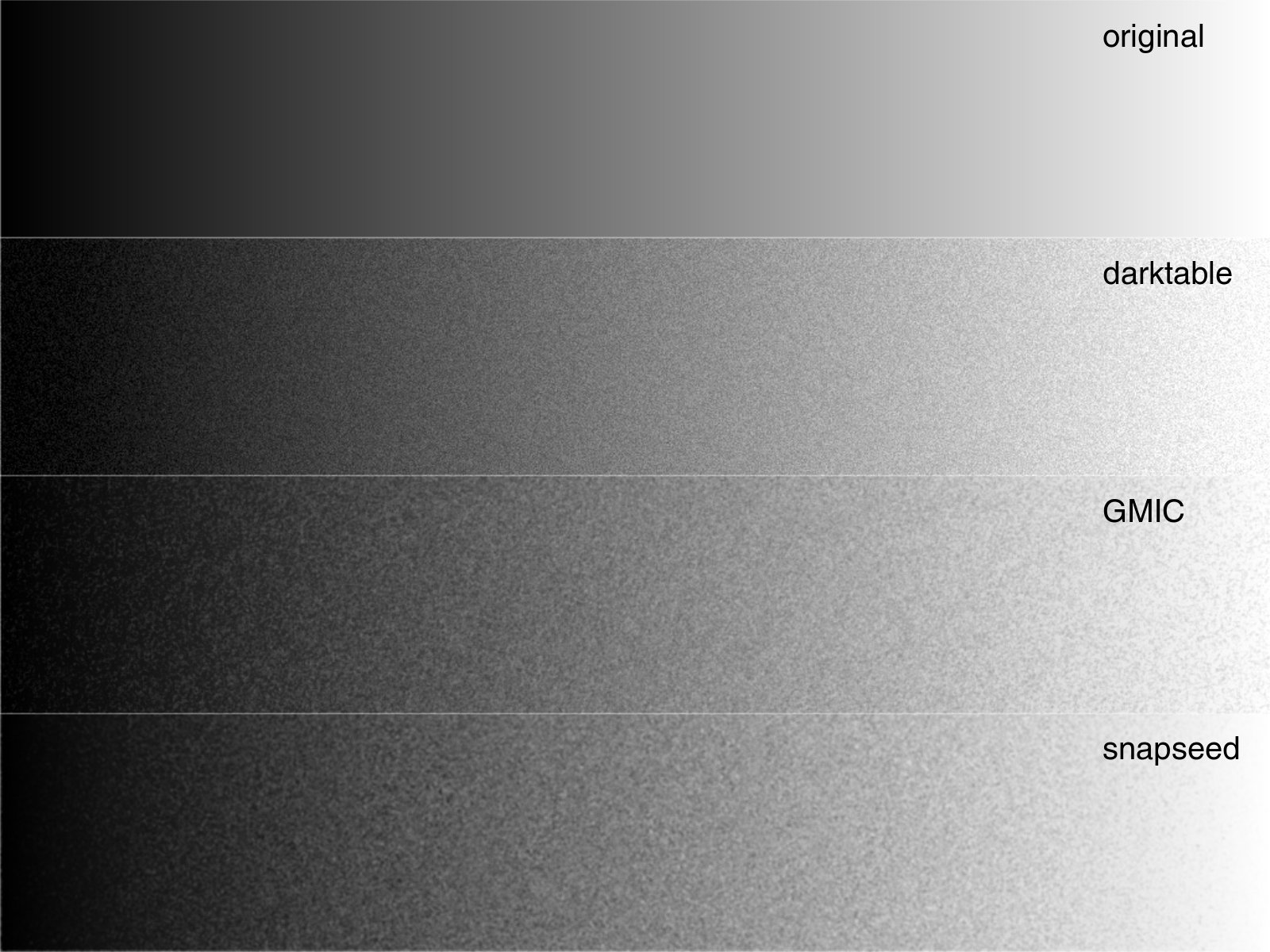
@arctic has posted some research about how to better simulate grain in our digital images and the ensuing conversation is both fascinating and way above my head! This discussion is thus far raw processor independent and more input and code is welcome!
We’ve somewhat recently welcomed the painters into the fold on the pixls’ forum and @Elle rewarded us all with a tutorial RGB color mixing. She delves into subjects such as mixing color pigments like a traditional painter and how to handle that in the digital darkroom. You can read the whole article here.
There has been a lot of on-going work to bring support for Pentax Pixel Shift files in RawTherapee; the thread has now reached 234 posts and it is inspiring to see the community and developers coming together to bring support for an interesting technology. The feature set has been evolving pretty rapidly and it will be exiting when it makes it to a stable release.
Some preliminary work has begun to bring generic midi controller support to darktable. The funding for the midi controller to spur the development of this feature is a direct result of the members of the forum directly giving to further community causes. Once the darktable developers are finished with the midi controller, it’ll be offered to other developers to use to help implement support!
With Stig Abell and Thea Lenarduzzi – Gerri Kimber on the role of women in the rise of the Western (plus the notorious case of Mrs Clem); as Tate Britain unveils the most extensive David Hockney retrospective yet, one of the show's curators talks us though some key moments, and themes, in a long and eclectic career; what makes a bestseller? Daisy Hildyard considers four new books that purport to tell us why some books succeed while others flop.
Clive Stafford Smith, lawyer and campaigner against miscarriages of justice, joins us in the studio to discuss his time defending death-row prisoners in Guantánamo and elsewhere, the "integrity" of the system, why torture doesn't work, and whether the age of mass incarceration might finally be drawing to a close. We end with Helen Mort reading her new poem, "Glasgow".Presented by Stig Abell and Thea Lenarduzzi. Discover more at www.the-tls.co.uk
With Stig Abell and Thea Lenarduzzi – Paul Collier on the new "hard" pragmatism and the future of capitalism; Michael Chabon discusses his invigorating new novel, Moonglow; Mary Beard on women in academia (the troubles and the triumphs, past and present), and why the Trump inauguration protests were a step in the right direction.Discover more at www.the-tls.co.uk
With Stig Abell and Thea Lenarduzzi – Devoney "Stone Cold Jane Austen" Looser on the slew of Jane Austen reincarnations (and why it's nothing to worry about); David Wheatley on the long-awaited final volume of Samuel Beckett's letters and its "black diamonds of pessimism"; and J. Michael Lennon on the titan of publishing Robert Gottlieb, and the writer-editor relationship. Discover more at www.the-tls.co.uk

 Login
Login