❌

Normal view

G'MIC 2.0


G'MIC 2.0

A second breath for open-source image processing.

The IMAGE team of the research laboratory GREYC in Caen/France is pleased to announce the release of a new major version (numbered 2.0) of its project G’MIC: a generic, extensible, and open source framework for image processing. Here, we present the main advances made in the software since our last article. The new features presented here include the work carried out over the last twelve months (versions 2.0.0 and 1.7.x, for _x_ varying from _2_ to _9_).


Links:


1. G’MIC: A brief overview

G’MIC is an open-source project started in August 2008, by the IMAGE team. This French research team specializes in the fields of algorithms and mathematics for image processing. G’MIC is distributed under the CeCILL license (which is GPL compatible) and is available for multiple platforms (GNU/Linux, MacOS and Windows). It provides a variety of user interfaces for manipulating generic image data, that is to say, _2D_ or _3D_ multispectral images (or sequences) with floating-point pixel values. This includes, of course, “classic” color images.

G'MIC logo
Fig.1.1: Logo of the G’MIC project, an open-source framework for image processing, and its mascot Gmicky.

The popularity of G’MIC mostly comes from the plug-in it provides for GIMP (since 2009). To date, there are more than 480 different filters and effects to apply to your images, which considerably enlarges the list of image processing filters available by default in GIMP.

G’MIC also provides a powerful and autonomous command-line interface, which is complementary to the CLI tools you can find in the famous ImageMagick or GraphicsMagick projects. There is also a web service G’MIC Online, allowing to apply image processing effects directly from a browser. Other (but less well known) G’MIC-based interfaces exist: a webcam streaming tool ZArt, a plug-in for Krita, a subset of filters available in Photoflow, Blender or Natron… All these interfaces are based on the CImg and libgmic libraries, that are portable, thread-safe and multi-threaded, via the use of OpenMP.

G’MIC has more than 950 different and configurable processing functions, for a library of only 6.5Mio, representing a bit more than 180 kloc. The processing functions cover a wide spectrum of the image processing field, offering algorithms for geometric manipulations, colorimetric changes, image filtering (denoising and detail enhancement by spectral, variational, non-local methods, etc.), motion estimation and registration, display of primitives (_2D_ or _3D_ mesh objects), edge detection, object segmentation, artistic rendering, etc. It is therefore a very generic tool for various uses, useful on the one hand for converting, visualizing and exploring image data, and on the other hand for designing complex image processing pipelines and algorithms (see these project slides for details).

2. A new versatile interface, based on Qt

One of the major new features of this version 2.0 is the re-implementation of the plug-in code, from scratch. The repository G’MIC-Qt developed by Sébastien (an experienced member of the team) is a _Qt_-based version of the plug-in interface, being as independent as possible of the widget API provided by GIMP.
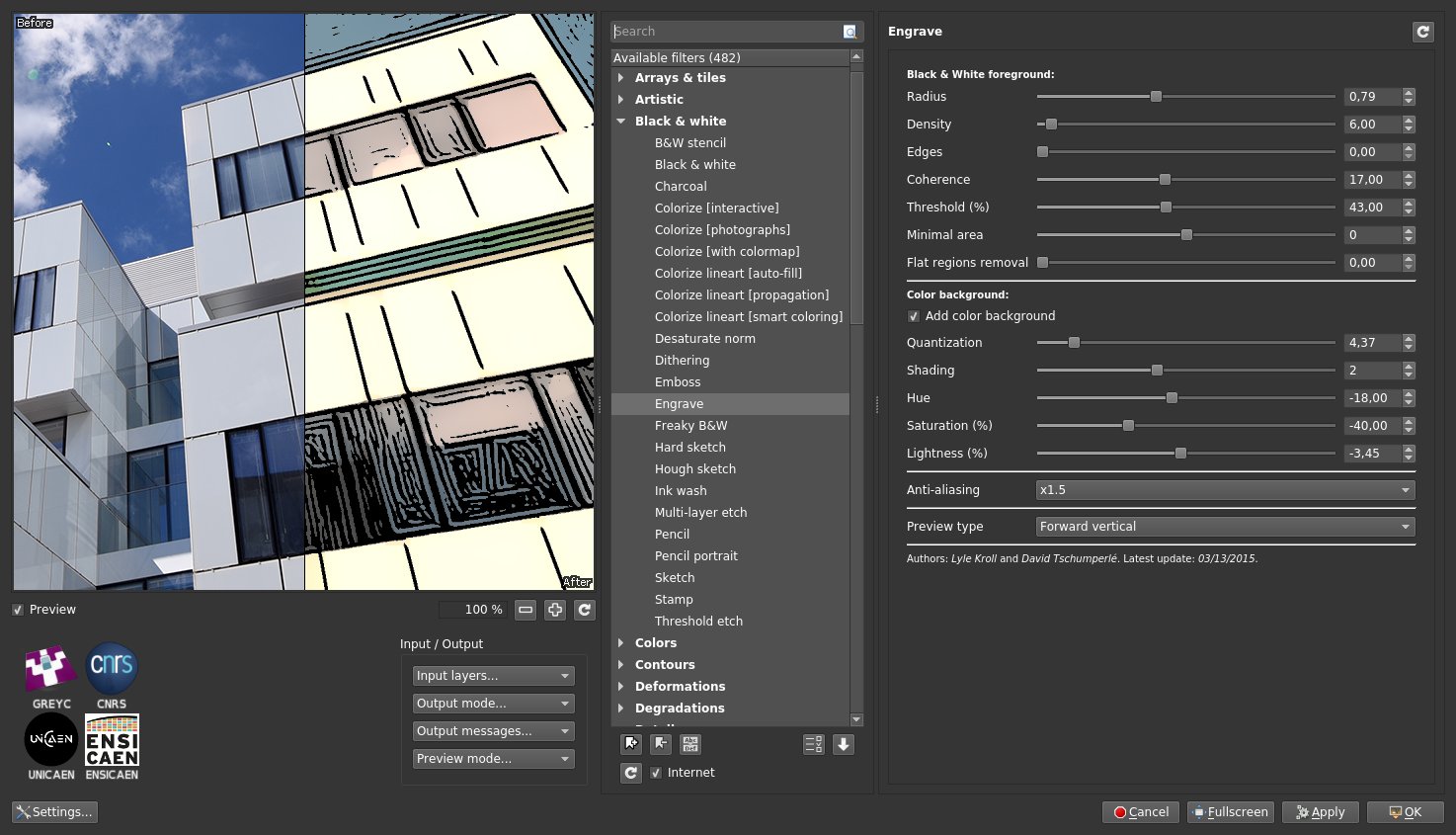
G'MIC-Qt plug-in 1
Fig.2.1: Overview of version 2.0 of the G’MIC-Qt plug-in running for GIMP.

This has several interesting consequences:

  • The plug-in uses its own widgets (in _Qt_) which makes it possible to have a more flexible and customizable interface than with the GTK widgets used by the GIMP plug-in API: for instance, the preview window becomes resizable at will, manages zooming by mouse wheel, and can be freely moved to the left or to the right. A filter search engine by keywords has been added, as well as the possibility of choosing between a light or dark theme. The management of favorite filters has been also improved and the interface even offers a new mode for setting the visibility of the filters. Interface personalization is now a reality.

  • The plug-in also defines its own API, which is used to facilitate its integration in third party software (other than GIMP). In practice, a software developer has to write a single file host_software.cpp implementing the functions of the API to make the link between the plug-in and the host application. Currently, the file host_gimp.cpp does this for GIMP as a host. But there is now also a stand-alone version available (file host_none.cpp that runs this _Qt_ interface in solo mode, from a shell (with command gmic_qt).

  • Boudewijn Rempt, project manager and developer of the marvelous painting software Krita, has also started writing such a file host_krita.cpp to make this “new generation” plug-in communicate with Krita. In the long term, this should replace the previous G’MIC plug-in implementation they made (currently distributed with Krita), which is aging and poses maintenance problems for developers.

Minimizing the integration effort for developers, sharing the G’MIC plug-in code between different applications, and offering a user interface that is as comfortable as possible, have been the main objectives of this complete redesign. As you can imagine, this rewriting required a long and sustained effort, and we can only hope that this will raise interest among other software developers, where having a consistent set of image processing filters could be useful (a file host_blender.cpp available soon ? We can dream!). The animation below illustrates some of the features offered by this new _Qt_-based interface.
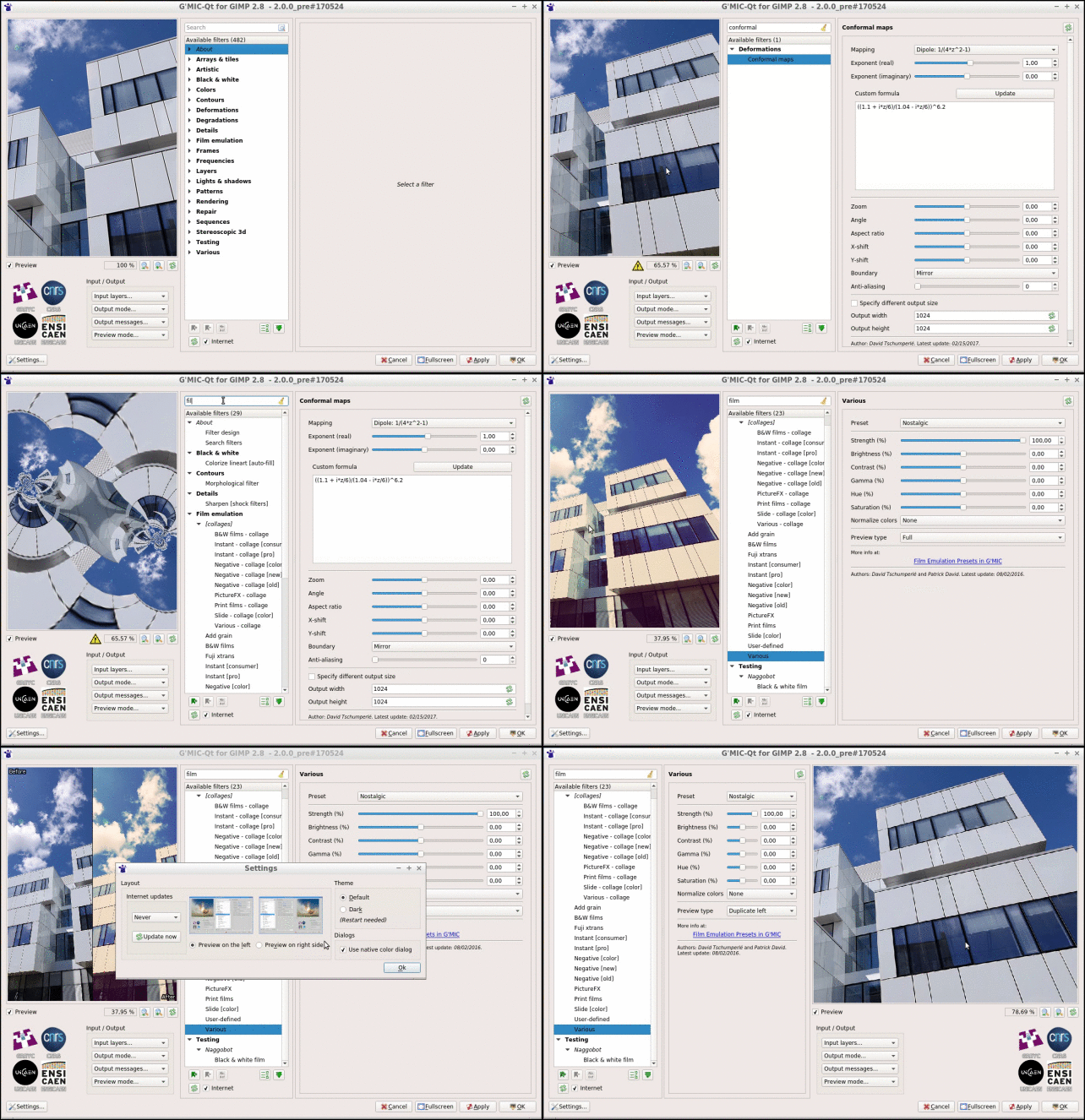
G'MIC-Qt plug-in 2
Fig.2.2: The new G’MIC-Qt interface in action.

Note that the old plug-in code written in GTK was updated also to work with the new version 2.0 of G’MIC, but has fewer features and probably will not evolve anymore in the future, unlike the _Qt_ version.

3. Easing the work of cartoonists…

One of G’MIC’s purposes is to offer more filters and functions to process images. And that is precisely something where we have not relaxed our efforts, despite the number of filters already available in the previous versions!

In particular, this version comes with new and improved filters to ease the colorization of line-art. Indeed, we had the chance to host the artist David Revoy for a few days at the lab. David is well known to lovers of art and free software by his multiple contributions in these fields (in particular, his web comic Pepper & Carrot is a must-read!). In collaboration with David, we worked on the design of an original automatic line-art coloring filter, named Smart Coloring.
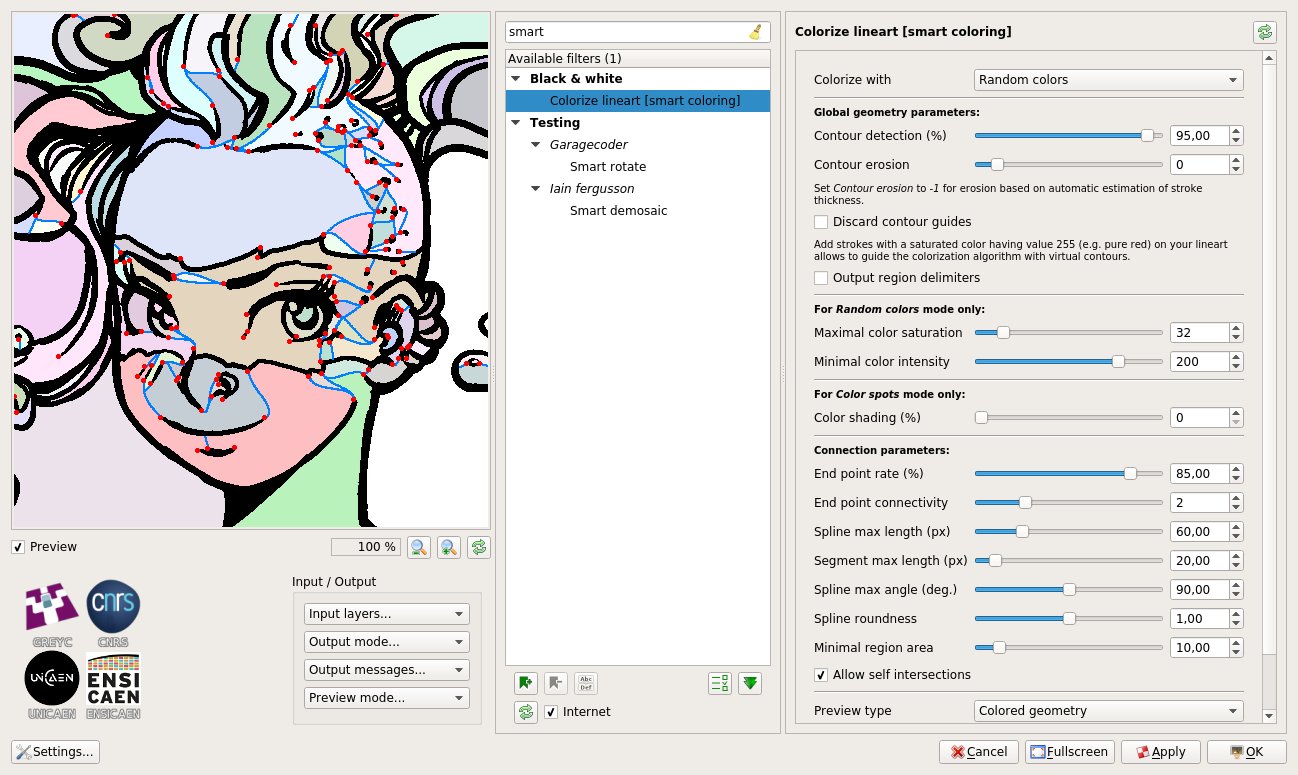
Smart coloring 1
Fig.3.1: Use of the “Colorize line-art [smart coloring]“ filter in G’MIC.

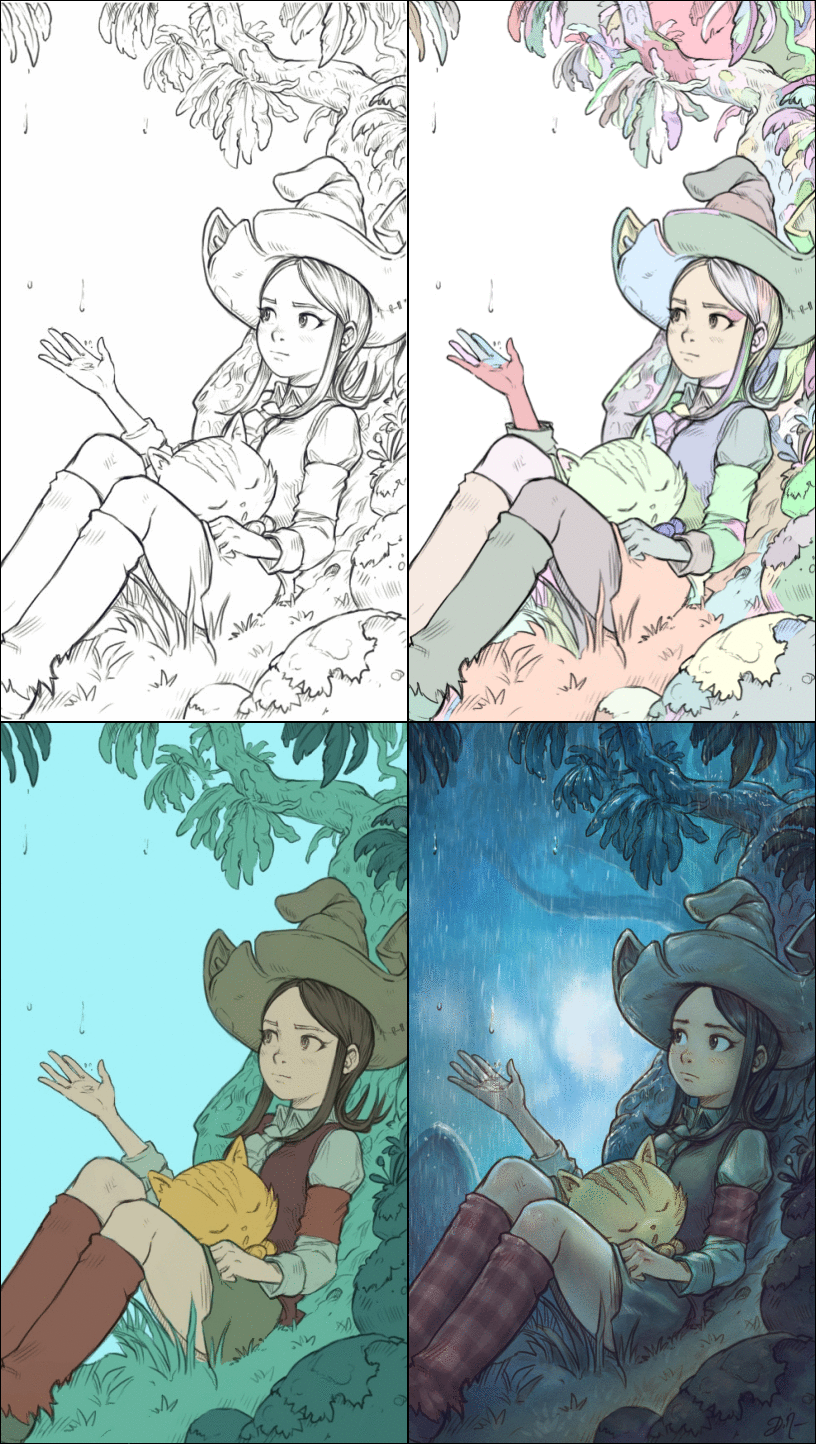
When drawing comics, the colorization of line-art is carried out in two successive steps: The original drawing in gray levels (Fig.3.2.[1]) is first pre-colored with solid areas, i.e. by assigning a unique color to each region or distinct object in the drawing (Fig.3.2.[3]). In a second step, the colourist reworks this pre-coloring, adding shadows, lights and modifying the colorimetric ambiance, in order to obtain the final colorization result (Fig.3.2.[4]). Practically, flat coloring results in the creation of a new layer that contains only piecewise constant color zones, thus forming a colored partition of the plane. This layer is then merged with the original line-art to get the colored rendering (merging both in multiplication mode, typically).
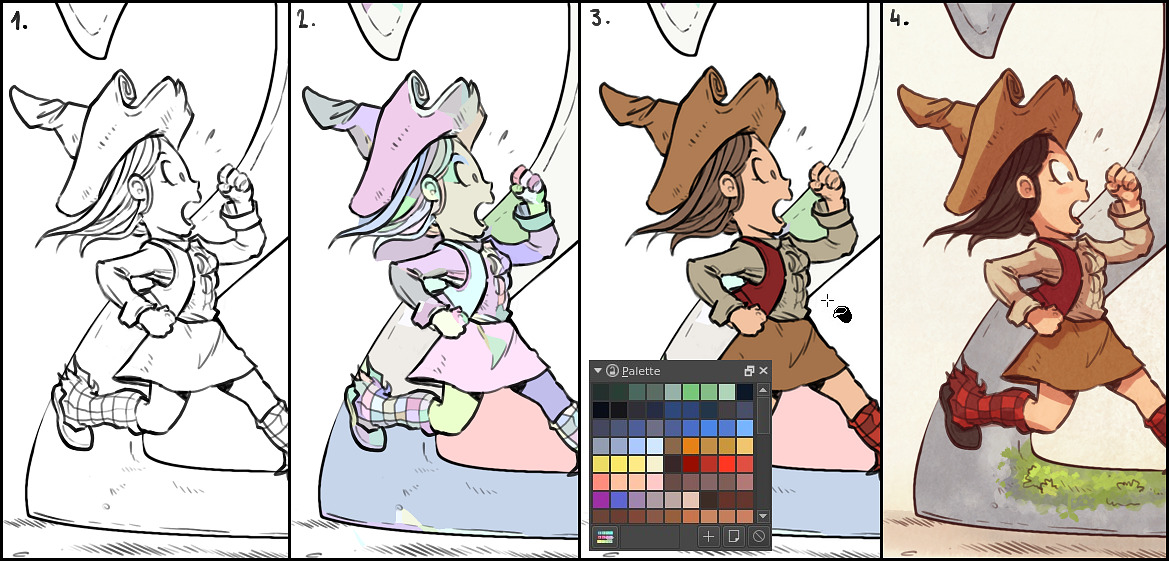
Smart coloring 2
Fig.3.2: The different steps of a line-art coloring process (source: David Revoy).

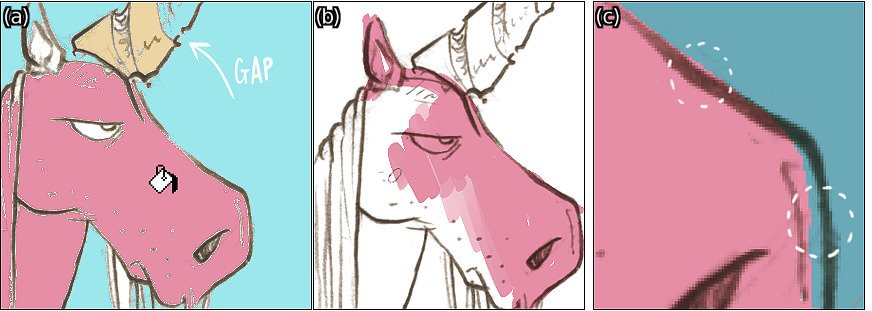
Artists admit it themselves: flat coloring is a long and tedious process, requiring patience and precision. Classical tools available in digital painting or image editing software do not make this task easy. For example, even most filling tools (bucket fill) do not handle discontinuities in drawn lines very well (Fig.3.3.a), and even worse when lines are anti-aliased. It is then common for the artist to perform flat coloring by painting the colors manually with a brush on a separate layer (Fig.3.3.b), with all the precision problems that this supposes (especially around the contour lines, Fig.3.3.c). See also this link for more details.
Smart coloring 3
Fig.3.3: Classical problems encountered when doing flat coloring (source: David Revoy).

It may even happen that the artist decides to explicitly constrain his style of drawing, for instance by using aliased brushes in a higher resolution image, and/or by forcing himself to draw only connected contours, in order to ease the flat colorization work that has to be done afterwards.

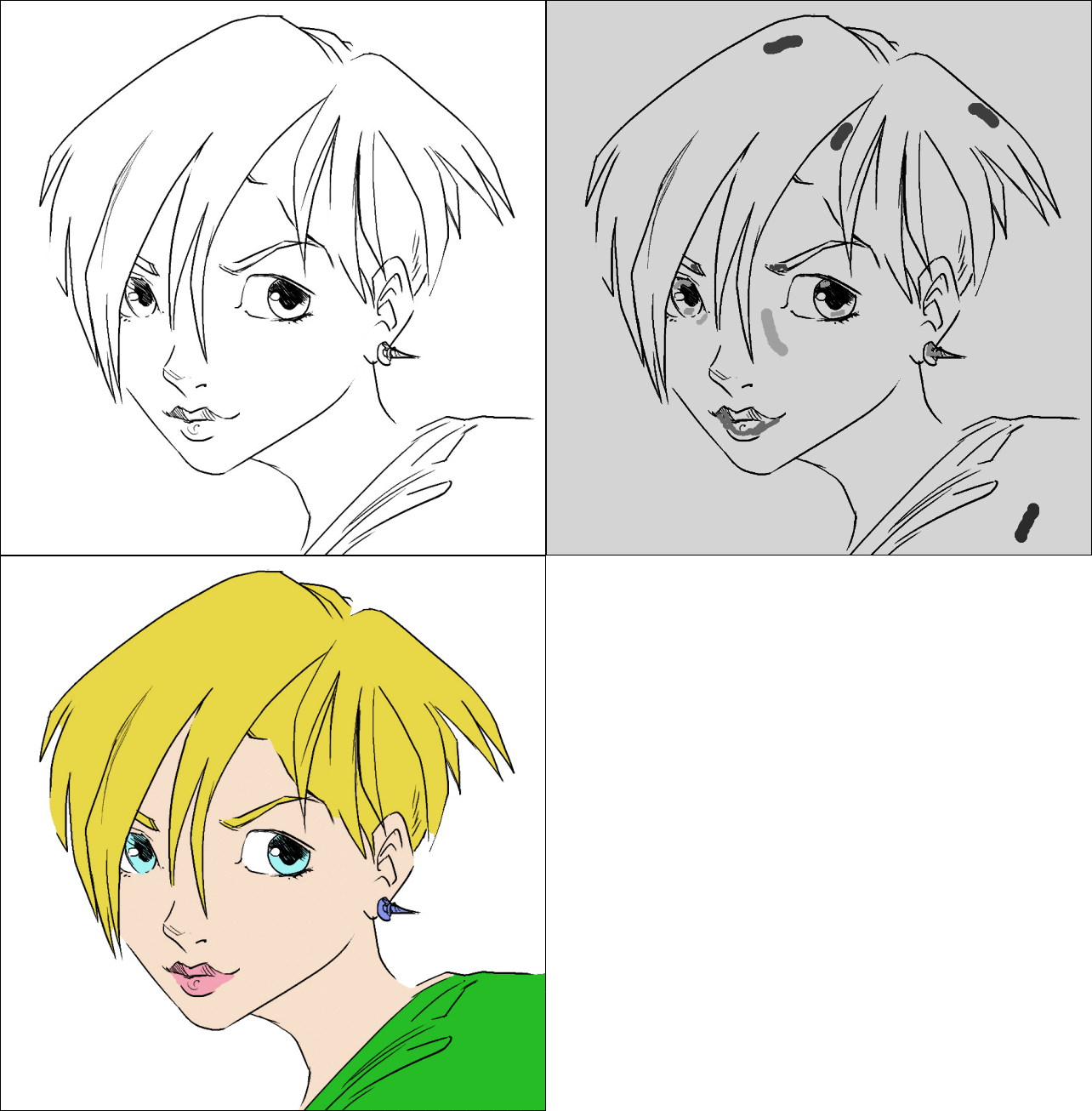
The Smart Coloring filter developed in version 2.0 of G’MIC allows to automatically pre-color an input line-art without much work. First, it analyses the local geometry of the contour lines (estimating their normals and curvatures). Second, it (virtually) does contour auto-completion using spline curves. This virtual closure allows then the algorithm to fill objects with disconnected contour plots. Besides, this filter has the advantage of being quite fast to compute and gives coloring results of similar quality to more expensive optimization techniques used in some proprietary software. This algorithm smoothly manages anti-aliased contour lines, and has two modes of colorization: by random colors (Fig.3.2.[2] and Fig.3.4) or guided by color markers placed beforehand by the user (Fig.3.5).
Smart coloring 4
Fig.3.4: Using the G’MIC “Smart Coloring“ filter in random color mode, for line-art colorization (source: David Revoy).

In “random” mode, the filter generates a piecewise constant layer that is very easy to recolor with correct hues afterwards. This layer indeed contains only flat color regions, and the classic bucket fill tool is effective here to quickly reassign a coherent color to each existing region synthesized by the algorithm.

In the user-guided markers mode, color spots placed by the user are extrapolated in such a way that it respects the geometry of the original drawing as much as possible, taking into account the discontinuities in the pencil lines, as this is clearly illustrated by the figure below:
Smart coloring 5
Fig.3.5: Using the G’MIC “Smart Coloring“ filter in user-guided color markers mode, for line-art colorization (source: David Revoy).

This innovative, flat coloring algorithm has been pre-published on HAL (in French): A semi-guided high-performance flat coloring algorithm for line-arts. Curious people could find there all the technical details of the algorithm used. The recurring discussions we had with David Revoy on the development of this filter enabled us to improve the algorithm step by step, until it became really usable in production. This method has been used successfully (and therefore validated) for the pre-colorization of the whole episode 22 of the webcomic Pepper & Carrot.

The wisest of you know that G’MIC already had a line-art colorization filter! True, but unfortunately it did not manage disconnected contour lines so well (such as the example in Fig.3.5), and could then require the user to place a large number of color spots to guide the algorithm properly. In practice, the performance of the new flat coloring algorithm is far superior.

And since it does not see any objection to anti-aliased lines, why not create ones? That is the purpose of another new filter “Repair / Smooth [antialias]“ able to add anti-aliasing to lines in cartoons that would have been originally drawn with aliased brushes.

Smooth [antialias]
Fig.3.6: Filter “Smooth [antialias]“ smooths contours to reduce aliasing effect in cartoons (source: David Revoy).

4. …Not to forget the photographers!

“Colorizing drawings is nice, but my photos are already in color!”, kindly remarks the impatient photographer. Don’t be cruel! Many new filters related to the transformation and enhancement of photos have been also added in G’MIC 2.0. Let’s take a quick look of what we have.

4.1. CLUTs and colorimetric transformations

CLUTs (Color Lookup Tables) are functions for colorimetric transformations defined in the RGB cube: for each color (Rs,Gs,Bs) of a source image _Is_, a CLUT assigns a new color (Rd,Gd,Bd) transferred to the destination image _Id_ at the same position. These processing functions may be truly arbitrary, thus very different effects can be obtained according to the different CLUTs used. Photographers are therefore generally fond of them (especially since these CLUTs are also a good way to simulate the color rendering of certain old films).

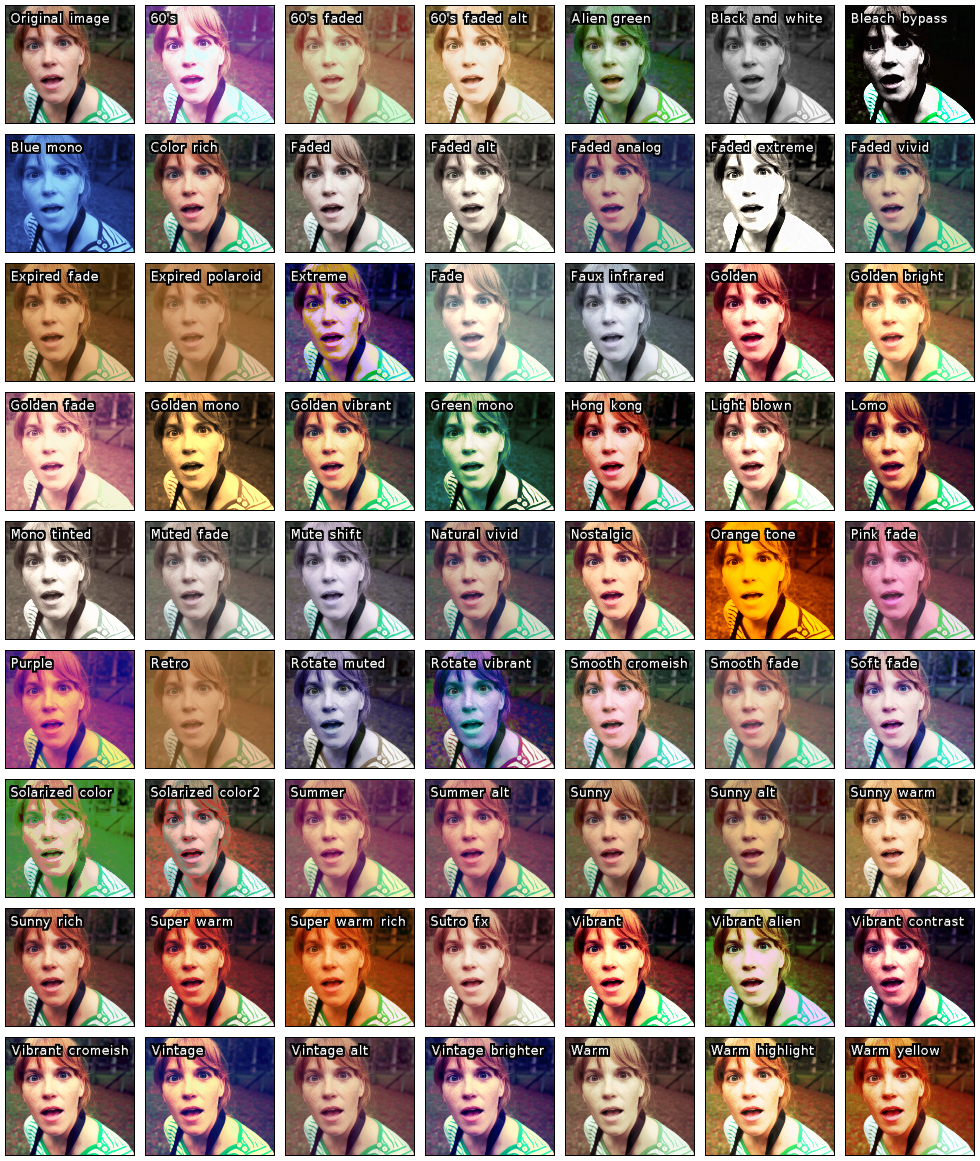
In practice, a CLUT is stored as a _3D_ volumetric color image (possibly “unwrapped” along the z = B axis to get a _2D_ version). This may quickly become cumbersome when several hundreds of CLUTs have to be managed. Fortunately, G’MIC has a quite efficient CLUT compression algorithm (already mentioned in a previous article), which has been improved version after version. So it was finally in a quite relax atmosphere that we added more than 60 new CLUT-based transformations in G’MIC, for a total of 359 CLUTs usable, all stored in a data file that does exceed 1.2 Mio. By the way, let us thank Pat David, Marc Roovers and Stuart Sowerby for their contributions to these color transformations.
CLUTs
Fig.4.1.1: Some of the new CLUT-based transformations available in G’MIC (source: Pat David).

But what if you already have your own CLUT files and want to use them in GIMP? No problem ! The new filter “Film emulation / User-defined“ allows to apply such transformations from CLUT data file, with a partial support of files with extension .cube (CLUT file format proposed by Adobe, and encoded in ASCII o_O!).

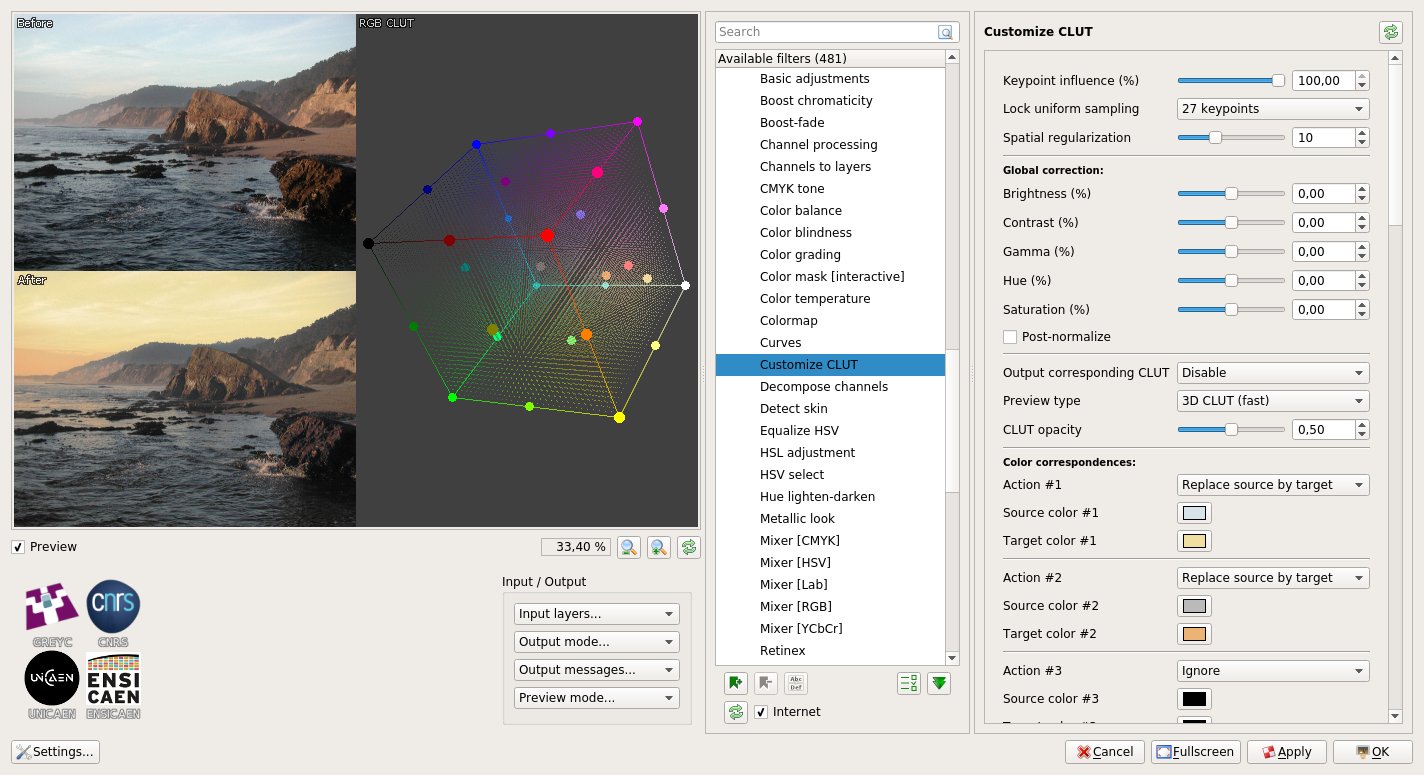
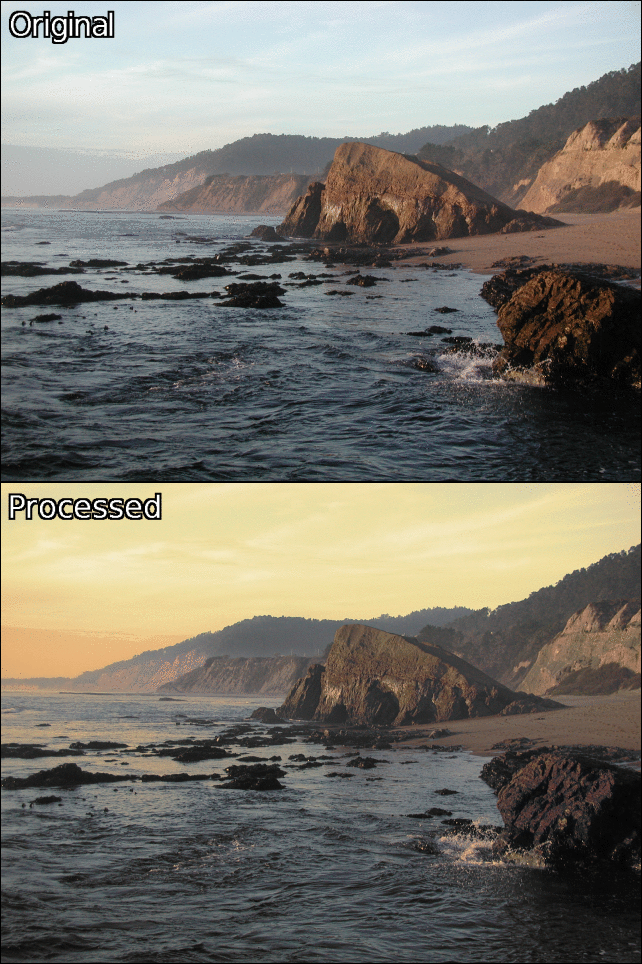
And for the most demanding, who are not satisfied with the existing pre-defined CLUTs, we have designed a very versatile filter “Colors / Customize CLUT“, that allows the user to build their own custom CLUT from scratch: the user places colored keypoints in the RGB color cube and these markers are interpolated in _3D_ (according to a Delaunay triangulation) in order to rebuild a complete CLUT, i.e. a dense function in RGB. This is extremely flexible, as in the example below, where the filter has been used to change the colorimetric ambiance of a landscape, mainly altering the color of the sky. Of course, the synthesized CLUT can be saved as a file and reused later for other photographs, or even in other software supporting this type of color transformations (for example RawTherapee or Darktable).
Customize CLUT 1
Fig.4.1.2: Filter “Customize CLUT“ used to design a custom color transform in the RGB cube.
Customize CLUT 2
Fig.4.1.3: Result of the custom colorimetric transformation applied to a landscape.

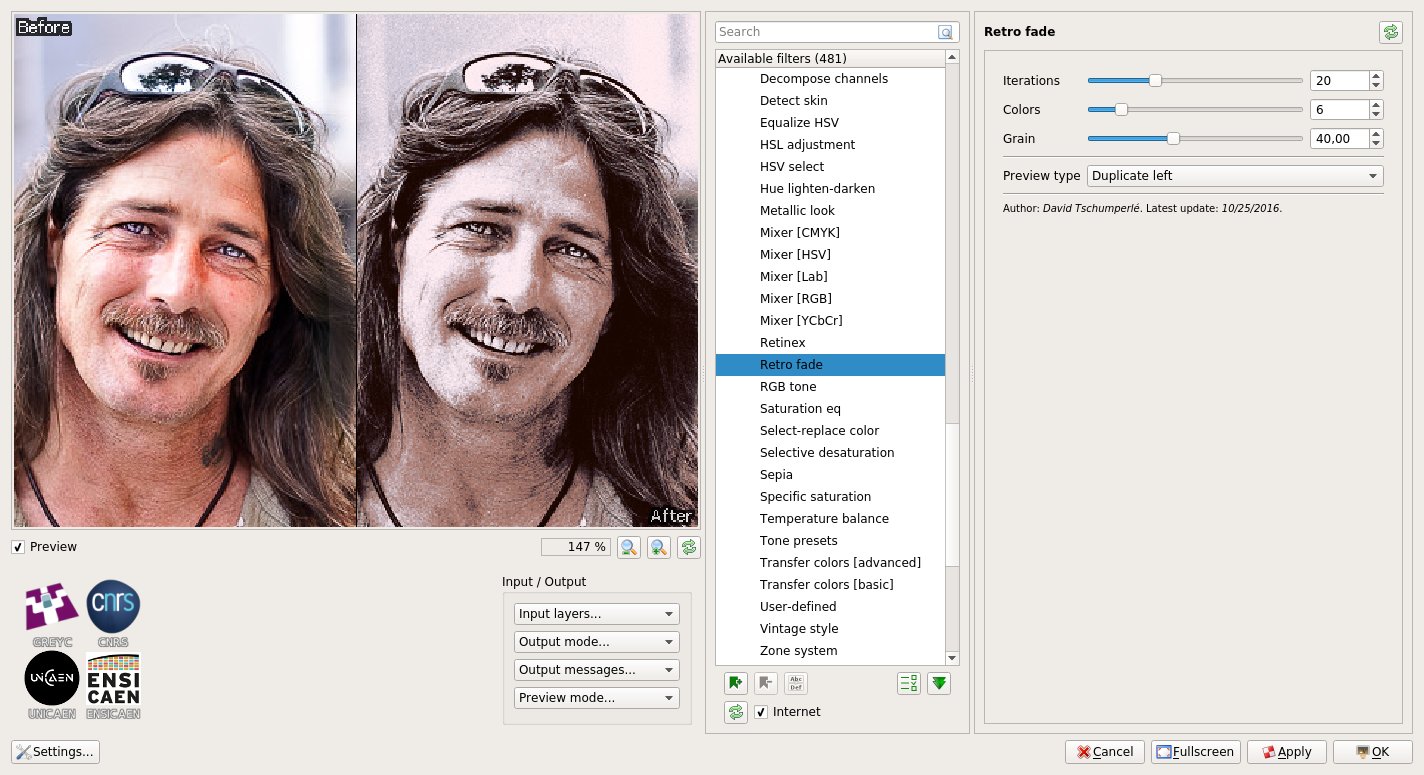
To stay in the field of color manipulation, let us also mention the appearance of the filter “Colors / Retro fade“ which creates a “retro” rendering of an image with grain generated by successive averages of random quantizations of an input color image.
Retro fade
Fig.4.1.4: Filter “Retro fade“ in the G’MIC plug-in.

4.2. Making the details pop out

Many photographers are looking for ways to process their digital photographs so as to bring out the smallest details of their images, sometimes even to exaggeration, and we can find some of them in the pixls.us forum. Looking at how they perform allowed us to add several new filters for detail and contrast enhancement in G’MIC. In particular, we can mention the filters “Artistic / Illustration look“ and “Artistic / Highlight bloom“, which are direct re-implementations of the tutorials and scripts written by Sébastien Guyader as well as the filter “Light & Shadows / Pop shadows“ suggested by Morgan Hardwood. Being immersed in such a community of photographers and cool guys always gives opportunities to implement interesting new effects!
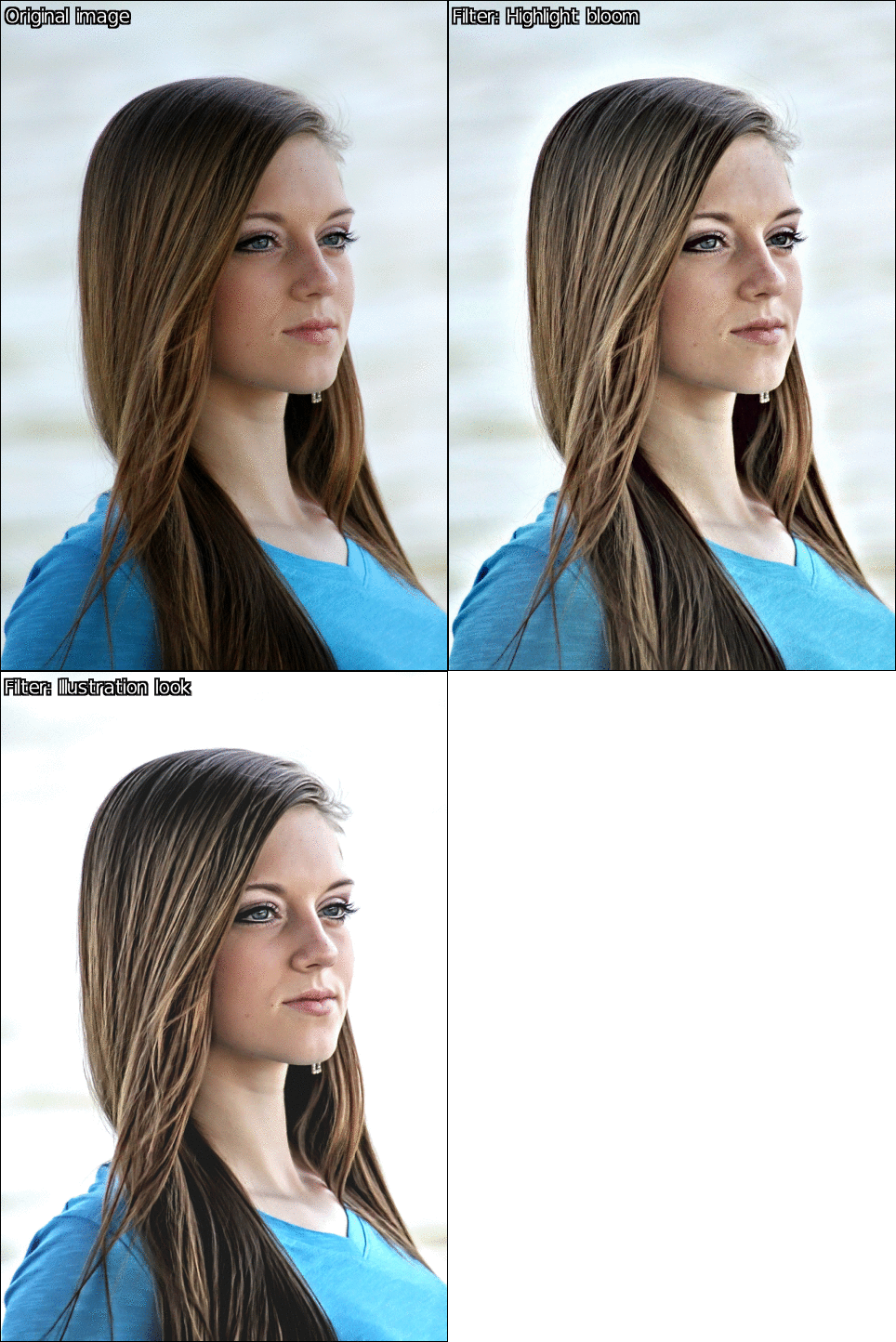
Illustration look
Fig.4.2.1: Filters “Illustration look“ and “Highlight bloom“ applied to a portrait image.

In the same vein, G’MIC gets its own implementation of the Multi-scale Retinex algorithm, something that was already present in GIMP, but here enriched with additional controls to improve the luminance consistency in images.

Retinex
Fig.4.2.2: Filter “Retinex“ for improving luminance consistency.

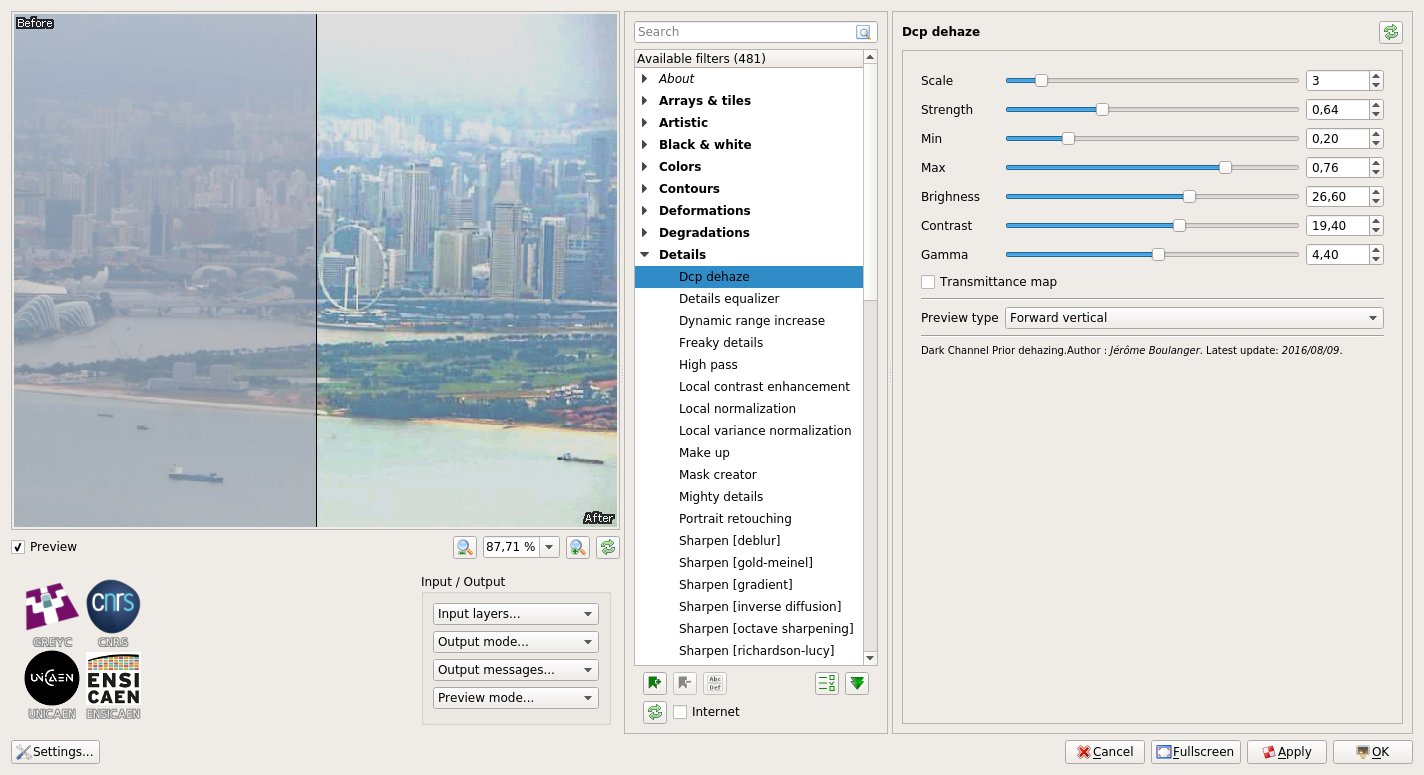
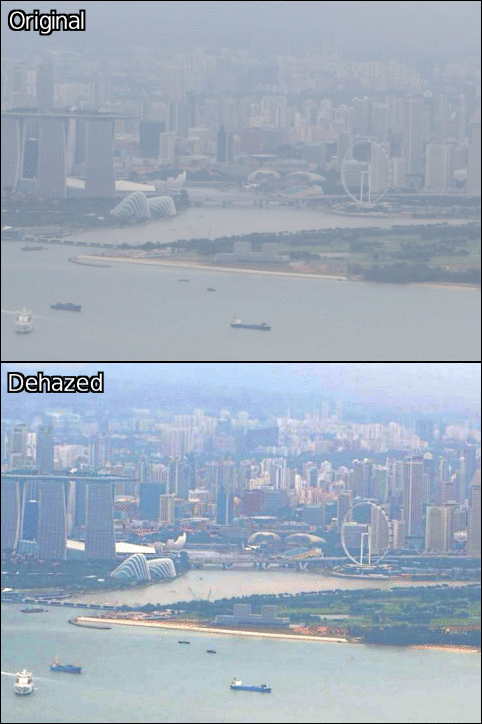
Our friend and great contributor to G’MIC, Jérome Boulanger, also implemented and added a dehazing filter “Details / Dcp dehaze“ to attenuate the fog effect in photographs, based on the Dark Channel Prior algorithm. Setting the parameters of this filter is kinda hard, but the filter gives sometimes spectacular results.
DCP dehaze 1 DCP dehaze 2
Fig.4.2.3: Filter “DCP Dehaze“ to attenuate the fog effect.

And to finish with this subsection, let us mention the implementation in G’MIC of the Rolling Guidance algorithm, a method to simplify images that has become a key step used in many newly added filters. This was especially the case in this quite cool filter for image sharpening, available in “Details / Sharpen [texture]“. This filter works in two successive steps: First, the image is separated into a texture component + a color component, then the details of the texture component only are enhanced before the image is recomposed. This approach makes it possible to highlight all the small details of an image, while minimizing the undesired halos near the contours, a recurring problem happening with more classical sharpening methods (such as the well known Unsharp Mask).

Sharpen [texture]
Fig.4.2.4: The “Sharpen [texture]“” filter shown for two different enhancement amplitudes.

4.3. Masking by color

As you may know, a lot of photograph retouching techniques require the creation of one or several “masks”, that is, the isolation of specific areas of an image to receive differentiated processing. For example, the very common technique of luminosity masks is a way to treat differently shadows and highlights in an image. G’MIC 2.0 introduces a new interesting filter “Colors / Color mask [interactive]“ that implements a relatively sophisticated algorithm (albeit computationally demanding) to help creating complex masks. This filter asks the user to hover the mouse over a few pixels that are representative of the region to keep. The algorithm learns in real time the corresponding set of colors or luminosities and deduces then the set of pixels that composes the mask for the whole image (using Principal Component Analysis on the RGB samples).

Once the mask has been generated by the filter, the user can easily modify the corresponding pixels with any type of processing. The example below illustrates the use of this filter to drastically change the color of a car

Color mask [interactive]
Fig.4.3.1: Changing the color of a car, using the filter “Color mask [interactive]“.

It takes no more than a minute and a half to complete, as shown in the video below:

Fig.4.3.2: Changing the color of a car, using filter “Color mask [interactive]“ (video tutorial).

This other video exposes an identical technique to change the color of the sky in a landscape.

Fig.4.3.3: Changing the color of the sky in a landscape, using filter “Color mask [interactive]“ (video tutorial).

5. And for the others…

Since illustrators and photographers are now satisfied, let’s move on to some more exotic filters, recently added to G’MIC, with interesting outcomes!

5.1. Average and median of a series of images

Have you ever wondered how to easily estimate the average or median frame of a sequence of input images? The libre aficionado Pat David, creator of the site pixls.us often asked the question. First of all when he tried to denoise images by combining several shots of a same scene. Then he wanted to simulate a longer exposure time by averaging photographs taken successively. And finally, calculating averages of various kind of images for artistic purposes (for example, frames of music video clips, covers of Playboy magazine or celebrity portraits).

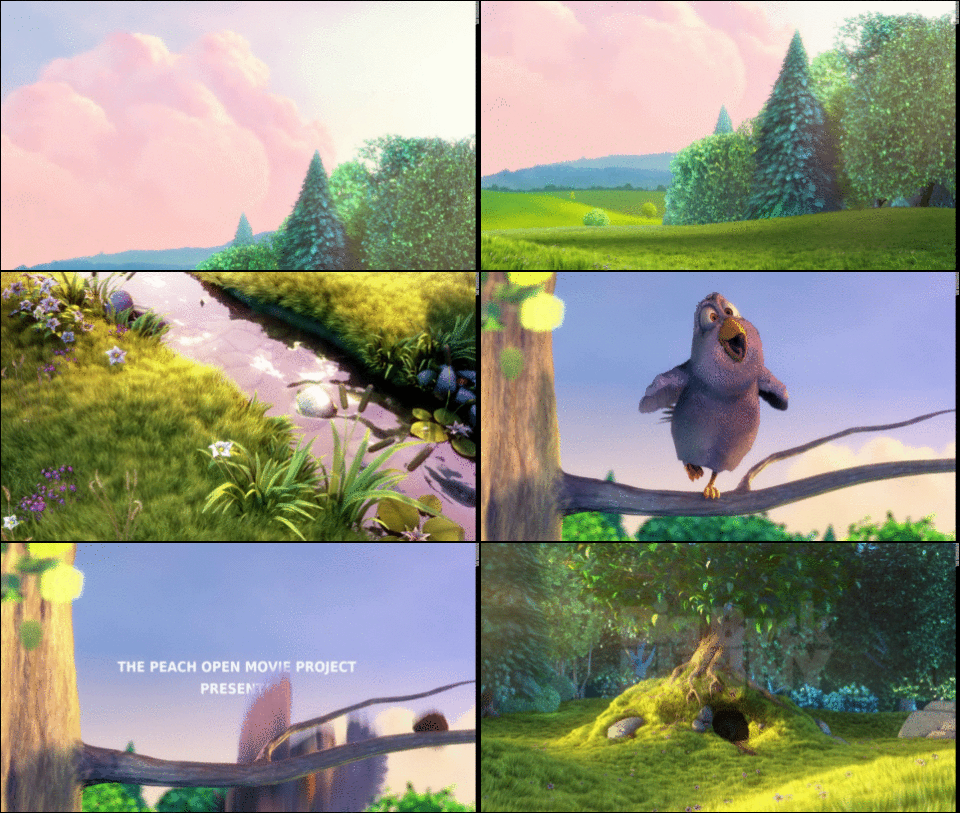
Hence, with his cooperation, we added new commands -median_files,-median_videos, -average_files and-average_videos to compute all these image features very easily using the CLI tool gmic. The example below shows the results obtained from a sub-sequence of the « Big Buck Bunny“ video. We have simply invoked the following commands from the Bash shell:

$ gmic -average_video bigbuckbunny.mp4 -normalize 0.255 -o average.jpg
$ gmic -median_video bigbuckbunny.mp4 -normalize 0.255 -o median.jpg
Big buck bunny 1
Fig.5.1.1: Sequence in the « Big Buck Bunny“ video, directed by the Blender foundation.
Big buck bunny 2
Fig.5.1.2: Result: Average image of the « Big Buck Bunny“ sequence above.
Big buck bunny 3
Fig.5.1.3: Result: Median image of the « Big Buck Bunny“ sequence above.

And to stay in the field of video processing, we can also mention the addition of the commands -morph_files and -morph_video that render temporal interpolations of video sequences, taking the estimated intra-frame object motion into account, thanks to a quite smart variational and multi-scale estimation algorithm.

The video below illustrates the rendering difference obtained for the retiming of a sequence using temporal interpolation, with (right) and without (left) motion estimation.

Fig.5.1.4: Video retiming using G’MIC temporal morphing technique.

5.2. Deformations and “Glitch Art”

Those who like to mistreat their images aggressively will be delighted to learn that a bunch of new image deformation and degradation effects have appeared in G’MIC.

First of all, the filter “Deformations / Conformal maps“ allows one to distort an image using conformal maps. These deformations have the property of preserving the angles locally, and are most often expressed as functions of complex numbers. In addition to playing with predefined deformations, this filter allows budding mathematicians to experiment with their own complex formulas.

Conformal maps
Fig.5.2.1: Filter “Conformal maps“ applying a angle-preserving transformation to the image of Mona Lisa.

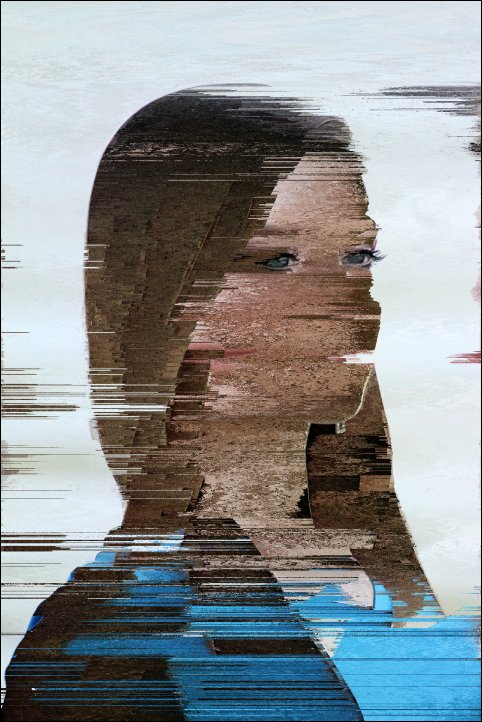
Fans of Glitch Art may also be concerned by several new filters whose rendering look like image encoding or compression artifacts. The effect “Degradations / Pixel sort“ sorts the pixels of a picture by row or by column according to different criteria and to possibly masked regions, as initially described on this page.
Pixel sort
Fig.5.2.2: Filter “Pixel sort“ for rendering a kind of “Glitch Art” effect.

Degradations / /Pixel sort also has two little brothers, filters “Degradations / Flip & rotate blocks“ and “Degradations / Warp by intensity“. The first divides an image into blocks and allows to rotate or mirror them, potentially only for certain color characteristics (like hue or saturation, for instance).
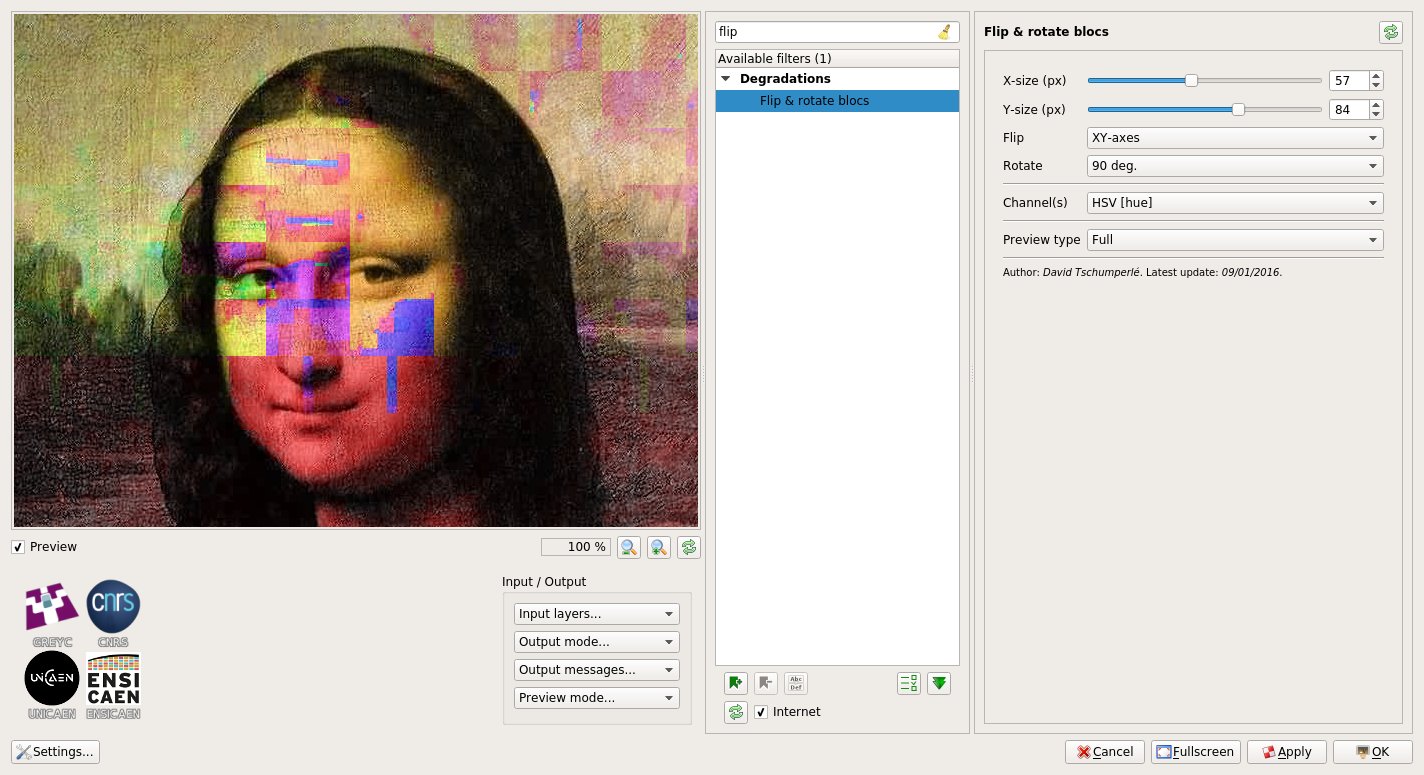
Flip and rotate blocks
Fig.5.2.3: Filter “Flip & rotate blocks“ applied to the hue only to obtain a “Glitch Art” effect.

The second locally deforms an image with more or less amplitude, according to its local geometry. Here again, this can lead to the generation of very strange images.
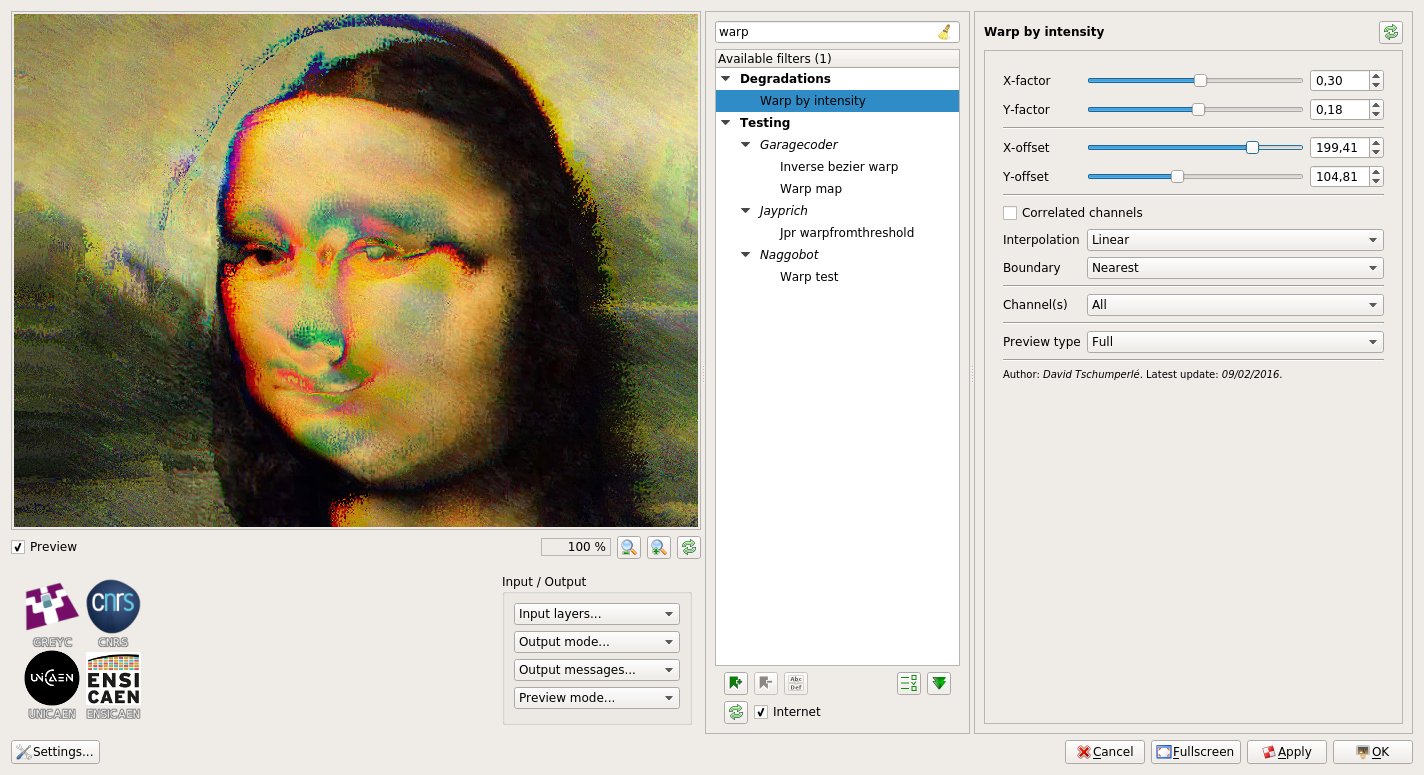
Warp by intensity
Fig.5.2.4: Filter “Warp by intensity“ applied to the image of Mona Lisa (poor Mona!).

It should be noted that these filters were largely inspired by the Polyglitch plug-in, available for Paint.NET, and have been implemented after a suggestion from a friendly user (yes, yes, we try to listen to our most friendly users!).

5.3. Image simplification

What else do we have in store? A new image abstraction filter, Artistic / Sharp abstract, based on the Rolling Guidance algorithm mentioned before. This filter applies contour-preserving smoothing to an image, and its main consequence is to remove the texture. The figure below illustrates its use to generate several levels of abstraction of the same input image, at different smoothing scales.
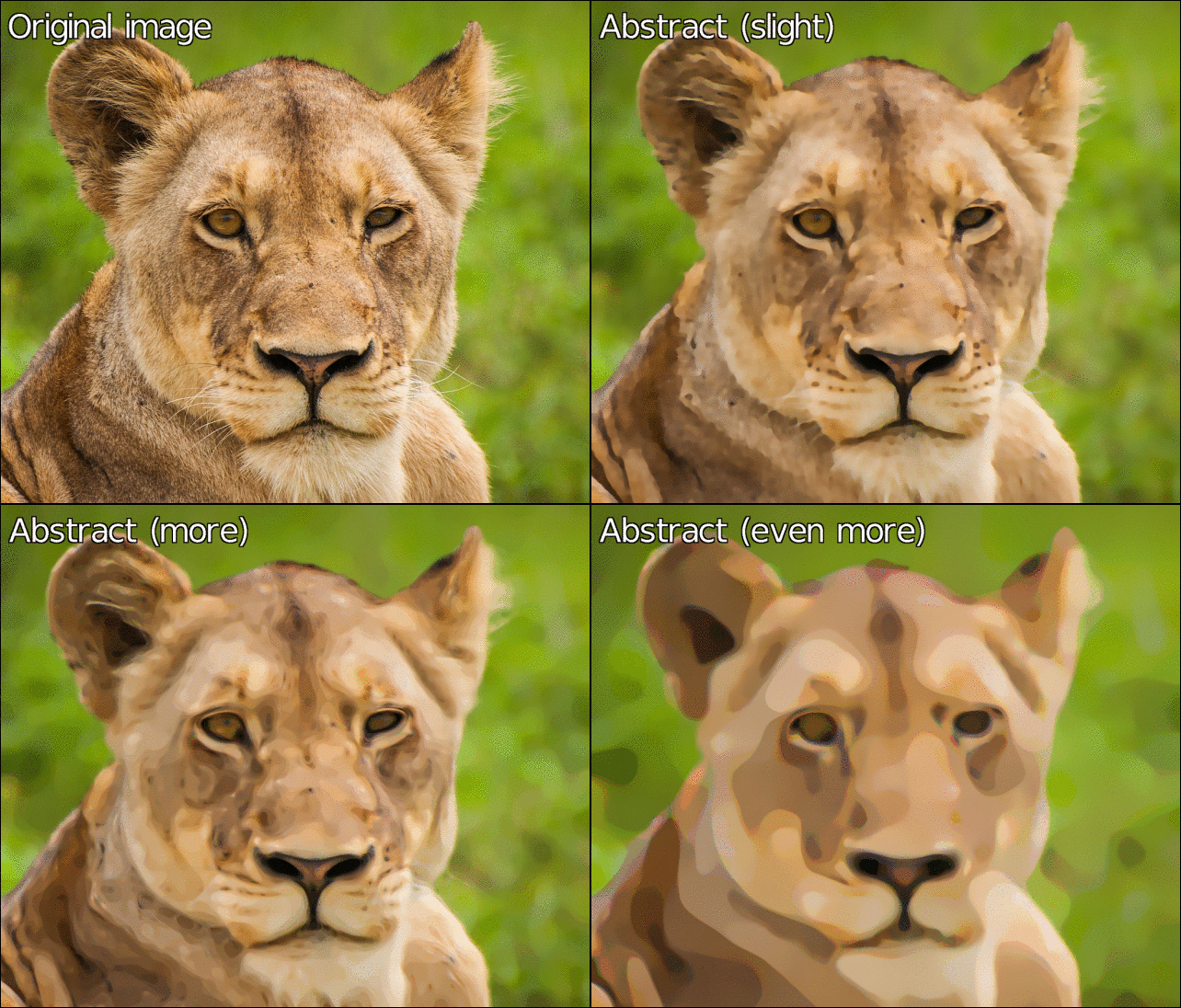
Sharp abstract
Fig.5.3.1: Creating abstractions of an image via the filter “Sharp abstract“.

In the same vein, G’MIC also gets a filter Artistic / Posterize which degrades an image to simulate posterization. Unlike the filter with same name available by default in GIMP (which mainly tries to reduce the number of colors, i.e. do color quantization), our version adds spatial simplification and filtering to approach a little more the rendering of old posters.
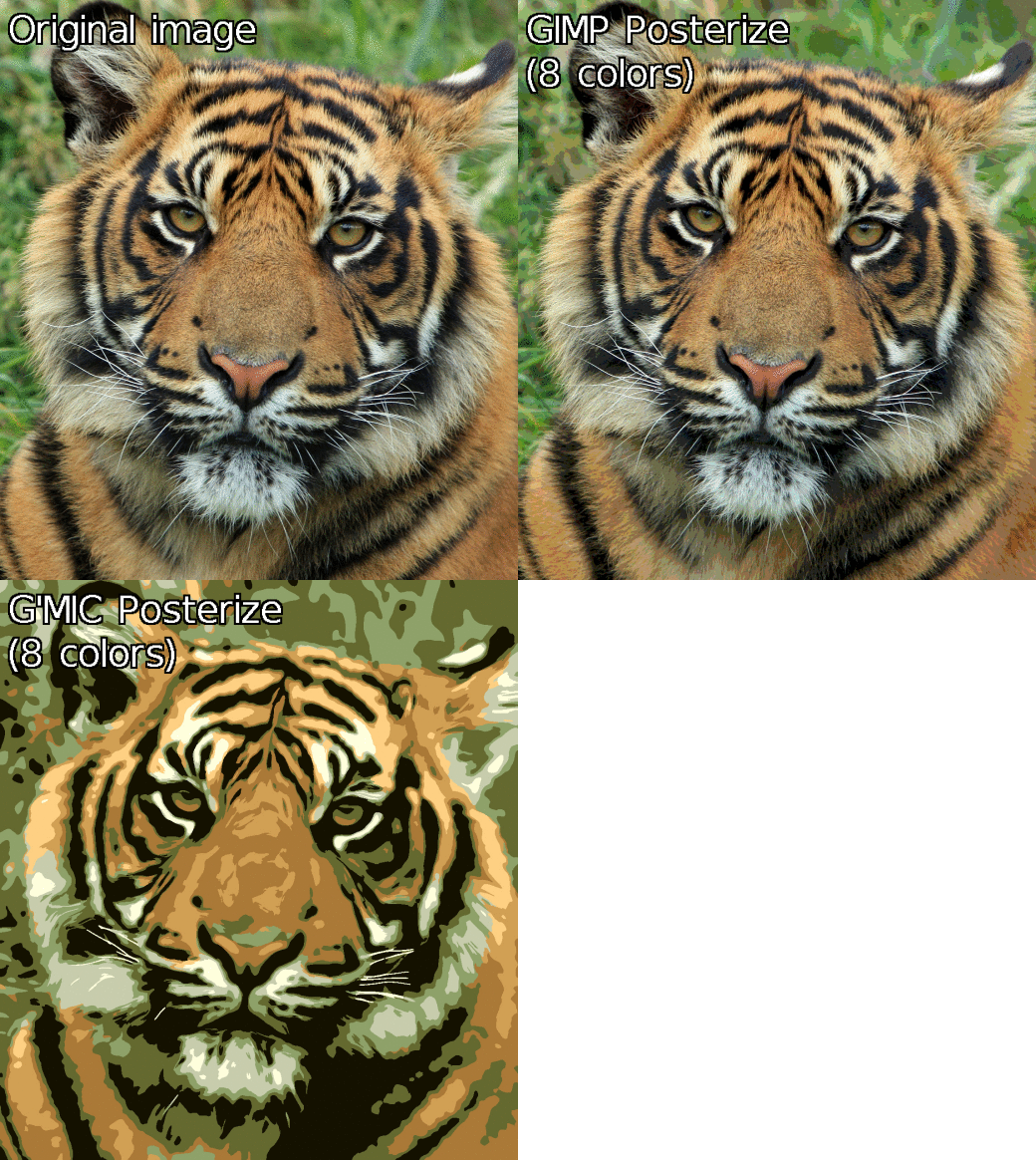
Posterize
Fig.5.3.2: Filter “Posterize“ of G’MIC, compared to the filter with same name available by default in GIMP.

5.4. Other filters

If you still want more (and in this case one could say you are damn greedy!), we will end this section by discussing some of the new, but unclassifiable filters.

We start with the filter “Artistic / Diffusion tensors“, which displays a field of diffusion tensors, calculated from the structure tensors of an image (structure tensors are symmetric and positive definite matrices, classically used for estimating the local image geometry). To be quite honest, this feature had not been originally developed for an artistic purpose, but users of the plug-in came across it by chance and asked to make a GIMP filter from it. And yes, this is finally quite pretty, isn’t it?

Diffusion tensors
Fig.5.4.1: Filter “Diffusion Tensors“ filter and its multitude of colored ellipses.

From a technical point of view, this filter was actually an opportunity to introduce new drawing features into the G’MIC mathematical evaluator, and it has now become quite easy to develop G’MIC scripts for rendering custom visualizations of various image data. This is what has been done for instance, with the command -display_quiver reimplemented from scratch, and which allows to generate this type of rendering:

-display_quiver
Fig. 5.4.2: Rendering vector fields with the G’MIC command -display_quiver.

For lovers of textures, we can mention the apparition of two new fun effects: First, the “Patterns / Camouflage“ filter. As its name suggests, this filter produces a military camouflage texture.
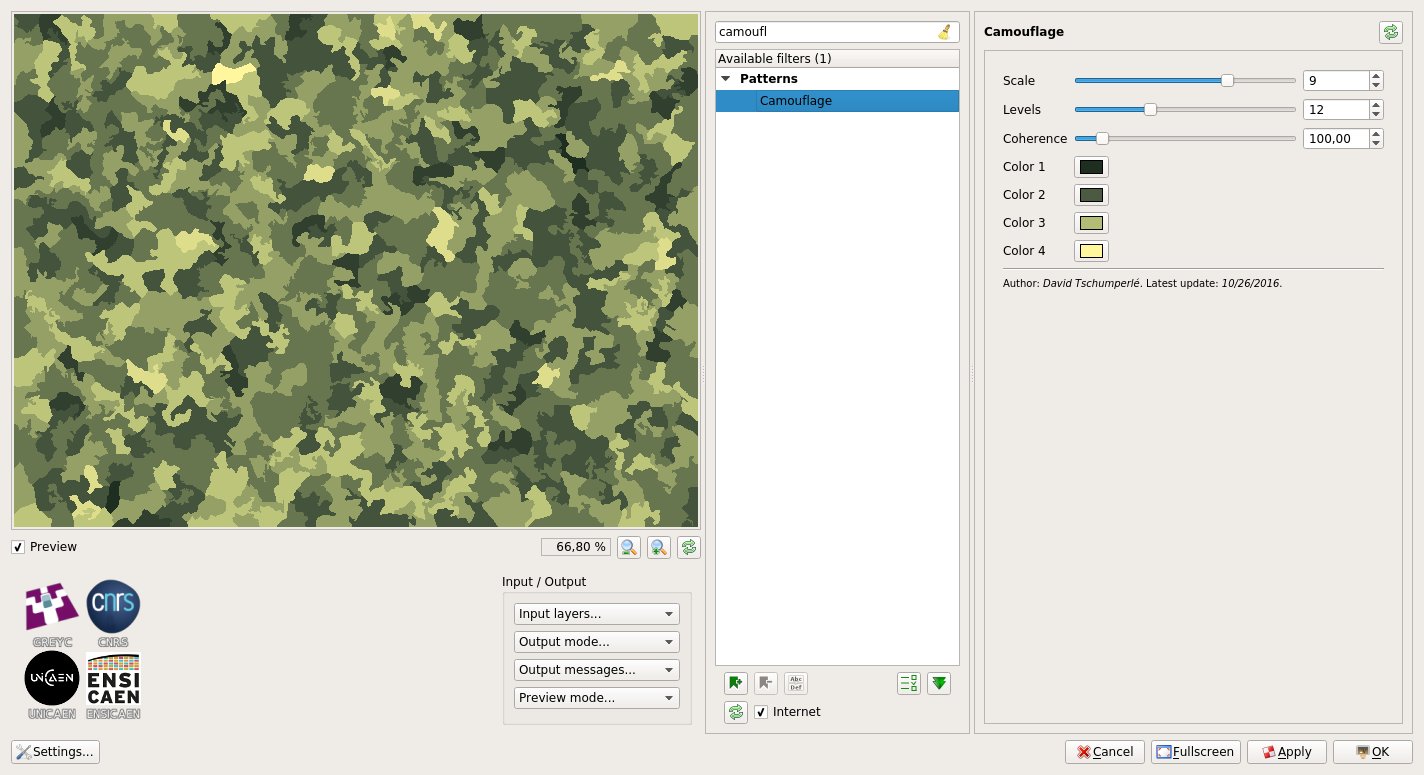
Camouflage
Fig. 5.4.3: Filter “Camouflage“, to be printed on your T-shirts to go unnoticed in parties!

Second, the filter “Patterns / Crystal background“ overlays several randomly colored polygons in order to synthesize a texture that vaguely looks like a crystal seen under a microscope. Pretty useful to quickly render colored image backgrounds.
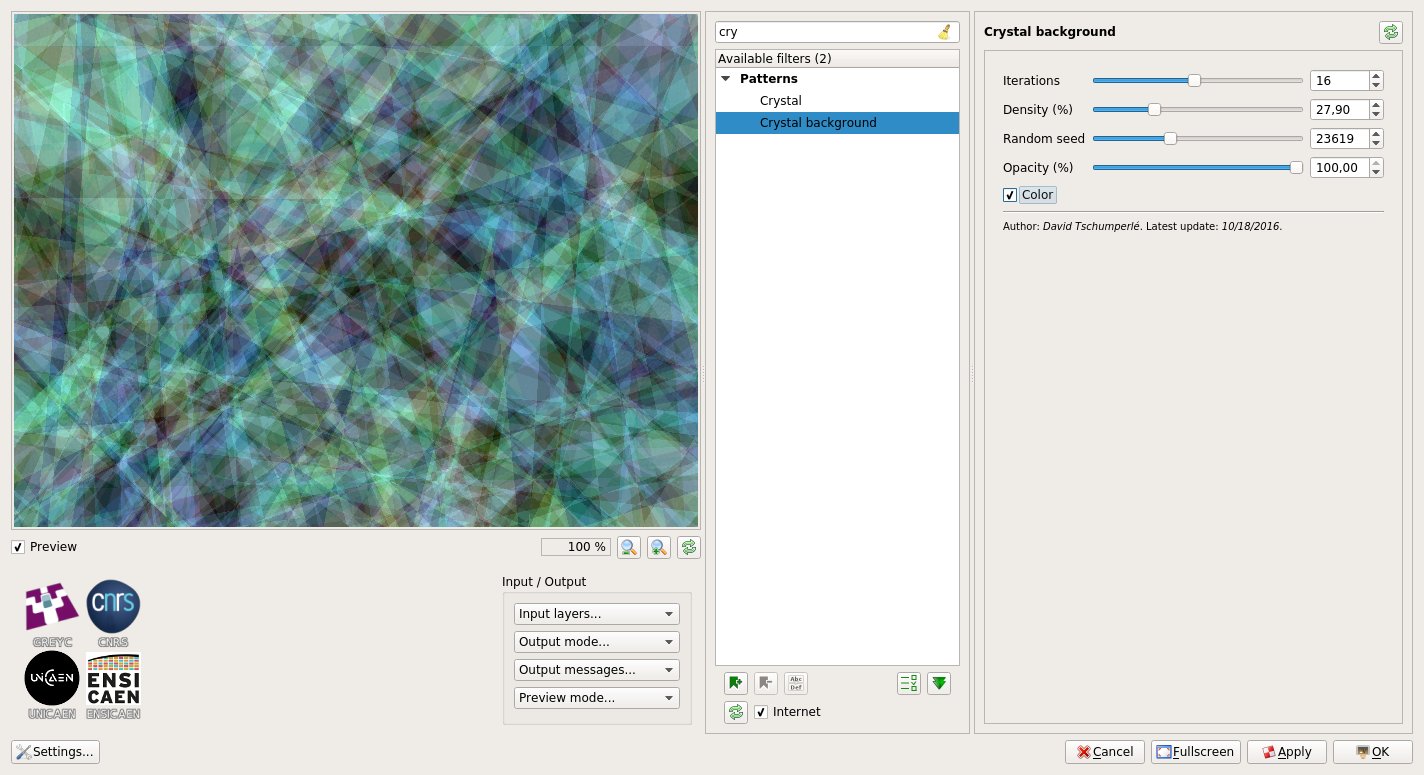
Crystal background
Fig.5.4.4: Filter “Crystal background“ in action.

And to end this long overview of new G’MIC filters developed since last year, let us mention “Rendering / Barnsley fern“. This filter renders the well-known Barnsley fern fractal. For curious people, note that the related algorithm is available on Rosetta Code, with even a code version written in the G’MIC script language, namely:

# Put this into a new file 'fern.gmic' and invoke it from the command line, like this:
# $ gmic fern.gmic -barnsley_fern
barnsley_fern :
  1024,2048
  -skip {"
      f1 = [ 0,0,0,0.16 ];           g1 = [ 0,0 ];
      f2 = [ 0.2,-0.26,0.23,0.22 ];  g2 = [ 0,1.6 ];
      f3 = [ -0.15,0.28,0.26,0.24 ]; g3 = [ 0,0.44 ];
      f4 = [ 0.85,0.04,-0.04,0.85 ]; g4 = [ 0,1.6 ];
      xy = [ 0,0 ];
      for (n = 0, n<2e6, ++n,
        r = u(100);
        xy = r<=1?((f1**xy)+=g1):
             r<=8?((f2**xy)+=g2):
             r<=15?((f3**xy)+=g3):
                   ((f4**xy)+=g4);
        uv = xy*200 + [ 480,0 ];
        uv[1] = h - uv[1];
        I(uv) = 0.7*I(uv) + 0.3*255;
      )"}
  -r 40%,40%,1,1,2

And here is the rendering generated by this function:

Barnsley Fern
Fig.5.4.5: Fractal “Barnsley fern“, rendered by G’MIC.

6. Overall project improvements

All filters presented throughout this article constitute only the visible part of the G’MIC iceberg. They are in fact the result of many developments and improvements made “under the hood”, i.e., directly on the code of the G’MIC script language interpreter. This interpreter defines the basic language used to write all G’MIC filters and commands available to users. Over the past year, a lot of work has been done to improve the performances and the capabilities of this interpreter:

  • The mathematical expressions evaluator has been considerably enriched and optimized, with more functions available (especially for matrix calculus), the support of strings, the introduction of const variables for faster evaluation, the ability to write variadic macros, to allocate dynamic buffers, and so on.

  • New optimizations have been also introduced in the CImg library, including the parallelization of new functions (via the use of OpenMP). This C++ library provides the implementations of the “critical” image processing algorithms and its optimization has a direct impact on the performance of G’MIC (in this respect, note that CImg is also released with a major version 2.0).

  • Compiling G’MIC on Windows now uses a more recent version of g++ (6.2 rather than 4.5), with the help of Sylvie Alexandre. This has actually a huge impact on the performances of the compiled executables: some filters run up to 60 times faster than with the previous binaries (this is the case for example, with the Deformations / Conformal Maps filter, discussed in section 5.2).

  • The support of large .tiff images (format BigTIFF, with files that can be larger than 4Gb) is now enabled (read and write), as it is for 64-bit floating-point TIFF images

  • The 3D rendering engine built into G’MIC has also been slightly improved, with the support for bump mapping. No filter currently uses this feature, but we never know, and prepare ourselves for the future!
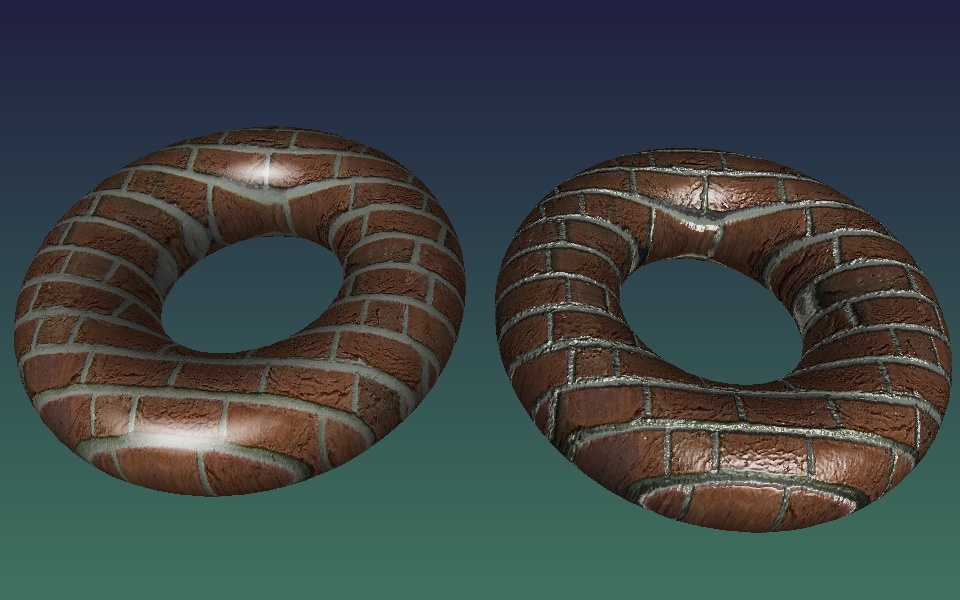
Bump mapping
Fig.6.1: Comparison of 3D textured rendering with (right) and without “Bump mapping” (left).
  • And as it is always good to relax after a hard day’s work, we added the game of Connect Four to G’MIC :). It can be launched via the shell command $ gmic -x_connect4 or via the plug-in filter “Various / Games & demos / Connect-4“. Note that it is even possible to play against the computer, which has a decent but not unbeatable skill (the very simple _AI_ uses the Minimax algorithm with a two-level decision tree).
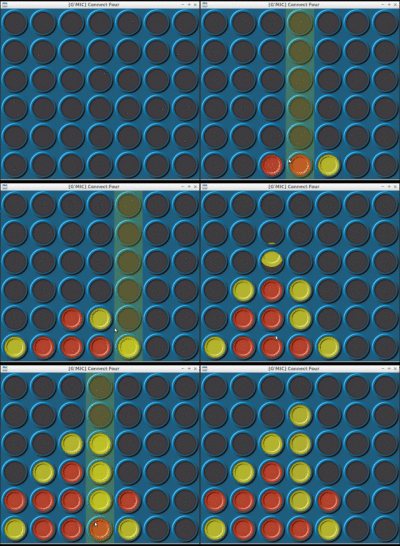
Connect four
Fig.6.2: The game of “Connect Four“, as playable in G’MIC.

Finally, let us mention the undergoing redesign work of the G’MIC Online web service, with a beta version already available for testing. This re-development of the site, done by Christophe Couronne and Véronique Robert (both members of the GREYC laboratory), has been designed to better adapt to mobile devices. The first tests are more than encouraging. Feel free to experiment and share your impressions!

7. What to remember?

First, the version 2.0 of G’MIC is clearly an important step in the project life, and the recent improvements are promising for the future developments. It seems that the number of users are increasing (and they are apparently satisfied!), and we hope that this will encourage open-source software developers to integrate our new G’MIC-Qt interface as a plug-in for their own software. In particular, we are hopeful to see the new G’MIC in action under Krita soon, this would be already a great step!

Second, G’MIC continues to be an active project, and evolve through meetings and discussions with members of artists and photographers communities (particularly those who populate the forums and IRC of pixls.us and GimpChat). You will likely able to find us there if you need more information, or just if you want to discuss things related to (open-source) image processing.

And while waiting for a future hypothetical article about a future release of G’MIC, you can always follow the day-after-day progress of the project via our Twitter feed.

Until then, long live open-source image processing!


Credit: Unless explicitly stated, the various non-synthetic images that illustrate this post come from Pixabay.

Embarrassing questions

With Stig Abell and Thea Lenarduzzi – Distinguished social psychologist Carol Tavris discusses whether we are seeing the end of definition by gender and whether there is any benefit in trying to track, physiologically and psychologically, the differences between men and women; Brian Dillon tackles the past, present and future of the essay form, via the indolent and melancholic work of Cyril Connolly, whose book The Unquiet Grave is "one of the strangest, funniest, most formally daring if badly flawed contributions to the literature of depression, disarray and the decay of ambition"; finally, the TLS's Religion Editor Rupert Shortt joins us to consider the true meaning of Islam, a religion so full of contradictions that – according to one critic – “very few Muslims consciously understand what being Islamic truly means”.

Hosted on Acast. See acast.com/privacy for more information.

💾

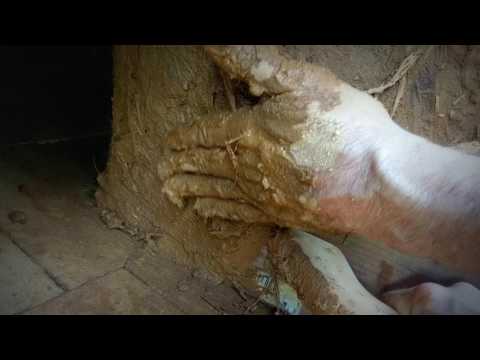
Building a door stop on a cob oven

💾

How to build out a lip around your cob oven doorway so the door has a stop to rest on. This makes it easier to open and close the oven and creates a nicer seal around the door to keep heat inside.

Football and the modern Middle East

With Stig Abell and Thea Lenarduzzi – TLS Politics editor Toby Lichtig speaks to Assaf Gavron, author of a fascinating essay on the role of football in the politics of the Middle East, and runs us through a number of pieces from this week’s issue on the legacy of the Six-Day War, 60 years on; "No wild animal plays a more significant or ambivalent role in the imaginings of the British than the fox", so says Tom Holland, who joins us to consider this curiously divisive beast; fresh from a marathon production of Wagner’s Ring Cycle, opera critic Guy Dammann explains the importance of this towering work of music and drama

Hosted on Acast. See acast.com/privacy for more information.

💾

Is consciousness a thing?

With Stig Abell and Thea Lenarduzzi – TLS Philosophy editor Tim Crane grapples with the mind-body problem and "what it means to be the kind of creatures we are", plus the year that brightened Nietzsche's outlook, and Biscuit the dog's self-consciousness; Korean American author Min Jin Lee on how Korean literature approaches the difficult dream of reunification and what a new collection of stories, The Accusation by the pseudonymous author "Bandi", "the first work of fiction written by a North Korean author presumed still to be alive and living in the country”, tells us about life in that deeply mysterious land; finally, the great Alasdair Gray, author of Lanark, reads "From Vers Doré by Gérard de Nerval", a new work first published in this week's TLS.

Hosted on Acast. See acast.com/privacy for more information.

💾

How to get rid of your spouse

With Stig Abell and Thea Lenarduzzi – Michel Foucault was so fascinated by lettres de cachet – pre-Revolutionary requests made by citizens to the lieutenant of police calling for the imprisonment without trial of a troublesome family member or neighbour – that he co-edited a little-known compendium of them: Biancamaria Fontana joins us to explain; Was the "plunder of black life" the driving force in making America great? Stephanie McCurry weighs in on a recent book, Slavery's Capitalism: A new history of American economic development; finally, in light of the Oxford Companion to Cheese, Paul Levy considers the politics of cheese and makes the case for a good strong Cheddar.

Hosted on Acast. See acast.com/privacy for more information.

💾

Happy 2nd Birthday Discuss


Happy 2nd Birthday Discuss

Time keeps on slippin'

I was idling in our IRC chat room earlier when @Morgan_Hardwood wished us all a “Happy Discuss Anniversary”. Wouldn’t you know it, another year slipped right by! (Surely there’s no way it could already be a year since the last birthday post? Where does the time go?)

We’ve had a bunch of neat things happen in the community over the past year! Let’s look at some of the highlights.

Support

I want to start with this topic because it’s the perfect opportunity to recognize some folks who have been supporting the community financially…

When I started all of this I decided that I definitely didn’t want ads to be on the site anywhere. I had gotten enough donations from my old blog and GIMP tutorials that I could cover costs for a while entirely from those funds (I also re-did my personal blog recently and removed all ads from there as well).

I don’t like ads. You don’t like ads. We’re a big enough community that we can keep things going without having to bring those crappy things into our lives. So to reiterate, we’re not going to run ads on the site.

We are hosting the main website on Stablehost, the forums (discuss) are on a VPS at Digital Ocean, and our file storage for discuss is out on Amazon S3(see below). All told our costs are about $30 per month. Not so bad!

Thank You!

Even so, we have had some folks who have donated to help us offset these costs and I want to take a moment to recognize their generosity and graciousness!

Dimitrios Psychogios has been a supporter of the site since the beginning. This past year he covered (more than) our hosting costs for the entire year, and for that I am infinitely grateful (yes, I have infinite gratitude). It also helps that based on his postings on G+ our musical tastes are very similarly aligned. As soon as I get the supporters page up you’re going to the top of the list! Thank you, Dimitrios, for your support of the community!

Jonas Wagner (@Jonas_Wagner) and McCap (@McCap) both donated this past year as well. Which is doubly-awesome because they are both active in the community and have written some great content for everyone as well (@McCap is the author of the article A Masashi Wakui look with GIMP, and has been active in the community since the beginning as well).

Mica (@paperdigits) and Luka are both recurring donators which I am particularly grateful for. It really helps for planning to know we have some recurring support like that.

I have a bunch of donations where the donators didn’t leave me a name to use for attribution and I don’t want to just assume it’s ok. If you know you donated and see your first name in the list below (and are ok with me using your full name and a link if you want) then please let me know and I’ll update this post (and for the donators page later).

These are the folks who are really making a difference by taking the time and being gracious enough to support us. Even if you don’t want your full name out here, I know who you are and am very, very grateful and humbled by your generosity and kindness. Thank you all so much!

  • Marc W. (you rock!)
  • Ulrich P.
  • Luc V.
  • Ben E.
  • Keith A.
  • Philipp H.
  • Christian M.
  • Matthieu M.
  • Christian M.
  • Christian K.
  • Maria J.
  • Kevin P.
  • Maciej D.
  • Christian K.
  • Egbert G.
  • Michael H.
  • Jörn H.
  • Boris H.
  • Norman S.
  • David O.
  • Walfrido C.
  • Philip S.
  • David S.
  • Keith B.
  • Andrea V.
  • Stephan R.
  • David M.
  • Bastian H.
  • Chance J.
  • Luka S.
  • Nathanael S.
  • Sven K.
  • Pepijn V.
  • Benjamin W.
  • Jörg W.
  • Patrick B.
  • Joop K.
  • Alain V.
  • Egor S.
  • Samuel S.

On that note. If anyone wanted to join the folks above in supporting what we’re up to, we have a page specifically for that:

https://pixls.us/support/

Remember, no amount is too small!

Libre Graphics Meeting Rio

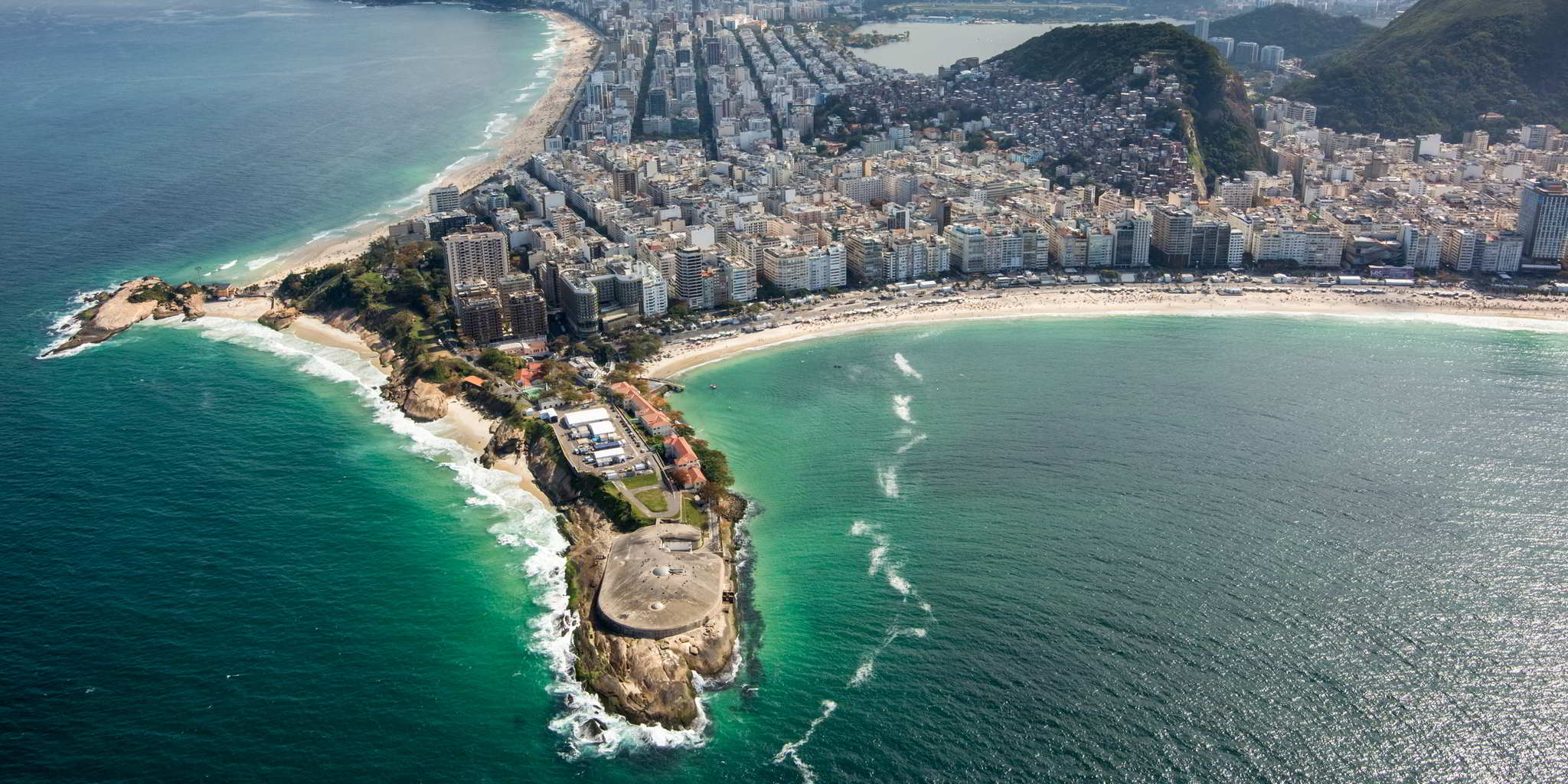
Forte de Copacabana, Rio
By Gabriel Heusi/Brasil2016.gov.br

I wasn’t able to attend LGM this year, being held down in Rio (but the GIMP team did). That’s not to say that we didn’t have folks from the community there: Farid (@frd) from Estúdio Gunga was there!

I was able to help coordinate a presentation by Robin Mills (@clanmills) about the state (and future) of Exiv2. They’re looking for a maintainer to join the project, as Robin will be stepping down at the end of the year for studies. If you think you’d be interested in helping out, please get in touch with Robin on the forums and let him know!

I also put together (quickly) a few slides on the community that were included in the “State of the Libre Graphics” presentation that kicks off the meeting (presented this year by GIMPer Simon Budig):

2017 LGM/Rio PIXLS.US State Of Slide 0 2017 LGM/Rio PIXLS.US State Of Slide 1 2017 LGM/Rio PIXLS.US State Of Slide 2
This slide deck is availabe in our Github repo.

This was just a short overview of the community and I think it makes sense to include it here was well. Since we stood the forum up two years ago we’ve seen about 3.2 million pageviews and have just under 1,400 users in the community. Which is just awesome to me.

@LebedevRI was also going to be mad if I didn’t take the time to at least let folks know about raw.pixls.us, where we currently have 693 raw files across 477 cameras. Please, take a moment to check raw.pixls.us and see if we are missing (or need better) files from a camera you may have, and get us samples for testing!

raw.pixls.us

We set up raw.pixls.us so we can gather camera raw samples for regression testing of rawspeed as well to have a place for any other project that might need raw files to test with. As we blogged about previously, the new site is also a replacement for the now defunct rawsamples.ch website.

Stop in and see if we’re missing a sample you can provide, or if you can provide a better (or better licensed) version for your camera. We’re focusing specifically on CC0 contributions.

Welcome digiKam!

digiKam Logo

As I mentioned in my last blog post, we learned that the digiKam team was looking for a new webmaster through a post on discuss. @Andrius posted a heads up on the digiKam 5.5.0 release in this thread.

Needless to say, less than a month or so later, @paperdigits had already finished up a nice new website for them! This is something we’re really trying to help out the community with and are super glad to be able to help out the digiKam team with this. The less time they have to worry about web infrastructure and security for it, the more time they can spend on awesome new features for their project and users.

Yes, we used a static site generator (Hugo in this case), and we were also able to move their commenting system to use discuss as its back-end! This is the same way we’re doing comments for PIXLS.US right now (scroll to the bottom of this post).

They’ve got their own category on discuss for both general digiKam discussion as well as their linked comments from their website.

Speaking of using discourse as a commenting system…

Discourse upstream

We’ve been using discourse as our forum software from the beginning. It’s a modern, open, and full-featured forum software that I think works incredibly well as a modern web application.

The ability to embed comments in a website that are part of the forum was one of the main reasons I went with it. I didn’t want to expose users to unnecessary privacy concerns by embedding a third-party commenting system (cough, disqus, cough). If I was going to go through the trouble of setting up a way to comment on things, I wanted to homogenize it with a full community-building effort.

This past year they (the discourse devs) added the ability to embed comments in multiple hosts (it was only one host when we first stood things up). This means that we can now manage the comments for anyone else thay may need them! Of course, building out a new website for digiKam meant that this was a perfect time to test things.

It all works beautifully, with one minor nitpick. The ability to style the embedded comments was limited to a single style for all the places that they might be embedded. This may be fine if all of the sites look similar, but if you visit www.digikam.org and compare it to here, you can see they are a little bit different… (we’re on white, digikam.org is on a dark background).

We needed a way to isolate the styling on a per-host basis, which after much help from @darix (yet again :)) I was able to finally hack something together that worked and get it pushed upstream (and merged finally)!

Discourse embed class name
I made this!

Play Raw

When RawTherapee migrated their official forums over to pixls they brought something really fun with them: Play Raw. They would share a single raw file amongst the community and then have everyone process and share their results (including their processing steps and associated .pp3 settings file).

If you haven’t seen it yet, we’ve had quite a few Play Raw posts over the past year with all sorts of wonderful images to practice on and share! There are portraits, children, dogs, cats, landscapes, HDR, and phở! There’s over 19 different raw files being shared right now, so come try your hand at processing (or even share a file of your own)!

The full list of play_raw posts can always be found here:
https://discuss.pixls.us/tags/play_raw

Amazon S3

We are a photography forum, so it only made sense that we made it as easy as possible for community members to upload and share images (raw files, and more). It’s one of the things I love about discourse that it’s so easy to add these things to your posts (simply drag-and-drop into the post editor) and upload them.

While this is easy to do, it does mean that we have to store all of this data. The VPS we use from Digital Ocean only has a 40GB SSD and it has to include all of the main forum running on it. We did have a little space for a while, but to help alleviate the local storage as a possible problem down the line, I moved our file storage out to Amazon S3.

This means that we can upload all we want and won’t really hit a wall with actual available storage space. It costs more each month than trying to store it all on local storage for the site, but then we don’t have to worry about expansion (or migration) later. Plus our current upload size limit per file is 100MB!

Amazon S3 costs

As you can see, we’re only looking at about $5USD/month on average in storage and transfer costs for the site with Amazon.

We’re also averaging about $22usd/month in hosting costs with Digital Ocean, so we’re still only about $27/month in total hosting costs. Maybe $30 if we include the hosting for the main website which is at Stablehost.

IRC

We’ve had an IRC room for a long time (longer than discuss I think), but I only just got around to including a link on the site for folks to be able to join through a nice web client (Kiwi IRC).

Discuss header bar

It was included as part of an oft-requested set of links to get back to various parts of the main site from the forums. I also added these links in the menu for the site as well (the header links are hidden when on mobile, so this way you can still access the links from whatever device you’re using):

Discuss menu

If you have your own IRC client then you can reach us on irc.freenode.net #pixls.us. Come and join us in the chat room! If you’re not there you are definitely missing out on a ton of stimulating conversation and enlightening discussions!

States of the nations

With Stig Abell and Lucy Dallas. Sudhir Hazareesingh gives his analysis of the French election and the rise of Macron; Toby Lichtig (sic) helps us tackle genre fiction, including our tips for the greatest ever historical novel; and Hal Jensen celebrates an 8-hour play about American identity.

Hosted on Acast. See acast.com/privacy for more information.

💾

#1. If This Is A Man – a live reading of Primo Levi's memoir of Auschwitz

On April 30, at London's Southbank Centre, an extraordinary cast of readers – including Philippe Sands, Tom Stoppard, Niklas Frank, whose father was Adolf Hitler's lawyer, and Susan Pollack, who survived the camp – gathered to mark 70 years since the publication of this seminal account of humanity at its most brutal. Across five episodes, in collaboration with the Southbank Centre, we bring you the full, live recording of the event, part of the Belief and Beyond Belief festival, exploring what it means to be human. This performance was directed by Nina Brazier with music directed by Tomo Keller and performed by Raphael Wallfisch, Tomo Keller, Robert Smissen, Simon Wallfisch and Lada Valesova; the event was devised by A. L. Kennedy and Philippe Sands, in collaboration with Ted Hodgkinson, Senior Programmer for Literature and Spoken Word at the Southbank Centre. You'll find all episodes on the-tls.co.ukChapters 1–3 read by: human-rights lawyer Philippe Sands QC; author A. L. Kennedy; actors Samuel West...

Hosted on Acast. See acast.com/privacy for more information.

💾

Rousseau and the me me me memoir

With Stig Abell and Thea Lenarduzzi – Frances Wilson on how Jean-Jacques Rousseau's Confessions of 1789 laid the foundations for the messy modern memoir; TLS commissioning editor Mika Ross-Southall on a strange new exhibition of Picasso's work that examines his career-long engagement with minotaurs and matadors; Lorna Scott Fox rediscovers Leonora Carrington, an almost-forgotten radical artist-thinker for our fragile times.

Hosted on Acast. See acast.com/privacy for more information.

💾

Welcome digiKam!


Welcome digiKam!

Lending a helping hand

One of the goals we have here at PIXLS.US is to help Free Software projects however we can, and one of those ways is to focus on things that we can do well that might help make things easier for the projects. It may not be much fun for project developers to deal with websites or community outreach necessarily. This is something I think we can help with, and recently we had an opportunity to do just that with the awesome folks over at the photo management project digiKam.

As part of a post announcing the release of digiKam 5.5.0 on discuss. we learned that they were in need of a new webmaster, and they needed something soon to migrate away from Drupal 6 for security reasons. They had a rudimentary Drupal 7 theme setup, but it was severely lacking (non-responsive and not adapted to the existing content).

Old digiKam website
The previous digiKam website, running on Drupal 6.
new digiKam website
The new digiKam website! Great work Mica!

Mica (@paperdigits) reached out to Gilles Caulier and the digiKam community and offered our help, which they accepted! At that point Mica gathered requirements from them and found in the end that a static website would be more than sufficient for their needs. We coordinated with the KDE folks to get a git repo setup for the new website, and rolled up our sleeves to start building!

Gilles Caulier by Alex Prokoudine
Gilles Caulier by Alexandre Prokoudine (CC BY NC SA 2.0)

Mica chose to use the Hugo static-site generator to build the site with. This was something new for us, but turned out to be quite fast and fun to work with (it generates the entire digiKam site in just about 5 seconds). Coupled with a version of the Foundation 6 blog theme we were able to get a base site framework up and running fairly quickly. We scraped all of the old site content to make sure that we could port everything as well as make sure we didn’t break any urls along the way.

We iterated some design stuff along the way, ported all of the old posts to markdown files, hacked at the theme a bit, and finally included comments that are now hosted on discuss. What’s wild is that we managed to pull the entire thing together in about 6 weeks total (of part-time working on it). The digiKam team seems happy with the results so far, and we’re looking forward to continue helping them by managing this infrastructure for them.

A big kudos to Mica for driving the new site and getting everything up and running. This was really all due to his hard work and drive.

Also, speaking of discuss, we also have a new category created specifically for digiKam users and hackers: https://discuss.pixls.us/c/software/digikam.

This is the same category that news posts from the website will post in, so feel free to drop in and say hello or share some neat things you may be working on with digiKam!

How comics got serious

With Stig Abell and Thea Lenarduzzi – The graphic artist Nicola Streeten discusses two new exhibitions, in Paris and London, linking comics to trauma theory, radical politics and feminism; Alexander van Tulleken on a new book by two "rock star professors" that purports to provide a bold new solution to the refugee crisis; a crackly clip just a few minutes long is all we have left of Virginia Woolf's voice – Emily Kopley fills us in on the fraught context behind "Craftsmanship", a talk broadcast by the BBC 80 years ago

Hosted on Acast. See acast.com/privacy for more information.

💾

Primo Levi speaks

With Stig Abell and Thea Lenarduzzi – Philippe Sands discusses his forthcoming project which assembles an international cast of actors, writers, musicians and politicians to read Primo Levi's seminal account of survival in Auschwitz, seventy years after its publication; as part of our Shakespeare edition this week, TLS Commissioning Editor Michael "The Doctor" Caines considers how protective we should be of the man and the work; Rebecca Spang wades through the murky matter of money, the growth of "off shore" finance and the bewildering sexualization of monetary metaphors.Discover more at www.the-tls.co.uk.

Hosted on Acast. See acast.com/privacy for more information.

💾

Beers with James Baldwin

With Stig Abell and Thea Lenarduzzi – TLS editor James Campbell, Baldwin's biographer and friend, on the writer's complex presence and legacy on and off screen; Michael Rosen on the "disappearance" of Émile Zola and the long, dappled shadow of the Dreyfus Affair; Jane Yager on a sensational and problematic investigation into mass rapes committed by allied soldiers in Germany in the wake of the Second World War, and how attitudes have – and haven't – changed.Discover more at www.the-tls.co.uk

Hosted on Acast. See acast.com/privacy for more information.

💾

Poets, cannibals and philosophers

With Stig Abell and Thea Lenarduzzi – Rory Waterman on the "uses" of poetry and Stephen Burt's admirable, if rather vexing, new collection The Poem is You: 60 contemporary American poems and how to read them; Barbara J. King on the cannibals in our midst (note: fragile-stomached listeners and lovers of banana slugs be warned); When did modern philosophy begin? And who is its godfather? – TLS Philosophy Editor Tim Crane tackles a new book by A. C. Grayling which seeks answers to these thorny questions.Discover more at www.the-tls.co.uk.

Hosted on Acast. See acast.com/privacy for more information.

💾

Not so still lives

With Stig Abell and Thea Lenarduzzi – Libby Purves on the stranger-than-fiction life of Aimée Crocker, a nineteenth-century heiress with proto-PC views and an affection for boa constrictors; Gabriel Josipovici on a magisterial but contentious study of two of the greatest figures in European art history, Hieronymus Bosch and Pieter Bruegel the Elder; and finally, the novelist and poet Colm Tóibín discusses his forthcoming novel, set in ancient Greece, and reads five new poems, published for the first time in this week's TLS Discover more at www.the-tls.co.uk.

Hosted on Acast. See acast.com/privacy for more information.

💾

GIMP is Going to LGM!


GIMP is Going to LGM!

Tall and tan and young and lovely...

This years Libre Graphics Meeting (2017) is going to be held in the lovely city seen above, Rio de Janeiro, Brazil! This is an important meeting for so many people in the Free/Libre art community as it’s one of the only times they have an opportunity to meet face to face.

We’ve had some folks attending the past LGM’s (Leipzig and London) and it’s a wonderful opportunity to spend some time with friends. (Also, @frd from the community will be there!)

GIMP and darktable at LGM
GIMPers, some darktable folks, and even Nate Willis at the flat during LGM/London!

So in the spirit of camaraderie, I have a request…

Donate

The GIMP team will be in attendance this year. I happen to have a fondness for them so I’m asking anyone reading this to please head over and donate to the project.

GIMP Wilber

That link is for the GNOME PayPal account, but there are other ways to donate as well.

This is one of the few times that the GIMP team gets a chance to meet in person. They use the time to hack at GIMP and to manage internal business. The time they get to spend together is invaluable to the project and by extension everyone that uses GIMP.

Just look at these faces! Surely this (Brady) Bunch of folks is worth helping to get a better GIMP?

GIMPers at LGM/London
Left to right, top to bottom:
Ville, Mitch, Øyvind,
Simon, Liam, João,
Aryeom, Jehan, Michael

Attending

Besides @frd I’m not sure who else from the community might be attending, so if I’ve missed you I apologize! Please feel free to use this topic to communicate and coordinate if you’d like.

It appears that personally I’m on a biennial schedule with attending LGM - so I’m looking forward to next year to be able to catch up with everyone!

RawTherapee and Pentax Pixel Shift


RawTherapee and Pentax Pixel Shift

Supporting multi-file raw formats

What is Pixel Shift?

Modern digital sensors (with a few exceptions) use an arrangement of RGB filters over a square grid of photosites. For a given 2x2 square of photosites the filters are designed to allow two green, and one each red and blue colors through to the photosite. These are arranged on a grid:

Bayer pattern on sensor

The pattern is known as a Bayer pattern (after the creator Bryce Bayer of Eastman Kodak). The resulting pattern shows how each RGB is offset into the grid.

Bayer pattern on sensor profile

Each of the pixel sites captures a single color. In order to produce a full color representation at each pixel, the other color values need to be interpolated from the surrounding grid. This interpolation and methods for calculating it are referred to as demosaicing. The methods for accomplishing this vary across different algorithms.

Bayer Interpolation Example
The final RGB value for the initially Red pixel needs to be interpolated from the surrounding Blue and Green pixels.

Unfortunately, this can often result in problems. There can be chromatic aliasing problems resulting in odd color fringing and roughness on edges or a loss of detail and sharpness.

Pixel Shift

Pentax‘s Pixel Shift (Available on the K-1, K-3 II, KP, K-70) attempts to alleviate some of these problems through a novel approach of capturing four images quickly in succession and by moving the entire camera sensor a single pixel for each shot. This has the effect of capturing a full RGB value at each pixel location:

Pixel Shift Example Diagram
Pixel Shift shifts the sensor by one pixel in each direction to be able to generate a full set of RGB values at each photosite.

This means a full RGB value for a pixel location can be created without having to interpolate from neighboring values.

Advantages

Less Noise

If you look carefully at the Bayer pattern, you’ll notice that when shifting to adjacent pixels there will always be two green values captured per pixel. The average of these green values helps to suppress noise that may have been interpolated and spread through a normal, single-shot raw file.

Pixel Shift Noise Reduction Example
Top: single raw frame, Bottom: Pixel Shift

Less Moiré

Avoiding the interpolation of pixel colors from surrounding photosites helps to reduce the appearance of Moiré in the final result:

Pixel Shift Moiré Reduction Example
Top: single raw frame, Bottom: Pixel Shift

Increased Resolution

This method is similar in concept to what was previously seen when Olympus announced their “High Resolution” mode for the OMD E-M5mkII camera (or manually as we previously described in this blog post). In that case they combine 8 frames moved by sub-pixel amounts to increase the overall resolution. The difference here is that Olympus generates a single, combined raw file from the results, while Pixel Shift gets you access to each of the four raw files before they’re combined.

In each case, a higher resolution image can be created from the results:

Pixel Shift Increased Resolution Example
Top: single raw frame, Bottom: Pixel Shift

Disadvantages

Movement

As with most approaches for capturing multiple images and combining them, a particularly problematic area is when there are objects in motion between the frames being captured. This is a common problem when stitching panoramic photography, when creating image stacks for noise reduction, and when combining images using methods such as Pixel Shift.

Although…

The RawTherapee Approach

Simply combining four static frames together is really trivial, and is something that all the other Pixel Shift-capable software can do without issue. The real world is not often so accommodating as a studio setup, and that is where the recent work done by @Ingo and @Ilias on RawTherapee really begins to shine.

What they’ve been working on in RawTherapee is to improve the detection of movement in a scene. There are several types of movement possible:

  • Objects showing at different places in a scene such as fast moving cars.
  • Partly moving objects like foliage in the wind.
  • Moving objects reflecting light onto static objects in the scene
  • Changing illumination conditions such as long exposures at sunset.

All of these types of movement need to be detected to avoid the artifacts they may cause in the final shot.

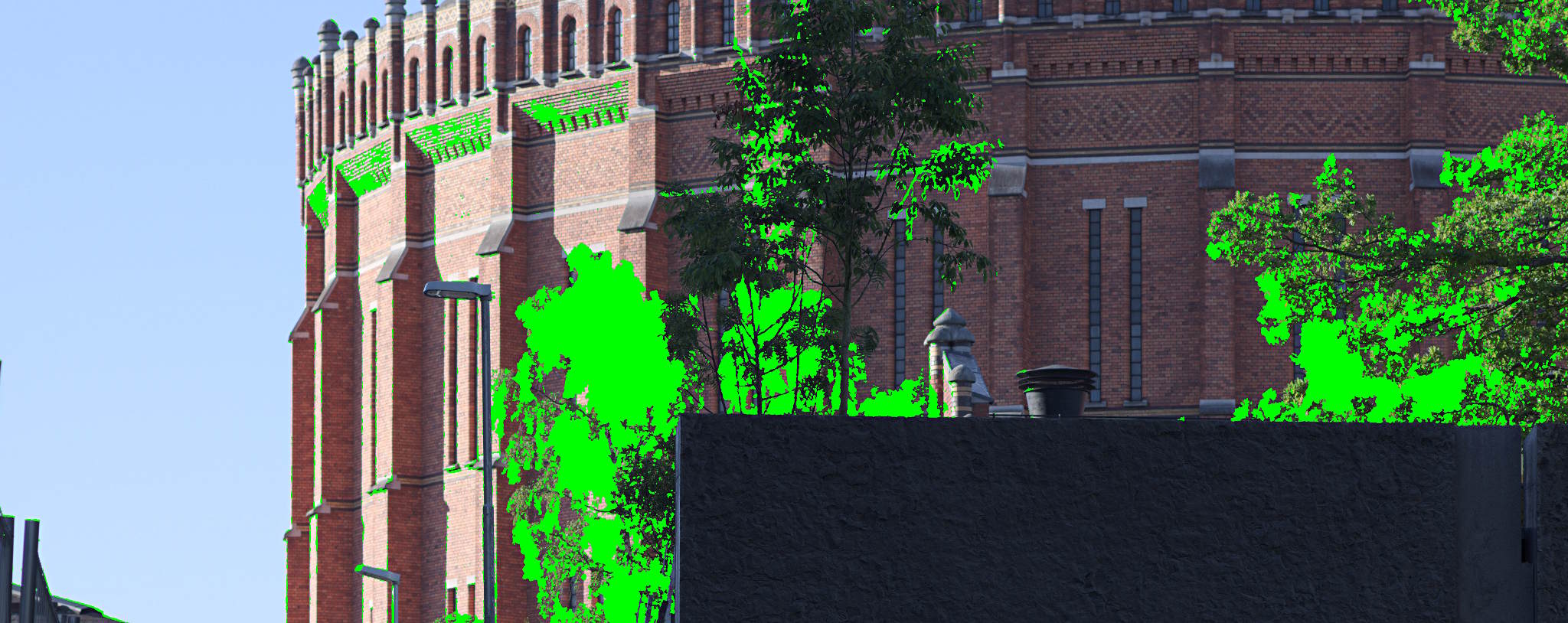
One of the key features of Pixel Shift movement detection in RawTherapee is that it allows you to show the movement mask, so you get feedback on which regions of the image are detected as movement and which are static. For the regions with movement RawTherapee will then use the demosaiced frame of your choice to fill it in, and for regions without movement it will use the Pixel Shift combined image with more detail and less noise.

Pixel Shift Movement Mask from RawTherapee
Unique to RawTherapee is the option to export the resulting motion mask
(for those that may want to do further blending/processing manually).

The accuracy of movement detection in RawTherapee leads to much better handling of motion artifacts that works well in places where proprietary solutions fall short. For most cases the Automatic motion correction mode works well, but you can also fine tune the parameters in custom mode to correctly detect motion in high ISO shots.

Besides being the only option (barring dcrawps possibly) to process Pixel Shift files in Linux, RawTherapee has some other neat options that aren’t found in other solutions. One of them is the ability to export the actual movement mask separate from the image. This will let users generate separate outputs from RT, and to combine them later using the movement mask. Another option is the ability to choose which of the other frames to use for filling in the movement areas on the image.

Pixel Shift Support in Other Software

Pentax’s own Digital Camera Utility (a rebranded version of SilkyPix) naturally supports Pixel Shift, but as with most vendor-bundled software it can be slow, unwieldy, and a little buggy sometimes. Having said that, the results do look good, and at least the “Motion Correction” is able to be utilized with this software.

Adobe Camera Raw (ACR) got support for Pixel Shift files in version 9.5.1 (but doesn’t utilize the “Motion Correction”). In fact, ACR didn’t have support at the time that DPReview.com looked at the feature last year, causing them to retract the article and re-post when they had a chance to use a version of ACR with support.

A recent look at Pixel Shift processing over at DPReview.com showed some interesting results.

Sample Image Raw
The image used in the DPReview article. ©Chris M Williams

We’re going to look at some 100% crops from that article and compare them to the results available using RawTherapee (the latest development version, to be released as 5.1 in April). The RawTherapee versions were set to the most neutral settings with only an exposure adjustment to match other samples better.

Looking first at an area of foliage with motion, the places where there are issues becomes apparent.

For reference, here is the Adobe Camera Raw (ACR) version of a single frame from a Pixel Shift file:

Pixel Shift Comparison #1

The results with Pixel Shift on, and motion correction on, from straight-out-of-camera (SOOC), Adobe Camera Raw (ACR), SilkyPix, and RawTherapee (RT) are decidedly mixed. In all but the RT version, there’s a very clear problem with effective blending and masking of the frames in areas with motion:

Pixel Shift Comparison #2

Things look much worse for Adobe Camera Raw when looking at high-motion areas like the water spray at the foot of the waterfall, though SilkyPix does a much better job here.

The ACR version of a single frame for reference:

Pixel Shift Comparison #2

Both the SOOC and SilkyPix versions handle all of the movement well here. RawTherapee also does a great job blending the frames despite all of the movement. Adobe Camera Raw is not doing well at all…

Pixel Shift Comparison #2

Finally, in a frame full of movement, such as the surface of the water.

The ACR version of a single frame for reference:

Pixel Shift Comparison #3

In a frame full of movement the SOOC, ACR, and SilkyPix processing all struggle to combine a clean set of frames. They exhibit a pixel pattern from the processing, and the ACR version begins to introduce odd colors:

Pixel Shift Comparison #3

As mentioned earlier, a unique feature of RawTherapee is the ability to show the motion mask. Here is an example of the motion mask for this image

Pixel Shift Motion Mask
The motion mask generated by RawTherapee for the above image.

Also worth mentioning is the “Smooth Transitions” feature in RawTherapee. When there are regions with and without motion, the regions with motion are masked and filled in with data from a demosaiced frame of your choice. The other regions are taken from the Pixel Shift combined image. This can occasionally lead to harsh transitions between the two.

For instance, a transition as processed in SilkyPix:

Pixel Shift Transition SilkyPix

RawTherapee’s “Smooth Transitions” feature does a much better job handling the transition:

Pixel Shift Transition RawTherapee

In Conclusion

In another example of the power and community of Free/Libre and Open Source Software we have a great enhancement to a project based on feedback and input from the users. In this case, it all started with a post on the RawTherapee forums.

Thanks to the hard work of @Ingo and @Ilias Pentax shooters now have a Pixel Shift capable software that is not only FLOSS but also produces better results than the proprietary solutions!

Not so coincidentally, community member @nosle gave permission to use one of his PS files for everyone to try processing on the Play pixelshift thread. If you’d like to practice consider heading over to get his file and feedback from others!

Pixel Shift is currently in the development branch of RawTherapee and is slated for release with version 5.1.

Isherwood, from Weimar Berlin to Hollywood

With Stig Abell and Thea Lenarduzzi – Henry K. Miller on the cinematic progress of Christopher Isherwood, a novelist who wanted nothing more than to be a filmmaker; Lamorna Ash on All This Panic, a dreamy documentary about seven girls stumbling towards womanhood in Brooklyn; Richard Fortey tells the story of the British landscape, a sweeping tale spanning several millennia, from the retreat of the ice caps in 9700 BC to the crowded island of today.

Hosted on Acast. See acast.com/privacy for more information.

💾

A new French Revolution?

With Stig Abell and Thea Lenarduzzi – Sudhir Hazareesingh on the seemingly unstoppable rise of Emmanuel Macron, the only politician now standing between the far-Right Marine Le Pen and the French presidency; Claude Rawson on the complex rage of Jonathan Swift, and why we should resist all attempts to sanitise Gulliver's Travels; Diane Purkiss delves into the murky history of alchemy, a slippery amalgam of science and the make-believe of great importance to our ancestors – and which we would do better than to scoff at.Discover more at www.the-tls.co.uk.

Hosted on Acast. See acast.com/privacy for more information.

💾

❌