Mary Beard reflects on the peculiarities of Homer's best-loved, many-sided epic; Neel Mukherjee on the scandalous survival of the Indian caste system; following the recent party conferences, James O'Brien offers a wry overview of Britain's political mess
Books:
The Measure of Homer: The ancient reception of the Iliad and the Odyssey by Richard Hunter
Ants Among Elephants: An untouchable family and the making of modern India by Sujatha Gidla
How To Be Right ... in a World Gone Wrong by James O'Brien
Michael Caines joins us to discuss female liberation in genteel Cheltenham; we look ahead to an Odyssey extravaganza, with Ted Hodgkinson from the Southbank centre; Paul Muldoon brings a salutary note of optimism to US politics and history with his new poem "With Joseph Brant in Canajoharie"
Books
Votes for Women: Cheltenham and the Cotswolds by Sue Jones
In this bonus episode, the TLS's History editor David Horspool discusses Thomas Cromwell with Diarmaid MacCulloch, the author of a new, definitive biography.
Lorna Scott Fox joins us to discuss the fiftieth anniversary of Mexico's Tlatelolco of 1968, a travesty still shrouded in obfuscation; the TLS's History editor David Horspool discusses Thomas Cromwell with Diarmaid MacCulloch, the author of a new, definitive biography; and finally, Rozalind Dineen offers a round-up of interesting new podcasts
Books and podcasts discussed
México 68: The students, the President and the CIA by Sergio Aguayo
Andrea is developing Photo Flow, GIMP AppImage, Hugin AppImage, and more!
Andrea Ferrero, or as we know him Carmelo_DrRaw, has been contributing to the PIXLS.US community since April of 2015. A self described developer and photography enthusiast, Andrea is the developer of the PhotoFlow image editor, and is producing AppImages for:
The GIMP image manipulation program - weekly AppImage packages from stable releases and development branches.
The Hugin panorama photo stitcher - AppImages for stable releases and development branches
Andrea is the best sort of community member, contributing six different projects (including his own)! He is always thoughtful in his responses, does his own support for PhotoFlow, and is kind and giving. He has finally started a Patreon page to support his all of his hard work. Support him now!
He was also kind enough to answer a few questions for us:
PX: When did you get into photography? What’s your favorite subject matter?
AF: I think I was about 15 when I got my first reflex, and I was immediately fascinated by macro-photography. This is still what I like to do the most, together with taking pictures of my kids. ;-)
By the way, you can visit my personal free web gallery on GitHub: http://aferrero2707.github.io/photorama/gallery/ (adapted from this project).
It is still a work in progress, but you are welcome to fork it and adapt it to your needs if you find it useful!
PX: What brought you to using and developing Free/Open Source Software?
AF: I started to get interested in programming when I was at the university, in the late 90’s. At that time I quickly realized that the easiest way to write and compile my code was to throw Linux into my hard drive. Things were not as easy as today but I eventually managed to get it running, and the adventure began.
A bit later I started a scientific career (nothing related to image processing or photography, so I won’t bother with more details about my daily job), and since then I have been a user of Linux-based computing clusters for almost 20 years at the time of writing… A large majority of the software tools I use at work are free and open sourced and this definitely has marked my way of thinking and developing.
PX: What are some new/exciting features you develop in Photo Flow?
AF: Currently I am mostly focusing on HDR processing and high-quality Dynamic Range compression - what is also commonly called shadows/highlights compression.
More generally, there is still a lot of work to do on the performances side. The software is already usable and quite stable, but some of the image filters are still a bit too slow for real-time feedback, especially when combined together.
The image exporting module is also currently in a state of work in progress. It is already possible to select either Jpeg or TIFF (8, 16 or floating-point 32 bits bit depth) as the output format, to resize the image and add some post-resize sharpening, and to select the output ICC profile.
What is still missing is a real-time preview of the final result, with a possibility to soft-proof the output profile. The same options need to be included in the batch processor as well.
On a longer term, and if there is some interest from the community, I am thinking about porting the code to Android in a simplified form that would be suitable for tablets and the like. The small memory footprint of the program could be an important advantage on such systems.
PX: What other applications would you like to make an AppImage for? Have you explored Snaps or Flatpaks?
AF: I am currently developing and refining AppImage packages for GIMP, RawTherapee, LuminanceHDR and HDRMerge, in addition to PhotoFlow. All packages are automatically built and deployed through Travis CI, for better reproducibility and increased security. Hugin is the next application that I plan to package as an AppImage.
All the AppImage projects are freely available on GitHub. That’s also the best place for any feedback, bug report, or suggestion.
There is an ongoing discussion with the GIMP developers about the possibility to provide the AppImage as an official download.
In addition to the AppImage packages, I am also working with the RawTherapee developers on cross-compiled Windows packages that are also automatically built on Travis CI. The goal is to help them provide up-to-date packages from the main development branches, so that more users can test them and provide feedback.
I’m also open to any suggestions for additional programs that could be packaged as AppImages, so do not hesitate to express your wishes!
Personally I am a big fan of the AppImage idea, mostly because, unlike Snap or Flatpack packages, it is not bound to any specific distribution or run-time environment. The packager has full control over the contents of the AppImage package, pretty much like MacOS bundles.
Moreover, I find the community of developers around the AppImage format very active and open-minded. I am currently collaborating to improve the packaging of GTK applications. For those who are interested in the details, the discussion can be followed here: https://github.com/linuxdeploy/linuxdeploy/issues/2
Philip Horne and Frances Wilson join us to discuss Henry James, the not-always masterly Master who gave us novels as apparently divergent as Washington Square, with its clear, tight prose, The Ambassadors (prone to accidents of publication) and The Golden Bowl, which spills pleasures of an altogether more sinuous nature; plus, details of a little-known trip James took to California, which – unexpectedly, perhaps –“completely bowled” him over
Books
Generous Mistakes: Incidents of error in Henry James by Michael Anesko
The Cambridge Edition of the Complete Fiction of Henry James: The Ambassadors; Edited by Nicola Bradbury. The Portrait of a Lady; Edited by Michael Anesko. The Jolly Corner and Other Tales, 1903–1910; Edited by N. H. Reeve (Michael Anesko, Tamara L. Follini, Philip Horne and Adrian Poole, general editors)
Roz Dineen on the time-stained image of the artist-addict, The Recovering by Leslie Jamison, and whether “stories about getting better [can] ever be as compelling as stories about falling apart"; "David Foster Wallace would send me letters and I wouldn’t answer them. He would send works in progress with forlorn notes. 'You’re under no obligation to read or to pretend you’ve read the enclosed,' he wrote on one piece. I didn’t." – David Streitfeld recalls being David Foster Wallace's "worst friend"
Books
The Recovering by Leslie Jamison
In The Realm of Hungry Ghosts: Close encounters with addiction by Gabor Maté
Andrew Motion discusses the life, work and curious afterlife of his friend and "subject" Philip Larkin; Imogen Russell Williams has written an essay on diversity (or the lack of it) in children's books and offers some recommendations; Zoe Williams gives her verdict on the very British political tradition that is Prime Minister’s Questions
Books
Philip Larkin: A writer's life by Andrew Motion (1993; reissued September 2018)
The Poet X by Elizabeth Acevedo
Square by Mac Barnett and Jon Klassen
I Am Thunder by Muhammad Khan
Knights and Bikes by Gabrielle Kent
You’re Safe With Me by Chitra Soundar and Poonam Mistry
Knights and Bikes by Gabrielle Kent
You’re Safe With Me by Chitra Soundar and Poonam Mistry
(For all the books discussed by Imogen Russell Williams, go to the-tls.co.uk)
Punch and Judy Politics: An insider’s guide to Prime Minister’s questions by Tom Hamilton and Ayesha Hazarika
The IMAGE team of the GREYC laboratory is happy to celebrate the 10th anniversary of G’MIC with you, an open-source (CeCILL), generic and extensible framework for image processing.
GREYC is a public research laboratory on digital technology located in Caen, Normandy/France, under the supervision of 3 research institutions: the CNRS (UMR 6072), the University of Caen Normandy and the ENSICAEN engineering school.
G’MIC-Qt, the main user interface of the G’MIC project.
This celebration gives us the perfect opportunity to announce the release of a new version (2.3.6) of this free software and to share with you a summary of the latest notable changes since our last G’MIC report, published on PIXLS.US in February 2018.
G’MIC is a multiplatform framework (GNU/Linux, macOS, Windows…) providing various user interfaces for manipulating generic image data, such as 2D or 3D hyperspectral images or image sequences with float values (thus including “normal” color images). More than 1000 different operators for image processing are included, a number that is extensible at will since users can add their own functions by using the embedded script language.
It was at the end of July 2008 that the first lines of G’MIC code were created (in C++).
At that time, I was the main developer involved in CImg, a lightweight open sourceC++ library for image processing, when I made the following observation:
The initial goal of CImg, which was to propose a “minimal” library of functions to help C++ developers to develop image processing algorithms, was broadly achieved; most of the algorithms I considered as essential in image processing were integrated. CImg was initially meant to stay lightweight, so I didn’t want to include new algorithms ad vitam æternam, which would be too heavy or too specific, thus betraying the initial concept of the library.
However, this would only cater to a rather small community of people with both C++ knowledge and image processing knowledge! One of the natural evolutions of the project, creating bindings of CImg to other programming languages, didn’t appeal much to me given the lack of interest I had in writing the code. And these potential bindings still only concerned an audience with some development expertise.
My ideas were starting to take shape: I needed to find a way to provide CImg processing features for non-programmers. Why not attempt to build a tool that could be used on the command line (like the famous convert command from Imagemagick)? A first attempt in June 2008 (inrcast, presented on the French news site LinuxFR), while unsuccessful, allowed me to better understand what would be required for this type of tool to easily process images from the command line.
In particular, it occurred to me that conciseness and coherence of the command syntax were the two most important things to build upon. These were the aspects that required the most effort in research and development (the actual image processing features were already implemented in CImg). In the end, the focus on conciseness and coherence took me much further than originally planned as G’MIC got an interpreter) of its own scripting language, and then a JIT compiler for the evaluation of mathematical expressions and image processing algorithms working at the pixel level.
With these ideas, by the end of July 2008, I was happy to announce the first draft of G’MIC. The project was officially up and running!
Fig. 1.1: Logo of the G’MIC project, libre framework for image processing, and its cute mascot “Gmicky” (illustrated by David Revoy).
A few months later, in January 2009, enriched by my previous development experience on GREYCstoration (a free tool for nonlinear image denoising and interpolation, from which a plug-in was made for GIMP), and in the hopes of reaching an even larger public, I published a G’MICGTK plug-in for GIMP.
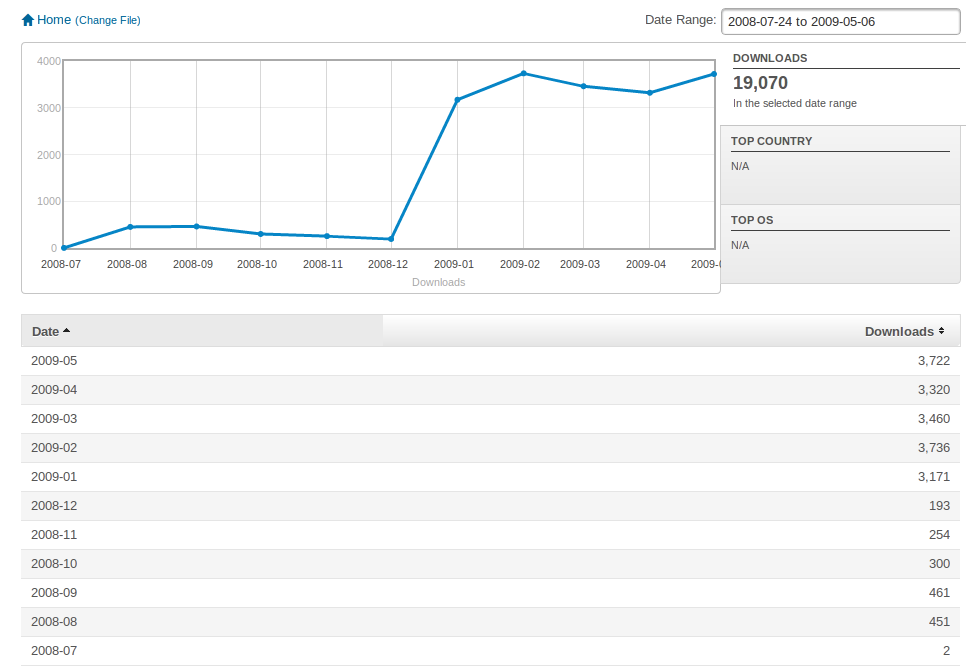
This step proved to be a defining moment for the G’MIC project, giving it a significant boost in popularity as seen below (the project was hosted on Sourceforge at the time).
Fig.1.2: Monthly downloads statistics of G’MIC, between July 2008 and May 2009 (release of the GIMP plug-in happened in January 2009).
The sudden interest in the plugin from different users of GIMP (photographers, illustrators and other types of artists) was indeed a real launchpad for the project, with the rapid appearance of various contributions and external suggestions (for the code, management of the forums, web pages, writing of tutorials and realization of videos, etc.). The often idealized community effect of free software finally began to take off! Users and developers began to take a closer look at the operation of the original command-line interface and its associated scripting language (which admittedly did not interest many people until that moment!). From there, many of them took the plunge and began to implement new image processing filters in the G’MIC language, continuously integrated them into the GIMP plugin. Today, these contributions represent almost half of the filters available in the plugin.
Meanwhile, the important and repeated contributions of Sébastien Fourey, colleague of the GREYC IMAGE team (and experienced C++ developer) significantly improved the user experience of G’MIC. Sébastien is indeed at the heart of the main graphical interface development of the project, namely:
The G’MIC Online web service (which was later re-organised by GREYC’s Development Department).
Free Software ZArt, a graphical interface - based on the _Qt_ library - for the application of G’MIC filters to video sequences (from files or digital camera streams).
And above all, at the end of 2016, Sébastien tackled a complete rewrite of the G’MIC plugin for GIMP in a more generic form called G’MIC-Qt. This component, also based on the _Qt_ library (as the name suggests), is a single plugin that works equally well with both GIMP and Krita, two of the leading free applications for photo retouching/editing and digital painting. G’MIC-Qt has now completely supplanted the original GTK plugin thanks to its many features: built-in filter search engine, better preview, superior interactivity, etc. Today it is the most successful interface of the G’MIC project and we hope to be able to offer it in the future for other host applications (contact us if you are interested in this subject!).
Fig.1.3: Different graphical interfaces of the G’MIC project, developed by Sébastien Fourey: G’MIC-Qt, G’MIC Online and ZArt.
The purpose of this article is not to go into too much detail about the history of the project. Suffice it to say that we have not really had time to become bored in the last ten years!
Today, Sébastien and I are the two primary maintainers of the G’MIC project (Sébastien mainly for the interface aspects, myself for the development and improvement of filters and the core development), in addition to our main professional activity (research and teaching/supervision).
Let’s face it, managing a free project like G’MIC takes a considerable amount of time, despite its modest size (~120k lines of code). But the original goal has been achieved: thousands of non-programming users have the opportunity to freely and easily use our image processing algorithms in many different areas: image editing, photo manipulation, illustration and digital painting, video processing, scientific illustration, procedural generation, glitch art…
The milestone of 3.5 million total downloads was exceeded last year, with a current average of about 400 daily downloads from the official website (figures have been steadily declining in recent years as G’MIC is becoming more commonly downloaded and installed via alternative external sources).
It is sometimes difficult to keep a steady pace of development and the motivation that has to go with it, but we persisted, thinking back to the happy users who from time to time share their enthusiasm for the project!
Obviously we can’t name all the individual contributors to G’MIC whom we would like to thank, and with whom we’ve enjoyed exchanging during these ten years, but our heart is with them! Let’s also thank the GREYC laboratory and INS2I institute of CNRS for their strong support for this free project. A big thank you also to all the community of PIXLS.US who did a great job supporting the project (hosting the forum and publishing our articles on G’MIC).
But let’s stop reminiscing and get down to business: new features since our last article about the release of version 2.2!
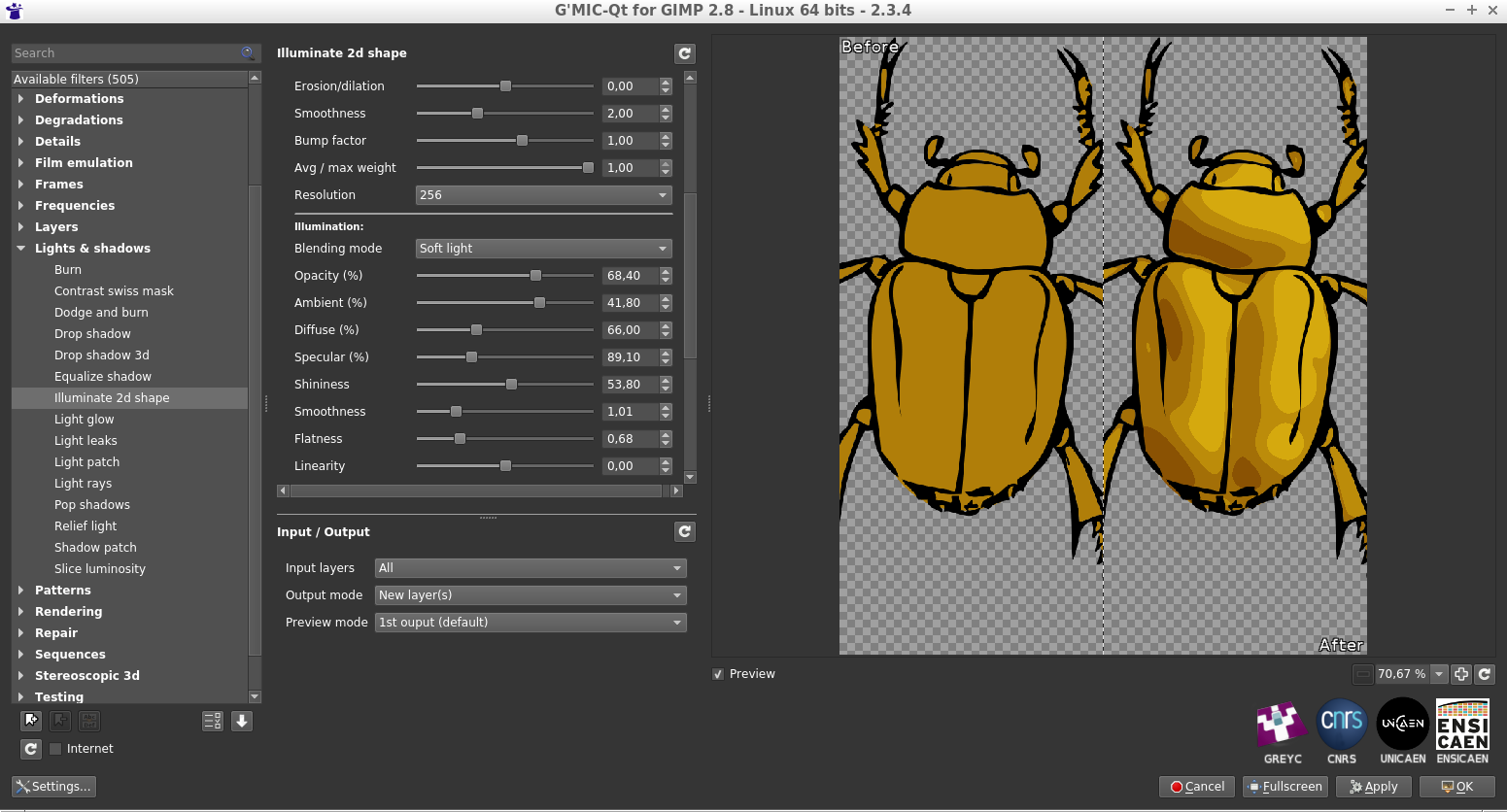
G’MIC recently gained a quite impressive new filter named « Illuminate 2D shape », the objective of which is to automatically add lit zones and clean shadows to flat-colored 2D drawings, in order to give a 3D appearance.
First, the user provides an object to illuminate, in the form of an image on a transparent background (typically a drawing of a character or animal). By analyzing the shape and content of the image, G’MIC then tries to deduce a concordant 3D elevation map (“ bumpmap “). The map of elevations obtained is obviously not exact, since a 2D drawing colored in solid areas does not contain explicit information about an associated 3D structure! From the estimated 3D elevations it is easy to deduce a map of normals (“ normalmap “) which is used in turn to generate an illumination layer associated with the drawing (following a Phong Shading model).
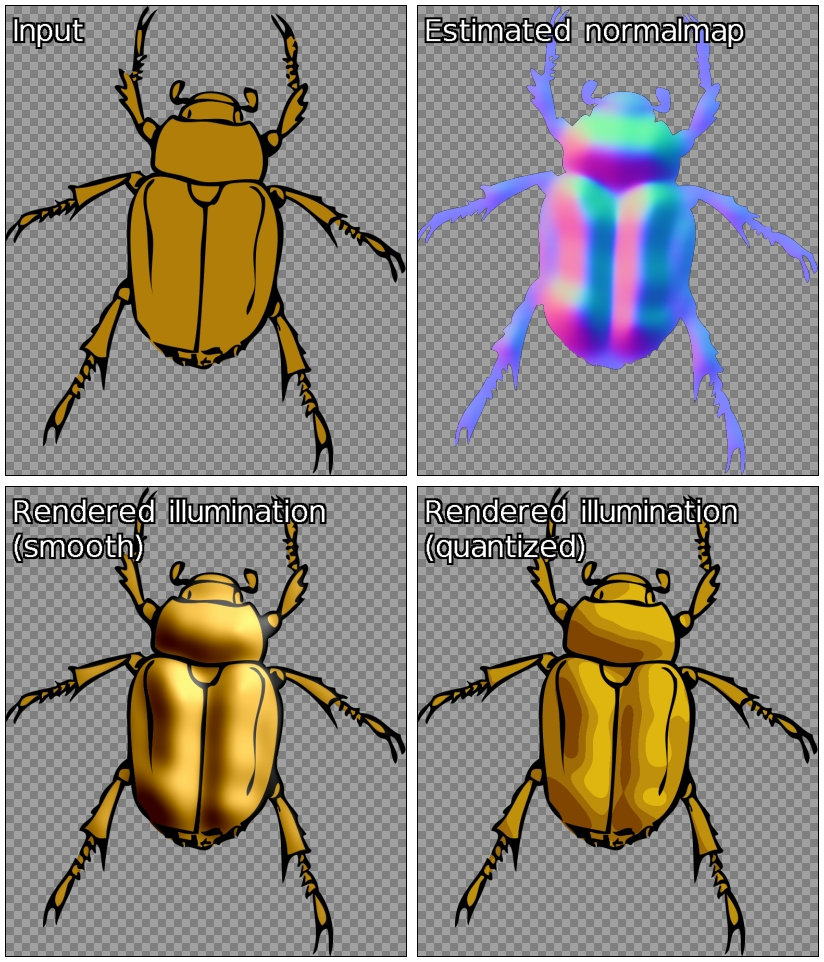
Fig. 2.1: G’MIC’s “Illuminate 2D shape“ filter in action, demonstrating automatic shading of a beetle drawing (shaded result on the right).
This new filter is very flexible and allows the user to have a fairly fine control over the lighting parameters (position and light source rendering type) and estimation of the 3D elevation. In addition the filter gives the artist the opportunity to rework the generated illumination layer, or even directly modify the elevation maps and estimated 3D normals. The figure below illustrates the process as a whole; using the solid colored beetle image (top left), the filter fully automatically estimates an associated 3D normal map (top right). This allows it to generate renditions based on the drawing (bottom row) with two different rendering styles: smooth and quantized.
Fig. 2.2: The process pipeline of the G’MIC “Illuminate 2D shape“ filter involves the estimation of a 3D normal map to generate the automatic illumination of a drawing.
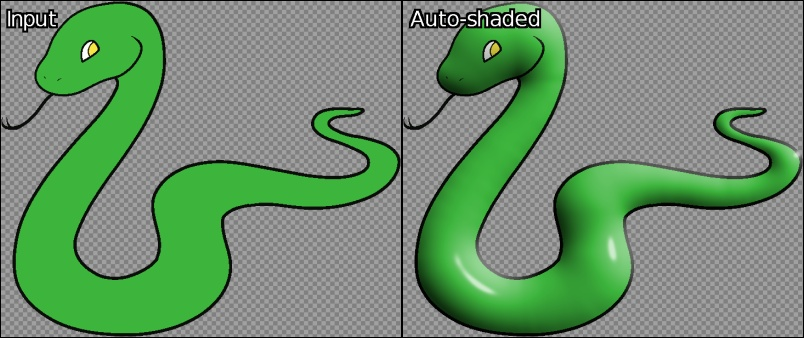
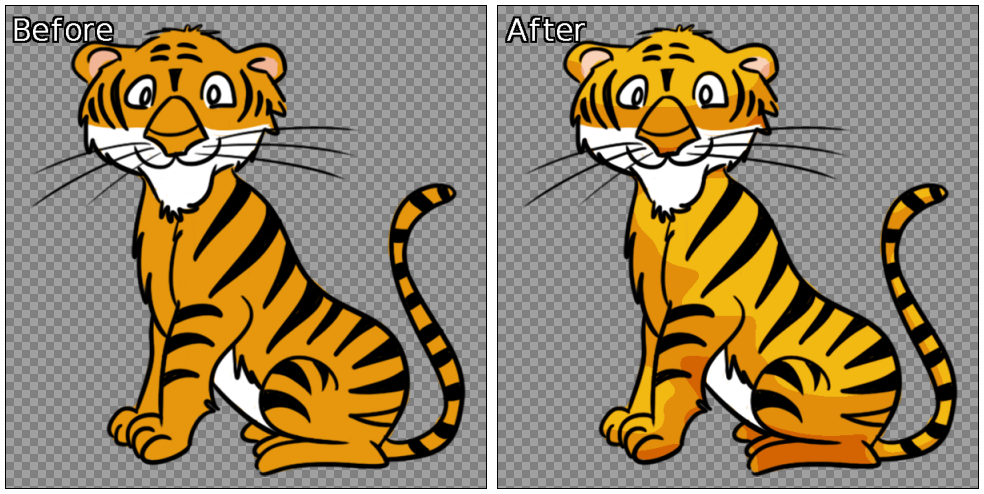
Despite the difficulty inherent in the problem of converting a 2D image into 3D elevation information, the algorithm used is surprisingly effective in a good many cases. The estimation of the 3D elevation map obtained is sufficiently consistent to automatically generate plausible 2D drawing illuminations, as illustrated by the two examples below - obtained in just a few clicks!
Fig. 2.3: Two examples of completely automatic shading of 2D drawings, generated by G’MIC
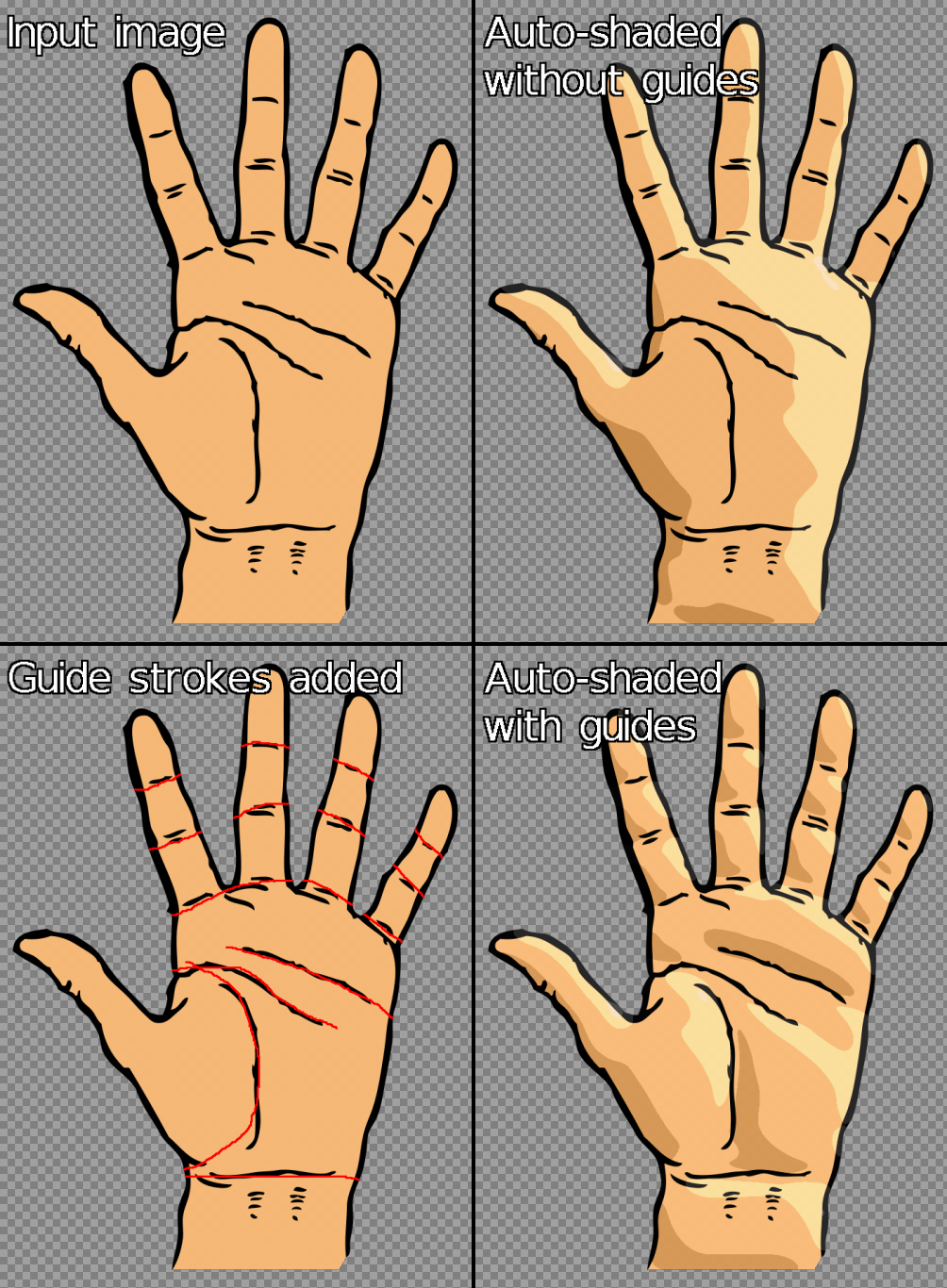
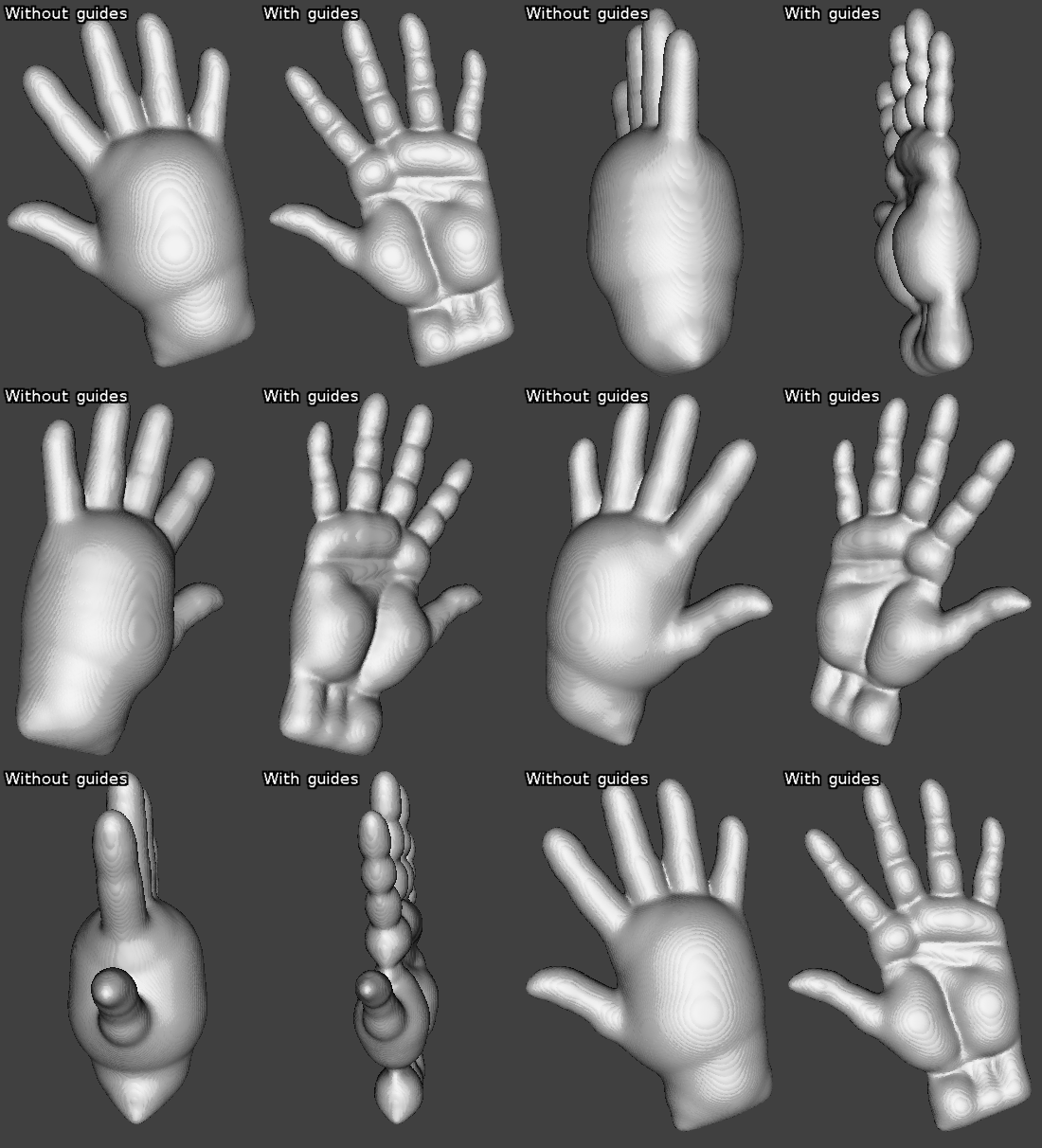
It occurs, of course, that the estimated 3D elevation map does not always match what one might want. Fear not, the filter allows the user to provide “guides” in the form of an additional layer composed of colored lines, giving more precise information to the algorithm about the structure of the drawing to be analyzed. The figure below illustrates the usefulness of these guides for illuminating a drawing of a hand (top left); the automatic illumination (top right) does not account for information in the lines of the hand. Including these few lines in an additional layer of “guides” (in red, bottom left) helps the algorithm to illuminate the drawing more satisfactorily.
Fig. 2.4: Using a layer of “guides” to improve the automatic illumination rendering generated by G’MIC.
If we analyze more precisely the differences obtained between estimated 3D elevation maps with and without guides (illustrated below as symmetrical 3D objects), there is no comparison: we go from a very round boxing glove to a much more detailed 3D hand estimation!
Fig. 2.5: Estimated 3D elevations for the preceding drawing of a hand, with and without the use of “guides”.
Finally, note that this filter also has an interactive preview mode, allowing the user to move the light source (with the mouse) and have a preview of the drawing illuminated in real time. By modifying the position parameters of the light source, it is thus possible to obtain the type of animations below in a very short time, which gives a fairly accurate idea of the 3D structure estimated by the algorithm from the original drawing.
Fig. 2.6: Modification of the position of the light source and associated illumination renderings, calculated automatically by G’MIC.
A video showing the various possible ways to edit the illumination allowed by this filter is visible here. The hope is this new feature of G’MIC allows artists to accelerate the illumation and shading stage of their future drawings!
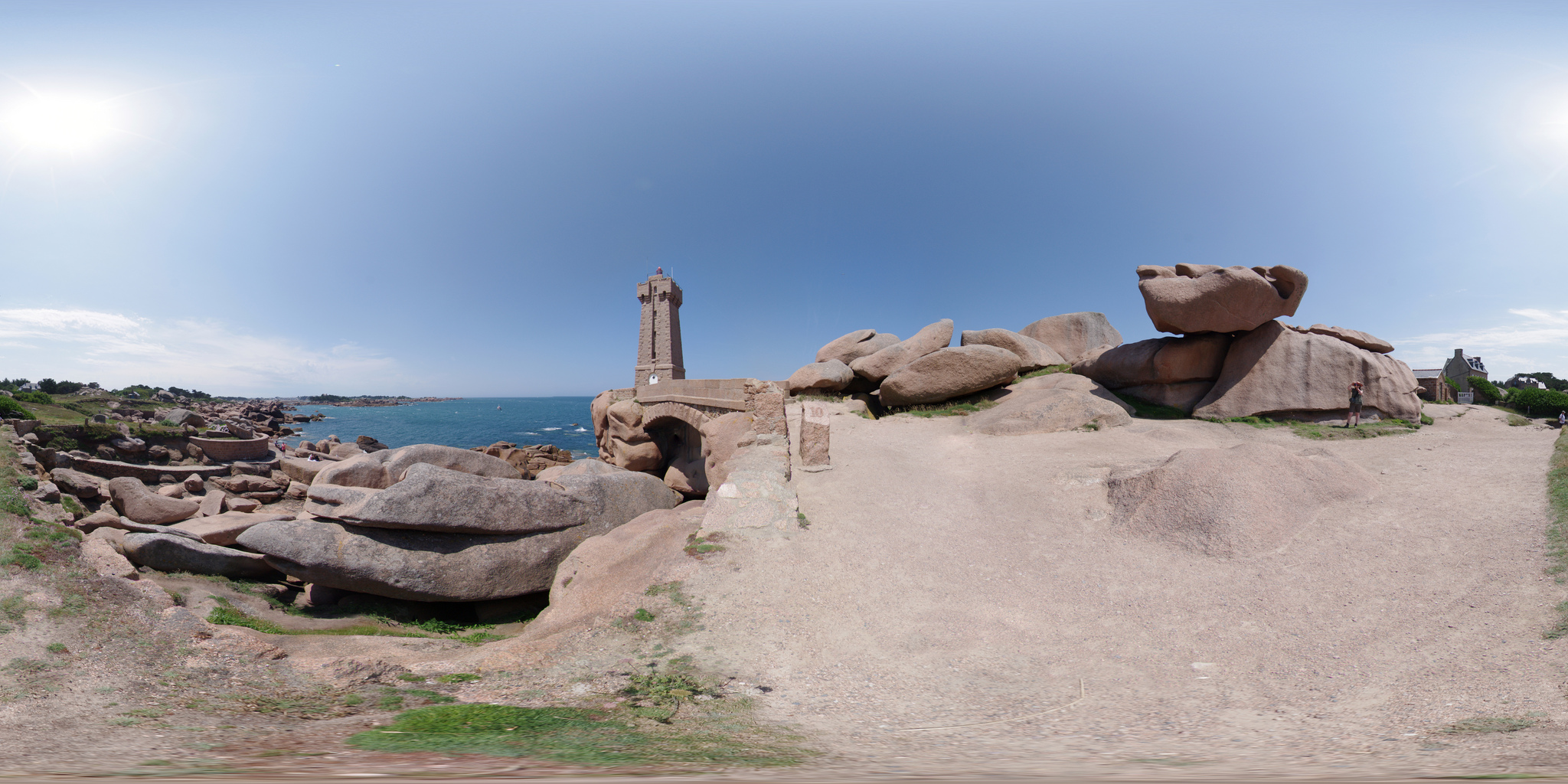
In a completely different genre, we have also added a filter implementing stereographic projection, suitably named “Stereographic projection“. This type of cartographic projection makes it possible to project planar defined image data onto a sphere. It should be noted that this is the usual projection used to generate images of “mini-planets” from equirectangular panoramas, like the one illustrated in the figure below.
Fig. 3.1: Example of equirectangular panorama (created by Alexandre Duret-Lutz).
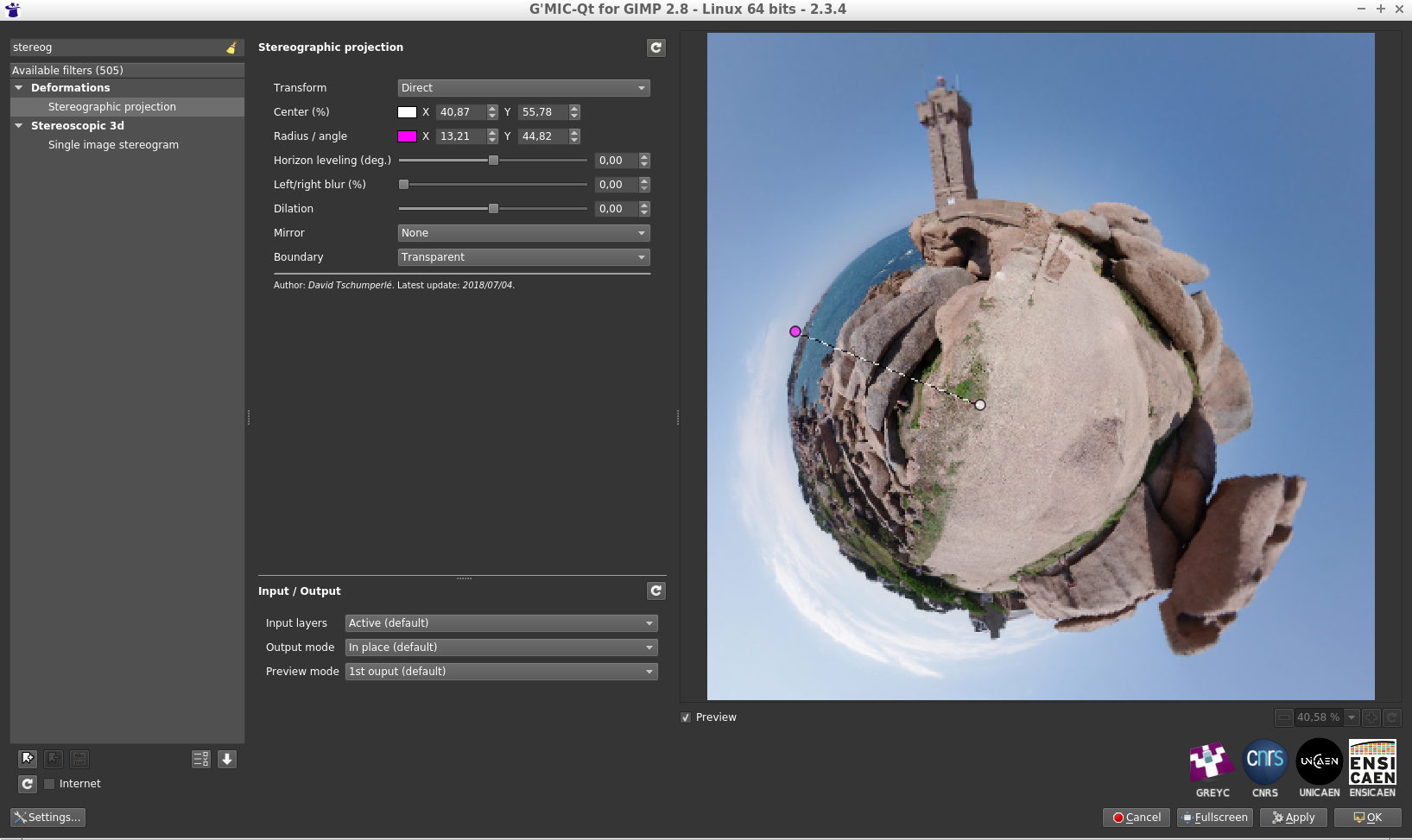
If we launch the G’MIC plugin with this panorama and select the filter “Stereographic projection“, we get:
Fig. 3.2: The “Stereographic projection“ filter of G’MIC in action using the plugin for GIMP or Krita.
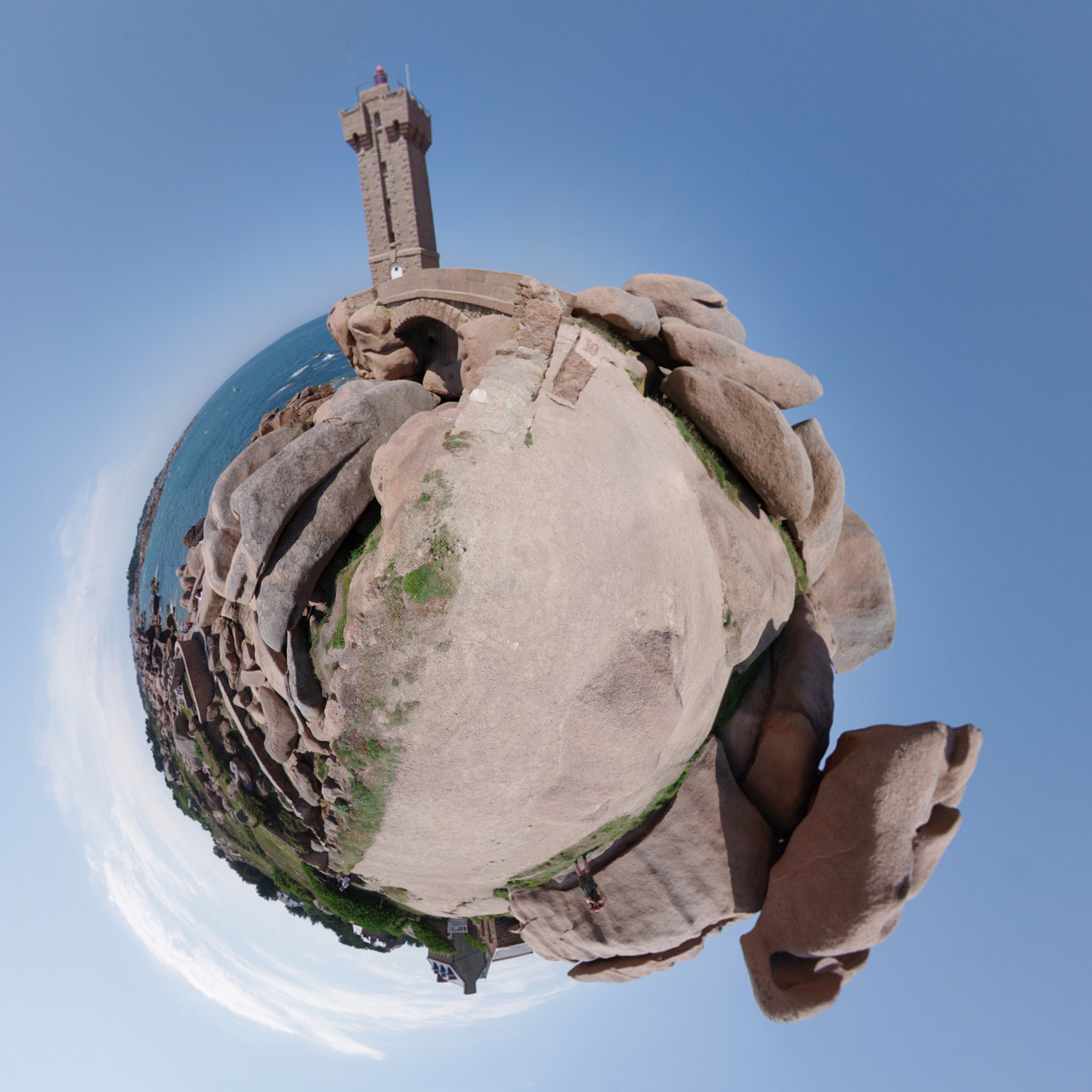
The filter allows precise adjustments of the projection center, the rotation angle, and the radius of the sphere, all interactively displayed directly on the preview window (we will come back to this later). In a few clicks, and after applying the filter, we get the desired “mini-planet”:
Fig. 3.3: “Mini-planet” obtained after stereographic projection.
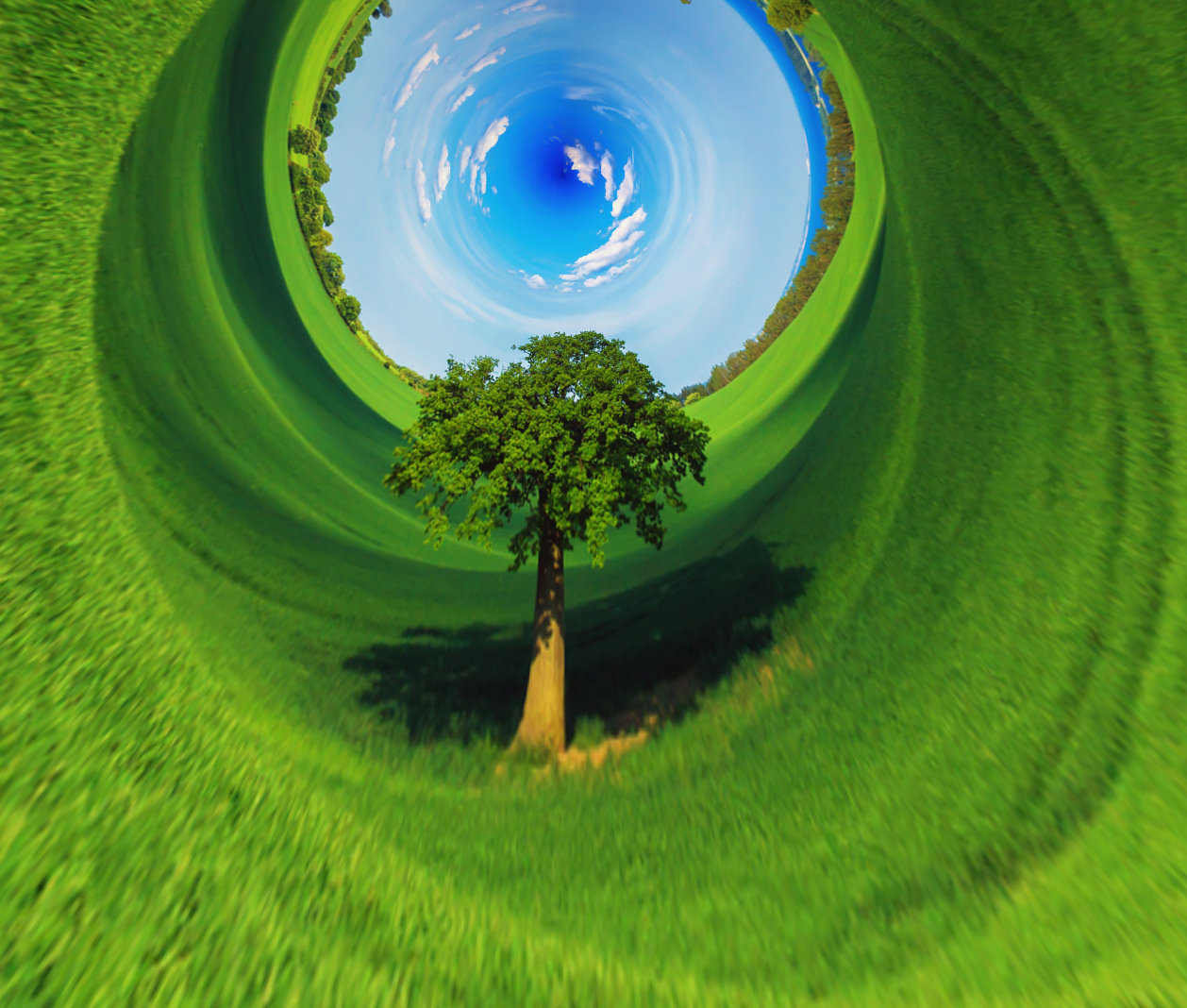
It is also intruiging to note that simply by reversing the vertical axis of the images, we transform a “mini-planet” into a “max-tunnel”!
Fig. 3.4: “Maxi-tunnel” obtained by inversion of the vertical axis then stereographic projection.
Again, we made this short video which shows this filter used in practice. Note that G’MIC already had a similar filter (called “Sphere“), which could be used for the creation of “mini-planets”, but with a type of projection less suitable than the stereographic projection now available.
Manipulating the colors of images is a recurring occupation among photographers and illustrators, and G’MIC already had several dozen filters for this particular activity - grouped in a dedicated category (the originally named “Colors“ category!). This category is still growing, with two new filters having recently appeared:
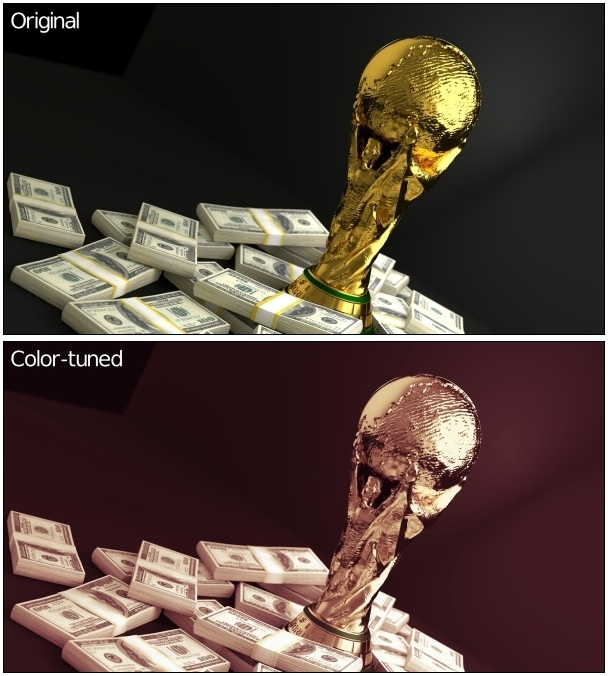
The “CLUT from after-before layers“ filter tries to model the color transformation performed between two images. For example, suppose we have the following pair of images:
Fig. 4.1: Pair of images where an unknown colorimetric transformation has been applied to the top image to obtain the bottom one.
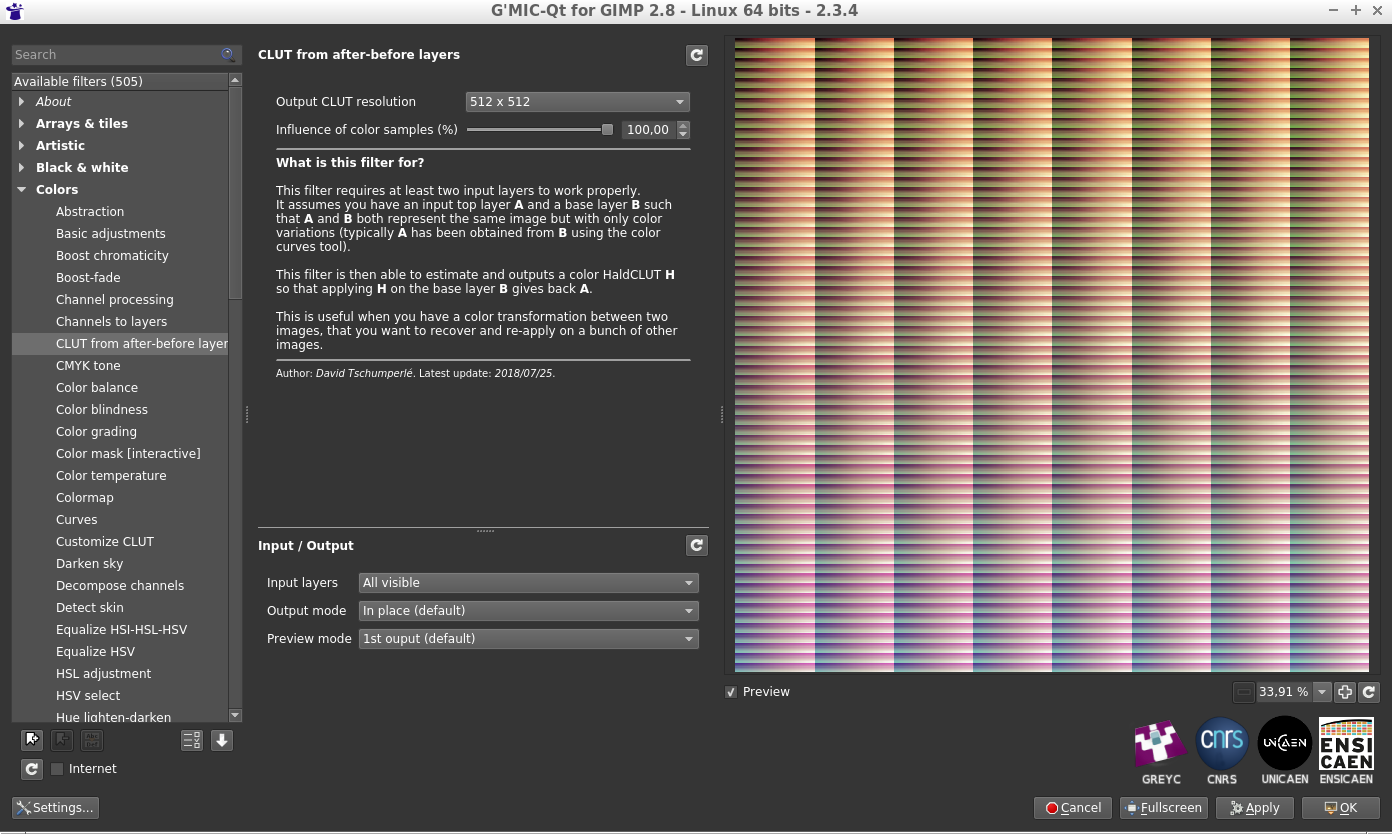
Problem: we do not remember at all how we went from the the original image to the modified image, but we would like to apply the same process to another image. Well, no more worries, call G’MIC to the rescue! The filter in question will seek to better model the modification of the colors in the form of a HaldCLUT, which happens to be a classic way to represent any colorimetric transformation.
Fig. 4.2: The filter models the color transformation between two images as a HaldCLUT.
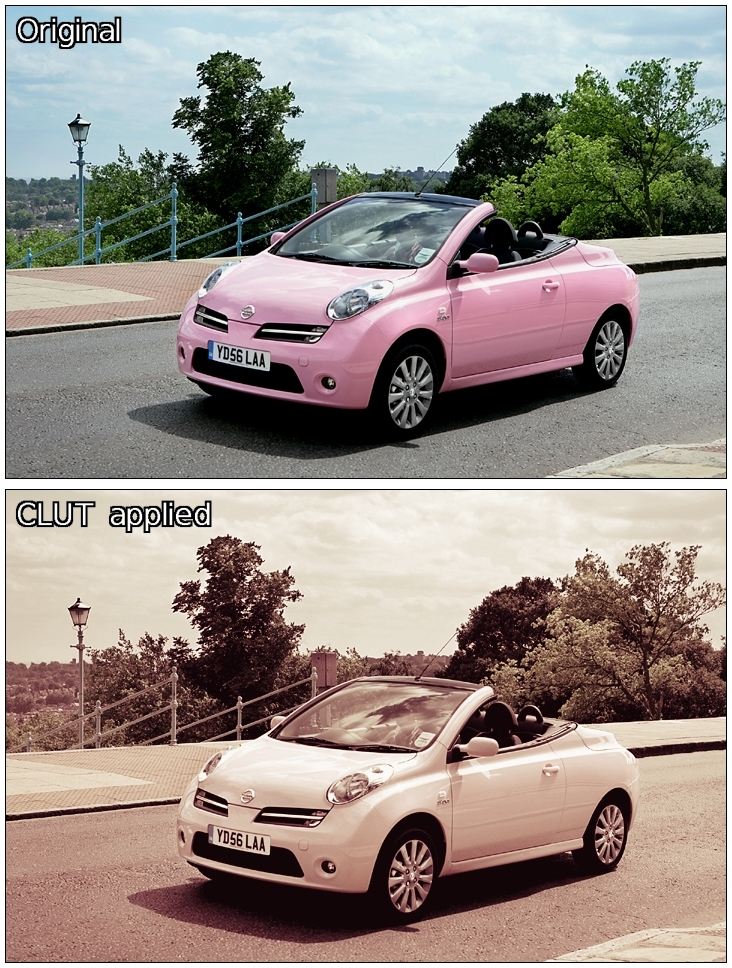
The HaldCLUT generated by the filter can be saved and re-applied on other images, with the desired property that the application of the HaldCLUT on the original image produces the target model image originally used to learn the transformation.
From there, we are able to apply an equivalent color change to any other image:
Fig. 4.3: The estimated color transformation in the form of HaldCLUT is re-applied to another image.
This filter makes it possible in the end to create HaldCLUT “by example”, and could therefore interest many photographers (in particular those who distribute compilations of HaldCLUT files, freely or otherwise!).
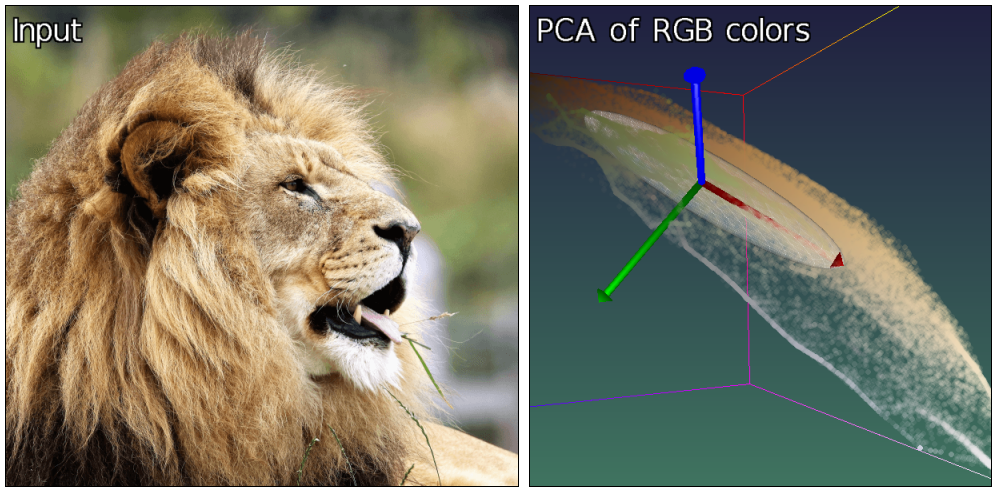
A second color manipulation filter, named “Mixer [PCA]“ was also recently integrated into G’MIC. It acts as a classic color channel mixer, but rather than working in a predefined color space (like sRGB, HSV, Lab…), it acts on the “natural” color space of the input image, obtained by principal component analysis (PCA) of its RGB colors. Thus each image will be associated with a different color space. For example, if we take the “lion” image below and look at the distribution of its colors in the RGB cube (right image), we see that the main axis of color variation is defined by a straight line from dark orange to light beige (axis symbolized by the red arrow in the figure).
Fig. 4.4: Distribution of colors from the “lion” image in the RGB cube, and associated main axes (colorized in red, green and blue).
The secondary axis of variation (green arrow) goes from blue to orange, and the tertiary axis (blue arrow) from green to pink. It is these axes of variation (rather than the RGB axes) that will define the color basis used in this channel mix filter.
Fig. 4.5: The “Mixer [PCA]“ filter is a channel mixer acting on the axes of “natural” color variations of the image.
It would be wrong to suggest that it is always better to consider the color basis obtained by PCA for the mixing of channels, and this new filter is obviously not intended to be the “ultimate” mixer that would replace all others. It simply exists as an alternative to the usual tools for mixing color channels, an alternative whose results proved to be quite interesting in tests of several images used during the development of this filter. It does no harm to try in any case…
This section is about a few other filters improved or included lately in G’MIC which deserve to be talked about, without dwelling too much on them.
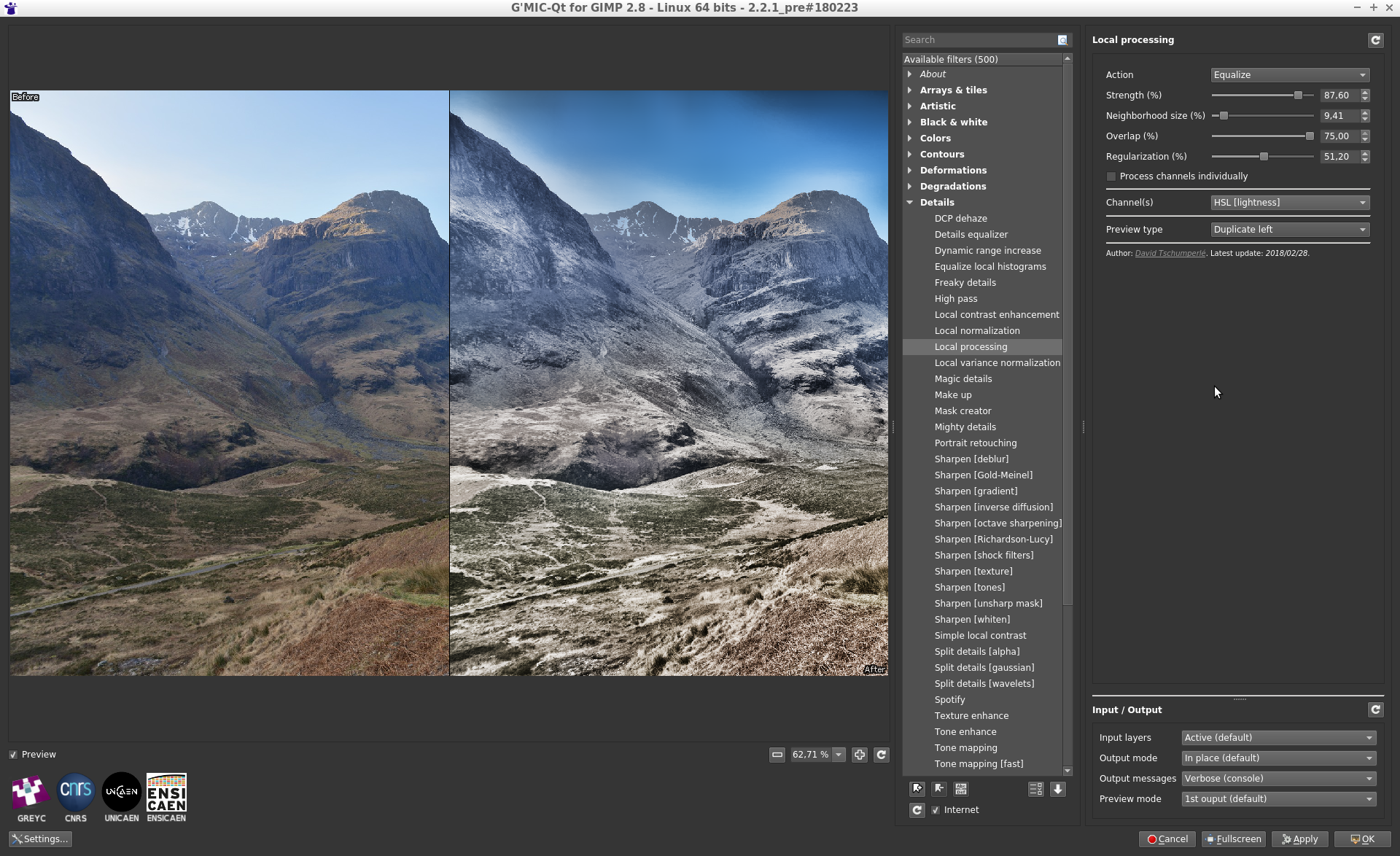
Filter “Local processing” applies a color normalization or equalization process on the local image neighborhoods (with possible overlapping). This is an additional filter to make details pop up from under or over-exposed photographs, but it may create strong and unpleasant halo artefacts with non-optimal parameters.
Fig. 5.1: The new filter “Local processing” enhances details and contrast in under or over-exposed photographs.
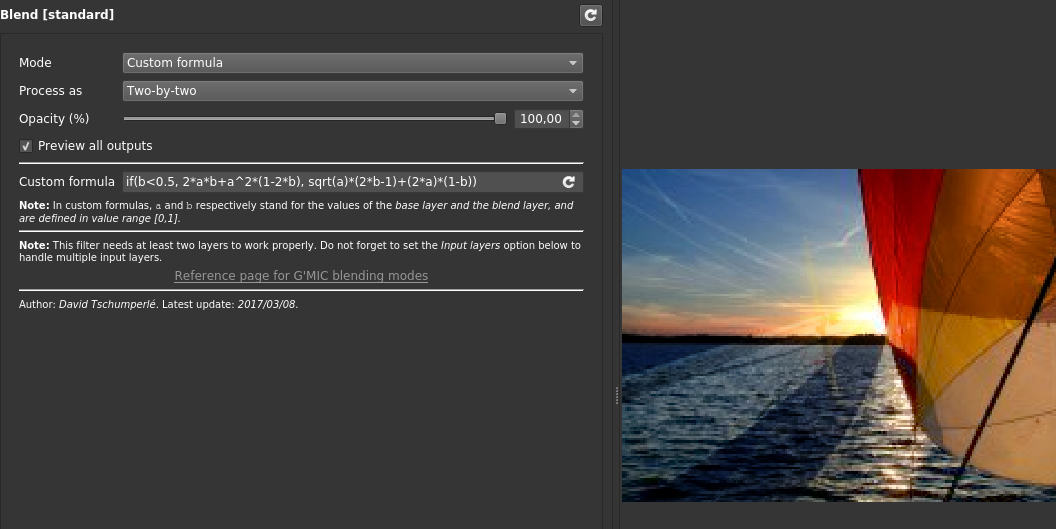
If you think that the number of layer blending modes available in GIMP or Krita is not enough, and dream about defining your own blending mode formula, then the recent improvement of the G’MIC filter « Blend [standard] » will please you! This filter now gets a new option « Custom formula » allowing the user to specify their own mathematical formula when blending two layers together. All of your blending wishes become possible!
Fig. 5.2: The “Blend [standard]“ filter now allows definition of mathematical formulas for layer merging.
Also note the complete re-implementation of the nice “Sketch“ filter, which had existed for several years but could be a little slow on large images. The new implementation is much faster, taking advantage of multi-core processing when possible.
Fig. 5.3: The “Sketch“ filter has been re-implemented and now exploits all available compute cores.
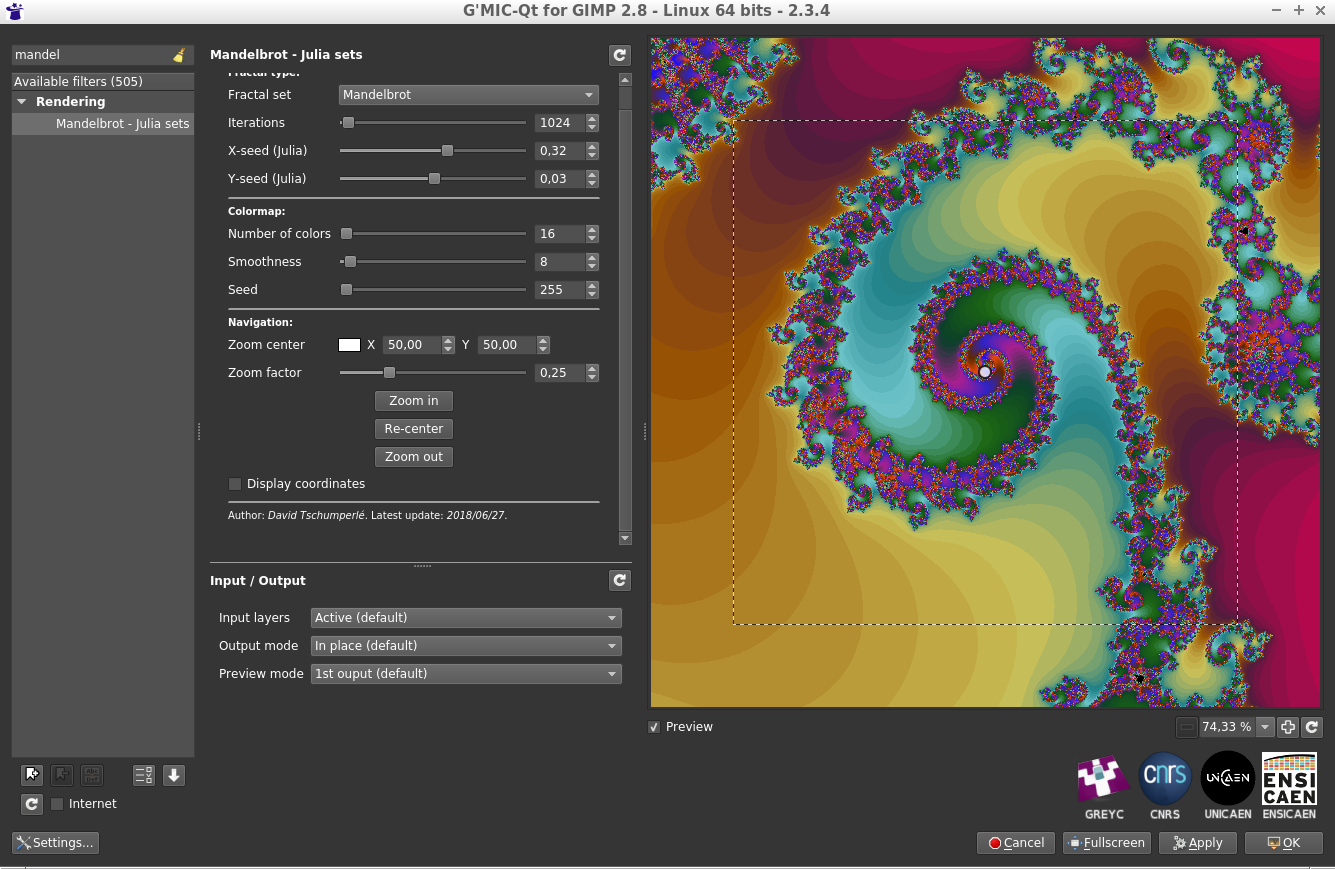
A large amount of work has also gone into the re-implementation of the “Mandelbrot - Julia sets“ filter, since the navigation interface has been entirely redesigned, making exploration of the Mandelbrot set much more comfortable (as illustrated by this video). New options for choosing colors have also appeared.
Fig. 5.4: The “Mandelbrot - Julia sets“ filter and its new navigation interface in the complex space.
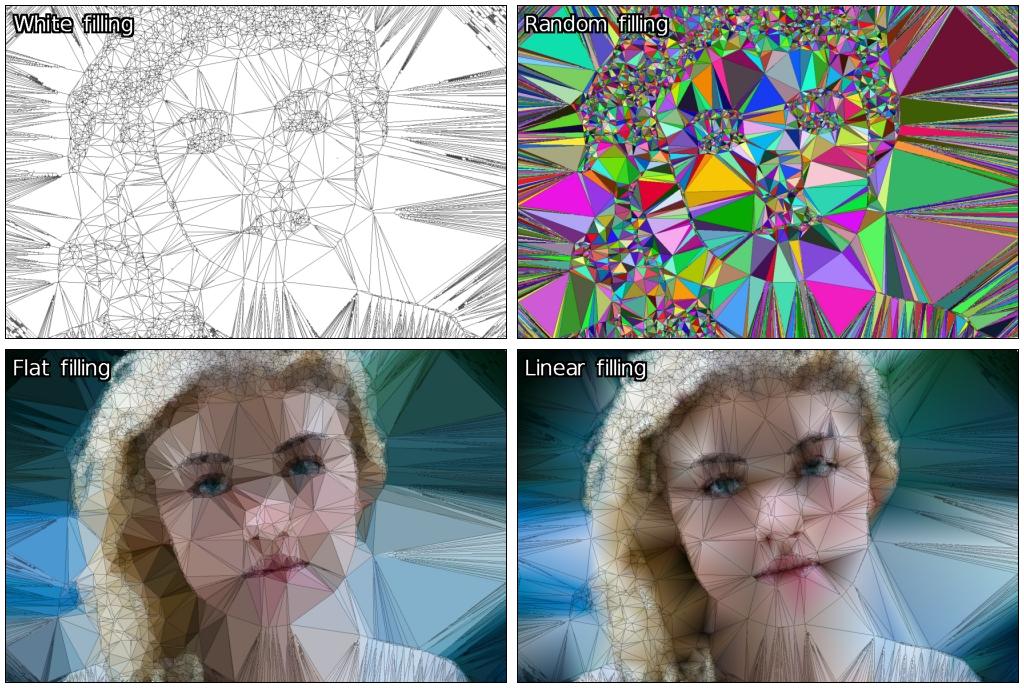
In addition, the “Polygonize [Delaunay]“ filter that generates polygonized renderings of color images has a new rendering mode, using linearly interpolated colors in the Delaunay triangles produced.
Fig. 5.5: The different rendering modes of the “Polygonize [Delaunay]“ filter.
Of course, the new features in G’MIC are not limited to just image processing filters! For instance, a lot of work has been done on the graphical interface of the plug-in G’MIC-Qt for GIMP and Krita:
Filters of the plug-in are now allowed to define a new parameter type point(), which displays as a small colored circle over the preview window. The user can drag this circle and move it with the mouse. As a result this can give the preview widget a completely new type of user interaction, which is no small thing! A lot of filters now use this feature, making them more pleasant to use and intuitive (look at this video for some examples). The animation below shows for instance how these new interactive points has been used in the filter « Stereographic projection » described in previous sections.
Fig. 6.1: The preview window of the G’MIC-Qt plug-in gets new user interaction abilities.
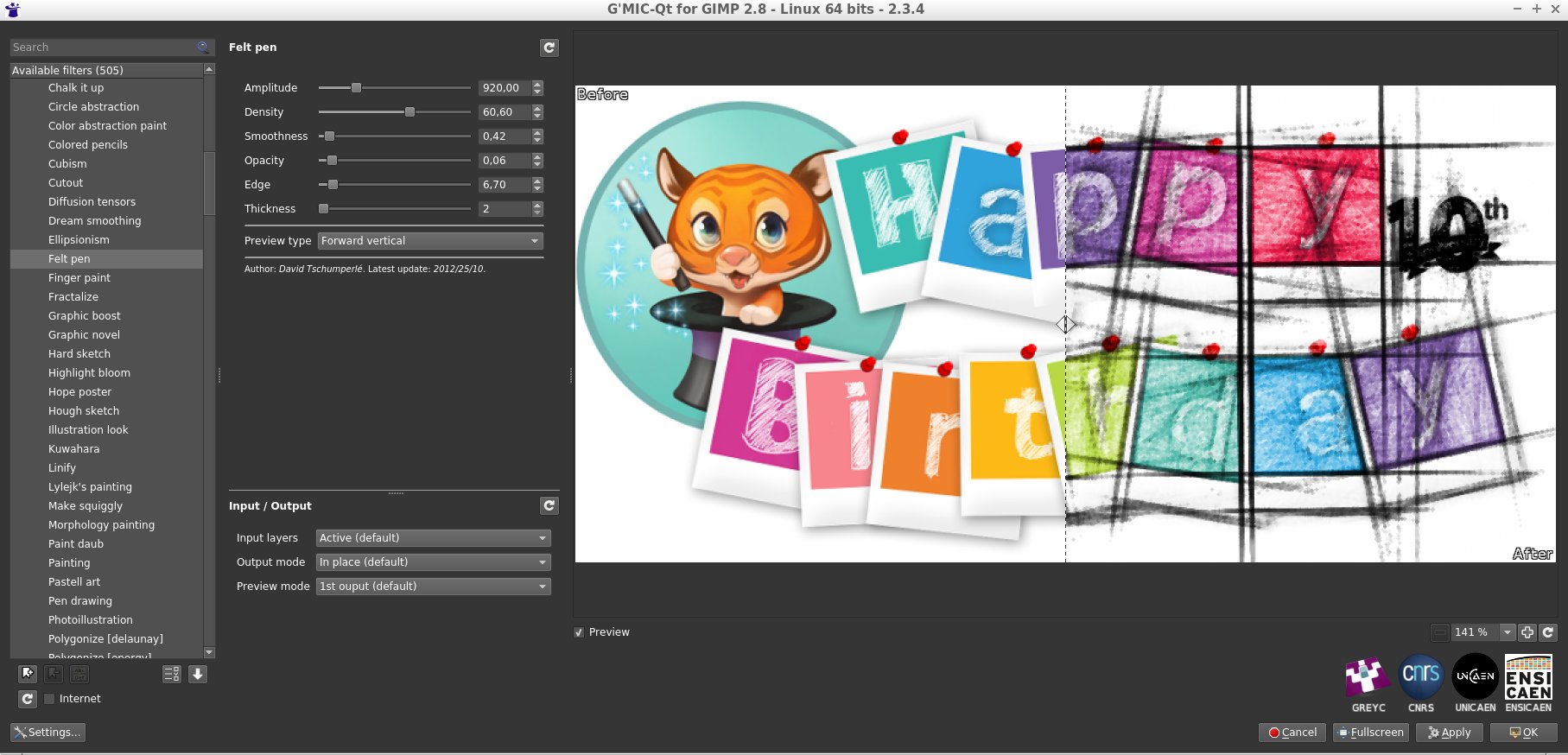
In addition, introducing these interactive points has allowed improving the split preview modes, available in many filters to display the « before/ after » views side by side when setting the filter parameters in the plug-in. It is now possible to move this « before/ after » separator, as illustrated by the animation below. Two new splitting modes (« Checkered » and « Inverse checkered » ) have been also included alongside it.
Fig. 6.2: The division modes of the preview now have a moveable “before / after” boundary.
A lot of other improvements have been made to the plug-in: the support of the most recent version of GIMP (2.10), of Qt 5.11, improved handling of the error messages displayed over the preview widget, a cleaner designed interface, and other small changes have been made under the hood, which are not necessarily visible but slightly improve the user experience (e.g. an image cache mechanism for the preview widget). In short, that’s pretty good!
Some new refinements of the G’MIC computational core have been done recently:
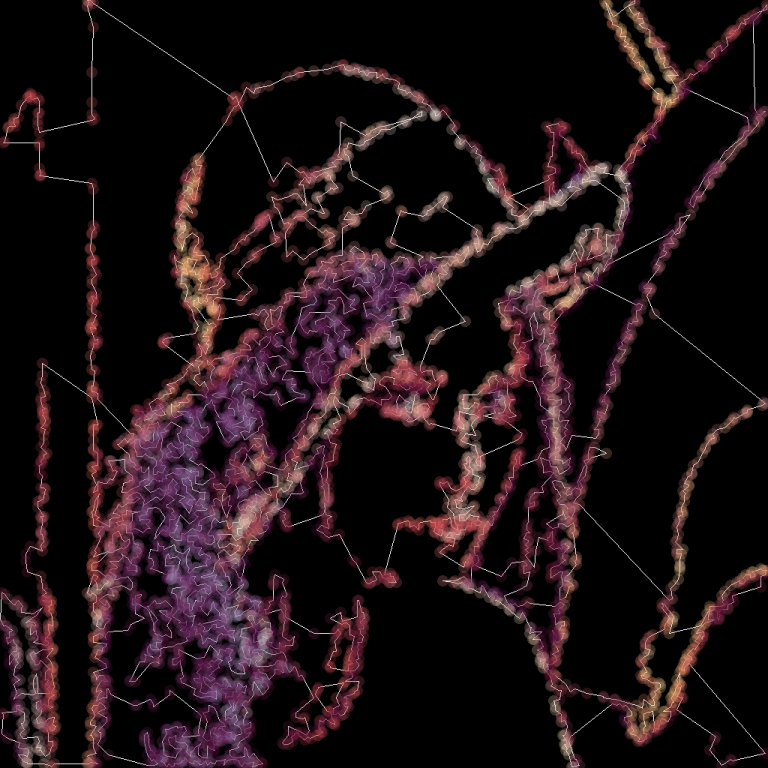
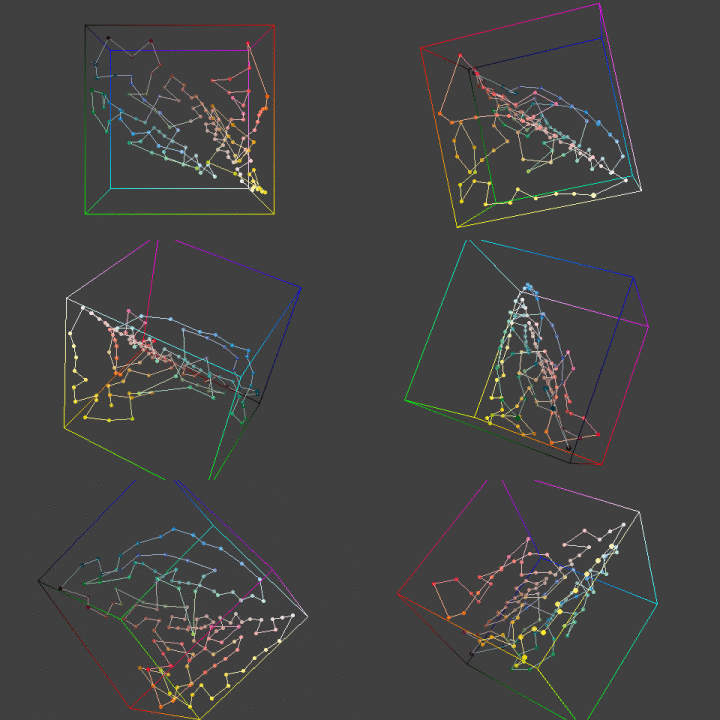
The “standard library” of the G’MIC script language was given new commands for computing the inverse hyperbolic functions (acoss, asinh and atanh), as well as a command tsp (travelling salesman problem) which estimates an acceptable solution to the well-known Travelling salesman problem, and this, for a point cloud of any size and dimension.
Fig. 6.3: Estimating the shortest route between hundreds of 2D points, with the G’MIC command tsp.
Fig. 6.4: Estimating the shortest route between several colors in the RGB cube (thus in 3D), with the G’MIC command tsp.
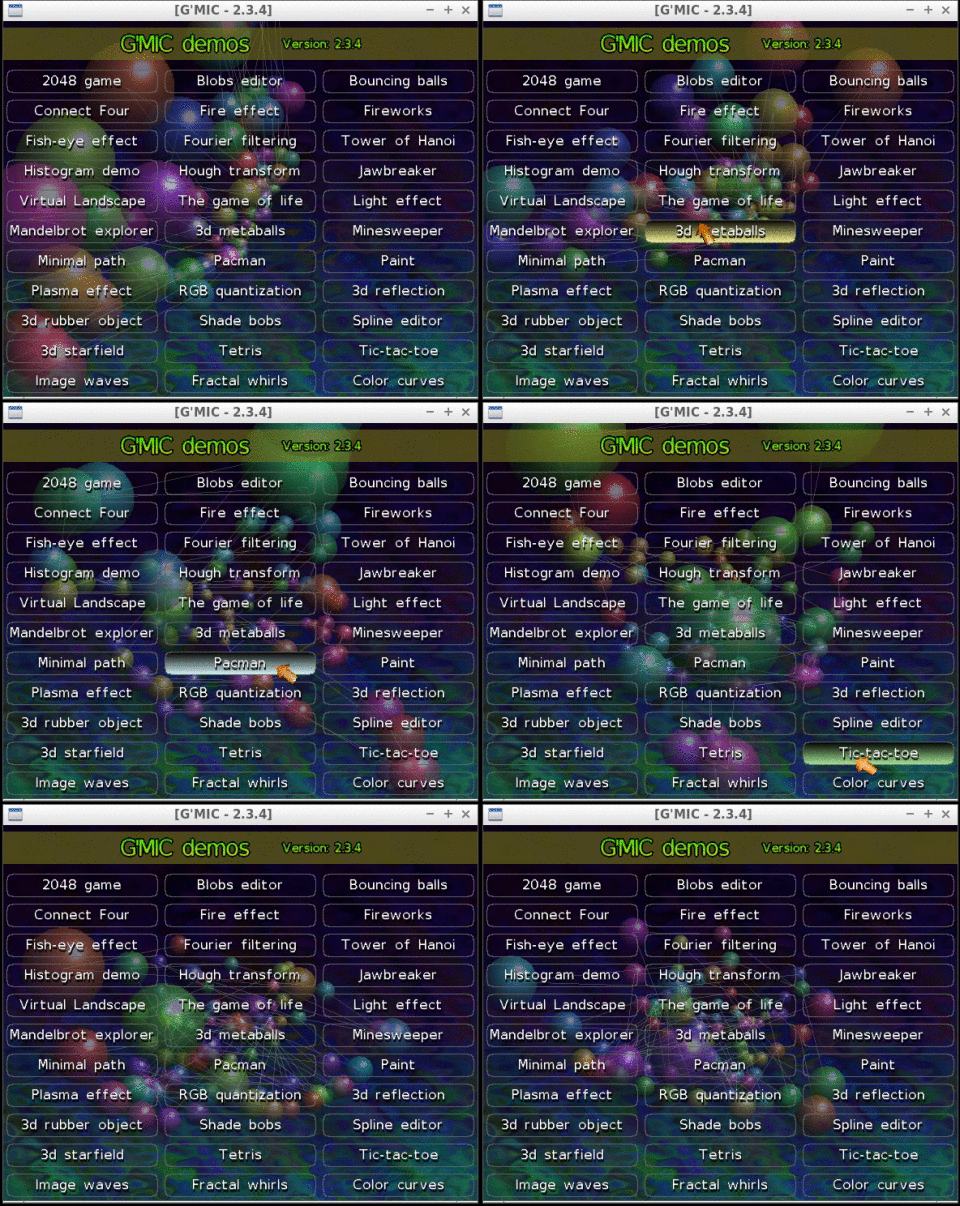
The demonstration window, which appears when gmic is run without any arguments from the command line, has been also redesigned from scratch.
Fig. 6.5: The new demonstration window of gmic, the command line interface of G’MIC.
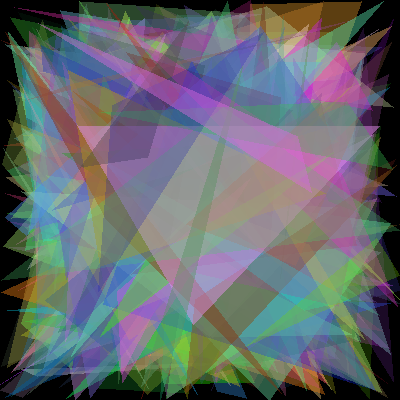
The embedded JIT compiler used for the evaluation of mathematical expressions has not been left out and was given new functions to draw polygons (function polygon()) and ellipses (function ellipse()) in images. These mathematical expressions can in fact define small programs (with local variables, user-defined functions and control flow). One can for instance easily generate synthetic images from the command line, as shown by the two examples below.
Fig. 6.7: Using the new function ellipse() from the G’MIC JIT compiler, to render a synthetic flower image.
Note also that NaN values are now better managed when doing calculus in the core, meaning G’MIC maintains coherent behavior even when it has been compiled with the optimisation -ffast-math. Thus, G’MIC can be flawlessly compiled now the maximum optimization level -Ofast supported by the compiler g++, whereas we were restricted to the use of -O3 before. The improvement in computation speed is clearly visible for some of the offered filters !
A lot of changes have also been made to the distribution channels used by the project:
First of all, the project web pages (which are now using secured https connections by default) have a new image gallery. This gallery shows both filtered image results from G’MIC and the way to reproduce them (from the command line). Note that these gallery pages are automatically generated by a dedicated G’MIC script, which ensures the displayed command syntax is correct.
Fig. 6.8: The new image gallery on the G’MIC web site.
This gallery is split into several sections, depending on the type of processing done (Artistic, Black & White, Deformations, Filtering, etc.). The last section « Code sample » is my personal favorite, as it exhibits small animations (shown as looping animated GIFs) which have been completely generated from scratch by short scripts, written in the G’MIC language. Quite a surprising use of G’MIC that shows its potential for generative art.
Fig. 6.9: Two small GIF animations generated by G’MIC_ scripts that are visible in the new image gallery._
We have also moved the main git source repository of the project to Framagit, still keeping one synchronized mirror on Github at the same place as before (to benefit from the fact that a lot of developers have already an account on Github which makes it easier for them to fork the project and write bug reports).
Voilà! Our tour of news (and the last six months of work) on the G’MIC project comes to an end.
We are happy to be celebrating 10 years with the creation and evolution of this Free Software project, and to be able to share with everyone all of these advanced image processing techniques. We hope to continue doing so for many years to come!
Note that next year, we will also be celebrating the 20th anniversary of CImg, the C++ image processing library (started in November 1999) on which the G’MIC project is based, proof that interest in free software is enduring.
As we wait for the next release of G’MIC, don’t hesitate to test the current version. Freely and creatively play with and manipulate your images to your heart’s content!
Thank you, Translators: (ChameleonScales, Pat David)
Carl Miller, the author of The Death of the Gods, which deals with how power works and who holds it in the digital age, sheds light on how algorithms, originally devised as simple problem-solving devices, have become so complicated that no one, not even their creators, can control them; Kristen Roupenian points out the problem with an “unfailingly enthusiastic” compendium of twentieth-century female intellectuals (including Dorothy Parker and Joan Didion): who is left out and why?; eighty-odd years ago, Zora Neale Hurston, now best known for her novel Their Eyes Were Watching God, interviewed Kossola O-Lo-Loo-Ay, the last known survivor of the Atlantic Slave Trade. As her book is finally published, Colin Grant joins us to tell us more
Books
The Death of the Gods: The new global power grab by Carl Miller
Sharp: The women who made an art of having an opinion by Michelle Dean
Barracoon: The story of the last “Black Cargo” by Zora Neale
In the course of his long literary career, Samuel Johnson reviewed only one novel. Who was it by? None other than the "preposterously confident” Charlotte Lennox, a force in eighteenth-century prose and a model for Jane Austen – Min Wild tells us more; What happens if you ask a literary critic to watch top-grossing (pun intended) Hollywood comedies from the past three decades? Robert Douglas-Fairhurst explains how comedy reflects broader culture and anxieties; How are women treated in film and television? Is there cause for celebration? Alice Wadsworth joins us in the studio to discuss.
Books
Charlotte Lennox: An independent mind by Susan Carlile
Stealing the Show: How women are revolutionizing television by Joy Press
Where No Black Woman Has Gone Before: Subversive portrayals in speculative film and TV by Diana Adesola Mafe
Are we entering a new age for LSD, full of medical potential? Can it shed its heavily tie-dyed cultural baggage? And who has written the finest prose about psychedelics? Toby Lichtig joins us to discuss; Eri Hotta (re)introduces us to Natsume Sōseki, "the greatest novelist of modern Japan"; Kate Chisholm considers the chequered history of Virago, founded in 1973 as a "feminist press", plus 40 years of Modern Classics, a series conceived to challenge the established male dominated literary canon and rescue and rehabilitate forgotten works by women
Scotland is internationally known for its traditional music. Scottish music is a significant aspect of the nation's culture. A famous traditional Scottish instrument is the Great Highland bagpipe. The clàrsach (harp), fiddle and accordion are also traditional Scottish instruments.
Traditional Music Channel is for everyone who has a passion for music.
Music is an expression of human creativity. UNESCO reports that among all the performing arts, music is the most universal and is found in every society, most often as an integral part of other performing art forms and other domains of intangible cultural heritage.
Traditional forms of music are considered carriers of cultural heritage because they represent expressions and traditions transferred through generations of a community.
With recordings from more than hundred nations our collection of traditional music offers a staggering diversity of our humanity.
With Stig Abell and Roz Dineen. Steven Nadler drops in to tell us all we need to know about the much-misunderstood Descartes; and En Liang Khong visits the Foundling museum to see an installation about how to commemorate loss.
To mark 200 years since Emily Brontë’s birth, we are joined by Robert Potts and Jacqueline Banerjee to look back at Brontë’s life and most famous work Wuthering Heights – with a nod to Kate Bush’s memorable track, as well as to other, more recent tributes; Mika Ross-Southall shares the story of Tommy Nutter, the "rebel tailor of 1960s Savile Row", who, from humble origins, pulled himself up by the force of his wild imagination to dress anyone who was anyone
Books, etc
Wuthering Heights by Emily Brontë (new edition by HQ; with a foreword by Michael Stewart)
Ill Will: The untold story of Heathcliff by Michael Stewart
Emily Brontë: A life in twenty poems by Nick Holland
Emily Brontë Reappraised: A view from the twenty-first century by Claire O’Callaghan
Ilya Varivchenko is a fashion and portrait photographer from Ivanovo, Russian Federation. He’s a UNIX administrator with a long-time passion for photography that has now become a second part-time job for him. Working on location and in his studio, he’s been producing a wonderful body of work specializing in portraiture, model tests, and more.
He’s a member of the community here (@viv), and he was kind enough to spare some time and answer a few questions (plus it gives me a good excuse to showcase some of his great work!).
Much of your work feels very classical in posing and light, particularly your studio portraits. What would you say are your biggest influences?
I am influenced by several classical painters and great modern photographers. Some of them are: Patrick Demarchelier, Steven Meisel and Peter Lindbergh.
The general mood defines what I see around me. Russia is a very neglected but beautiful country and women around are an inexhaustible source of inspiration.
How would you describe your own style overall?
My style is certainly a classic portrait in its modern performance.
What motivates you when deciding who/how you shoot?
I usually plan shooting in advance. The range of models is rather narrow and it’s not so easy to get there. However, I am constantly looking for new faces. I choose the style and direction of a particular shooting based on my vision of the model and the current mood.
Why portraits? What about portraiture draws you to it?
I shoot portraits because people interest me. For me, photography is an instrument of knowing people and a means of communication.
If you had to pick your own favorite 3 photographs of your work, which ones would you choose and why?
It’s difficult to choose only three photographs, but maybe these:
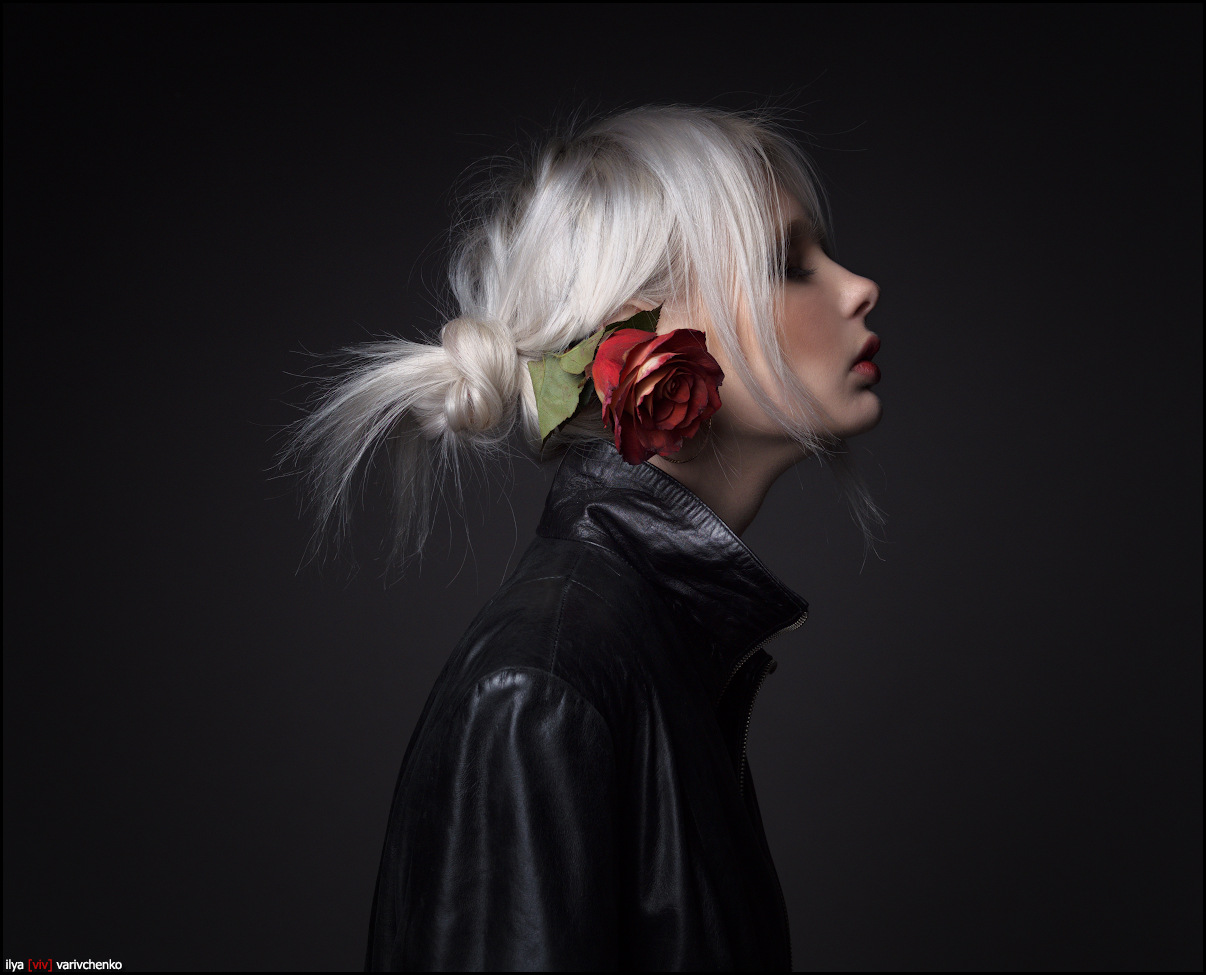
This photo was chosen by Olympus as a logo for their series of photo events in Russia 2017.
This is one of my most reproducible photos. ;)
This photo has a perfect mood in my opinion.
If you had to pick 3 favorite images from someone else, which ones would you choose and why?
It is very difficult to choose only three photos. The choice in any case will be incomplete, but here’s the first ones that comes to mind:
3) The portrait of Nicole Kidman by Patrick Demarchelier
How do you find your models usually?
Via social media which is the best means for model searching, but if I meet a girl I really like in the street, I can try and talk to her straight away.
In fact, the problem is not to find a model, but to choose how to reject a request without offending a prospect model that is of no interest to me.
Do you pre-visualize and plan your shoots ahead of time usually, or is there a more organic interaction with the model and the space you’re shooting in?
It’s always good to have a plan. It is also very good to have a spare plan.
Usually I discuss some common points with the model and stylist before shooting. But these plans are more connected with the mood and the general idea of the session. So when the magic of shooting begins, usually all the plans fly to hell. ;)
Do you have a shooting assistant with you, or is normally just you and the model?
The preparatory stage of shooting often requires participation of many people: a makeup artist, a hair stylist, etc., but shooting itself goes better when only two persons are involved. This is a fairly intimate process. Just like sex. :)
On the other hand, if we do a fashion shoot on order, then the presence of the customer representatives is a must.
Many shots have a strong editorial fashion feel to them: are those works for magazine/editorial use - or were they personal works you were planning to be that way?
I take pictures for local magazines and advertising agencies sometimes. Maybe it somehow influenced my other work.
What do you do with the photos you shoot?
Most of my works are for personal use.
However, I often print them in a large format and I’ve also had two solo exhibitions. Prints with my works are sold and they can always be ordered. I also publish in photo magazines sometimes, but these magazines are Russian ones so they are hardly known to you.
By the way: I periodically take part in the events held by Olympus Russia, where I demonstrate my workflow.
This video shows that I use the RawTherapee as a raw converter :)
You’re shooting on Olympus gear quite a bit, are you officially affiliated with Olympus in some way?
On occasions I hold workshops as a part of the Olympus company marketing activities. Sometimes the Olympus company provides me with their products for testing and I am expected to follow up with a review.
Is your choice to use Free Software for pragmatic reasons, or more idealistic?
The choice was dictated by purely practical considerations. I found a tool, the results of which I am almost completely satisfied with. Detail for example is outstanding, comfortable work with color grading, excellent black and white conversion, and much more.
The fact that the product is free and (which is more important to me) I have an opportunity to communicate with its developers is a huge plus!
For example, with the output of Fuji X-T20, when it was required to add a new DCP profile to the converter I simply contacted the developers, shot the test target and got what I wanted.
Would you describe your workflow a bit? Which projects do you use regularly?
My workflow is quite simple:
Shooting.
I try to shoot in a way which will not require heavy postprocessing at all. It is much easier to set up light properly than to fix it in Photoshop later.
Raw development with RawTherapee.
My goal is to develop the image in a way which makes it as close to final as possible.
Sometimes this is the end of my workflow. ;)
Color correction (if necessary) with 3DLutCreator.
In rare cases, it is more convenient to make complex color correction with the help of LUTs.
Retouching with Adobe Photoshop.
Nothing special. Removal of skin and hair defects, etc. Dodge and burn technique with a Wacom Intuos Pro.
Speaking of gear, what are you shooting with currently?
I have two systems now: Micro Four Thirds system from Olympus and X Series from Fujifilm.
Typical setups are:
Studio: Olympus PEN-F + Panasonic G 42.5/1.7
Planair: Olympus PEN-F + M.Zuiko 75/1.8 or FujiFilm X-T20 + Fujinon 35/1.4
Many of your images appear make great use of natural light. For your studio lighting setup, what type of lighting gear are you using?
My studio equipment is a mix of Aurora Codis and Bowens studio lights + a lot of modifiers from large 2 meters parabolic octobox to narrow 40x150 strip boxes and so on.
Is there something outside your comfort zone you wish you could try/shoot more of?
It is definitely landscape photography. And macro photography also attracts me - ants and snails are all great models in fact. :)
What is one piece of advice you would offer to another photographer?
Find in yourself what you want to share with others. Beauty is in the eye of the beholder. No beautiful models will help if you are empty inside.
I want to thank Ilya for taking the time to chat with me!
Take some time to have a look through his blog and work (it’s chock full of wonderful work)!
All images copyright Ilya Varivchenko and used with permission.
Romani music or Gipsy music is the music of the Romani people, who have their origins in northern India, but today live mostly in Europe. Historically nomadic, though now largely settled, the Romani people have long acted as entertainers and tradesmen. In many of the places Romanies live they have become known as musicians. The wide distances travelled have introduced a multitude of influences of Byzantine, Greek, Arabic, Indian, Persian, Turkish, Slavic, Romanian, German, Dutch, French, Spanish and even Jewish musical forms. It is difficult to define the parameters of a unified Romani musical style, as there are many differences in melodic, harmonic, rhythmic and formal structures from region to region. Lyrics to Romani songs are often sung in one or more dialects of the Romani language, and dance frequently accompanies Romani music performance.
The quintessentially Spanish flamenco is to a very large extent the music (and dance, or indeed the culture) of the Romani people of Andalusia. Apart from Romani music for local use, in Eastern Europe a separate Romani music originated for entertainment at parties and celebrations. This music drew its themes from Hungarian, Romanian, Russian and other sources. Later on it gained popularity in Western Europe, where many Romani orchestras were active, playing sophisticated melodies of East European origin. Most Romani music is based on the folk music of the countries where the Romani went through or settled. Local music is adopted and performed – usually instrumental – and, slowly, it is transformed into Romani styles, which are usually more complex than the original styles. In its turn, Romani music has greatly influenced the local music.
Traditional Music Channel is for everyone who has a passion for music.
Music is an expression of human creativity. UNESCO reports that among all the performing arts, music is the most universal and is found in every society, most often as an integral part of other performing art forms and other domains of intangible cultural heritage.
Traditional forms of music are considered carriers of cultural heritage because they represent expressions and traditions transferred through generations of a community.
With recordings from more than hundred nations our collection of traditional music offers a staggering diversity of our humanity.
“How much do you make things happen or let them happen to you?” “Can women be happy alone?” – questions such as these form the basis of a series of interviews with women, from heiresses to factory workers, conducted in the 1960s by the British writer Nell Dunn; as a reissue of Talking To Women appears Kate Webb introduces us to this seminal feminist text. And Patricia J. Williams discusses the role and lingering influence of the Progressive Era's 'American Plan' to stamp out immorality through policies including compulsory STD tests and government-endorsed sterilization
Books
Talking To Women by Nell Dunn
Fixing the Poor: Eugenic sterilization and child welfare in the twentieth century by Molly Ladd-Taylor
The Trials of Nina McCall: Sex, surveillance, and the decades-long government plan to imprison 'promiscuous' women by Scott W. Stern
The Carpathian Mountains or Carpathians are a mountain range system across Central and Eastern Europe. They are the third-longest mountain range in Europe after the Ural Mountains and Scandinavian Mountains. The Carpathians consist of a chain of mountain ranges that stretch in an arc from the Czech Republic in the northwest through Slovakia, Poland, Hungary and Ukraine, Serbia and Romania in the southeast. The highest range within the Carpathians is the Tatras, on the border of Slovakia and Poland. The second-highest range is the Southern Carpathians in Romania.
The largest range is the Tatras in Poland and Slovakia. A major part of the western and northeastern Outer Eastern Carpathians in Poland, Ukraine, and Slovakia is traditionally called the Eastern Beskids. Section of the Carpathians within borders of Ukraine is commonly known as the Ukrainian Carpathians. Classification of eastern sections of the Carpathians is particularly complex, since it was influenced by several overlapping traditions. Terms like Wooded Carpathians, Poloniny Mountains or Eastern Beskids are often used in varying scopes by authors belonging to different traditions.
Traditional Music Channel is for everyone who has a passion for music.
Music is an expression of human creativity. UNESCO reports that among all the performing arts, music is the most universal and is found in every society, most often as an integral part of other performing art forms and other domains of intangible cultural heritage.
Traditional forms of music are considered carriers of cultural heritage because they represent expressions and traditions transferred through generations of a community.
With recordings from more than hundred nations our collection of traditional music offers a staggering diversity of our humanity.

 Login
Login





![Filter 'Mixer [PCA]'](http://gmic.eu/gmic234/fullsize/gmic_mix_pca.png)