Ruth Scurr on the master biographer Robert A. Caro, whose subjects include Robert Moses, Lyndon B. Johnson and, now, himself; Dmitri Levitin talks us through Diogenes Laertius' Lives of the Eminent Philosophers, an eccentric and often inaccurate guide to early thinkers; Why bother with literary criticism? Whither this generation's Lionel Trilling? Michael LaPointe joins us to discuss
Working: Researching, interviewing, writing by Robert A. Caro
American Audacity: In defense of literary daring by William Giraldi
Hater: On the virtues of utter disagreeability by John Semley
Lives of the Eminent Philosophers, by Diogenes Laertius, translated by Pamela Mensch
A reação de ministros da corte suprema a suspeitas sobre o possível envolvimento de magistrados com corrupção política é alarmante porque viola a Constituição.
Leia mais (04/18/2019 - 02h00)
There is only one author to whom the TLS devotes an issue every year: William Shakespeare. Michael Caines talks us through the latest theories, research and reviews; Ian McEwan discusses his new novel, Machines Like Me
‘Still a giddy neighbour’ – Shakespeare’s parish in the 1590s, by Geoffrey Marsh, the TLS
The Bible on the Shakespearean Stage: Cultures of interpretation in Renaissance England, edited by Thomas Fulton and Kristen Poole
Believing in Shakespeare: Studies in longing, by Claire McEachern
Religious Conversion in Early Modern English Drama, by Lieke Stelling
What Blest Genius?: The Jubilee that made Shakespeare, by Andrew McConnell Stott
Shakespeare’s Rise to Cultural Prominence: Politics, print and alteration, 1642–1700, by Emma Depledge
Shakespeare: The theatre of our world, by Peter Conrad
Siril is a program for processing astronomical photographs.
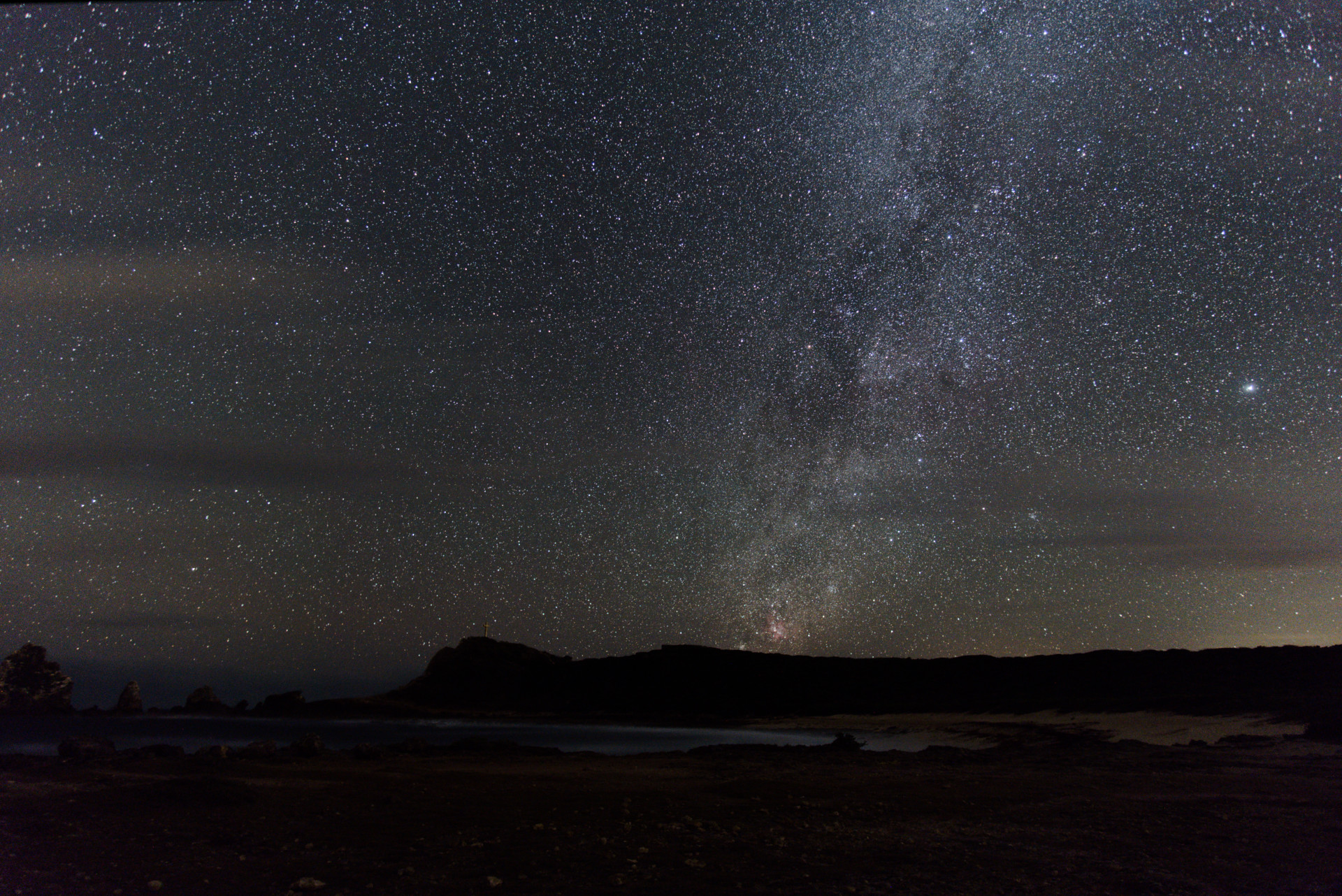
In this tutorial, I’ll show you how to process a nightscape in Siril 0.9.10.
It doesn’t intend to be comprehensive tutorial but rather to present a basic general workflow that is a good starting point for those who want to learn Siril.
For this purpose, I’m sharing the raw files I used for the image I presented here, except that for this tutorial I limited the number of frames for the sake of bandwidth and processing speed.
The Creations, by Sebastien Guyader
You can find and download the raw files here (~1GB).
Setup
The raw files are placed in specific sub-folders according to their use:
bias/offset frames → ./Bias (20 files)
dark frames → ./Darks (15 files)
flats field frames → ./Flats (15 files)
main subject/light frames → ./Lights (10 files)
Bias, dark, and flat field frames are also called “calibration” frames, their purpose being to improve the quality of the image by correcting the signal-to-noise ratio (in the case of bias and dark frames) and vignetting (with the flat frames).
There are several places where you can learn more about the different types of frames for astrophotography.
At the root of the folder, I placed two text files with the .ssf extension, these are scripts used by Siril for batch processing the files. Quite useful. If you want to run a script from Siril, place the .ssf files in ~/.siril/scripts. Upon restarting Siril, a new Scripts menu appears in the top menu bar, allowing you to launch the installed scripts.
I suggest you download the whole folder (~1GB), and move the scripts as indicated above. This way, if you set the working directory in Siril to the root of the folder, launching the script named processing_from_raw.ssf will automagically process the raws and create the output image in both .fit and .tif (16-bit) formats. Please note that in order to successfuly run the scripts, there must be a folder structure like the one used in this tutorial.
Step-by-step processing
I will present the steps I used to process an image of the Milky Way. I don’t know if it’s the best way, but it’s probably close to what the developers of Siril advise to do for the general case of starting from raw files (actually, I started from one of their scripts and just slightly adapted it).
We will start with processing the calibration files, and then processing the lights.
Preparing the bias frames
Set the working directory to the Bias sub-folder by clicking on Change dir….
We will use the 20 bias frames to generate a master-bias frame. To load the bias frames, click on the + button as shown (make sure that you select RAW DSLR Camera Files in the combo box) and select the bias frames located in the Bias subfolder.
In the “Sequence name” field, enter bias (or whatever you see fit) to set the prefix of the sequence and subsequent files, and click Convert to convert the files to the FITS format, which is the main format used by Siril. Note that you don’t need to demosaic the files yet, make sure the Debayer box is unchecked.
When done converting the bias frames, a window will pop up showing a preview of one of the bias frames. Note that since it’s not demosaiced, it will only show as a B&W channel image.
At this point, the bias frames are loaded and ready to be processed to make a master-bias frame.
In the Stacking tab, choose Average stacking with rejection as stacking method, and No normalisation under the normalisation combo box. You can leave the Sigma parameters at their default (unless you know or want to experiment for better values).
It should look like this:
Click on the Start stacking button. The resulting master-bias frame will be saved as bias_stacked.fit in the Bias subfolder.
Preparing the flat field frames
Since the flats also contain the sensor readout noise (contained in the bias frames), we should remove it by subtracting the master-bias.
In the File conversion tab, remove the files already loaded by clicking on the button located just below the - (minus) button, and by clicking on the + (plus) button select and load the flat frames located in the Flats subfolder.
Set the working directory to the Flats sub-folder by clicking on “Change dir…” and set the Sequence name as “flats”.
Like for the bias frames, ensure Debayer is unchecked, then click on Convert.
In the Pre-processing tab, check only the Use offset box, click on Browse to select the Bias/bias_stacked.fit file, and click on Start pre-processing.
To generate the master-flat, go to the Stacking tab, and this time set Normalisation to Multiplicative and the Stacking Method as Average with rejection.
Click on Start stacking to produce the pp_flat_stacked.fit master-flat frame in the Flats subfolder.
Preparing the dark frames
As with the bias and flats, you need to load the dark frames.
In the File conversion tab, remove the files already loaded, select and load the dark frames located in the Darks subfolder.
Set the working directory to the Darks sub-folder by clicking on Change dir…, and set Sequence name as darks.
Debayer should be unchecked.
Click on Convert.
The darks need to be stacked the same way as the bias frames. In the Stacking tab, choose Average with rejection and No normalisation.
Click Start Stacking.
The master-dark frame is saved as Darks/dark_stacked.fit.
Note: if you take images often in the same conditions (same air temperature, same exposure settings), you can save the dark_stacked and pp_flat_stacked files, and re-use them to process future light frames faster. I read on some forums that some astrophotographers keep their calibration files and use those for around 1 year, before taking new calibration frames.
Preparing the light frames
Now it’s time to start processing the light frames, by first subtracting the darks (which also contain the bias signal) and the flats (from which bias has already been subtracted).
Select the light frames in the File conversion tab.
Set the Sequence name to lights, and point the working directory to the Lights (Change dir...).
Convert the files, still without debayering.
Then go to the Pre-Processing tab, check Use dark, select the Darks/dark_stacked.fit file, check Use flat, and select the Flats/pp_flat_stacked.fit file.
Make sure that the other boxes are checked as in the following screenshot.
Note that “Cosmetic Correction” can also be done from the “Image Processing” tab.
Click Start pre-processing.
This will produce new FITS files with the prefix pp_light_ and the corresponding .seq file. These files are loaded.
Demosaicing the files
It’s time to demosaic our processed files. There’s something strange in the GUI, in that after pre-processing, when you uncheck “Use dark” and “Use flat” boxes, the “Debayer FITS images before saving” and the “Start pre-processing” button become grayed out.
In the File conversion tab, remove the selected files and load the 10 pp_light_000xx.fit files.
Check the Debayer box and write db_pp_light as the sequence name.
Click Convert.
The pre-processed lights will be saved as FITS files, and the corresponding db_pp_light.seq file loaded. Two preview windows will open this time, one with the 3 RGB channels separated, and one with the RGB composite image.
In the Register tab, select Global Star Alignment (deep-sky) from the registratrion method drop-down list and click Go register.
If you have more 8GB of RAM, you can try checking the Simplified Drizzle x2 box (it will up-sample the images by a factor 2, increasing the RAM usage by a factor 4). Siril will detect the stars and register each of the 10 images. The preview windows will be updated. By the way, you can play with the zoom and select AutoStretch to get a better preview of the selected image.
In the Stacking tab, make sure that Average with rejection is selected as the stacking method, and that Additive with scaling is set for Normalisation.
Click on Start stacking.
The resulting aligned and stacked image will be saved as Lights\r_db_pp_light_stacked.fit.
At this step, you can also save the resulting image as JPEG, TIFF, PNG, etc. for further processing in your favorite image editor. On the menu, just click on File > Save As, and pick the image format you wish (or right-click on the RGB windows and pick the format that best suits you).
Post-processing the image
Siril can do some more or less specialized post-processing to your image. I found it interesting to use.
While the stacked image is still loaded in Siril, you can apply a log transform (it is in linear mode in Siril). I haven’t found how to do it in the GUI, but you can simply type “log” in the “Console” field at the bottom of the Output logs tab, in the main window.
Still in the console field, you can use the command “crop” followed by the coordinates of the bounding box in pixels, to crop the image (some auto-detection tools in Siril require the image to be cropped to remove the borders introduced by aligning the images, in order to work properly). For example, my image can be cropped by typing crop 30 30 5950 3970.
You can apply green noise removal in the “Image Processing” tab > “Remove Green Noise…”.
Lucy-Richardson deconvolution can be applied in “Image Processing” menu option > “Deconvolution…”. 10 iterations and a Sigma value of 0.6 are a good starting point.
The resulting image can be saved as JPEG, TIFF, PNG, etc. for further processing in your favorite image editor or as a finished image if you’re satisfied.
Processing for the foreground
The problem with this whole process, is that because the images have been aligned with the stars as reference, the foreground will be blurred because earth moved between successive frames. What I do is to reprocess the light frames from just after the calibration step (i.e. after the dark and flat frames subtraction) but only skipping the stars registration step. By doing so, the foreground will undergo the same pre- and post-processing, and the resulting image will have a sharp foreground and trailing sky.
I provided a script (processing_from_raw_foreground.ssf) which will do that for you, if you already used the first script or if you use the same file naming convention as in the script.
Finally, in your favorite image editor, you can combine the “sky” and “foreground” images using a mask, to get both the sky and the foreground sharp.
Here’s what I obtained following these steps (but using the scripts), after just combining the 2 images in Gimp:
And after quick curve and saturation tweaking in Gimp:
A única parte do som de cinema gravada no set de filmagem é a fala dos atores. O restante – barulho de tiros, explosões, passos, portas abrindo, portas fechando, bocas beijando, bocas fumando, bocas mascando chiclete, afagos, tapas e socos – tudo isso é feito na pós-produção.
Como esse universo sonoro é criado por artistas de foley, editores de efeito e mixadores? Quais os paralelos entre o som inventado e o som real? Como o áudio cinematográfico mudou com o tempo? Como a tecnologia influenciou essas mudanças? E qual é o peso delas nos filmes que você vê no cinema? E o que, afinal, o alho-poró tem a ver com isso?
Escute e descubra!
*** Você pode assinar o podcast gratuitamente no iTunes, no Spotify e nos principais aplicativos de podcast ***
O núcleo familiar do presidente flertou durante meses com a tese segundo a qual o Brasil deveria ajudar os Estados Unidos a conter a expansão econômica da China na América Latina.
Leia mais (04/11/2019 - 02h00)
Shauneen Lambe on ephibiphobia, fear of the teenager, and why we get youth justice wrong; Alice Bloch considers new possibilities at the frontiers of sex and robotics; George Berridge explains why now is the time to take out shares in the novelist Max Porter
Why Children Follow Rules: Legal socialization and the development of legitimacy by Tom R. Tyler and Rick Trinkner
James Garbarino
Miller’s Children: Why giving teenage killers a second chance matters for all of us by James Garbarino
Turned On: Science, sex and robots by Kate Devlin
Grief is the Thing with Feathers by Max Porter, adapted by Enda Walsh (Barbican Theatre, before heading to New York)
Anna Picard discusses the problems of subject matter and sensationalism in the new opera Jack the Ripper: The Women of Whitechapel; Anna Vaux talks us through the Bauhaus school and its global influence, as well as Lucian Freud's compulsion to create and control
Books
Jack the Ripper:The Women of Whitechapel by Iain Bell, ENO, until April 12
Walter Gropius: Visionary founder of the Bauhaus by Fiona MacCarthy
I’ve been a member of the community over at blenderartists.org (previously elysiun) for a long time (it’ll be 15 years this October according to my profile there).
So it was nice to see when they finally transitioned to using Discourse a little while back.
What I really liked, though, was the work that Bart did to specific pages and tag lists to display them.
Here’s what their current homepage looks like:
Current blenderartists.org homepage
They use a different default main page style, “Categories” view, than we do (“Latest”). This just shows the site categories as a column on the left, then the latest posts in a column on the right.
The row of featured images along the top is actually part of a plugin that I’ll get to in a moment.
If you want to change your own default main page view of the forums, you can modify it at your account Preferences → Interface (and change it to Categories):
The default landing page is neat, but what they did with their forum gallery page is much neater:
blenderartists.org forum gallery page
They set up the Topic List Previews plugin so the entire category is actually viewed as a tile of images.
I think we can all agree that this is generally a much nicer way to view categories that are heavily image-based.
Of course, I thought this was a natural fit for us as well!
So through the magic of having an invaluable resource like a darix, he was able to make it a reality for us!
We’ve got it implemented now on the Play Raw category (now its own sub-category under the Processing category), the Critique, and the Showcase category.
If you haven’t had a chance to check it out yet, please do. (darix announced it in the thread Play raw posts and you so feel free to give us any further feedback in that topic.)
The Critique category
Keep in mind that for those categories, the preview image will correspond to the first image in the first post. Try to remember to make the first image in those category topics the one you’ll want in the preview.
We haven’t enabled the featured row of images after some initial feedback. We may revisit it again at some point, but hopefully the Play Raw and Showcase categories will look a little better now. It certainly makes the categories a little easier and faster to navigate now that you can see the previews directly on the page.
O carro autônomo já é uma realidade. Desde 2009, veículos sem motorista desenvolvidos pelo Google já rodaram mais de dez milhões de milhas. No Brasil, há empresas e universidades trabalhando no assunto. E conforme esse novo tipo de transporte chegar às ruas, o que vai acontecer em breve, mudanças profundas ocorrerão nas cidades.
Para muitos especialistas, os acidentes e as mortes no trânsito podem cair mais de 90%. Pensando mais para o futuro, se todos os carros forem automatizados, as cidades poderão ser integradas em grandes sistemas inteligentes que regularão a fluidez do trânsito. Nesse mundo utópico, eles só precisarão parar para abastecer ou para manutenção.
Assim, espaços hoje utilizados para estacionamento, para postos de gasolina, concessionárias e oficinas mecânicas poderão ganhar outros usos.
Mas será que é isso mesmo? Ou será que todo esse processo envolve a criação de uma tecnologia desnecessária, que tem o objetivo maior de nos roubar alguns dados, sem olhar de fato para antigos problemas urbanos?
Engenheiro mecânico, professor e responsável pelo desenvolvimento do Veículo Inteligente do Laboratório de Mobilidade Autônoma (VILMA) da Universidade de Campinas (Unicamp).
Mestre pela faculdade de arquitetura e urbanismo da USP, pesquisador colaborador do centro de estudos Sociedade e Tecnologia, da Escola Politécnica da USP, e um dos coordenadores do grupo de estudo Cenários Urbanos Futuros, ligado à FAU.
Quando pousar em Israel, Jair Bolsonaro desmontará a velha estratégia brasileira para lidar com o conflito no Oriente Médio: apoiar a criação de dois Estados, um judeu e um palestino. Concebida em seguida à Guerra dos Seis Dias (1967), essa política rendeu ao Brasil excelentes relações com judeus e árabes.
Leia mais (03/28/2019 - 02h00)
Richard Fortey takes us on an energetic sprint through 65 million years of Europe's complex biological history; David Robey introduces the life and work of Emilio Salgari, the Italian Rider Haggard; Ella Baron, the TLS's regular cartoonist, discusses her work, including this week's European cover.
Books
Europe: A natural history by Tim Flannery
Emilio Salgari: Una mitologia moderna tra letteratura, politica, società (volumes I and II) by Ann Lawson Lucas
Ella Baron's work will be exhibited at Christie's in London, from April 5 to 10
For years the incredible team over at G’MIC (GREYC’s Magic for Image Computing) have been producing an incredible image processing system and many awesome filters to go along with it.
They’ve got an very active and awesome community right here on their forums and they’ve been producing all manner of neat processing filters for photographers, digital artists, and scientists.
Due to the project being under the auspices of a French Research Lab, the GREYC laboratory in Caen, France, they were limited in being able to accept any donations.
I first heard about GREYCstoration (proto-G’MIC) a long time ago (over 10 years) as the only really viable Free Software image denoising option for photographers.
It allowed me to de-noise images on par (or better in many cases) with the then popular Noise Ninja.
It’s been an essential part of my toolkit ever since!
Back then David Tschumperlé was really only looking for postcards from users as a “thank you” and maybe some occasional donations to pay for hot chocolates during the day.
I finally got to buy him a milkshake while at the Libre Graphics Meeting 2014 in Leipzig, Germany and for the value he has provided me with his software I owe him many, many more!
The man, the myth, the legend.
Value is exactly what I want to bring up in this post.
I’m sure many here have had an opportunity to use G’MIC in some form and any attempt at listing the wide range of filters and capabilities it provides would not do it justice.
If you’ve realized some value from the project, now is the time to show some love.
I’ve been lucky to call David a friend for a long time now and I can personally attest to his kindness and sincerity.
With that in mind I implore you: if you have a few spare dollars, euros, yen, pesos, or gold bullion please consider donating to the project and make sure the milkshakes (or hot chocolates) never stop flowing.
David (and Sébastien Fourey!) are a sound investment in providing high value to Free Software artists and photographers!
For a long time David was unable to accept donations from community members.
There were some concerns from the research institution his lab is a part of in France.
Just recently, though, they managed to reach an agreement where the funds flow through a French non-profit called Libre Comme L’Art, LILA, that includes the fabulous Jehan Pagès of the GIMP team as a member and where the ZeMarmot animated film is being produced.
A big “Thank You!” to Jehan and LILA for making this possible!
Jair Bolsonaro trouxe de Washington uma vitória para seu governo. Na Casa Branca, ele obteve concessões para dar aos principais grupos de interesse que o sustentam no poder. A soma de benefícios constitui o maior pacote de apoio já dado pelo incumbente americano ao mandatário brasileiro numa visita inaugural desde 1985.
Leia mais (03/21/2019 - 02h00)
Carol Tavris considers new approaches to the old problem of old age (and the newer problem of old old age); as secularism wanes on the global scale, Rupert Shortt considers whether religion does more harm than good
Books
Bolder: Making the most of our longer lives by Carl Honoré
Borrowed Time: The science of how and why we age by Sue Armstrong
Retirement and Its Discontents: Why we won’t stop working, even if we can by Michelle Pannor Silver
Women Rowing North: Navigating life’s currents and flourishing as we age by Mary Pipher
On the Brink of Everything: Grace, gravity and getting old by Parker J. Palmer
This Chair Rocks: A manifesto against ageism by Ashton Applewhite
Does Religion do More Harm than Good? by Rupert Shortt
“What we often forget in the daily drumbeat of abuses by the dominant tech companies is our complicity in these abuses, and in the fundamental and unsettling ways the internet has changed every one of us.”
As the Universal Declaration of Human Rights enters its seventieth anniversary, Dave Eggers, in the 2018 PEN H. G. Wells lecture, argues that urgent amendments are needed to mitigate the corrosive effects of technology on the societal and the personal. You can read an edited extract from the lecture on the TLS website.
This is a recording of an event that took place on December 16, 2018, at the Bridge Theatre, London.
Phil Baker guides us through the morbid, wistful and yet immensely charming world of the writer and illustrator Edward Gorey; Frances Wilson weighs the pleasures and pains of letter and email writing; Ian Sansom on the struggle to be funny
Books
Born To Be Posthumous: The eccentric life and mysterious genius of Edward Gorey, by Mark Dery
What a Hazard a Letter Is: The strange destiny of the unsent letter, by Caroline Atkins
Written In History: Letters that changed the world, by Simon Sebag Montefiore
In Their Own Words: Volume 2: More letters from history
Wit's End: What wit is, how it works, and why we need it, by James Geary
Messing About In Quotes: A little Oxford dictionary of humorous quotations, compiled by Gyles Brandreth

 Login
Login