WooCommerce is old enough that its most important string values (order statuses, product types, stock states, tax modes) predate almost every modern PHP convention. Across the WooCommerce codebase, and in many extensions, every one of those comparisons was written against a raw string literal:
if ( 'completed' === $order->get_status() ) { // hope you spelled it right!
Over the last few years, WooCommerce has begun shipping a family of enum classes under Automattic\WooCommerce\Enums. These are named, documented constants for order statuses, product types, stock states, settings values, and more.
The enum classes are considered a public API, and extension developers are encouraged to use them. This post covers what’s available, why we built classes of string constants instead of native PHP enums, and what shipping them taught us about load order and backward compatibility.
The price of a “magic string”
String literals might feel easier to write or more simple than classes, but the come with tradeoffs. Spread across a codebase the size of WooCommerce and the many extensions, magic strings tax you four ways:
Silent errors. Linters, autoloaders, and tests may not catch an error like typing 'complete' instead of 'completed'.
Abiguity. WordPress stores post-prefixed order statuses as wc-completed, while most WooCommerce APIs expect the un-prefixed completed, something a developer may only discover the hard way.
Discoverability. An agent searching 'simple' to find product-type logic returns half the codebase. Grepping for ProductType::SIMPLE should return a much narrower, accurate set of results.
Documentation. The definition for a status like on-hold will now live in a docblock next to its declaration.
Enum classes have the added benefit of clarifying empty strings based on intent. For example, woocommerce_default_customer_address treats '' as “no default”, which is unguessable without a named constant.
Why not native PHP enums
PHP has had enum support since 8.1, but for a few reasons, it wasn’t a viable solution for WooCommerce. Primarily, WooCommerce’s minimum supported PHP version is 7.4 which doesn’t include support for native enums.
There’s also an architectural difference.These values are already stored as plain strings in millions of databases, and thousands of extensions expect them to stay that way. Native PHP enums would turn those strings into objects, which could break existing code. String constants avoid this problem. OrderStatus::COMPLETED still produces the same 'completed' string, so developers can use the clearer name without changing how WooCommerce works. Existing code continues to work, and extensions can adopt the new constants when they are ready.
final class OrderStatus {
	/**
	 * Order fulfilled and complete.
	 */
	public const COMPLETED = 'completed';
	// ...
}
These constants are intentionally a publicly discoverable API, with explicit public visibility, docblocks, and developer docs. Extension developers are welcome to rely on them.
use Automattic\WooCommerce\Enums\OrderStatus;
use Automattic\WooCommerce\Enums\ProductType;

if ( OrderStatus::COMPLETED === $order->get_status() ) {
	// ...
}

$products = wc_get_products( array( 'type' => ProductType::SIMPLE ) );
Two things to check before adopting them:
Your minimum supported WooCommerce version. The classes landed incrementally: OrderStatus in WooCommerce 9.5, the product classes around 9.7 and 9.8, the settings-value classes across the 10.x releases. If you support older versions, keep the literal or guard usage with class_exists().
Which string WooCommerce expects.OrderStatus::COMPLETED is completed; OrderInternalStatus::COMPLETED is wc-completed. Most WooCommerce functions take the un-prefixed form; database-level and post_status contexts use the prefixed one.
New vocabularies in core should now get an enum class by default. WooCommerce still contains many string values that deserve names, and contributions are welcome.
[00:00:19] Nathan Wrigley: Welcome to the Jukebox Podcast from WP Tavern. My name is Nathan Wrigley.
Jukebox is a podcast which is dedicated to all things WordPress. The people, the events, the plugins, the blocks, the themes, and in this case, navigating WordPress security in the era of AI.
If you’d like to subscribe to the podcast, you can do that by searching for WP Tavern in your podcast player of choice, or by going to wptavern.com/feed/podcast, and you can copy that URL into most podcast players.
If you have a topic that you’d like us to feature on the podcast, I’m keen to hear from you and hopefully get you, or your idea, featured on the show. Head to wptavern.com/contact/jukebox and use the form there.
So on the podcast today we have Aaron D. Campbell.
Aaron is a seasoned veteran in both the internet and WordPress space. With over 25 years of experience spanning agency work, security products, hosting giants like GoDaddy and Newfold, and now his role at Monarx, a company focused on malware detection and remediation, particularly for web hosts. He’s led, the WordPress Security Team, has been involved deeply in shaping security practises, and remains tightly connected to the WordPress ecosystem.
We talk about the rapidly changing landscape of WordPress security, specifically how the advent of AI has escalated the speed, scale, and complexity of attacks, moving the security game from a battle of wits to a battle of compute power. Aaron discusses how attacks that once required human ingenuity are now orchestrated by AI agents, capable of chaining vulnerabilities that humans would struggle to conceive.
We get into the shift from a reactive to a proactive security posture across the WordPress ecosystem. Aaron explains how both attackers and defenders are now deploying AI leading to an arms race, where AI is used to combat AI, and where collaboration among security teams is just as crucial as information sharing among adversaries.
Which chat about the motivators behind attacks, spoiler, it’s almost always money. And the specific vulnerabilities WordPress faces as the most popular CMS on the web. Of interest is the narrowing window between when vulnerabilities are discovered and when they’re exploited, how supply chain attacks are on the rise, and what the WordPress “Protect the Shire” innovation means for plugin security.
Towards the end of the episode, we explore practical security advice for everyday WordPress users, with Aaron, recommending actionable tips on updates, choosing security minded hosts, and monitoring for Compromise credentials.
If you are concerned about how AI is reshaping the WordPress security landscape, and want to know how the community is responding, this episode is for you.
If you’re interested in finding out more, you can find all of the links in the show notes by heading to wptavern.com/podcast, where you’ll find all the other episodes as well.
And so without further delay, I bring you Aaron D. Campbell.
I am joined on the podcast by Aaron Campbell. Hello, Aaron.
[00:03:43] Aaron D Campbell: Hello, nice to be here.
[00:03:44] Nathan Wrigley: Yeah. Thank you for joining me. We’re in a corridor. I should say that at the very beginning. We’re in a corridor at WordCamp US, and so if background noise becomes a problem, we’re just going to have to cope with it. So apologies. But thank you for joining me in a corridor.
[00:03:57] Aaron D Campbell: Absolutely.
[00:03:58] Nathan Wrigley: We’re going to talk today a little bit about WordPress security, and particularly about the advent of AI, and the way that certainly in the more recent past, it appears to have upended what once was normal, I think it’s fair to say. I think things are happening at a rate of knots that perhaps a year or two ago we wouldn’t necessarily have predicted.
Do you want to just give us a little bit of background about yourself in terms of where you have worked, where you currently work, and what it is that you do for a living?
[00:04:25] Aaron D Campbell: Sure. So I guess I have worked in the internet space for a very long time at this point. I guess 25 years-ish. Ran my own agency for a long time and then into security product in the WordPress space, and over into hosting at GoDaddy, at Newfold, at hosting.com.
During that time I ran the WordPress security team for a couple years, have continued to be involved with it along the way, and now I am over at Monarx. We do malware detection and remediation, and have some security tooling for web hosts. So I’m still very tightly tied into that space on a few fronts.
[00:05:09] Nathan Wrigley: Is Monarx a new company? Because it’s not one that may necessarily come into mind when we talk about security online, WordPress security specifically.
So if you’re willing, could you just give us a little bit of a potted history of Monarx and what specifically you do in the WordPress space? I think it’s perhaps more related to hosting companies than it might be to end users. Just flesh that out a little bit.
[00:05:33] Aaron D Campbell: Yeah. Monarx has been around probably longer than you expect, six or seven years. The name’s may be not as recognisable, because a lot of times we are a white label in the background. Hosts run us, and you may not know that.
We protect more than just WordPress, but obviously WordPress is a big part of that. And we help hosts keep their users, their end users, safe and secure and malware free by monitoring the files, the runtime, having a WAF layer, protecting it several different layers along the way.
[00:06:08] Nathan Wrigley: So is this kind of like a white label solution? You are in talks with hosts, many of which I’m sure we’ve heard of, but their purchase of the products and services that you sell is white labelled.
[00:06:20] Aaron D Campbell: Yes, they may sell us as their own security product. They may also just include us in higher end hosting packages so that the malware detection and remediation and all that kind of stuff is included in your package. It varies from host to host, but most of the time you’re not seeing the Monarx name out in front, but you’re benefiting from our services anyway.
[00:06:40] Nathan Wrigley: So does that allow you to, because you are cross platform in terms of hosting company, hosting company X, hosting company Y, hosting company A, B, and C. Does that give you a larger depth of knowledge for want of a better word? So you can see that hosting company A’s got this Linux set up, and these kind of things are happening.
[00:06:59] Aaron D Campbell: Yes, it does. It’s less about their specific setups. I think the most valuable thing of being across many hosts like that, is that we see attacks, or new and novel malware, or those kinds of things happening in pockets and can often then protect against it globally, even though maybe it first started at host A.
By the time it spreads to host B X or Y in your example, we’ve already been able to understand what that is and block it across the whole realm. So we get a bigger picture, which is super useful. Especially as we start talking about some of the AI stuff and how fast it moves. That’s really necessary to stay ahead of that curve.
[00:07:42] Nathan Wrigley: Okay, so let’s move into that a little bit. And I think if we were having this conversation, let’s go for four years ago, that seems like a long enough period of time where AI was not really on anybody’s menu.
And now we seem to be in the era where the human is really being surpassed in almost everything logical, let’s go with that word. If it can be achieved with some kind of logic then AI seems to have surpassed humans.
And, especially recently, there seems to have been an uptick, not just in the WordPress news cycle, but also just in the general news cycle about, okay, we need to be a little bit more mindful about the products and services that we buy. We need to be more mindful about the security and logging in and credentials and all of that.
But specifically in the WordPress space over the last three or four months, I’ve heard story after story, which was unlike anything I’d heard before. These kind of chained attacks where, something that a human probably would never have conceived and pulled off is now possible. You spend 25 US cents on an AI agent, wait for six hours, and it’s come up with these 14 overlapping things, and it can hack WordPress Core and various other things.
So just paint the landscape of how alarming it is, and then presumably you can paint the landscape of how not alarming it is, because how you can mitigate against that.
[00:09:00] Aaron D Campbell: That’s fair. Let’s explain the reality and then let’s hopefully, help comfort people at least a little. It can be pretty scary. You’re absolutely right. AI has dramatically changed the game. And the way I like to explain it is it hasn’t changed the absolute core realities of the game in that there’s still a bit of cat and mouse. They’re trying to surpass us. We’re, trying to stay ahead of them.
But the scale and the speed and the complexity at which it is able to happen now is nothing we could have imagined four years ago. Honestly, even two, two and a half years ago. It has moved that fast. And what that looks like are, a few different things.
One, the speed at which AI can find issues in code, potential exploits, vulnerabilities, et cetera, is so much faster than any human. Like the compute power of it doing those logical bits rather than humans doing those logical bits, makes that move so fast. So the number of things being found, and being either reported or exploited, or both, the volume has just gone up dramatically.
And then on the complexity side of it, you are right. A simple example of that, one of the WordPress Core reports that I looked at recently, I needed to print it out and mark it up with a pen to wrap my brain around all these steps that it was taking. When I printed it out, it was 11 pages. 11 pages of like steps and instructions for an actual vulnerability that turned out to be real.
If four years ago that had existed in your piece of software, you would consider your software absolutely secure. No human’s ever going to find that. No one would ever know about it. And now AI is able to chain all those steps together into something that it can then write scripts to go automate and exploit.
And so those two things have both really shifted the game in a way that feels like it can put software owners, software managers, SaaS services, all these things on their back foot. There’s just such this flood, and such a complex flood coming at you.
[00:11:10] Nathan Wrigley: So I guess also the problem is that these things never sleep. So four years ago, every human, maybe they could put 10 hours in at the computer and then they would have to rest. So you get a, breathing space, and and the human can do this one thing.
But that’s not the case here. With an AI, presumably it could have 10, 50, a hundred, a thousand, the sky is the limit, things happening simultaneously. Just testing absolutely every permutation of everything conceivable. And then coming back with something. I don’t even know how we compete against that. And obviously we can get into that in a moment.
Is this a moment of despair or is there genuinely a way of getting out ahead of it? Or is it always going to be a case looking into the future where you are going to be reactive instead of proactive? In other words, when you wake up in the morning and you print out the 11 and then next year, the 30, and then the year after that, the 80 page document, how does that make you feel? Are you sanguine or is it just a prophecy of doom.
[00:12:08] Aaron D Campbell: I think it is a time of overwhelm, but hopefully not despair. Which is different. And I think that as big technology shifts hit, which AI is a big technology shift. There is often a significant adjustment. And we are at that time, and I am even one that maybe would say, I think it might get a little bit worse before it gets better, but it’s definitely going to get better.
And I see the path there in some of the foundations that we’re laying in things that we’re learning right now during this time of overwhelm, where we’re feeling flooded like this, is going to put us in a place to start getting into that curve where everything gets better.
And I think that, what’s the right way to put this? I think that the path there is apparent, but takes some time. And part of that’s because we have to shift from the being reactive to the being proactive all the time. Because agents move so fast to 24 hours a day, seven days a week. And the second they find a thing, they can immediately, automatically start trying to exploit it.
We have to shift to being ahead. Because there is no longer a gap in between when a thing is found and when it’s exploited, for us to fix the thing. We have to get ahead.
[00:13:36] Nathan Wrigley: So, you are obviously deep in the weeds of this, and it sounds like you’ve got an intuition that at some point in the near to midterm future, you feel like you are going to reach a point where things start to improve. That was the implication, I think of what you said.
What is that intuition? How do you come to the conclusion that there is an opportunity for things to improve. Even if you need to go into the weeds a little bit. I’m curious as to how it’s not a prophecy of doom, and how you believe that a moment will arrive where, I can’t answer that for you. I’ll just open it up.
[00:14:06] Aaron D Campbell: Yeah. So I think that some of this comes from historical experience, right? We’ve had these kinds of experiences where say, a certain type of hash that we used for security became a thing that hackers could break with the level of computing power that they finally had access to.
And that felt doom and gloom. But also we created better hashing algorithms. We created better things that were able to counteract that. We were able to shift to those, and we were also able to learn from them and think further forward.
So now some of the algorithms that we’re using aren’t just better enough to handle current computing, but better enough that we think they’re going to last a decent ways into the future.
I think that there are similar things with AI now. Where we are leveraging the same kind of tools now that these bad actors are, and we’re learning how to use them not just to protect against the way the bad actors are using them, but to get ahead enough to stay ahead of them.
And the way that looks, because that sounds maybe too vague to be realistic I guess, is we’re not just running those same algorithms against our code, or those same models against our code and hoping that we find the stuff before they find it. We’re instead also looking at how can we push to a different part of the stack? How can we protect against things that we’ve never seen? How can we start to recognise these patterns so that we can look at behaviours and protect against those, rather than just flaws that need to be patched. It’s shifting our thinking some, but I think in a way that’s going to help us get ahead in this game.
[00:16:03] Nathan Wrigley: Okay. That’s really interesting. I have a question surrounding how this kind of stuff happens, and I’m thinking about it from the adversarial’s point of view. What is that like? Because I have a notion that a decade ago it was individuals, perhaps offices, that’s probably the wrong word, but, collections of people sitting in a space, but there would be a finite number of them. There may be 10 in a room, one in a room, a hundred in a room.
But I don’t know if that’s still the case. Do the adversaries that you are dealing with, do they have a collaborative approach to hacking? Do they share information? And then the flip side of that is do you also, in the industry that you work in, do you share information?
If you discover something, does Monarx treat that like it’s your intellectual property? Or is there a, a whole system of sharing that amongst the community so that everybody benefits from the work that you do? You’re giving away the hard work that you’ve done. If that’s the case.
[00:16:59] Aaron D Campbell: So, first let me just say personally, one of the most important things to me is to raise the level of security across the whole internet, because that is better for humanity that relies on it so much, for all kinds of things in our daily lives, and for sharing information and making progress forward as people.
I think that I’m not alone in the space. Like I think that a lot of us that were drawn to this security space are drawn to it because it is a way to improve life for everybody. Will there be some intellectual property for individual companies? Yes, but I think it’s a lot more in how we approach the thing, and less we’re not going to tell people about this new vulnerability, or this new method that we found. Because we do want to be able to see the end user protected. Like that is the way we’re going.
Backing up to your, how do the adversaries work? It’s been a long time, I think since they sat in rooms together. They’re now virtual rooms, right? They can be spread all over the world, but still be working together. And they definitely do. They share information around. For us to be able to keep up with that, we have to share information around too. That is super important.
Simple example of that, the WordPress Security Team. Let me step back from Monarx and talk more of the space in general. The WordPress Security Team. You talked about how for the last few months you’ve seen maybe more security releases going out from WordPress and stuff. The way that the WordPress Security Team treats those, when we find out about them, and we triage them, and we realise that they’re real, and we start figuring out what our approach is to patching them. We then have a whole private Slack channel that has other people in it that can help us get protection out. Broader, wider by sharing some of that information sooner.
Cloudflare can maybe put some rules in place, and protect tonnes of people before the WordPress release goes out. So can some of the big hosts. So can some of the security groups. And so not only do we share that information, we’ve built it into our processes as a must, because that’s the only way to really do it right, and really protect as many people as possible. Because our adversaries are doing that. And so we have to as well. And we’ve just realised that, learned from it and made that the right way to do it.
[00:19:26] Nathan Wrigley: I’m just going to flip back to the comment that you made a moment ago where you said that you woke up and you printed out this summation. Let’s go with that. And it was 11 pages, and presumably that took a certain amount of your day to parse and understand.
How likely is it that that process will begin to run away from humans’ capacity to actually do it? So as an example, let’s say that a year from now that thing that you print out is 50 pages or 80 pages. Just the reading of it would be a whole morning, let alone the understanding of how those layers, and the stacks and the way that they’re overlapping and reliant upon each other.
Have we now, or have you now as an industry, have you almost handed the responsibility to figuring that stuff out, figuring out what the adversaries are doing? Has that gone to AI from your part as well? So is it AI versus AI basically, which seems very dystopian.
[00:20:18] Aaron D Campbell: We definitely pit AI against AI. It’s an extremely useful tool to combat itself essentially. And yeah, even for that 11 page one. Yes, I had to read through it and figure it out. but I did use AI to help summarise that. What are the steps that I need to do? Where does this actually track to in the code base?
I use it as an assistive tool in getting through that. And I do think that the longer the reports get, the more that’s going to be necessary. And now I personally, and several other people that I work with, have built testing rigs in AI, in various models, that are purpose built to help with this.
I can give it a report, in the repository and it can check its viability. It can see if that’s simplified. Check certain things. Is this a thing that requires some level of authentication, all these things that we use to have to do manually. And now we’re sharing around these sort of test rigs, or assessment rigs, that use this so that we can all use them, and grow them faster and make them better and make them more efficient. Because we are pitting AI against AI in many ways.
And as human, I think that it’s still important for the human to guide the process in a way that’s ensuring the fix is forward thinking enough, and that it’s in the right place and whatnot. Because in the end, the software is largely used by humans. But, in order to scale to the level that AI is pushing us to scale to, the human needs to be the decision maker, and possibly the opinionated one on form, and function, but not the logical power behind any of it now.
[00:22:01] Nathan Wrigley: Do you get the sense that WordPress itself is the target, or is WordPress just a bit of collateral damage? Are these adversaries of yours, are they specifically targeting WordPress because it’s got this giant footprint? Or is it more a case of this is just the adversaries just spraying and scatter gunning, and it just so happens that every so often they stumble across a WordPress thing.
[00:22:23] Aaron D Campbell: There is spray and scatter gun, just not running WordPress, or running your own bespoke thing is not enough to get away from AI trying to break your thing. But the bigger you are, the bigger the potential benefit from finding an exploit in you. And therefore, the more you are, like the bigger you are, the target is on you.
So WordPress has a big target, but it’s not just WordPress. Some big hosting companies also have a big target on their infrastructure in the same way that they’re targeting WordPress, their targeting, maybe a Hosting or a GoDaddy or a Blue. Someone big that has many people on it, not because they think their security is lax, or that they have some reason to suspect that there’s vulnerabilities, but because the payoff of finding a vulnerability there can be big. And so there’s a big focus there.
So yes, the bigger you are, the bigger the target. But that doesn’t mean that the scattershot isn’t also happening. And that they’re not also hitting small targets.
[00:23:24] Nathan Wrigley: Yeah. I suppose there would’ve had to have been a lot of joined up thinking in the past from a human to discover that, “Okay, this thing with Linux over here, okay we’ll just store that somewhere. But then there’s a PHP thing over here. Oh, and then curiously, there’s a PHP thing in WordPress, which,” that would’ve all had to have been conjured up by a human. And the memory of that would be difficult to maintain over time. But presumably the AI can just remember that forevermore. Store that PHP thing for the next decade and suddenly whip it out when it’s happens to coincide with some other thing. It’s fairly bleak.
Okay, so in terms of WordPress specifically, what is the incentive specifically? Why would somebody, let’s say somebody was coming after WordPress. What is it that they gain? What could they possibly have that benefits them off the back of a, let’s go for WordPress Core vulnerability which is, I don’t know, you can successfully log in as an admin or whatever it may be. What do they actually gain?
[00:24:17] Aaron D Campbell: It really comes down to money in end, if I’m honest. WordPress Core powers tens of millions of sites all over the web. Some of those have valuable stuff on them. Many of them frankly don’t. But that doesn’t mean that they’re worthless. They can be used, you’ve seen pharma ads and stuff showing up on a site, and it’s a pay per click kind of thing. And someone’s making some money off of putting not great ads your site. Even if you don’t get a lot of traffic, they’re making something. And when you’re looking at the potential of this vulnerability could apply to tens of millions of sites, you don’t need to make much per site.
But also, you could use that site as a way to have broad compute power to attack some other site. You’re using tens of thousands of sites to do it. Each one of them is on some separate IP. So now you have a distributed attack that’s harder to block than if you were doing the same attack from one place.
But you’re only doing that because it costs a lot to buy your own distributed power from everywhere. So you’re essentially stealing it and it’s making it, there’s some sort of worthwhile monetary value from it.
And so you may think, they can’t make anything off my site. They don’t have to. Your site’s one small bit in a huge array of sites that they’re trying to get, to get some monetary benefit in the end.
[00:25:40] Nathan Wrigley: So there’s no one size fits all. But money is essentially the broad overlapping thing?
[00:25:46] Aaron D Campbell: I mean, there are exceptions to that, where people are doing it for some political reason. Or some moral directive that they have or whatever. But the vast majority can be traced back to there’s money in it somewhere.
[00:25:59] Nathan Wrigley: I wonder curiously, because you mentioned about things like, pay per click style, you take oversight and you flood it with, I don’t know, nonsense about the thing that you’ve got and you want the world to notice. I wonder if curiously, people’s adoption of AI and that different way that we’re searching for things will actually impoverish that way of monetizing, because simply nobody’s actually looking on a search, well, increasingly people seem to be relying less and less on a search engine, and so maybe that kind of bit of it will dry up. Who knows?
[00:26:27] Aaron D Campbell: I love the optimism there. And I would like to think that those ads specifically probably will at some point. But the root of how those work is, I’ve broken into a site and I can inject some JavaScript ad, or some something like that.
And if those ads stop being valuable, then maybe I can inject some AI directives so that when an AI agent of some kind hits that site, it’s getting some sneaky thing snuck into its memory, or pulled in as a skill, that can then use that AI agent for nefarious purposes in the future.
I think that we can’t lower our guard against those things, because our adversaries will pivot and reuse it for something else. And so we will continue to protect against it.
[00:27:13] Nathan Wrigley: I’m going to peel back the contents of your head a little bit here. Because I’ve often wondered what the characteristic is of somebody like you who constantly facing this tidal wave of things. You’ve got to get up every morning, and every morning you could potentially wake up to the next big thing.
How do you just remain calm in the face of all of it? It’s a peculiar question, I realise, but tomorrow could be the next big thing. The day after that could be the next big thing. I’m imagining on most days now there is not necessarily the next big thing, but there’s a thing. It’s like you’re a fireman or something, except that there’s a fire going off in every district of town, and you are constantly busy and you never get to put the fire hose down. You’re just constantly at work.
[00:27:52] Aaron D Campbell: Some of us love that little consistent regular shot of adrenaline, and we get it in different ways than the firemen. But, honestly, I love complex problems solve. I love the challenges. Do I get exhausted and burnt out at times when they really do come every day for X amount of time? Sure, I’m human, I need to sleep, et cetera. But I think that it’s because I enjoy figuring out those really difficult problems, that I enjoy being in this space. And even specifically on this side of the space, the white hat side.
[00:28:26] Nathan Wrigley: Yeah. I suppose it’s like playing a good opponent at chess. You enjoy the chess game, even though it’s a hard thing and it stretches your brain. You play the chess over and over again because it’s a pleasurable thing to have your brain exercised in that way.
[00:28:39] Aaron D Campbell: And it’s like the more you do it the better chance you have at winning at chess. And I think it’s the same way in our game, right? Like the more you’re doing it, the more ways you’re finding to outmanoeuvre and to essentially win, and keep people safe online. And that’s, that’s exciting.
[00:28:56] Nathan Wrigley: You get the fist pump moment do you, there’s once in a while where you literally figure something out and you’re like, I nailed that.
[00:29:04] Aaron D Campbell: You absolutely do.
[00:29:04] Nathan Wrigley: Okay. Yeah. That’s really interesting. Your bio reads like an open source manifesto. I know that open source has been the thing for you throughout your career. I imagine that you could have gone into proprietary security and all of that.
But how does open source, particularly WordPress, how does that approach to developing software, how does that benefit the position that we can take and the security posture that you can take, and the reliability that you can have in things like WordPress going forwards? In your head, does it offer a superior model for fighting the adversaries?
[00:29:35] Aaron D Campbell: Yes, in my opinion it offers a superior model for fighting the adversaries. And the reason is actually still the same as it was 20 years ago when I started doing this. And I’ll explain why in just a second, but first, the reason is because we are able to benefit from many intelligent people, many more than any single company could with their source code.
Looking at our source code, and finding the weaknesses and even pitching in to help fix them. Hundreds of thousands, or millions, of people around the world are looking at our source code, finding those issues, and able to help pitch in and fix them, or report them to us so that we can, by having all that out there, it’s sort of like a building’s not less likely to collapse because no one saw the crack. It’s actually better that people are inspecting it, and finding those things and making sure it’s done right.
Now, that has shifted a little bit now, where in the past our adversaries looked at our source code too, right? They would immediately look at our repository when new things went out. As a matter of fact, when I ran the security team, I stopped committing stuff for a while, because it turned out that was a tell that this thing was probably a security issue, and people would look at that and try to figure it out.
So now the adversaries are using AI to watch our source code, which is also open to them, 24 7 and really look deep at it. But so are those many thousands of people using our source code for good. And so it’s still true that we have so many people on our side in helping us out, because our source code is out there because we’re open source, and it outweighs the bad. We find things faster because of that, and ultimately end up with more secure software more rapidly.
[00:31:36] Nathan Wrigley: Is there ever going to become a time where the amount of time that a vulnerability is available becomes moot? So in the past, a six hour window, where something wasn’t patched in WordPress Core, that’s a thing, but it’s not really a big thing. Maybe a month where something’s unpatched, that’s a big, I’m just wondering if in the future with the nature of the adversaries that you described and the tooling that they can bring to bear, if even like a three or five second window is going to become a thing.
[00:32:05] Aaron D Campbell: That is possible. We’re not at the three to five second window yet, so that’s good. I’ll let everybody relax a little bit. But the time from vulnerability disclosure to exploitation has shrunk dramatically over the last few years.
We did in fact used to have weeks, and then eventually days where it was okay to find out about the vulnerability, and responsible people, or responsible hosts, or responsible software companies could see that disclosure, patch the problem before there was much exploitation at all. And that’s now hours for major vulnerabilities.
As a matter of fact, we did a Monarx in conjunction with Patchstack, did like a year in review, thing looking back at last year. And we saw that for the more major vulnerabilities, it was about five hours. That’s not enough time for, you know, what happens if it happens in the middle of the night for a host who’s constantly monitoring that, immediately patching it, that’s difficult. And I do think that it will continue to shrink. And that that time that causes risk will be shorter and shorter.
And, we saw that with the recent wp2shell WordPress exploit. Once we released the patch, and everything was out there, the spike of exploitation that we as Monarx saw, like monitoring stuff happened within 30 minutes. Honestly, even a little bit faster than that. But the big spike started coming in about 30 minutes later, and that is just really fast.
But on the flip side, all that coordination that I talked about that WordPress did, had many millions of people already protected by then. And that’s how we have to look at it. We have to say, this is eventually going to get down to three to five seconds being a problem. How do we get ahead of it? And that’s what we’re trying to do.
[00:34:03] Nathan Wrigley: So a timely thing at the moment is this new innovation in the WordPress space called Protect the Shire. And Protect the Shire is the, a time bound moment where a plugin that has an update, it can’t be updated at the moment, I believe it’s standing at something in the region of six hours. On the face of it, that seems like a really excellent posture. But then there’s the flip side of that. If an exploit becomes discovered, and nobody can update their plugin for six hours, then that’s a big six hour window we’ve just painted. in the future where milliseconds may count. What do you think about that? It’s a interesting innovation. It’s something new. It was worth a try. Do you think that’s the way forward?
[00:34:41] Aaron D Campbell: I think it, was not only worth a try. I think it was a really good choice, and I think it will continue to be. We are seeing that a lot of current attacks are essentially supply chain attacks. How can we compromise whether it’s some package, an NPM package or something like that. Or whether it’s a plugin that’s gotten sold to a nefarious person, or even just hacked into and taken over by a nefarious person. That is happening more and this six hour gap helps protect against that.
But it can’t be a hard and fast, locked in stone, can never have exceptions, rule. And the truth is, it’s not. If there is a vulnerability in your plugin, or especially in a major plugin, reach out to the WordPress Security Team because we can coordinate a faster release, we can make an exception to that rule when it’s necessary.
And I think that for security fixes that are clearly security fixes that exception iss an easy one to make, because we do want to protect immediately. But slowing things down enough to make sure that there’s not been some sort of supply chain issue that is actually going to cause a vulnerability rather than fix one, is smart.
And so I think that it will find the right balance there as we continue to move forward, and figure out how to make better processes around this, to make it easier to do the right thing all the time, and know exactly which of those right things. But I think at the moment we’re in a pretty good place there and continuing to find the exact right place.
[00:36:18] Nathan Wrigley: It feels from the outside as if security’s fairly binary. On the one hand, adversary on the other hand, good guys. On the one hand hacked, on the other hand, not hacked. It’s black and white. But it seems from everything that you’ve been talking about today, that you are occupying a really grey area. You’re just trying to figure out what the path is forward. You’re constantly staring into the future trying to figure out what the adversaries are doing. Trying to patch, trying to make sure that everything is as good as it possibly can be. And I hadn’t really thought about it in that way. It’s not, there is no destination here where everything’s white. It’s a journey and every day’s going to be a bit grey. There’s going to be a bit of black and a bit of white, but a lot of grey in the middle.
[00:36:58] Aaron D Campbell: I don’t really look at it as grey, but I can see where you’re going there. But I think that there is this black and white, and then there’s sort of the cloudy. The further forward you look, the more difficult it is to know exactly where the black and white are always going to be. And some of that sort of comes across as grey. It’s a little blurry. You can’t quite figure it out.
But you’re right. there’s some prediction. There’s some, we think that moving this way is going to cause more white and less black. And that’s what we’re, that’s what we’re constantly aiming for. But you can’t just say turning right always makes things more white. Because sometimes there could be black over on that side somewhere, right? You’re really trying to be predictive, but not just randomly predictive, right?
Many of the people like myself that are trying to help guide this path forward, and even more than me, some of the people like Matt, who instituted that wait policy and some of the people that are running the WordPress Security Team, we have decades of experience watching this, that’s helping to inform our predictions. And so it’s not, we’re not just willy-nilly guessing. And I think that’s important to point out to the people that rely on us, to help guide them to the right space going forward.
[00:38:02] Nathan Wrigley: Yeah. Okay. So my schooling in chemistry was pretty basic, but I know that if I want to understand chemistry, my quickest way to do that is to rely on an expert, is to go and find a chemist who has years of experience. And, the same would be true here. I think most of us have probably not got the capacity to actually get a hold of what you’re saying. We, understand that your expertise is what we need to be listening to. But I’m just wondering for a typical WordPress user of whom many listen to this podcast, they have a WordPress site, but they’re not really interested in security, other than how it may impact their business.
So I’m going to ask for some very basic advice here. What would be the 1, 2, 3 things that somebody using WordPress with no security credentials whatsoever. What would be the few things that you would advise them to either go and read, or go and do, or go and think about?
[00:38:51] Aaron D Campbell: Yeah, so I think the biggest thing that I would encourage them to do, is essentially position themselves in such a way that they are relying on the experts, right? You’re not an expert and that’s okay. No one can be an expert in everything. But there are some things you can do to position yourself such that you’re benefiting from those experts.
One of those is updating as fast as possible. So WordPress auto updates turned on, those kinds of things. This WordPress Security Team that I’m talking about that has so much expertise in the area, and their whole focus is trying to make sure that WordPress is always secure. That lets you rely on them to help keep your site secure.
I think in similar ways, you want to find the right host that is also doing those security focused things for you, so that you don’t need to. And maybe that’s asking your host, what do you do to keep me safe? We talk about security, like the best security is layered security. It’s almost like having a gate at the complex, but also having a lock on your door, right? Those kinds of things. You can ask your host, what do you do to protect me in a layered way?
And maybe that question doesn’t make sense to you, and maybe even their answers don’t make sense to you, but if they have an answer, that’s good for you. It means that you can rely on their expertise.
And then stepping out of the obvious space to give a third thing that people should be doing. And this is, this may sound out in left field, but you should get some form of dark web monitoring for yourself, for your own credentials. And whether that’s going to someplace like, Have I Been Pwned, and looking at your own email address, and passwords and seeing if they’ve been in some breached data from somewhere, and are now being sold on the dark web. Or whether that’s using some service that offers it. I think that’s important, more so now than it’s ever been.
Because one of the other things that AI is doing that it’s particularly good at is collecting all this massive amount of breach data that’s happened over the last couple decades, that’s being sold on the dark web. Collating it all and saying, oh, we see that, gosh, 15 years ago, an account that Aaron had was in a breach. And we now know one of his passwords.
And granted it’s 15 years old, but it’s very easy for that AI to then say, where is Aaron now? What’s he doing? What can we learn about him? He works at Monarx. I wonder if this password works for his Monarx account. I wonder if this password works for the bank that he’s at. Or this other tool that we see that he uses. Let’s try all his social media accounts.
And so knowing whether that’s out there and being able to, you can’t get rid of that data, but being able to do things to protect yourself because you now know it’s out there is more important than it’s ever been.
[00:41:47] Nathan Wrigley: I hope you take this in the spirit in which it’s offered, but I really do wish to live in a world where you don’t have a job.
[00:41:55] Aaron D Campbell: Me too.
[00:41:56] Nathan Wrigley: But, am glad that we live in a world where you do, somebody like you does have a job. So I hope that landed correctly.
[00:42:02] Aaron D Campbell: If I could work to the point where I could work myself out of a job, I would find a new career and I would feel so accomplished, you couldn’t even imagine it. I’m okay with that.
[00:42:12] Nathan Wrigley: Yeah. Good. Aaron, just before we wrap up, is there a place where you hang out online where people could poll you if they’ve got a question, or any thoughts about what we’ve talked about?
[00:42:21] Aaron D Campbell: Yeah, if you’re looking for me professionally, you can find me Monarx.com, M-O-N-A-R-X.com. I also have aarondcampbell.com if you want some of my own more personal takes on security and things. And you can find me on Bluesky or the WordPress Slack. Those are probably the biggest places I’m at.
[00:42:40] Nathan Wrigley: What I will do, dear listener, into the show notes, if you go to wptavern.com and you search for the episode with Aaron Campbell, you’ll be able to find the links. I will dig out the Bluesky, and the various social links and the Monarx website and what have you, so you don’t have to hunt around too much. Go there wptavern.com. And Aaron, thank you so much for chatting to me today.
[00:43:01] Aaron D Campbell: Thank you. This was a really fun talk.
On the podcast today we have Aaron D Campbell.
Aaron is a seasoned veteran in both the internet and WordPress space, with over 25 years of experience spanning agency work, security products, hosting giants like GoDaddy and Newfold, and now his role at Monarx, a company focused on malware detection and remediation, particularly for web hosts. He’s led the WordPress Security Team, has been deeply involved in shaping security practices, and remains tightly connected to the WordPress ecosystem.
We talk about the rapidly changing landscape of WordPress security, specifically how the advent of AI has escalated the speed, scale, and complexity of attacks, moving the security game from a battle of wits, to a battle of compute power. Aaron discusses how attacks that once required human ingenuity are now orchestrated by AI agents capable of chaining vulnerabilities that humans would struggle to conceive.
We get into the shift from a reactive to a proactive security posture across the WordPress ecosystem. Aaron explains how both attackers and defenders are now deploying AI, leading to an arms race where AI is used to combat AI, and where collaboration among security teams is just as crucial as information-sharing among adversaries.
We chat about the motivators behind attacks, spoiler, it’s almost always about money, and the specific vulnerabilities WordPress faces as the most popular CMS on the web. Of interest is the narrowing window between when vulnerabilities are discovered and when they’re exploited, how supply chain attacks are on the rise, and what the WordPress “Protect the Shire” innovation means for plugin security.
Towards the end of the episode, we explored practical security advice for everyday WordPress users, with Aaron recommending actionable tips on updates, choosing security-minded hosts, and monitoring for compromised credentials.
If you’re concerned about how AI is reshaping the WordPress security landscape, and want to know how the community is responding, this episode is for you.
Variation galleries were introduced in WooCommerce 10.9 as an opt-in feature and rolled out gradually. As per previous announcement, starting in WooCommerce 11.1, they will enabled for every store, and the experimental feature toggle is removed.
The functionality previously provided by the WooCommerce Additional Variation Images extension is now part of WooCommerce core. When a store updates to WooCommerce 11.1, the standalone extension is automatically deactivated to prevent conflicts. Existing variation galleries continue to appear through WooCommerce core.
Technical details
Core stores gallery attachment IDs in _product_image_gallery on the variation record—the same postmeta key used for galleries on parent products.
The wc/v3 product variation REST API exposes the gallery through the readable and writable gallery_image_ids property. This property contains gallery attachment IDs only; the variation’s featured image remains separate in image.
The former feature option, wc_feature_woocommerce_additional_variation_images_enabled, is removed during the WooCommerce 11.1 database update. Variation galleries are always enabled and no longer appear under WooCommerce > Settings > Advanced > Features.
Migrating from Additional Variation Images
If migration has not already completed, WooCommerce schedules an Action Scheduler job that copies data from _wc_additional_variation_images to _product_image_gallery. It processes up to 250 variations per run and requeues itself until no variations remain.
The migration is idempotent and does not overwrite a non-empty _product_image_gallery value. Legacy meta is preserved for backward compatibility, but it is not kept synchronized after core takes ownership of the gallery. We recommend testing the upgrade on a staging site, especially for stores with large variation catalogues or custom gallery integrations.
How can developers tell if they are affected?
You may be affected if your extension, theme, or custom code:
Uses the Additional Variation Images extension.
Reads or writes _wc_additional_variation_images or _product_image_gallery directly.
Stores without the extension or custom variation-gallery integrations do not need to take action.
What action do developers need to take if affected?
Remove any feature gates based on wc_feature_woocommerce_additional_variation_images_enabled, because WooCommerce 11.1 deletes this option.
Access variation galleries through WC_Product_Variation::get_gallery_image_ids() and set_gallery_image_ids(), or through gallery_image_ids in the wc/v3 product variation REST API.
Do not treat _wc_additional_variation_images as the current source of truth. Although its existing value is preserved, core edits are not written back to it, and subsequent writes to the legacy key may not affect the gallery displayed by WooCommerce.
Test custom storefront integrations when selecting, changing, and clearing variations, particularly when variations have different galleries or no gallery of their own.
Initially scheduled for Tuesday, September 1, 2026, we are tentatively postponing the release of WooCommerce 11.1.0 to Thursday, September 3, 2026.
Reason for delay
During early testing of WooCommerce 11.1.0 RC1, we identified certain issues around the mini cart, and highlighted some additional fixes .
We are preparing RC2 with a fix and will complete another round of pre-release validation before the stable release.
What happens next?
We plan to prepare RC2 and begin additional testing on September 2, 2026. If testing is successful, WooCommerce 11.1.0 will be released on Thursday, September 3, 2026. We will share any further changes to the release plan through this blog.
Thank you
Thank you for your patience and understanding as we work toward the WooCommerce 11.1 release.
WooCommerce block types and patterns were previously registered on nearly every request, including many that never render or edit blocks. We are changing that deliberately: a request should only pay for block registration when it can actually render or edit blocks.
The first step shipped in WooCommerce 11.0, where patterns register by file path and their content is loaded only when the editor requests it, matching WordPress core and saving 5–8 ms on every request that registers blocks .
WooCommerce 11.1 completes the change: a new BlockRegistrationContext guard now skips block and pattern registration on non-rendering requests. One exception is built in: when a product or variation description contains a WooCommerce block, block types are registered on demand via the woocommerce_short_description filter, so descriptions still render correctly in the products REST API, the Store API, the variation AJAX endpoint, and product webhooks.
Front-end, core admin, and block/site editor requests are unchanged, and the guard only skips contexts it recognizes; anything else keeps registering blocks, so a missed case costs a little performance, never a rendering regression.
The benefit: Store API and WooCommerce REST requests are 13–18 ms (30–42%) faster in our measurements.
How can developers tell if they are affected?
This applies from WooCommerce 11.1.0. You are affected only if your extension renders WooCommerce blocks, or relies on WooCommerce block types, patterns, or per-block assets being registered, during one of the skipped requests above. A WooCommerce block comes back as raw block markup (<!– wp:woocommerce/… –>) or as static HTML without its dynamic output which can be confirmed in code:
// Returns false in a skipped context on WooCommerce 11.1+.

WP_Block_Type_Registry::get_instance()->is_registered( 'woocommerce/mini-cart' );
Product and variation descriptions need no action; they are handled on demand. Blocks your extension registers itself with register_block_type() are also unaffected; so this only covers registration done by WooCommerce.
What action do developers need to take if affected?
Opt back in with the new woocommerce_should_register_blocks filter; return true only for the requests where you actually render blocks:
The filter runs on plugins_loaded, before the main query is parsed, so the condition can only rely on what’s available that early ($_SERVER, $_GET).
Please test your extension against WooCommerce 11.1 before the final release.
One more recommendation: don’t build your blocks onAbstractBlock. It’s an internal class, and blocks built on it inherit every registration decision WooCommerce makes, including the skips above; its lifecycle will keep changing as we optimize registration.
Retiring stable WooCommerce Admin feature flags in WooCommerce 11.1
WooCommerce 11.1 retires a set of stable WooCommerce Admin feature flags from the normal feature configuration pipeline.
These features are no longer experimental or optional, so WooCommerce now loads them directly instead of treating entries in core.json, development.json, or window.wcAdminFeatures as the source of truth for whether the feature should be available.
This change should not remove functionality from stores. The affected features continue to be available. To preserve backward compatibility, WooCommerce 11.1 includes deprecated PHP and JavaScript compatibility shims for existing checks.
These will continue to return compatibility values for now. However, these checks are deprecated and will emit deprecation warnings. The compatibility layer is intended to give extension developers time to remove feature-flag-based gates before the shims are removed in a future WooCommerce version.
Who is affected?
This affects extensions and custom code that check retired WooCommerce Admin feature flags before loading UI, routes, tasks, recommendations, or other WooCommerce Admin behavior.
Developers should audit their code for usage of:
– Features::is_enabled()
– Features::exists()
– Features::get_available_features()
– Features::get_optional_feature_options()
– Features::enable()
– Features::disable()
– window.wcAdminFeatures
– the woocommerce_admin_features filter when used to control stable WooCommerce Admin features
In most cases, checks for retired stable feature flags can be removed because the related feature is now treated as stable and available.
Affected feature flags
The retired compatibility shims include the following feature slugs:
Developers should use the underlying option or supported API when they need to check behavior that remains configurable.
About woocommerce_admin_features
The woocommerce_admin_features filter should no longer be used to control retired stable WooCommerce Admin features.
WooCommerce now loads these features directly, so removing a retired stable slug from the filtered feature list is not a supported way to disable the underlying feature behavior. Deprecated compatibility lookups may still reflect legacy filtered values while the shim exists, but those lookups now emit deprecation warnings and should be removed.
Extensions that currently use woocommerce_admin_features to gate stable WooCommerce Admin features should migrate away from that pattern and use the actual option or API for behavior that remains configurable.
In WooCommerce 11.1, we changed how WC_Abstract_Order::remove_order_items() handles persisted order items.
Core data stores now record the IDs of order items present when removal is requested. Only those IDs will be deleted when the order is saved. This prevents extensions that save replacement items before $order->save() from having those new items accidentally deleted.
Custom order data stores overriding delete_items() retain synchronous deletion. They can opt into deferred deletion by also overriding the new optional delete_items_by_ids() method. Developers should check custom stores for incompatible existing get_item_ids() or delete_items_by_ids() declarations.
The existing hooks and arguments are unchanged. On the deferred path, woocommerce_removed_order_items fires when deletion occurs during $order->save().
Most extensions require no changes. Developers maintaining custom order data stores should review their deletion methods and any code relying on immediate deletion or hook timing.
The good news for me: with my five-year anniversary at Automattic, I get to go on a 3-month sabbatical, starting this week. It also means not only a break from Automattic but also from the WordPress community, a place that kept me engaged for the last 17 years. So that’s going to be a little weird for me. When I get back, I’ll let you know how it went.
The good news for you: my colleague Justin Tadlock will keep publishing Weekend Editions on Gutenberg Times while I am away. If you’ve read his tutorials on the WordPress Developer Blog or his earlier posts here on the Gutenberg Times, you know you’re in excellent hands. Not every week, but enough to tide you over during my pause.
And, just to give serendipity a chance, I will be at WordCamp Athens in December. Until then, all the best to you, your business and your family. I’ll be back.
Yours, Birgit
Table of Contents
Developing Gutenberg and WordPress
Karol Król‘s first look walks you through six features of WordPress 7.1 worth your attention: responsive styles, the new Tabs block, the Media Editor, the admin bar’s wider reach, hover and focus pseudo states, and the latest Notes updates. A useful orientation if you’ve been meaning to sit down with the release but haven’t had a chance to click around in the editor yet.
Plugins and Tools for #nocode site builders and owners
Change one header and it changes everywhere — that’s the part templates make easy and the part that trips people up. Wes Theron’s seven-minute walkthrough on editing WordPress templates covers the difference between editing a page and editing its template, how to tell which template a page uses, and how to work through List View. Along the way you’ll remove titles across pages, add a site-wide banner, drop featured images from all posts, and reset a template when you’ve gone too far.
Your wp-admin, but as a desktop: OpenStation opens admin screens as draggable, resizable windows with a dock built from the admin menu, plus virtual desktops, snap-to-grid, wallpapers, and a Cmd+K palette. It’s opt-in per user, patches nothing in core, and reverts completely on deactivation — the classic admin stays untouched for everyone else. Bundled extensions add a Monaco code editor, a cron manager, and an RSS reader. Available on the plugin directory as Desktop Mode, or try it in Playground. The plugin also inspired contributors to create three additional features for the Desktop mode:
Built at WordCamp US Contributor Day, the Photo Directory Importer lets you search wordpress.org/photos from inside wp-admin and pull CC0 images into your Media Library. No API key, no account, and imports are deduplicated. In the block editor it’s a tab inside the Media Library modal rather than an entry next to Openverse and Pexels — so look one level deeper. Topher DeRosia and six co-contributors want testing before it goes to the .org repo.
The admin bar takes up viewport space and makes every page you view slightly not the page your visitors see. The official WordPress browser extension hides it while keeping the shortcuts in your browser toolbar, and adds block outlines, a phone-sized preview, cache-busted reloads, and cookie clearing. Jake Goldman of HumanMade writes that nothing leaves your device. Chrome and Safari now, Firefox next. Ray Morey of The Repository has more on its origins as Goldman’s WP Detective side project.
Anne McCarthy‘s Accessibility Lab plugin prototype arrives with the Accessibility Team’s buy-in and a clear boundary: it’s a testing ground for features headed to core, not a substitute for fixing core. Three modules so far — Media Library view controls, real-time heading-order validation, and Troy Chaplin’s Block Accessibility Checks. Rae Morey traces how the idea won conditional support after 2025’s pushback, and where you can contribute.
Theme Development for Blocks
Mitch Canter‘s field guide to responsive block styles in WordPress 7.1 gets into the details the announcement posts skipped: the theme.json syntax, the two default viewports (@mobile at 480px and @tablet at 782px), and how to set your own breakpoints. You’ll also see :hover and :focus states — official only on Button and Navigation Link blocks so far — how the feature coexists with fluid typography and clamp() tokens, and a quick-reference table worth bookmarking.
“Keeping up with Gutenberg – Index 2026” A chronological list of the WordPress Make Blog posts from various teams involved in Gutenberg development: Design, Theme Review Team, Core Editor, Core JS, Core CSS, Test, and Meta team from Jan. 2024 on. Updated by yours truly.
“This block contains unexpected or invalid content“; if you maintain custom blocks, you’ve met that message. Paulo Carvajal collected five WordPress block deprecation patterns in a GitHub Gist that cover most real cases: markup-only changes, attribute renames paired with isEligible() and migrate(), source changes, InnerBlocks restructuring, and stacked deprecations ordered newest-first. Each comes with copy-ready code, plus a reminder to test against real database content and keep old save() functions intact.
You might have heard that building a custom block no longer requires React or a build pipeline. Fränk Klein tests PHP-only block registration in WordPress on CSS-Tricks: an autoRegister flag generates the editor JavaScript and sidebar controls for you, straight from the PHP registration. He’s honest about the limits (no in-preview editing, no live post data, three attribute types) and argues the real win is porting legacy widgets, shortcodes, and template parts into block themes with PHP skills you already have.
WordPress and AI
Ask ten agencies whether they use AI and you’ll get ten yeses, Brad Williams, Co-Founder of WebDevStudios, notes in explaining what agentic AI development means for your WordPress project. Building on Alfredo Navas‘s WordCamp US talk, “the model knows WordPress, it doesn’t know your WordPress”, William’s the post lays out three prerequisites: written project rules, documented processes, and scoped tool access, with a human reviewing everything. You also get five questions to ask any agency, including where your project’s knowledge lives when people leave.
Jonathan Bossenger‘s latest live stream puts three viewer-suggested plugins through a WordPress AI plugin showdown: Cross AI MCP Manager, Albert, and WP Vibe, judged on whether you can set each up without reading docs, connect it to a local site, and tell what data it sends home. WP Vibe routes everything through a third-party server, Albert won’t connect locally at all, and Cross AI — after real troubleshooting of its separate abilities and tools — is the only one working end to end.
Now also available via WordPress Playground. There is no need for a test site locally or on a server. Have you been using it? Email me with your experience.
Questions? Suggestions? Ideas? Don’t hesitate to send them via email or send me a message on WordPress Slack or Twitter @bph.
WooCommerce 11.1 introduces Order Withdrawal, bringing the right of order withdrawal functionality to better serve EU customers. This gives customers a simple, self-serve way to request a withdrawal from their order within 14 days of placing it.
This feature may help your store meet these requirements, but it does not guarantee compliance. For guidance specific to your business and where your customers are located, please consult a legal professional.
How to enable it
Order Withdrawal is disabled by default, since it won’t apply to every store. One can enable it by following the steps below:
Go to WooCommerce > Settings > Advanced > Features
Enable the Order Withdrawal option
Save your changes
Once enabled, the request form becomes available at /my-account/withdraw-order for you to surface it to your users. You can change that URL by editing the endpoint under WooCommerce > Settings > Advanced > Page Setup. The page works whether or not the customer is logged in, so a shopper who checked out as a guest can still find it.
Note: By default the “Order Withdrawal” page is available for all users logged in or not, but it is not linked anywhere by default. You can surface it by adding a link to the page from a prominent location, like your store’s footer and/or order emails.
What the customer sees
A customer who visits the withdrawal page is presented with a short request form. After filling it in, they get a chance to review their details before submitting.
Order withdrawal form
Once they submit the request, they see a confirmation screen and receive an acknowledgment email containing the details they entered. This gives the customer a confirmation that their request has been submitted and provides a record of the request.
Customer email confirmation
What the merchant sees
When a request comes in, we make sure the store owners know about it in a couple of ways: an email notification for the withdrawal request, and an inbox notification on your WooCommerce home screen.
Inbox notificationStore email notification
If the order number and billing email match an existing order, the request is automatically linked to that order, and an order note is added. If there’s no match, the request is still accepted, and the customer still gets their acknowledgment email; the notification simply flags that manual review is needed and skips the order link.
Submitting a withdrawal request does not change the order status, cancel the order, or issue a refund. How a store handles each request is up to the owner, whether that’s approving a refund, asking for the item back, or following up for more information.
What’s next
Order Withdrawal is coming in WooCommerce 11.1. Give it a try, and let us know how it works for your store!
[00:00:19] Nathan Wrigley: Welcome to the Jukebox Podcast from WP Tavern. My name is Nathan Wrigley.
Jukebox is a podcast which is dedicated to all things WordPress, the people, the events, the plugins, the blocks, the themes, and in this case a new way to keep up with WordPress news and updates.
If you’d like to subscribe to the podcast, you can do that by searching for WP Tavern in your podcast player of choice, or by going to wptavern.com/feed/podcast, and you can copy that URL into most podcast players.
If you have a topic that you’d like us to feature on the podcast, I’m keen to hear from you and hopefully get you, or your idea, featured on the show. Head to wptavern.com/contact/jukebox, and use the form there.
So on the podcast today, we have Damon Cook. Damon has been a developer in the WordPress ecosystem for over a decade, working with WordPress centric agencies, and more recently running his own freelance business, Noma Digital. He’s a longtime community member, contributor, and someone who remains keenly engaged with the latest WordPress developments from releases like 7.1, to shifts in plugins, themes, and the broader WordPress landscape.
Damon joins us today to discuss WP Trend Watcher, an open source tool he’s created to help WordPress professionals keep up with the ever increasing deluge of news, community updates and feature releases. As the WordPress space grows more dynamic, and let’s be honest, sometimes a bit overwhelming, WP Trend Watcher is designed to sift through a fire hose of RSS feeds, summarise the trends, and inject some much needed human curation into AI generated content.
Damon talks about the importance of staying ahead in the WordPress ecosystem, especially for freelancers, agency owners, and developers who want to anticipate changes and support their clients.
He gets into the technical nuts and bolts, breaking down how the tool gathers, and summarises, news. The models and local AI setup he’s experimented with, and the balance between automation and critical human review.
If you’re someone who struggles to keep up with the relentless pace of WordPress news, and wants a smarter way to separate the worthwhile updates from the dross, this episode is for you.
If you’re interested in finding out more, you can find all of the links in the show notes by heading to wptavern.com/podcast, where you’ll find all the other episodes as well.
And so without further delay, I bring you Damon Cook.
I am joined on the podcast by Damon Cook. Hello, Damon.
[00:03:04] Damon Cook: Hi, Nathan. Good to see you again.
[00:03:05] Nathan Wrigley: Yeah, thank you. Damon and I had a chat at WordCamp US. I think you said a little while ago that it was in 2024. So it’s been a few years since we’ve had a chat, and there’s been a few pivots in your life. At the time you were working for a hosting company, which I don’t think you are doing anymore. But we’re going to have a chat today about something which caught my attention probably on social media, I imagine, I saw it there. It’s called WP Trend Watcher.
I would just say at the beginning before we get stuck into the topic, if you go to the WP Tavern website, I will bury all of the links in the show notes. So anything that we discover today, go and click on the links over there. And actually given the nature of the topic, it might be wise, dear listener, to go and do that before you get into this podcast, because it’ll be fun to have a poke around and be forewarned as to what is it that we’re going to be looking at.
So anyway, Damon, thank you for joining us again. Just before we begin, I mentioned that you have changed roles in the last 24 months or so. Do you just want to tell us a little bit about you and your roles in WordPress over these many years?
[00:04:07] Damon Cook: Sure, yeah. Yeah, been a developer in WordPress ecosystem for over a decade. And always been with WordPress-centric agencies. And yeah, as of the past year about, I’ve just been running my own freelance, Noma Digital, then also doing some contract work. And yeah, and still keeping up on all the latest WordPress news and features coming out. 7.1, what is coming out in, well yeah, in like a week, I think.
[00:04:37] Nathan Wrigley: Yes. Yeah.
[00:04:38] Damon Cook: Lots of cool stuff there.
[00:04:39] Nathan Wrigley: Yeah, there really is a lot happening. Genuinely, there is a lot happening in the WordPress space. And, it may be that you’re a developer, and so that side of things captures your attention. But from my perspective, I am not really a developer, but I am curious about all the things that are going on, because I’m fascinated by Core and plugins and themes and blocks and all of that.
But equally, the community side and all of that. There’s a whole load going on, and events and marketing and loads going on. But that deluge of information, that sort of fire hose is very hard to keep a track of. Some websites that were publishing for many years die out and other ones replace them, and things come at you from different angles.
And so you have built a tool, WP Trend Watcher, which you’re able to put on your local machine. I believe that’s right at the moment. It’s a sort of local install, and we can talk about the technicalities of that in a moment.
But this tool, the way that you’ve built it is primarily pre-built, if you like, to go out and inspect the WordPress space so that you can summarise the zeitgeist, of what’s going on in the WordPress world. You can keep up without having to do that manual slog of going out, reading everything, spending hours every day kind of wasting time, and I’m doing air quotes there, if you know what I mean.
Okay, so my first question is revolving around the why of this. What was the importance here that you felt that you wanted a tool that did this for you? And really what I’m trying to get there is why did you feel it was important to keep up with the WordPress space? Is it… if you’re a client, if you’ve got relationships with clients and you’re building client websites, is it not enough in your scenario just to know that WordPress drops, they do a version change every now and again, we get a release, I’ve got a suite of plugins, I probably need to keep up to date with those. Why? Why are you interested in the broader landscape?
[00:06:34] Damon Cook: Sure, yeah. I’ve been a, I was pretty active contributor for a while to the project, not so much lately. But, when I was a contributor there was, I mean, there’s always been a lot of news to keep up with, between Slack and Trac and WordPress.org stuff. But I started to see some of what were the reliable sources in that area. And as I work with WordPress daily, I still need to keep up with what is coming down the pipeline.
And so yeah, I just wanted to take that, it was very a selfish starting point. I needed to take all these RSS feeds, get them summarised, but then also verify that, what’s being summarised with AI isn’t just hallucinations or some kind of, you know, mistrust was there, because that’s a critical component to this project was the human layer. It’s just pulling in a bunch of RSS feeds, summarizing it, and then I go through and make sure the summaries and click through it, like a lot of the stuff, and read it, and it’s helpful for me to process and see what’s actually going on and then provide my own judgment on it, so.
[00:07:47] Nathan Wrigley: The sort of curious bit there then I suppose is that you, it feels like you always want to be one step ahead of what’s happening in the WordPress space. And I suppose if you’re being a freelancer, having that knowledge of what’s coming up, particularly in WordPress and WordPress Core, because I’ve noticed that a lot of RSS feeds, for want of a better word, and we’ll get into that in a moment, are Core related.
So that then sort of tells me that you want to be ahead of what’s coming in the next feature set so that you can, I don’t know, forewarn your clients, or practice things that you know are going to suddenly drop on a particular day of the year, and so that when the inevitable call comes, “Why is this there now?” And, “How does this new feature work?” You’re ahead of it all. Does that kind of summarise your interest in it, or is it more eclectic than that? You’re just curious about it because it’s curious.
[00:08:39] Damon Cook: Yeah, I mean there’s certainly the curiosity is there, but yes, I do like to be at the bleeding edge of what is coming down in the new, like for example, the 7.1 release coming out. Just seeing what’s being worked on, what might have gotten dropped from proposals. Yeah and just I guess being in the ecosystem, I’ve seen how a lot of the community has come and gone, and what has been critically talked about is, what is a critical feature, and why might something not be worked on and all that stuff.
So yeah, it’s just a selfish way to keep up on the latest, developer news and, yeah, and share it out and summarise it and get some human judgment behind it.
[00:09:22] Nathan Wrigley: A curious thing which is not related to this podcast, but most Mondays I do like a live show in which we have three or four panelists, and we bat around the WordPress news from the previous seven days. And I’ve been doing that show for, oh, I don’t know, maybe seven or eight years or something like that. And in the sort of the week preceding, I go around the internet, I look at social networks, I read the blogs that I’m familiar with. I’ve got a giant list of RSS URLs in a feed reader, and I go through, and I read them, and I look at them all.
And it, genuinely is incredibly time inefficient. That is to say that I open things, get halfway through, realise there’s nothing really for me to talk about here with my guests, and there’s probably nothing for the the listeners to engage with. And so I lose a lot of time, doing that exercise, and it strikes me that in the era of AI, that would be, the intention here is to cut out that. Cut through the dross, sift out the bits and pieces that are of interest, and make the bits that finally reach your eyeballs worthy of attention.
How have you orchestrated that to happen? Because with the best will in the world, I think we all know that AI can go off the rails a little bit. It may be that it doesn’t quite match the intentions that you would wish it to have. How are you corralling it to be what it is that you want?
[00:10:47] Damon Cook: Sure. Like I alluded to, it just stemmed from a selfish kind of interest in keeping up on these news sources, and I knew a lot of them all had RSS feeds. I think that even I, you know, I have a fascination, an obsession almost, with AI these days and I’m always trying some cutting, more cutting edge stuff and tinkering.
But I think even myself, and I think I see a lot of people confuse AI with automation. And so it’s interesting to see, when I, this project, I didn’t want to automate the whole thing, like just go get RSS feeds, AI summarises, AI publishes, just do it, right? Which I can, we could potentially do with the project, but I limited it to that contract of, go get these RSS feeds, the latest news, come back, summarise them, and then show them to me so I can audit them.
A lot of them, I just open up like yourself. It seems counterproductive, but I actually like that’s how I really keep up. Because if I just read the paragraph from the AI summary, which I do, it’s it’s not really covering, and might miss something in that full article that actually really interested me.
So you know, I click through most of these and I’m reading. I peruse, I don’t read every single word for sure, but I peruse and just try to validate that the summary matches, and then I look for tidbits that might been missed that I’m curious about, and then drop that in the human summary element of the published final briefing. So that’s the workflow of it right now.
[00:12:27] Nathan Wrigley: Yeah.
[00:12:27] Damon Cook: That’s how I’ve set it up and I enjoy just the whole, the sequential part of like gathering and then, there is an automation of it shows me everything I gathered, and then gives me an area to write my thoughts and then I click through everything. So it’s just turned into a weekly, kind of hobby project and it’s fun to do, so.
[00:12:48] Nathan Wrigley: Yeah, so the bit that is infuriating to me is just the dead time. And the dead time for me is not once I’ve found the link. That for me is when it actually becomes interesting. You click the link, you open it, and you do the reading and what have you. It’s finding the link and finding the interesting thing.
[00:13:07] Damon Cook: Yep.
[00:13:07] Nathan Wrigley: And so I think, it is totally credible to get AI to do that. And I have this, I’m not a great user of AI. That is to say I’m not somebody that uses AI an awful lot. But it’s becoming pretty clear to me that one of the areas which it genuinely is good at is curating like a silo of information. You give it a body of information, a corpus of information, and say, “summarise that,” or, “Draw out of that the bits that might be of interest.”
Now, it’s not perfect, but it seems to be exceedingly good at that. The creative side, maybe less so, and we don’t really need to get too much into that. But this bit of drop the corpus of information in, summarise that, publish your results. That seems like a really credible way of using AI in the year 2026, and that is indeed what you’ve done.
So now that you’ve got this built, and I will link to a report so you can see Damon’s previous, I think you’ve got seven or six or something like that, previous ones from previous weeks up, and you can see them all. It basically ends up in a bullet-pointed, numbered list of titles with links, and then maybe one sentence of about 20 words following on from that. And then that will obviously either lead to a click or not.
How have you found those summaries to be? The 20 or so that you’ve got in each of your little editions. How have you found them to be? Do they seemingly accurately represent what’s contained within, or does it tend to go off the rails a bit?
[00:14:39] Damon Cook: No, they’re accurate.
[00:14:41] Nathan Wrigley: Yeah.
[00:14:42] Damon Cook: The key kind of component there is when the summaries happen, it’s using, I set it up because I wanted to use local models. It’s all prompt-based, so essentially, it’s going to these RSS feeds, getting the latest articles and links, then parsing that through AI and saying, and passing a prompt along saying, “summarise this for developers and agency owners with a critical eye on, X, Y, Z.”
And so that’s where things do actually come, they come back pretty accurate. And the inference of what the summary shows, it’s fascinating. But yeah, it’s pretty accurate, and the fun part is trying to prove it, to see like, “okay wow,” that sounds like it would interest me as a developer and agency owner. I’m going to click and read through and make sure that’s an actual thing, and not a hallucination. So it’s like a game of just fact-checking in a way.
[00:15:46] Nathan Wrigley: I’m curious to know what it doesn’t include. So for example the addition, I’m going to call it an addition. I don’t know. Oh, summary. There we go. Weekly summary is what you’ve called it. This particular one has 19 items listed, and I don’t know if it produced 19 different things and all of them got written to the page, or if, I don’t know if you can see in the background, 34 just didn’t cut the mustard. Can you inspect what didn’t get included and thereby start to have intuition to say “okay, I wonder why that one didn’t cut the mustard?”
[00:16:20] Damon Cook: Yeah, there is a built-in, for the AI to, when it does a review, it checks sources and it looks for duplicate, two kind of posts on two different sites about the same exact topic. It’s going to try to not do a summary on both of those.
[00:16:39] Nathan Wrigley: Okay.
[00:16:40] Damon Cook: So it does check for duplicates, weak language, missing sections. So it does do some of that to cut out the duplicate work. But also, yeah, it’s not looking, like part of the prompt and part of the exercise for AI is to not look for superfluous, just like really fact-based deterministic stuff and not just you know. It’s funny because trend is in the title, right? WP Trend Watcher.
[00:17:06] Nathan Wrigley: Which is maybe the exact opposite of what you’re after.
[00:17:09] Damon Cook: It’s kind of like it’s not really looking for what’s popular, but what is factual coming out of a lot of these sources.
[00:17:17] Nathan Wrigley: Okay. When you are looking at this, this is a strange question, and I don’t know how you’re going to react to this. How does it make you feel? Do you have the intention that you’re cheating on the Damon from five years ago would’ve thought, “Oh, this is horrific, somebody did all this with a computer. This should be done by, a human being should be corralling this.” How does it make you feel on that level?
[00:17:41] Damon Cook: Yeah, it does make me feel cheap.
[00:17:43] Nathan Wrigley: Yeah.
[00:17:45] Damon Cook: And I think that’s kind of why I publish these. It’s trying to be transparent. So if anybody’s going to go and read this, they know that I even put at the bottom how much time I spent trying to look through everything. So you can take all those facts and base whether you want to read this or not.
[00:18:08] Nathan Wrigley: Yeah.
[00:18:09] Damon Cook: Did he spend enough to? You can pass your own judgment. Did he spend enough time? Maybe he should have spent more time.
[00:18:14] Nathan Wrigley: Yeah.
[00:18:16] Damon Cook: But yeah, that’s part of the exercise for me is making this open source, and just having this public, and so if folks do find it fascinating and helpful, they could even fork it and try to do something else. Or I even have, possibility to submit sources because I’m always thinking “Should I have another source in here?” or.
[00:18:39] Nathan Wrigley: Yes, yes.
[00:18:41] Damon Cook: There’s room for improvement too.
[00:18:43] Nathan Wrigley: The issue there is you end up with scope creep, don’t you? And before you know it, you’ve got 5,000 RSS feeds that you’re pummeling everywhere, and then you really are in a maze of trying to figure out what’s relevant and what’s useful.
The report that you get on the front end, obviously, you’ve got these AI generated the numbered list, in this case 19, the one that I’m looking at. Again, links will be in the show notes.
But then the interface that you built provides the option then to add sort of human notes, for want of a better word, at the end. So it’s not just a case of, okay, that’s where it ends. The idea is then that you would go in, contribute for yourself what it is that you feel is important here, free form writing like we always used to do, and so on.
[00:19:24] Damon Cook: Yep.
[00:19:24] Nathan Wrigley: Why did you include that bit? Why, what was the purpose in having that? Was it just a more human curated portion at the end, so you wanted to remember what you actually thought?
[00:19:33] Damon Cook: Yeah. It’s twofold. I wanted the human in the loop. It’s a pretty popular phrase these days with AI, but I wanted that aspect there. But also selfishly, a game to fact-check a lot of these things and make sure AI isn’t hallucinating. But also it’s the exercise of memory of like going through and reading these things, because then I actually, you know, it registers in my brain. Like this is really what’s coming down the pipe. Because if I just read through the summaries, even if they were 100% accurate and I just trusted them out of the box, I feel like it doesn’t necessarily always register for me. So the actually exercise of going and clicking and reading through and comparing to what AI summarised is helpful for to sink in that data.
[00:20:20] Nathan Wrigley: I think if this were something that I was looking at, and I’m definitely not ruling out doing something like this because I genuinely think there’s a lot of merit in my specific case for this. I think I’d be looking at four of those a day and just trying to, I don’t know, at 9 in the morning just before the day begins, or at 5 at night just as the day’s about to end, the workday. Just go in and look at a few of those. Because I’m like you, if I read the AI 20-word summary, there’d be no substance to that and I wouldn’t remember it.
But the fact that the interface is there and those articles have been surfaced, and I presume you could probably run one of these each day and adapt what was there the previous day and what have you. So technically then, how does it work? I’m fairly sure that this is a thing which you have built, and is currently sitting on a machine in your house somewhere.
[00:21:08] Damon Cook: Yep.
[00:21:08] Nathan Wrigley: Just describe the technicalities of what you need to get, on your machine to make this occur.
[00:21:13] Damon Cook: Yeah. It’s a TypeScript code base, and it’s on GitHub, so you can fork it, contribute to it. But yeah, I run it. You can pass in kind of a flag. I run it weekly. It was just an arbitrary decision, and it felt weekly would be good. But you can, yeah, it just checks basically the last date of when it ran, and then tries to grab the sources.
Then I use LM Studio application on my Mac, which allows me to kind of download models that are fit for my system. I have an 18 gigabyte memory that I can work with, so that is limiting. But, I think a lot of these models are coming down in size and the local AI movement, I don’t know if it’s a movement, but I think it’s taking off in a lot of ways.
[00:22:07] Nathan Wrigley: Yeah, I think so. Yeah. Yep
[00:22:09] Damon Cook: We’re starting to see a lot more, yeah, local implications. That was part of the exercise for me, was exploring that. What models I could use on my system, and then what were the results of using those models with this tool for the summaries.
So yeah, I think every week at the bottom, that’s part of the report is what model I used locally to run the summaries against. And I try to switch it up. I think I used probably six of them, I used the same model. I think it was a Qwen model. Then the most recent one I used, I switched it up, and it was a, I forget the name even. It was like an LS.
[00:22:49] Nathan Wrigley: Oh, these things come and go so fast. Yeah.
[00:22:51] Damon Cook: Yeah, exactly. And that’s the fascinating part is just to drop in a new model and see how it does, and the softwares look like, because they do change. And even the report, I think you’ll, if you just compare this week’s with last, just the output is a little different. And I’m trying to… That’s something I plan on working more towards is deterministic, the output. The summaries are one thing, but then when it outputs into the final report, getting that more deterministic. Especially, I really want to have footnotes, so that people can see where these summaries and stuff are, what they’re exactly they’re linking to. It’s kind in there but it does’t always output exactly the same in formatting, so.
[00:23:35] Nathan Wrigley: So you’re doing this work on the local machine, and then obviously I’m looking at it so it’s published, by the looks of it on GitHub. Is that all automated or are you curating that process? Or have you got, you know, your local machine is bound to GitHub, your GitHub repository and so this is all automated in that sense as well?
In other words, what I’m saying is if you took a break for a month and came back, would this all just be chugging along in the background and producing these weekly reports? Or is this something that you manually invoke on a weekly basis and copy and paste and what have you?
[00:24:07] Damon Cook: That’s the part that, yes. I just run the report and write my judgment in it, then publish it to GitHub, and then GitHub does a little, it takes basically the artifacts and just spits them out. But there’s not much there in the automation on GitHub. It’s just publishing it to GitHub Pages.
The fact that I have a section that’s required for human in the loop kind of takes away full automation. I could make it run, but then I would have to take that component out of me reading through, clicking through, and writing my own judgment at the end of the report. And I don’t plan on getting rid of that. I actually enjoy that aspect, so.
[00:24:47] Nathan Wrigley: So it’s become a bit of an interface. The AI plus Damon equals the finished product. You really don’t want it to be automated. And in a way, that feels to me a bit like, I don’t know, a race to the bottom. If we automate all the things, I just don’t know where the audience for that lives, because you’ll, never really know. Because there’ll never be a moment where you look back at it and say, “Is anybody reading this?”. “Has anybody talked to me about this?” and what have you. Whereas the fact that you’re interested in it, you’re on this podcast talking about it, you’ve got an interest in the subject matter, you’ve clearly engaged with it. I don’t really have a question there, but there’s definitely something there. The fact that you’re in the weeds of it and it’s not just AI for AI sake, I think is important.
[00:25:32] Damon Cook: Yeah. And it’s, yeah, that’s a great point. And I think that makes me, I don’t know, I guess go back to, where some of this started from. Yeah, I think people are creating their own knowledge bases. And you even touched on this. Just having that corpus of artifacts, a lot of that AI can do these days, and you can automate some of that.
But, how you take all that data and get the human in the loop and, is it even interesting if you, it’s interesting maybe to you to read, but if you want to share that, is it going to interest others? And yeah, the human aspect is critical for me there, because, especially if you’re going to share it publicly, you know.
[00:26:14] Nathan Wrigley: Yeah.
[00:26:14] Damon Cook: At least be transparent.
[00:26:16] Nathan Wrigley: Yeah, so you’ve called it WP Trend Watcher. And it feels to me, if I was to rewind the clock to, I don’t know 2023, where for the first time we were all beguiled when ChatGPT came along, and we all just thought this whole interface was remarkable. But it felt, oh, it’s novel, it’s interesting, it behaves in many ways it’s a bit, I don’t know, passed the Turing test and it convinced us that it was human.
But now that we’re in the year 2026, it feels like one of AI’s central roles is just, as I said earlier, these corpses of information, but not finite in the way that a human brain is. There’s only a capacity that I have to remember so much, and it’s alarmingly little. But over time, if you were to stick with this endeavor, the name that you’ve given it, this sort of Trend Watcher, it feels like the data that you’re gathering, as it grows and grows and the AI’s capacity to manipulate, understand, I’m doing air quotes, “understand” and, create meaning from the disparate bits of data, that will grow over time.
And so it’d be interesting in 2027 and 2028, what happened? Why did that bit never got built? And how did we get this thing shipped into Core? Where did it come from? What were all the little bits and pieces? Where were the jigsaw pieces that led that to happen? And how did this happen? And what’s the market trend? Why have we got a 4% decrease or an 8% increase in market share? How’s all that happened?
So it feels to me as if you keep pushing this out, that kind of information will be available, kind of MCP-able, by simply asking it questions, in a way that we’ve never had available to us in the past. Again, there’s no question, but do, you know what I’m saying there?
[00:28:03] Damon Cook: Yeah. I think, when I set out to build this there is, and there is still a component where I do want to have kind of the trend watching part of taking these past reports and having AI review them, and come up with inference of was there a trend? Why, yeah, why did we go from report 1 to report 18 about this? Maybe there’s this feature in WordPress 7, whatever. What changed there? And come up with a separate component for that. I haven’t built that in, but that’s kind of a potential, that’s always the end goal. And keeping these receipts for now and generating these reports is just the scaffolding in a way.
[00:28:48] Nathan Wrigley: So it feels to me as if it really isn’t bound to WordPress. You could run with what you’ve built and point it at just about any industry or thing. Your local tennis club or, whatever it may be. You could, over time, build up this sort of trend analysis, and see what’s going on.
And dare I say it, you could even implement it upon yourself so that you can see, what’s the cadence of my writing? How have I done my fitbit data or whatever it may be? You can see that, even as I’m saying the words, I’m thinking, “Oh, this is a dystopia that I don’t want to live in.” But at the same time, I’m really curious as to what that bigger capacity to maintain state and hold data over time. What that will furnish us with.
Because we all forget things, our brains are very ephemeral. Things that are important to us come and go. We misremember things constantly, and it will be really interesting to see what things like you’ve built, are going to enable us in the future. And it does seem like this is baby steps. The humans in 2029 looking back on the work like you’ve just been talking about for the last half an hour will think, “Oh, that was cute, but look where we got to now, we stood on the shoulders of those giants, and here we are now.” It’s fascinating and terrifying in equal measure. Let’s say it that way.
[00:30:11] Damon Cook: Yes. Yeah, absolutely.
[00:30:13] Nathan Wrigley: Yeah.
[00:30:14] Damon Cook: There’s so much data and it’s just growing, right?
[00:30:17] Nathan Wrigley: Yeah.
[00:30:17] Damon Cook: It’s going to get worse before it gets better.
[00:30:19] Nathan Wrigley: Yes. Well, it’ll be very interesting to see how it all lands. But, what I would encourage everybody to do, I’m going to link to at least three things. I will link to the GitHub repository, which is obviously at Damon’s GitHub account. It’s colorful-tones, and then this is called WP Trend Watcher. I’ll also link to damonacook.com, where there is a blog post about how you can get up and running and what the necessary steps are for you to do that.
But I will also link to the sort of output, which is again, it’s a GitHub repository, but you can go and see the weekly summaries and what have you, and judge for yourself whether or not this is something that you want to install on your local machine.
I think the inevitable is going to be that there’s going to be more and more of this in our lives. It remains to be seen whether we have the time to actually interact with the data that it puts out, or we’ll need another layer of AI to cope with the level of AI we’ve got, if you know what I mean. It’ll be wheels within wheels.
So there you go. Anything you want to add? Did I miss anything there before we wrap it up?
[00:31:27] Damon Cook: No, the only thing just you know I’m colorful-tones. Actually, it might not be with, it might not have the hyphen, but on X. And then on LinkedIn I try to just share the report out weekly on there just for folks keep up, but that’s about it.
[00:31:47] Nathan Wrigley: Lovely, in that case, I will endeavor to find your Twitter or X handle and various other bits and pieces. And, wptavern.com, if you search for the episode with Damon Cook. It’s spelt in the way that you might imagine, D-A-M-O-N Cook, C-O-O-K. Search for that. And yeah, thank you so much for chatting to me today, and bravo for a topic which I think I’m going to be leveraging very much for my WordPress news cycle.
[00:32:14] Damon Cook: We can get that, get some RSS feeds and we can get them, get you hooked up.
[00:32:18] Nathan Wrigley: Yeah.
[00:32:18] Damon Cook: You can start generating some other reports.
[00:32:20] Nathan Wrigley: Okay, great. Yeah, let’s have a chat after we click stop in a moment. Damon Cook, thanks so much for chatting to me today.
[00:32:26] Damon Cook: Thanks.
On the podcast today we have Damon Cook.
Damon has been a developer in the WordPress ecosystem for over a decade, working with WordPress-centric agencies and, more recently, running his own freelance business, Noma Digital. He’s a long-time community member, contributor, and someone who remains keenly engaged with the latest WordPress developments, from releases like 7.1 to shifts in plugins, themes, and the broader WordPress landscape.
Damon joins us today to discuss WP Trend Watcher, an open source tool he created to help WordPress professionals keep up with the ever-increasing deluge of news, community updates, and feature releases. As the WordPress space grows more dynamic, and let’s be honest, sometimes a bit overwhelming, WP Trend Watcher is designed to sift through a fire hose of RSS feeds, summarise the trends, and inject some much-needed human curation into AI-generated content.
Damon talks about the importance of staying ahead in the WordPress ecosystem, especially for freelancers, agency owners, and developers who want to anticipate changes and support their clients. He gets into the technical nuts and bolts, breaking down how the tool gathers and summarises news, the models and local AI setup he’s experimented with, and the balance between automation and critical human review.
If you’re someone who struggles to keep up with the relentless pace of WordPress news and wants a smarter way to separate the worthwhile updates from the dross, this episode is for you.
In WooCommerce 11.1 and 11.2, we are focusing on performance optimizations for larger product catalogs. While this work prioritizes backward compatibility, some of the components involved were designed years ago and are structurally incapable of supporting the required performance improvements — the changes below outline what’s affected for extension developers and stores with customizations.
As the product data stores now skip these calls when the stored value already matches, the optimization reduces per-save SQL count by up to 45%.
While technically, the contracts are preserved, changed set_object_terms hook invocation frequency can cause side effects. To verify your extensions and customizations for side effects this change could potentially cause, consider using AI tooling of your choice with the following prompt:
Search the active plugins, mu-plugins, and theme's functions.php for add_action('set_object_terms', ...) callbacks. For each match, check if the callback assumes it fires on every product save regardless of whether the product type changed. If so, the callback needs to be moved to a more appropriate hook (e.g., woocommerce_update_product or save_post_product).
Previously, when you reordered products under Products -> All Products -> Sorting, the complete catalog was reindexed. The new algorithm is designed to work with large catalogs and implements faster re-indexing and smarter (range-based) reordering.
The algorithm replacement required redefining customization and deprecating old hooks according to this table:
Using deprecated hooks will cause a fallback to the old unoptimized algorithm. Please reference the second PR for details.
Hook
Status
Use-case
woocommerce_after_single_product_ordering
Deprecated
Fired per product during catalog reindexing
woocommerce_after_product_ordering
Deprecated
Fired once after reordering is completed.
clean_post_cache
Unchanged
Fires per affected product on both legacy and fast paths.
Depending on the exact usage of the deprecated hooks, please consider using clean_post_cache, wp_ajax_woocommerce_product_ordering, woocommerce_product_ordering_process_reindexed_products, and woocommerce_product_ordering_process_moved_products as primitives for replicating the original behaviour.
In this 134th episode of the Gutenberg Changelog Podcast, Birgit Pauli-Haack hosts Jessica Lyschik , senior developer at Greyd, to discuss recent Gutenberg and WordPress developments. The conversation centers on the releases of Gutenberg 23.7, 23.8, and WordPress 7.1 (“Mary Lou”), highlighting user-facing enhancements and developer-oriented changes. WordPress 7.1 introduced notable features, including new styling […]
In this 134th episode of the Gutenberg Changelog Podcast, Birgit Pauli-Haack hosts Jessica Lyschik , senior developer at Greyd, to discuss recent Gutenberg and WordPress developments. The conversation centers on the releases of Gutenberg 23.7, 23.8, and WordPress 7.1 (“Mary Lou”), highlighting user-facing enhancements and developer-oriented changes.
WordPress 7.1 introduced notable features, including new styling tools, updated media flow, notes functionality for collaboration, and improved support for AI-driven workflows. Jessica Lyschik emphasized the impactful addition of pseudo states (hover, focus, active) in buttons and navigation links, though global style options for navigation states are still being developed for 7.2. The new icon API was also discussed, which currently requires plugins for full editor integration.
Both speakers observed an ongoing shift: features first become available via theme.json for theme builders, then gradually get exposed in the UI for broader audiences. They also touched on the evolving approach to child themes, font management, and the need for clear style inheritance indicators. Specific enhancements in Gutenberg 23.7/23.8, like responsive editing toggles and improvements to dynamic galleries and block inspector controls, were covered alongside new opt-out mechanisms for block controls.
The episode closed with a look toward WordPress 7.2, highlighting efforts to address “block editor paper cuts” (small annoyances) and improved tracking of in-progress features. Birgit Pauli-Haack announced a three-month podcast hiatus for sabbatical, promising a return for the 7.2 release. Listeners were encouraged to follow GitHub tracking issues and stay current with upcoming Gutenberg releases.
Birgit Pauli-Haack: Welcome to our 134th episode of the Gutenberg Changelog podcast. In today’s episode, we will talk about Gutenberg 23.7 and 23.8, and also, of course, WordPress 7.1, which was just released, and also what’s in the pipeline. Not very detailed, but we’ll see. I’m your host, Birgit Pauli-Haack, curator at the Gutenberg Times and a full-time core contributor for the WordPress open source project sponsored by Automattic. It’s again a special treat for me to have Jessica Lyschik to join me on the show again. Jessica is a senior developer at Greyd, which is a German WordPress company that builds Greyd.Suite, an all-in-one toolkit for building and managing professional WordPress sites. Welcome to the show, Jessica. How are you today?
Jessica Lyschik: Thank you. I’m very good today. And thanks for having me yet again. I don’t know how often have I been here now?
Birgit Pauli-Haack: I think it’s either the 6th.
Jessica Lyschik: 3rd, 4th?
Birgit Pauli-Haack: Well, I think we’re coming up to 6 or 7.
Jessica Lyschik: Is there like an ongoing list of people how often they have been on the show?
Birgit Pauli-Haack: Of course. Of course there is a list.
Jessica Lyschik: Probably I’m very at the top.
Birgit Pauli-Haack: It feels like. Absolutely. Yeah, you are. Top producer here.
Jessica Lyschik: Nice.
Birgit Pauli-Haack: Yeah. So Jessica, you are not only working on Greyd, you also work co-organizer on the WordPress Germany, and you also are a co-organizer for the German-speaking DACH Online WordPress Meetup. DACH, for those who don’t know it, is Deutsch, Austrian, also Österreich and Schweiz, Länderkennung.
Jessica Lyschik: Yes.
Birgit Pauli-Haack: And the meetup comes together every other month, right?
Jessica Lyschik: Yes.
Birgit Pauli-Haack: The 3rd Wednesday in a month in odd months. Yeah.
Jessica Lyschik: Correct. Yes.
Birgit Pauli-Haack: Yeah. So what are you doing there? What’s coming over next?
Jessica Lyschik: So our next meetup is, well, it is all in German. So for those listeners who are not speaking German, it’s unfortunately not for you, but you can try and come over and practice and listen. But we mainly held a whole day meetup in German. So for the German, Austrian, and Swiss communities. And yeah, the next meetup is in September and it is, yes, on the 16th. And we are talking about WordPress 7.0 and 7.1 as the latest releases. We will have Benjamin Sekavica with us who was also the, I think, release coordinator for 7.1, if I’m not mistaken.
Birgit Pauli-Haack: Yes.
Jessica Lyschik: So he will share a bit more because he has been fairly involved into the last past 2 releases and he will share a few insights and everyone can share their experiences. We can answer each other’s questions. And yeah, that’s what we are going to do. So we aim for more of a professional audience with the online meetup.
Birgit Pauli-Haack: You mean developers and agencies?
Jessica Lyschik: Yeah, or also anyone who is working professionally with WordPress. And we are not focusing too much on like beginners, but this is our area where we have our target audience, basically.
Birgit Pauli-Haack: Yeah, yeah, it makes sense. Awesome.
Announcements
Well, thanks for letting us know about that. We’re coming to some announcements. I only got one that I wanted to share with you, dear listeners. Jeff Paul opened the call for volunteers for WordPress 7.2 release squad, and the release is scheduled for December 9th. So that’s kind of the timeframe that you’re looking at. December 9th means there’s 4 weeks beforehand is release candidate, and 6 weeks and 7 weeks is beta before that. So by October, you’re probably gonna be part of the— ongoing work to get this release over the finish line 2 months later.
Jessica Lyschik: Yeah.
Birgit Pauli-Haack: So experience being on the release squad, you had experience with that and I had too. I don’t think that’s a job for someone who hasn’t been part of core for a while because it’s a very fast-moving process and you need to know a lot about how WordPress is actually managed, developed, and released.
Jessica Lyschik: Mm-hmm.
Birgit Pauli-Haack: There are quite a few release squads from previous releases that could come up and volunteer again. Yeah.
Community Contributions
So speaking of first-time contributors to core, there is a new WordPress Contributor Toolkit that has been tested quite a bit, and it’s out in the first version. The first contribution does not start again with installing Git, Node.js, and Docker, and kind of takes the whole Contributor Day morning or in the afternoon when you start doing that. So this is a desktop …
Jessica Lyschik: I remember this.
Birgit Pauli-Haack: Yeah. And not everybody has their computer set up so it all goes smoothly. Yeah. So I have always had trouble with all the installations because my computer is not on the latest stuff. Yeah. So this desktop app handles it all. And after you run the setup wizard, Contributors can link to a track ticket and apply or test existing patches on the running site. It’s also based on Playground. And then open a pull request or attach a patch or hand their work to a mentor or— yeah, there’s quite a few features in there. And Juan Margarito is the project manager, so to speak, but he had input from quite a few core contributors. And I have not heard yet how it all went on WordCamp US, but I think the next version for WordCamp Asia is already in the works. So yeah, test it out. Then if you see something that needs to be fixed or that doesn’t work, yeah, find your way into the GitHub repo so you can leave an issue or, yeah, have some discussion there.
Jessica Lyschik: Yeah, that sounds actually very promising to speed up the process. As I said, I remember like being on Contributor Day and now you have to install this, now you have to install Docker. Now you have to do this. Docker doesn’t work properly. What is the issue? It was a never-ending story. And having a setup that is like ready to go, I think this is very interesting. Yeah, I have not been at WordCamp US either, so I don’t know how this worked out, but I heard only good vibes so far from Contributor Day. Right.
Birgit Pauli-Haack: They published quite a few.
Jessica Lyschik: I think it will speed up the process.
Birgit Pauli-Haack: Yeah, absolutely. Yeah. Yeah, WordCamp US was, the Contributor Day were about 400 people out of 1,000. So that’s a phenomenal ratio there. And they changed the format a little bit from what I read, that they actually were project-oriented. So they actually were able to finish a few projects. And it’s more like a hackathon rather than kind of everybody picks something up and works on things. And that’s what I heard from a lot of people that were at the contributor day.
Jessica Lyschik: Yeah.
What’s Released – WordPress 7.1
Birgit Pauli-Haack: And on August 19th, WordPress 7.1 was released called Mary Lou. After the jazz musician Mary Lou Williams, who has over 100 records. So she was very prolific in producing her music. And I’m glad that we found another woman to be part of the jazz naming for a WordPress version.
We talked quite a bit on this show about the various features. Just a reminder, there’s a lot packed into new styling tools. Updated media flows, added notes functionality, some changes to the new capabilities for AI, other tools and workflows. Anne McCarthy was the first-time release lead for it, and I must say she did a fantastic job, probably better than any other of the release leads because her communication style was very upfront, and it was also always kind of keeping everybody in the loop, and it was really nice to see. And for me, working on the source of truth, truth, it was really helpful that she was the release lead and I could bounce off some things like, how does it work? Or did I get this right? Or yeah, what is missing? What are your most favorite features from 7.1? Or what is it that tripped you up as a developer? Kind of, we can have both ways of talking about things.
Jessica Lyschik: Yeah, we can, we can do it. There’s, uh, some things that have happened. So what I’m really happy about is the pseudo states. So hover, focus, active on buttons. For when I saw that, I went in there and during the release candidate phase and was like, hmm, I read something about navigation and if in the source of truth, what is going on? So I figured out that navigation links do have on the individual navigation links, you can toggle it on. But then I thought like, hey, for navigation, it would just make so much more sense if you would do that in the global styles. But it was not there. So there was nothing in the global styles to change these states. And I was a bit confused about that. But glad we figured it out in the outreach channel. I think I posted it on Slack. And it was actually not done yet because there’s one more addition coming to it, which is the, the active state.
Birgit Pauli-Haack: Mm-hmm.
Jessica Lyschik: So it’s not the, it’s not the pseudo state active, but when you have in WordPress, when you click on a navigation item, then this specific navigation item on the page you’re on gets the class current menu item as of now. I don’t think this is going to change in the future, but then what’s being worked on is that this also can be, this color can also be changed or this settings for when this state is actually happening.
Birgit Pauli-Haack: Mm-hmm.
Jessica Lyschik: And now for the navigation items, you would have then 3 states. So you have the responsive styles, you would have the pseudo styles, and you would have this active style. And because these are kind of intertwined, this was the reason why it has not been coming into 7.1 yet, but it’s being worked on for 7.2. So Maggie is on it. Maggie Cabrera, who I did the Twenty Twenty-Four theme with, she’s working on that. So that’s very cool. And yeah, that’s something to look forward because I just remember like the last week been talking about it with someone and it was in Torino Twenty Twenty-Four on my talk when at Workcamp Europe where I think it was Rich Tabor who asked the question what I would like to see, and I was like, pseudo styles would be great.
Birgit Pauli-Haack: Yeah.
Jessica Lyschik: So 2 years later, we are finally here. Of course, it’s not everywhere yet, but I think it’s a very good start. We have it on buttons now, and it can only extend to other blocks as we have seen it with many features before. They start out on one very specific area and then got released to the rest of the items that are there. So yeah, I’m very much looking forward to that. The new icon API is also something that’s very interesting. And I just had an email from a client today saying, hey, there’s this new icon API. What’s, what’s the matter? So I was curious too, of course, can I just do this in the editor? Because this was probably most people are going to ask. And no, you cannot, but you technically can through a plugin. There’s also an article from Justin Tadlock on the developer blog about this, right? I saw that this week.
Birgit Pauli-Haack: Yeah.
Jessica Lyschik: I have not tested it out yet. I had not had the time with this, but it definitely looks promising to— we’re getting there to like all these little changes that are kind of not just nice to have, but kind of sort of life improvements to how you would otherwise work that. I mean, there’s the icon block, of course, from Nick Diego, who is like the base for all what is in Core now, but you still can do a lot more in terms of customization with it. But yeah, we’re getting there. So yeah, we’re looking forward to that.
Birgit Pauli-Haack: Yeah. So when you say it’s not there yet for the navigation link, it’s also not there. Well, you can do it in the theme.json. So it’s just the UI or the interface wasn’t finished. But the feature is there for theme builders that use the theme.json to style their stuff. They don’t have to rely on the global styles interface.
Jessica Lyschik: Yeah, but that’s always the first route you go. So you go first in the editor. Can I see it? Is it there? And it was like, eh, disappointment. Yeah, but that’s what I forgot to mention. You can use it through theme.json, but then it’s like a bit of a, how to say, it’s, yeah, like you need to have your own theme.json. You just cannot go into any default theme or any existing theme that is from another author and then change it there because with the next theme update, your changes will be gone. So this is something you have to watch out for. And then for most people, it’s like also the feedback I often get from clients, from colleagues, it’s like, is it in the editor? No, sorry.
Birgit Pauli-Haack: Not yet. Still have to code. Not yet.
Jessica Lyschik: Not yet.
Birgit Pauli-Haack: But that’s pretty much the cadence of any of the styling things, that they are first coming into theme.json for theme builders, because that’s the basis of it. That’s kind of the API. That’s the— yeah, how it all fits in with the rest of it. And then it’s a whole different mindset to figure out how the interface is going to work, because the interface also needs to kind of figure out not only for those that are advanced builders, but also for those that are actually beginners or don’t know what a pseudo-state is. Yeah, so you have a language issue there, and it’s a whole different mindset to get this right for the interface. And I’m really glad that we finally have it in the theme.json and people can work with it from there. But yeah, you’re right, it’s not for one of the default themes where you can change the theme.json. Yeah, but it’s your own. Yeah, like I did for the Gutenberg Times. I have my own theme and I can kind of change things there.
Jessica Lyschik: Yeah, it just depends how comfortable people are with using it. So if some are just, give me an existing theme that does get updates every now and then to do changes. And some just code their own because they feel comfortable with it. So It’s, it’s just that as long as we communicate, hey, that’s the current state of this. You can use it there, here and there, but here, watch out. This is the catch. Then I think it’s all fine because the more you know, the more you can adjust to your needs.
Birgit Pauli-Haack: And some who are longer in the WordPress space than just 4 years or so, so since it’s block themes, there is also the idea of a child theme that a lot of people go that route, which has its own theme.json. that is then combined with the parent theme and the global style. It gets a little bit unwieldy. Yeah, kind of figuring out where things are changed and how do you revert something and where does it go? Because you also have the additional CSS and then the block-level CSS. So yeah, there’s a lot of things that you can change and confuse everybody.
Jessica Lyschik: Or even yourself. So it does happen that you change something somewhere, then forget about it and come back like 6 months later and be like, Why does this not change when I change the setting here? Now I can change the setting, but nothing happens. And I’ve been there. Don’t worry. It happens to the best. So it’s a tough one, but yeah, you just have to find your way in how you approach things. And again, everyone’s different. Everyone has different knowledge, different base on it. Child themes, definitely you can use them. Some people say child themes are dead. Well, it depends.
Birgit Pauli-Haack: It depends. Yeah.
Jessica Lyschik: I mean, the most cases are slowly like, for example, if you wanted to use fonts, special fonts, then a child theme was always the best option to just have the files there, implement them and queue them correctly and so on. Well, now we have the font library. So. With a little exception, if you cannot upload certain fonts or do not want to use Google Fonts, for example, like there’s Adobe and like Adobe Fonts and another font places. where we, where you can get fonts from, you still need to implement them in a sort of hacky way. It does work. It’s not perfect, but it’s one of those things where a child theme would, or is still useful in my opinion.
Birgit Pauli-Haack: Yeah.
Jessica Lyschik: And yeah, there’s just so much variety around it. So yeah, everyone will find its way or their way too.
Birgit Pauli-Haack: I made the decision to not go with child theme, although the Gutenberg Times theme is based on Twenty Twenty-Five. Okay. I don’t, I don’t wanna kind of have this whole mental load, like figuring out where my patterns live or what are the theme.json settings that I need to override. And so I said, okay, I will make a copy and delete everything else that I need— don’t need, and then take it from there. It’s so robust that I don’t think I’m running into any problems that I didn’t make myself. Yeah.
What else? 7.1, I wanted to interject that with— so 7.2 is of course coming. We talked about it on December 9th. There is not a roadmap out yet, but what’s already in the works is what you mentioned is that we get ourselves confused when we don’t know where things are in styling. There’s actually an effort to have in the inheritance of styles be marked in the interface. There is a discussion on how to make that, and the designers are still kind of figuring it out. But you get an indicator in either the global styles or in the block settings in the sidebar if that’s a changed style. So it’s not the global style, but it’s kind of an individual style. So you can at least manage that.
Jessica Lyschik: Yeah.
Birgit Pauli-Haack: Or at least recognize it. How far it goes, we don’t know, but the discussions are there. And I will link that particular issue in the show notes so you can kind of check it out if you want to and kind of see how that’s gonna come out. So anything else you wanna kind of say what you like about 7.1? What about the responsive styles? Do you like them?
Jessica Lyschik: They look promising. I have not tried them out yet. I mean, it’s been just 2 days. I have been very busy with keeping up and, well, not having things break for great customers. We did have a little release. I was doing a little release yesterday for a little fix. No fatal errors or anything.
Birgit Pauli-Haack: Yeah.
Jessica Lyschik: Yeah, you are on your tippy toes when a new release is out. And of course, I have had it running on my local environment for quite some time, the release candidate, just to make sure that if I work or test things that I do not run into any issues. No, no deep dive yet, but what I noticed is that quite a few things moved around. For example, I was just made aware of yesterday that at the group block, you now have these settings that were usually the first thing. It’s like the blocks should inherit the site width or content width or something like that.
Birgit Pauli-Haack: Oh yeah.
Jessica Lyschik: This, this, the layout. Yeah. The layout part, it has now been moved from the settings to the styles. And I think this was because of the responsiveness, because then you have everything together in one go and do not have to switch the tabs back and forth for this.
Birgit Pauli-Haack: Yep.
Jessica Lyschik: I mean, there is some refinement in the, in the UI of how things look. I think the notices got quite an update. They are looking different now. And it’s just like the little details from what I noticed in working on it, but I did not do yet, unfortunately, but I hope I can. Yeah. Dive a bit more deeper in this weekend. What’s new? I’ve been just reading on, just checking technically if there’s anything. I mean, one big thing is definitely the enforced iframe in the editor.
Birgit Pauli-Haack: Yeah. I was about to ask you about that, if you had any issues there with your—
Jessica Lyschik: We actually prepared for 7.0 already because it was first said, hey, we are doing this for 7.0, and then it was rolled back. It’s like, okay, we are not doing this for 7.0, but we are doing this for 7.1. So we were kind of prepared.
Birgit Pauli-Haack: Mm-hmm.
Jessica Lyschik: We just had to catch up with, I think, 2 blocks that we offer, but all, all works fine. So we are, we are good now there. And we did this ahead of time. So we were aware of these changes. And this is what I’m looking out specifically. Sometimes the fancy details as well, because I have to know, because most people come to me in my company saying, hey, why is that? What, what, what have, what has changed here? Tell me. And then I have to go to deep dive. I did it. I did this yesterday to say, why did things move? Ah, things move because of the responsive styles. Okay. So then you have the train of thought and know what’s happening, like kind of reverse engineering it, if you will.
Birgit Pauli-Haack: Mm-hmm.
Jessica Lyschik: But yeah, I will have a deeper dive into 7.1 and testing out a few things because I’m curious myself. I mean, of course we still work in, in and with WordPress, so we need to be aware of what’s happening.
Gutenberg 23.7
Birgit Pauli-Haack: All right. Yeah. So Gutenberg 23.7 was released and it has a few enhancements that we can talk about. Some of them actually made it into 7.1, which is actually a little bit unusual because normally after beta there are no enhancements. But if that’s a blessed, so to speak, feature, then still enhancement can make it into beta. And even if a release candidate, if it’s important and it needs to be fixed.
Enhancements
So there were not a whole lot of things that I would point out, but the first one was the responsive editing enabled setting.
Jessica Lyschik: Yeah.
Birgit Pauli-Haack: With that, you can actually turn off the responsive styles option, and that made it into 7.1. It’s just a setting in your, in your block.json file, there, I think there’s also a filter where you can do that.
Jessica Lyschik: Yeah, you can use a filter in the functions.php of your theme or child theme, preferably child theme in this case.
Birgit Pauli-Haack: Yeah.
Jessica Lyschik: Just where we had it. So you can, but then it’s, I think it removes it completely if I’m not mistaken, because the way the filter looks to me looks like it would disable it for everything.
Birgit Pauli-Haack: Right.
Jessica Lyschik: When you use it on the block itself in the block.json, then it’s just for that one block.
Birgit Pauli-Haack: Right, right. The filters goes for everything. And it could be custom blocks, yeah, that you don’t want the responsive editing to come in, or you want them enabled. You know, it’s kind of the other thing. What is not turned off is the styling that you already put in. Yeah. So those are not affected by that filter. So if you come from a theme that already has them in the global styles or in the theme.json, they’re not turned off. It only turns off.
Jessica Lyschik: Yeah. So it’s just basically in the user interface that you do not have this option anymore. You cannot access it anymore. Yeah.
Birgit Pauli-Haack: So it, it came out of the feedback loop from a lot of agencies that kind of said, okay, can I have my user not use that? So, which is pretty common for WordPress. Yeah. If you have a new feature that you also need to implement a turnoff thing for a lot of people.
The next one. is to extract— well, I’m reading that— to extract the preset management from shadows and font sizes. To implement those presets for shadows, so you have your own shadow configuration or your own font size configuration in the global styles or in the theme.json, those are actually handled pretty similar. And the developers said, okay, we don’t want to have too many same-looking files in our codebase. So let’s unify things and make it available so we can actually add additional presets with the same management kind of system. It’s a codebase and it’s on Gutenberg behind the scenes, but I think it will actually change a little bit how you code that for your custom blocks if you want to also have preset management enabled with that. So I wanted to point that out. I don’t know if that makes any sense to you.
Jessica Lyschik: I have to deep— deeper dive into it because I actually don’t— it was not on my radar, to be honest, but it sounds fairly interesting. Yeah.
Birgit Pauli-Haack: Do you wanna take the next one?
Jessica Lyschik: Reflect inherited global styles values and block inspector controls. This was what you were just talking about, right?
Birgit Pauli-Haack: Right.
Jessica Lyschik: Yeah.
Birgit Pauli-Haack: So it is already in 23.7. Yeah.
Jessica Lyschik: Yeah. I think when you scroll down further, I think this is with the kind of, how do you say, flipped squares or diamond sort of shape. I wonder if this is maybe not too— it’s not too visible. It’s like very hidden and kind of very much blends in. I would be curious to see what that actually looks like. So, okay, I do not have only 7.1 tasks for me for this weekend, but also Gutenberg tasks. Coming from the, what you just described before, that you don’t know where things are coming from, if things have changed locally, I think this is a very interesting user interface change that I assume will be kind of helpful for people to figure out, okay, apparently this is not the global style. Something has changed here. The question is then where?
Birgit Pauli-Haack: Yeah.
Jessica Lyschik: It will be interesting to see how good this particular style or sort of indication will be, will be kind of recognized because I find it very, it blends in too much from, in my opinion.
Birgit Pauli-Haack: Yeah.
Jessica Lyschik: I think there needs to be a pop of color because we have this purple color as well for certain things in editor. And I think because if it’s just black and white, it’s kind of, it blends in too much because you have the, there’s screenshots from the typography panel when you choose the font size, when it’s You have only 5 options, S, M, L, XL, and XXL. And then it’s just a little dot or an outlined dot sort of, because it’s fairly small and it kind of blends in with the toggle next to it where you can toggle the Preset selection. Yeah, the sizes. So yeah, you’re right to see what other people will think about this.
Birgit Pauli-Haack: Yeah, it will come with a tooltip definitely for that. And it also will open a modal or will open the same modal that you have where you can reset a setting. So if somebody says, okay, we changed the theme update and you didn’t see— that’s the case where it really makes sense is, oh, and you don’t see the new styles or new things is because you have an override in the database and you can reset that to theme style and then you get the new new stuff in there. So that’s kind of the use case that I can think of. And I think it makes fairly sense. And once you know what that little diamond or whatever does, but you’re right, it’s not in your face and it’s not very …
Jessica Lyschik: I mean, it shouldn’t be like in your face, like kind of be like a giant billboard, you have made a change here, but it should be like a bit more coming out a bit more because right now I think it blends in too much. And I would probably be wondering if this is maybe a bug or if that neighboring icon may be having some sort of display issue or something because it’s too— not distinct enough, I think is the right term.
Birgit Pauli-Haack: It’s very subtle. Subtle, yeah. Yeah, I— when I first looked at it, was it a scratch on my screen or something like that?
Jessica Lyschik: Yeah, exactly, exactly. So I was like, It looks a bit small, so I have to check it out on, on like on an actual installation and see what happens. If I notice it or if I just wonder where I did the change and it did not happen for whatever reason.
But Fixes
Birgit Pauli-Haack: Yeah, the next item is, it’s one of those quality of life things that you mentioned. It’s that the COVID and accordion blocks have now an exit on enter. So you hit enter once, you get to the next one, and then enter twice and you’re out of that whole container block. I only want to mention it because it’s— I found it missing on quite a few ones, except especially one of the cover and accordions. But it’s also when you— if you’re a developer and you want to learn how to do this, this is also a PR where you can actually check out how that’s going to work because it’s actually just a block support, yeah, that you need to put in there. It’s an experimental API, but it has been around for I think about 2 years now. And as long as Core is using it, it’s probably gonna stay there. So it could be also a good way for the block developers to kind of learn that little quality of life feature that you give the user out on the, on the block without having to do after and before kind of thing. Yeah. That I have to refer to once in a while.
Jessica Lyschik: Yeah, but I didn’t know about it. I learned something today.
Birgit Pauli-Haack: So, yeah.
Jessica Lyschik: Mission accomplished.
Birgit Pauli-Haack: Yes.
Jessica Lyschik: Yeah, but it’s actually, yeah, I can totally get it for the COVID block because like what I am, I’m hon— I wanna be honest here. I am very much, I click away. I click somewhere outside because it does not work in, quote, in air quotes that, uh, you can exit a block and go up the next level outside of the block. So yeah, that’s good to know.
Birgit Pauli-Haack: All right, great. Yeah. Do you want to take the next one?
Jessica Lyschik: Yeah. Dynamic gallery. Rename toolbar button to detach and add a modal explaining what will happen.
Birgit Pauli-Haack: The dynamic gallery is the one where you can have a gallery automatically created from your attached images. And that’s especially interesting for those that have been blogging for a long time and have been there. Photos all over the place. And now they can, you can, you don’t have to take one image at a time. You can do it all in one swoop. But the problem is when you want to add an image that’s not attached to it, or if you want to delete one, you need to break that dynamic thing.
Jessica Lyschik: Oh yeah.
Birgit Pauli-Haack: Yeah. So you can do singular image things with a gallery. So you need to detach it. And then the modal explains that particular context. Kind of comes up and say, you say okay, and then be done with it. That detached image also comes, and we see it probably in 23.8 when we talk about it later. That’s also the same method how you can, for the page list in the navigation, that’s at first a dynamic one, but once you change things and add another link in there, it’s kind of not dynamic anymore. So it will, new things will not be added is also a downside of that. And it’s the same thing for the table of content block has instead of the, it had a long time convert to a static list. So it’s also not dynamic anymore. It’s now also called detach. I don’t know if it’s the same modal. I haven’t tested that yet, but it’s kind of a switch in. How, how we teach people about the attach and detach kind of thing, kind of the, the context of this is a dynamic block that you can actually free from the, from that automation.
Jessica Lyschik: Yeah, we actually have the similar wording in the Grid plugin. So it’s, it’s very familiar to see here, detach this. Because we also have sort of like these dynamic features and you can detach stuff from these dynamic features to make them static. Basically what you just explained. It’s interesting to see that even though I don’t think anyone has ever, like I was not involved in this, but seeing this basically turning out exactly what we’ve been doing in a product already, it’s kind of interesting. So it’s, I guess, not the worst idea to do.
Birgit Pauli-Haack: Yeah. But like, especially when it’s kind of already done by you.
Jessica Lyschik: Yeah, yeah, yeah. But like, it’s like to have a— not really consenting, but like to have a general understanding of that, this wording of detaching stuff and like having it dynamic is like universal, sort of. So, and this is kind of the language where we are going to. Yeah, it’s just great to see that there is not much that you have to reteach people because plugins have it done this way, but now core is like kind of catching up and you can use that knowledge that, okay, if I detach this, it’s no longer connected to it. And if it’s kind of dynamic, then okay, maybe there is some sort of connection. I mean, in a very broad sense now.
Birgit Pauli-Haack: Yeah. Yeah. Glad we can kind of continue in the consistency that you brought to your product in core.
Jessica Lyschik: Yeah.
Birgit Pauli-Haack: Yeah.
Jessica Lyschik: It’s really, it’s my, And I was not involved. I just want to say that I was not involved in this one.
Birgit Pauli-Haack: Don’t blame me. Yeah. So, so what’s next? I don’t know why I looked at that.
Jessica Lyschik: Dynamic mode conversion, a single undo level. I think this was also part of that.
Birgit Pauli-Haack: Yeah, I tested this dynamic gallery quite a bit because I couldn’t get my head around why that was important because I don’t— every time I’m in my block editor on a post, I upload images and I know they’re automatically attached, but I wouldn’t upload images in bulk in my editor. And then I kind of, it flipped for me that, okay, in the media library I can upload images in bulk and I can also in bulk attach it to a post. There’s a column there where you can attach it. And I said, okay, when you do that, then you really appreciate that you can have a gallery with that. So It took me a while to kind of get that because it’s a, it wasn’t a workflow that I wasn’t familiar with and I wouldn’t, wouldn’t have used. So what’s the dynamic mode conversion thingy? Undo?
Jessica Lyschik: I think it’s just a sort of small life improvement that you, when you undo, so you have a dynamic gallery, then you kind of make it detached to stay with the, with the wording here. And then when I go back and said I made a mistake, Then you only have to press undo once instead of 15 times, twice, or multiple times for every image. Now the entire gallery gets basically back to the state it was in.
Birgit Pauli-Haack: Pretty neat. Yes, I like it. So there were quite a few changes to the background image and to the global styles, but they are also minor. Yeah, there’s one thing that theme builders that use theme.json probably need to know about that is that the level block level preset class specificity has been changed through the :where command. So that is certainly something when you— that you might come across when you have a custom theme and you have some custom CSS and try to work with that.
Jessica Lyschik: Yeah, I think we had this kind of big thing last year when things got changed with the :where selector, and then you had to redo stuff because things were not applying or Again, applying to things depending on what it was. So yeah, that’s something we have to look out for to see. Because every time core is like changing something like this, you just need to double check that your stuff still works. Because I think, I wouldn’t say a lot, but I know it from the Greyd WP theme. We do use quite some extra styles to make the theme happen and have the blocks styled the way we would, we imagine it in our theme. And yeah, it’s just like revisiting your theme again to make sure things still work. To-do for the theme developers, definitely.
Birgit Pauli-Haack: Right, right. Absolutely. And that is actually in 7.1. This was patched back to core during the release. Yeah. So that’s why I’m pointing that out.
Experiments
And then the last thing I think is in the experiment section that the inheritance UI that we talked about quite a bit in this show is actually now only visible through the Gutenberg experiment screen. Yeah. So you need to switch it on to actually test it for yourself.
Jessica Lyschik: Good to know because, and I would’ve been very confused again if I just went, oh, let’s update to Gutenberg plugin. Why does this not show? Okay, let’s do a deep dive once again.
Birgit Pauli-Haack: Right. Yeah. So now you know.
Jessica Lyschik: But that’s why it’s so helpful to have all these What’s New in Gutenberg blog posts, I have to say. Because they highlight everything and then you can go back and just like yesterday I was searching for something, why did this thing change? And that’s how I got back into like, okay, this was the change. Then obviously whatever is in the pull request is quite a kind of technical. And if you do not have technical people asking you the question, you kind of need to translate, okay, this happened because of that. And this is the reason for it because you just cannot send them a link to the pull request and here is it. And then they go back, what is it about?
Birgit Pauli-Haack: So yeah, well, it’s always— There’s one step that I use now is I share that URL with Claude and say, explain it to me like an 8-year-old or something like that. And then it kind of tells me what’s this about. I mean, and that’s when I know.
Jessica Lyschik: It does work. But if the person is already with you and like, Jessica, what is—
Birgit Pauli-Haack: No, no, of course.
Jessica Lyschik: What is going on here? Then you’re like, Yeah.
Birgit Pauli-Haack: That’s how I get smarter.
Jessica Lyschik: Yeah, it’s definitely, it, it helps me also. So I’m not just saying that this is, I did not use it in that case. I probably should have done this yesterday, but I like to search for things and find, figure things out, why, why things change and how they work. AI is like the shortcut to it.
Birgit Pauli-Haack: Yeah.
Jessica Lyschik: And I do use it sometimes. Yeah, definitely. And, but I still like to. tinker and figure things out myself because that’s what I enjoy.
Birgit Pauli-Haack: Yeah, that’s one thing. That’s also when you learn, you know, if an AI kind of gets you something back, you have it for the moment, but it’s harder to retain that information for a longer period of time. You know, that’s how our brains work.
Jessica Lyschik: That’s true.
Birgit Pauli-Haack: Yeah. If we, we need the challenges to overcome to actually learn something. Yeah. All right. That was our fast go through 23.7.
Gutenberg 23.8
23.8 came out just this week. This week was the whole release week. Yeah. With, or last week with 7.0.4, 7.1, Gutenberg released 23.8.
Jessica Lyschik: Yeah.
Birgit Pauli-Haack: It’s kind of a lot of information to disseminate. And I have found that the Gutenberg releases have more PRs in them than previous. Last year or something like that. So there are a lot of, a lot more people or the same people pushing more PRs into the release. It’s really interesting to go through all the changelogs and all that. So we might miss something. So in terms of collaboration, the notes feature got a new method, that is the email— that it emails users now that are mentioned in a note. So you have now— you can now mention people that are on the blog with an @ sign. And then once you save the note, it emails those users that they were mentioned and that there was a note for them to do or to look at, which is quite nice because not everybody goes to every site every time.
Jessica Lyschik: So, yeah, or this specific blog post, because if you do not, are not working on that because you don’t know that your attention is needed there, then this is definitely a way that you can actually get to know that people are waiting for a reply for you.
Birgit Pauli-Haack: Yeah.
Jessica Lyschik: Of you.
Birgit Pauli-Haack: Yeah. I’m still looking for that place where I can see all my comments on posts in one swoosh and not have to go into the post. I don’t know if it’s coming, but it’s definitely plugin territory. So if you want to have a good plugin, that’s definitely a feature request for me. Let me know if you start it out. Do you want to do the next one?
Enhancements
Jessica Lyschik: Visual revisions, add shareable URLs. Ooh, this is interesting. Yeah, I have been quite a fan of the visual revisions so far. I mean, I have not used them too much yet, but—
Birgit Pauli-Haack: Me too.
Jessica Lyschik: It’s like, it’s just a whole new experience. And now you can actually get a shareable URL of that. So you can basically say, hey, here’s the URL to that specific change set. Here’s what I’m having trouble with, dealing with, whatever it is. This is actually kind of cool.
Birgit Pauli-Haack: That’s the one thing. And what I also can see is that you say, okay, this was the version before and this is it now. Yeah. So people say, what changed? Or wasn’t it better before kind of thing? Yeah. And then you can actually see it side by side or you say, okay, I have 2 versions of it. This is one version, this is the other one version. Which do you like? Yeah, kind of. So you don’t have to do the staging site just for little changes. You can actually put it on site, but you always have a main version there. So a live version. So yeah, be careful with that.
Jessica Lyschik: And that’s why you have revisions. So whenever you do something wrong, you can go back if you have revisions. So it’s that custom post types sometimes do not have revisions.
Birgit Pauli-Haack: Yeah.
Jessica Lyschik: And you have to turn that on when you register the post type. I think most plugins let you do that. And if you do not do it and you have no revisions.
Birgit Pauli-Haack: Yep.
Jessica Lyschik: And it’s a bad thing.
Birgit Pauli-Haack: Yeah. I also learned that some of the shared hosting providers actually turn revisions off or just limit them to 3 revisions or 10 revisions. And then, yeah, I would be doomed because some of my posts have 100 revisions. For especially the source of truth. Yeah. So. Yeah.
Jessica Lyschik: Yeah. You need to be aware of that sometimes. So there are different ways, not different ways. The way to limit the post revisions is through the, a constant in the wp-config file.
Birgit Pauli-Haack: Yep.
Jessica Lyschik: And yeah, it’s true that shared hosts, they limit it probably because they do not want the data, the databases to blow up because every time a new revision is added, it is basically like a post in a database. You just do not see it, but it’s connected to the post. I think it’s, the post type should be revision or something. It’s not post. Yeah, it’s post type revision. So that’s why it’s filterable. And yeah, so yeah, if you have 100 revisions, you have like this blog post 100 times essentially in your database. If you just have a few blog posts, no one cares. But if you have a very huge site with a lot of posts and a lot of pages and maybe even WooCommerce running, for example, then your database goes whoosh and everything is huge. And yeah, so there is a good reason for it.
And the next thing we actually talked about it, that the rename of the edit action to detach for page list and table of contents, that’s now in 23.8. So you can see that in your interface. Oh, and here it is also the opt-out for block style state controls. We talked about the opting out of the responsive styles. And in 23.8, you also find an opt-out method from the state controls, which is, I think, going through the same— no, it says block states enabled opt-out. So there is another variable filter for that on the block editor settings.
Jessica Lyschik: Yeah, it basically follows the other one for the responsive styles. Yeah.
Birgit Pauli-Haack: Yeah. So it’s responsive styles editing enabled is the variable. And the other one is block states enabled. And setting that to false. What else is next?
Jessica Lyschik: Oh, more revisions. Add a code diff view inside the editor. Ooh, is it what it is? I think. Yeah, it is. It is actually what I think it is. So it’s kind of bringing back the old view that we had for revisions where it was just like this, like you know it from, if you’re a developer, you know how diffs look like. And now that we have the new visual revisions, now we can actually go back to that specific thing and maybe see if, I don’t know, any HTML tags have changed or any settings in there have changed, which is true that these are not as visible. With the visual revisions. So the visual revisions are great for like scanning the content and making sure like the content is as you wish or wanna go back or whatever. But yeah, I think this is actually a very good change to bring this kind of view back. Because if you need to go a bit more technical and see, okay, have block settings changed, for example, it’s not easy to see on the, on the visual.
Birgit Pauli-Haack: Right. And they have tried to make this also available in this, in the inspector controls in the sidebar, if there are any block attributes changed. But I think it’s helpful to see it in a, in a code edit view better than just to name the block attribute how that changed. So it’s, yeah, I think it’s a good, good feature set to bring back.
Oh, and there was, I didn’t highlight that, but it’s, we talked about Presets management in 23.7. Now the— in 23.8, there’s also that font size presets and the shadow presets actually use this new preset management layer. So that’s actually already implemented and is now— it’s a code change in the background, but it’s actually streamlining the whole thing and makes it available for extensibility later on.
Yeah, that was 23.8, and we are also almost coming up on the end of the show. It’s not the end of the changelog. This changelog was also really huge.
Jessica Lyschik: The lists are endless for both 23.7 and 23.8. It’s probably also because of AI, I guess, has accelerated it quite a bit to get the pull requests done and finding things, fixing things, doing things. So it’s a lot. There’s a lot to go through, definitely.
What’s in Active Development or Discussed
Birgit Pauli-Haack: Yeah, definitely. Yeah. So I have 2 things that are for active development and what’s discussed, and they’re both for 7.2. So Ella van Durpe has a tracking issue of block editor paper cuts, which means to, to list all the small annoyances that she could find that people have issues with and put them all in a list to be fixed.
So it might be big tasks like rethinking the appenders and inserters, how they actually behave, or writing flow, writing flow improvements, or even longstanding bugs that have been passing Excel to in the block editor, or selection quirks with Safari, or multi-block selections on iOS, or yeah, these kind of things. She found 48 issues to be fixed. If you have one that is not listed, feel free to put it in the issue and have it also on the list. She already fixed 9 items when I was putting this together. There might be even more now. So she definitely needs help with testing and commenting on those issues. So yeah, it’s a nice little literature for you if you have been working with the block editor for years and years and years, what you see that comes up. So I will share, of course, the link in the show notes.
And then, Anne McCarthy for 7.1 had actually said, the release lead, that it would be great to have, because it’s hard to follow which feature comes in and what are the plans and all that. And she needs it for roadmap. And other people like Jessica and I, we need to kind of see what’s going up, ongoing issues or features that are in the works so we can test them and we can kind of figure out things. So she asked the teams that are working on features to actually put tracking issues together for the certain versions.
So quite a few actually have already put in the tracking issues for 7.2, and I will share the search link. I haven’t gone through them yet to study them, but there’s an iteration issue for the notes features, for the dynamic galleries, for the media editor modal, for the pattern editing. Also how to extend the site editor. I’m really very happy to see that. Then of course for the responsive styles. And so all the ongoing things. Or Maggie’s custom states for blocks tracking issue. So you can follow along on the things because then they have sub-issues and you see which ones have already been merged and which ones are already in the works and are in review or these kinds of things. So it’s really good to follow along. It’s not for everybody because GitHub is not for everybody, but it’s definitely something to go there. And if you want, I haven’t mentioned it yet.
Dear listeners, this will be the last episode on the Gutenberg changelog until December. There will be a break. And I’m very grateful for the break because Automattic, after a 5-year anniversary, allows you to go on sabbatical for 3 months. And I’m starting mine next week. So this is the last episode of the Gutenberg changelog.
There will be a Gutenberg Weekend Edition, certainly not every weekend, but Justin Tadlock is going to take that on and he will do it either biweekly or monthly. It’s not quite sure yet because he has other duties, but he’s definitely looking forward to writing those weekend editions.
So, dear listeners, take the link to the tracking issue as your homework for the next 3 months on my break. And of course, study every Gutenberg release in the meantime. I think I checked it out. So this was 23.8. And in November, when I get back, we will already beony 24.4 Gutenberg releases. So there are quite a few releases in there. 6 exactly. I will not catch up on those, but I will catch up on the 7.1— 7.2 again, 7.2 release, because it’s only about 10 days away when I get back. So that’s definitely the first episode that we are going to do in December. Yeah. Anything that you wanna talk about here that we haven’t covered yet?
Jessica Lyschik: No, I think, I think you made a very good thing. I didn’t know about editor paper cuts PR. Well, my homework is getting longer and longer for the weekend. Definitely.
Birgit Pauli-Haack: Yeah.
Jessica Lyschik: I mean, it will be sad to not have a Gutenberg changelog for the next couple weeks, but I guess it’s well deserved that you go on a sabbatical.
Birgit Pauli-Haack: Well, thank you.
Jessica Lyschik: And I feel very honored that I have been on the last show for now. And yeah, let’s see. If we can catch up.
Birgit Pauli-Haack: Yes, absolutely. Absolutely. Just to make sure it’s not a couple of weeks, it’s 12 weeks. So a long couple weeks, 6 couple of weeks. So, and yeah, I will share how you can reach Jessica on all the interwebs with the show notes so she doesn’t have to repeat it here. But I want to also point out she’s sometimes on the Greyd podcast with the Greyd conversations. And there are quite a few interesting episodes there. I’ll send, put also the link into the— is there one that you wanna point out about block editor or block themes or so that you had?
Jessica Lyschik: Oh, I have not been on the show in quite a while.
Birgit Pauli-Haack: Okay.
Jessica Lyschik: I have been very busy in the background. So, but we do have very interesting shows. I think the latest ones were with Katie Keith and Matt Cromwell about products and, and stuff. I think there was one more person on there. I know this is horribly bad for me.
Birgit Pauli-Haack: No, no worries. No, I put you on the spot there, so don’t worry about it. But I mean, I can— I was trying to look it up. It’s about product companies and—
Jessica Lyschik: Yeah, it’s about a product business. And maybe just— I think we redo that and I would just like to correctly say it.
Birgit Pauli-Haack: Yeah. It’s How Can Product Companies Grow in WordPress Space Right Now? And it was with Katie Keith, as you said, and Aurelio Volle. He’s the founder.
Jessica Lyschik: Oh, Aurelio. Yeah. WP Umbrella.
Birgit Pauli-Haack: WP Umbrella and Matt Crumbrall, founder of Roots and Fruits. Roots and Fruits.
Jessica Lyschik: Yes.
Birgit Pauli-Haack: And they are, they’re talking about product companies and how they can be successful in the WordPress space, especially now. With or without AI and with the abundance of plugins now. So it’s gonna be interesting to see how you can build a business there. All right.
Jessica Lyschik: Yep.
Birgit Pauli-Haack: As always, the show notes will be published on gutenberg-times.com/podcast. This is episode 134. And if you have questions, suggestions that can wait until December, send me an email to changelog@gutenberg-times.com. That’s changelog@gutenberg-times.com. Caveat there, I’m not gonna pick up email during sabbatical on the Gutenbergtimes.com or on Automattic and very, very sporadically on my Gmail account. But yeah, send me things and you will see what happens.
Thanks, Jessica, for being with me on the show. Thank you all for listening. And this is goodbye.
It has been another evenful week for sure! WordCamp US came to an end and WordPress 7.1 was released.
Your WordPress profile now has a shortcut w.org/@[yourusername]. If you want to check out mine w.org/@bph (don’t forget the @ sign) . Mullenweg mentioned in his closing fire side chat that this could actually work without the redirect in the future. Now that would be cool, right?
Another cool and rather weird thing Mullenweg mentioned are Piplets. One self-contained PHP-file for your notes, no database, no hosting needed, for tinkerers who live in the Terminal window. If that’s you, grab the file from the GitHub repo and try it out. (64-bit PHP 8.1 or newer is required.) There will be . To be honest, it’s not my idea of simplicity, though. I am firm in the Obsidian camp.
Apropo WordCamp US: All Talks are already available in the Playlist on YouTube for your on-demand viewing pleasure. Or you organize a viewing party with your local WordPress Meetup. Just a thought.
Have a great weekend!
Yours, Birgit
Table of Contents
Nicholas Garofalo’s recap of WordCamp US 2026 in Phoenix covers four days, 1,100 attendees, 111°F, and a Contributor Day where 425 people formed 26 teams around goals they could finish by evening. You’ll get the Showcase Day migrations of The Ankler and Daily Kos, keynotes from Bo English-Wiczling and Loyal Pyczynski on judgment in the age of AI, and Matt Mullenweg’s closing pitch for simplicity, including Piplets, a single self-modifying PHP file with no database.
WordPress 7.1 is out!
WordPress 7.1 “Mary Lou”, names after Mary Lou Williams an American jazz pianist, arranger, and composer who recorded hundreds of records.
The WordPress 7.1 micro site with the featurettes, tiny videos highlighting the main features is definitely a beauty! What a pleasure to read and experience the most important updates!
Release lead Anne McCarthy kept a WordPress 7.1 release lead decision log, and it reads like the other half of the release notes. You’ll see why real-time collaboration, React 19, inherited-style display, and the Classic block removal were punted, why responsive styling got an opt-out rather than a pause, and how she decided to publish the announcement when auto-updates had already reached 300K sites while Matt Mullenweg was on the WordCamp US stage. Each entry links to the thread where the call was made.
On the WordPress Developer Blog, Justin Tadlock goes hands-on with the WordPress 7.1 Icon Registration API and builds a restaurant icon collection from scratch. You’ll register a collection with wp_register_icon_collection(), add 13 food icons via wp_register_icon(), and see why he prefers a string-backed PHP enum over arrays for naming them. He also lists what 7.1 still strips: only svg, path, and polygon elements survive, and stroke attributes are removed, so stick with fill-based icons for now.
If Justin Tadlock’s walkthrough is more than you need right now, Ryan Welcher covers the same API in five minutes in his video on custom icons in WordPress 7.1. He registers a collection and a single icon in PHP, loads a folder of SVGs from disk the way core does, and renders one in a template with wp_get_icon(). The gotchas matter most: the sanitizer strips fill="currentColor", and a function_exists() check keeps 7.0 sites from fatal-erroring.
The block editor’s single biggest frustration is finally addressed, Jackson argues in his tour of the new features in WordPress 7.1, and he means responsive block styles. Over twenty minutes you’ll see thirteen features in action: hover and active states for buttons and navigation, the Tabs block, the Icon block with Aki Hamano’s custom icon plugin, the Playlist block’s waveform, the in-browser media editor, and a Query Loop checkbox that stops your related posts from recommending the post you’re reading.
Gutenberg 23.8 released
Selecting all blocks in a 1,000-paragraph post used to take 16.8 seconds; in Gutenberg 23.8 it takes 0.4. Release lead Jon Surrell’s post on what’s new in Gutenberg 23.8covers that List View speed-up alongside the shareable revision URLs and in-editor code diff, and email notifications when someone @-mentions you in a note. You also get a real default block on the empty canvas, Audio-to-Playlist transforms, and, for developers, inner block templates declared in registerBlockType() and public Calendar components in @wordpress/ui.
For the Gutenberg Changelog 134 episode, Jessica Lyschik, senior developer at Greyd, joined me to discuss Gutenberg versions 23.7 and 23.8. We also chatted about WordPress 7.1 and what comes next for the December release of WordPress 7.2 As always the episode with its show notes will come to your favorite podcast app over the weekend.
Plugins and Tools for #nocode site builders and owners
If you build with the Ollie block theme, Gina Lucia‘s WordPress 7.1 walkthrough shows where the new core features meet Ollie’s tools. Responsive styling now lives in core, so Ollie Pro’s Responsive Controls shift to handling column and grid stacking, while its Class Manager picks up where the new hover and focus states for Button and Navigation Link leave off. You’ll also see how the Tabs and Playlist blocks, gradient-over-image backgrounds, and the persistent admin bar fit your Ollie site.
Merging cells is still missing from the core Table block, and Aki Hamano‘s Flexible Table Block plugin fills that gap on 40,000+ sites. Version 3.9.0 adds WordPress 7.1 support and announces row and column selection to screen readers. You can merge and split cells, style the table, cells, and caption separately, and set your own breakpoint for horizontal scrolling or stacking cells on mobile. It also converts to and from the core Table block with rowspan and colspan intact. Aki Hamano is a major contributor to the Gutenberg project from Japan and co-tech lead for WordPress 7.1. There is a lot of crediblity attached to this plugin. And hat tip to Daniel Kossmann, editor of the Portuguese WordPress newsletter PainelWP 374.
The new Tabs block in WordPress 7.1 swaps panels abruptly, since the Interactivity API toggles the hidden attribute. Elliott Richmond‘s Tabs Animationplugin softens that with a fade or a slide from any of four directions, plus a duration up to 3000ms and five easing options under Settings → Tabs Animation. It’s one small inline stylesheet with no JavaScript and no theme changes, and it switches itself off for visitors who prefer reduced motion. One setting applies site-wide for now.
“Keeping up with Gutenberg – Index 2026” A chronological list of the WordPress Make Blog posts from various teams involved in Gutenberg development: Design, Theme Review Team, Core Editor, Core JS, Core CSS, Test, and Meta team from Jan. 2024 on. Updated by yours truly.
On his livestream, Ryan Welcher got back on his son’s hockey team site with WordPress Studio Code, this time handing over the single post template. The first pass got close, then navigation broke, the header came in too tall, and the content width wouldn’t match the homepage, so you’ll watch him go several rounds with Annotate, clicking and describing what’s wrong. Two hours used 2.5 percent of his monthly limit. He also covers the 7.1 iframe change and a twenty-minute custom fields tangent.
Now also available via WordPress Playground. There is no need for a test site locally or on a server. Have you been using it? Email me with your experience.
Questions? Suggestions? Ideas? Don’t hesitate to send them via email or send me a message on WordPress Slack or Twitter @bph.

 Login
Login

 The latest episode is


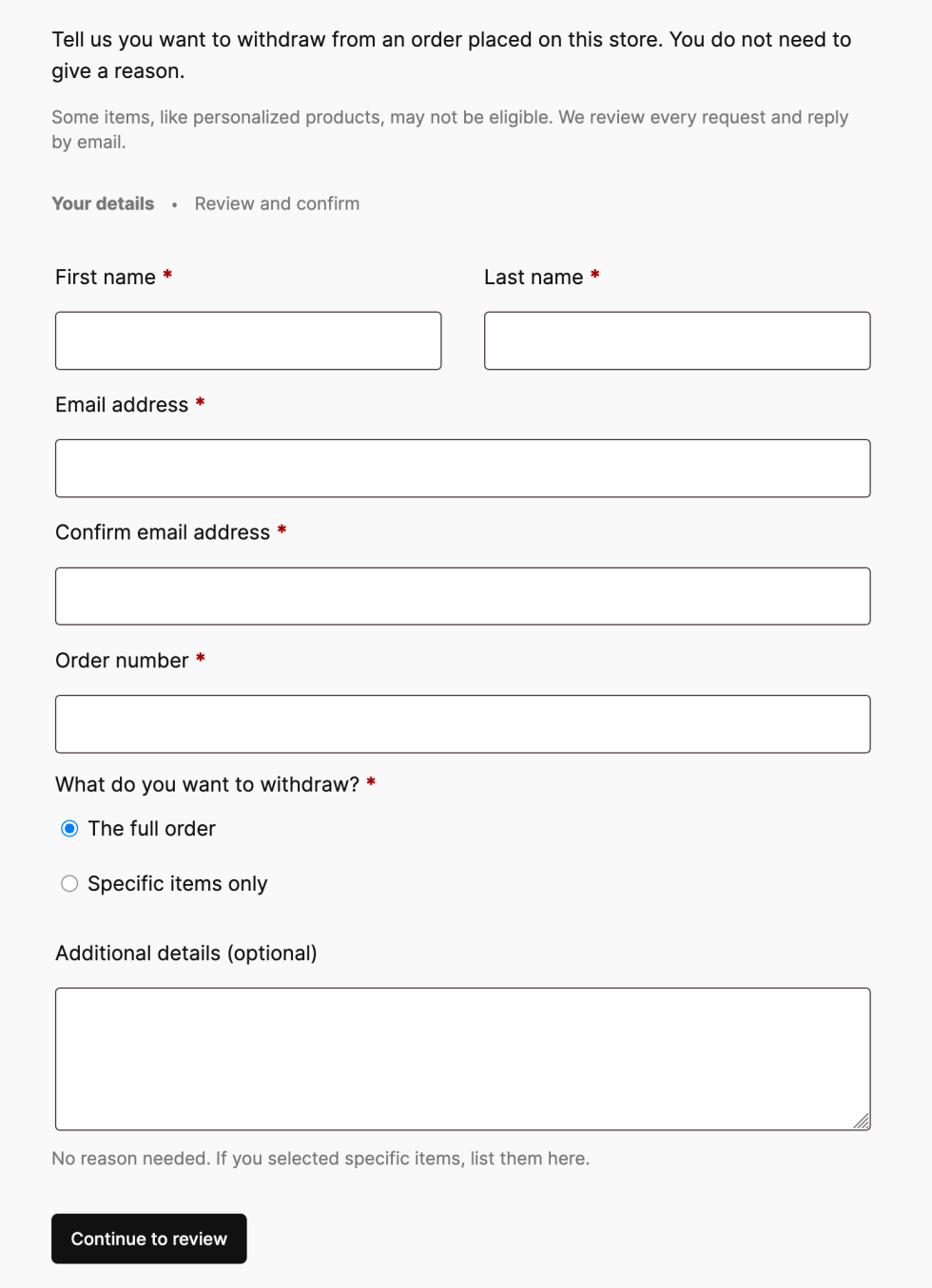

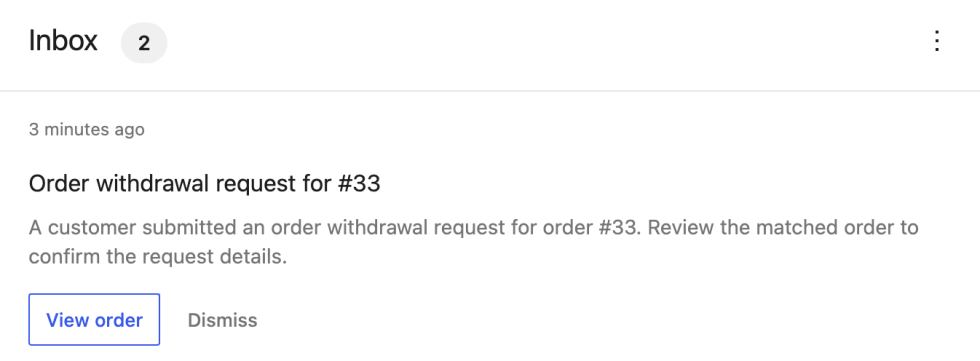
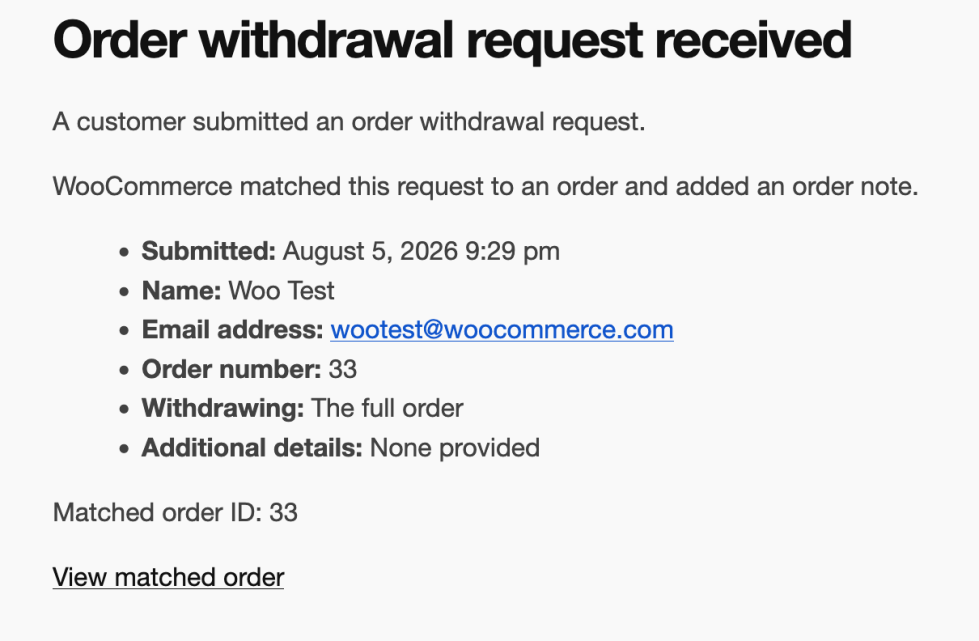
 . To be honest, it’s not my idea of simplicity, though. I am firm in the Obsidian camp.


