Mini-Cart styling: Fixes an issue where cart contents could appear unstyled below the footer when a visibility rule hides the Mini-Cart block. #68790
REST API authentication: Updates authentication checks to ensure WooCommerce API credentials are used only for the intended REST API requests. #68827
API permissions and sessions: Updates permission checks for the legacy options API and mobile app login, and strengthens guest-session validation. #68862
Join us on Wednesday, September 30, 2026, at 10 a.m. PDT / 1 p.m. EDT / 7 p.m. CEST for a practical live conversation about building WooCommerce stores with block themes.
Block themes give merchants and builders new ways to shape a store’s layout, styles, and templates. They also change how agencies think about design systems, plugin compatibility, performance, and the boundary between visual editing and custom code. If you have been curious about block themes—or tried them and found the experience harder than expected—this conversation is for you.
We are excited to welcome Mike McAlister, creator of the Ollie block theme, alongside WooCommerce engineers Karol Manijak and Lucio Giannotta. Mike will bring the perspective of an independent theme builder supporting real stores, while Karol and Lucio will share what the team is learning as it improves Woo Blocks and builds Purple, our block theme currently in beta.
Woo Developer Advocates Brian Coords and Shani Banerjee will lead the discussion, exploring practical ideas for trying block themes safely and a checklist for deciding whether they are a good fit for your next project. Bring your thoughts and questions, and join us for audience Q&A at the end.
On September 2nd, Anthropic published the Claude commerce agents, an open-source starter code for shopping assistants as well as merchant assistants. We leverage the code to ship our own version for WooCommerce which can be found in our latest Agentic Tools repo, which will be a fun, growing space for our open-source commerce tools. Please keep in mind that these are built for experimentation and growth, and are not maintained within official capacity.
We wanted to get a version out that really considers merchant control. Ultimately, you as developers and merchants should still be at the helm of your catalog, checkout experience, payment gateway decisions and ultimately your customer relationships. This is the direction we’d like to see agentic commerce move towards, and we would like to define that together. So, we encourage you to utilize and test the agents and code, and experiment with the opportunities to build on these elements.
What Anthropic actually shipped
Anthropic shipped a blueprint for patterns and guardrails needed to get commerce agents up and running:
The shopping agent allows for catalog search, comparison, multi-item planning, cart building, order tracking, policy answers, and customer memory.
The merchant agent contains sales performance questions, inventory and order alerts, pricing and promotion suggestions, campaign drafting. Every write is staged behind a human approval gate.
This includes three runtime paths with Messages API, Claude Agent SDK, and Managed Agents with MCP as the external system connection. It also requires Python 3.11 or newer for backend and Node 22 and Next.js on the frontend.
What we built for WooCommerce
The blueprint is platform-agnostic by design. It defines the agents and leaves the connection to a real store for each platform to build. With ours, a shopper can ask the assistant for products, build a cart, and get handed to the store’s normal WooCommerce checkout. A store owner can ask about sales, stock, and problem orders, and approve the assistant’s suggested changes (prices, restocks, listing copy, scheduled sales) before anything goes live. Nothing places an order or takes payment on its own.
The shopper side needs a small bridge plugin on the store. The assistant’s cart lives under a Store API cart token, and the shopper’s browser has its own WooCommerce session that can’t see it. When the shopper clicks through to check out, the plugin re-adds each item to the shopper’s own cart with normal stock checks and sends them to checkout. Once the order is placed, it empties the assistant’s cart and records which cart the order came from, which is how the assistant can later answer “Where is my order?” The plugin is part of the reference, not a supported extension. We encourage you to read it and the code before installing it.
python3 -m venv .venv && source .venv/bin/activate
pip install -r requirements.txt && npm install
	# Python packages, then the two web apps
cp .env.example .env
	# then set ANTHROPIC_API_KEY in .env
wordpress/local-store/scripts/setup.sh
	# WordPress + WooCommerce in Docker on :8090, seeded
One command starts a Docker WordPress and WooCommerce test store which includes a test store “ACME Supply Co.”, eight products, nine orders, policy pages, shipping, and the bridge plugin. Then start each side in its own terminal.
Storefront:
source .venv/bin/activate && uvicorn storefront.api.main:app --port 8006
npm run dev -w storefront/web                       # http://localhost:3006
Merchant:
source .venv/bin/activate && uvicorn merchant.api.main:app --port 8007
npm run dev -w merchant/web                         # http://localhost:3007
From a clean checkout to a first conversation takes about fifteen minutes. To point either side at your own store instead of the test store, follow the README, and start with a staging copy.
Limitations
Since this is reference code, there are a number of limitations to be aware of:
There is no undo: Reversing a change means asking the assistant to stage a new one with the old values. That is a redo, which can be refused, and it can be wrong.
No durable record. The conversation is the log of what changed, and a restart drops it. In WooCommerce the changes appear under the API key’s user with nothing naming the assistant. Only orders from the bridge are marked.
No authentication. Anyone who can reach the services can use them, and the merchant service holds a full-write REST key. Put them behind your own auth.
Built for small stores. Headline totals come from WooCommerce Analytics when it is available. Alerts and per-product figures come from a scan capped at 400 recent orders and 250 products, so a high-volume store can get alerts wrong.
No traffic or conversion data. WooCommerce core records no sessions.
Campaigns are read-only. The assistant can report on campaigns from installed marketing extensions but not draft them.
Retrieval is keyword search. The model does the semantic work on top, rephrasing, retrying, and judging results, so it behaves like a hybrid. It can only reason about products a keyword actually returned. This one matters most for large or oddly-named catalogs, which is exactly what we want people to test.
It is a self-hosted Python service beside WordPress. Cost is Claude usage, and the merchant side uses a larger model, plus hosting.
Who is this for?
The shopper side essentially runs as a second storefront, so shoppers will use it instead of the theme and return to the store at checkout – and for a merchant, it sends the shopper out to a different frontend in order to access this. This should be kept in mind for conversion from a merchant’s perspective.
The merchant side is currently built for smaller stores. If you want this kind of functionality at higher order volumes, reach out to join the WooCommerce AI Beta.
Ideally, this reference code is best used by developers and agencies that are evaluating and prototyping AI applications and workflows for their merchant-clients.
If the initial question is, “how do I start building an assistant on Anthropic’s stack” then the reference code above is the ideal gateway to experimentation. However, we can think of WooCommerce AI as a tool that answers the more specific question of, “what should a merchant’s assistant be?”
WooCommerce AI brings scoped opinion and direction for a merchant’s AI experience. It lives inside wp-admin and communicates with the store by answering from the store’s own data from inside WooCommerce.
Installed as a plugin, WooCommerce AI runs every change through preview, approval, and undo. Each change carries a reversibility tier, and an Activity Log records what the assistant did. It handles batch changes as well. There is nothing additional for a merchant to host, the assistant runs within the merchant’s admin.
Want to contribute?
If you’re interested in experimenting with our agentic tools, please head to our Agentic Tools repo, and also add your thoughts to the GitHub Discussion.
Issues and PRs are welcome, so don’t be afraid to contribute!
If you are interested in participating in the WooCommerce AI Beta, please reach out to @shanibanerjee via the WooCommerce Community Slack or at developer-advocacy@woocommerce.com.
WooCommerce has spent the last few years investing heavily in the block editing experience for merchants and developers. The only thing missing was an official block theme we could recommend, built specifically for Woo.
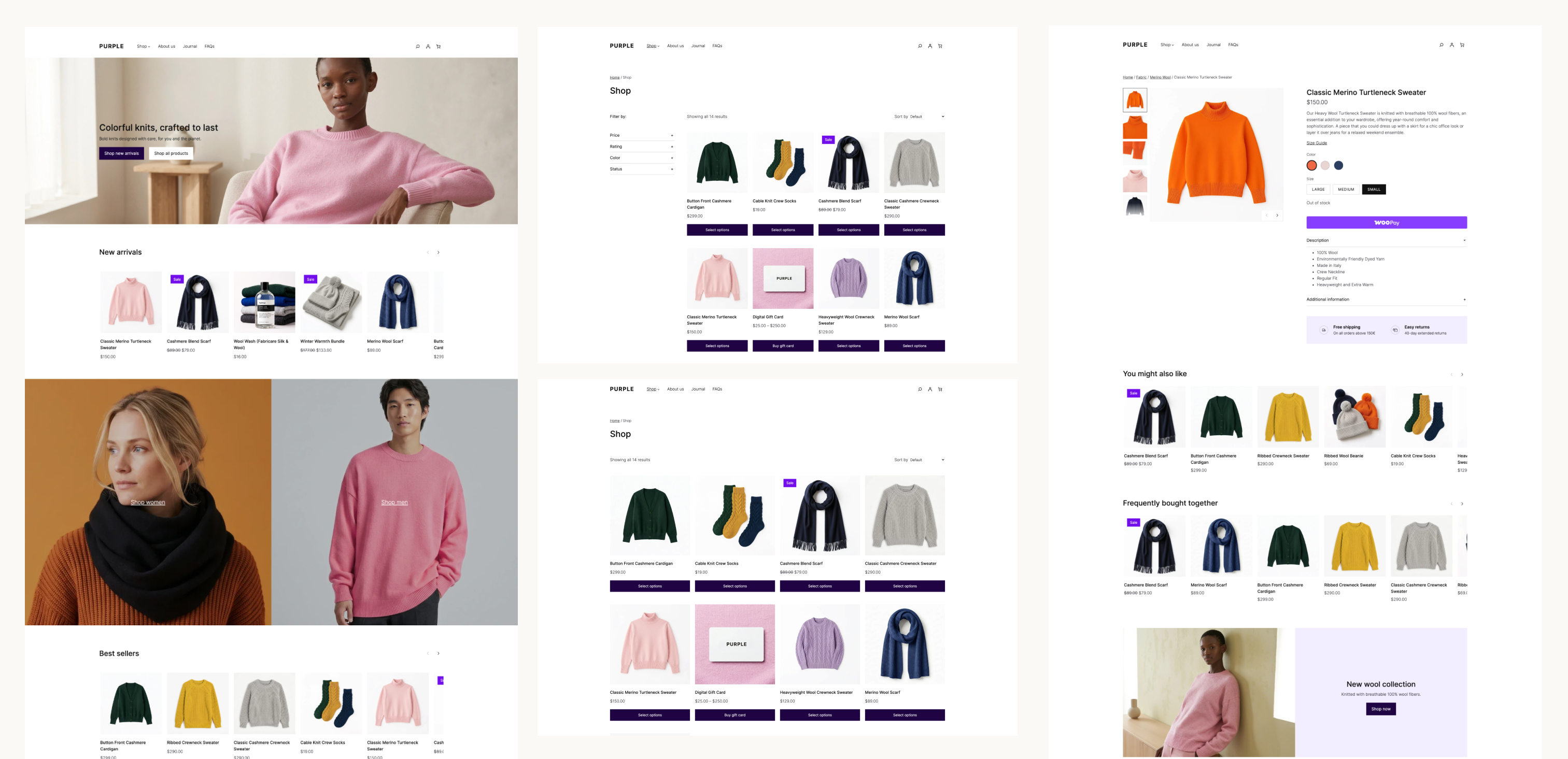
Purple is the open source WooCommerce starter theme made by Woo. The theme includes templates for most block-enabled WooCommerce pages, ten color palettes and ten font pairings, and custom styles for WooCommerce and WordPress core blocks. It also includes a pattern library focused on ecommerce with product grids, filters, collections, call-to-actions, product detail pages, and more.
For merchants launching on Woo, Purple is designed to give your store a modern and performant starting point. However, thanks to the customization options built into blocks, developers and agencies can modify and extend the templates and styles and use the theme as a starting point for bespoke store designs.
With everything WordPress and Woo have to offer, a good block theme is intentionally lean and modular. They don’t require the traditional layers of functionality and lock-in that older theme framework typically included.
When you compare Purple to our classic flagship theme, Storefront, you might wonder where all the featured extensions have gone. When using Storefront, you might have needed extensions for product hero designs, custom homepages and product galleries, a mini-cart, or even a more advanced header and footer. With WooCommerce’s block library and the block editor, those customizations are already possible within any block theme, including Purple.
The work is landing in WooCommerce core
The larger project is the work that Purple helped drive in WooCommerce core: more granular style controls in blocks, templates that showcase your product catalog, and an easy path to defining your store’s brand consistently across your site.
The improvements below are a small example of what’s available to any block theme that uses the affected blocks and APIs.
WooCommerce 11.0 made block themes lighter and more consistent
WooCommerce 11.0 established several foundations for the work that followed:
Pattern content is loaded on demand. WooCommerce registers patterns by file path and loads their content when the editor requests it, reducing work on requests that do not need pattern content (#65922).
Product images work better with theme settings. The Product Image block uses larger thumbnails and preserves the correct aspect ratio for cropped images (#66191, #66354).
Product collections compose more reliably. The Product Collection block now keeps the right context when nested inside a Query Loop, so its inner product blocks render correctly in composed templates and patterns (#65637).
More blocks participate in global styles. The Breadcrumbs block supports theme.json styling, including custom font sizes (#65460, #65537).
Product filters are easier to compose. The Product Filters block gained an option to disable its filter drawer and fixes synchronization across multiple filter instances (#65671, #65622).
Cart markup is more accessible. Cart table headers now expose the appropriate ARIA roles and scope attributes for assistive technology (#65364).
WordPress 7.1 introduced responsive design controls for the block editor. WooCommerce 11.1 gives those controls more useful WooCommerce blocks to work with:
Product Price supports responsive styling for typography, colors, padding, and margins, with the editor and frontend using the same responsive states (#67007).
Product Reviews now follows the WordPress wrapper used for responsive styling, so review content and the review form can reflect the styles selected for each viewport (#67360).
Product Details supports padding, margin, background, and border settings through the block and Global Styles (#67409).
Product Gallery supports custom aspect ratios and keeps the large image area and thumbnail rail in sync (#66441).
The release also completed some initial performance improvements for block registration. WooCommerce skips block and pattern registration for recognized requests that cannot render blocks, making Store API and REST requests 30–42% faster in the published measurements (#65781). This release also introduces experimental support for unified block editor assets while editing your site, with a 48.3% reduction in network transfer size.
WooCommerce 11.2 continues refining the storefront building blocks
WooCommerce 11.2 is still in development, and it contains some of the most visible examples of the theme work moving into core:
Product Filters has responsive overlay and sticky-positioning controls. The block can stay inline, switch to an overlay on mobile or tablet, or use an overlay at every viewport. The behavior works in the editor and on the frontend, respects the configurable responsive breakpoints in WordPress 7.1, and can keep filters visible as shoppers move through a product catalog (#67696, #68256).
Product Quantity exposes more styling controls. Text color, background color, border radius, and border and shadow styles can be configured through block styles. Grouped product quantity controls use the same styling model (#68040, #68000, #68148).
Product images can use theme-defined borders. The Product Image block now supports border styles, giving product grids and collection patterns another way to express a store’s visual system (#68342).
Chips are more themeable. The Chips block, used by Product Filters and Add to Cart + Options, adds typography and border-radius controls that can be styled consistently with the rest of the store (#68105).
WooCommerce patterns are easier to find and customize. The inserter category is being renamed from “WooCommerce” to “Shop,” and customized template parts no longer take priority over template parts queried directly (#67874, #67892).
This is just a subset of the most recent work done to improve the block editing experience, but Purple has been a long project, and a key factor in our work to improve the foundations of WooCommerce for all users.
How to test Purple
Please test Purple on a staging or local site. Use the latest version of WordPress and WooCommerce so you can exercise the responsive controls described above.
Install the purple directory as a theme, either by uploading a zip of that directory or copying it into wp-content/themes.
Activate Purple and open Appearance > Editor.
Review the front page, Shop or Product Catalog, Single Product, Cart, Checkout, My Account, and search templates.
Test the Product Filters block at desktop, tablet, and mobile widths. Try the inline and overlay modes, then test a custom settings.viewport configuration.
Test Product Price, Product Details, Product Reviews, Product Gallery, Product Quantity, Catalog Sorting, and Mini-Cart with simple, variable, and grouped products.
Add your usual extensions and child-theme customizations, then repeat the tests on the frontend and in the editor.
Purple is a beta. Expect the templates, patterns, and styling to continue changing as we learn from testing. Note: when downloading Purple directly from GitHub, it will not receive automatic updates.
Share your feedback
Please open an issue in the Woo Themes repository when you find a problem or have a suggestion. Include the WordPress, WooCommerce, PHP, and Purple versions; the template or block you were testing; the steps to reproduce the problem; and screenshots or a recording when the issue is visual.
Your feedback will help us improve the default WooCommerce storefront and the blocks and templates available to every block theme.
WooCommerce Subscriptions 9.2.0 comes with updated settings page UI and behavior, and includes several other changes worth knowing if you build extensions, gateways, or custom integrations for Subscriptions. Here are the ones with the widest impact; the full list of fixes and changes is in the latest version notes on the product page.
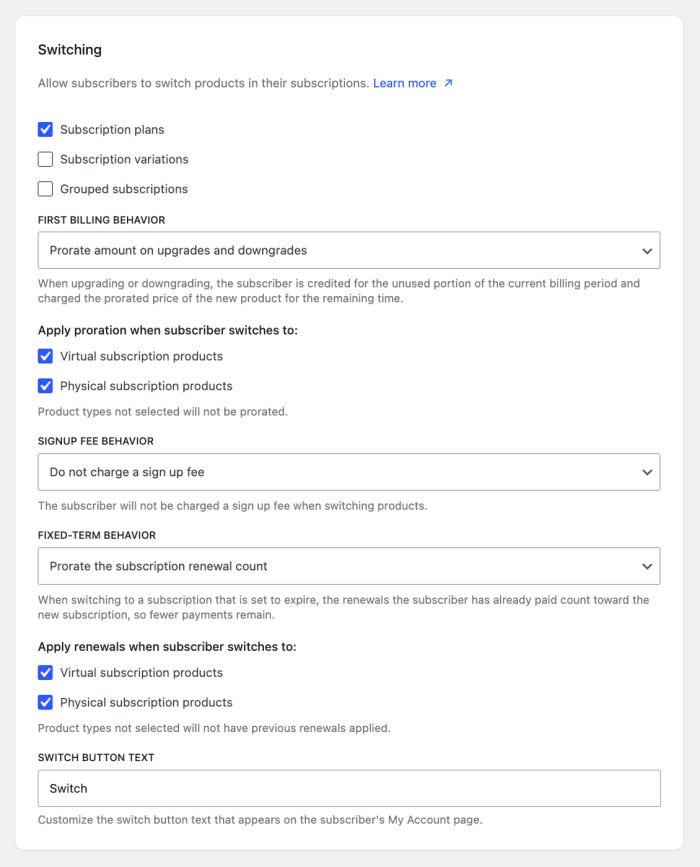
Physical products can now be prorated
Changing proration settings has historically focused on virtual products only; 9.2.0 now allows for “Prorate Recurring Payment” and “Prorate Subscription Length” to be applied to physical products as well!
woocommerce_subscriptions_apportion_recurring_price accepts two new values, physical-upgrade and physical, and woocommerce_subscriptions_apportion_length accepts physical. These behave the same way as their virtual counterparts: the -upgrade variant prorates upgrades only and leaves downgrades alone, while plain physical prorates in both directions.
The change is additive. Default values are unchanged, and the wcs_switch_should_prorate_recurring_price and wcs_switch_should_prorate_length filters keep their existing signatures.
Rolling back to 9.1.0 or earlier: older versions don’t recognize the new values, so proration defaults “off” without any fatals or data loss.
On the 9.1.0 settings screen, the dropdown has no option matching the stored value, so nothing appears selected. If an admin saves that settings section without picking a new value, the stored physical or physical-upgrade is overwritten with no.
Closing the gap on manual-payment flags
“Turn off automatic payments” could previously force a subscription into a manual renewal state even if the parent setting, “Accept Manual Renewals,” was disabled.
WCS_Manual_Renewal_Manager::is_manual_renewal_required() now requires both settings to be enabled. A one-time upgrade routine re-enables “Accept Manual Renewals” on any store caught in that contradictory state, so existing behavior carries over rather than changing silently.
Line item removal gets a capability check, and links get their own nonces
Removing a line item has always been the subscription owner’s privilege, but the code enforced it loosely. wcs_can_items_be_removed( $subscription, $user_id = 0 ) in wcs-functions.php now checks the edit_shop_subscription_line_items capability, which only the owner holds. The visible effect is small — the recipient of a gifted subscription no longer sees the remove-item control on My Account.
Two things to know if you call or filter it. The capability check runs after the existing wcs_can_items_be_removed filter and is combined with it, so a filter can still narrow the result but can no longer grant removal on its own; the filter now receives the user as a third argument. With no user to check, the function returns false, so calls from cron, WP-CLI, or an unauthenticated REST request now return false where they previously could return true.
The same hardening reaches the links themselves: removal and resubscribe links now mint a nonce for their own operation instead of sharing one keyed only to the subscription ID, so a link issued for one can’t be replayed for the other. Links generated before 9.2.0 no longer verify. A resubscribe link can be reopened from My Account, but the “Undo?” link offered right after a removal can’t be reissued.
Gifting moves from a global switch to a per-product setting
While Enable gifting for subscriptions is still available — Enabled/Disabled for all products default has been removed. Gifting is now set per product via the _subscription_gifting meta key, and a new bulk-edit option turns it on or off across many products at once.
If the storewide default was “enabled for all products,” a background migration writes that value onto existing products that don’t already have one. Stores that had gifting off need no migration since off is the new default for products with no value set.
The migration has no filter, so the per-product meta and the bulk edit are the only ways to adjust gifting on existing products.
Settings REST fields get a new registration path, and one field changes type
The Subscriptions settings tab now registers through woocommerce_get_settings_pages rather than woocommerce_settings_tabs_array. A new Settings_Page class registers the /wc/v3/settings/subscriptions REST fields, replacing the now-deprecated WC_REST_Subscriptions_Settings class.
woocommerce_subscriptions_max_customer_suspensions changes from a select with a fixed option list to a number field. The values it reads and writes are unchanged. The woocommerce_subscriptions_max_customer_suspension_range filter, which adjusted that list, is deprecated and its return value is now ignored.
One wiring detail: Settings_Page hooks its output() callback to woocommerce_settings_subscriptions at priority 1 rather than the usual 10, so it renders before anything else on that action at the default priority. If your code adds to this screen expecting to run after core’s output, that assumption no longer holds.
Loading the All Products plan-selector script on custom pages
The plan-selector script (wcsatt-frontend) used to load on every page, even ones that couldn’t show subscription options. It’s now registered but not enqueued.
If you render the plan-selector markup somewhere Subscriptions doesn’t already handle — a custom template, an AJAX-loaded fragment, a quick-view modal — call WCS_ATT_Display::enqueue_frontend_script() before scripts print. It’s an idempotent wrapper around wp_enqueue_script(), so calling it from several places is fine.
A couple of smaller items:
WCS_ATT_Product::get_instance_id() no longer re-runs full module bootstrap used previously by All Products for WooCommerce Subscriptions (re-registering hooks, re-firing the wcsatt_modules filters) on every call – it was doing that on every product lookup.
And a new woocommerce_subscriptions_paypal_standard_expected_payment_amounts filter lets you add acceptable amounts for a PayPal Standard renewal when the subscription’s price has changed since the profile was created.
For the complete list of fixes and changes in 9.2.0, see the latest version notes.
The WooCommerce engineering team has been evaluating WooCommerce’s minimum PHP requirement, talking with the community, and tracking general store hosting trends. Our goal is to bump the minimum requirement to PHP 8.1 or newer, starting with the WooCommerce 11.5 release currently targeted for January 2027. This change would end support for PHP 7.4 and 8.0 in future versions of WooCommerce.
We want to hear from store owners, agencies, hosting providers, extension developers, and other WooCommerce contributors as we determine the target release.
Benefits of requiring PHP 8+
PHP 7.4 and PHP 8.0 are no longer supported by the PHP project. PHP 7.4 reached end of life in November 2022, and PHP 8.0 reached end of life in November 2023. Running unsupported PHP versions can leave sites exposed to security issues that no longer receive fixes.
Our internal WooCommerce usage data shows that PHP 7.4 currently accounts for approximately 7% of tracked stores, while PHP 8.0 accounts for approximately 2%. Among stores running a relatively recent WooCommerce version (within the last year), the combined usage is closer to 6% and trending consistently downward. WooCommerce usage tracking is opt-in, so these figures do not represent every store, but a representative sample.
Moving to a newer minimum PHP version would allow WooCommerce and third-party developers to:
Adopt newer, more secure dependency packages that no longer support older PHP versions.
Reduce the number of PHP versions that must be tested in continuous integration, speeding up e2e testing, PR reviews, and releases.
Remove compatibility branches and legacy code paths that are increasingly difficult to maintain.
Simply upgrading to PHP 8.0+ means performance improvements for WooCommerce stores by default. Those benefits come from upgrading the PHP runtime itself, and our goal is to see every WooCommerce store continually running the most optimized stack available.
Impact on stores running PHP 7.4 or 8.0
A store running PHP 7.4 or 8.0 would not be automatically upgraded to a WooCommerce version that requires PHP 8.1.
If the proposal is adopted:
WooCommerce 11.5 would declare Requires PHP: 8.1.
By default, WordPress would prevent the update from being offered to stores that do not meet that requirement.
The store would continue running its existing WooCommerce version and receive any dot releases to that particular branch.
The store would need to upgrade PHP before updating to WooCommerce 11.5 or a later compatible release.
This follows the same general approach used for previous WooCommerce PHP requirement changes. For example, WooCommerce 8.2 raised the minimum requirement to PHP 7.4 with advance communication and migration guidance. See New Requirement for WooCommerce 8.2: PHP 7.4+.
The change would not update PHP on a store’s behalf or automatically deactivate an existing WooCommerce installation. Stores that remain on an older PHP version would remain on the latest WooCommerce release compatible with that environment, subject to WooCommerce’s existing support policy.
WordPress and WooCommerce PHP requirements
WordPress currently runs on PHP 7.4 or newer and recommends PHP 8.3 or newer for a modern hosting environment. See the WordPress requirements.
WooCommerce has previously maintained a higher PHP requirement than WordPress. WooCommerce is a complex ecommerce application with its own dependencies, performance requirements, and compatibility considerations, so its minimum PHP version does not need to match WordPress’s minimum version.
Guidance for extension developers and agencies
Developers extending Woo should already be testing their code against newer PHP versions, but additional testing may be helpful.
Extensions that target WooCommerce 11.5 or later could use PHP features and dependencies available in the new supported range. Extensions that continue supporting older WooCommerce versions may need to maintain compatibility layers or separate code paths.
Raising WooCommerce’s minimum PHP version does not guarantee that every extension, theme, or custom snippet will work after a store upgrades PHP. Testing on a staging site remains important.
Feedback on the proposed PHP requirement
Please let us know:
What would prevent your store or client sites from moving beyond PHP 7.4 or 8.0?
Are there extensions, themes, or custom integrations that still require these PHP versions?
Would targeting WooCommerce 11.5 (January 2027) provide enough time to prepare?
Do hosting providers have additional data about PHP version usage across WooCommerce stores?
Are there compatibility or deployment concerns we have not covered?
What migration guidance would make this change easier for your team or customers?
When reporting a compatibility concern, please include the PHP version, WooCommerce version, affected extension or integration, and any relevant error messages or reproduction steps.
Decision and release timeline
We will review the feedback and usage data before confirming the target release and minimum PHP version.
As the change proceeds, we plan to provide advance notice, communicate the final release target, and give developers time to test against the new requirement before WooCommerce 11.5 is released.
This release is now available for download. Review the highlights below, follow the update guide, and check the full changelog before updating production sites.
WooCommerce 11.1 is here! This release includes a number of performance improvements for variable products and block registration, more accurate refund details in API endpoints, improvements to product CSV imports, and experimental support for videos in product galleries. Here’s a few more highlights:
Introducing variation image galleries
Variation galleries are now enabled for all stores in WooCommerce 11.1 and WooCommerce Additional Variation Images is being retired. That means you no longer need a separate extension to add image galleries to your product variations — it’s a native WooCommerce feature available to every store, for free. There’s nothing to switch on: the experimental toggle is now gone from the Features screen, and a database update (11.1.0-1) enables the feature even on stores that had previously opted out. (#67884)
Right of order withdrawal for EU customers
Disabled by default, stores that need to conform to EU guidelines can enable the order withdrawal form for their customers. This feature creates a new screen in the My Account page for users to submit an order withdrawal request. The request is logged and the merchant is notified via email and the dashboard. Because each store is unique and the process may differ, withdrawing and potentially refunding an order remains a manual process.
Cleaner admin orders for virtual products
Orders that don’t need fulfillment no longer show a shipping address in the admin order summary. Store API checkout retains billing-derived shipping data for compatibility, so virtual-only orders were displaying an address that meant nothing; that read-only address and its implicit phone fallback are now hidden. Physical, mixed, and unresolved orders keep their details. (#66488, refined by #66627).
Video support in product gallery (beta)
WooCommerce 11.1 introduces experimental support for videos in both classic and block-based product galleries. The initial release supports locally uploaded videos only. The feature is disabled by default and can be enabled under WooCommerce → Settings → Advanced → Features → Product gallery videos. As an experimental feature, it may change in future releases. Share your feedback in the GitHub discussion. (#65396)
Developer updates
Unified block editor assets A new experimental feature replaces WooCommerce’s per-block editor scripts and styles with shared JavaScript and CSS bundles, cutting the number and total size of editor asset requests. It’s disabled by default in 11.1; with it off, existing handles and per-block assets behave exactly as before, and frontend assets are unchanged either way. (#66200)
Changes to order item deletion WC_Abstract_Order::remove_order_items() now records which item IDs existed when removal was requested, so replacement items an extension adds before $order->save() are no longer deleted by accident. Most extensions won’t require a change, but if you maintain a custom order data store, review your get_item_ids() and delete_items_by_ids() implementations.
Block registration skips non-rendering requests WooCommerce 11.1 no longer registers block types and patterns on requests that can’t render or edit blocks, making Store API and REST requests 30–42% faster. If your extension renders WooCommerce blocks during one of those requests, opt back in with the new woocommerce_should_register_blocks filter. Product and variation descriptions are handled on demand and need no action.
Retiring stable WooCommerce Admin feature flags A set of stable WooCommerce Admin features now load directly instead of through the feature configuration pipeline. No functionality is removed, and deprecated shims keep Features::is_enabled() and window.wcAdminFeatures returning compatibility values, but they now emit deprecation warnings, so audit your extensions and remove those gates before the shims go.
WooCommerce is old enough that its most important string values (order statuses, product types, stock states, tax modes) predate almost every modern PHP convention. Across the WooCommerce codebase, and in many extensions, every one of those comparisons was written against a raw string literal:
if ( 'completed' === $order->get_status() ) { // hope you spelled it right!
Over the last few years, WooCommerce has begun shipping a family of enum classes under Automattic\WooCommerce\Enums. These are named, documented constants for order statuses, product types, stock states, settings values, and more.
The enum classes are considered a public API, and extension developers are encouraged to use them. This post covers what’s available, why we built classes of string constants instead of native PHP enums, and what shipping them taught us about load order and backward compatibility.
The price of a “magic string”
String literals might feel easier to write or more simple than classes, but the come with tradeoffs. Spread across a codebase the size of WooCommerce and the many extensions, magic strings tax you four ways:
Silent errors. Linters, autoloaders, and tests may not catch an error like typing 'complete' instead of 'completed'.
Abiguity. WordPress stores post-prefixed order statuses as wc-completed, while most WooCommerce APIs expect the un-prefixed completed, something a developer may only discover the hard way.
Discoverability. An agent searching 'simple' to find product-type logic returns half the codebase. Grepping for ProductType::SIMPLE should return a much narrower, accurate set of results.
Documentation. The definition for a status like on-hold will now live in a docblock next to its declaration.
Enum classes have the added benefit of clarifying empty strings based on intent. For example, woocommerce_default_customer_address treats '' as “no default”, which is unguessable without a named constant.
Why not native PHP enums
PHP has had enum support since 8.1, but for a few reasons, it wasn’t a viable solution for WooCommerce. Primarily, WooCommerce’s minimum supported PHP version is 7.4 which doesn’t include support for native enums.
There’s also an architectural difference.These values are already stored as plain strings in millions of databases, and thousands of extensions expect them to stay that way. Native PHP enums would turn those strings into objects, which could break existing code. String constants avoid this problem. OrderStatus::COMPLETED still produces the same 'completed' string, so developers can use the clearer name without changing how WooCommerce works. Existing code continues to work, and extensions can adopt the new constants when they are ready.
final class OrderStatus {
	/**
	 * Order fulfilled and complete.
	 */
	public const COMPLETED = 'completed';
	// ...
}
These constants are intentionally a publicly discoverable API, with explicit public visibility, docblocks, and developer docs. Extension developers are welcome to rely on them.
use Automattic\WooCommerce\Enums\OrderStatus;
use Automattic\WooCommerce\Enums\ProductType;

if ( OrderStatus::COMPLETED === $order->get_status() ) {
	// ...
}

$products = wc_get_products( array( 'type' => ProductType::SIMPLE ) );
Two things to check before adopting them:
Your minimum supported WooCommerce version. The classes landed incrementally: OrderStatus in WooCommerce 9.5, the product classes around 9.7 and 9.8, the settings-value classes across the 10.x releases. If you support older versions, keep the literal or guard usage with class_exists().
Which string WooCommerce expects.OrderStatus::COMPLETED is completed; OrderInternalStatus::COMPLETED is wc-completed. Most WooCommerce functions take the un-prefixed form; database-level and post_status contexts use the prefixed one.
New vocabularies in core should now get an enum class by default. WooCommerce still contains many string values that deserve names, and contributions are welcome.
Variation galleries were introduced in WooCommerce 10.9 as an opt-in feature and rolled out gradually. As per previous announcement, starting in WooCommerce 11.1, they will enabled for every store, and the experimental feature toggle is removed.
The functionality previously provided by the WooCommerce Additional Variation Images extension is now part of WooCommerce core. When a store updates to WooCommerce 11.1, the standalone extension is automatically deactivated to prevent conflicts. Existing variation galleries continue to appear through WooCommerce core.
Technical details
Core stores gallery attachment IDs in _product_image_gallery on the variation record—the same postmeta key used for galleries on parent products.
The wc/v3 product variation REST API exposes the gallery through the readable and writable gallery_image_ids property. This property contains gallery attachment IDs only; the variation’s featured image remains separate in image.
The former feature option, wc_feature_woocommerce_additional_variation_images_enabled, is removed during the WooCommerce 11.1 database update. Variation galleries are always enabled and no longer appear under WooCommerce > Settings > Advanced > Features.
Migrating from Additional Variation Images
If migration has not already completed, WooCommerce schedules an Action Scheduler job that copies data from _wc_additional_variation_images to _product_image_gallery. It processes up to 250 variations per run and requeues itself until no variations remain.
The migration is idempotent and does not overwrite a non-empty _product_image_gallery value. Legacy meta is preserved for backward compatibility, but it is not kept synchronized after core takes ownership of the gallery. We recommend testing the upgrade on a staging site, especially for stores with large variation catalogues or custom gallery integrations.
How can developers tell if they are affected?
You may be affected if your extension, theme, or custom code:
Uses the Additional Variation Images extension.
Reads or writes _wc_additional_variation_images or _product_image_gallery directly.
Stores without the extension or custom variation-gallery integrations do not need to take action.
What action do developers need to take if affected?
Remove any feature gates based on wc_feature_woocommerce_additional_variation_images_enabled, because WooCommerce 11.1 deletes this option.
Access variation galleries through WC_Product_Variation::get_gallery_image_ids() and set_gallery_image_ids(), or through gallery_image_ids in the wc/v3 product variation REST API.
Do not treat _wc_additional_variation_images as the current source of truth. Although its existing value is preserved, core edits are not written back to it, and subsequent writes to the legacy key may not affect the gallery displayed by WooCommerce.
Test custom storefront integrations when selecting, changing, and clearing variations, particularly when variations have different galleries or no gallery of their own.
Initially scheduled for Tuesday, September 1, 2026, we are tentatively postponing the release of WooCommerce 11.1.0 to Thursday, September 3, 2026.
Reason for delay
During early testing of WooCommerce 11.1.0 RC1, we identified certain issues around the mini cart, and highlighted some additional fixes .
We are preparing RC2 with a fix and will complete another round of pre-release validation before the stable release.
What happens next?
We plan to prepare RC2 and begin additional testing on September 2, 2026. If testing is successful, WooCommerce 11.1.0 will be released on Thursday, September 3, 2026. We will share any further changes to the release plan through this blog.
Thank you
Thank you for your patience and understanding as we work toward the WooCommerce 11.1 release.
WooCommerce block types and patterns were previously registered on nearly every request, including many that never render or edit blocks. We are changing that deliberately: a request should only pay for block registration when it can actually render or edit blocks.
The first step shipped in WooCommerce 11.0, where patterns register by file path and their content is loaded only when the editor requests it, matching WordPress core and saving 5–8 ms on every request that registers blocks .
WooCommerce 11.1 completes the change: a new BlockRegistrationContext guard now skips block and pattern registration on non-rendering requests. One exception is built in: when a product or variation description contains a WooCommerce block, block types are registered on demand via the woocommerce_short_description filter, so descriptions still render correctly in the products REST API, the Store API, the variation AJAX endpoint, and product webhooks.
Front-end, core admin, and block/site editor requests are unchanged, and the guard only skips contexts it recognizes; anything else keeps registering blocks, so a missed case costs a little performance, never a rendering regression.
The benefit: Store API and WooCommerce REST requests are 13–18 ms (30–42%) faster in our measurements.
How can developers tell if they are affected?
This applies from WooCommerce 11.1.0. You are affected only if your extension renders WooCommerce blocks, or relies on WooCommerce block types, patterns, or per-block assets being registered, during one of the skipped requests above. A WooCommerce block comes back as raw block markup (<!– wp:woocommerce/… –>) or as static HTML without its dynamic output which can be confirmed in code:
// Returns false in a skipped context on WooCommerce 11.1+.

WP_Block_Type_Registry::get_instance()->is_registered( 'woocommerce/mini-cart' );
Product and variation descriptions need no action; they are handled on demand. Blocks your extension registers itself with register_block_type() are also unaffected; so this only covers registration done by WooCommerce.
What action do developers need to take if affected?
Opt back in with the new woocommerce_should_register_blocks filter; return true only for the requests where you actually render blocks:
The filter runs on plugins_loaded, before the main query is parsed, so the condition can only rely on what’s available that early ($_SERVER, $_GET).
Please test your extension against WooCommerce 11.1 before the final release.
One more recommendation: don’t build your blocks onAbstractBlock. It’s an internal class, and blocks built on it inherit every registration decision WooCommerce makes, including the skips above; its lifecycle will keep changing as we optimize registration.
Retiring stable WooCommerce Admin feature flags in WooCommerce 11.1
WooCommerce 11.1 retires a set of stable WooCommerce Admin feature flags from the normal feature configuration pipeline.
These features are no longer experimental or optional, so WooCommerce now loads them directly instead of treating entries in core.json, development.json, or window.wcAdminFeatures as the source of truth for whether the feature should be available.
This change should not remove functionality from stores. The affected features continue to be available. To preserve backward compatibility, WooCommerce 11.1 includes deprecated PHP and JavaScript compatibility shims for existing checks.
These will continue to return compatibility values for now. However, these checks are deprecated and will emit deprecation warnings. The compatibility layer is intended to give extension developers time to remove feature-flag-based gates before the shims are removed in a future WooCommerce version.
Who is affected?
This affects extensions and custom code that check retired WooCommerce Admin feature flags before loading UI, routes, tasks, recommendations, or other WooCommerce Admin behavior.
Developers should audit their code for usage of:
– Features::is_enabled()
– Features::exists()
– Features::get_available_features()
– Features::get_optional_feature_options()
– Features::enable()
– Features::disable()
– window.wcAdminFeatures
– the woocommerce_admin_features filter when used to control stable WooCommerce Admin features
In most cases, checks for retired stable feature flags can be removed because the related feature is now treated as stable and available.
Affected feature flags
The retired compatibility shims include the following feature slugs:
Developers should use the underlying option or supported API when they need to check behavior that remains configurable.
About woocommerce_admin_features
The woocommerce_admin_features filter should no longer be used to control retired stable WooCommerce Admin features.
WooCommerce now loads these features directly, so removing a retired stable slug from the filtered feature list is not a supported way to disable the underlying feature behavior. Deprecated compatibility lookups may still reflect legacy filtered values while the shim exists, but those lookups now emit deprecation warnings and should be removed.
Extensions that currently use woocommerce_admin_features to gate stable WooCommerce Admin features should migrate away from that pattern and use the actual option or API for behavior that remains configurable.
In WooCommerce 11.1, we changed how WC_Abstract_Order::remove_order_items() handles persisted order items.
Core data stores now record the IDs of order items present when removal is requested. Only those IDs will be deleted when the order is saved. This prevents extensions that save replacement items before $order->save() from having those new items accidentally deleted.
Custom order data stores overriding delete_items() retain synchronous deletion. They can opt into deferred deletion by also overriding the new optional delete_items_by_ids() method. Developers should check custom stores for incompatible existing get_item_ids() or delete_items_by_ids() declarations.
The existing hooks and arguments are unchanged. On the deferred path, woocommerce_removed_order_items fires when deletion occurs during $order->save().
Most extensions require no changes. Developers maintaining custom order data stores should review their deletion methods and any code relying on immediate deletion or hook timing.
WooCommerce 11.1 introduces Order Withdrawal, bringing the right of order withdrawal functionality to better serve EU customers. This gives customers a simple, self-serve way to request a withdrawal from their order within 14 days of placing it.
This feature may help your store meet these requirements, but it does not guarantee compliance. For guidance specific to your business and where your customers are located, please consult a legal professional.
How to enable it
Order Withdrawal is disabled by default, since it won’t apply to every store. One can enable it by following the steps below:
Go to WooCommerce > Settings > Advanced > Features
Enable the Order Withdrawal option
Save your changes
Once enabled, the request form becomes available at /my-account/withdraw-order for you to surface it to your users. You can change that URL by editing the endpoint under WooCommerce > Settings > Advanced > Page Setup. The page works whether or not the customer is logged in, so a shopper who checked out as a guest can still find it.
Note: By default the “Order Withdrawal” page is available for all users logged in or not, but it is not linked anywhere by default. You can surface it by adding a link to the page from a prominent location, like your store’s footer and/or order emails.
What the customer sees
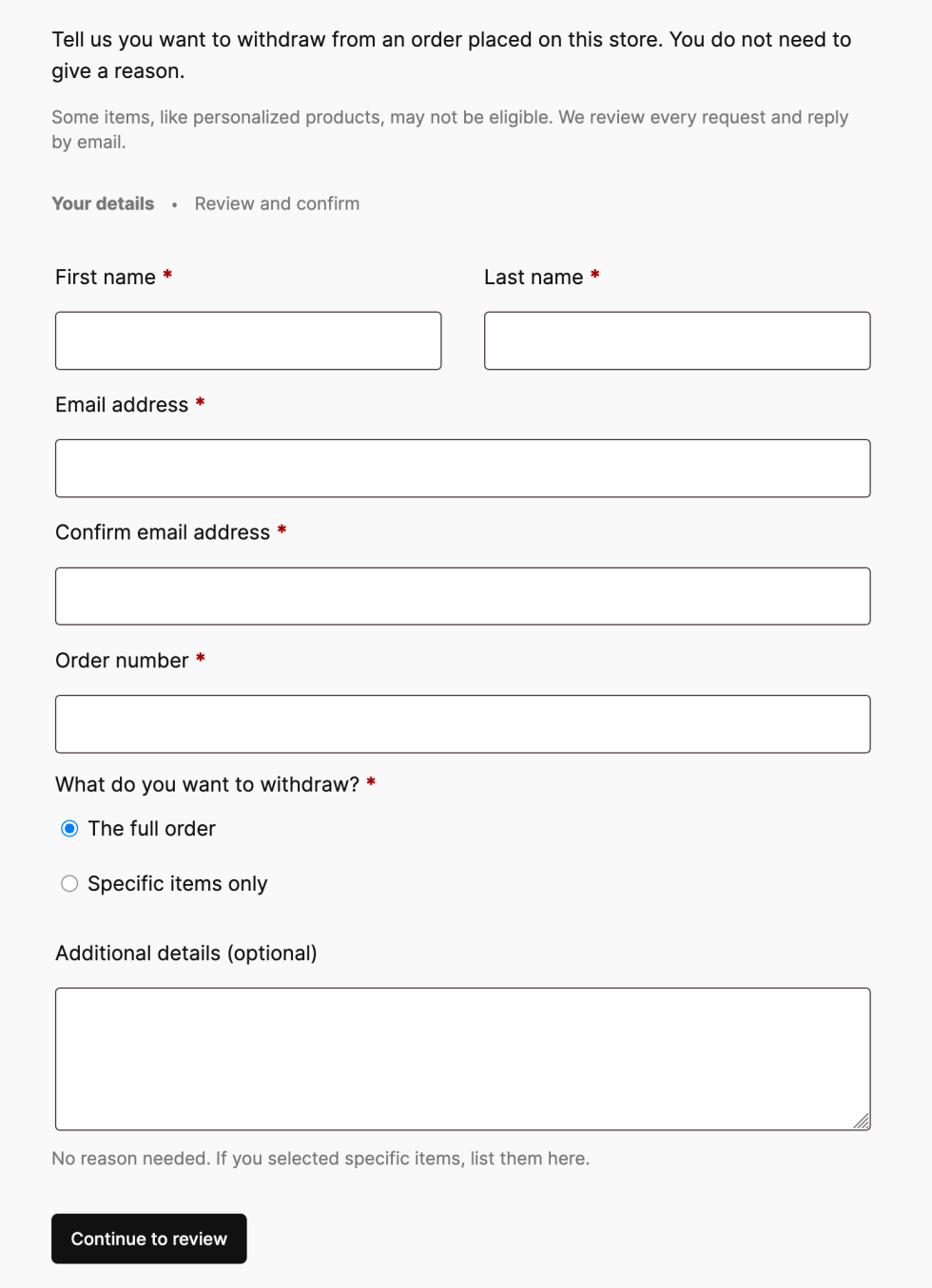
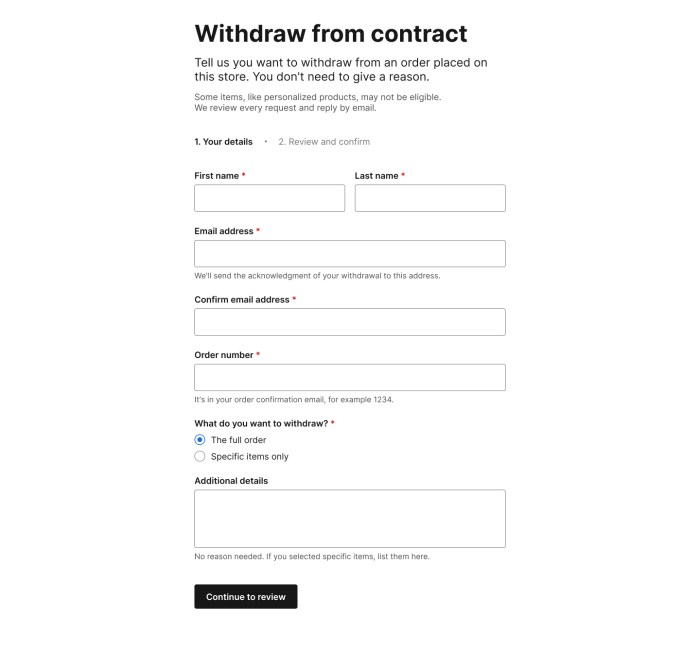
A customer who visits the withdrawal page is presented with a short request form. After filling it in, they get a chance to review their details before submitting.
Order withdrawal form
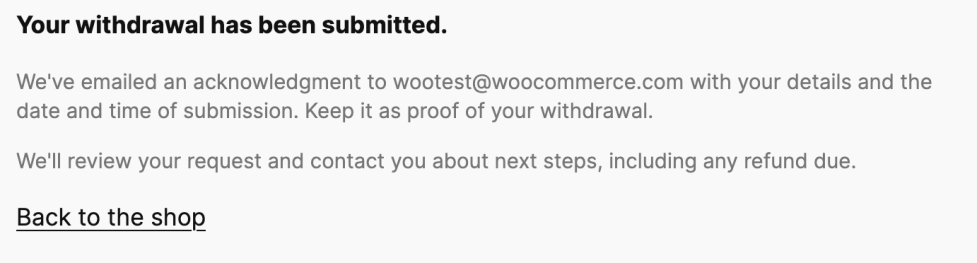
Once they submit the request, they see a confirmation screen and receive an acknowledgment email containing the details they entered. This gives the customer a confirmation that their request has been submitted and provides a record of the request.
Customer email confirmation
What the merchant sees
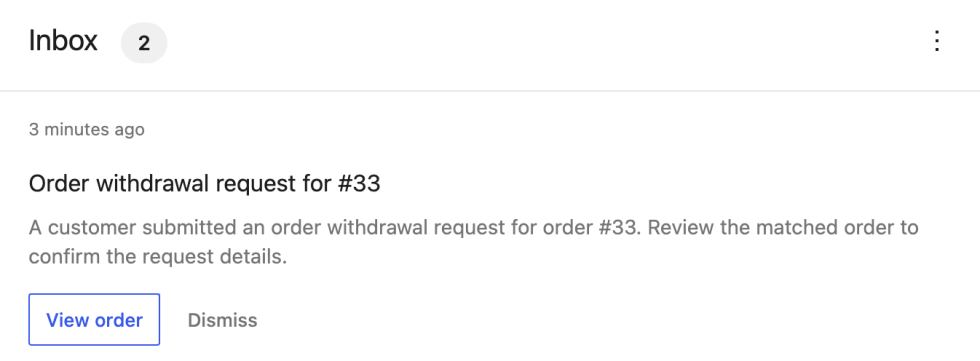
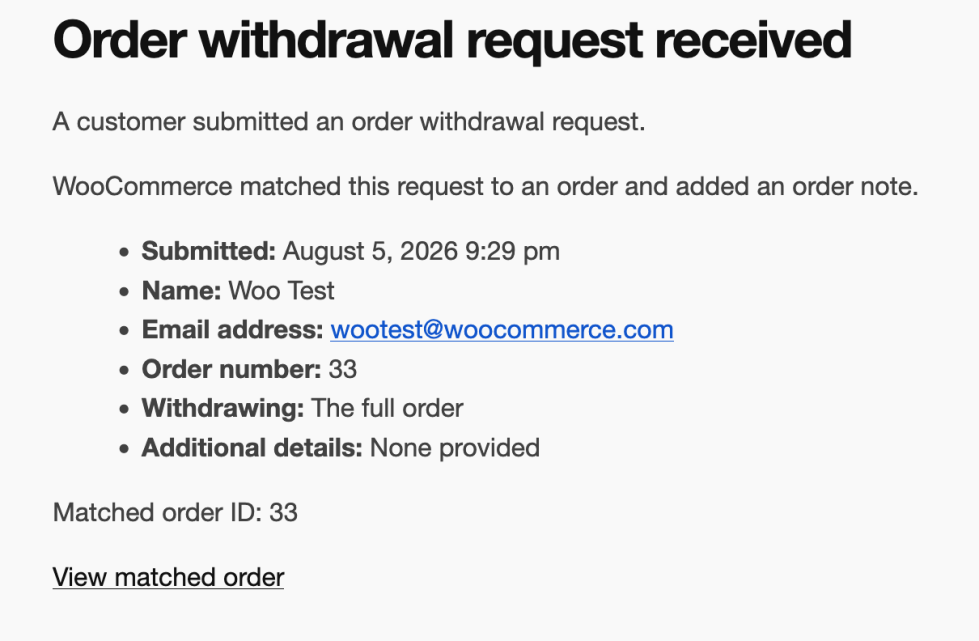
When a request comes in, we make sure the store owners know about it in a couple of ways: an email notification for the withdrawal request, and an inbox notification on your WooCommerce home screen.
Inbox notificationStore email notification
If the order number and billing email match an existing order, the request is automatically linked to that order, and an order note is added. If there’s no match, the request is still accepted, and the customer still gets their acknowledgment email; the notification simply flags that manual review is needed and skips the order link.
Submitting a withdrawal request does not change the order status, cancel the order, or issue a refund. How a store handles each request is up to the owner, whether that’s approving a refund, asking for the item back, or following up for more information.
What’s next
Order Withdrawal is coming in WooCommerce 11.1. Give it a try, and let us know how it works for your store!
In WooCommerce 11.1 and 11.2, we are focusing on performance optimizations for larger product catalogs. While this work prioritizes backward compatibility, some of the components involved were designed years ago and are structurally incapable of supporting the required performance improvements — the changes below outline what’s affected for extension developers and stores with customizations.
As the product data stores now skip these calls when the stored value already matches, the optimization reduces per-save SQL count by up to 45%.
While technically, the contracts are preserved, changed set_object_terms hook invocation frequency can cause side effects. To verify your extensions and customizations for side effects this change could potentially cause, consider using AI tooling of your choice with the following prompt:
Search the active plugins, mu-plugins, and theme's functions.php for add_action('set_object_terms', ...) callbacks. For each match, check if the callback assumes it fires on every product save regardless of whether the product type changed. If so, the callback needs to be moved to a more appropriate hook (e.g., woocommerce_update_product or save_post_product).
Previously, when you reordered products under Products -> All Products -> Sorting, the complete catalog was reindexed. The new algorithm is designed to work with large catalogs and implements faster re-indexing and smarter (range-based) reordering.
The algorithm replacement required redefining customization and deprecating old hooks according to this table:
Using deprecated hooks will cause a fallback to the old unoptimized algorithm. Please reference the second PR for details.
Hook
Status
Use-case
woocommerce_after_single_product_ordering
Deprecated
Fired per product during catalog reindexing
woocommerce_after_product_ordering
Deprecated
Fired once after reordering is completed.
clean_post_cache
Unchanged
Fires per affected product on both legacy and fast paths.
Depending on the exact usage of the deprecated hooks, please consider using clean_post_cache, wp_ajax_woocommerce_product_ordering, woocommerce_product_ordering_process_reindexed_products, and woocommerce_product_ordering_process_moved_products as primitives for replicating the original behaviour.
WooCommerce 11.1 brings a complete order withdrawal flow for shoppers, a new REST API refund calculation endpoint, several bug fixes for the product CSV import and export, and a focused set of compatibility changes for extension developers. Here is an early look at the changes taking shape before the release.
Several bug fixes were applied to Product Importing, including preserving terms and categories in re-uploads, clearing images when the file indicates so, respecting existing store currency settings, and better handling for variation creation if the product already exists.
Order withdrawal
WooCommerce 11.1 brings the right of order withdrawalfunctionality to better serve EU customers. A customer can request a withdrawal from a new My Account page /my-account/withdraw-order/, no auth required. Submissions are then routed to merchants, who receive an email and an inbox notification to follow up with the customer. Order withdrawal is disabled by default and must be enabled from WooCommerce -> Settings -> Advanced -> Features.
REST API refunds and Store API checkout totals
We have updated the refund flow in the WC REST API. We now call POST /wc/v3/orders/{id}/refunds with compute_totals: true in the body, which lets the server calculate the refund totals for you (instead of doing manual calculations).
A new endpoint POST /wc/v3/orders/{id}/refunds/preview allows you to run the calculation and preview the refund without actually applying it.
On Store API, checkout endpoints gain an optional expected_total: integer field that should contain the total the customer is seeing, and if they get charged a different amount, the request would fail with a new 409woocommerce_rest_checkout_total_mismatch response. This field is then immediately applied in the Checkout block.
The block email editor makes core/embed insertable for providers that render clickable thumbnails: YouTube, Vimeo, VideoPress, TikTok, and Dailymotion, plus the WordPress embed, which renders as a rich link card. Audio providers are excluded. Embeds from unsupported providers can still be pasted in; however, the editor issues a warning and sends a link to reflect the delivered result.
Personalization tag callbacks now receive their destination content type. A tag can escape correctly for HTML, plain text, or an href. The new parameter is optional and defaults to HTML; automatic escaping applies only to newly registered text-typed tags.
Multiple performance fixes are included in this release, mainly reducing N+1 queries around variations and attributes in both the editor and frontend, and reducing queries on price caching as well.
Block registration is skipped on non-rendering requests
Block types and patterns previously registered on nearly every request, including many that never render or edit blocks. A new BlockRegistrationContext guard now skips registration on cron, AJAX, and REST API requests, while preserving front-end, admin, and editor behavior.
One exception is built in: when a product or variation description contains a WooCommerce block, block types are registered on demand via the woocommerce_short_description filter, so descriptions still render correctly in the products REST API, the Store API, the variation AJAX endpoint, and product webhooks.
Extensions that assume block registration on every request must adapt. The new woocommerce_should_register_blocks filter opts back in for extensions that render blocks in a skipped context.
An experimental unified block editor assets feature replaces per-block editor scripts and styles with shared JavaScript and CSS bundles. Frontend assets are unchanged. Testing measured 91.7% fewer editor assets, a 48.3% reduction in network transfer size, and 62.3% smaller style bundles.
The experiment is disabled by default, and stores can opt in to test it from WooCommerce -> Settings -> Advanced -> Features -> Experimental features. When enabled, WooCommerce blocks use the wc-block-library handle instead of individual block handles, editor styles consolidate under wc-block-library-style, and legacy handles stay registered as placeholders that emit a deprecation warning when enqueued.
Internal storage for a product video gallery is behind a feature flag as the first step toward product gallery videos; this can be enabled through WooCommerce > Settings > Advanced > Features > Product gallery videos (Beta).
is_rest_api_request() previously detected REST requests only through pretty-permalink paths under /wp-json/. It now treats a non-empty rest_route query parameter as a REST request.
Other compatibility notes
ProductGalleryUtils::get_product_gallery_image_count() is deprecated and restored as a shim that emits a deprecation notice pointing to get_product_gallery_media_count(): #66550.
The quantity stepper’s DOM order now matches its visual order, fixing WCAG 1.3.2 and 2.4.3. Themes with CSS keyed to the old DOM order should re-test: #66670.
WC_Order_Item_Product::set_product() now resets variation_id, and partial REST order updates preserve variation IDs when product_id is unchanged. An explicit variation_id: 0 still demotes to parent: #66734, #67343.
search_products() now wraps its OR-group disjunction in parentheses, so include, exclude, status, and type clauses apply to all groups. Result sets change: #67420.
A new GET /wc-analytics/activity-panel/counts collapses three endpoints previously called by two components each, turning six requests per admin page load into one: #66276.
Analytics page output no longer carries request-derived properties, so cached pages cannot emit another visitor’s request data: #67003.
@woocommerce/entities no longer exposes internal utilities on window.wc.wcEntities. Those utilities were never intended as a public API: #66978.
Currency symbol output changes for MOP (P to MOP$) and ZMW (ZK to K). Existing symbol-override filters continue to work: #66716, #66722.
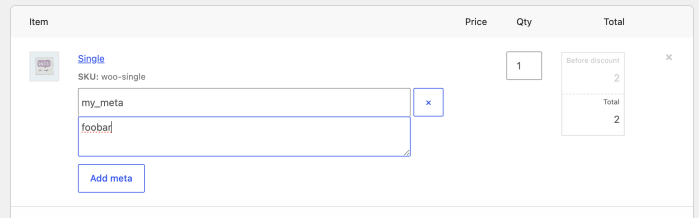
As of WooCommerce 11.0.0, the order items form in the admin order editor no longer attempts to save reserved meta keys entered through its Add meta button, an operation that never worked reliably.
A key is reserved when the order item’s data store lists it as internal meta (e.g. _product_id, _qty, _line_total), or when an extension registers it as hidden via the woocommerce_hidden_order_itemmeta filter.
Order item metadata in the admin.
Why this change
The goal is correctness and consistency: reserved keys are data that WooCommerce or extensions manage, and editing them through a generic form was never safe. Before 11.0.0, the form accepted these keys, with broken results.
Keys backed by a setter, such as _product_id, were silently processed by the item’s setter, where an invalid value could break the order screen and a valid one could partially overwrite data. Any other reserved key was appended as a new meta row even when the item already had one, confusing code that expects a single value.
In no case could the entered value be reviewed or edited afterwards.
What has and hasn’t changed
Reserved keys entered through the Add meta button in the order editor are now skipped when the item is saved. In practice, not much else changes: these keys never showed in the form, and adding one only ever worked when the key was missing, due to a bug.
Everything else stays the same:
Keys that aren’t reserved save normally, even if they start with _. Order item meta doesn’t follow rules similar to WordPress protected meta.
Programmatic reads and writes via add_meta_data(), update_meta_data(), the REST API, WP-CLI, etc. are unchanged.
Order meta (the order’s own custom fields) is unaffected: this change only concerns meta on order items.
For developers
If your extension registers keys in woocommerce_hidden_order_itemmeta those will be skipped not just for rendering, as usual, but now also at save time, failing silently.
If admins are expected to manage a meta key, don’t register it as hidden, or provide a dedicated UI for it, giving them a much clearer flow than raw meta entry.
To keep the key hidden but still let admins set it from the items form, re-apply the submitted value from woocommerce_before_save_order_items as a workaround:
If an extension’s documentation asks you to enter a meta key through Add meta and the value doesn’t stick, the extension most likely registers that key as hidden. Until the extension is updated, you can unhide the key with a small snippet, which makes it visible and editable in the order editor:
Admin settings initialize consistently across WooCommerce admin pages. This fixes a Payments settings bug that could show a false business-location mismatch warning for stores outside the United States. (#67532)
Password protection covers product short descriptions across embeds, Product Summary blocks, and block-based single-product templates. Shoppers must enter the product password before these summaries appear. (#67557)
Store API payments for existing orders enforce each coupon usage limits correctly. (#67549)
Store API cart tokens are read from one request source and validated before a customer session loads. A PHP_CodeSniffer rule catches direct token reads in future Store API code. (#67550)
Guest session cookies now use a stronger, salted hashing scheme. Legacy cookies remain valid until they expire so guest carts survive the upgrade. (#67408)
Single dismissible notices in Cart and Checkout blocks are sanitized before rendering. Entity-encoded HTML in Store API error messages is displayed as safe content instead of executable markup. (#67476)
The [woocommerce_review_order] shortcode renders only on WooCommerce’s managed review-order page with a matching order key. Requests from other pages or with the wrong key return no order content. (#67552)
External product button labels pass through text sanitization when submitted to REST API versions 1 through 4, and the Product Button block escapes labels on output. (#67558)
Automatic featured-image matching by SKU requires the current user to have the edit_product capability for the matched product. An image upload cannot change a product the user lacks permission to edit. (#67530)
Activating a Marketplace subscription requires activate_plugins for plugins or switch_themes for themes. The endpoint also rejects unsupported product types. (#67567)
The onboarding theme-installation endpoint checks the WordPress install_themes capability. Users without that permission cannot install a theme through onboarding. (#67533)
Analytics CSV exports validate report_args against the selected report’s REST schema. Unsupported orderby values are rejected whether an export is queued through REST or directly in PHP. (#67551)
Analytics order reports accept only recognized date columns from the woocommerce_date_type option or a date_type query argument. Unknown stored values fall back to date_paid, while unknown per-request values fall back to date_created. (#67554)
Writing a log no longer requires scanning the entire wc-logs directory, reducing checkout latency on stores with large log backlogs. Cleanup processes bounded batches until the backlog is empty, and the woocommerce_order_step_logging_enabled filter lets developers disable place-order debug logging without changing the site-wide threshold. (#67410)
The Orders list is compatible with WordPress 7.1’s updated list-table markup. Checkbox interactions and responsive layouts work correctly with both the old and new primary-cell markup. (#67364)
The product-review list-table test accepts both the older check-column markup and the markup introduced in WordPress 7.1. This keeps pre-release CI compatible with both versions without changing runtime behavior. (#67517)
The Add Product screen’s JavaScript-count test accounts for the wp-tooltip and wp-sync scripts added in WordPress 7.1. This test-only change does not affect runtime behavior. (#67473)

 Login
Login Wednesday, September 30, 2026
 10 a.m. PDT / 1 p.m. EDT / 7 p.m. CEST