With Stig Abell and Thea Lenarduzzi – Ruth Scurr on Beryl Bainbridge's life, love and works; Jessica Loudis on two memoirs, of New York City and the Chelsea Hotel; ruthless and high-minded or likeable and good-natured? Dinah Birch on the ever-enigmatic J. M. W. Turner; and finally, we're joined by the TLS's resident Shakespearean Michael Caines to talk us through a new compendium of writing on the playwright. Just don't call him the Bard. Find out more: www.the-tls.co.uk
With Stig Abell and Thea Lenarduzzi – Adam Kuper on French structuralist and hoarder of myths Claude Lévi-Strauss; Joe Paul Kroll on what happened when a slightly belligerent group of eminent German writers visited America; Laura James on the intractable paradox of aid in Africa and different approaches to nation-building; finally, TLS Poetry Editor Alan Jenkins discusses the enigmatic poet Louis Aragon, and reads his new translation "Elsa at the Mirror".Find out more at www.the-tls.co.uk
Replicating a 'Lucisart'/Dave Hill type illustrative look
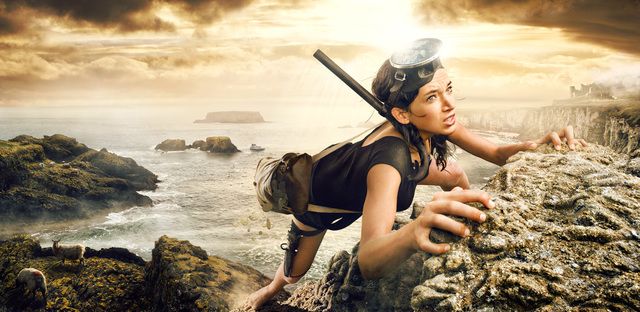
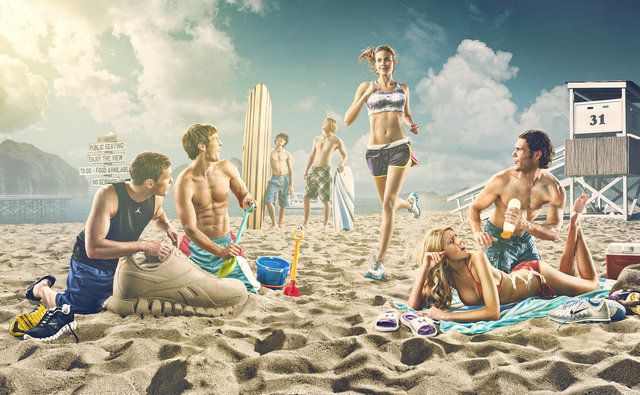
Over in the forums community member Sebastien Guyader (@sguyader) posted a neat workflow for emulating a photo-illustrative look popularized by photographers like Dave Hill where the resulting images often seem to have a sort of hyper-real feeling to them. Some of this feeling comes from a local-contrast boost and slight ‘blooming’ of the lighter tones in the image (though arguably most of the look is due to lighting and compositing of multiple elements).
To illustrate, here are a few representative samples of Dave Hill’s work that reflects this feeling:
A video of Dave presenting on how he brought together the idea and images for the series the first image above is from:
This effect is also popularized in Photoshop® filters such as LucisArt in an effort to attain what some would (erroneously) call an “HDR” effect. Really what they likely mean is a not-so-subtle tone-mapping. In particular the exaggerated local contrasts is often what garners folks attention.
We had previously posted about a method for exaggerating fine local contrasts and details using the “Freaky Details” method described by Calvin Hollywood. This workflow provides a similar idea but different results that many might find more appealing (it’s not as gritty as the Freaky Details approach).
Sebastien produced some great looking preview images to give folks a feeling for what the process would produce:
Sebastien’s approach relies only on having the always useful G’MIC plugin for GIMP. The general workflow is to do a high-pass frequency separation, and to apply some effects like local contrast enhancement and some smoothing on the residual low-pass layer. Then recombine the high+low pass layers to get the final result.
Open the image.
Duplicate the base layer. Rename it to “Lowpass”.
With the top layer (“Lowpass”) active, open G’MIC.
Use the Photocomix smoothing filter:
Testing → Photocomix → Photocomix smoothing
Set the Amplitude to 10. Apply. This is to taste, but a good startig place might be around 1% of the image dimensions (so a 2000px wide image - try using an Amplitude of 20).
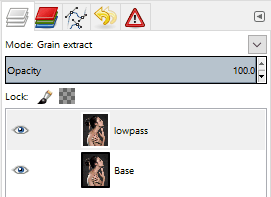
Change the “Lowpass” layer blend mode to Grain extract.
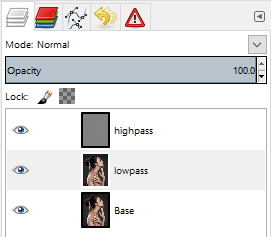
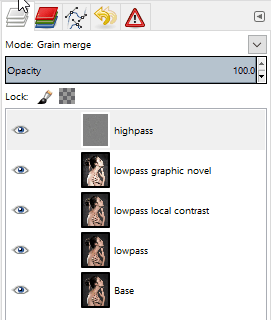
Right-Click on the layer and choose New from visible. Rename this layer from “Visible“ to something more memorable like “Highpass” and set its layer mode to Grain merge. Turn off this layer visibility for now.
Activate the “Lowpass” layer and set its layer blend mode back to Normal. The rest of the filters are applied to this “Lowpass” layer.
Open G’MIC again. Apply the Simple local contrast filter:
Details → Simple local contrast
Using:
Edge Sensitivity to 25
Iterations to 1
Paint effect to 50
Post-gamma to 1.20
Open G’MIC again. Now apply the Graphic novel filter:
Artistic → Graphic novel
Using:
check the Skip this step checkbox for Apply Local Normalization
Pencil size to 1
Pencil amplitude to 100-200
Pencil smoother sharpness/edge protection/smoothness to 0
Boost merging options Mixer to Soft light
Painter’s touch sharpness to 1.26
Painter’s edge protection flow to 0.37
Painter’s smoothness to 1.05
Finally, make the “Highpass” layer visible again to bring back the fine details.
Trying It Out!
Let’s walk through the process. Sebastien got his sample images from the website https://pixabay.com, so I thought I would follow suit and find something suitable from there also. After some searching I found this neat image from Jerzy Gorecki licensed Create Commons 0/Public Domain.
The first steps (1—7) are to create a High/Low pass frequency separation of the image. If you have a different method for obtaining the separation then feel free to use it. Sebastien uses the Photocomix smoothing filter to create his low-pass layer (other options might be Gaussian blur, bi-lateral smoothing, or even wavelets).
The basic steps to do this are to duplicate the base layer, blur it, then set the layer blend mode to Grain extract and create a new layer from visible. The new layer will be the Highpass (high-frequency) details and should have its layer blend mode set to Grain merge. The original blurred layer is the Lowpass (low-frequency) information and should have its layer blend mode set back to Normal.
So, following Sebastien’s steps, duplicate the base layer and rename the layer to “lowpass”. Then open G’MIC and apply:
Testing → Photocomix → Photocomix smoothing
with an amplitude of around 20. Change this to suit your own taste, but about 1% of the image width is a decent starting point. You’ll now have the base layer and the “lowpass” layer above it that has been smoothed:
“lowpass” layer after Photocomix smoothing with Amplitude set to 20.
Setting the “lowpass” layer blend mode to Grain extract will reveal the high-frequency details:
The high-frequency details visible after setting the blurred “lowpass” layer blend mode to Grain extract.
Now create a new layer from what is currently visible. Either right-click the “lowpass” layer and choose “New from visible” or from the menus:
Layer → New from Visible
Rename this new layer from “Visible” to “highpass” and set its layer blend mode to Grain merge. Select the “lowpass” layer and set its layer blend mode back to Normal.
The visible result should be back to what your starting image looked like.
The rest of the steps for this tutorial will operate on the “lowpass” layer.
You can leave the “highpass” filter visible during the rest of the steps to see what your results will look like.
Modifying the Low-Frequency Layer
These next steps will modify the underlying low-frequency image information to smooth it out and give it a bit of a contrast boost. First the “Simple local contrast” filter will separate tones and do some preliminary smoothing, while the “Graphic novel” filter will provide a nice boost to light tones along with further smoothing.
Simple Local Contrast
On the “lowpass” layer, open G’MIC and find the “Simple local contrast” filter:
Details → Simple local contrast
Change the following settings:
Edge Sensitivity to 25
Iterations to 1
Paint effect to 50
Post-gamma to 1.20
This will smooth out overall tones while simultaneously providing a nice local contrast boost. This is the step that causes small lighting details to “pop”:
After applying the “Simple local contrast” filter. (Click to compare to the original image)
The contrast increase provides a nice visual punch to the image. The addition of the “Graphic novel” filter will push the overall image much closer to a feeling of a photo-illustration.
Graphic Novel
Still on the “lowpass” layer, re-open G’MIC and open the “Graphic Novel” filter:
Artistic → Graphic novel
Change the following settings:
check the Skip this step checkbox for Apply Local Normalization
Pencil size to 1
Pencil amplitude to 100-200
Pencil smoother sharpness/edge protection/smoothness to 0
Boost merging options Mixer to Soft light
Painter’s touch sharpness to 1.26
Painter’s edge protection flow to 0.37
Painter’s smoothness to 1.05
The intent with this filter is to further smooth the overall tones, simplify details, and to give a nice boost to the light tones of the image:
After applying the “Graphic novel” filter. (Click to compare to the local contrast result)
The effect at 100% opacity can be a little strong. If so, simply adjust the opacity of the “lowpass” layer to taste. In some cases it would probably be desirable to mask areas you don’t want the effect applied to.
I’ve included the GIMP .xcf.bz2 file of this image while I was working on it for this article. You can download the file here (34.9MB). I did each step on a new layer so if you want to see the results of each effect step-by-step, simply turn that layer on/off:
Example XCF layers
Finally, a great big Thank You! to Sebastien Guyader (@sguyader) for sharing this with everyone in the community!
A G’MIC Command
Of course, this wouldn’t be complete if someone didn’t come along with the direct G’MIC commands to get a similar result! And we can thank Iain Fergusson (@Iain) for coming up with the commands:
Terry Eagleton gives the Theos annual lecture, on the not un-problematic, not un-high-stakes, and not un-incendiary twin matters of The Death of God and the War on Terror. Find our more: www.the-tls.co.uk
With Stig Abel and Thea Lenarduzzi: Tim Crane guides us through our philosophy special edition (including on how the brain works); Lisa Hilton helps to recover the voices of Parisian wartime women; Anna Katharina Schaffner explains why the Nazis were all high. Plus Andrew Motion reflects on his freedom from the role of Poet Laureate, and reads his poem "Evening Traffic".
With Stig Abell and Thea Lenarduzzi – Marcia Zug on marriage in America (plus the pros and cons of mail-order brides); Laura Freeman on Beatrix Potter's naughty charm; Paul Duguid considers the implications of unrestrained information for all – is more necessarily better?; and finally, Robert Potts reads "Gift", a poem by the concrete poet Ian Hamilton Finlay, first published in the TLS in 1960.
With Stig Abell and Thea Lenarduzzi – Mark Ford on Thomas Hardy's unlikely London romance; Hirsh Sawhney on Aravind Adiga's captivating new novel and his messy portrait of India; to tie in with a special run of features on the Middle East, TLS editors Robert Irwin and Toby Lichtig discuss the challenges, historical and present, facing the region; and finally, Mark Ford reads Thomas Hardy's poem "Coming Up Oxford Street: Evening", from 1872.
With Stig Abell and Lucy Dallas.Including Ferdinand Mount on what defines England and its inhabitants;David Horspool on responses to Hitler and his ideas; and Mika Ross-Southall on Nick Cave's savagely sad album.
With Stig Abell and Lucy Dallas.Raymond Tallis on the ongoing threat to the NHS; Bee Wilson on descriptions of pregnancy and childbirth; and Marjorie Perloff on seeing O.J. Simpson as Othello.
Welcome to the first installment of From the Community, a (hopefully) quarterly blog post to highlight a few of the things our community members have been doing!
Free Software development tends to move at a pretty good pace, so there is always something new to try out! Not all of the new things warrant a new release, but our community steps up and builds the software so that others can use and test! Instead of random links to dropboxes and such, we’ve created a Community-built Software page to help centralize and make it easy for our users to help find and download the freshest builds of software from our great community members. Keep in mind that support may be limited for these builds and they’re considered testing, so quality may vary, but if you covet the newest, shiniest things, this is the place for you!
Watermarking is ugly and takes focus away from your image. Why not try and add an attribution bar to your images? In this post, @patdavid lays out how to add a bar underneath your image with your name, the image title, and a little logo. @David_Tschumperle followed that effort up with an alternate implementation using G’MIC instead of imagemagic. Lastly, @vato rolled the imagemagick version into a bash script with the necessary parameters exposed as variables at the beginning of the script.
Finally, we’re still working on our beginner article to help new users navigate the myriad of free software photography software that is out there. If you have ideas, or better yet, want to author a bit of content with our community, please join and help out! The post is community wiki and has complete revision control, so don’t be afraid to jump in and contribute!
With Stig Abell and Lucy Dallas: Clare Lowdon on Safran Foer's great big dazzling novel; Mary Beard on what makes Classics relevant; and Can Dundar on being imprisoned by the Turkish state for telling the truth.
With Thea Lenarduzzi and Toby Lichtig – Edward Luttwak on the global unravelling occasioned by the Panama Papers; Mary Beard on the enigmatic Emperor Nero, matricidal monster and lover of music; and Hermione Hoby on the difficult beauties of Hollywood, from Babra Streisand to Meryl Streep; plus, a look ahead to next week's special edition of the show.
With Stig Abell and Thea Lenarduzzi – Patrick Wilcken brings us the real Brazil, a country at breaking point; Francesca Wade considers the radical interior designs, and desires, of the Bloomsbury Group; Toby Lichtig on the failures and successes of Geoff Dyer; and Rachel Hadas reads her poem, "Raw Jute".
With Stig Abell and Thea Lenarduzzi – Thomas Meaney on death (and what to do with the remains) in the West; Professor Amy Knight on how Putin keeps getting away with murder; Edmund White reconsiders Pale Fire, Nabokov's "great gay comic novel", and reads from the novel's opening.
This week: Andrew Motion on Housman's hidden corners; Trev Broughton on rediscovering Charlotte Bronte; and DJ Taylor on the myths of the Sixties. Plus Andrew Motion reads from Housman's A Shropshire Lad.

 Login
Login