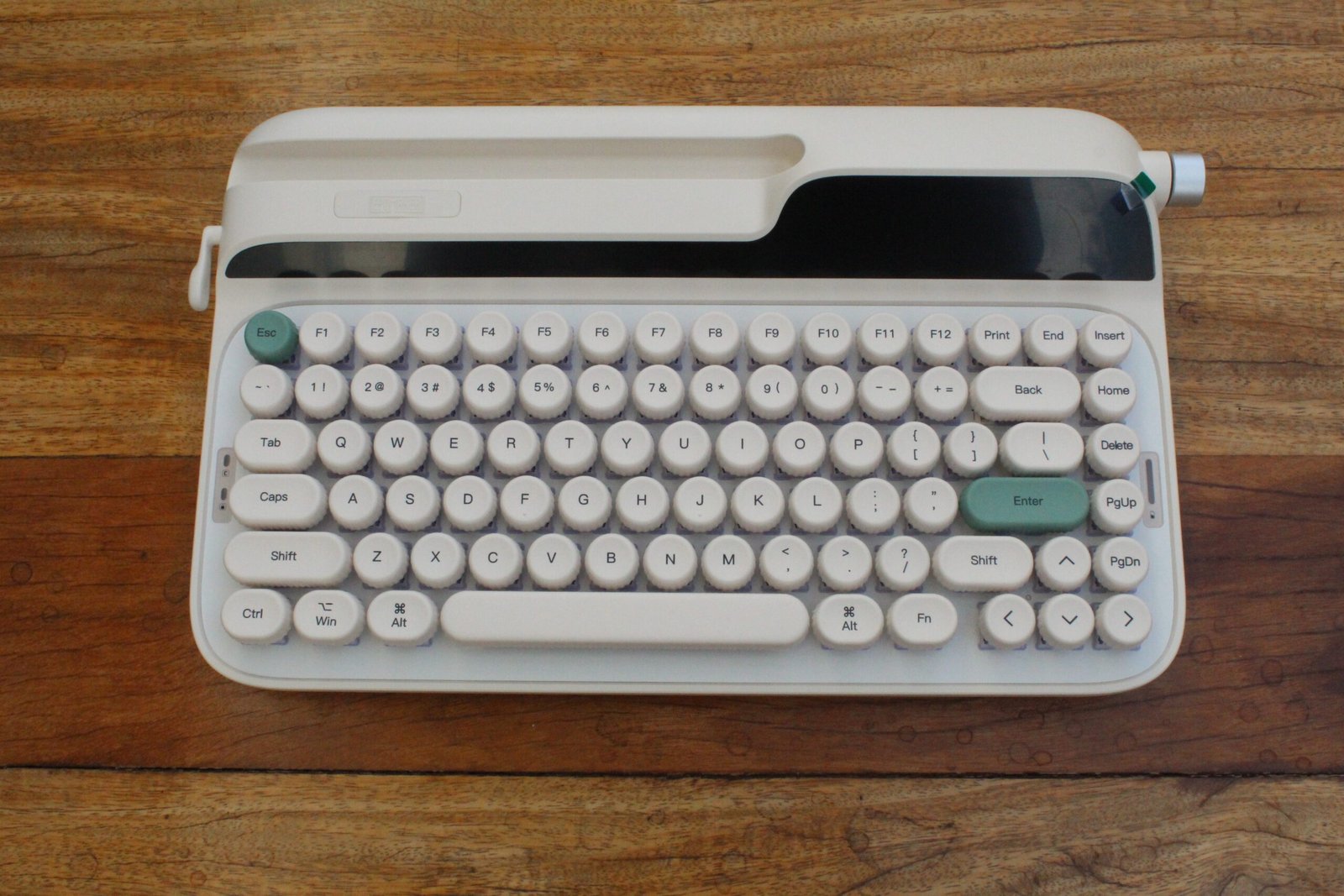
Nesse artigo irei analisar o EPOMAKER Glyph, que se trata de um teclado mecânico "75%", ou seja, sem teclado numérico, mas mantendo as teclas de função e setas direcionais, no padrão ANSI, sem "Ç", com construção em plástico e iluminação RGB, onde seu maior diferencial é o visual retrô diferente de tudo que já passou aqui pelo site. Mas será esse um bom teclado? É o que vamos descobrir.
Acompanhe a lista atualizada dos nomes que disputam à Presidência. Com fim das convenções partidárias, 13 candidatos foram confirmados pelos partidos. Lula e Flávio Bolsonaro aparecem à frente das pesquisas.
What does author of The Dog Stars think of the film adaptation?
The New Scientist Book Club has been reading Peter Heller’s post-apocalyptic novel The Dog Stars in August. He joined head of books Alison Flood to discuss the trend for dystopian fiction, how he didn’t plan anything before writing the book – and what it felt like to watch Ridley Scott’s film adaptation, released later this month.
Watch the full interview: https://www.newscientist.com/podcasts/
Season 10, Episode 13. October 15th, 2023. After addressing the beginning of the Gaza War, John Oliver discusses the continued chaos in Congress as they try to decide on a new Speaker of the House, then details some of the major vulnerabilities in our food-safety system.
Subscribe to the #lastweektonight YouTube channel for more almost news as it almost happens: www.youtube.com/lastweektonight
Or find us on your favorite social media platform we may or may not have discussed at length on the show:
Incredible performers read correspondence that will delight music lovers of all stripes, from Elton John’s moving letter of advice to his 16-year-old self, to Rik Mayall’s hilarious letter of complaint about Band Aid.
Featuring performances from Kylie Minogue, Benedict Cumberbatch, Taron Egerton, Gillian Anderson and Dagmara Domińczyk.
Check out Plaud using my link: https://bit.ly/4xaAtrp. Amazon: https://amzn.to/45Ba5La. Use my code SABINE for 10% off!
A nuclear fusion startup in New Zealand just published a design for a "levitating dipole" reactor, an approach almost everyone had written off as fundamentally flawed. It’s the first new idea in nuclear fusion design for decades. Let's take a look.
👕T-shirts, mugs, posters and more: ➜ https://sabines-store.dashery.com/
💌 Support me on Donorbox ➜ https://donorbox.org/swtg
👉 Transcript with links to references on Patreon ➜ https://www.patreon.com/Sabine
📝 Transcripts and written news on Substack ➜ https://sciencewtg.substack.com/
📩 Free weekly science newsletter ➜ https://sabinehossenfelder.com/newsletter/
👂 Audio only podcast ➜ https://open.spotify.com/show/0MkNfXlKnMPEUMEeKQYmYC
🔗 Join this channel to get access to perks ➜
https://www.youtube.com/channel/UC1yNl2E66ZzKApQdRuTQ4tw/join
📚 Buy my book ➜ https://amzn.to/3HSAWJW
O Vale do Silício está obcecado pela ideia de bom gosto ("taste"). Se a inteligência artificial permite a qualquer pessoa fazer qualquer coisa, qual será então o diferencial? A resposta do momento é justamente o "bom gosto". Não sou eu quem está dizendo isso. É gente como Greg Brockman, presidente da OpenAI, e colegas que gostam de repetir que "bom gosto é a nova habilidade essencial" do presente.
Leia mais (08/23/2026 - 12h00)
I’m Dan Piraro, the creator of the Bizarro newspaper comic, and this is my weekly blog post. The large Sunday comic above is mine, as are all of the below-cartoon comments to follow.
Since January 2018, the Monday-Saturday Bizarro comics have been written and drawn by my comics partner, Wayno. For more fun, check out Wayno’s weekly blog post.
That’s Spanish for “welcome, Jazz Pickles.” I’m visiting my family in Oklahoma this weekend, haven’t spoken any Spanish for a few days, and didn’t want to get rusty. Use it or lose it, as they say. Nobody wants to lose their pepinillos.
So I’m visiting my dad, who is about to complete his 91st year on this brutal planet, and up until recently, everything was going pretty well. My mom left a few months ago, and Dad says he’s more than ready to join her. But the body sometimes refuses to leave politely all at once and prefers to fall apart slowly, piece by piece.
That’s where my dad is these days. He feels trapped in an increasingly broken department-store mannequin. The mind and body he’s always trusted to come up with words to express his thoughts and movements to get him where he wants to go are now routinely raising a metaphorical middle finger to his desires.
He’s frustrated but hasn’t lost his sense of humor, and is still able to laugh in between bouts of complaining. A visit with Dad these days is a bit like a Rodney Dangerfield routine.
He regularly tells me that if he believed in suicide, he’d be gone by now, but he insists on leaving “on God’s schedule.” I warned him that with that attitude, if there is no god, he may live forever, but he remains undaunted in his determination to wait it out. I offered to slip something into his drink when he wasn’t paying attention, and he looked at me side-eyed with a wicked smile.
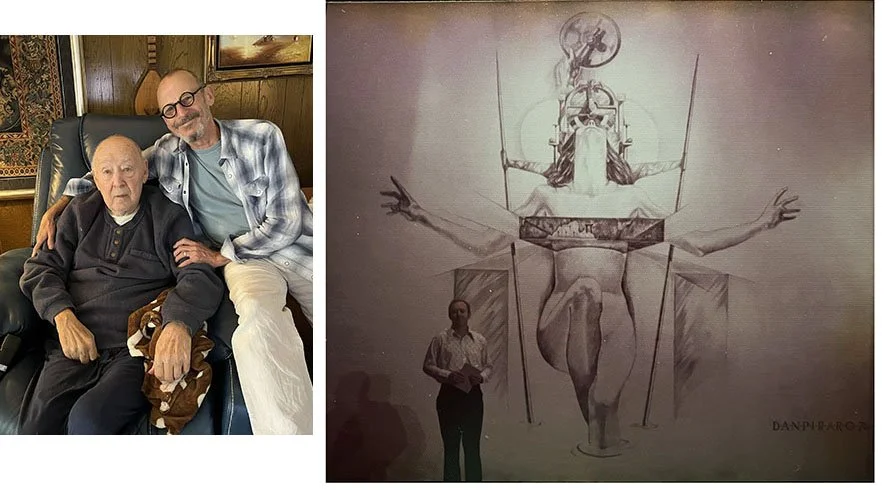
Yesterday, I went to visit one of my favorite teachers from high school, Darryl Goode. He’s 88 and spent his life directing who knows how many high school theater productions, some award-winning. I was in a few of them in the mid-70s.
Darryl was a creative, open-minded, free-thinking teacher the likes of which I’d never known in any other quarter of my life. He taught us how to express ourselves with both enthusiasm and discipline, wowing the crowd, but keeping our egos in check; no small accomplishment with a herd of hormone-crazed teenagers.
We had a heartfelt visit yesterday, and I told him how important he’d been to my development as a creative being, and how, had it not been for him, I’d have doubtless been a different person. I could’ve easily chosen a different career, and ended up in a cubicle or behind a counter somewhere doing a job that kept me watching the clock, yearning to escape. (I had quite a few of those before I bamboozled my way into a cartoon career.)
I’m convinced that had there been no Darryl Goode in my life, there would have been no Bizarro, so you regular readers have him to thank, too.
Left: Darryl Goode and me now. Right: Darryl standing in front of a theater backdrop that I drew in 1976. (Crayon on canvas)
Now the mushy part: Darryl and I agreed yesterday that every life is interconnected with every other. We have no idea how far every one of our words and actions reverberates, nor the dominoes they set in motion. I like thinking about that and realizing that we’re not just living through history; each of us creates it, a molecule at a time.
Be good to someone today and every day, and change the fucking world. Lord knows it needs it.
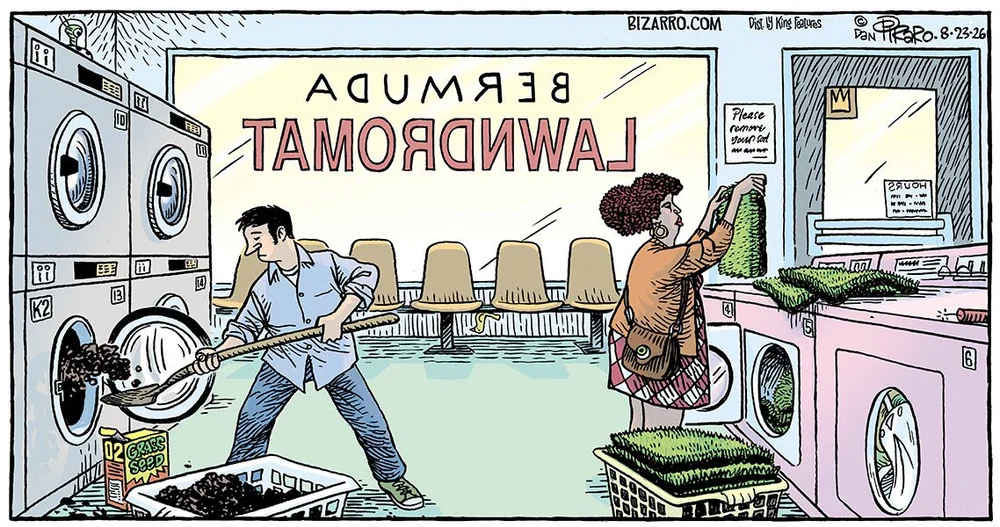
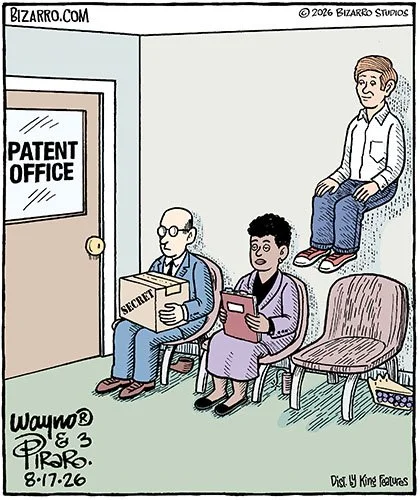
Let’s find out what history Wayno created with his latest Bizarro comics…
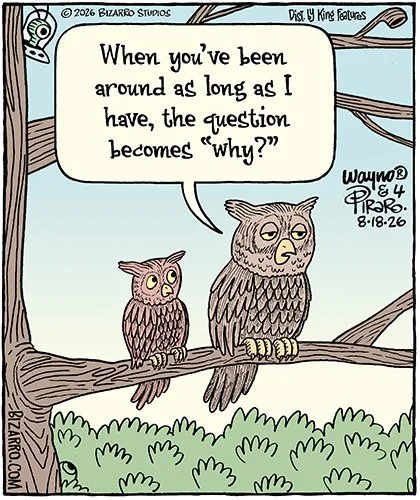
He’s either discovered a way to float, or a pill that works the opposite of Gas-X.
My dad could’ve written this one.
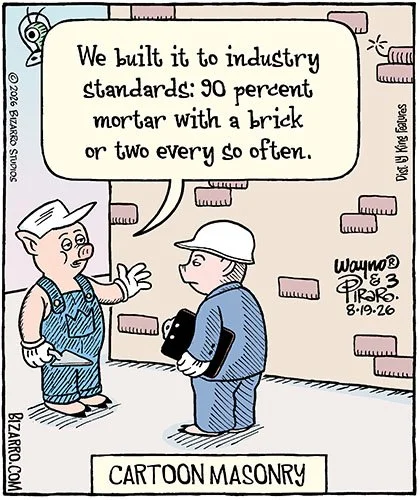
This is why cartoon buildings rarely survive earthquakes.
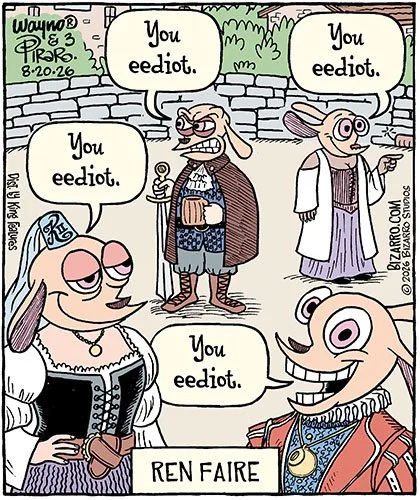
If you don’t get this one, you may be either too young, or an eediot.
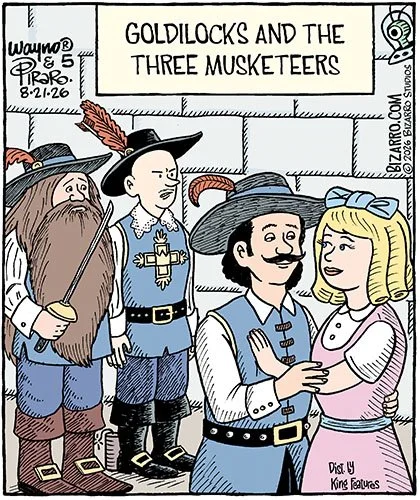
I can’t help but recall her famous words, “Too soft. Too hard. Just right.”
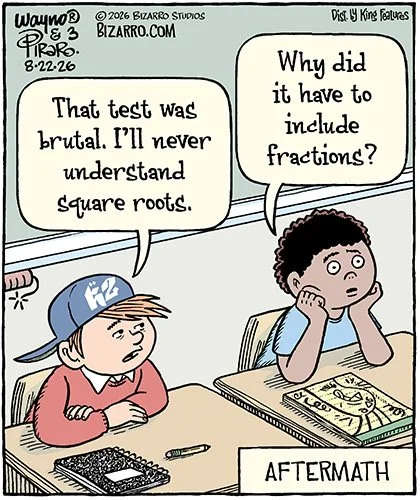
I’m so crappy at math that I don’t even understand this cartoon.
That’s all I got for this week, Pepinillos de Jazz. I gotta run off to breakfast with my sisters and brothers-in-law now. If you’re digging the groovy vibes we’re laying down here for free, please consider helping us keep it that way via the links below. We’ll be so damned grateful!
Super fun BIZARRO SWAG from ComicsKingdom, including women’s V-neck styles! (And some weird shit from other comics that doesn’t even belong in our shop. Sorry about that.)
Michael Craig-Martin was born in Dublin, Ireland, in 1941. He grew up and was educated in the United States, studying Fine Art at the Yale School of Art and Architecture. He has lived and worked in Britain since 1966.
His first solo exhibition was at the Rowan Gallery in London in 1969. He participated in the definitive exhibition of British conceptual art, The New Art at the Hayward Gallery in 1972. His best known works include An oak tree of 1973, in which he claimed to have changed a glass of water into an oak tree; his large-scale black and white wall drawings; and his intensely coloured paintings, installations, and commissions, including the European Investment Bank in Luxembourg, the Laban Dance Centre in London (in collaboration with Herzog and de Meuron), the DLR station at Woolwich Arsenal, and, most recently, the HDI Gerling Headquarters in Hannover.
Over the past forty-two years, he has had numerous exhibitions and installations in galleries and museums across the world, including the Centre Pompidou, Paris, and MoMA, New York; the Kunstvereins in Düsseldorf, Stuttgart, and Hannover; IVAM in Valencia; and Kunsthaus Bregenz. He represented Britain at the 23rd São Paulo Biennial. A retrospective of his work was presented at the Whitechapel Art Gallery, London, in 1989; a second at the Irish Museum of Modern Art in Dublin in 2006; and a third at the Serpentine Gallery, London, in 2015.
Craig-Martin is well known for being an influential teacher at Goldsmiths College, London. He was a Tate Trustee from 1989 to 1999, was awarded a CBE in 2000, and was elected an RA in 2006. In 2016, he was knighted in the Queen’s Birthday Honors for his services to art.
Michael Craig-Martin was interviewed by Marc-Christoph Wagner in his London studio in February 2026.
Camera: Simon Weyhe
Edit: Nanna Dahm
Produced by: Marc-Christoph Wagner
Copyright: Louisiana Museum of Modern Art, 2026
Louisiana Channel is supported by Den A.P. Møllerske Støttefond.
Subscribe to our channel for more videos: https://www.youtube.com/thelouisianachannel
SIGN UP FOR OUR NEWSLETTER:
https://channel.louisiana.dk/newsletter
FOLLOW US HERE:
Website: http://channel.louisiana.dk
Instagram: http://www.instagram.com/louisianachannel
Facebook: https://www.facebook.com/LouisianaChannel
Learn more about Westward Gold (CSE: WG) (OTCQB: WGLIF) at https://westwardgold.com/ and view the stock overview here: https://www.tradingview.com/symbols/CSE-WG/ DISCLAIMER: This advertisement has been disseminated on behalf of Westward Gold. I have been compensated by Senergy Capital to produce and distribute this video. This content is for informational purposes only and does not constitute financial advice or a recommendation to buy or sell any securities. Viewers should consult a qualified financial professional before making any investment decisions. Investing in small-cap companies involves significant risk, including potential loss of capital, and past performance is not indicative of future results. Please do your own research (DYOR) before making any investment decisions. Please read the full disclaimer at https://docs.google.com/document/d/1AZMuQJDZ0oVbLg1hOymVqsv6MJH0W01B7SxJmZpzWLo/edit?usp=sharing.
Alberta’s push for independence could be the first domino in a much bigger fight over Canada’s future.
Keep tabs on what’s happening around the world and see where a situation is heading before it becomes obvious. Try Pulse with a free DeltaSweep trial: https://www.deltasweep.com
De repente, a surpresa. Em meio ao noticiário envolvendo as trumpices do presidente Donald Trump, a primeira página do site do jornal The New York Times do dia 3 último oferecia uma reportagem intitulada "Mude a tampa de sua privada e mude seu estilo de vida". E, para atenuar o estupor do leitor, completava: "É sério". Secular leitor do jornal americano, nunca tinha visto título mais ousado desde o famoso "HOMENS CAMINHAM NA LUA", de 21 de julho de 1969, enorme e em maiúsculas.
Leia mais (08/23/2026 - 08h00)
In this 134th episode of the Gutenberg Changelog Podcast, Birgit Pauli-Haack hosts Jessica Lyschik , senior developer at Greyd, to discuss recent Gutenberg and WordPress developments. The conversation centers on the releases of Gutenberg 23.7, 23.8, and WordPress 7.1 (“Mary Lou”), highlighting user-facing enhancements and developer-oriented changes. WordPress 7.1 introduced notable features, including new styling […]
In this 134th episode of the Gutenberg Changelog Podcast, Birgit Pauli-Haack hosts Jessica Lyschik , senior developer at Greyd, to discuss recent Gutenberg and WordPress developments. The conversation centers on the releases of Gutenberg 23.7, 23.8, and WordPress 7.1 (“Mary Lou”), highlighting user-facing enhancements and developer-oriented changes.
WordPress 7.1 introduced notable features, including new styling tools, updated media flow, notes functionality for collaboration, and improved support for AI-driven workflows. Jessica Lyschik emphasized the impactful addition of pseudo states (hover, focus, active) in buttons and navigation links, though global style options for navigation states are still being developed for 7.2. The new icon API was also discussed, which currently requires plugins for full editor integration.
Both speakers observed an ongoing shift: features first become available via theme.json for theme builders, then gradually get exposed in the UI for broader audiences. They also touched on the evolving approach to child themes, font management, and the need for clear style inheritance indicators. Specific enhancements in Gutenberg 23.7/23.8, like responsive editing toggles and improvements to dynamic galleries and block inspector controls, were covered alongside new opt-out mechanisms for block controls.
The episode closed with a look toward WordPress 7.2, highlighting efforts to address “block editor paper cuts” (small annoyances) and improved tracking of in-progress features. Birgit Pauli-Haack announced a three-month podcast hiatus for sabbatical, promising a return for the 7.2 release. Listeners were encouraged to follow GitHub tracking issues and stay current with upcoming Gutenberg releases.
Birgit Pauli-Haack: Welcome to our 134th episode of the Gutenberg Changelog podcast. In today’s episode, we will talk about Gutenberg 23.7 and 23.8, and also, of course, WordPress 7.1, which was just released, and also what’s in the pipeline. Not very detailed, but we’ll see. I’m your host, Birgit Pauli-Haack, curator at the Gutenberg Times and a full-time core contributor for the WordPress open source project sponsored by Automattic. It’s again a special treat for me to have Jessica Lyschik to join me on the show again. Jessica is a senior developer at Greyd, which is a German WordPress company that builds Greyd.Suite, an all-in-one toolkit for building and managing professional WordPress sites. Welcome to the show, Jessica. How are you today?
Jessica Lyschik: Thank you. I’m very good today. And thanks for having me yet again. I don’t know how often have I been here now?
Birgit Pauli-Haack: I think it’s either the 6th.
Jessica Lyschik: 3rd, 4th?
Birgit Pauli-Haack: Well, I think we’re coming up to 6 or 7.
Jessica Lyschik: Is there like an ongoing list of people how often they have been on the show?
Birgit Pauli-Haack: Of course. Of course there is a list.
Jessica Lyschik: Probably I’m very at the top.
Birgit Pauli-Haack: It feels like. Absolutely. Yeah, you are. Top producer here.
Jessica Lyschik: Nice.
Birgit Pauli-Haack: Yeah. So Jessica, you are not only working on Greyd, you also work co-organizer on the WordPress Germany, and you also are a co-organizer for the German-speaking DACH Online WordPress Meetup. DACH, for those who don’t know it, is Deutsch, Austrian, also Österreich and Schweiz, Länderkennung.
Jessica Lyschik: Yes.
Birgit Pauli-Haack: And the meetup comes together every other month, right?
Jessica Lyschik: Yes.
Birgit Pauli-Haack: The 3rd Wednesday in a month in odd months. Yeah.
Jessica Lyschik: Correct. Yes.
Birgit Pauli-Haack: Yeah. So what are you doing there? What’s coming over next?
Jessica Lyschik: So our next meetup is, well, it is all in German. So for those listeners who are not speaking German, it’s unfortunately not for you, but you can try and come over and practice and listen. But we mainly held a whole day meetup in German. So for the German, Austrian, and Swiss communities. And yeah, the next meetup is in September and it is, yes, on the 16th. And we are talking about WordPress 7.0 and 7.1 as the latest releases. We will have Benjamin Sekavica with us who was also the, I think, release coordinator for 7.1, if I’m not mistaken.
Birgit Pauli-Haack: Yes.
Jessica Lyschik: So he will share a bit more because he has been fairly involved into the last past 2 releases and he will share a few insights and everyone can share their experiences. We can answer each other’s questions. And yeah, that’s what we are going to do. So we aim for more of a professional audience with the online meetup.
Birgit Pauli-Haack: You mean developers and agencies?
Jessica Lyschik: Yeah, or also anyone who is working professionally with WordPress. And we are not focusing too much on like beginners, but this is our area where we have our target audience, basically.
Birgit Pauli-Haack: Yeah, yeah, it makes sense. Awesome.
Announcements
Well, thanks for letting us know about that. We’re coming to some announcements. I only got one that I wanted to share with you, dear listeners. Jeff Paul opened the call for volunteers for WordPress 7.2 release squad, and the release is scheduled for December 9th. So that’s kind of the timeframe that you’re looking at. December 9th means there’s 4 weeks beforehand is release candidate, and 6 weeks and 7 weeks is beta before that. So by October, you’re probably gonna be part of the— ongoing work to get this release over the finish line 2 months later.
Jessica Lyschik: Yeah.
Birgit Pauli-Haack: So experience being on the release squad, you had experience with that and I had too. I don’t think that’s a job for someone who hasn’t been part of core for a while because it’s a very fast-moving process and you need to know a lot about how WordPress is actually managed, developed, and released.
Jessica Lyschik: Mm-hmm.
Birgit Pauli-Haack: There are quite a few release squads from previous releases that could come up and volunteer again. Yeah.
Community Contributions
So speaking of first-time contributors to core, there is a new WordPress Contributor Toolkit that has been tested quite a bit, and it’s out in the first version. The first contribution does not start again with installing Git, Node.js, and Docker, and kind of takes the whole Contributor Day morning or in the afternoon when you start doing that. So this is a desktop …
Jessica Lyschik: I remember this.
Birgit Pauli-Haack: Yeah. And not everybody has their computer set up so it all goes smoothly. Yeah. So I have always had trouble with all the installations because my computer is not on the latest stuff. Yeah. So this desktop app handles it all. And after you run the setup wizard, Contributors can link to a track ticket and apply or test existing patches on the running site. It’s also based on Playground. And then open a pull request or attach a patch or hand their work to a mentor or— yeah, there’s quite a few features in there. And Juan Margarito is the project manager, so to speak, but he had input from quite a few core contributors. And I have not heard yet how it all went on WordCamp US, but I think the next version for WordCamp Asia is already in the works. So yeah, test it out. Then if you see something that needs to be fixed or that doesn’t work, yeah, find your way into the GitHub repo so you can leave an issue or, yeah, have some discussion there.
Jessica Lyschik: Yeah, that sounds actually very promising to speed up the process. As I said, I remember like being on Contributor Day and now you have to install this, now you have to install Docker. Now you have to do this. Docker doesn’t work properly. What is the issue? It was a never-ending story. And having a setup that is like ready to go, I think this is very interesting. Yeah, I have not been at WordCamp US either, so I don’t know how this worked out, but I heard only good vibes so far from Contributor Day. Right.
Birgit Pauli-Haack: They published quite a few.
Jessica Lyschik: I think it will speed up the process.
Birgit Pauli-Haack: Yeah, absolutely. Yeah. Yeah, WordCamp US was, the Contributor Day were about 400 people out of 1,000. So that’s a phenomenal ratio there. And they changed the format a little bit from what I read, that they actually were project-oriented. So they actually were able to finish a few projects. And it’s more like a hackathon rather than kind of everybody picks something up and works on things. And that’s what I heard from a lot of people that were at the contributor day.
Jessica Lyschik: Yeah.
What’s Released – WordPress 7.1
Birgit Pauli-Haack: And on August 19th, WordPress 7.1 was released called Mary Lou. After the jazz musician Mary Lou Williams, who has over 100 records. So she was very prolific in producing her music. And I’m glad that we found another woman to be part of the jazz naming for a WordPress version.
We talked quite a bit on this show about the various features. Just a reminder, there’s a lot packed into new styling tools. Updated media flows, added notes functionality, some changes to the new capabilities for AI, other tools and workflows. Anne McCarthy was the first-time release lead for it, and I must say she did a fantastic job, probably better than any other of the release leads because her communication style was very upfront, and it was also always kind of keeping everybody in the loop, and it was really nice to see. And for me, working on the source of truth, truth, it was really helpful that she was the release lead and I could bounce off some things like, how does it work? Or did I get this right? Or yeah, what is missing? What are your most favorite features from 7.1? Or what is it that tripped you up as a developer? Kind of, we can have both ways of talking about things.
Jessica Lyschik: Yeah, we can, we can do it. There’s, uh, some things that have happened. So what I’m really happy about is the pseudo states. So hover, focus, active on buttons. For when I saw that, I went in there and during the release candidate phase and was like, hmm, I read something about navigation and if in the source of truth, what is going on? So I figured out that navigation links do have on the individual navigation links, you can toggle it on. But then I thought like, hey, for navigation, it would just make so much more sense if you would do that in the global styles. But it was not there. So there was nothing in the global styles to change these states. And I was a bit confused about that. But glad we figured it out in the outreach channel. I think I posted it on Slack. And it was actually not done yet because there’s one more addition coming to it, which is the, the active state.
Birgit Pauli-Haack: Mm-hmm.
Jessica Lyschik: So it’s not the, it’s not the pseudo state active, but when you have in WordPress, when you click on a navigation item, then this specific navigation item on the page you’re on gets the class current menu item as of now. I don’t think this is going to change in the future, but then what’s being worked on is that this also can be, this color can also be changed or this settings for when this state is actually happening.
Birgit Pauli-Haack: Mm-hmm.
Jessica Lyschik: And now for the navigation items, you would have then 3 states. So you have the responsive styles, you would have the pseudo styles, and you would have this active style. And because these are kind of intertwined, this was the reason why it has not been coming into 7.1 yet, but it’s being worked on for 7.2. So Maggie is on it. Maggie Cabrera, who I did the Twenty Twenty-Four theme with, she’s working on that. So that’s very cool. And yeah, that’s something to look forward because I just remember like the last week been talking about it with someone and it was in Torino Twenty Twenty-Four on my talk when at Workcamp Europe where I think it was Rich Tabor who asked the question what I would like to see, and I was like, pseudo styles would be great.
Birgit Pauli-Haack: Yeah.
Jessica Lyschik: So 2 years later, we are finally here. Of course, it’s not everywhere yet, but I think it’s a very good start. We have it on buttons now, and it can only extend to other blocks as we have seen it with many features before. They start out on one very specific area and then got released to the rest of the items that are there. So yeah, I’m very much looking forward to that. The new icon API is also something that’s very interesting. And I just had an email from a client today saying, hey, there’s this new icon API. What’s, what’s the matter? So I was curious too, of course, can I just do this in the editor? Because this was probably most people are going to ask. And no, you cannot, but you technically can through a plugin. There’s also an article from Justin Tadlock on the developer blog about this, right? I saw that this week.
Birgit Pauli-Haack: Yeah.
Jessica Lyschik: I have not tested it out yet. I had not had the time with this, but it definitely looks promising to— we’re getting there to like all these little changes that are kind of not just nice to have, but kind of sort of life improvements to how you would otherwise work that. I mean, there’s the icon block, of course, from Nick Diego, who is like the base for all what is in Core now, but you still can do a lot more in terms of customization with it. But yeah, we’re getting there. So yeah, we’re looking forward to that.
Birgit Pauli-Haack: Yeah. So when you say it’s not there yet for the navigation link, it’s also not there. Well, you can do it in the theme.json. So it’s just the UI or the interface wasn’t finished. But the feature is there for theme builders that use the theme.json to style their stuff. They don’t have to rely on the global styles interface.
Jessica Lyschik: Yeah, but that’s always the first route you go. So you go first in the editor. Can I see it? Is it there? And it was like, eh, disappointment. Yeah, but that’s what I forgot to mention. You can use it through theme.json, but then it’s like a bit of a, how to say, it’s, yeah, like you need to have your own theme.json. You just cannot go into any default theme or any existing theme that is from another author and then change it there because with the next theme update, your changes will be gone. So this is something you have to watch out for. And then for most people, it’s like also the feedback I often get from clients, from colleagues, it’s like, is it in the editor? No, sorry.
Birgit Pauli-Haack: Not yet. Still have to code. Not yet.
Jessica Lyschik: Not yet.
Birgit Pauli-Haack: But that’s pretty much the cadence of any of the styling things, that they are first coming into theme.json for theme builders, because that’s the basis of it. That’s kind of the API. That’s the— yeah, how it all fits in with the rest of it. And then it’s a whole different mindset to figure out how the interface is going to work, because the interface also needs to kind of figure out not only for those that are advanced builders, but also for those that are actually beginners or don’t know what a pseudo-state is. Yeah, so you have a language issue there, and it’s a whole different mindset to get this right for the interface. And I’m really glad that we finally have it in the theme.json and people can work with it from there. But yeah, you’re right, it’s not for one of the default themes where you can change the theme.json. Yeah, but it’s your own. Yeah, like I did for the Gutenberg Times. I have my own theme and I can kind of change things there.
Jessica Lyschik: Yeah, it just depends how comfortable people are with using it. So if some are just, give me an existing theme that does get updates every now and then to do changes. And some just code their own because they feel comfortable with it. So It’s, it’s just that as long as we communicate, hey, that’s the current state of this. You can use it there, here and there, but here, watch out. This is the catch. Then I think it’s all fine because the more you know, the more you can adjust to your needs.
Birgit Pauli-Haack: And some who are longer in the WordPress space than just 4 years or so, so since it’s block themes, there is also the idea of a child theme that a lot of people go that route, which has its own theme.json. that is then combined with the parent theme and the global style. It gets a little bit unwieldy. Yeah, kind of figuring out where things are changed and how do you revert something and where does it go? Because you also have the additional CSS and then the block-level CSS. So yeah, there’s a lot of things that you can change and confuse everybody.
Jessica Lyschik: Or even yourself. So it does happen that you change something somewhere, then forget about it and come back like 6 months later and be like, Why does this not change when I change the setting here? Now I can change the setting, but nothing happens. And I’ve been there. Don’t worry. It happens to the best. So it’s a tough one, but yeah, you just have to find your way in how you approach things. And again, everyone’s different. Everyone has different knowledge, different base on it. Child themes, definitely you can use them. Some people say child themes are dead. Well, it depends.
Birgit Pauli-Haack: It depends. Yeah.
Jessica Lyschik: I mean, the most cases are slowly like, for example, if you wanted to use fonts, special fonts, then a child theme was always the best option to just have the files there, implement them and queue them correctly and so on. Well, now we have the font library. So. With a little exception, if you cannot upload certain fonts or do not want to use Google Fonts, for example, like there’s Adobe and like Adobe Fonts and another font places. where we, where you can get fonts from, you still need to implement them in a sort of hacky way. It does work. It’s not perfect, but it’s one of those things where a child theme would, or is still useful in my opinion.
Birgit Pauli-Haack: Yeah.
Jessica Lyschik: And yeah, there’s just so much variety around it. So yeah, everyone will find its way or their way too.
Birgit Pauli-Haack: I made the decision to not go with child theme, although the Gutenberg Times theme is based on Twenty Twenty-Five. Okay. I don’t, I don’t wanna kind of have this whole mental load, like figuring out where my patterns live or what are the theme.json settings that I need to override. And so I said, okay, I will make a copy and delete everything else that I need— don’t need, and then take it from there. It’s so robust that I don’t think I’m running into any problems that I didn’t make myself. Yeah.
What else? 7.1, I wanted to interject that with— so 7.2 is of course coming. We talked about it on December 9th. There is not a roadmap out yet, but what’s already in the works is what you mentioned is that we get ourselves confused when we don’t know where things are in styling. There’s actually an effort to have in the inheritance of styles be marked in the interface. There is a discussion on how to make that, and the designers are still kind of figuring it out. But you get an indicator in either the global styles or in the block settings in the sidebar if that’s a changed style. So it’s not the global style, but it’s kind of an individual style. So you can at least manage that.
Jessica Lyschik: Yeah.
Birgit Pauli-Haack: Or at least recognize it. How far it goes, we don’t know, but the discussions are there. And I will link that particular issue in the show notes so you can kind of check it out if you want to and kind of see how that’s gonna come out. So anything else you wanna kind of say what you like about 7.1? What about the responsive styles? Do you like them?
Jessica Lyschik: They look promising. I have not tried them out yet. I mean, it’s been just 2 days. I have been very busy with keeping up and, well, not having things break for great customers. We did have a little release. I was doing a little release yesterday for a little fix. No fatal errors or anything.
Birgit Pauli-Haack: Yeah.
Jessica Lyschik: Yeah, you are on your tippy toes when a new release is out. And of course, I have had it running on my local environment for quite some time, the release candidate, just to make sure that if I work or test things that I do not run into any issues. No, no deep dive yet, but what I noticed is that quite a few things moved around. For example, I was just made aware of yesterday that at the group block, you now have these settings that were usually the first thing. It’s like the blocks should inherit the site width or content width or something like that.
Birgit Pauli-Haack: Oh yeah.
Jessica Lyschik: This, this, the layout. Yeah. The layout part, it has now been moved from the settings to the styles. And I think this was because of the responsiveness, because then you have everything together in one go and do not have to switch the tabs back and forth for this.
Birgit Pauli-Haack: Yep.
Jessica Lyschik: I mean, there is some refinement in the, in the UI of how things look. I think the notices got quite an update. They are looking different now. And it’s just like the little details from what I noticed in working on it, but I did not do yet, unfortunately, but I hope I can. Yeah. Dive a bit more deeper in this weekend. What’s new? I’ve been just reading on, just checking technically if there’s anything. I mean, one big thing is definitely the enforced iframe in the editor.
Birgit Pauli-Haack: Yeah. I was about to ask you about that, if you had any issues there with your—
Jessica Lyschik: We actually prepared for 7.0 already because it was first said, hey, we are doing this for 7.0, and then it was rolled back. It’s like, okay, we are not doing this for 7.0, but we are doing this for 7.1. So we were kind of prepared.
Birgit Pauli-Haack: Mm-hmm.
Jessica Lyschik: We just had to catch up with, I think, 2 blocks that we offer, but all, all works fine. So we are, we are good now there. And we did this ahead of time. So we were aware of these changes. And this is what I’m looking out specifically. Sometimes the fancy details as well, because I have to know, because most people come to me in my company saying, hey, why is that? What, what, what have, what has changed here? Tell me. And then I have to go to deep dive. I did it. I did this yesterday to say, why did things move? Ah, things move because of the responsive styles. Okay. So then you have the train of thought and know what’s happening, like kind of reverse engineering it, if you will.
Birgit Pauli-Haack: Mm-hmm.
Jessica Lyschik: But yeah, I will have a deeper dive into 7.1 and testing out a few things because I’m curious myself. I mean, of course we still work in, in and with WordPress, so we need to be aware of what’s happening.
Gutenberg 23.7
Birgit Pauli-Haack: All right. Yeah. So Gutenberg 23.7 was released and it has a few enhancements that we can talk about. Some of them actually made it into 7.1, which is actually a little bit unusual because normally after beta there are no enhancements. But if that’s a blessed, so to speak, feature, then still enhancement can make it into beta. And even if a release candidate, if it’s important and it needs to be fixed.
Enhancements
So there were not a whole lot of things that I would point out, but the first one was the responsive editing enabled setting.
Jessica Lyschik: Yeah.
Birgit Pauli-Haack: With that, you can actually turn off the responsive styles option, and that made it into 7.1. It’s just a setting in your, in your block.json file, there, I think there’s also a filter where you can do that.
Jessica Lyschik: Yeah, you can use a filter in the functions.php of your theme or child theme, preferably child theme in this case.
Birgit Pauli-Haack: Yeah.
Jessica Lyschik: Just where we had it. So you can, but then it’s, I think it removes it completely if I’m not mistaken, because the way the filter looks to me looks like it would disable it for everything.
Birgit Pauli-Haack: Right.
Jessica Lyschik: When you use it on the block itself in the block.json, then it’s just for that one block.
Birgit Pauli-Haack: Right, right. The filters goes for everything. And it could be custom blocks, yeah, that you don’t want the responsive editing to come in, or you want them enabled. You know, it’s kind of the other thing. What is not turned off is the styling that you already put in. Yeah. So those are not affected by that filter. So if you come from a theme that already has them in the global styles or in the theme.json, they’re not turned off. It only turns off.
Jessica Lyschik: Yeah. So it’s just basically in the user interface that you do not have this option anymore. You cannot access it anymore. Yeah.
Birgit Pauli-Haack: So it, it came out of the feedback loop from a lot of agencies that kind of said, okay, can I have my user not use that? So, which is pretty common for WordPress. Yeah. If you have a new feature that you also need to implement a turnoff thing for a lot of people.
The next one. is to extract— well, I’m reading that— to extract the preset management from shadows and font sizes. To implement those presets for shadows, so you have your own shadow configuration or your own font size configuration in the global styles or in the theme.json, those are actually handled pretty similar. And the developers said, okay, we don’t want to have too many same-looking files in our codebase. So let’s unify things and make it available so we can actually add additional presets with the same management kind of system. It’s a codebase and it’s on Gutenberg behind the scenes, but I think it will actually change a little bit how you code that for your custom blocks if you want to also have preset management enabled with that. So I wanted to point that out. I don’t know if that makes any sense to you.
Jessica Lyschik: I have to deep— deeper dive into it because I actually don’t— it was not on my radar, to be honest, but it sounds fairly interesting. Yeah.
Birgit Pauli-Haack: Do you wanna take the next one?
Jessica Lyschik: Reflect inherited global styles values and block inspector controls. This was what you were just talking about, right?
Birgit Pauli-Haack: Right.
Jessica Lyschik: Yeah.
Birgit Pauli-Haack: So it is already in 23.7. Yeah.
Jessica Lyschik: Yeah. I think when you scroll down further, I think this is with the kind of, how do you say, flipped squares or diamond sort of shape. I wonder if this is maybe not too— it’s not too visible. It’s like very hidden and kind of very much blends in. I would be curious to see what that actually looks like. So, okay, I do not have only 7.1 tasks for me for this weekend, but also Gutenberg tasks. Coming from the, what you just described before, that you don’t know where things are coming from, if things have changed locally, I think this is a very interesting user interface change that I assume will be kind of helpful for people to figure out, okay, apparently this is not the global style. Something has changed here. The question is then where?
Birgit Pauli-Haack: Yeah.
Jessica Lyschik: It will be interesting to see how good this particular style or sort of indication will be, will be kind of recognized because I find it very, it blends in too much from, in my opinion.
Birgit Pauli-Haack: Yeah.
Jessica Lyschik: I think there needs to be a pop of color because we have this purple color as well for certain things in editor. And I think because if it’s just black and white, it’s kind of, it blends in too much because you have the, there’s screenshots from the typography panel when you choose the font size, when it’s You have only 5 options, S, M, L, XL, and XXL. And then it’s just a little dot or an outlined dot sort of, because it’s fairly small and it kind of blends in with the toggle next to it where you can toggle the Preset selection. Yeah, the sizes. So yeah, you’re right to see what other people will think about this.
Birgit Pauli-Haack: Yeah, it will come with a tooltip definitely for that. And it also will open a modal or will open the same modal that you have where you can reset a setting. So if somebody says, okay, we changed the theme update and you didn’t see— that’s the case where it really makes sense is, oh, and you don’t see the new styles or new things is because you have an override in the database and you can reset that to theme style and then you get the new new stuff in there. So that’s kind of the use case that I can think of. And I think it makes fairly sense. And once you know what that little diamond or whatever does, but you’re right, it’s not in your face and it’s not very …
Jessica Lyschik: I mean, it shouldn’t be like in your face, like kind of be like a giant billboard, you have made a change here, but it should be like a bit more coming out a bit more because right now I think it blends in too much. And I would probably be wondering if this is maybe a bug or if that neighboring icon may be having some sort of display issue or something because it’s too— not distinct enough, I think is the right term.
Birgit Pauli-Haack: It’s very subtle. Subtle, yeah. Yeah, I— when I first looked at it, was it a scratch on my screen or something like that?
Jessica Lyschik: Yeah, exactly, exactly. So I was like, It looks a bit small, so I have to check it out on, on like on an actual installation and see what happens. If I notice it or if I just wonder where I did the change and it did not happen for whatever reason.
But Fixes
Birgit Pauli-Haack: Yeah, the next item is, it’s one of those quality of life things that you mentioned. It’s that the COVID and accordion blocks have now an exit on enter. So you hit enter once, you get to the next one, and then enter twice and you’re out of that whole container block. I only want to mention it because it’s— I found it missing on quite a few ones, except especially one of the cover and accordions. But it’s also when you— if you’re a developer and you want to learn how to do this, this is also a PR where you can actually check out how that’s going to work because it’s actually just a block support, yeah, that you need to put in there. It’s an experimental API, but it has been around for I think about 2 years now. And as long as Core is using it, it’s probably gonna stay there. So it could be also a good way for the block developers to kind of learn that little quality of life feature that you give the user out on the, on the block without having to do after and before kind of thing. Yeah. That I have to refer to once in a while.
Jessica Lyschik: Yeah, but I didn’t know about it. I learned something today.
Birgit Pauli-Haack: So, yeah.
Jessica Lyschik: Mission accomplished.
Birgit Pauli-Haack: Yes.
Jessica Lyschik: Yeah, but it’s actually, yeah, I can totally get it for the COVID block because like what I am, I’m hon— I wanna be honest here. I am very much, I click away. I click somewhere outside because it does not work in, quote, in air quotes that, uh, you can exit a block and go up the next level outside of the block. So yeah, that’s good to know.
Birgit Pauli-Haack: All right, great. Yeah. Do you want to take the next one?
Jessica Lyschik: Yeah. Dynamic gallery. Rename toolbar button to detach and add a modal explaining what will happen.
Birgit Pauli-Haack: The dynamic gallery is the one where you can have a gallery automatically created from your attached images. And that’s especially interesting for those that have been blogging for a long time and have been there. Photos all over the place. And now they can, you can, you don’t have to take one image at a time. You can do it all in one swoop. But the problem is when you want to add an image that’s not attached to it, or if you want to delete one, you need to break that dynamic thing.
Jessica Lyschik: Oh yeah.
Birgit Pauli-Haack: Yeah. So you can do singular image things with a gallery. So you need to detach it. And then the modal explains that particular context. Kind of comes up and say, you say okay, and then be done with it. That detached image also comes, and we see it probably in 23.8 when we talk about it later. That’s also the same method how you can, for the page list in the navigation, that’s at first a dynamic one, but once you change things and add another link in there, it’s kind of not dynamic anymore. So it will, new things will not be added is also a downside of that. And it’s the same thing for the table of content block has instead of the, it had a long time convert to a static list. So it’s also not dynamic anymore. It’s now also called detach. I don’t know if it’s the same modal. I haven’t tested that yet, but it’s kind of a switch in. How, how we teach people about the attach and detach kind of thing, kind of the, the context of this is a dynamic block that you can actually free from the, from that automation.
Jessica Lyschik: Yeah, we actually have the similar wording in the Grid plugin. So it’s, it’s very familiar to see here, detach this. Because we also have sort of like these dynamic features and you can detach stuff from these dynamic features to make them static. Basically what you just explained. It’s interesting to see that even though I don’t think anyone has ever, like I was not involved in this, but seeing this basically turning out exactly what we’ve been doing in a product already, it’s kind of interesting. So it’s, I guess, not the worst idea to do.
Birgit Pauli-Haack: Yeah. But like, especially when it’s kind of already done by you.
Jessica Lyschik: Yeah, yeah, yeah. But like, it’s like to have a— not really consenting, but like to have a general understanding of that, this wording of detaching stuff and like having it dynamic is like universal, sort of. So, and this is kind of the language where we are going to. Yeah, it’s just great to see that there is not much that you have to reteach people because plugins have it done this way, but now core is like kind of catching up and you can use that knowledge that, okay, if I detach this, it’s no longer connected to it. And if it’s kind of dynamic, then okay, maybe there is some sort of connection. I mean, in a very broad sense now.
Birgit Pauli-Haack: Yeah. Yeah. Glad we can kind of continue in the consistency that you brought to your product in core.
Jessica Lyschik: Yeah.
Birgit Pauli-Haack: Yeah.
Jessica Lyschik: It’s really, it’s my, And I was not involved. I just want to say that I was not involved in this one.
Birgit Pauli-Haack: Don’t blame me. Yeah. So, so what’s next? I don’t know why I looked at that.
Jessica Lyschik: Dynamic mode conversion, a single undo level. I think this was also part of that.
Birgit Pauli-Haack: Yeah, I tested this dynamic gallery quite a bit because I couldn’t get my head around why that was important because I don’t— every time I’m in my block editor on a post, I upload images and I know they’re automatically attached, but I wouldn’t upload images in bulk in my editor. And then I kind of, it flipped for me that, okay, in the media library I can upload images in bulk and I can also in bulk attach it to a post. There’s a column there where you can attach it. And I said, okay, when you do that, then you really appreciate that you can have a gallery with that. So It took me a while to kind of get that because it’s a, it wasn’t a workflow that I wasn’t familiar with and I wouldn’t, wouldn’t have used. So what’s the dynamic mode conversion thingy? Undo?
Jessica Lyschik: I think it’s just a sort of small life improvement that you, when you undo, so you have a dynamic gallery, then you kind of make it detached to stay with the, with the wording here. And then when I go back and said I made a mistake, Then you only have to press undo once instead of 15 times, twice, or multiple times for every image. Now the entire gallery gets basically back to the state it was in.
Birgit Pauli-Haack: Pretty neat. Yes, I like it. So there were quite a few changes to the background image and to the global styles, but they are also minor. Yeah, there’s one thing that theme builders that use theme.json probably need to know about that is that the level block level preset class specificity has been changed through the :where command. So that is certainly something when you— that you might come across when you have a custom theme and you have some custom CSS and try to work with that.
Jessica Lyschik: Yeah, I think we had this kind of big thing last year when things got changed with the :where selector, and then you had to redo stuff because things were not applying or Again, applying to things depending on what it was. So yeah, that’s something we have to look out for to see. Because every time core is like changing something like this, you just need to double check that your stuff still works. Because I think, I wouldn’t say a lot, but I know it from the Greyd WP theme. We do use quite some extra styles to make the theme happen and have the blocks styled the way we would, we imagine it in our theme. And yeah, it’s just like revisiting your theme again to make sure things still work. To-do for the theme developers, definitely.
Birgit Pauli-Haack: Right, right. Absolutely. And that is actually in 7.1. This was patched back to core during the release. Yeah. So that’s why I’m pointing that out.
Experiments
And then the last thing I think is in the experiment section that the inheritance UI that we talked about quite a bit in this show is actually now only visible through the Gutenberg experiment screen. Yeah. So you need to switch it on to actually test it for yourself.
Jessica Lyschik: Good to know because, and I would’ve been very confused again if I just went, oh, let’s update to Gutenberg plugin. Why does this not show? Okay, let’s do a deep dive once again.
Birgit Pauli-Haack: Right. Yeah. So now you know.
Jessica Lyschik: But that’s why it’s so helpful to have all these What’s New in Gutenberg blog posts, I have to say. Because they highlight everything and then you can go back and just like yesterday I was searching for something, why did this thing change? And that’s how I got back into like, okay, this was the change. Then obviously whatever is in the pull request is quite a kind of technical. And if you do not have technical people asking you the question, you kind of need to translate, okay, this happened because of that. And this is the reason for it because you just cannot send them a link to the pull request and here is it. And then they go back, what is it about?
Birgit Pauli-Haack: So yeah, well, it’s always— There’s one step that I use now is I share that URL with Claude and say, explain it to me like an 8-year-old or something like that. And then it kind of tells me what’s this about. I mean, and that’s when I know.
Jessica Lyschik: It does work. But if the person is already with you and like, Jessica, what is—
Birgit Pauli-Haack: No, no, of course.
Jessica Lyschik: What is going on here? Then you’re like, Yeah.
Birgit Pauli-Haack: That’s how I get smarter.
Jessica Lyschik: Yeah, it’s definitely, it, it helps me also. So I’m not just saying that this is, I did not use it in that case. I probably should have done this yesterday, but I like to search for things and find, figure things out, why, why things change and how they work. AI is like the shortcut to it.
Birgit Pauli-Haack: Yeah.
Jessica Lyschik: And I do use it sometimes. Yeah, definitely. And, but I still like to. tinker and figure things out myself because that’s what I enjoy.
Birgit Pauli-Haack: Yeah, that’s one thing. That’s also when you learn, you know, if an AI kind of gets you something back, you have it for the moment, but it’s harder to retain that information for a longer period of time. You know, that’s how our brains work.
Jessica Lyschik: That’s true.
Birgit Pauli-Haack: Yeah. If we, we need the challenges to overcome to actually learn something. Yeah. All right. That was our fast go through 23.7.
Gutenberg 23.8
23.8 came out just this week. This week was the whole release week. Yeah. With, or last week with 7.0.4, 7.1, Gutenberg released 23.8.
Jessica Lyschik: Yeah.
Birgit Pauli-Haack: It’s kind of a lot of information to disseminate. And I have found that the Gutenberg releases have more PRs in them than previous. Last year or something like that. So there are a lot of, a lot more people or the same people pushing more PRs into the release. It’s really interesting to go through all the changelogs and all that. So we might miss something. So in terms of collaboration, the notes feature got a new method, that is the email— that it emails users now that are mentioned in a note. So you have now— you can now mention people that are on the blog with an @ sign. And then once you save the note, it emails those users that they were mentioned and that there was a note for them to do or to look at, which is quite nice because not everybody goes to every site every time.
Jessica Lyschik: So, yeah, or this specific blog post, because if you do not, are not working on that because you don’t know that your attention is needed there, then this is definitely a way that you can actually get to know that people are waiting for a reply for you.
Birgit Pauli-Haack: Yeah.
Jessica Lyschik: Of you.
Birgit Pauli-Haack: Yeah. I’m still looking for that place where I can see all my comments on posts in one swoosh and not have to go into the post. I don’t know if it’s coming, but it’s definitely plugin territory. So if you want to have a good plugin, that’s definitely a feature request for me. Let me know if you start it out. Do you want to do the next one?
Enhancements
Jessica Lyschik: Visual revisions, add shareable URLs. Ooh, this is interesting. Yeah, I have been quite a fan of the visual revisions so far. I mean, I have not used them too much yet, but—
Birgit Pauli-Haack: Me too.
Jessica Lyschik: It’s like, it’s just a whole new experience. And now you can actually get a shareable URL of that. So you can basically say, hey, here’s the URL to that specific change set. Here’s what I’m having trouble with, dealing with, whatever it is. This is actually kind of cool.
Birgit Pauli-Haack: That’s the one thing. And what I also can see is that you say, okay, this was the version before and this is it now. Yeah. So people say, what changed? Or wasn’t it better before kind of thing? Yeah. And then you can actually see it side by side or you say, okay, I have 2 versions of it. This is one version, this is the other one version. Which do you like? Yeah, kind of. So you don’t have to do the staging site just for little changes. You can actually put it on site, but you always have a main version there. So a live version. So yeah, be careful with that.
Jessica Lyschik: And that’s why you have revisions. So whenever you do something wrong, you can go back if you have revisions. So it’s that custom post types sometimes do not have revisions.
Birgit Pauli-Haack: Yeah.
Jessica Lyschik: And you have to turn that on when you register the post type. I think most plugins let you do that. And if you do not do it and you have no revisions.
Birgit Pauli-Haack: Yep.
Jessica Lyschik: And it’s a bad thing.
Birgit Pauli-Haack: Yeah. I also learned that some of the shared hosting providers actually turn revisions off or just limit them to 3 revisions or 10 revisions. And then, yeah, I would be doomed because some of my posts have 100 revisions. For especially the source of truth. Yeah. So. Yeah.
Jessica Lyschik: Yeah. You need to be aware of that sometimes. So there are different ways, not different ways. The way to limit the post revisions is through the, a constant in the wp-config file.
Birgit Pauli-Haack: Yep.
Jessica Lyschik: And yeah, it’s true that shared hosts, they limit it probably because they do not want the data, the databases to blow up because every time a new revision is added, it is basically like a post in a database. You just do not see it, but it’s connected to the post. I think it’s, the post type should be revision or something. It’s not post. Yeah, it’s post type revision. So that’s why it’s filterable. And yeah, so yeah, if you have 100 revisions, you have like this blog post 100 times essentially in your database. If you just have a few blog posts, no one cares. But if you have a very huge site with a lot of posts and a lot of pages and maybe even WooCommerce running, for example, then your database goes whoosh and everything is huge. And yeah, so there is a good reason for it.
And the next thing we actually talked about it, that the rename of the edit action to detach for page list and table of contents, that’s now in 23.8. So you can see that in your interface. Oh, and here it is also the opt-out for block style state controls. We talked about the opting out of the responsive styles. And in 23.8, you also find an opt-out method from the state controls, which is, I think, going through the same— no, it says block states enabled opt-out. So there is another variable filter for that on the block editor settings.
Jessica Lyschik: Yeah, it basically follows the other one for the responsive styles. Yeah.
Birgit Pauli-Haack: Yeah. So it’s responsive styles editing enabled is the variable. And the other one is block states enabled. And setting that to false. What else is next?
Jessica Lyschik: Oh, more revisions. Add a code diff view inside the editor. Ooh, is it what it is? I think. Yeah, it is. It is actually what I think it is. So it’s kind of bringing back the old view that we had for revisions where it was just like this, like you know it from, if you’re a developer, you know how diffs look like. And now that we have the new visual revisions, now we can actually go back to that specific thing and maybe see if, I don’t know, any HTML tags have changed or any settings in there have changed, which is true that these are not as visible. With the visual revisions. So the visual revisions are great for like scanning the content and making sure like the content is as you wish or wanna go back or whatever. But yeah, I think this is actually a very good change to bring this kind of view back. Because if you need to go a bit more technical and see, okay, have block settings changed, for example, it’s not easy to see on the, on the visual.
Birgit Pauli-Haack: Right. And they have tried to make this also available in this, in the inspector controls in the sidebar, if there are any block attributes changed. But I think it’s helpful to see it in a, in a code edit view better than just to name the block attribute how that changed. So it’s, yeah, I think it’s a good, good feature set to bring back.
Oh, and there was, I didn’t highlight that, but it’s, we talked about Presets management in 23.7. Now the— in 23.8, there’s also that font size presets and the shadow presets actually use this new preset management layer. So that’s actually already implemented and is now— it’s a code change in the background, but it’s actually streamlining the whole thing and makes it available for extensibility later on.
Yeah, that was 23.8, and we are also almost coming up on the end of the show. It’s not the end of the changelog. This changelog was also really huge.
Jessica Lyschik: The lists are endless for both 23.7 and 23.8. It’s probably also because of AI, I guess, has accelerated it quite a bit to get the pull requests done and finding things, fixing things, doing things. So it’s a lot. There’s a lot to go through, definitely.
What’s in Active Development or Discussed
Birgit Pauli-Haack: Yeah, definitely. Yeah. So I have 2 things that are for active development and what’s discussed, and they’re both for 7.2. So Ella van Durpe has a tracking issue of block editor paper cuts, which means to, to list all the small annoyances that she could find that people have issues with and put them all in a list to be fixed.
So it might be big tasks like rethinking the appenders and inserters, how they actually behave, or writing flow, writing flow improvements, or even longstanding bugs that have been passing Excel to in the block editor, or selection quirks with Safari, or multi-block selections on iOS, or yeah, these kind of things. She found 48 issues to be fixed. If you have one that is not listed, feel free to put it in the issue and have it also on the list. She already fixed 9 items when I was putting this together. There might be even more now. So she definitely needs help with testing and commenting on those issues. So yeah, it’s a nice little literature for you if you have been working with the block editor for years and years and years, what you see that comes up. So I will share, of course, the link in the show notes.
And then, Anne McCarthy for 7.1 had actually said, the release lead, that it would be great to have, because it’s hard to follow which feature comes in and what are the plans and all that. And she needs it for roadmap. And other people like Jessica and I, we need to kind of see what’s going up, ongoing issues or features that are in the works so we can test them and we can kind of figure out things. So she asked the teams that are working on features to actually put tracking issues together for the certain versions.
So quite a few actually have already put in the tracking issues for 7.2, and I will share the search link. I haven’t gone through them yet to study them, but there’s an iteration issue for the notes features, for the dynamic galleries, for the media editor modal, for the pattern editing. Also how to extend the site editor. I’m really very happy to see that. Then of course for the responsive styles. And so all the ongoing things. Or Maggie’s custom states for blocks tracking issue. So you can follow along on the things because then they have sub-issues and you see which ones have already been merged and which ones are already in the works and are in review or these kinds of things. So it’s really good to follow along. It’s not for everybody because GitHub is not for everybody, but it’s definitely something to go there. And if you want, I haven’t mentioned it yet.
Dear listeners, this will be the last episode on the Gutenberg changelog until December. There will be a break. And I’m very grateful for the break because Automattic, after a 5-year anniversary, allows you to go on sabbatical for 3 months. And I’m starting mine next week. So this is the last episode of the Gutenberg changelog.
There will be a Gutenberg Weekend Edition, certainly not every weekend, but Justin Tadlock is going to take that on and he will do it either biweekly or monthly. It’s not quite sure yet because he has other duties, but he’s definitely looking forward to writing those weekend editions.
So, dear listeners, take the link to the tracking issue as your homework for the next 3 months on my break. And of course, study every Gutenberg release in the meantime. I think I checked it out. So this was 23.8. And in November, when I get back, we will already beony 24.4 Gutenberg releases. So there are quite a few releases in there. 6 exactly. I will not catch up on those, but I will catch up on the 7.1— 7.2 again, 7.2 release, because it’s only about 10 days away when I get back. So that’s definitely the first episode that we are going to do in December. Yeah. Anything that you wanna talk about here that we haven’t covered yet?
Jessica Lyschik: No, I think, I think you made a very good thing. I didn’t know about editor paper cuts PR. Well, my homework is getting longer and longer for the weekend. Definitely.
Birgit Pauli-Haack: Yeah.
Jessica Lyschik: I mean, it will be sad to not have a Gutenberg changelog for the next couple weeks, but I guess it’s well deserved that you go on a sabbatical.
Birgit Pauli-Haack: Well, thank you.
Jessica Lyschik: And I feel very honored that I have been on the last show for now. And yeah, let’s see. If we can catch up.
Birgit Pauli-Haack: Yes, absolutely. Absolutely. Just to make sure it’s not a couple of weeks, it’s 12 weeks. So a long couple weeks, 6 couple of weeks. So, and yeah, I will share how you can reach Jessica on all the interwebs with the show notes so she doesn’t have to repeat it here. But I want to also point out she’s sometimes on the Greyd podcast with the Greyd conversations. And there are quite a few interesting episodes there. I’ll send, put also the link into the— is there one that you wanna point out about block editor or block themes or so that you had?
Jessica Lyschik: Oh, I have not been on the show in quite a while.
Birgit Pauli-Haack: Okay.
Jessica Lyschik: I have been very busy in the background. So, but we do have very interesting shows. I think the latest ones were with Katie Keith and Matt Cromwell about products and, and stuff. I think there was one more person on there. I know this is horribly bad for me.
Birgit Pauli-Haack: No, no worries. No, I put you on the spot there, so don’t worry about it. But I mean, I can— I was trying to look it up. It’s about product companies and—
Jessica Lyschik: Yeah, it’s about a product business. And maybe just— I think we redo that and I would just like to correctly say it.
Birgit Pauli-Haack: Yeah. It’s How Can Product Companies Grow in WordPress Space Right Now? And it was with Katie Keith, as you said, and Aurelio Volle. He’s the founder.
Jessica Lyschik: Oh, Aurelio. Yeah. WP Umbrella.
Birgit Pauli-Haack: WP Umbrella and Matt Crumbrall, founder of Roots and Fruits. Roots and Fruits.
Jessica Lyschik: Yes.
Birgit Pauli-Haack: And they are, they’re talking about product companies and how they can be successful in the WordPress space, especially now. With or without AI and with the abundance of plugins now. So it’s gonna be interesting to see how you can build a business there. All right.
Jessica Lyschik: Yep.
Birgit Pauli-Haack: As always, the show notes will be published on gutenberg-times.com/podcast. This is episode 134. And if you have questions, suggestions that can wait until December, send me an email to changelog@gutenberg-times.com. That’s changelog@gutenberg-times.com. Caveat there, I’m not gonna pick up email during sabbatical on the Gutenbergtimes.com or on Automattic and very, very sporadically on my Gmail account. But yeah, send me things and you will see what happens.
Thanks, Jessica, for being with me on the show. Thank you all for listening. And this is goodbye.
Inscreva-se em nossa academia de aprendizagem gratuita: https://academy.forests4farming.org
Nesta série voce vai entender mais profundamente como fazer suas plantas prosperarem sem depender de insumos externos eternamente, como avançar trabalhando em conjunto com a natureza. Quando entendemos os princípios que governam a vida no planeta, nossas ações encontram ressonância e cada ação se amplifica, porque agora temos bilhões de seres trabalhando conosco, a nosso favor. Capa: https://www.reddit.com/r/BiologiaBrasil/comments/1mmw8xp/mapa_metab%C3%B3lico/
Você pode comprar a segunda edição impressa do livro, Agricultura Sintrópica segundo Ernst Götsch, com desenhos inéditos e originais de Ernst. Comprando o livro você apoia as pesquisas de Ernst Götsch e do CEPEAS.
Acesse a loja no link abaixo:
https://www.lojaplantandoflorestas.com.br
Para comprar na Europa acesse: https://bambualportugal.pt/ (inglês e português)

 Login
Login