A delação premiada é uma prerrogativa da Viúva. Em dezembro de 2008, o FBI prendeu o financista Bernie Madoff, que brilhava sentado numa pirâmide de US$ 65 bilhões. Comparado com suas conexões, Daniel Vorcaro com seu Banco Master era um flanelinha. Madoff tinha o que contar, um de seus fundos juntava boa parte da granfinagem internacional (com alguns brasileiros). Não se conhecem os detalhes de suas conversas com o Ministério Público, mas o fato é que nem o governo, nem ele puseram a carta da delação na mesa.
Leia mais (08/11/2026 - 23h00)
Before you dive headfirst into all the big and small changes and pick your favorites, make sure to read these preliminary thoughts about this post and how to use it. If you have any questions, leave a comment or email me at pauli@gutenbergtimes.com.
A huge “Thank you” to Anne McCarthy, Justin Tadlock, Isabel Brison, Adam Silverstein, Ramon Dodd, Andrew Serong, Hans-Gerd Gerhards, Marin Atanasov, Krupa Nanda, Aaron Robertshaw, Ben Dwyer, Brent MacKinnon, Ashar Fuadi, and a lot more. It still takes a village. Also huge respect to the whole release squad on getting WordPress 7.1 over the finish line.
Try not to just copy and paste what’s in this post since it’s going to be shared with plenty of folks. Use this as inspiration for your own stuff and to get the best info about this release. If you do copy and paste, just remember that others might do the same, and it could lead to some awkward moments with duplicate content floating around online.
Each item has been tagged using best guesses with different high-level labels so that you can more readily see at a glance who is likely to be most impacted. Each item has a high-level description, visuals (if relevant), and key resources if you would like to learn more.
WordPress 7.1 rounds out the block editor’s styling controls and makes working with media noticeably smoother. Long-requested features let you style how blocks look across three screen sizes and in interactive states like hover and focus — all without writing custom CSS. The admin experience becomes more personal, too, following you with your own color scheme and toolbar across every screen.
Handling images gets a considerable upgrade, too. The new media editor modal brings free-form cropping, rotation, and metadata editing into one workflow, and client-side media processing makes uploads faster and more resilient, with broader format support and better-optimized files.
The new Playlist and Tabs blocks enrich the layout options available out of the box and make for more creative information presentation. In the same realm fall the expanded Icon API with custom icon collections, dynamic galleries, and background gradients for more blocks.
The unification of WP Admin and the block editors progresses as well: the editors now respect your admin color scheme, and the admin bar stays with you on every screen — including the editors and the front end.
While real-time collaboration has been punted to a future WordPress version, the asynchronous collaboration in Notes took real steps forward with inline notes on partial text selections, @mentions, rich text formatting, and multiple notes per block.
Beyond the headliners, core blocks receive many quality-of-life improvements and bug fixes to make editing content in WordPress streamlined, consistent, and fast — and developers get an expanding set of APIs to build on.
This release consists of features from the Gutenberg plugin version 22.7 – 23.6. Here are the release posts of those plugin releases: 22.7 | 22.8 | 22.9 | 23.0 | 23.1 | 23.2 | 23.3 | 23.4 | 23.5 | 23.6 Later Gutenberg releases contain bug fixes, backported to WordPress 7.1. release branches.
To make this document easier to navigate based on specific audiences, the following tags are used liberally:
[end user]: end user focus.
[theme builder]: block or classic theme author.
[plugin author]: plugin author, whether block or otherwise.
[developer]: catch-all term for more technical folks.
[site admin]: this includes a “builder” type.
[enterprise]: specific items that would be of interest to or particularly impact enterprise-level folks
[all]: broad impact to every kind of WordPress user.
How can you use these? Use your browser’s Find capability and search for the string including the brackets. Then use the arrows to navigate through the post from one result to the next.
Short video on how to use the tags to navigate the post.
Priority Items for WordPress 7.1
WordPress 7.1 introduces significant enhancements to block-based design and editing. These priority features focus on responsive controls, interactive states, media management, and modernized Admin bar navigation.
Responsive styles for blocks
[theme builders] [site admin][end user]
Probably the most requested improvement of the block editor: after years of pushing intrinsic design for fonts and spacing, WordPress 7.1 makes responsive design a built-in, first-class part of the editing experience. The feature builds on earlier steps in this direction — the ability to show or hide blocks by screen size and the Navigation block’s customizable mobile overlay — and extends the idea to styling itself.
The feature is available across all block editors for Posts, Pages, Templates, Patterns,template parts and Navigation. Responsive styling follows a desktop-first model, letting styles cascade to smaller screens until you customize them for specific devices.
Viewport-specific values are currently limited to block sidebar settings (like typography, spacing, and colors). The controls work in Global Styles (affecting all instances of a block) and on individual block instances, across all block editors — Posts, Pages, Templates, Patterns, template parts, and Navigation.
Any controls from the toolbar that can’t be set by viewport will be hidden when a viewport state is enabled. Among the most significant controls: viewport-level aspect ratio presets for Image, Featured Image, and Cover blocks, so each can be optimized per device (#78543). Alongside this work, the Layout controls moved from the Settings tab to the Styles tab, keeping all styling decisions together.
Community feedback from the Call for Testing made sure this feature ships with an off switch via a new responsiveEditingEnabled editor setting: turned off, both the Responsive styles option in the View menu and the viewport selector in Global Styles disappear. It gates the editing interface only. Responsive styles already saved keep rendering as before. (#80814). See code examples are in the responsive styles dev note.
Follow the Call for Testing: Responsive Styling to learn how to invoke the feature and what to look out for, and find the technical details in the Dev Note: Responsive block styles and configurable viewports in WordPress 7.1.
Themes can now define custom breakpoints in theme.json, so both responsive styling and per-viewport block visibility work from your design system’s breakpoints instead of WordPress’s defaults. For theme developers and designers, this provides fine-grained, device-agnostic control over responsive behavior. (79104).
This makes interactive design accessible to non-coders and theme builders. It eliminates the need to add custom CSS snippets for common interactions.
Interactive states styling (hover, focus)
You can now style interactive pseudo-states (:hover, :focus, or :active) without writing any CSS. For the Button block, this works both per-instance and site-wide in Global Styles. For navigation link blocks (Custom Link, Page Link), the state controls are available per-instance in the block inspector; in Global Styles, the state selector is enabled per block, with Button as the first, so styling navigation states site-wide currently goes through theme.json. An editor UI for the current-item state is also in development as part of the custom states iteration for 7.2.
The new media editor modal replaces the inline cropping tool, accessed via the familiar Crop button, and brings together free-form and aspect-ratio cropping, flip, fine-grained rotation with snap guides, and metadata editing in one unified workflow. (78653, 78935, 78792)
This considerably improves the editing experience in WordPress Block editor. The goal was to eliminate the need for external tools for basic image editing. You can now exercise faster, more precise control over your images—fine-tuning framing, fixing orientation, or mirroring an image to better fit your layout in just a few clicks, all without breaking your editing flow.
For the Cover Block, this new media editor modal is hooked up to the Crop background image button. The option appears whenever the Cover block uses an editable image, and the block automatically recalculates its overlay color and contrast after an edit, so text stays readable even if the crop removes the image’s brightest or darkest areas (79258 )
When you upload an image in the block editor, your browser — not your server — will now handle the creation of all sub-sized images using a WebAssembly (WASM) version of libvips (wasm-vips), a high-performance image processing library. The result stored on your server is improved over what server-side processing produced until today: smaller files generated directly on your device. Server-side image processing CPU usage could decline by more than 80% on capable devices (79188)
The update also comes with broader modern image format support that includes HEIC (the default format for iPhone photos), JPEGS with HDR gain maps (used by UltraHDR and Adaptive HDR), AVIF and WebP support built in. A great performance improvement is the GIF-to-video conversion feature for lighter, more efficient files that are faster to load on the front-end. This feature is opt-in right now. Uploads are also more resilient, with a progress indicator and automatic retries if your data connectivity drops off (76765, 79307).
For content creators uploading media, this update means better support for HDR images, faster, more reliable uploads, broader format support, and better-optimized files without manual intervention.
Plugin developers should note that some server-side hooks, including `wp_generate_attachment_metadata`, `image_resize_dimensions`, and `wp_handle_upload` may not fire as before. The team is working on documentation and mitigation strategies. (74333)
WordPress 7.0 shipped a built-in set of SVG icons for the block editor and the Icon block. With WordPress 7.1, this grows into a proper, public API: plugins and themes can register their own icons, group them into collections, render them on the server, and read them over the REST API.
For developers, the pieces come together on the PHP side: register a collection with wp_register_icon_collection(), add icons with wp_register_icon() — from an inline SVG string or an .svg file — and print any registered icon with wp_get_icon(), including size, CSS class, and an accessible label. Icon names get strict validation, the registry’s register method is now public, and REST API endpoints expose collections and icons to your own code. A dev note with full code examples is on its way to the Make Core blog.
One breaking change to flag: all 330 icons in @wordpress/icons v15 now declare fill="currentColor", so icons inherit the surrounding text color by default. If you’ve been tinting icons with the CSS fill property, switch to color — it’s more reliable, since an icon may use fill, stroke, or both internally. If you register your own icons, add fill=”currentColor” to their <svg> element to get the same behavior.
With WordPress 7.1, the WordPress admin bar which sits at the top of your site’s front end and other admin pages is now displayed when using block editor by default. It stays hidden when Fullscreen mode and Distraction-free mode are both turned on.
Until now, entering the editor in its default fullscreen mode meant the admin bar disappeared, cutting you off from the rest of wp-admin. Since the admin bar now provides site context, the update also replaces the top-left W/site icon in the site editor with an explicit back button, making the navigation control more obvious (79197).
With this update also comes a design refresh:
your site icon replaces the home icon,
the profile avatar becomes circular, and
the command palette keyboard shortcut moves into the Admin bar to remove visual clutter and resolve shortcut conflicts. (79060)
This keeps the familiar navigation with you on all screens again.
This release expands the block library with versatile new tools. These additions provide content creators with improved ways to display interactive media and organize information.
Playlist block
The new Playlist block lets you create audio playlists with waveform visualization, making it easy to showcase multiple tracks or podcast episodes in a single interactive player. Visitors can browse and play through your audio content without leaving the page. For content creators this provides a rich, modern listening experience built right into WordPress to highlight podcast episodes, track of music or talks.
Each track comes with its metadata: artwork, artist name, track number, and track length. The tracklist itself is configurable — you can set the play order and toggle artwork, artist names, track numbers, and track length individually to suit the design of your page.
This is the first version and contributors are working on improvements for the next WordPress version, too looking to add more waveform styles, shuffle and skip buttons, a hover overlay for more intuitive track scrubbing, as well as performance improvements.
The new Tabs block organizes content into separate tabbed panels that visitors click through to navigate. It’s a design pattern that presents information compactly without overwhelming readers with a wall of text. It’s a common layout for FAQs, product features, or any content where you want to show options side-by-side. For editors, it’s a familiar, flexible layout pattern now available natively in WordPress.
The block family consists of a Tab List for the navigation and Tab Panels for the content. Each panel accepts any blocks you like, and the tab buttons come with their own color, typography, border, and spacing controls, so the navigation can be styled to match your theme. Using the toolbar buttons you can reorder the tabs quickly.
Core blocks receive numerous quality-of-life improvements in 7.1. These updates refine existing editing workflows, simplify media handling, and provide deeper customization for layouts and design.
Block transforms: preview first, convert faster
[end user][site admin]
Switching a block’s look or type is now much easier to evaluate before you commit. When you open the block switcher in the toolbar, the style options a theme provides — say, a Button’s “Outline” style — show live previews on hover, so you see exactly how your block will look with the style applied. (75889) The same previews in the inspector’s Styles panel now match the toolbar presentation, so it no longer matters where you make the switch. (75989) A small polish fix also centers the Navigation block’s preview in its preview pane. (75741)
Transforms got more capable, too: a block can now transform directly into a variation of another block. Instead of converting to a Group and then picking Row afterwards, the transform menu offers Row or Stack as direct targets — one step instead of two. (78713)
The same “one step instead of two” thinking extends to legacy content. Pasting or converting an shortcode now creates a proper Embed block instead of leaving raw shortcode text behind, so embeds from YouTube and other services display correctly right away (77937)— and if you change your mind, undo restores a paragraph with the URL rather than deleting it. (77551).
The Shortcode block joins in as well: when its content matches a registered shortcode, it now offers block-specific transforms to convert it into the equivalent block. (77944)
For anyone maintaining a site with years of shortcode-based posts, that removes a tedious cleanup step on the way to block-based editing.
Combine gradient and image backgrounds
[end user][theme builder][site admin]
More blocks now support background gradients through the new background.gradient block support, which layers a gradient on top of a background image instead of one overwriting the other — a translucent color wash over a photo, for instance, without custom CSS.
Previously, gradients lived only in the Color panel, stored as a CSS background shorthand that clashed with any image on the block. The new support adds a Gradient control to the Background panel next to the existing Image control, and the style engine combines both into a single layered background-image value on individual blocks, in Global Styles, and via theme.json. A follow-up allows modern color functions in standalone gradients, and the text and background color controls moved to the Typography and Background panels to match.
To place the two color settings for background and gradients in the sidebar together, the controls needed to be split up from the text color. So now the color settings for text color and background colore are in two different panels.
WordPress 7.1 ships with six blocks supporting the new gradients: Group, Verse, Accordion, Pullquote, Post Content, and Quote. More will follow, with a long-term plan to migrate the older color.gradient to the new system across all blocks. There’s no built-in migration path in 7.1 yet.
For extenders, opting in follows the familiar block supports pattern. Custom blocks declare it in their block.json:
JSON
"supports": {"background": {"gradient": true }}
Themes control the setting via theme.json under settings.background.gradient (it’s also included in appearanceTools), and can define gradient values in styles — at the root, per block, or in style variations:
Besides gaining the new media editor modal for background images, the Cover block addresses a request from community feedback. When the block’s “Embed video from URL” feature shipped in WordPress 7.0, site builders asked for a way to curate or disable it. WordPress 7.1 adds a new allowedVideoProviders attribute to restrict which video providers are offered, or to remove the URL-embed option entirely by allowing none (#80092). Existing embeds keep working; only new URL input in the editor is restricted.
Gallery and the attached images workflow in the Media Library
[end user][site admin]
Images you upload while writing a post have always been “attached” to that post. This specifically true for older sites, pre-Block editor. Attached images where no accessible as an cluster and need to be added the block editor canvas one at a time. WordPress 7.1 finally puts that relationship to work in the editor, via an additional filter drop-down item Uploaded to this post in the Media Library Inserter modal. Photos and other media you’ve uploaded stay within reach for reuse instead of disappearing into the media library.
The Gallery block is the showcase: instead of hand-picking every image, a single Use attached images button populates a dynamic gallery from all media attached to the current post (#78796). For content creators, this makes assembling image galleries faster and more flexible. It also helps reorganize image on older posts. The Source panel provides options for sorting the images. This brings the block editor handling of Galleries up to par with some features of the [ gallery ] shortcode.
To have entire freedom to control the Gallery block, the Detach feature comes in handy. A Detach button in the toolbar and in the sidebar’s Source panel, makes out a stand-alone Gallery without the dynamic connetion to the post’s image. Using it help user to edit/upate the gallery block.
Below video visualizes the connection between a list of image attached to a post from the Media Library and the gallery block with the new feature.
It’s a step back toward the simplicity of dropping photos into a post and having WordPress do the arranging. It’s the first visible piece of a larger effort around dynamic galleries and post-attached media, with dynamic queries by date and eventually categories or tags ahead.
Image Block: Mark as decorative toggle
[end user][site admin]
Screen readers announce every image to their users — but some images, like dividers and design flourishes, carry no information worth announcing. The Image block’s new “Mark as decorative” checkbox tells assistive technologies to skip such an image entirely on the front end, by rendering it with role=”none” in the published post. It now eliminates the question, did we forget an alt=text or was it a deliberate decision to leave the alt-text empty?
There is further processing to come with the checked box. Marking an image decorative clears its alt text and disables captions and links, since an image that links somewhere or explains something isn’t decorative by definition. Until now, the accessible route was knowing the empty-alt-text convention; the checkbox makes the intent explicit, machine-readable, and available to every content creator. (78064)
Login/out Block Improvements
[theme builder][site admin][developer]
The Login/Logout block has an option to display a full login form instead of a simple link — but until now, that form’s submit button ignored your theme entirely, rendering with plain browser-default styles that stuck out next to every other button on the site. With a block theme active, the submit button now carries the standard button classes (wp-block-button__link and wp-element-button), so it automatically picks up the button styling your theme defines in theme.json — colors, border radius, and all — with no custom CSS required. The block follows the same approach the Comments form already uses, resolving a mismatch first reported back in 2023. (76746)
Navigation Block and Link Creation
[theme builder][site admin][end user]
The Navigation block picks up several improvements that give site builders more freedom in what a menu can contain and where it can be edited. The Login/Logout block can now be nested inside submenus (#75497), handy for tucking account actions into a “My Account” dropdown instead of spending a top-level slot on them. New links can be created directly from the sidebar List View in the Site Editor (#75918), so building out a menu no longer requires clicking into each item on the canvas. And the Home Link block gains previously missing controls (#76672), bringing it up to par with its navigation siblings.
One behavior change to note for theme builders: the Navigation block no longer force-propagates its font size down to individual menu items (#77419). Until now, every navigation link, submenu, and page list item received the parent’s font-size markup — and because relative units multiply, nested dropdowns compounded dramatically (1.5em became 2.25em, then 3.375em).
The block now relies on standard CSS inheritance instead, which also fixes mismatched typography between the editor canvas and the front end. Most themes need no changes, but themes that target has-{slug}-font-size classes directly on nav items should check their menus — the Miscellaneous Editor Changes dev note includes a filter to restore the old markup if needed.
Search block Styling
[theme builder][site admin][end user]
A styling gap is closed in the release for the Search block: color settings now apply to the search input field even when the search button is disabled (77219), so your search boxes match your design system regardless of which display options you choose.
The block also embraces modern HTML: it can now render inside the native <search> landmark element, which carries search semantics for browsers and assistive technologies without the manual role=”search” attribute. Because dropping that attribute could break existing theme CSS, the feature is opt-in — per block via a new HTML element selector in the Advanced panel, or site-wide with add_theme_support( ‘search-element’ ) (#78485). Default output is unchanged, with a path to making the modern markup the default in a future release.(78485)
Query block
[theme builder][site admin][end user]
The Query block received an additional filter to control the list of blocks: You can now exclude the current post from a list of posts. This is useful when you want to add a list of posts with related posts. (64916).
General quality of life improvements.
Pattern editing experience improvements
[theme builder][site admin][developer]
WordPress 7.0 shifted pattern editing to focus on content changes rather than exposing every tool, treating patterns more like single blocks. In 7.1, work focuses on UX refinements based on feedback, bug fixes, and general maintenance. For users inserting and customizing patterns, this means a more polished, predictable experience with fewer rough edges.
Pattern Editing and Block Fields: Highlight selected block (74841)
Pattern editing: show root block identity when editing pattern sections #79417
Block Width and Layout Controls
[theme builder][site admin][developer]
Refines spacing and layout tools to be more intuitive. The Columns block no longer shows a confusing ‘Skip’ option in its layout picker, the Button block now uses the standard width control system, and spacing controls display in a more logical order when unlinked. These changes remove friction points that tripped up editors when building complex layouts.
Columns: Remove redundant Skip option from layout picker #78405
Re-order spacing side controls when unlinked #66317
Link Control and Preview Enhancements
[theme builder][site admin][developer]
When linking to pages or posts, the link picker now shows ‘Homepage’ instead of just ‘Page’ for your site’s front page, and uses the actual entity link title for previews. These small improvements make link creation feel smarter and help editors understand exactly what they’re linking to before publishing.
Use entity link title for link control preview #77155
Link Picker: Use Homepage badge instead of Page if Homepage #75929
Additional CSS Validation
[theme builder][site admin][developer][end user]
Additional CSS is now validated both on mount and via a new dimension validation endpoint for sideloaded styles. These checks prevent malformed or insecure CSS from breaking your site’s appearance or introducing security risks, giving you more confidence when adding custom styles.
Add dimension validation to sideload endpoint #74903
Block Editor Attribute Handling
[theme builder][developer]
The block editor now correctly targets the right block when copying direct insert block attributes, fixing edge cases where attributes would apply to the wrong block. This fix ensures that copy-paste and duplication workflows behave as expected.
Block Editor: Fix target block for copying direct insert block attributes #77877
A set of small fixes makes working with images more predictable. If an image points to a media library item that has since been deleted, the editor no longer treats it as a local attachment, preventing confusing errors. The crop button only appears when cropping is actually available for your user role and image type, so you’re never offered a tool that can’t work.
And the featured image field now shows placeholder text making clear at a glance what goes there.
Image block: Validate attachment ID exists before treating image as local #77178
Image/Site Logo: hide crop toolbar when editMediaEntity is unavailable #76626
Ensures the Post Template block’s fallback styles only apply when appropriate, preventing layout conflicts when custom minimum column widths are defined. This fix gives editors more predictable control over query loop layouts without unexpected style overrides.
Ensure Post Template fallback styles don’t apply when minimumColumnWidth is defined #77411
Post Title Block Enhancements
[site admin][end user]
The Title block gains a placeholder attribute, letting you show helpful text when no title has been entered yet. This small addition improves the editing experience for custom post types and guides content creators to fill in required fields.
Post Title: Add placeholder attribute #7601v22.7.0
Block Inserter Enhancements
[site admin][end user]
Makes discovering and adding blocks easier with visual polish to the inserter interface. The search input now stays visible while scrolling through block options, and the inserter button animates to clearly signal when the panel is open. These small touches reduce friction when building pages and help editors stay oriented while exploring block options.
Block Inserter: Animate inserter button icon to signal open state. #78306
Make Block Inserter search input sticky while scrolling #77698
Editor enhancements
Beyond the block improvements, the editing experience itself picks up refinements across the board. Notes mature into a fuller commenting workflow. Visual revisions gain a more detailed timeline. And your site’s brand identity gets a dedicated home in the Site Editor.
Notes, the inline editorial comments right in the editor, continue to mature, with several additions in this release that make asynchronous collaboration richer and easier to act on without leaving WordPress.
The headline feature: inline notes. You can now attach a note to a specific text selection rather than to a whole block. Select part of a paragraph, add a note, and the highlight stays anchored to that text as you keep editing around it. A single block can carry multiple inline notes, sorted by the order they appear, and none of the highlighting shows up in the published post. Also, blocks are no longer limited to a single conversation, either — you can start multiple note threads on the same block.
The conversations themselves got more expressive, too. Notes now support rich text formatting — bold, italic, links, and code. @mention autocomplete makes it quick to pull a colleague into a thread. Longer notes collapse behind a “Show more” toggle, and a “Resolved” divider in the sidebar separates finished discussions from open ones, so it’s easy to see what still needs attention.
A new Appearance > Editor > Identity screen consolidates your site’s logo, favicon, title, and tagline into one easy-to-find location, with inline editing so you can crop and adjust images right there. This eliminates hunting through Settings or digging into templates just to update foundational branding. For new site builders especially, it makes setting up your site’s identity quick and straightforward. Existing site owners have an intuitive place to update the data. (76264, 76116)
Visual revisions improvements
[site admin][end user][theme builder]
Building on the visual revisions introduced in 7.0, the revisions screen gains a paginated timeline in the inspector with more detailed information about each revision, making it easier to understand what changed as you scrub through versions. (77333)
Changes made via autosave are now labeled in the revisions timeline and make the autosave notice work with the visual revisions UI.(79950, 79947)
Apply Globally now with review panel
The block inspector’s Apply globally action which has been a one button push of the block’s local style changes to Global Styles, has received an upgrade in WordPress 7.1 so designer can have a more granular control, on which part of the styles will make it into the global styles.
The button now opens a review modal instead, listing each modified style with its current and new value. All changes come pre-selected; deselect any you want to keep as local overrides, and only the checked styles are applied. Undo still restores the previous state in one step. What was a somewhat risky action is now a deliberate choice. You see exactly what will change across your site before committing. (#79839)
Admin / Workflow updates
Updates to admin and workflow tools in 7.1 improve navigation, content management, and site administration. These changes are designed to reduce friction and help you work more efficiently within the WordPress dashboard.
Organized command palette
[all]
The command palette, the quick-access menu you open with keyboard shortcuts, now groups results into recent, suggested, and matching sections, and remembers your recently-used commands across sessions. The visual design has also been refreshed to make scanning results easier. This helps you navigate WordPress faster by surfacing the tools you use most often right at the top. (75691)
Change a comment’s parent from the Edit Comment screen
[end user][site admin][enterprise]
Ever needed to fix a comment that landed in the wrong thread? The Edit Comment screen now has an “In reply to” control in the Save box — hit Edit and you get a dropdown of the post’s other comments, listed by the author with a short excerpt. Top-level comments just show “None.”
You can’t create broken threads with it: the dropdown hides the comment itself and anything nested under it, and the server double-checks on save — the new parent has to be on the same post and can’t be the comment or one of its own replies (anything invalid gets bounced with a WP_Error). If the current parent wouldn’t normally show up in the list (a pingback, say), it’s kept in there as the selected option, so saving without touching the field changes nothing. Works without JavaScript too, and there are tests covering the validation. (65570)
See an excerpt of posts without titles
[end user][site admin]
If you publish posts without titles for instance for quick status-style updates, the Posts list has been pretty useless for telling them apart: just a column of identical “(no title)” links.
Now, in Compact view, untitled posts show the first 15 words of the excerpt right after “(no title)”, so you can actually see what each post is at a glance.
The checkbox’s screen-reader label gets the same text, password-protected posts keep their content hidden, and the Extended view is unchanged since it already shows excerpts.(65022).
Media Library: infinite scrolling is back on by default, with a per-user opt-out
[end user][site admin]
The Media Library grid now uses infinite scrolling by default, so attachments load continuously as you scroll instead of behind a “Load more” button. For anyone who prefers the previous behavior, there’s a new personal option: a “Disable infinite scrolling in the Media Library grid view” checkbox on the profile screen. The setting only appears for users who can actually upload files, since others never see the attachment grid.
For developers, the existing media_library_infinite_scrolling filter still works and now takes top precedence: a hooked filter always wins, followed by the user’s profile preference, with infinite scrolling enabled when neither is set. Note the filter’s default value has flipped from false to true as of 7.1.0, so any code relying on the old default should be reviewed. The change ships with unit tests covering the new user option and the full precedence chain (65564).
Since WordPress 6.8, speculative loading lets browsers prefetch or prerender pages a visitor is likely to open next, making navigation feel near-instant. WordPress ships with deliberately cautious defaults — and until now, changing them required an mu-plugin. With WordPress 7.1, hosting providers and site owners can adjust the default mode and eagerness through environment variables or wp-config.php constants. A well-configured host with page and object caching in place can opt its sites into more aggressive speculation and pass the speed gains on to visitors. The real-world data hosts gather this way will also help inform whether core changes the defaults for everyone in a future release. The technical details are available in the core ticket (#65624).
WordPress 7.1 provides developers with expanded APIs, theme.json capabilities, and system improvements. These tools offer greater control over site design, block behavior, and system integrations.
Post editor iframe now always on
Other editors in WordPress—the site editor, the template editor, and block, template, and device previews—have been unconditionally iframed for a long time, going back to the template editor’s introduction in 5.8. The post editor was the holdout: starting in 7.0, whether it ran isolated depended on the blocks actually present in a given post, so a post using only Block API v3+ blocks got the isolated canvas, while a post containing even one older block (API v1 or v2) dropped out of it entirely. That meant the same site, even the same author, could see the editor behave differently from post to post. In 7.1, that condition is removed: every post editor is always iframed, regardless of theme type or block API version.
For most people writing and editing content, this is good news—no more switching behavior depending on which blocks happen to be inserted. Block developers have a bit of homework, though: the iframe has its own document and window, separate from the admin page where editor scripts run, so any code that reaches for the global document or window to touch the canvas will now be looking at the wrong place. The usual fix is to get the canvas’s document from an element inside it (via ownerDocument and its defaultView) rather than the global object, and to use useRefEffect for attaching and cleaning up canvas event listeners.
The Abilities API arrived in WordPress 6.9, and 7.1 gives extenders real control over it. Four new lifecycle filters let plugins step into ability execution — short-circuit it entirely (think caching, rate limiting, or maintenance mode), transform input, layer on extra authorization rules, or reshape and even recover results. Two more filters add custom input and output validation on top of JSON Schema, and a new wp_ability_invoked action fires on every invocation — even failed ones — handy for logging and auditing. The core info abilities return more user details, input over the REST API now arrives properly typed, and wp_prepare_json_schema_for_client() strips PHP callbacks and WordPress-only conventions before a schema goes out to REST clients, MCP integrations, or AI tools.
A new public metadata flag rounds it out: declare once that an ability is meant for external clients, and REST, MCP adapters, and future integrations use it as their default — with channel-specific flags still able to override, and permission callbacks still guarding actual execution.
Finding the right abilities gets easier too: wp_get_abilities() now accepts arguments to filter registered abilities by category, namespace, or meta — with the same filtering available on the REST endpoint.
Theme authors can now define text shadows directly in theme.json via a new textShadow property under styles.typography. It works everywhere you’d expect: at the root level, per-block (say, a shadow on paragraphs only), via style variations, and on elements — including pseudo-selectors like a link’s :hover state. Any valid CSS text-shadow value is accepted, including stacked multi-shadow definitions. Block placeholder text in the editor resets the shadow so it stays readable regardless of what the theme sets.
Nine more core blocks (Post Date, Post Excerpt, Post Navigation Link, Post Title, Query Title, Site Tagline, Site Title, Pullquote and Term Name) now use WordPress’s standardized text-align system. As part of a larger migration effort this update ensures consistent alignment controls across the editor and makes these blocks behave predictably alongside newer blocks.
WordPress EndUser are not supposed to see any changes and existing blocks continue to work. Theme designers are now able to style any of these blocks text align via theme.json property. The code example shows how to set the center as the site-wide TextAlign default. And `”textAlign”: false` disables the feature for this block
When set to false, the toolbar button and block options menu item are hidden. In this regard, it makes this block support consistent with color, typography etc.
blockVisibility.allowEditing follows the layout flag. The reason is the two-fold nature of blockVisibility at the block supports level: a bool means don’t render the block at all, but viewport settings allow users to control visibility per viewport.
The object shape also leaves the door open to extending block visibility to triggers, not only blockVisibility.viewports but others like post type or whatever. (76559).
Block Supports: CSS variables by feature selector
Block Supports now generates CSS custom properties based on a block’s feature-specific selectors, not just its root selector. Some blocks—the Button block is the example given—define their outer wrapper and an inner styling target as different elements, and previously there was no way to output a preset variable (like a dimension size) onto that inner element specifically. Theme and plugin authors building design systems now have a way to target the right element per feature, without needing custom CSS to work around the mismatch.
A minimum-width option for block dimensions
Blocks already supported height, minHeight, and width. What was missing was a way to stop something from shrinking too far—so a layout element wouldn’t collapse into an unusable sliver on a narrow screen. Minimum-width closes that gap, mirroring how minimum-height already works.
It’s opt-in at the block level: the control stays hidden in the inspector until a block explicitly enables it, though it shows by default in the global styles panel. Theme-defined dimension presets carry over automatically, so existing spacing scales just work. The Group block is the first to adopt it.
The first version of the design system’s theme component arrives in WordPress 7.1. It consists of standardized CSS custom properties that follow the W3C Design Tokens specification. You probably won’t spot the difference right away — the default theme was deliberately built to match existing styles — but this is the machinery that will power the admin color scheme in the Site Editor. You can read more details on the future direction in the Merge Proposal: Design System Theming
The Site Editor’s sidebar and interface now respect your chosen WordPress admin color scheme instead of always showing a dark background. This brings visual consistency across the post editor, Site Editor, and admin dashboard. If you’ve personalized WordPress with a color scheme you prefer, that choice now carries through everywhere you work. 78397
Mix static HTML with editable blocks
A new innerContent block support lets a block keep static HTML fragments interleaved with editable inner blocks as the canonical source of its own markup. In practice, this means a hand-written HTML structure can have just a piece of it—a paragraph, an image—editable in place, while the rest stays fixed and can’t be moved, removed, or rearranged.
The Custom HTML block is the first adopter: pasting HTML with a block comment delimiter embedded in it (for example, a <!– wp:paragraph –> block inside a larger static <div>) makes that inner piece editable directly in the canvas, while the surrounding markup remains locked in place. It’s a narrow, developer-facing capability for now—the HTML block is the only place it’s wired up—but it opens the door for custom blocks to offer the same kind of “mostly static, partly editable” experience going forward. (79115)
The List Item block has gained Block Bindings support. A List Item’s content can now be connected to a data source—a custom field, a pattern override, or another registered source—so individual entries in a list can be populated dynamically rather than typed in by hand. The change registers content as a bindable attribute for core/list-item.
A related fix rounds out the feature: previously, if a bound List Item also contained a nested sub-list, that nested list was dropped when the binding was rendered. Now a List Item can carry a bound value and a nested list beneath it at the same time. In practice, this means multi-level lists—say, a team member’s name pulled from a custom field, with a nested list of their current projects underneath—can now be fully dynamic without losing structure.
The Connectors framework, which manages WordPress’s connections to external services like AI providers, now supports username and application password authentication as an alternative to API keys. A merged pull request adds a default connector form for this method, along with the underlying authentication type, mirroring the equivalent API already available in WordPress Core.
The change also handles the practical details: saved passwords are masked in the UI and over REST, credentials can be set via constants or environment variables instead of the database, and a companion Core patch keeps the two in sync. For connectors that require an account login rather than a bare API key, this removes the need for a custom settings screen.
This lands alongside a broader open proposal for a PHP-side field registry that would let connector authors declare arbitrary settings—model choice, temperature, custom URLs, and more—the way register_setting() works elsewhere in WordPress. That registry isn’t built yet; the application password work is a first, concrete step (new auth method, not new field types), addressing one of the two gaps the proposal identified rather than the full vision.
Blocks package stabilizes two experimental functions
The Blocks package stabilizes cloneSanitizedBlock and sanitizeBlockAttributes, dropping their __experimental prefixes now that the functions have been stable in practice for some time. The old __experimental-prefixed names still work but will log a deprecation notice, so plugins or themes importing them directly should switch to the new names.
Post author notifications: the filter decides
The notify_post_author filter now has the final say: approval status is checked before the filter runs, so it receives an accurate default and returning true reliably sends a notification — even for unapproved comments. Sites forcing notifications with __return_true should switch to a callback that checks approval, or they’ll start receiving emails for spam and moderated comments. (#64217). More Details can be found in the Dev note The notify_post_author filter now has the final say on post author notifications
Accessible tooltips and toggle tips API
WordPress adds a core mechanism for accessible tooltips (51006), offering an alternative to the title attribute, which is not available to keyboard and touch users. Two new functions cover different use cases: wp_get_tooltip() exposes an accessible name when a control has focus or hover, such as for icon-only buttons, and wp_get_toggletip() implements a popover disclosure with extended help information that stays open until dismissed. Both generate accessible markup that avoids excess verbosity for screen readers and follows best practices for voice command users.
The first toggle tip in core explains the “Remember Me” option on the login screen (55343). Plugin developers can use the functions for their own settings screens and metaboxes. (62741).
Plugin developers can now configure the Site Editor’s Pages, Templates, Template Parts, and Patterns screens through four new PHP filters — one per screen. Each filter adjusts the DataViews and DataForm components powering these screens: the default view (layout, sort order, visible fields), the layouts available to users, the preconfigured views in the sidebar such as “All” or “Drafts,” and the fields shown in the Quick Edit form.
This creates a single place of configuration per entity, with more screens — including the editor inspector — planned to draw from the same source in future releases (#76544). Code examples are in the Dev Note: Filtering Site Editor Screens in WordPress 7.1.
Post list table markup changed for accessibility
An eleven-year-old accessibility ticket is resolved: in post list tables, the row header (th scope="row") moves from the checkbox column to the title column, so screen readers identify each row by the post’s name rather than by a checkbox that may not even be present. (#32892).
Extenders should check their CSS and JavaScript: selectors like th.check-column or ones expecting the title and row actions inside a td need updating. The dev note Post list tables row headers changed lists the affected patterns, and keeping both td and th selectors preserves compatibility with older WordPress versions.
Nesse episódio, Sergio Amadeu conversou com Mauro Salles, diretor do Sindicato dos Bancários de Porto Alegre e integrante da CONTRAF-CUT. Mauro apresentou o histórico projeto IANDE, primeiro nó de uma rede federada soberana de data centers de baixo impacto ambiental, sem uso de água, para treinamento e inferência de IA. Esse projeto pioneiro no Brasil mostrará que existem outros modos de implementar sistemas automatizados, com software livre, código aberto, sem necessidade de estruturas de hiperescala. Acompanhe essa conversa e se você quer integrar essa rede federada soberana entre em contato com o Sindicato dos Bancários de Porto Alegre. Divulgue e compartilhe esse episódio. Histórico!
O Pop!_OS e o ambiente desktop COSMIC voltaram a ser o assunto principal do mundo Linux! Mas será que essa nova atualização justifica todo o barulho na internet? Neste vídeo, eu testo a versão mais recente do Pop!_OS com o COSMIC para descobrir se ele já está pronto para voltar a ser o sistema operacional principal do meu PC ou se ainda precisa de tempo.
Analisamos o progresso do desenvolvimento da System76, com os mais de 180 desenvolvedores envolvidos no projeto e as grandes novidades visuais, como o efeito de transparência Frosted Glass (Blur). Além disso, explicamos a psicologia por trás do design e da Teoria das Affordances de James Gibson e Donald Norman, mostrando por que interfaces com blur e foco visual passam a sensação de modernidade e tecnologia de ponta.
🔴 Seja Membro: https://youtube.com/diolinux/join
🤔 Dúvidas sobre ser membro? Confira o FAQ: https://diolinux.com.br/play
▶️ Inscreva-se no @diolinuxlabs: https://www.youtube.com/@Diolinuxlabs
📩 Conteúdo do Diolinux sem Algoritmo: http://diolinux.com.br/newsletter
🎤 Conheça o nosso Podcast: https://diolinux.com.br/diocast
📬 Contato comercial: https://diolinux.com.br/contato
💙 Nossas redes sociais e mais: https://diolinux.com.br/links
🛒 Diolinux Ofertas: https://diolinux.com.br/ofertas
📎 Fontes e Links referentes ao conteúdo:
‣ Os primeiros 7 meses do COSMIC: https://system76.com/blog/post/cosmic-de-first-seven-months
‣ COSMIC Utils: https://cosmic-utils.github.io/
‣ Site do COSMIC: https://system76.com/cosmic
‣ Github COSMIC: https://github.com/pop-os/cosmic-epoch
‣ O plano de longo prazo da System76 para o COSMIC: https://youtu.be/rhStBJjSph8?si=54gZ1iEKhoi7TBoO
‣ As melhores distros para cada caso de uso: https://youtu.be/Tm9mzbIuNig?si=ocB3PzOFmXNOGUZa
‣ Esperei 3 anos pelo novo COSMIC: https://youtu.be/HrvZ7W3YJbk?si=mXnMCz6PLqK8BUCM
Trabalho de James Gibson sobre a teoria da “Affordances”: https://library.uniq.edu.iq/storage/books/file/The%20Ecological%20Approach%20to%20Visual%20Perception%20Approach/1667383098The%20Ecological%20Approach%20to%20Visual%20Perception%20Classic%20Edition%20(James%20J.%20Gibson)%20(z-lib.org)%20(1).pdf
‣ Nilsen Norman Group sobre Glassmorphism: https://www.nngroup.com/articles/glassmorphism/
00:00 - Por que está todo mundo testando Pop!_OS de novo?
01:31 - Primeiras impressões: O que mudou no COSMIC
01:48 - Explorando os novos Applets da comunidade
02:30 - Compatibilidade Visual: Configurações QT5 e QT6
03:17 - Novo Monitor de Sistema do COSMIC (Completo!)
04:57 - Evolução do Gestor de Arquivos e Editor de Texto
05:59 - O recurso que todos queriam: Efeito Frosted Glass
07:05 - Por que partes do sistema ainda estão em Inglês?
07:57 - Personalizando a transparência e Blur (Passo a passo)
09:47 - Aplicativos exclusivos feitos para o COSMIC
11:11 - A psicologia por trás do Blur no Design (Apple e mais)
12:20 - Teoria das Affordances aplicada a interfaces
14:38 - Mellow Buds A30: Design e Performance
15:15 - Vale a pena usar o Pop!_OS COSMIC agora?
16:40 - Recomendações de Distros Linux para cada perfil
Pontos chave do vídeo:
‣ O motivo do Pop!_OS e do COSMIC estarem em alta novamente
‣ Quantidade de desenvolvedores e saúde do projeto da System76
‣ O efeito Frosted Glass (Blur) e o design moderno em interfaces
‣ Psicologia do Design: A Teoria das Affordances e a percepção visual
‣ Teste real de estabilidade, hardware, bugs e aplicativos do COSMIC
‣ Veredito: O Pop!_OS já vale a pena para usuários iniciantes?
📹 Produção:
Roteiro e Apresentação: Dionatan Simioni
Edição e efeitos: Willian Zanella
Thumbnail: @adrielfilipetech
As maiores mineradoras e empresas de transformação mineral instaladas no Brasil têm em comum incentivos fiscais bilionários, histórico de danos socioambientais edívidas também bilionárias com o governo federal.
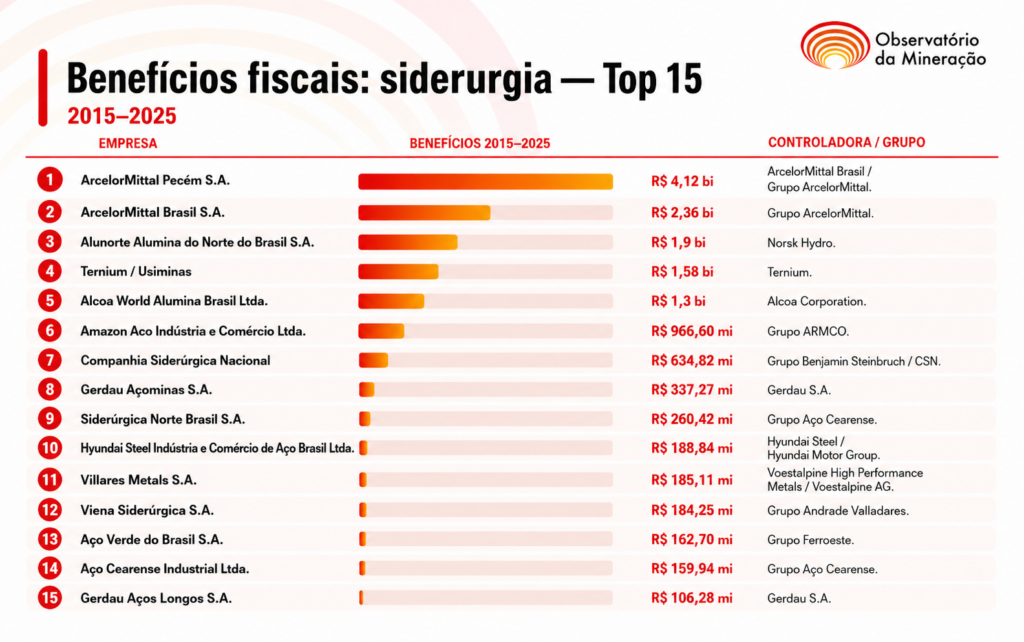
Dados da Receita Federal compilados entre 2015 e 2025 mostram que 15 indústrias de siderurgia e metalurgia acumularam R$ 14,6 bilhões em incentivos fiscais. O levantamento, em linha com a reportagem sobre as isenções concedidas às mineradoras, confirma que os dois setores estão entre os principais beneficiários de renúncias fiscais no país.
Entre as empresas do topo deste ranking estão a ArcelorMittal Pecém S.A. que conseguiu R$ 4,12 bilhões em renúncia fiscal, seguidas por outra empresa do grupo, a ArcelorMittal Brasil S.A. com R$ 2,36 bilhões. Ambas são seguidas pela Usiminas com R$ 1,58 bilhão, empresa controlada pela multinacional Ternium.
Grupo ArcelorMittal registra problemas em Minas Gerais e no Ceará
Além de ter que assinar dois acordos por conta de problemas causados em Minas Gerais com a sua barragem em Itatiaiuçu, assumindo o compromisso de repassar aos atingidos mais de R$ 436,7 milhões, o grupo ArcelorMittal, multinacional com sede em Luxemburgo que se diz a maior produtora de aços do Brasil, ainda tem que explicar dados sobre o licenciamento ambiental da sua nova planta industrial no Ceará.
Antes da conclusão da compra da Companhia Siderúrgica do Pecém (CSP) em março de 2023 por R$ 2,2 bilhões, o Ministério Público do Estado do Ceará (MPCE) já investigava os estudos ambientais (EIA/RIMA) desta siderúrgica. Documentos mais recentes deste inquérito, aberto em maio de 2022, revelam que o Núcleo de Apoio Técnico (NATEC) do MPCE declarou não possuir capacidade técnica interna para realizar a perícia necessária, sugerindo a contratação de uma fundação ligada à Universidade Federal do Ceará (UFC) por um custo de R$ 400 mil.
O MPCE investiga há mais de quatro anos se esse estudo original, com mais de duas décadas, ainda é apto a subsidiar o licenciamento atual, considerando o “significativo lapso temporal” e a possível defasagem dos diagnósticos ambientais.
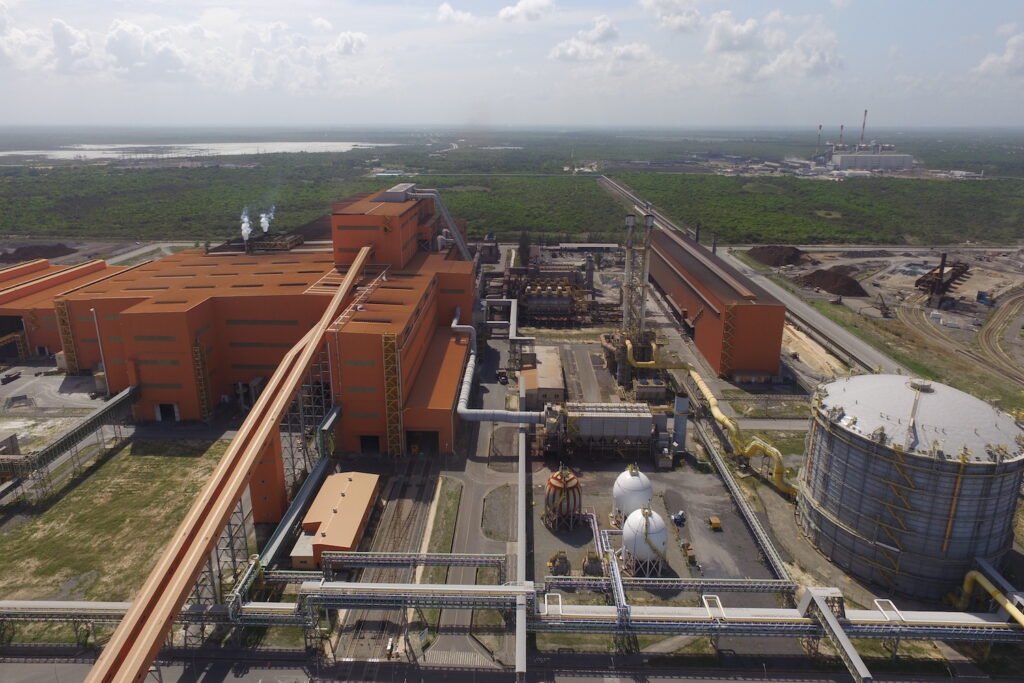
ArcelorMittal Pecém / Divulgação
Além disso, o órgão questiona se foram devidamente considerados os impactos cumulativos e sinérgicos do empreendimento no Complexo Industrial e Portuário do Pecém (CIPP) e se os mecanismos de participação social e transparência observados à época atendem aos padrões rigorosos de hoje.
Até o momento, a 1ª Promotoria de Justiça de São Gonçalo do Amarante realizou diversas diligências técnicas, incluindo a requisição de informações detalhadas à Superintendência Estadual do Meio Ambiente (Semace) sobre o cumprimento de condicionantes da Licença de Operação emitida em 2020.
Em sua defesa, a ArcelorMittal Pecém apresentou planilhas e documentos digitais buscando comprovar o atendimento de todas as 31 condicionantes ambientais impostas.
Em resposta ao Observatório da Mineração, a ArcelorMittal defendeu a legalidade dos incentivos recebidos. Segundo a empresa, isso “fortalece a competitividade da indústria nacional, estimula a geração de emprego e renda e promove o desenvolvimento econômico regional”. Veja a nota completa no fim da reportagem.
Projetos siderúrgicos são parte da dupla expropriação, diz especialista
No caso do grupo Ternium, em fevereiro de 2025 o Observatório da Mineração publicou detalhes do relatório “Aço maculado”, da organização Mighty Earth, que expõe um padrão “alarmante” de violações de direitos humanos e abusos ambientais na cadeia produtiva da montadora Hyundai.
A investigação revela que fornecedoras como a Ternium estão ligadas à destruição ambiental, exploração de trabalhadores e danos severos à saúde pública, como a “chuva de prata” que afeta moradores do Rio de Janeiro, além de impactos em comunidades indígenas e quilombolas no Maranhão e Pará.
Ana Luisa Queiroz, coordenadora de projetos e gestão do Instituto Políticas Alternativas para o Cone Sul (PACS), entidade que pesquisou as operações da empresa em 2022, avalia que projetos destas grandes siderúrgicas não deveriam acumular tantos benefícios por conta dos danos causados, mas que seguem acontecendo pela “narrativa do desenvolvimento econômico”.
“O levantamento dos incentivos fiscais é fundamental. Com esse número, constata-se que o modelo de negócio que sustenta empresas como a Ternium e a Usiminas é baseado em uma dupla expropriação e acumulação de capital: parte feita pela extração de riquezas naturais, parte através do recebimento de orçamento público via financiamento e isenção“, diz.
A coordenadora do PACS lembra que, segundo reportagem do jornal Valor Econômico, o grupo Ternium faturou mais de US$ 425 milhões líquidos, com receita de US$ 15,6 bilhões em 2025. “Neste cenário, o empenho de orçamento público em isenções fiscais ilustra o quanto a população, além de ser submetida a poluição fruto dessa operação, é também sua fiadora”, argumenta Ana Luísa Queiroz.
Também segundo pesquisas, informa a representante do PACS, de cientistas da Universidade Veiga de Almeida e da Universidade Federal do Rio de Janeiro (UFRJ), a poluição do ar tem apresentado graves efeitos na cidade do Rio de Janeiro. Em 2023, mais de 30% das mortes de crianças de bairros vizinhos ao distrito industrial de Santa Cruz (Bangu, Paciência e Santa Cruz), aconteceram em função da poluição do ar.
“Vale destacar que, em função da regra definida via Termo de Ajustamento de Conduta, hoje é a própria empresa a responsável por fazer o monitoramento do ar e da água, e repassar os dados para o INEA. Esse procedimento fere gravemente o princípio de transparência e controle público sobre os impactos de sua operação”, explica.
Na Amazônia, siderurgia acumula impactos por décadas
Os danos sociais que atingem as comunidades afetadas pela siderurgia na Amazônia e no Maranhão foram mapeadas ainda em 2020 pelo Conselho de Direitos Humanos da ONU. A comitiva da ONU visitou comunidades afetadas pela mineração no Maranhão, e classificou a luta de mais de 300 famílias em Piquiá de Baixo como “emblemática”. Os dados do relatório, divulgado pelo Observatório da Mineração, revelaram que 65% dos membros da comunidade relataram problemas respiratórios, doenças oftalmológicas e problemas de pele, agravados pela poluição.
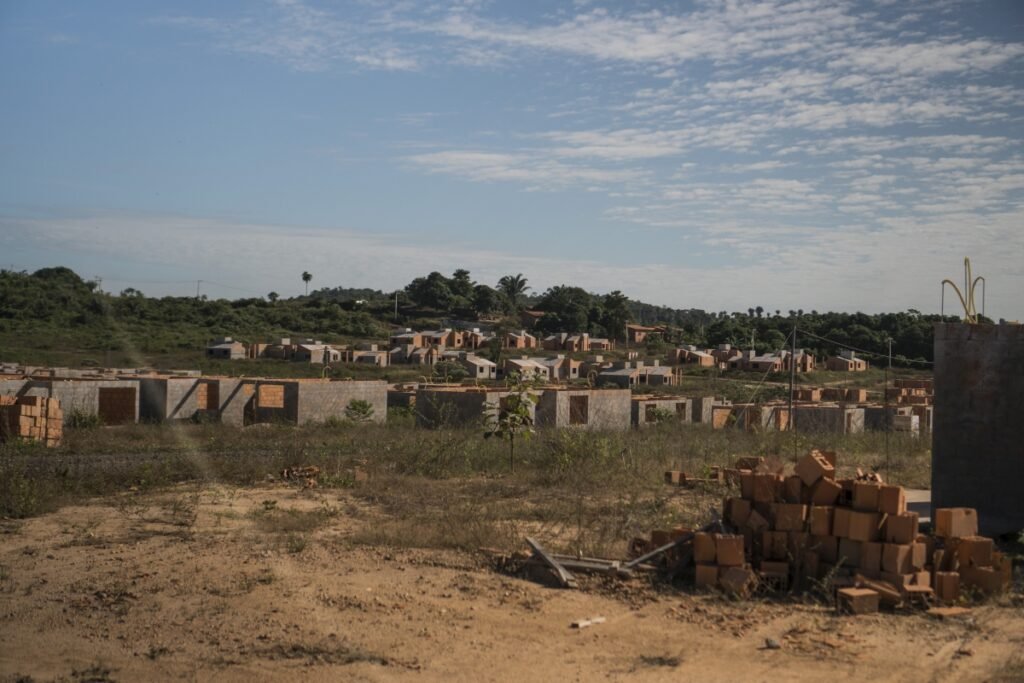
Segundo a representante do Justiça nos Trilhos, um dos exemplos desta contradição é Açailândia (MA) onde há uma forte presença de empresas do setor da siderurgia. A cidade é conhecida como um polo siderúrgico, especialmente pela presença histórica de cinco siderúrgicas localizadas no bairro de Piquiá de Baixo, desde a década de 80. Hoje elas já não funcionam na mesma quantidade e nem na mesma intensidade, mas deixaram ao longo dos últimos anos um bairro inteiro sem condições dignas de vida, além da contaminação da fauna e da flora.
Reassentamento da comunidade de Piquiá de Baixo. Ingrid Barros / Observatório da Mineração
Na cadeia de alumínio e da extração da bauxita, os danos ambientais e sociais também são recorrentes e fazem parte das empresas que tiveram as maiores isenções tributárias entre 2015 e 2025. No caso do grupo norueguês Norsk Hydro, que controla a Alunorte Alumina do Norte do Brasil S.A e a Mineração Paragominas, os conflitos mais recentes estão concentrados no mineroduto da multinacional no Pará.
As obras para construção deste canal afetam mais de 600 famílias e, segundo, manifesto assinado por associações de indígenas, quilombolas e ribeirinhos do Vale do Acará em setembro de 2024, as obras da Hydro têm devastado rios e florestas, esgotado os recursos hídricos das comunidades e comprometido duramente suas condições de vida.
No mapa do Observatório dos Conflitos da Mineração no Brasil, o projeto de extração de bauxita da Alcoa, em Juruti, no Pará, também é destacado. São registrados 14 conflitos entre 2020 e 2023 na exploração que atinge 6.600 pessoas. Em outro trecho, o estudo mostra que a empresa em 2022 ainda não tinha realizado a compensação coletiva com a criação de um centro de formação. Em junho de 2022, os atingidos bloquearam por dois dias a ferrovia da Alcoa para cobrar o comprimento do acordo.
Para Larissa Pereira Santos, coordenadora Política da Associação Justiça nos Trilhos, é necessária uma revisão da política de incentivos fiscais para o setor diante do legado negativo da siderurgia, especialmente das empresas sediadas na Amazônia e no polo do setor no Maranhão.
“É preciso que tais incentivos sejam revisados fazendo com que as práticas empresariais mudem de forma drástica, assim como elas mudam de forma drástica as vidas das pessoas (nesse caso para pior). As leis que garantem incentivos fiscais para empresas hoje, da forma como são, estão levando as pessoas à morte na Amazônia ao seu fim”, avalia.
Para Larissa Santos, todo benefício fiscal deveria estar atrelado a uma regra clara e direta que, se não cumprida, deveria gerar responsabilização empresarial, como o fato das empresas não serem autorizadas a realizar suas ações ou o fato delas nem serem autorizadas a iniciarem uma operação.
“Isso tudo mediante aos diversos incentivos fiscais municipais, estaduais e federais. O que observamos na região, marcada pelo bioma amazônico, é que as regras ambientais, sociais e as tecnologias dessas empresas deveriam ser usadas para reduzir os danos ao meio ambiente não são usadas”, aponta.
Empresas defendem legalidade dos incentivos e contrapartidas em produção e manutenção de empregos
A ArcelorMittal defendeu a legalidade dos incentivos recebidos que fazem parte de programas públicos para fomentar investimentos na produção, além de “fortalecer a competitividade da indústria nacional, estimular a geração de emprego e renda e promover o desenvolvimento econômico regional”. Como contrapartida, a ArcelorMittal afirma que investiu R$ 25 bilhões no Brasil, “o maior investimento da história da indústria do aço no país”.
“O grupo ArcelorMittal no Brasil também direciona recursos em iniciativas de sustentabilidade, incluindo projetos de eficiência energética, redução de emissões, gestão responsável dos recursos naturais e proteção ambiental. No campo social, a organização tem uma atuação em todos os estados do país e apoia projetos comunitários e ações voltadas ao fortalecimento das comunidades locais. A Fundação ArcelorMittal, em seus 37 anos de atuação, impactou a vida de mais de 12 milhões de pessoas por meio de seus projetos sociais em quatro frentes: educação, cultura, esporte e economia circular”, diz o comunicado.
Sobre a investigação em andamento no MPCE, a empresa informa que não foi notificada ou intimada até agora. E destaca que, neste momento, não tem condições de se manifestar sobre o inquérito, mas que “todas as exigências legais e condicionantes ambientais estabelecidas são devidamente cumpridas pela ArcelorMittal”.
A Ternium/Usiminas destacou que os incentivos estão vinculados aos programas do governo de Minas Gerais firmados desde 2008, que contemplaram investimentos em modernização industrial, ampliação da capacidade produtiva e atualização tecnológica de suas operações no estado.
“Ao longo desse período, a empresa realizou investimentos da ordem de R$ 10 bilhões, vinculados aos protocolos assinados, que possibilitaram a geração de emprego e renda, movimentação da cadeia de fornecedores e ganhos de competitividade para uma das principais operações industriais do estado. Destaque para a reforma do Alto-Forno 3, que gerou cerca de 9 mil empregos ao longo da obra em 2023 e mais de R$ 600 milhões em compras de serviços e materiais de fornecedores, preferencialmente locais”, informa a Ternium/Usiminas.
O grupo Hydro, que controla a Alunorte, também defendeu a legalidade dos incentivos fiscais ao afirmar que as empresas “cumprem as exigências legais, fiscais e regulatórias relacionadas aos regimes aplicáveis, incluindo as contrapartidas formalmente estabelecidas, quando previstas”.
Entre as contrapartidas citadas na resposta estão o apoio à verticalização da cadeia produtiva do alumínio, o aumento da produção local, a priorização das vendas internas para o mercado regional, troca da matriz energética e a implementação de linhas de produção de ligas especiais, com investimentos em tecnologia e inovação para agregar valor ao alumínio produzido no Pará.
“Além do cumprimento das obrigações formalmente relacionadas aos regimes fiscais, as empresas do grupo Hydro mantêm investimentos relevantes no desenvolvimento do Pará. Desde 2015, foram destinados aproximadamente R$ 730 milhões ao desenvolvimento socioambiental, incluindo iniciativas realizadas por meio do Fundo Hydro. A companhia também registra R$ 500 milhões em investimentos para equipamentos públicos e R$ 230 milhões em investimentos socioeconômicos. As operações da Hydro no Pará mantêm cerca de 15 mil empregos diretos e indiretos, sendo aproximadamente 80% dos empregados nascidos no estado”, afirma a Hydro.
A reportagem também pediu posicionamento para a Alcoa, mas não recebeu retorno até o fechamento desta edição. O espaço continua aberto para a manifestação da empresa.
Notas completas:
ArcelorMittal
A ArcelorMittal esclarece que os incentivos fiscais decorrem de programas instituídos pelo poder público com o objetivo de fomentar investimentos produtivos, fortalecer a competitividade da indústria nacional, estimular a geração de emprego e renda e promover o desenvolvimento econômico regional.
Como contrapartida aos incentivos recebidos, a ArcelorMittal mantém investimentos contínuos em suas operações, contribuindo para a geração de empregos de qualidade e para o fortalecimento da cadeia produtiva e do desenvolvimento econômico das regiões onde atua. Somente nos últimos cinco anos (2022 a 2026), a ArcelorMittal, que conta com 20 mil empregados, investiu R$ 25 bilhões no Brasil, o maior investimento da história da indústria do aço no país.
O Grupo ArcelorMittal no Brasil também direciona recursos em iniciativas de sustentabilidade, incluindo projetos de eficiência energética, redução de emissões, gestão responsável dos recursos naturais e proteção ambiental. No campo social, a organização tem uma atuação em todos os estados do país e apoia projetos comunitários e ações voltadas ao fortalecimento das comunidades locais.
A Fundação ArcelorMittal, em seus 37 anos de atuação, impactou a vida de mais de 12 milhões de pessoas por meio de seus projetos sociais em quatro frentes: educação, cultura, esporte e economia circular.
Relativamente ao inquérito mencionado, esclarecemos que a ArcelorMittal Pecém S.A. (atual denominação da antiga Companhia Siderúrgica do Pecém – CSP, adquirida pela ArcelorMittal em 2023) não foi, até a presente data, notificada ou intimada em tal procedimento, não possuindo, neste momento, condições de se manifestar acerca das questões eventualmente discutidas ali. Todas as exigências legais e condicionantes ambientais estabelecidas são devidamente cumpridas pela ArcelorMittal.
Ternium/Usiminas
Os incentivos fiscais recebidos pela Usiminas no período mencionado estão vinculados a programas do Governo de Minas Gerais voltados à atração, expansão e manutenção de investimentos produtivos no Estado. Eles estão associados a protocolos de intenções firmados com o Estado desde 2008, que contemplaram investimentos em modernização industrial, ampliação da capacidade produtiva e atualização tecnológica de suas operações em Minas Gerais.
Ao longo desse período, a empresa realizou investimentos da ordem de R$ 10 bilhões, vinculados aos protocolos assinados, que possibilitaram a geração de emprego e renda, movimentação da cadeia de fornecedores e ganhos de competitividade para uma das principais operações industriais do estado. Destaque para a reforma do Alto-Forno 3, que gerou cerca de 9 mil empregos ao longo da obra em 2023 e mais de R$ 600 milhões em compras de serviços e materiais de fornecedores, preferencialmente locais.
Os investimentos realizados pela Usiminas também permitiram importantes avanços tecnológicos e ambientais. No Alto-Forno 3 houve ganho em eficiência energética e redução de emissões atmosféricas; na Aciaria ocorreu a modernização dos sistemas de captação e limpeza de gases; nas coquerias da usina, atualmente em reforma, ocorre a atualização tecnológica das instalações; e foram implantados diversos sistemas de controle e monitoramento ambiental, como a Central de Monitoramento Ambiental, Rede Automática de Monitoramento de Particulados, um sistema abrangente de monitoramento das partículas sedimentáveis em Ipatinga, Rede Automática de Monitoramento de efluentes e diversos investimentos nos sistemas de controle de emissões em suas operações.
A Usiminas destaca que todos os incentivos recebidos ocorreram dentro dos instrumentos legais estabelecidos pelo Governo de Minas Gerais e estiveram vinculados a compromissos de investimentos fundamentais para a perenidade do negócio, avaliados e acompanhados pelos órgãos competentes do Estado.
Alunorte/Hydro
Os incentivos tributários utilizados pela cadeia produtiva do alumínio estão previstos na legislação aplicável e integram políticas públicas voltadas ao desenvolvimento regional, à industrialização, à geração de empregos e ao crescimento socioeconômico. As empresas do grupo Hydro cumprem as exigências legais, fiscais e regulatórias relacionadas aos regimes aplicáveis, incluindo as contrapartidas formalmente estabelecidas, quando previstas.
Entre as contrapartidas vinculadas aos respectivos regimes estão o apoio à verticalização da cadeia produtiva do alumínio, o aumento da produção local, a priorização das vendas internas para o mercado regional, troca da matriz energética e a implementação delinhas de produção de ligas especiais, com investimentos em tecnologia e inovação para agregar valor ao alumínio produzido no Pará.
As contrapartidas vinculadas aos incentivos fiscais e os investimentos socioambientais voluntários possuem naturezas distintas e são acompanhados conforme a legislação e os instrumentos aplicáveis.
Além do cumprimento das obrigações formalmente relacionadas aos regimes fiscais, as empresas do grupo Hydro mantêm investimentos relevantes no desenvolvimento do Pará. Desde 2015, foram destinados aproximadamente R$ 730 milhões ao desenvolvimento socioambiental, incluindo iniciativas realizadas por meio do Fundo Hydro. A companhia também registra R$ 500 milhões em investimentos para equipamentos públicos e R$ 230 milhões em investimentos socioeconômicos. As operações da Hydro no Pará mantêm cerca de 15 mil empregos diretos e indiretos, sendo aproximadamente 80% dos empregados nascidos no estado.
Our sound and lighting courses can be found at https://school.learnlightandsound.com!
In this week’s episode we have a look at the Neumann NDH 30 reference headphones. These premium headphones inspire confidence when it comes to mixing sound for video on open-back headphones. But the unique value is in the add-on plugin/app called RIME which turns these headphones into immersive headphones, allowing you to playback up to 7.1.4 Dolby Atmos immersive sound. Let’s have a look and a listen!
If you’d like to learn how to make great dialogue audio for your film and video projects, please have a look at my courses including processing dialogue audio in Adobe Audition and DaVinci Resolve/Fairlight, recording sound, how to use the Zoom F4, F6, F8, and F8n, and how to get the most from the Sound Devices MixPre series of recorders. Our latest courses cover Sound for Live Streaming with the ATEM Mini and an Intro to Izotope RX. See https://school.learnlightandsound.com for more info!
Support my work creating videos by donating at Ko-Fi.com: http://ko-fi.com/curtisjudd
Gear used or mentioned in this episode (the links below are Amazon.com, B&H Photo, Sweetwater, or other affiliate links. As an affiliate, I earn from qualifying purchases):
- Neumann NDH 30 open back reference headphones — https://guitarcentercreator.pxf.io/vDmnae
- Neumann NDH 20 closed back reference headphones — https://guitarcentercreator.pxf.io/JkZrPa
- Neumann U87 Ai microphone — https://geni.us/phYZH
- Neumann RIME plugin — https://www.neumann.com/en-us/products/software/rime
- Sound Devices MixPre audio recorder — https://geni.us/O8e0
- Impact Turtle-Base C-Stands — https://geni.us/8a8tt
- Aputure Light Dome III Softbox — https://geni.us/AVHU1p
- Rosco Prismatic Glass Gobo in Cool Lavender — https://geni.us/GWKt
- Canon C70 Cinema Camera — https://geni.us/ABYB
- Canon RF 24-70 f/2.8 lens — https://geni.us/qwsEs
- Panasonic GH5 camera — https://geni.us/InspOl
- Panasonic 12-35mm f/2.8 II lens — https://geni.us/gr47
Copyright 2026, Curtis Judd
#Neumann
#NDH30
#ATMOS
Index
00:00 Introduction
00:46 What is special about the NDH 30?
01:12 What I appreciate about the NDH 30
05:20 RIME plugin/app for immersive monitoring
07:20 Are they "flat"? Harman and diffuse field curves
09:25 Other notes — cable, open vs closed back
10:30 Price — what's the value?
12:33 Please buy my courses
Why the US Government Buried This Battery. Back to School Tech Deals: https://micro.center/9e4f63 Sign up for a FREE 128 gig Flash Drive at Micro Center Austin, TX: https://micro.center/b2e98c Sign up for a FREE 128 gig Flash Drive at Micro Center Columbus, OH: https://micro.center/a0a24f Visit Micro Center News: https://micro.center/e8c665 Every summer, your building throws away heat. Every winter, it burns fuel to make that heat all over again. What if you could bank July's heat underground, then pull it back out in January? Aquifer thermal energy storage does exactly that. It turns the groundwater under your feet into an underground thermal battery, and the Netherlands has been running ATES this way for more than 30 years. The US Department of Energy proved the idea worked here decades ago, then let it go quiet. So is ATES actually the cheapest way to heat and cool a whole city block? Or is the Dutch head start too big for us to copy?
Watch Why The Biggest Battery Company Is Betting On Lithium Air https://youtu.be/Y1AfP4IXMeE?list=PLnTSM-ORSgi7uzySCXq8VXhodHB5B5OiQ
Video script and citations:
https://undecided.tech/why-the-us-government-buried-this-battery/
Get my achieve energy security with solar guide:
https://undecided.link/solar-guide
Follow-up podcast:
Video version - https://www.youtube.com/channel/UC4-aWB84Bupf5hxGqrwYqLA
Audio version - https://undecided.link/stilltbd-podcast
Join the Undecided Discord server:
https://undecided.link/discord
👋 Support Undecided on Patreon!
https://undecided.link/patreon
Visit my Energysage Portal (US):
Research solar panels, heat pumps, and more to get quotes for free!
https://undecided.link/energysage
For a curated solar buying experience (Canada)
EnergyPal's free personalized quotes:
https://undecided.link/energypal
👉 Follow Me
Mastodon
https://mastodon.social/@mattferrell
Some music provided by Epidemic Sound
https://undecided.link/epidemic
I may earn a small commission for my endorsement or recommendation to products or services linked above, but I wouldn't put them here if I didn't like them. Your purchase helps support the channel and the videos I produce. Thank you.
Chapters
00:00 - Intro
06:51 - Where Could it Work?
08:09 - The Dutch Example
10:33 - Could it Work in the US?
👉 Grab your free seat to the 2-Day AI Claude-athon: https://links.outskill.com/CASREPAUG3
🔐 100% Discount for the first 1000 people
💥 Dive deep into Claude, its models, and Learn Automations, build AI Agents, make videos & images – all for free!
🎁 Bonuses worth $5100+ if you join and attend
Trump still has ways to end the war with Iran, but politically, conflict escalation may be easier than making the compromises needed for peace.
Keep tabs on what’s happening around the world. DeltaSweep brings the latest developments and open-source intelligence together on one live global map. Start your free trial: https://www.deltasweep.com
If you want to support CaspianReport, the best way is simple: watch, like, and share the videos. For direct support, you can join as a member or contribute; every bit helps keep the channel independent and improves the quality of the work.
Nothing can devastate us more than the loss of a loved one. In this episode of Overthink, David and Ellie talk about mourning. What kinds of losses hurl us into a state of mourning? Are there healthy and unhealthy ways of mourning? Or does this distinction not apply in cases when we are dealing with irreparable loss? And how do we deal with the loss of someone when the feeling of loss doesn't naturally resolve but rather stays with us like “an open wound,” as Freud says? To shed light on this difficult experience, your hosts explore Sigmund Freud’s distinction between mourning and melancholia, Roland Barthes’ account of grieving the death of his mother, as well as Emilio Uranga’s analysis of the role that culture plays in our experience of death. In the Substack bonus segment, Ellie and David discuss how Freud’s notion of ambivalence can help to make sense of mourning.
Works Discussed:
Roland Barthes, Mourning Diary
Julie Alev Dilmaç, “The new forms of mourning: Loss and exhibition of the death on the internet”
Martin Heidegger, Being and Time
Corina Sas and Alina Coman, “Designing personal grief rituals: An analysis of symbolic objects and actions”
Sigmund Freud, “Mourning and Melancholia”
Emilio Uranga, “Dos teorias de la muerte: Sartre y Heidegger”
Emilio Uranga, “Notas para un estudio del mexicano”
Emilio Uranga, Analysis of Mexican Being
Enjoy our work? Support Overthink via tax-deductible donation: https://www.givecampus.com/fj0w3v
Subscribe to our Substack for ad-free versions of both audio and video episodes, extended episodes, exclusive live chats, and more: https://overthinkpod.substack.com/
Website: overthinkpodcast.com
Substack: overthinkpod.substack.com
Facebook: https://www.facebook.com/Overthink-podcast-105420885026249
Apple podcasts: https://podcasts.apple.com/us/podcast/overthink/id1538249280
Spotify: https://open.spotify.com/show/4aIlXHTDz5vrc78DyjFg66
Art19 RSS: https://rss.art19.com/overthink
Find us on Instagram, Twitter, and TikTok at @overthink_pod
#darktable #tutorial #newfeatures
In this episode, we look at more of the new features in darktable 5.6.
00:00 start
00:21 intro
00:40 extra shortcut buttons
00:51 Shortcuts for modules, module groups, and instances
01:00 toggle the filmstrip auto-center behavior
01:23 change to the radius for capture sharpening
01:57 tone equalizer now visualizes an invalid curve
02:15 improvements to AGX
03:45 gamma-corrected data scaling
04:14 filter by capture month
05:11 EXIF tags added to the metadata editor
As always, thanks to William Justice for his youtube chapter generator!
https://billjustice.com/youtube-chapter-generator
Also, thanks to my tier 1 Patreon supporters:
William Atkinson
Totoroot
Peter Frohberg
travellingjournalist
SaturdayScience
Rainer H
Bas van de Kerkhof
Marcus Ahlberg
Dave Shepherd
Pascal
John Bell
mike s
Alexander Haak
Kevin McKibben
chris8142
Gitte
David Staves
Erik Oksanen
Rob van Esseveld
Ferg
Fernando Pérez
Steve Ansell
Emil Ohlsson
Robert Stites
Daniel
Bart Bartels
Ulrich Gesing
Andy McGarty
Michael Rasmussen
Matthias Liebich
Martin Vines
Rohn Shearer
Alun Spencer
Jon Hoskins
SteMuBo
Henry St. Clair
peterschlaufer
Larry
Dan Putler
If you'd like to support my work, get access to these videos before everyone else, AND get access to additional content, please head over to patreon.com/understandingdarktable and pick a tier that is comfortable for you.

 Login
Login