🙏🏼APOIOS🙏🏼
🧠 HiWell: Falem 15 minutos com um psicólogo absolutamente grátis:
👉🏼 https://hiwell.app/despolariiza 👈🏻
Código para 27€ de desconto na primeira consulta: Despolariza27
🙏🏼FORMAS DE APOIAR O PROJECTO 🙏🏼
Junta-te à comunidade de mecenas! Ganhas acesso a conteúdo exclusivo, eventos, debates de Discord, grupo Whatsapp, sessões privadas com o Tomás e muito mais: https://www.donorbox.org/despolariza
Grátis e de alto impacto: Like, Subscrever, Activar Notificações, Comentar, e Partilhar
💭 DESCRIÇÃO 💭
Recebemos o João Cotrim Figueiredo!
Economista pela London School of Economics, com um MBA feito em Portugal e trinta e quatro anos de carreira em gestão, passou pela Compal, pelo grupo Nutrinvest, pela direção da TVI e pela presidência do Turismo de Portugal. Entrou na política em 2019 como deputado único da Iniciativa Liberal, liderou o partido até 2023 — levando-o de um para oito deputados — e é hoje eurodeputado. Em janeiro de 2026 foi candidato a Presidente da República, ficando em terceiro lugar com 16% dos votos, a melhor votação de sempre de um liberal nas presidenciais portuguesas.
Pode a sorte sobrepor-se ao esforço, ou é sempre o trabalho que decide? O que é que aconteceu às oportunidades que existiam nos anos 80 e simplesmente desapareceram? O Estado deve intervir na economia — fixar preços, possuir empresas-chave — ou será sempre o pior gestor de todos? E o que é mais perigoso nas redes sociais: o conteúdo, ou o vício que elas foram desenhadas para criar? Foi um episódio biográfico, da escola alemã ao chá com o diretor da LSE, da Tabaqueira ao banco que não conseguiu salvar — e que acaba num apelo à reforma do Estado. Espreitem a cronologia. Obrigado, João!
⏰ CRONOLOGIA ⏰
00:00:00 - Introdução (Torna-te Mecenas!)
00:03:11 - Lotaria genética e social
00:04:53 - Colégio Alemão: arte e matemática de mãos dadas
00:08:22 - Memórias do 25 de Abril e de um país por normalizar
00:10:46 - Porquê Londres e a London School of Economics
00:14:07 - O técnico à noite e a beleza da matemática
00:20:53 - Dahrendorf, Popper e a descoberta de ser liberal
00:30:32 - Mercado de capitais nos anos 80: "tudo parecia possível"
00:36:58 - Títulos de indemnização e a privatização da Tabaqueira
00:44:03 - Compal: aprender a gerir com as mãos na massa
00:51:20 - TVI: tudo se resume a atrair e reter talento
00:53:28 - BPP: salvar um banco falido só com uma licença
01:03:26 - Turismo de Portugal: acabar com os subsídios a amigos
01:04:58 - PAIND: "O Estado tem de intervir na economia"
01:10:21 - Redes sociais: o perigo não é o conteúdo, é o vício
01:13:47 - Concessões, monopólios e o Estado mau gestor
01:22:27 - Reformar o Estado e vencer a mediocridade
📚 REFERÊNCIAS 📚
ORGANIZAÇÃO: London School of Economics
https://en.wikipedia.org/wiki/London_School_of_Economics
ORGANIZAÇÃO: Turismo de Portugal
https://www.turismodeportugal.pt
ORGANIZAÇÃO: Iniciativa Liberal
https://pt.wikipedia.org/wiki/Iniciativa_Liberal
https://www.wook.pt/pesquisa/João Cotrim Figueiredo?a_aid=644ebe7982823
CONCEITO: Primavera Marcelista
https://pt.wikipedia.org/wiki/Primavera_Marcelista
PESSOA: Ralf Dahrendorf
https://pt.wikipedia.org/wiki/Ralf_Dahrendorf
PESSOA: Karl Popper
https://pt.wikipedia.org/wiki/Karl_Popper
LIVRO: A Sociedade Aberta e os Seus Inimigos
https://www.wook.pt/pesquisa/A-Sociedade-Aberta-e-os-Seus-Inimigos?a_aid=644ebe7982823
CONCEITO: Paradoxo da Tolerância
https://pt.wikipedia.org/wiki/Paradoxo_da_tolerância
PESSOA: Adam Smith
https://pt.wikipedia.org/wiki/Adam_Smith
CONCEITO: Epigenética
https://pt.wikipedia.org/wiki/Epigenética
EMPRESA: Compal
https://pt.wikipedia.org/wiki/Compal
PESSOA: Aníbal Cavaco Silva
https://pt.wikipedia.org/wiki/Aníbal_Cavaco_Silva
EMPRESA: Philip Morris International
https://en.wikipedia.org/wiki/Philip_Morris_International
EMPRESA: Tabaqueira
https://pt.wikipedia.org/wiki/Tabaqueira
EMPRESA: TVI
https://pt.wikipedia.org/wiki/TVI
PESSOA: Eamonn Butler
https://en.wikipedia.org/wiki/Eamonn_Butler
CONCEITO: Glass-Steagall Act
https://en.wikipedia.org/wiki/Glass–Steagall_legislation
EMPRESA: Banco Privado Português
https://pt.wikipedia.org/wiki/Banco_Privado_Português
LIVRO: A Riqueza das Nações
https://www.wook.pt/pesquisa/A-Riqueza-das-Nações?a_aid=644ebe7982823
LIVRO: A Teoria dos Sentimentos Morais
https://www.wook.pt/pesquisa/A-Teoria-dos-Sentimentos-Morais?a_aid=644ebe7982823
🔗 MAIS LINKS 🔗
Ja leste o Blog ou viste o Instagram?
👉🏼 https://linktr.ee/despolariza
Estúdio e Produção Multimedia:
👉🏼https://linktr.ee/mindframe.media
O escritório da FIFA no Trump Tower é apenas a parte mais visível de uma conexão muito mais profunda.
De um lado está a responsável pela organização da Copa do Mundo. Do outro, o presidente do principal anfitrião.
Entre as duas partes, existe um jogo de milhões de dólares.
Por onde navegam os grandes beneficiários dos negócios ligados ao Mundial: empresários MAGA (Make America Great Again), doadores de campanha, financiadores da tentativa de golpe do 6 de janeiro de 2021, frequentadores de Mar-a-Lago e velhos conhecidos, cúmplices de histórias vividas juntos desde os tempos das festas de Jeffrey Epstein.
Em resumo: os amigos do rei. Desde já, os grandes vencedores da Copa do Mundo de 2026. Sem precisar entrar em campo, lucrando ou em negócios com o estado americano ou diretamente com a FIFA.
Gente como Timothy Unes e Justin Caporale, da Event Strategies, uma empresa de produção de eventos da Virgínia, que no último 2 de janeiro assinou contrato de US$ 4,4 milhões, o equivalente a cerca de R$ 22.156.200,00 (vinte e dois milhões, cento e cinquenta e seis mil e duzentos reais) com o Transportation Security Administration (TSA), subordinado ao Department of Homeland Security (Departamento de Segurança Interna – DHS), órgão do governo federal, tendo como objeto “criar e operar toda a comunicação digital nos aeroportos americanos durante a Copa FIFA 2026 e os eventos do America 250.”
O contrato relacionado à Copa do Mundo é apenas mais um entre os tantos milhões de dólares que Unes e Caporales já faturaram no atual governo Trump.
Tim Unes é o presidente da Event Strategies. Justin Caporales é o CEO.
A dupla e a empresa, que já haviam trabalhado na campanha presidencial de Trump em 2016, são apontados em investigações parlamentares como peças fundamentais na estrutura da tentativa de golpe de estado no ataque ao Capitólio, em Washington, no 6 de janeiro de 2021.
O coração do evento era o comício “Stop the Steal” (“Pare o Roubo”) de Donald Trump. Justin Caporale era o “Project Manager” (Gerente de Projeto) do comício e Tim Unes atuou como “Stage Manager” (Gerente de Palco).
Ambos foram interrogados no “Comitê Seleto da Câmara dos Deputados dos Estados Unidos” (“House Select Committee to Investigate the January 6th Attack on the United States Capitol”), que apurou os atos golpistas. De acordo com o relatório do comitê, a empresa foi a responsável por planejar, produzir e executar a logística do comício no Ellipse, o gramado ao sul da Casa Branca.
Documentos do comitê do congresso mostram que o CEO da Event Strategies recebeu previamente mensagens que informavam as intenções de Donald Trump em incitar o ataque violento, ordenando uma marcha ao Capitólio. “As expectativas do Potus (Trump) são de ter algo íntimo e depois mandar todos para o Capitólio”, dizia a mensagem recebida por Justin Caporale.
Intimado a entregar os documentos relativos ao evento do 6/1/2021, Caporale removeu esta mensagem, que só foi revelada posteriormente, entregue por outras testemunhas.
Após a atuação na logística do evento do Capitólio, a empresa dos dois passou a conquistar significativos contratos no governo significativos contratos depois da eleição de Trump. Somente em 2025 foram US$ 11 milhões. Um aumento de 1.700 % em relação ao ano anterior, antes de Trump.
A gratidão presidencial pela empresa vai além dos milhões em contratos. Em 29 de abril de 2025, em um comício no Michigan para marcar os 100 dias de mandato, Trump citou Justin Caporales em seu discurso: “Justin Caporale, Justin, muito obrigado, onde quer que você esteja. Ele provavelmente está aí nos bastidores”. O CEO da Event Strategies também foi nomeado como “Produtor Executivo dos Grandes Eventos” da Casa Branca. Unes e Caporales não foram indiciados.
FIGURA CENTRAL DO GOVERNO TRUMP NA RELAÇÃO COM A FIFA FOI PROTAGONISTA DA LISTA DE EPSTEIN
Em março de 2025, Donald Trump nomeou oficialmente seu escolhido para ser o rosto do seu governo junto a FIFA e ao Comitê Olímpico Internacional (COI).
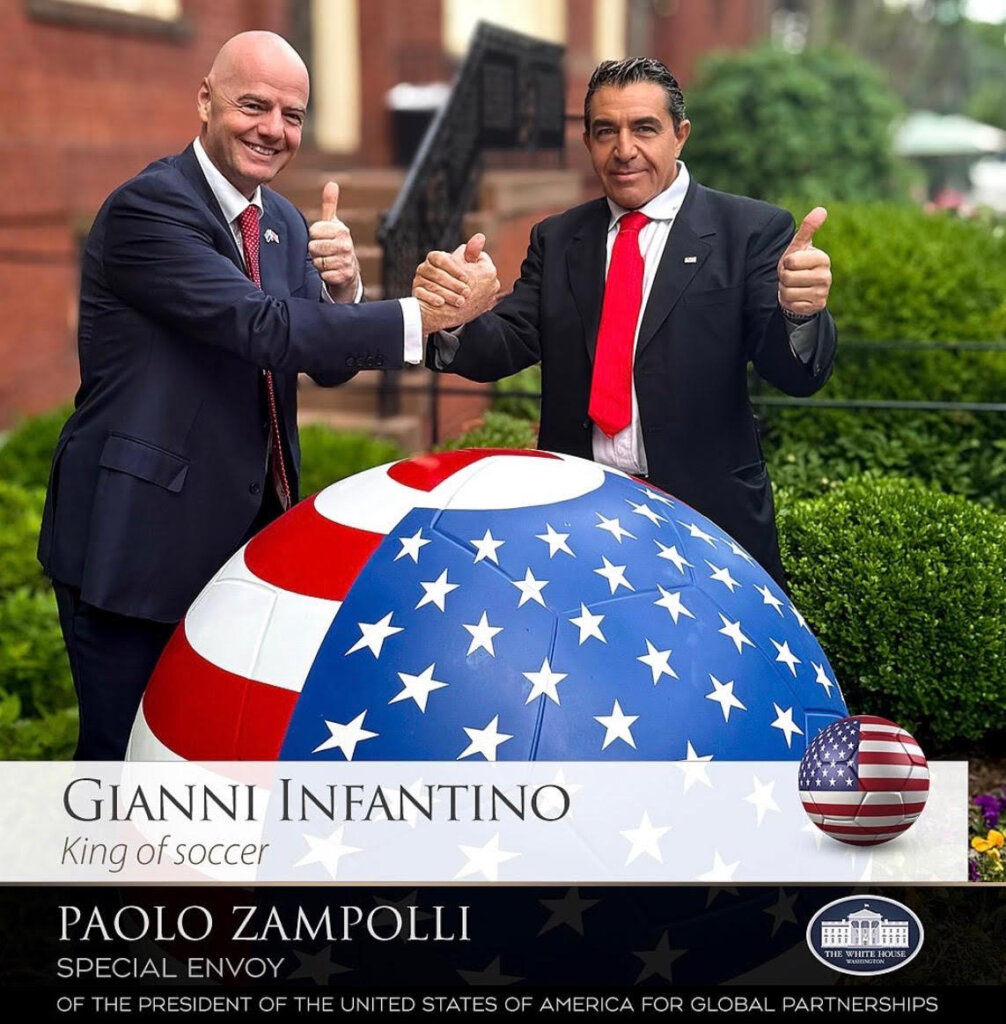
Com o cargo de “Enviado Especial Para Parcerias Globais”, Paolo Zampolli percorre o mundo na condição de embaixador do presidente para os dois megaeventos que serão sediados nos Estados Unidos: a Copa do Mundo e os Jogos Olímpicos de 2028, com sede em Los Angeles, realizando o que ambos classificam como “a diplomacia do esporte”.
É nessa condição que aproveita o cartão de visitas dos eventos para realizar grandes negócios e difundir o discurso MAGA. Em janeiro, no Fórum de Davos, Suíça, foi o representante do governo Trump e comandou a “Casa dos Estados Unidos em Davos”, um centro de reuniões da extrema-direita mundial. Em abril, levou o tema da “Sports Economy” para o “Spring Meetings” do Fundo Monetário Internacional (FMI).
Nas redes sociais de Zampolli, a figura mais presente e repetida é Gianni Infantino. O embaixador que representa Trump não usa meias palavras para falar sobre o presidente da FIFA: “o rei do esporte”, grudado ao nome sempre que se refere a Infantino.
Nem mesmo o escândalo em ter como embaixador do país junto a FIFA e COI um protagonista da chamada “Lista de Epstein” fez com que Donald Trump afastasse o ítalo-americano, de 55 anos, das funções.
Jeffrey Epstein era um financista americano que morreu em 2019 em uma cadeia nova-iorquina, depois de ter se suicidado, conforme autópsia divulgada pelo Departamento de Estado americano. Preso pelos crimes sexuais cometidos desde os anos 90, inclusive contra meninas menores de idade e por comandar um esquema de tráfico sexual, que funcionava como uma rede de poder, influência e troca de favores com algumas das pessoas mais poderosas do mundo inteiro e de diferentes áreas.
Paolo Zampolli, Jeffrey Epstein e Donald Trump estiveram juntos nos anos 90 no mesmo ramo de negócios, ambientes e festas.
Enquanto Zampolli era dono da ID Model Management, Trump tinha a Trump Model Management.
Já Epstein, apesar de ter financiado a MC2 Model Management, de Jean-Luc Brunel, (também preso por crimes sexuais e que também consta ter se enforcado na cadeia), não tinha uma agência própria, apenas circulava por elas.
Sob diferentes grafias: “Zampolli”, “Zampoli”, “Zempoli”, o nome de Paolo Zampolli aparece pelo menos 51 vezes na “Lista de Epstein” e ainda através da antiga agência de modelos da propriedade dele, a “ID Models”.
DOCUMENTO DO FBI MOSTRA INTERMEDIAÇÃO DE ZAMPOLLI EM CONTATO DE EPSTEIN COM MODELO
As ligações de Zampolli e Epstein são detalhadas em um documento do Federal Bureau of Investigation (FBI) de 26 de novembro de 2019.
Os manuscritos com o depoimento que subsidiaram a peça do FBI também estão nos arquivos do Departamento de Estado Americano que compõem a Lista de Epstein. Os nomes das vítimas não aparecem nos registros.
Epstein é descrito como alguém que frequentava a agência de Zampolli, participava dos castings (os recrutamentos) e avaliava os portfólios das modelos.
Em frases curtas, a vítima conta sobre a ida a uma boate com Zampolli e Epstein. E uma ida à casa na Rua 71 (Epstein morava em East 71st street, rua no Upper East Side, um dos bairros mais tradicionais e elegantes de Manhattan, Nova Iorque).
“Ele (JE) folheou fotos de portfólios.” (JE: Jeffrey Epstein).
“JE olhou para a minha quando [eu estava] usando apenas partes de baixo (biquíni).
Posteriormente, após Epstein analisar e escolher a modelo no portfólio da agência de Zampolli, ocorreu um encontro entre ela e Epstein na casa do financista onde, segundo o depoimento da vítima ao FBI, ocorreu o abuso sexual.
O relato é semelhante ao de várias outras vítimas, seguindo o padrão de conduta descrito por várias vítimas nos arquivos da investigação, que apontam que Epstein costumava tocar piano para as meninas antes do jantar. Ao fim do encontro, levou para a “sala de massagem e esfregou uma espécie de vibrador”, para então mandar que um motorista levasse embora.
De acordo com o relato, Zampolli e Epstein tentaram comprar a Elite Models juntos: “ele tentou comprar a Elite Models com JE”.
A modelo lembra ainda no depoimento que Zampolli serviu de cupido e apresentou Melanie a Trump.
“ZAMPOLLI ERA DESPREZÍVEL”
Em outro documento do FBI, com data de 23 de abril de 2020, uma modelo vítima de Epstein e que assinou com a agência de Zampolli aos 18 anos, descreve assim o agora todo-poderoso homem dos esportes nos Estados Unidos junto à FIFA e COI:
“Zampolli era desprezível”. A palavra usada no depoimento é “sleazy”, que pode ter distintas traduções, entre elas, além de desprezível, sórdido, canalha.
A vítima conta que o empresário se relacionava com as modelos. Em determinado momento, obrigou-a a cortar o cabelo bem curto e depois a dispensou.
Outros registros na lista corroboram um mesmo modus operandi da relação, relatando Epstein como alguém que frequentava a agência de Zampolli constantemente e tinha acessos aos portfólios das modelos.
ZAMPOLLI É ACUSADO POR CRIMES SEXUAIS PELA EX-MULHER, A BRASILEIRA AMANDA UNGARO
Paolo Zampolli foi denunciado em carta que consta ser assinada por Amanda Ungaro, a brasileira com quem Zampolli viveu por 19 anos e com quem tem um filho.
No texto, a ex-modelo afirma que foi testemunha, de acordo com o texto, de vários crimes cometidos pelo ex-marido. “Eu testemunhei muitas coisas desde que eu era uma adolescente que se envolveu neste pesadelo. Tenho fotos para provar o
abuso físico que experimentei nas mãos de Paolo. Eu tenho provas de que Paolo começou a tentar namorar comigo quando eu tinha 15 anos de idade, e é verdade que eu estava no avião de Jeffrey Epstein quando adolescente. Tinha apenas 16 anos na primeira vez que fui colocada no avião dele”, afirma Amanda Ungaro, que, entre outras acusações, publicou a cópia de uma lista em vôo que afirma ser do avião de Epstein onde consta o nome dela.
A recente entrevista do embaixador de Trump para a RAI, rede italiana, também não resultou em seu afastamento, apesar do teor ofensivo em relação às mulheres brasileiras.
“As mulheres brasileiras causam confusão com todo mundo, certo? Não é que essa foi a primeira, asmulheres brasileiras são programadas”. E foi além ao falar sobre a mãe do seu filho: “É uma dessas putas brasileiras, essa raça maldita de brasileiras, são todas iguais. Aquela vaca, estávamos juntos, trepava com ela, depois ela também ficou louca”, afirmou o embaixador.
Contra Paolo Zampolli não há nada na justiça. O empresário não foi indiciado em momento algum como parte das acusações dos crimes cometidos por Epstein.
O UFC NO QUINTAL DE TRUMP E O PRESENTE PARA O PRÓPRIO AGENTE
O grande evento que simboliza as relações entre os empresários próximos a Donald Trump tem data: no próximo dia 14 de junho, o UFC será realizado no gramado da Casa Branca, como parte das comemorações pelos 250 anos da independência dos Estados Unidos.
Desde o início da preparação, Trump tem se movimentado para tomar a data nacional como um festejo MAGA, tendo articulado inclusive a criação de uma agência, a Freedom 250, integrada a Força-Tarefa 250, da Casa Branca, para a promoção das comemorações. Tomando espaço da America 250, criada em 2016 pelo congresso e de caráter bipartidário, sob a coordenação da Comissão do Semiquincentenário dos Estados Unidos.
Muito além dos festejos de independência, a data do UFC na Casa Branca tem algo particular: aniversário de Donald Trump. Assim, com dinheiro do contribuinte americano e instalações do estado, Donald Trump prepara um evento 100% MAGA para se autocelebrar na data de aniversário.
O presente não é apenas para Trump. Milhões em dólares esperam Ari Emanuel, empresário muito próximo ao presidente tendo, inclusive, sido agente do presidente quando ele era estrela da série de TV “O Aprendiz”.
O UFC é propriedade do TKO Group, que, por sua vez, é parte do Endeavor Group, ambos tendo Ari Emanuel como sócio majoritário.
Milhões arrecadados com patrocinadores são estimados para o evento. Pacotes para marcas incluindo assentos ao lado do ringue são especulados a preços estratosféricos.
De acordo com reportagem do Wall Street Journal, recentemente o presidente Donald Trump chegou a ligar para juízes federais em socorro a Ari Emanuel, em um caso que a justiça combatia o monopólio na venda de ingressos por parte de empresa ligada ao amigo.
Ari Emanuel também é um dos grandes personagens da Copa do Mundo.
Sua empresa On Location, também do grupo Endeavor, ganhou, em julho de 2024, a concorrência para comercialização dos pacotes de hospitalidade da Copa do Mundo que se aproxima, derrubando décadas de supremacia da Match Hospitality, que por anos deteve esse direito junto à FIFA.
Pacotes de hospitalidade são um dos mais valiosos ativos de comercialização de um Mundial, juntamente com direitos de transmissão.
Apenas mais um negócio MAGA na ação entre amigos em que se transformou a Copa do Mundo marcada desde já pelas relações íntimas e pouco transparentes entre Gianni Infantino e Donald Trump.
OUTRO LADO:
GOVERNO DOS ESTADOS UNIDOS:
“Graças à liderança do Presidente Trump, a Copa do Mundo da FIFA de 2026 será, sem dúvida, um dos maiores e mais espetaculares eventos da história da humanidade, atraindo milhões de fãs de todo o mundo para onze cidades-sede nos Estados Unidos. Este será um evento monumental que exige estreita coordenação entre o governo Trump, a FIFA e todos os nossos importantes parceiros federais, estaduais e locais. O Presidente Trump está empenhado em garantir que esta seja não apenas uma experiência incrível para todos os fãs e visitantes, mas também a mais segura da história.”
Davis Ingle, porta-voz da Casa Branca
FIFA:
A reportagem enviou pedido de “outro lado” através da diretoria de comunicação da entidade, sem obter resposta.
PAOLO ZAMPOLLI:
“Muito obrigado pela sua solicitação. Antes de mais nada, Amanda é a mãe biológica do meu filho; nunca fomos casados. Desejo-lhe tudo de bom em seus projetos e atividades futuras. Não estamos juntos desde 2017. De qualquer forma, em relação ao arquivo de Jeffrey Epstein, meu nome consta lá, assim como o de muitos outros- não há nada mais a acrescentar”.
ON LOCATION:
A reportagem enviou pedido de “outro lado” para a empresa, sem obter resposta.
Unpaid: The Past, Present and Future of Wage Theft by Matthew Cole is out now: https://www.versobooks.com/products/3206-unpaid?utm_source=youtube&utm_medium=social&utm_campaign=unpaid_26
From unpaid overtime and under-the-table jobs to algorithmic exploitation, there are as many ways to steal wages as there are to pay them. But what if wage theft isn’t a bug but a feature of capitalism itself?
Matthew Cole sits down with Ashok Kumar shows that wage theft is not just about broken laws but about the nature of property itself. He makes a powerful case for our collective right to reassert our labour-power.
At Network Rail's Manchester classroom, I learn why it's very rare for trains to collide... and try out signalling for real. | ▶️ The next episode is on Nebula right now: https://nebula.tv/videos/tomscott-can-a-70yearold-telescope-still-be-useful | 🗺️ England series map: https://www.tomscott.com/england/
🟥 MORE FROM TOM: https://www.tomscott.com/
(you can find contact details and social links there too)
❓ LATERAL, free weekly podcast: https://lateralcast.com/ https://youtube.com/lateralcast/
👥 THE TECHNICAL DIFFICULTIES: https://youtube.com/techdif
Written and presented by
Tom Scott
Producers
for Penny4 https://penny4.co.uk/
Cambria Bailey-Jones
Guy Larsen
Studio Associate Producer
Heloise Lowenthal
Studio Director of Photography
Jamie MacLeod
Studio Gaffer
Frank Hammond
Head of Post
for Breadbox Studios https://www.breadboxstudios.co.uk/
Mandy Celine
Associate Post Producer
Isla McTear
Senior Editor
Jamie MacLeod
Assistant Editor
Alex “J’Rassic” Bate
Sound Supervisor
Dan Pugsley
Sound Assistant
Maggy Apodaca
Subtitles by So Speedy https://www.sospeedy.co.uk/
With thanks to the Historic County Borders Project https://www.county-borders.co.uk/
This week I’m joined by archaeologist Dr. Alyce Cannon () for a conversation about dogs in the ancient world, archaeology, mythology, and one of the most devastating dog stories ever told.
When Odysseus finally returns to Ithaca after twenty years away, he arrives disguised as a beggar. No one recognizes him—not his servants, not his people, not even his wife.
But Argos knows.
Old, neglected, and near the end of his life, the faithful dog lifts his head, flattens his ears, and wags his tail. Odysseus recognizes him too, but cannot reveal himself without jeopardizing everything. He walks past.
Moments later, Argos dies.
Nearly 3,000 years later, audiences still remember that scene. It speaks to something timeless: loyalty, memory, recognition, and the extraordinary bond between humans and dogs.
In this episode, Dr. Cannon and I explore what stories like Argos can tell us about the ancient world, how dogs appear in mythology and the archaeological record, and why our relationship with them remains one of humanity’s most enduring partnerships.
Listen now on Spotify, Apple, or watch the full episode on YouTube
Learn the updated way to convert text to paths in Inkscape by "flattening" the object instead of converting it to a path.
Want to learn more about how Inkscape works? Check out the Inkscape Master Class - a comprehensive series of over 80 videos where I go over every tool, feature and function in Inkscape and explain what it is, how it works, and why it's useful: https://logosbynick.com/inkscape/
Join my mailing list and get 200+ free design templates: https://join.logosbynick.com/
🔗 RESOURCE LINKS
Hire me to design your logo: https://logosbynick.com/
Get my premium logo templates: https://logosbynick.com/design-templates/
Upgrade to the latest version of Inkscape here: https://inkscape.org/release/
Why do dog stories hit us harder than almost any other kind of story?
In this episode of Ethnocynology, David Ian Howe sits down with classical canine scholar Dr. Alyce Cannon to explore dogs in mythology, history, literature, film, and popular culture. From Argos in The Odyssey to Seymour in Futurama, Hachikō, I Am Legend, and beyond, we examine why dogs have become humanity's most enduring symbols of loyalty, companionship, death, and remembrance.
We also dive into the role of dogs in ancient Greece, the Athenian plague, Diogenes and Cynic philosophy, dogs as psychopomps, and how canine-human relationships have shaped stories for thousands of years.
If you've ever cried over a dog in a movie, this episode explains why.
Guest: Dr. Alyce Cannon
Host: David Ian Howe
Dog Course: https://www.Fluent.pet/David
Merch: https://www.davidianowe.com/store
Timecodes:
0:00 Intro
1:48 Alyce's Work
4:59 Cynicism and Diogenes
09:38 Athenian Plaguye and Dogs
14:39 Psychopomps
18:40 Argos
27:23 Dogs Dying in Movies
31:54 Socializing with Dogs
35:48 Futurama
39:08 Greyfriars Bobby / Psychopomps
44:35 Lost
46:00 Dogs as Signals of Character
53:10 The Odyssey Film
Em um dos momentos mais tocantes da encíclica que o papa Leão 14 lançou sobre inteligência artificial, ele cita Gandalf, o mago de "O Senhor dos Anéis": "Não nos compete dominar todas as marés do mundo, mas sim fazer o que nos for possível para ajudar os anos em que estamos inseridos, erradicando o mal nos campos que conhecemos, para que quem viver depois possa ter terra limpa para amanhar".
Leia mais (06/07/2026 - 14h00)
Our sound and lighting courses can be found at https://school.learnlightandsound.com!
In this week’s episode, we have a look at and listen to Point Source Audio’s Embrace lav mic system- specifically the Embrace EO-8WLh. This ear-worn lav system is super easy to use and specified for high-sensitivity use cases, like interviews, demonstrations, and other dialogue-based recording scenarios. Let’s take a closer look and find out if the Embrace would be a good lav solution for your workflow!
If you’d like to learn how to make great dialogue audio for your film and video projects, please have a look at my courses including processing dialogue audio in Adobe Audition and DaVinci Resolve/Fairlight, recording sound, how to use the Zoom F4, F6, F8, and F8n, and how to get the most from the Sound Devices MixPre series of recorders. Our latest courses cover Sound for Live Streaming with the ATEM Mini and an Intro to Izotope RX. See https://school.learnlightandsound.com for more info!
Support my work creating videos by donating at Ko-Fi.com: http://ko-fi.com/curtisjudd
Gear used or mentioned in this episode (the links below are Amazon.com, B&H Photo, Sweetwater, or other affiliate links. As an affiliate, I earn from qualifying purchases):
- Point Source Audio Embrace EO-8WLh Ear-Mount Lavalier Mic Kit — https://geni.us/k1xkwyc
- Shure SLXD Wireless System — https://geni.us/Skc87
- Sound Devices MixPre-3 II 32-bit float audio recorder — https://geni.us/O8e0
- Impact Turtle-Base C-Stands — https://geni.us/8a8tt
- Aputure Light Dome III Softbox — https://geni.us/AVHU1p
- Rosco Prismatic Glass Gobo in Cool Lavender — https://geni.us/GWKt
- Canon C70 Cinema Camera — https://geni.us/ABYB
- Canon RF 24-70 f/2.8 lens — https://geni.us/qwsEs
- Panasonic GH5 camera — https://geni.us/InspOl
- Panasonic 12-35mm f/2.8 II lens — https://geni.us/gr47
Copyright 2026, Curtis Judd
#pointsourceaudio #lavalier #microphone
Index
00:00 Why choose the Embrace system mics?
00:27 A word from our sponsor
00:38 This episode’s signal chain
01:23 Audio samples
02:05 What makes the Embrace mics unique?
02:55 Common use cases
03:26 Unique features con’t
04:29 X Connectors!
04:50 Kit contents
05:03 Practical noise sample
05:42 My take/Quick demo
06:25 Spec options
06:42 X Connector options
07:28 Please buy my courses!
I’m Dan Piraro, the creator of the Bizarro newspaper comic, and this is my weekly blog post. The large Sunday comic above is mine, as are all of the comments to follow.
Since January 2018, the Monday-Saturday Bizarro comics have been written and drawn by my comics partner, Wayno. For more fun, check out the latest edition of Wayno’s weekly blog post.
Hola, Jazz Pickle. Thanks for popping into our Tiki bar.
Last week I talked about the latest production at the New York Metropolitan Opera, El Último Sueño de Frida y Diego. It was (IMHO) spectacular.
Since then, I discovered the following quote by Diego Rivera in reference to a product he would not allow in their home:
“The black water of Imperialism.”
He was talking about Coca-Cola. I love that expression because his instincts were dead right, and he was foretelling the future.
That delicious poison was injected into Mexico in the first quarter of the 20th century and is now a daily, lifelong staple of the diets of far too many people. Obesity and diabetes are rampant in Mexico for a variety of reasons, with Coke leading the way.
On a more amusing note, my Sunday cartoon above, written by my comics partner, Wayno, and illustrated by me, metaphorically describes a funny story that happened to me in Mexico many years ago.
I lived in Texas in my twenties, and my best friend was a Mexican-American. He invited me to go to Mexico City with him for a few days, and I accepted. It was my first visit to this country.
We wandered the city and visited many of the fascinating historical and cultural spots, including Chapultepec Park, the world-famous Museum of Anthropology, the enormous central plaza (El Zócalo), under which they had only just discovered and begun excavating the Templo Mayor, now an amazing underground museum of the main Aztec temple that the Spanish destroyed and replaced with a Catholic cathedral. (Imperialism at its worst.)
A major highlight of the trip was a visit outside the city to the great pyramids of Teotihuacan.
Another major highlight occurred later that night…
Because we were in our twenties and still had energy after dark, we decided to look for a club to go to after dinner.
Wandering the crowded streets, we spotted a nightclub with large posters outside advertising elaborately dressed chorus girls. It looked like something from the early days of nightclub floor shows, so we decided to give it a try.
Seated at a small table near the front of the stage, we sipped our cocktails, chatted, and waited for the show to begin. As curtain time approached, I looked around at the other audience members—well-dressed couples mostly—and began to sense something odd. As I looked more closely, I realized that everyone in the audience was male. Including the “women.”
I leaned over and whispered this to my friend just as the show began, and yes, it was a drag queen club. We got a terrific laugh out of our naivete, settled in, and enjoyed the show.
I can’t help but wonder if anyone else in the audience was watching us as we figured it out. It must have been hilarious.
Olive Oyl and I love Mexico City and have visited at least once a year since we moved here. I think of it as a tropical New York City. We still haven’t experienced all there is to see and do there, but we’ll keep at it.
When Wayno suggested this comic to me decades later, he knew nothing about my drag show story, but the memory of it, combined with my love of Tiki culture, made this a terrifically fun comic to draw.
Time to experience the tiki tickles that await us with Wayno’s Bizarro comics from the week…
You never know what to expect when you shop at Bunny Mart.
To be clear, a group of monks is not called “monkeys.”
The pie is essential, grasshopper.
Don’t feel sorry for him. His career will last decades longer than human soccer players. (“Football players,” for our readers not in the US, Canada, or Australia.)
Unsurprisingly, Sir Robin is afraid of cell phone technology and still uses a landline.
Once inconceivable, it is now every con-artist’s dream to one day be president.
That’s last call at the Bizarro Tiki Bar, Jazz Pickles. If you enjoy this nonsense and appreciate that we offer it a the low, low price of FREE, please consider helping us keep it that way via the links below. I’ll light a candle for you in thanks, the next time I visit the Templo Mayor in Mexico City.
In episode 131 of the Gutenberg Changelog, Birgit Pauli-Haack welcomes Isabel Brison to discuss the latest developments in Gutenberg plugin releases 23.1, 23.2, and 23.3, as well as progress leading up to WordPress 7.1. The hosts highlight recent calls for testing, including collaborative editing—previously delayed from 7.0 due to stability concerns—and the new media editor […]
In episode 131 of the Gutenberg Changelog, Birgit Pauli-Haack welcomes Isabel Brison to discuss the latest developments in Gutenberg plugin releases 23.1, 23.2, and 23.3, as well as progress leading up to WordPress 7.1. The hosts highlight recent calls for testing, including collaborative editing—previously delayed from 7.0 due to stability concerns—and the new media editor modal for the image block.
Isabel Brison shares insights into the new responsive global block styles, allowing users to customize styles per device breakpoint, as well as updates to the layout and dimensions controls in the block editor. She encourages feedback from users as these features iterate for the upcoming WordPress 7.1 release. The episode covers stabilizations, such as the improved, more ergonomic media editor and cropper, and strides in accessibility, particularly regarding the tabs block.
The hosts also discuss experiments in dashboard widgets, content type management, and empowering plugin developers with new admin UI components. Both stress the importance of community feedback and testing, given the ambitious new features arriving soon. The episode wraps with practical notes on documentation improvements, React 19 integration, and a reminder of the short summer break ahead.
Birgit Pauli-Haack: So welcome to our 131st episode of the Gutenberg Changelog. We will talk about Gutenberg plugin releases 23.1, 23.2 and 23.3. There are calls for testing out for WordPress 7.1 and we have more. I’m your host, Birgit Pauli-Haack, curator at the Gutenberg Times and a full-time core contributor for the WordPress open source project sponsored by Automattic. Today, Isabel Brison joins me from Sydney again. Isabel is a longtime core contributor and JavaScript developer on the Gutenberg Project. Welcome back to the show, Isabel. Thank you for joining me. How are you?
Isabel Brison: I’ll be good. Thanks for having me. It’s always a pleasure to be here.
Birgit Pauli-Haack: Well, I’m so glad you’re here because you and your team have worked on some of the most exciting features that coming to Gutenberg. People have been waiting for quite a long time. So we will dive in when we get to the updates. How is Sydney?
Isabel Brison: It’s winter, cold, rainy, you know, the usual.
Birgit Pauli-Haack: The usual? Yeah. How is the technology? I know you’re going to meetups there. Are these WordPress meetups or are these other technology meetups?
Isabel Brison: I go to a variety of tech meetups. There’s not a huge amount, so I’ll go say to JavaScript meetup and there’s a good technology leaders one too. I enjoy going to the Python meetup even though I don’t work with Python. It’s just a lovely community and they have some interesting talks. So it’s sort of whatever’s on offer, I guess.
Birgit Pauli-Haack: Oh, nice. Yeah, I found out in Munich to the technology community and I kind of connected with a local Claude meetup community and it was kind of interesting at the Technical university or the Design university, they switch around the places, but it was interesting. Yeah, they had some lightning talks. Yeah, like 20-minute talks and it was really cool. Yeah, I think we need to get out more.
Isabel Brison: Yeah, no, I like, I like going out after work and just, you know, even if it’s just to listen to some tech talks, you get a bit of air and meet new people.
Birgit Pauli-Haack: Yeah, that’s good. Yeah.
Announcements
All right, so we have a few announcements. WordPress 7.0 has been released two weeks ago and we are heading big steps towards 7.1. Beta 1 is scheduled for July 15th. That’s kind of a little bit of ahh. It’s only six weeks away.
Isabel Brison: Yeah. So we get going not long time at all.
Birgit Pauli-Haack: And contributors have been working on the next major version already. So the official roadmap planning post is in the works. The team is in the final steps to assemble the release squad and we do well from the Gutenberg plugin releases we get a pretty good idea what might come through also from what didn’t make it into 7.0 as well. So we will. But it’s the web, right? Web is translated for me in the Japanese kind of design thing. Yeah, it’s like wabi sabi. Nothing is finished, nothing is last, and nothing is perfect. So we always get work to do and it’s always getting better. Yeah.
Isabel Brison: Yep. It’s a work in progress.
Birgit Pauli-Haack: It’s a work in progress.
Calls for Testing – WordPress 7.1
So there are two calls for testing out now. One is announcing the collaborative editing outreach effort for 7.1. Many of you dear listeners remember, okay, collaborative editing, real time collaborative editing was pulled from the 7.0 because it wasn’t stable enough for all the hosting environments that are out there. And there was this call for testing out for hosting and now there’s another one for outreach effort to make sure that everything is kind of caught for 7.1.
And Anne McCarthy just published it on the Make Core blog so you can join it anytime. There’s a separate channel Collaborative Editing Outreach that you can. It’s kind of modeled after the full site editing outreach program that ran for two or three years. I hope this doesn’t run for two or three years before it’s released, but it definitely there are more people kind of discussing it and how it all supposed to work. Amy Kamala, who was the Release Coordinator for 7.0 and Justin Tadlock, who is a developer advocate at Automattic and Theme Team Rep are helping Anne to coordinate those calls for testing. And also some of the teams at Automattic who work with Enterprise level are also there. So yeah, it’s a bigger discussion on how collaborative editing works on all the levels.
Isabel Brison: Yeah, it’s a pretty big and complex piece of work.
Birgit Pauli-Haack: Yeah, join the channel and dive right in if that’s a feature that you are excited about. I’m excited about it. But I also only have two or three people that handle my editing stuff. So I don’t have 10 or 15 editors in my post zone.
Another call for testing is about the media editor Modal that has been added to the image block. Ramon Dodd published a call for testing about two weeks ago about the new modal for the image cropper. It’s kind of the bigger image cropping in the block editor, so you don’t have to. It’s a much easier way to get your images in line, but you can also rotate the images and resize them. And it has been merged with the Gutenberg plugin. It also, with 23.3, is out of experimentation. So anybody who has the Gutenberg plugin installed can be testers. And Ramon has some great details on how to test things and what to look for and how to share the feedback. It also has a little paragraph there on what’s out of scope. So for this version, we of course share all the links in the show. Notes. Isabel, you’re part of that project. What excites you about it?
Isabel Brison: I haven’t actually, actually worked on it. Well, not I, I, I helped a little, a little bit at the very beginning when we were discussing sort of choice of libraries and whether to build our own or use a third party. And a bit with the initial testing, but it was mostly Ramon and Andrew’s work. This latter part, the bit that’s now in Gutenberg, in fact, it was all their work. And I think it’s super exciting because replacing the old, the old Cropper, I. I never liked it. I have to be perfectly honest.
Birgit Pauli-Haack: I hate the old Cropper.
Isabel Brison: I never could figure out how to use it. It was not ergonomic at all. And this one is such a better experience. Aside from allowing us to do all the stuff that the old Cropper, the in Editor Cropper is what I’m talking about. The one that you can access from the Image block toolbar. It’s also on the site Logo block. So you can now access it from both those blocks and the new one, in addition to what the old one did, also allows you to do free cropping and free rotating. So if you want to rotate your image 3 degrees and if you want to crop it to whatever weird aspect ratio you like, you can do that, which you couldn’t on the old one. Yeah, and it’s. It’s just a much nicer experience. I believe it’s also more accessible than the old one in terms of the keyboard accessibility of it. It’s. It’s better too, so. All advantages. Yeah, they did a great job on it.
Birgit Pauli-Haack: I used it just for a little bit and I was so amazed how smooth it was. Yeah, I kind of. It was also much more intuitive. I never knew what to do with the Cropper when I was pinging it previously and said, so how do I do this now? Every. I had to think every time. And this one is very, very intuitive and very smooth also to use it and to see it. So I’m really happy about that. I’m hoping it makes it into 7.1. Yeah, so we have that.
Isabel Brison: Yeah, it’s, it’s on track, I don’t think. I mean, barring any major natural disaster, I don’t think that there’s any reason for that not to make 7.1. It’s a great piece of work. It’s really stable and now that it’s not behind the experiment flag anymore, real users are using it. I’m sure we’re going to get tons of feedback if there’s anything that’s not 100% perfect and we still have time to iterate on it until beta one.
Birgit Pauli-Haack: I really appreciate that Roman and Andrew went to the research portion and kind of looked at how other graphic programs actually are doing things and tried to get some of the experiences also into the blocked. So okay, yeah, so two calls for testing for those who want to dive in. It’s a very good way to contribute to WordPress because it’s so close to what you’re doing with WordPress. And not only developers but also content creators can help testers even better and those who work at agencies or work with clients at agencies to kind of see how that all works. Which brings us to what’s released. I mentioned it.
What’s Released – WordPress 7.0
WordPress 7.0 Armstrong was released. We talked about it in previous episodes on this changelog with various people from the agency view, from the designer view, from the content creators views. We will share in the show notes in case you need to catch up. The Field Guide the link to the official field guide for WordPress 7.0 as well as to the source of truth on Gutenberg Times that has all the user facing stuff in there. Those are the best information on 7.0. I have not seen in the last two weeks any major boo boos that came in. Yeah, it was such a great testing cycle with a delay of six weeks.
Most of the bugs were actually caught quite early or in the loliso, I don’t think. I’m not sure when there will be a point release which normally happens within a few weeks of the major release, but I have not seen any planning for that. But it could be end of June after WorldCap Europe.
So let’s dive into the Gutenberg releases. We start with Gutenberg 23.1. Oh, one question, Isabel, do you have a favorite feature that came into WordPress 7.0?
Isabel Brison: Oh, I don’t know. There’s a bunch of interesting features and I worked on some of them. Of course I have sort of my personal favorites of the ones that I worked on of which one that is. It was very, very subtle or sort of low profile. We didn’t talk about it much, but I worked on a little handy addition to the grid block or the grid layout type, I should say. That allows us to configure a responsive number of columns. So by setting column count and a minimum width you can say I want my block to always have at maximum three columns but on smaller screens it can go down to two and even one. So that’s something we didn’t have before and I’m quite happy with it. I think it’s a good improvement. But compared to. Oh, there was. There was loads of stuff. The pattern editing work I think is going to be really handy. And what else? There was the notes feature.
Birgit Pauli-Haack: No, I was in 6.9 already. Yeah.
Isabel Brison: Oh yeah. No, there was something about what? Oh God, I’m confusing my releases.
Birgit Pauli-Haack: Yeah, yeah, they’re kind of. They melt together once it’s released. They melt all together. It’s kind of. Yeah. Was it there or there? Yeah, sometimes.
Gutenberg 23.1
All right, let’s dive into Gutenberg 23.1. It was released on May 7, had 212 closed PRs by 49 contributors. So we are really wrapping up the releases or the work on Gutenberg and the block editor. It’s now not only the block editor, it’s also the site editor. It’s the data views, it’s the. The design system, those all. So the Gutenberg repo has kind of exploded in other areas for the WordPress ecosystem. So. But yeah, the first one on the list and it’s. It’s really interesting how these change logs are actually automated and coming together is the upload media and it enabling concurrent sideload uploads. That’s an interesting thing because it’s so performance issue to have multiple streams on upload on images so you don’t have to wait so long that the image shows up in your block canvas. And that’s a really good improvement for that.
Isabel Brison: Yeah, yeah. I’d imagine when uploading, when bulk uploading particularly.
Birgit Pauli-Haack: So when you copy paste content from another source it has this also a feature that you can download and upload the images that you connect there. And that also happens in this module stream uploads thing. So it’s really cool. You only know this because it’s faster but other than that there’s no disruption of your work or any of that.
Isabel Brison: Yeah, there’s a lot of good work. This was also the client side. This is part, I believe, of the client side media processing work that did not make 7.0 but is now being aimed at 7.1. That’s mostly Adam Silverstein’s been working on that. I haven’t kept a close eye on it, but it looks like, you know, very useful work and it’ll be good once we manage to get it in for performance.
Birgit Pauli-Haack: Yeah, Adam Silverstein has worked on these image handling features quite a bit for 6.9 as well.
Enhancements
So yeah, there is an enhancement that I have flagged here, but I’m not sure how useful that is. It’s for the WordPress UI overlays and a global preview styles on the storybook. So the WordPress UI is the next level of components for WordPress.
Isabel Brison: It’s sort of the successor of the components package.
Birgit Pauli-Haack: Yeah. And at the moment both are used, but I have seen now efforts to migrate, merge things, I don’t know how you call it, but to get it kind of in one thing. But the overlays, the preview styles is how you can show the preview in the storybook so you have a better inkling how it’s going to look later on.
Isabel Brison: Yeah, that should be good.
Birgit Pauli-Haack: And then there are tons of changes for the components, the admin ui, the UI components, dialogues. This is mostly for developers that are working with WordPress and creating their own either building WordPress or creating plugins for WordPress to have a unified design system, unified component system that they don’t have to kind of come up with their own interfaces. Those decisions are already made and you can kind of build on top of things before any of that, even the components, every plugin had to design their own interfaces and now this is really cool.
Isabel Brison: Yeah, it’s good to have a sort of a system that you can use when you’re extending and you need to build a new screen or something for your plugin, you can just use these components and everything looks integrated with WordPress.
Birgit Pauli-Haack: And it’s also good for the users because they don’t have to think about how do I use this tool now? Or how, how is. How do I filter now on this screen? Because it’s all a unified system and it’s all built out and stable. So the next thing is on the notes getting a few updates. So right now it’s in 23.1. It’s mostly refactors on the positions and the floating board. But we will see later in, in the other releases that there are some nice features coming in for the Blocked libraries. We have updates to the tabs block. I’m really hoping that it comes into 7.1. It’s still behind an experiment flag, but now it can handle duplicate tabs, meaning duplicate handles on the tabs. And it follows now WCAG tabs pattern for accessibility in the renaming of the blocks. So which is a. It’s a major step towards accessibility and acceptance for that. I’m really waiting for the tabs to come into Gutenberg or to.
Isabel Brison: Mostly I think the renaming was about as I understand it, so that the blocks have names that match the accessibility standards or how these things are known as. There’s a WCAG pattern it’s linked to in the PR, and those sort of example patterns that the WCAG website has for people to know how to use ARIA attributes correctly, which is a whole science. And the idea is to have our tabs blocks match the names of that pattern so that it feels more standard and it’ll be more familiar to people who might have implemented tabs in other places.
Birgit Pauli-Haack: Yeah. And those are the standards also where screen readers kind of tap into and people are. That use screen readers kind of have a common pattern for that. Yes. So that definitely elevates the tabs block in its accessibility. Yeah.
Isabel Brison: So it’s going to be pretty useful block once it’s stabilized. So I hope it is.
Birgit Pauli-Haack: Yeah. Yeah. I know that quite a few block collections have tabs right from the beginning in the last eight years. And they’re not going to go away because the first iteration of any of the core blocks will not be as feature rich as any of the block collections that have been developed for the last six or seven years. Yeah. The next one is tapping into the image cropper we talked about. So you can. And it was tapping into the keyboard actions with drag handles on the canvas. So you can use your mouse to do some of the actions that you want to do with the image cropper or the image tool. Yeah, if you say Image Cropper, it kind of reduces it to cropping, but yeah, it’s also the handling to rotate
Isabel Brison: And all that too.
Birgit Pauli-Haack: Yeah, yeah. There’s a new API for the WordPress grid package, but that’s a different grid that you are working on.
Isabel Brison: Yeah, that’s not the layout. The block layout grid. This is something else. This is a grid that you can use for dashboard UI.
Birgit Pauli-Haack: Exactly.
Isabel Brison: Sort of admin stuff.
Birgit Pauli-Haack: Yeah. That’s the new API that powers the new experiments that in Gutenberg. That is the dashboard widgets. We kind of talked about it a little later. You as a plugin developer or extender of WordPress, you can use them now as well for any of your dashboards. If you are having a plugin that has some data vising kind of, you can put them into these grid package and display them on your plugin settings pages. The guidelines is also a new API and it has now a public API method and the REST API route to it. There have been iterations after 23.1, so I think that that would be really helpful to look at later.
New APIs
The guidelines are actually a whole set of content types that are for AIs. Pretty much when your agents come to the WordPress site, you can tell them what to do with things. What’s the purpose of the site? The editing guidelines? Yeah, how, how you want AIs to behave on your site if you let them in. And it’s really important when you have other agents come in that you don’t control. Yeah, that sounds scary.
But if you as a site owner connect your Claude to your website, you can have in the guidelines all the things that you want Claude to know about your site. So it’s. You don’t have to put it all in a prompt and it kind of finds all the things and it’s also your memory. So if you use an agent to do your SEO, to do your. Some of the content updates like headlines or tags, your policies on how to do tags and categories, that’s all things that you can solidify in your documentation in the guidelines for your AI. And it will remember that. But it’s also interesting to see the discussions about it. I had a short discussion with Grzegorz, who was a former co-host here on the Changelog, a few, I would say a few hundred episodes before, but it wasn’t that much. But he is now part of that team who thinks about AI and memory and all that. And it was really interesting to hear because if you are in an agency, you work on multiple different sites, but you have one Claude, so you don’t want things to bleed over from one site to the next. And these guidelines help you kind of keep track of everything. So it’s an interesting problem space that came out with AI.
Isabel Brison: It’s like providing the correct context and the correct amount of context so that the AI can be maximally productive on your website, whatever you want to do with it.
Birgit Pauli-Haack: Yeah, right. Yeah, yeah. Most people are really not all that into. Site owners are not so into AI, but it helps a few things quite nicely. I find it with SEO and with yeah, accessibility and all that. It’s really helpful to have a double check there. Yeah. All right, what’s next in 23.1? Do we have something?
Experiments
Oh yeah, there’s these custom taxonomies experiment in 23.1 with the custom post types and taxonomy management that started out as out of. I don’t know how that came about, but it probably is one of the radical speed month project as well that people say okay, we probably need to have content management when the APIs were in WordPress in 3.1. But there is no interface there and there were always plugins there to do this, be it custom UI, custom post UI or ACF or so. But there’s no interface for. And that’s where this experiment comes in to kind of push the envelope on that a bit. Have the REST controllers in there, have the interface in there. But it definitely is not the last word spoken there yet because that is a field where there have been a lot of extensions in the universe or in the WordPress ecosystem that might not fit in where this is going. So it’s just a. It’s a prototype kind of experimental way to do that. But check it out. You just have to enable the experiment in the Gutenberg plugin and then you can kind of try it out and work with it. It uses the common APIs.
The other experiment is the dashboard. We talked a little bit about it because that’s the grid package was created for that. The dashboard to have administ page routes and sidebar menus as a shell to add additional grids on the dashboard. I’m interested to see. I haven’t played with it yet but I want to see if I can. So what are the dashboards? The dashboard right now is just a. The quick edit and the site health and the news that’s on your dashboard right now and a few other things and plugin kind of tap into that as well. But I have never have not seen yet and I’m still thinking about it to. Maybe Claude can help me with that. Having a quick edit that’s a block editor actually. So when you log in into your WordPress site you don’t want to kind of just do all the other admin stuff. You just want to create a new post. So why not have it on the dashboard and create a blog post right there from the quick edit. Quick Edit only gives you text based things but not block editor.
Isabel Brison: So a block based quick edit, do you reckon all the blocks. I reckon it would need to be A very simplified version of the block editor.
Birgit Pauli-Haack: Yeah. Yeah.
Isabel Brison: Maybe images, paragraphs, but yeah, that would be cool.
Birgit Pauli-Haack: Yeah, yeah. Lists. Yeah. Like an outliner kind of. Yeah. Very fast kind of. Yeah. Maybe come back to the white space, but kind of instead of having a classic editor, just build blocks with it. Yeah. So kind of a distraction free, quick edit, full set, toolbar on top kind of thing. I don’t know. When I’m bored, I’m gonna star B. Prototype it. Prototype it. Yeah. And get it in. Yeah. That. That was one of the things that a lot of writers said. I don’t want to deal with all the stuff I’m getting so distracted. Yeah. There’s announcements and all that. So let me just start my blog post. But anyway, and then there is a list of Media editor modal call for testing. We talked about it. There’s a whole in 23.1. There’s a whole list of bigger and smaller PRs that went in. I think the call for testing gives you all the ins and outs of it that I think was. Was it. Did you find anything for 23.1 that you wanted to talk about further?
Isabel Brison: Not. Not really. Apart from the things that you’ve already highlighted. I just thought. I already mentioned that the media editor is also on the site logo block. So you can test it on both blocks and that’s it.
Gutenberg 23.2
Birgit Pauli-Haack: So right into Gutenberg. 23.2 was released on May 21st and also with 204 PRs by 50 contributors and there were four first timers there. Congratulations. You got your first contribution to WordPress core. Yeah. And you got your badge. Well, you got your badge when 7.1 is released, I guess the first feature that is listed is the responsive global block styles with states. This is so cool. Yeah. What does it say? Can you walk us through it?
Isabel Brison: Yeah. So this was the first part of the work towards enabling responsive styles for blocks. And it’s with States because it leverages a style states API that was already built. So Maggie Cabrera was who did that initial work for the States API, and her part was just leveraging it for adding the ability to style pseudo states for very few blocks have pseudo states. Well, this might be extended, but it won’t be super extended because not all blocks need to have pseudo by pseudo states, I mean hover focus and things like that. So usually only interactive blocks would need those.
And so States came about to cater to that pseudo element scenario. But it was always something that could potentially be extended further. And one of the use cases that had been thought out when this initial idea of having the states API was thought it was using it to be able to create responsive styles for blocks was one of the possibilities there. And I had been eyeballing all those issues that have been sitting in the Gutenberg repo for years about creating some mechanism that allows us to define responsive styles. And I finally had the opportunity to pick them up. And having that state’s work already partially done was great because, you know, sometimes it’s starting something is the hard part. And there were endless decisions in the repo about how should we build this and let’s do this and let’s do that and let’s not do that. And it’s like we should take this into account. You know, how you can talk and talk and talk and then it never actually starts because it seems like the problem is too big and too complicated. And the more that’s added to the discussion, the bigger and the more complicated it gets.
But there was this little stepping stone. This states API had already been built. And so I thought, well, it’s already in there for pseudo states, let’s try building responsive. So we call them viewport states. I’ve been working on this with my teammate Dan Richards. We’ve both started working on this and thought, okay, let’s do as sort of a baseline for global styles, but then as a stretch goal, let’s try and do it for actual block instance too. So we managed to do both in the end, but for 23.2, it was only the global block styles that was ready. And this means when you go into the site editor and into the style section, where you have global styles, then you go into blocks. This only works for blocks. It doesn’t work for top level global styles yet. We’re not quite sure. Well, we’re not quite sure if there’s a need to add this to top level stars yet. It’s still something that’s being thought about because for a lot of them, so a lot of really sort of global basic elements like typography, you know, font sizes. Okay, we already have ways of defining them responsively even without using breakpoints. So we are using the clamp function. You can define a maximum and a minimum and you can pretty much, you know, manipulate it so that you get your different font sizes on mobile and tablet and desktop. So there is to some extent you already have that responsive functionality there. So that’s something that might be looked at later on for enabling actual breakpoints for those global styles. But for now it only applies to blocks so for each block you can go into the block, into the block’s global styles and you can pick a state. There’s a new little states drop down at the top and so by default you’ll be styling the default state that’s you know, no media query. And then you have a tablet and a mobile state and the tablet state is only, so it’s, it’s only from you know, the top level. Like what’s your maximum Breakpoint to the minimum, which is the maximum for mobile. So the tablet styles will only apply to tablet to that breakpoint and then the mobile styles will only apply to their own breakpoint. And that’s. Yeah, essentially that’s it.
You can do anything color typography and spacing wise. So for most blocks you know, you have the typography, you have the colors, you have dimensions like not for most blocks you don’t have dimensions, you have, you know, margin, padding, block gap if the block has layout and you can define per break point what you want those values to be. And there are certain features that exist in global styles that do not yet work with, with that responsive logic and those. So when you enter that breakpoint you know, you get, you choose the tablet viewport and you’ll see that some of the tools might be hidden. So for instance, Duotone is one. You can’t set Duotone per breakpoint yet. This is something that will be worked on in the future but it feels like a bit like I’m not sure how many people will need to change the colors per break point. That’s not usually responsive styles are more about spacing dimensions, that sort of thing. So we focused more on those that felt like these are the ones that are really going to be used by most people and the more edge Casey ones if they don’t work out of the box, we sort of. Okay that, you know, that’s a problem for later. We’ll, we’ll figure it out later. And Duotone is one of those awesome.
Birgit Pauli-Haack: Yeah. Well a lot of people have been waiting for that a long time. So glad you, you finally started taking it.
Isabel Brison: I hope it’s useful. I just hope that folks can take this and like ok, okay, I can finally build the thing and yeah, and it works. And please, please, to anyone listening and wanting to try this out, if there’s anything that’s not working, if there’s anything you don’t like or you think, no, no, this should be different because it doesn’t work. Just please give us feedback. We need feedback because this is in the plugin now it’s aimed to go into 7.1. We still have those six weeks until beta one. Those six weeks will be iterating on the feature. The earlier we get feedback the better so that we know if there’s anything that really isn’t working for anyone then we can change it.
Birgit Pauli-Haack: Yeah. Yeah. Awesome. So that’s a 23.2. There’s also a WordPress components called WordPress Theme and that’s actually the theme for the admin section. We have definitely confusion things going on because we use the same term for multiple things that are totally different and have nothing to do with each other except they are now motion design tokens for duration and easing in the WordPress theme component. So if you want to use those for your admin pages and plugins, go have at it. I am really because it kind of gets you a little bit more into a more interactive way to build websites and I think we really like those or I do. Yeah. Although I’m not a motion or animation kind of person. But yeah, I like when it’s nice.
Isabel Brison: Yeah. Little bits of discreet smooth animation here and there can really make a web experience.
Birgit Pauli-Haack: Yeah. It’s kind of a quality of life kind of thing. Yeah. Yeah. What else is in the 23? Yeah, the content types. It was an iteration on. We talked about it on the content types experiments with various improvements and post type and taxonomy management, duplicate view, quick edit actions. A ton of PRs have been added to that so it definitely is maturing and you can with 23.2 also the media editor modal had matured and there is now. I also will share in the show notes a link to an overview issue on the Dashboard experiment so you can go back and read up about it, what it’s all about. Because there’s a whole lot of work still being done with that.
Experiments
There’s also an experiment on the classic block migration notice. I’m just pointing that out because you might see it that the classic block might get deprecated or might not be available in certain situations.
Isabel Brison: Yeah. I believe the plan is to deprecate it and remove it at some point, but it’s a whole process because I guess lots of folks are using it. So it needs to be slow, give people time to adjust, choose alternatives.
Birgit Pauli-Haack: Yeah, well it has been in Gutenberg for eight years and all that and actually what I found is that some of the AI tools actually create blocks that need to be. That are looking like classic blocks and need to be migrated to blocks before they can be in the block editor canvas. So, yeah, those things also need to be kind of tested in that space.
Isabel Brison: Yeah, that’s a good point. With AI, with AI tools increasingly being used to build websites and create and. Or move content across from other places, it. You don’t want AI sort of adding the classic block to its knowledge base and suddenly deciding that the easiest way to do anything is to just dump all the content into a classic block,
Birgit Pauli-Haack: Which what they’re doing right now. Yeah.
Isabel Brison: So this is a good time to deprecate it so that. Okay, let’s. Let’s ensure that AI works properly, that it’s easier for AI tools to work properly and do things as we expect them to.
Documentation
Birgit Pauli-Haack: It hasn’t been merged yet, but there is also a documentation issue. It’s a big. It was a big undertaking that Juan Margarito took on, was that it was found that an AI can’t really find documentation on the block markup for each of the core blocks. And that was a documentation gap that was kind of found that none of the block library blocks had a readme so it wouldn’t. So what Guan Ma did, he created automatically from the block JSON files a readme for each block on documentation site and then created some tokens where you can have on the readme additional manual content that’s put in there and then have a parser go through that and put it into the block editor handbook. And that is a really. So it talks about the supports, it talks about the, the, the global styles design tool supports about the block markup and also the connection with other blocks. It’s a comprehensive documentation about each block and that’s in the block handbook. It will be merged. We had a hardware hangout on it. We had a proposal on MakeBlog, a core block about that. And I think it’s finally going to be merged within I hope a week, but maybe days.
Isabel Brison: Oh, cool.
Birgit Pauli-Haack: That’ll be super useful. So it will be in the, in the block edit handbook. It has an additional 80 pages, of course. Yeah. But they’re all connected and categorized by blocks. And so now block developers and there were some comments from the community where people said, well, I wish I had that when I was starting out learning about block development and now it’s finally coming. But it was a huge undertaking because it kind of created a ton of new code and that all needs to be reviewed. And it was so. But there were a lot of people kind of working on that. Guided or spearheaded by Guan Ma but it’s now coming and it’s really cool. I’m so happy that it made it.
Isabel Brison: I mean, you can never have too much documentation, but developers are crap at writing it. So, you know, nowadays we have tools to assist us in the creation of the documentation and we should leverage them.
Birgit Pauli-Haack: Yeah. And the hybrid version, automatic documentation plus a way to have also manual content in that is actually a good combination because for some of the blocks, Joe Dawson from the Accessibility team has said, okay, maybe we also want to have some documentation about the accessibility of blocks. And anybody who has comments on that can add it to the, the readme file of that particular block to elaborate on that. And that is outside of any automation. You can just add it to the page. And it was really cool to see that process working. I post a link to the proposal into the show notes just as a side note here.
Gutenberg 23.3
And now we’re coming to 23.3. That was just released a day ago June 3rd with 270 closed PRs and 57 contributors. So we are ramping up to 7.1 kind of thing. And the first item on that is really cool that you can now that the notes section. And I think it was Adam Silverstein as well who worked on that.
Isabel Brison: Oh yeah, the multiple notes per block. Yeah. Oh, that’s cool. That’s really useful.
Birgit Pauli-Haack: Yeah, so you can have multiple threads or comments per block. That’s also helpful when you work with AI that comes in and kind of reviews some of your post and posts notes in there. So yeah, it was really helpful. And it’s also. And he found it to be necessary to have that. So what’s missing in the notes in comparison to Google Docs is that you can highlight a section and then comment on that section. So yeah, like, okay, you probably can delete this half sentence or something like that. And that you couldn’t do that up until now. And with the multi threads on the notes for a block you can highlight a section because if the paragraph is, I don’t know, 10 lines or something like that, you might have multiple comments on the, on that block. And now you can have that. So it’s really cool.
Isabel Brison: Yeah. So the note is attached to a part of a block and not to the block itself.
Birgit Pauli-Haack: Yeah, yeah. The next sections are a continuation on your quest for responsive styles.
Enhancements
Isabel Brison: Yeah, that’s part two, part two of the work which is enabling responsive styles for block instances. So again this, this was a part. So Maggie Cabrera had worked on the sudo style states for global styles and she had an open PR to add them to block instances. And Dan and I basically hijacked her PR with her approval of course. We asked Maggie first, can we just take this work that you. She was off doing something else. She wasn’t actively working on the PR at the time. We thought ah, we could just take that over and finish it and then build the responsive styles on top of it. So we did and that obviously there was work already pre-existing so it sort of made it easier to build it step by step on top of it. And now we have in 23.3 the ability to add responsive styles to. So any block, open a post, pick a block, open the inspector controls and then at the top where you have the block name you have this little menu which has a drop down that has the states.
So again just like with global styles we have tablet and mobile. The default is what you get by default what you already had. And then you have a tablet breakpoint and a mobile breakpoint. And for those again as in global styles there were a few things that didn’t really work out of the box, a few of the controls. So we decided to hide everything that doesn’t work. So for now what’s enabled is only the controls that you can actually create responsive styles with. Those are pretty much all the block supports, the standard block supports like color typography, dimensions, block gap. Now layout is also supported and we aside a sort of side effect of that was that we ended up moving the layout panel into the styles tab. And well that was sort of. I’d been wanting to do that for ages I have to say because to me it didn’t make any sense at all that layout was in at the same time. Settings tab and Dimensions, which has controls that are intimately related to layout such as block gap was in the styles tab. And so I felt the. The only thing that makes sense is to have them side by side. If it’s not the same panel, which I still think we could maybe make it the same panel. But that’s another different conversation. But at least they’re side by side. So now layout is in the styles panel. That’s the reason why it’s in the styles panel. So when we have a responsive state enabled we’re only showing the styles panel in the inspector and only the controls that work, which is most of them. There’s a couple of things that we had to hide again, you know, duotonethings like that.
And for block instances there are some blocks have custom controls and some of those custom controls should probably become Block supports. Some are like aspect ratio is a block support, but there’s only one block using it and there’s a couple of blocks that have their own custom implementation of aspect ratio. This is something that should change. I have an open PR to try and enable aspect ratio to work responsively because I feel that that’s one of the important ones that people will want to change aspect ratios for different breakpoints. So that’s in progress and what our plan is basically to try to get as much as we can working until 7.1.
Birgit Pauli-Haack: Awesome. So when I want to start testing this, I’m going to add a paragraph to my block canvas and then I go to the block inspector and say, okay, this paragraph, I want a different background for a different viewport. So on the mobile I want it green and on tablet I want it yellow and on desktop I want it gray.
Isabel Brison: Yep, you can do that.
Birgit Pauli-Haack: Okay. Yeah, so that’s how I will change it.
Isabel Brison: You go into. So you give the default. The desktop is the default. I guess we’re not mobile. We were never mobile first really. I mean Gutenberg has from the beginning being a dev stop first experience. And that’s how it’s sort of turned out to be. So you have default desktop and then you can go into the tablet state, you can select the tablet state and then whatever you add to the visible controls in the block inspector in that state is exclusive to that state. And you can go into the mobile and choose a different color for that and save everything and then you can go and do the good old resizing. Well, in the block editor we leveraging the responsive preview, the sort of device specific preview to show you a preview of what the styles are as you’re editing them. And then once you go into the front end, you can resize your window to your heart’s content and see all the changes happening.
Birgit Pauli-Haack: All right, all right. So that is really cool and I’m looking forward to kind of testing it out and trying it out and have opinions.
Isabel Brison: Yeah, yeah, no, lots of opinions, I’m sure. And one of the things that I feel like we haven’t got 100% right is the previewing because you switch like you go enable mobile state for this block and it switches you to the mobile preview. But then you can select another block while still being in the mobile preview and then you’re not in the mobile state for that blocking. So I feel like this is something that we’re working on. We need to improve that experience and feedback. Again, very welcome. What are your opinions on this and how you think it would be the most intuitive to work with.
Birgit Pauli-Haack: Well, awesome. Yeah. I’m thinking maybe we should actually have a demo hallway hangout about that somewhere. Let me think about that. Well, I have a time issue because I’m going on vacation.
Isabel Brison: Okay. Yeah.
Birgit Pauli-Haack: Coming back to the beginning of July, but yeah, definitely. Maybe find somebody to do a demo video or something like that. Well, the demos are all on the PR, so definitely check those out because they’re the best way to learn how to use that and how what works or what doesn’t work. Yeah. All right. What’s else in 23.3?
Isabel Brison: There was so much. Well, the media editor was stabilized, so now it’s no longer an experiment. You get it by default whether you want it or not. Again, I mean, we hope to get feedback on that. I think it’s a pretty good piece of work, honestly.
Birgit Pauli-Haack: Yeah, it is. Yeah. Yeah, absolutely. Yeah. Just wanted to. You said it in the. You talked about it. But if you are looking for the layout panel after 23.3 Gutenberg plugin install, it’s not hidden, it’s not lost. It’s in the Styles tab now.
Isabel Brison: Yes.
Birgit Pauli-Haack: Some content creators that are not interested in this, all that, they might have a little oops, where is it? Kind of thing. It’s in the other tab now. Yeah.
Isabel Brison: And that is. It might be weird for blocks that still have a Settings panel. So, for blocks, what happened with the group block? For instance, the group block only had layout and position in Settings, so we moved position into styles. Because it makes sense. Position is a style. And now the group block doesn’t have a Settings tab. So you open the group. I think it’s much easier because you don’t have clicking, clicking, clicking. Everything’s there, everything’s visible. Layout, position, all the other controls in the same tab for other blocks. For instance, the navigation block still has a bunch of stuff in Settings. So if you put a navigation block on the page and suddenly you’re, oh, where’s the layout controls gone? Okay, they’re in the Styles tab. They’re no longer in the Settings tab.
Birgit Pauli-Haack: I just wanted to point that out. People kind of miss that part because they’re so excited about the responsiveness.
And then there’s also. Oh, there was one thing that was fixed. It was a. I would say it was a bug, but it is an enhancement that the additional CSS. If there was an error in there, you wouldn’t see that when you get back into the post again, until you interact with the additional CSS field, you wouldn’t see the error message. So unless you interact with that, you wouldn’t see that it’s actually not working. That has changed. That now has a little notification that there is something in the additional CSS that’s not valid CSS for those who muck about with that. Yeah. And here it is. The PR78653 has the modal media editor, image cropper modal being the default experience for the block editor. It’s out of experiments in. Another thing for 23.3 is that Gutenberg upgraded to React 19. This is important for plugin developers and those who have a very tight handle on the dependencies for their work. React 19 is now the default and there might be dragons out there. Please, please, please, yeah. Give feedback on that. Create issues what works and what doesn’t work. Especially what doesn’t work. So those can be fixed PR 7.1 so you don’t have any surprises later on. What else? I think those were the, the big items.
Isabel Brison: Yeah, I mean I’ve, I’ve been sort of like under, under my responsive styles rock for these past few weeks just working on that. Very, very fixated on getting this thing right.
Birgit Pauli-Haack: So I have to say nothing.
Isabel Brison: I mean it’s definitely got a huge amount of attention to. Yeah. What else is out there?
Birgit Pauli-Haack: Definitely God’s work.
Isabel Brison: Hopefully it’s worth it.
Birgit Pauli-Haack: Yeah, absolutely. Yeah, absolutely. Yeah, I think that’s it. As I said, there are 270 PRs. So. Yeah. And it just has been released for a while ago.
Isabel Brison: There’s a lot of enhancements and bug fixes and stuff in here.
Birgit Pauli-Haack: Yeah, that’s it. I think we are good. So, dear listeners, you will see on the Weekend Edition and the Gutenberg Changelog will pause during my vacation. I’m going on vacation next week, which is June 15th and I’m coming back in beginning of July. So in time for 7.1 beta, you’ll hear us again and you will read us again.
I’m so happy, Isabel, you are here on the show to walk us through all the good things that come with Gutenberg to 7.1, especially the responsive parts. The responsive parts. I like that. Responsive parts. Thank you so much for taking the time out of your busy work schedule and be on the show and walk us through that.
Isabel Brison: No worries. You always enjoy this show.
Birgit Pauli-Haack: Well, thank you so much. And as always, dear listeners, the show notes will be published on GutenbergTimes.com podcast. This is episode 1311 31st. And if you have questions or suggestions or news you want us to include, send them to changelogutenbergtimecs.com that’s changelogutenburgtimes.com.
Thank you all for listening. And until the next time, and I see you in July.
Every country is trying to “fix” education, but you can’t repair a system that was built on an industrial metaphor. Tinkering at the edges with gradual, safe evolution won't work for a system that is fundamentally designed for conformity.
As Sir Ken Robinson reminded us: we don't need evolution. We need a revolution.
Revolutions don’t start from the top. They begin with the educators, parents, and rule-breakers on the ground who are willing to demand a complete REIMAGINING of how we learn. This Hoodie is a statement of intent.
The Design Featuring a bold, uncompromising graphic, the slow and methodical "Evolution" is fiercely crossed out by the urgency of a red, brush-stroke "REVOLUTION." It’s loud, it’s clear, and it leaves no room for misinterpretation.
Why Wear It?
Spark the Conversation: A wearable provocation designed to challenge the status quo and get people talking about the reality of our schools.
Stand for the Movement: Show that you are part of the push for systemic, creative change - perfect to wear out in the world or layer instead of your Imagine if... jumper.
Support the Legacy: Wear your philosophy on your chest and show the politicians that the demand for true creative learning cannot be ignored.
Today’s great political fiction is a path-breaking work of science fiction: David explores Ursula Le Guin’s The Dispossessed (1974), which imagines a world without the need for government or coercive authority. What makes this the most realistic of all utopias? How was Le Guin’s vision of anarchism shaped by nineteenth-century Russia and twentieth-century Israel? Why was her imagined version of political freedom so coloured by the Cold War? And where does Oppenheimer fit in?
Out tomorrow on PPF+: a bonus episode in which David talks to Luke Kemp, author of Goliath’s Curse, about whether and how Le Guin’s vision of a stateless world matches his own. To get this and all our bonus episodes plus ad-free listening sign up to PPF+ now https://www.ppfideas.com/join-ppf-plus
Join us on Friday 19th June at the Regent Street Cinema in London for the final film in our current season: a screening of Never Let Me Go followed by a live podcast recording with geneticist and science writer Adam Rutherford. Tickets available now https://bit.ly/4x641XC
You can find out everything you need to know about this podcast – who we are, what we do, plus merch, events and full lists of all episodes including PPF+ bonus episodes on our website https://www.ppfideas.com
Next Time in Great Political Fictions: The Human Factor
Algumas das coisas mais interessantes que eu sei sobre a língua portuguesa aprendi com um húngaro. Esta lição não é exatamente sobre língua portuguesa, mas é sobre língua.
Leia mais (06/06/2026 - 16h00)
Com a ajuda da Casa Branca, o bolsonarismo tornou-se o único movimento político que conseguiu aumentar os impostos dos brasileiros estando na oposição.
Leia mais (06/06/2026 - 15h24)
Desde que surgiu o ChatGPT, a questão é repetida: será que as máquinas aprenderão a contar boas histórias? Produzirão contos, crônicas, romances, poemas, peças, roteiros de filmes e séries com profundidade, graça, beleza? Na mesma seara, em entrevistas com escritores virou pergunta obrigatória "Você usa IA no seu trabalho?".
Leia mais (06/06/2026 - 12h40)

 Login
Login